Node.prototype.appendChild inserts a node as the last child of a parent element—or moves an existing node from its old parent into the new one, because a node can only have one parent at a time. The usual flow is create with document.createElement, set properties or textContent, then append. For sibling-specific ordering or inserting before a known child, pair this with JavaScript insertBefore; for multiple nodes at once, consider a DocumentFragment.
The console.log lines below were captured with Node.js v20.18.2 and jsdom 24.0.0, which implements the same DOM APIs browsers expose on document. To reproduce them, run npm install [email protected] in a folder and execute each script with node. In a real HTML page, skip the JSDOM bootstrap and run the DOM portion in a <script> or DevTools where document already exists.
Tested on: Node.js v20.18.2 and jsdom 24.0.0; fenced
textoutput below each snippet is the exact console output from that run.
Quick reference
Use this table for javascript appendchild vs append and related DOM moves.
| Goal | API |
|---|---|
| One child at the end; need return value | parent.appendChild(node) |
| Multiple nodes or raw strings | parent.append(...) |
| Batch insert (nodes “lifted” into parent) | DocumentFragment + parent.appendChild(fragment) |
| Insert before a specific sibling | parent.insertBefore(newNode, referenceChild) |
| Keep source subtree in place | cloneNode(true) then append the clone |
1. Basic appendChild (javascript appendchild)
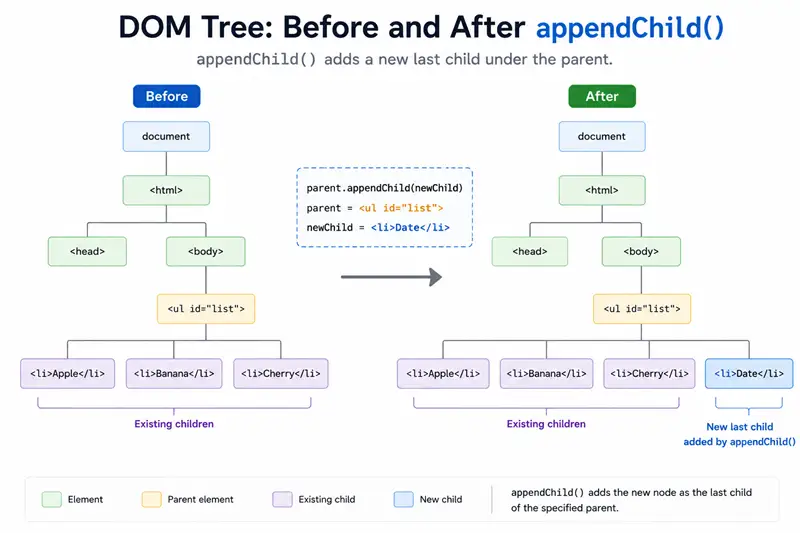
Select a parent (for example with document.getElementById or querySelector), create a child, set its text, then append.
const { JSDOM } = require("jsdom");

const { document } = new JSDOM(
  `<!DOCTYPE html><html><body><div id="parent"></div></body></html>`,
).window;

const parent = document.getElementById("parent");
const child = document.createElement("p");
child.textContent = "Welcome Home";

const returned = parent.appendChild(child);

console.log(parent.innerHTML);
console.log(returned === child);<p>Welcome Home</p>
trueThe first line is parent.innerHTML after the insert. The second line shows appendChild returns the same node you passed in—useful for chaining.
2. Append another list item (appendchild on a <ul>)
appendchild javascript tutorials often use a list: new li nodes are added after existing children.
const { JSDOM } = require("jsdom");

const { document } = new JSDOM(
  `<!DOCTYPE html><html><body>
    <ul id="list"><li>HTML</li><li>CSS</li><li>JS</li></ul>
  </body></html>`,
).window;

const list = document.getElementById("list");
const item = document.createElement("li");
item.textContent = "Python";

list.appendChild(item);

console.log(list.innerHTML.replace(/\s+/g, " ").trim());<li>HTML</li><li>CSS</li><li>JS</li><li>Python</li>3. Moving an existing node (not a copy)
If the node already has a parent, appendChild in JavaScript moves it: the old parent loses the subtree at that branch.
const { JSDOM } = require("jsdom");

const { document } = new JSDOM(
  `<!DOCTYPE html><html><body>
    <div id="oldParent"><p id="child">Holder Value</p></div>
    <div id="parent1"></div>
  </body></html>`,
).window;

const parent1 = document.getElementById("parent1");
const child = document.getElementById("child");

parent1.appendChild(child);

const oldParent = document.getElementById("oldParent");

console.log("old:", oldParent.innerHTML.replace(/\s+/g, " ").trim());
console.log("new:", parent1.innerHTML.replace(/\s+/g, " ").trim());old:
new: <p id="child">Holder Value</p>To duplicate instead of move, use cloneNode(true) and append the clone (duplicate id attributes are invalid in real pages—assign a new id when needed).
const { JSDOM } = require("jsdom");

const { document } = new JSDOM(
  `<!DOCTYPE html><html><body>
    <div id="p1"></div><div id="p2"></div>
  </body></html>`,
).window;

const p1 = document.getElementById("p1");
const p2 = document.getElementById("p2");
const span = document.createElement("span");
span.textContent = "x";

p1.appendChild(span);
const copy = span.cloneNode(true);
p2.appendChild(copy);

console.log("p1:", p1.innerHTML);
console.log("p2:", p2.innerHTML);
console.log("same object:", span === copy);p1: <span>x</span>
p2: <span>x</span>
same object: false4. append vs appendChild (js appendchild vs modern append)
For javascript appendchild html-style ergonomics, compare Element.append: it accepts strings (converted to Text nodes) and multiple arguments, while appendChild only accepts one Node.
const { JSDOM } = require("jsdom");

const { document } = new JSDOM(
  `<!DOCTYPE html><html><body><div id="box"></div></body></html>`,
).window;

const box = document.getElementById("box");
const span = document.createElement("span");
span.textContent = "a";

box.appendChild(span);
box.append(" ", "b");

console.log(JSON.stringify(box.innerHTML));"<span>a</span> b"5. DocumentFragment: several nodes, one appendChild
appendChild js patterns for batch insert: build a DocumentFragment, append multiple children to the fragment, then parent.appendChild(fragment). The fragment empties—its children become the parent’s children.
const { JSDOM } = require("jsdom");

const { document } = new JSDOM(
  `<!DOCTYPE html><html><body><div id="root"></div></body></html>`,
).window;

const root = document.getElementById("root");
const frag = document.createDocumentFragment();

frag.appendChild(document.createElement("span")).textContent = "1";
frag.appendChild(document.createElement("span")).textContent = "2";

root.appendChild(frag);

console.log("fragment children after append:", frag.childNodes.length);
console.log(root.innerHTML);fragment children after append: 0
<span>1</span><span>2</span>6. Inserting before the end — insertBefore
appendChild cannot place a node in the middle; use insertBefore(newNode, referenceNode).
const { JSDOM } = require("jsdom");

const { document } = new JSDOM(
  `<!DOCTYPE html><html><body>
    <ul id="u"><li id="a">A</li><li id="b">B</li></ul>
  </body></html>`,
).window;

const ul = document.getElementById("u");
const li = document.createElement("li");
li.textContent = "mid";

ul.insertBefore(li, document.getElementById("b"));

console.log(ul.innerHTML.replace(/\s+/g, " ").trim());<li id="a">A</li><li>mid</li><li id="b">B</li>7. Security note (javascript appendchild html)
Prefer createElement plus textContent / appendChild for structured UI. Treat innerHTML and insertAdjacentHTML as HTML parsers: unsafe with untrusted strings. After nodes exist, you can wire behavior with addEventListener.
Summary
appendChildadds oneNodeas the last child and returns it; if the node was mounted elsewhere, it moves.- Use
appendfor multiple arguments or string children; useDocumentFragmentto batch several elements in one append. - Use
insertBeforefor ordering; usecloneNode(true)when you must not move the original.
References
MDN entries for appendChild, append, and related node APIs.