
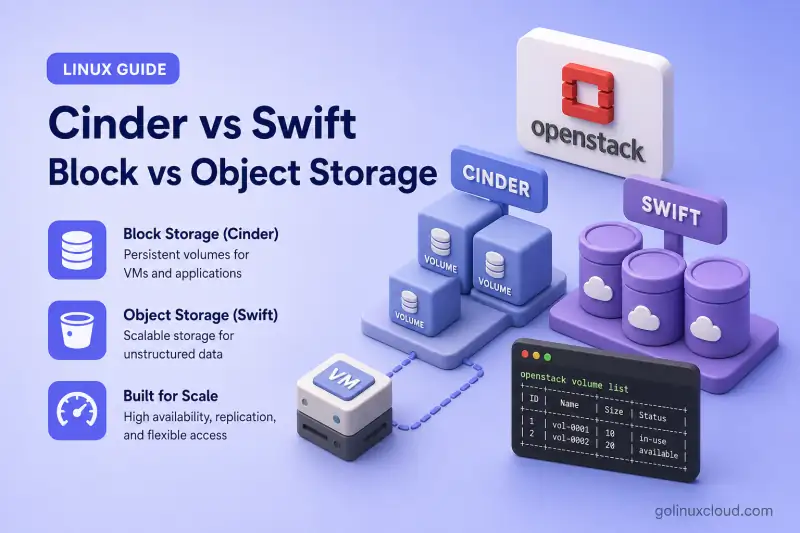
OpenStack provides different storage services because virtual-machine disks and application objects have different access, performance, and scaling requirements.
Cinder provides block-storage volumes, while Swift provides API-accessible object storage.
Use Cinder when a server needs a persistent disk that can be partitioned, formatted, and mounted. Use Swift when an application needs to store and retrieve objects such as images, backups, archives, videos, logs, or other unstructured data.
Cinder vs Swift at a Glance
| Feature | Cinder | Swift |
|---|---|---|
| OpenStack service | Block Storage | Object Storage |
| Storage unit | Volume or block device | Object |
| Organization | Volumes and snapshots | Accounts, containers, and objects |
| Access method | Attach to a server | REST API, CLI, SDK, or application |
| Guest usage | Partition, format, and mount | Upload and download objects |
| Typical workload | VM disks, databases and filesystems | Images, backups, archives and media |
| Data access | Block-level reads and writes | Complete or ranged object requests |
| Sharing | Normally one server; optional multiattach | Many clients can access through the API |
| Scaling model | Storage-backend dependent | Distributed object-storage cluster |
| Typical OpenStack integration | Nova, snapshots and volume backups | Glance data, backups and application objects |
Choose Cinder when the workload expects a disk. Choose Swift when the workload expects an object-storage API.
What Is OpenStack Cinder Block Storage?
Cinder is OpenStack's Block Storage service. Cinder provisions persistent block volumes that can have a lifecycle independent of a Nova instance.
Cinder provisions detachable volumes to virtual machines, bare-metal systems, containers, and other consumers. A volume behaves like an additional disk: you attach it to a server, and the guest operating system partitions and formats it. Depending on the attachment and delete-on-termination settings, data can remain on the volume after the instance is deleted. Cinder officially describes volumes as persistent storage managed separately through the Block Storage service. Users create snapshots and backups through Cinder APIs, and volume types select capabilities and storage backends such as LVM, Ceph RBD, or vendor storage arrays.
A Cinder volume is comparable to an additional disk connected to a server, but the volume is provisioned and managed through OpenStack APIs.
How Cinder Access Works
A read or write from your application travels down through the guest stack before it reaches physical storage:
- Application — your database, web app, or other process uses normal filesystem calls.
- Guest filesystem — ext4, XFS, or another filesystem on the attached volume handles files and directories.
- Virtual block device — the hypervisor presents the Cinder volume as a disk inside the VM.
- Nova attachment — Nova maps the volume to the instance through the block-device connection.
- Cinder volume — the logical volume object managed by the Block Storage API.
- Storage backend — LVM, Ceph RBD, or a vendor array stores the actual blocks.
The application normally accesses a filesystem on the attached volume rather than calling the Cinder API for every read or write.
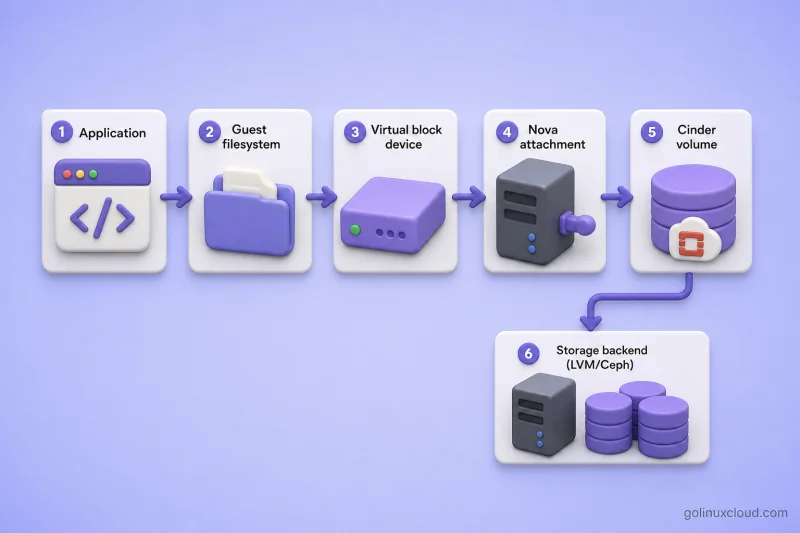
The diagram shows the same top-to-bottom path: application traffic flows through the guest filesystem and virtual block device, Nova attaches the volume to the instance, and Cinder hands off I/O to the configured storage backend.
Can One Cinder Volume Attach to Multiple Servers?
A normal Cinder volume is generally attached to one server at a time. OpenStack also supports multiattach volumes when the selected volume type, storage backend, Nova configuration, filesystem, and application support concurrent access.
Cinder requires a specially configured multiattach volume type for simultaneous attachment to multiple servers. Multiattach does not automatically make an ordinary filesystem safe for concurrent writes—attaching the same ext4 or XFS volume read-write to several VMs can corrupt data unless you use cluster-aware filesystems or applications designed for shared block access.
What Is OpenStack Swift Object Storage?
Swift is OpenStack's Object Storage service—a distributed object/blob store designed for large quantities of unstructured data.
Objects live inside containers, which belong to accounts. Applications access data through an HTTP-based API, attach custom metadata to objects, and rely on Swift to distribute data across storage nodes. Depending on the selected storage policy, Swift protects object data through replication or erasure coding. The policy is selected at container creation; erasure-coded policies use reconstructors rather than replication alone. Swift is built for availability, durability, and horizontal scaling. Swift uses an eventually consistent distributed model. During failures or periods of high load, replica convergence, account and container metadata, and object listings may temporarily lag behind completed object operations.
Swift is closer to API-based cloud object storage than to an attached hard disk.
Swift behaves more like API-accessible cloud object storage where applications upload and retrieve complete objects. You do not partition, format, or mount a Swift container the way you do with a Cinder volume.
How Swift Access Works
Swift clients talk to the object store through HTTP—not through a mounted block device:
- Application or client — a web app, CLI tool, SDK, or backup service issues REST requests.
- Swift REST API — authenticated HTTP calls to upload, download, list, or delete objects.
- Proxy servers — front-end nodes that route each request to the correct account, container, or object service.
- Account, container and object services — middleware layers that enforce naming, metadata, and storage policies.
- Distributed storage nodes — disks on storage nodes hold object replicas or erasure-coded fragments.
Applications normally do not partition a Swift container, format it with ext4 or XFS, attach it as a virtual disk, or mount it like local block storage. They upload, retrieve, update, and delete named objects through the API.
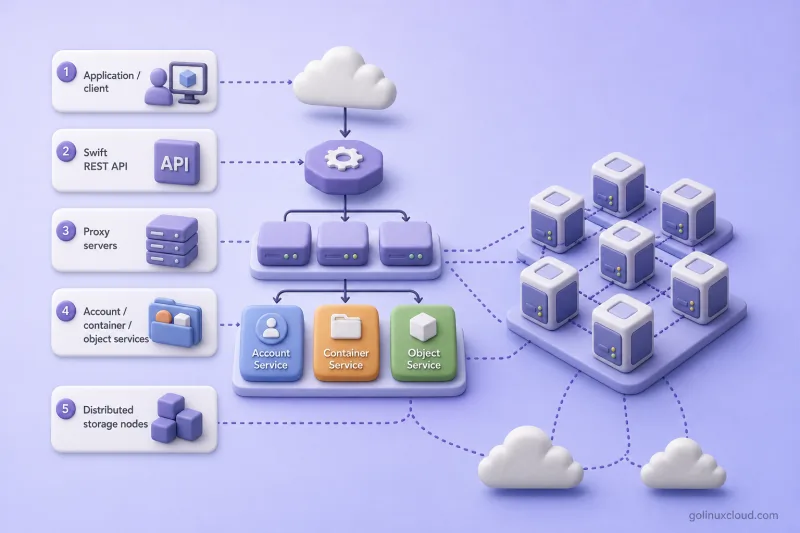
The diagram follows the same request path: clients hit the REST API and proxy tier, account/container/object services apply policy, and data lands on distributed storage nodes across the cluster.
Swift is not required merely to launch Nova instances, but it can provide independent object storage and integrate with services such as Cinder Backup and Glance. Cinder currently includes a Swift backup driver for storing volume backups as Swift objects.
Cinder vs Swift: Detailed Comparison
| Comparison point | Cinder | Swift |
|---|---|---|
| Data model | Fixed-size block volume | Named object with metadata |
| Primary consumer | Operating system or block-aware application | API client or object-aware application |
| Filesystem | Created by the user inside the volume | Not required |
| Random updates | Suitable for block-level changes | Usually objects are replaced or uploaded again |
| Database storage | Common use case | Generally unsuitable for a mounted transactional database |
| Static content | Possible but usually inefficient | Strong use case |
| VM boot disk | Supported through bootable volumes | Not attached as a VM boot disk |
| Snapshots | Volume snapshots | Object versions depend on Swift configuration/features |
| Backup target | Volume can be backed up | Can store Cinder backup objects |
| Capacity model | Requested volume size | Object and container quotas |
| Backend | LVM, Ceph and vendor drivers | Swift storage-node disks and storage policies |
| Failure handling | Depends partly on backend capabilities | Replication or erasure coding, handoff nodes, and background consistency processes |
Neither service is universally better. They solve different storage problems.
Cinder and Swift Use Cases
Choose Cinder for
- Persistent virtual-machine disks
- Boot-from-volume instances
- Databases requiring block storage
- Filesystems such as XFS or ext4
- Application data mounted inside a server
- Workloads requiring low-level random reads and writes
- Volume snapshots and clones
- Storage with backend-specific performance tiers
Example:
- A database server needs a persistent 500 GB disk formatted with XFS → use a Cinder volume.
Choose Swift for
- Images, videos and media files
- Software packages and artifacts
- Log archives
- Backup files
- Static website assets
- Large unstructured datasets
- Data shared with many API clients
- Long-term object retention
Example:
- An application stores millions of user-uploaded images and serves them over HTTP → use Swift.
Avoid Cinder when
- Millions of independently addressable objects must be distributed across a large cluster
- Applications already use an object-storage API
- Mounting a filesystem provides no benefit
Avoid Swift when
- The workload requires a normal block device
- An operating system must boot from the storage
- A transactional database expects block-level filesystem semantics
- Applications continuously overwrite small sections of a file
How Cinder and Swift Work Together
This is not always an either-or choice.
Store Cinder Volume Backups in Swift
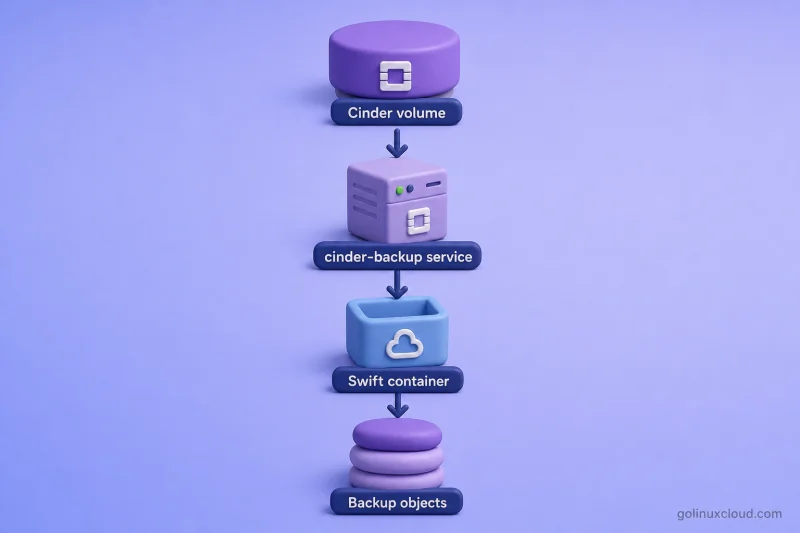
The backup path works like this:
- Cinder volume — the live block volume attached to your workload.
- cinder-backup — the Cinder Backup service reads volume data and packages it for off-site storage.
- Swift container — backup data is written into a Swift container using the Swift backup driver.
- Backup objects — each backup is stored as one or more Swift objects you can restore later.
The active workload stays on the Cinder volume; only backup copies live in Swift as objects.
Use Swift as an Image-Storage Backend
Glance can use object-storage backends, including Swift, for virtual-machine image data. That keeps large image libraries off local controller disks and leverages Swift's replication model.
Application Using Both Services
A single application often splits data by access pattern:
- Cinder — database volume and application filesystem (block-level, mounted inside the server).
- Swift — user uploads, images, archives, and backup objects (API-accessible blobs).
Production deployments commonly use both storage types in the same cloud for different datasets.
Cinder vs Swift vs Manila
Readers often confuse block, object, and shared file storage.
| Service | Storage type | Typical access |
|---|---|---|
| Cinder | Block storage | Attach a volume to a server |
| Swift | Object storage | Access objects through an API |
| Manila | Shared file storage | Mount an NFS, SMB or similar share |
- Cinder when one or more supported systems need block storage.
- Swift when applications need object storage.
- Manila when multiple clients need a shared filesystem.
Which Should You Choose?
| Requirement | Recommended service |
|---|---|
| Additional VM disk | Cinder |
| Bootable persistent volume | Cinder |
| Database data directory | Cinder |
| XFS or ext4 filesystem | Cinder |
| API-accessible image repository | Swift |
| Backup and archive objects | Swift |
| Large media collection | Swift |
| Static unstructured application data | Swift |
| Shared NFS or SMB filesystem | Manila |
| Cinder volume backups stored remotely | Cinder with Swift as the backup backend |
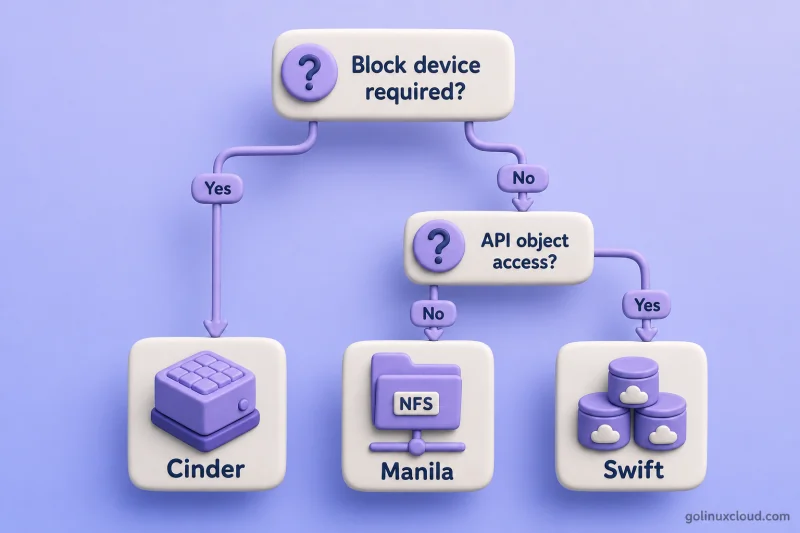
Use the decision flow above when the requirement table does not give an obvious answer:
- Block device required? → Cinder — the workload needs a disk to partition, format, and mount (VM disk, database, boot volume).
- No block device, but named objects through an API? → Swift — images, backups, media, logs, and static application data accessed over HTTP.
- No block device and no object API, but a shared mounted filesystem? → Manila — multiple clients need NFS, SMB, or a similar network share.
Start with the block-device question. Most VM and database workloads stop at Cinder; object-heavy applications stop at Swift; only shared-file scenarios need Manila.
References
- OpenStack Block Storage (Cinder) documentation
- OpenStack Object Storage (Swift) documentation
- OpenStack Shared File Systems (Manila) documentation
- Cinder multiattach volumes
- Related guides: install multi-node OpenStack with Packstack, configure a Ceph storage cluster for OpenStack, root disk vs ephemeral disk in OpenStack
Summary
Cinder and Swift are complementary OpenStack storage services.
- Cinder provides persistent block volumes that servers can attach, partition, format and mount.
- Swift provides distributed object storage accessed through APIs.
- Cinder is suitable for VM disks, filesystems and databases.
- Swift is suitable for static data, media, archives and backups.
- Normal Cinder volumes are generally attached to one server, while specialized multiattach configurations support additional scenarios.
- Swift can serve as a backup destination for Cinder.
- Manila should be considered when the requirement is a shared filesystem rather than block or object storage.
