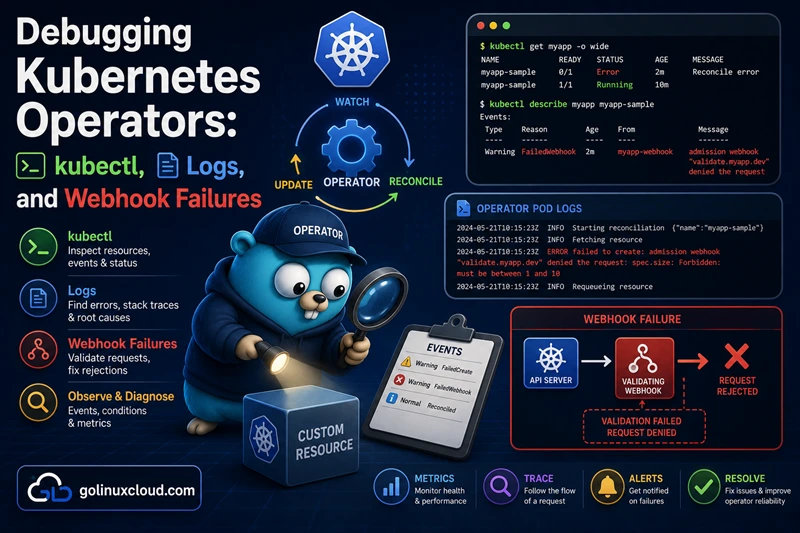
When an Operator misbehaves, you rarely need to attach a debugger on the first day. Most production incidents are visible from kubectl, Events, and manager logs—plus a short checklist for webhooks, CRD conversion, and Server-Side Apply (SSA). This guide walks you through that path in a deliberate order so you can narrow the blast radius before you open an IDE.
You can lean on the kubectl, Events, webhook, and TLS sections even if you have not read the deeper reconcile articles yet. If you are still building intuition for how often Reconcile runs or what RequeueAfter means in logs, Requeue, RequeueAfter, and error handling in controller-runtime is useful background—but not a hard prerequisite. The examples below assume you operate a manager built with controller-runtime or Operator SDK (or anything that behaves similarly).
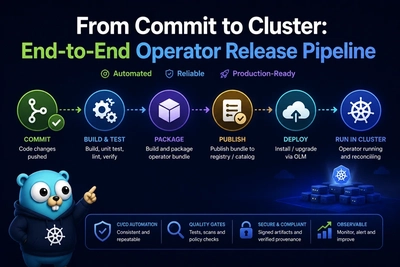
If the operator is installed through Operator Lifecycle Manager (OLM), check Subscription, ClusterServiceVersion, and install Plan status alongside the manager Deployment: install or upgrade failures there often masquerade as “the controller does nothing” long before CR webhooks matter.
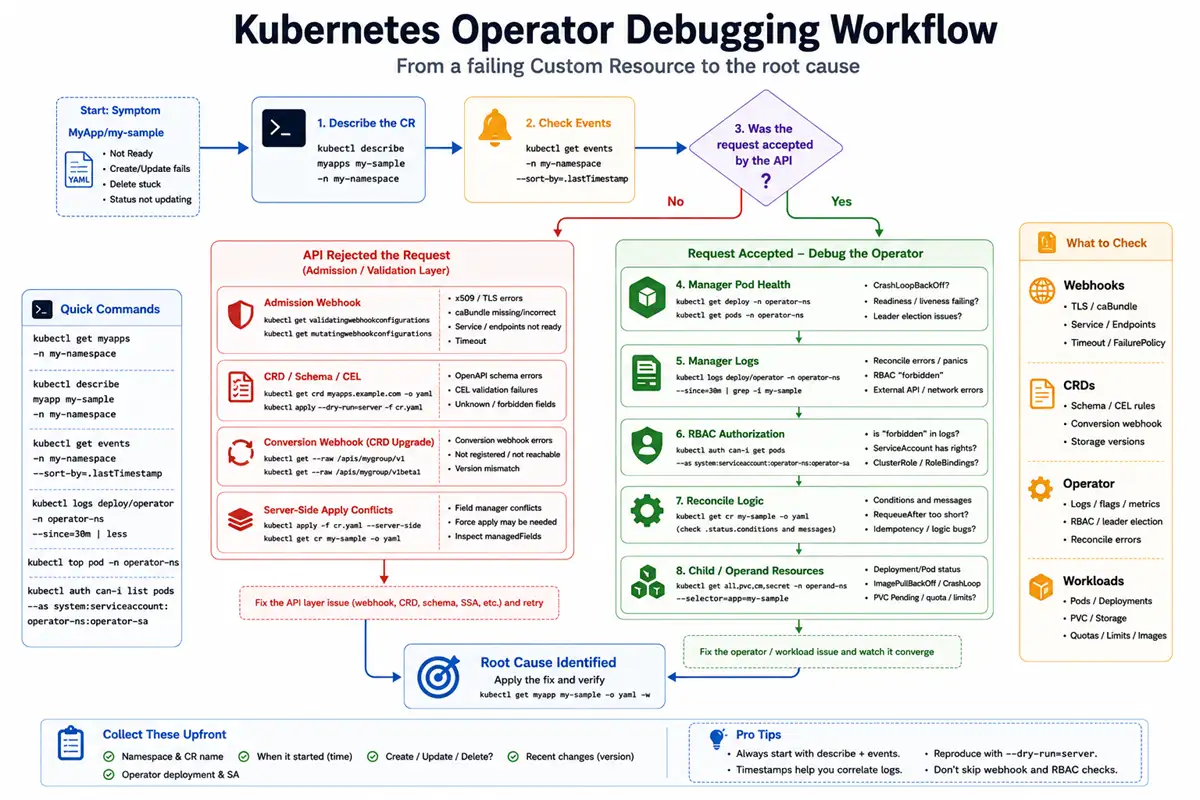
Debug flow quickstart
Later sections spell out admission webhooks, CRD conversion, SSA managedFields, and a symptom → command playbook you can skim during an incident.
First signals
- If
kubectl applyfails, inspect CRD validation, admission webhooks, and API errors before looking at controller code. - If the CR is accepted but never becomes
Ready, inspect Conditions, Events, operator logs, and generated workloads. - If the operator Pod crashes or never becomes
Ready, inspect startup flags, leader election, webhook certificates, and health probes. - If children exist but continuously drift, inspect Server-Side Apply field managers and ownership boundaries.
- Always correlate a single CR name and namespace across Events, logs, and child resources before increasing log verbosity.
Classify the failure (API vs manager vs operand)
- API layer — create/update/delete rejected (webhook, CRD schema, SSA conflict).
- Manager layer — Pod crash loop, leader loss, reconcile panics, RBAC forbidden.
- Operand layer — Deployment unhealthy, PVC pending, image pull errors.
Work top-down: if kubectl apply of the CR never succeeds, fixing the Deployment behind the operator will not help until the API accepts the object.
Minimum facts to collect
Before you grep the codebase, capture:
- Namespace and exact CustomResource name.
- Operator Deployment name and ServiceAccount.
- Whether the failure happens on create, update, delete, or only when status changes.
- The timestamp of the first failure (helps correlate logs and Events).
Five commands to run first
Substitute your CR kind, namespaces, names, and operator Deployment:
kubectl describe <cr-kind> <cr-name> -n <workload-ns>
kubectl get events -n <workload-ns> --sort-by=.metadata.creationTimestamp | tail -n 40
kubectl logs deploy/<operator-deployment> -n <operator-ns> --since=30m | tail -n 80
kubectl get validatingwebhookconfiguration,mutatingwebhookconfiguration
kubectl get endpoints -n <operator-ns>
Then narrow: add --field-selector involvedObject.name=<cr-name> on Events, open the relevant ValidatingWebhookConfiguration / MutatingWebhookConfiguration, or kubectl get crd <plural>.<group> -o yaml when errors mention conversion or OpenAPI validation.
Manager process: flags, log verbosity, and correlating logs
Common logging flags and environment variables
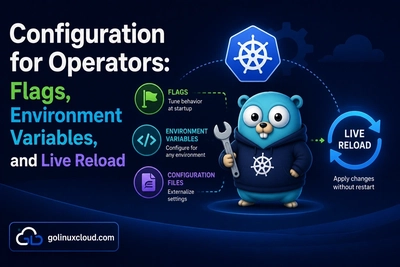
controller-runtime projects usually log through zap, controlled with flags such as --zap-log-level (and related --zap-* options) or LOG_LEVEL / ZAP_* environment variables when the chart wires them that way. Some binaries or sidecars still use klog, where -v controls verbosity. They are different stacks—check your Deployment args: and env to see which applies. Raise verbosity only for a short debugging window: higher levels show cache resyncs, webhook registration, and reconcile entry, but they flood production if left enabled.
Correlating namespace / name with reconcile lines
Structured logs should include the reconcile key. When you read logs, filter by the CR’s namespace and name:
kubectl logs deploy/<operator-deployment> -n <operator-ns> --since=30m | grep -iE 'mynamespace|my-cr-name'On Windows PowerShell you can use Select-String instead of grep. If your operator logs JSON, pipe through jq and select the fields your team standardized (controller, object, namespace, name).
Leader election, metrics, and webhook listen addresses
At startup, confirm the manager bound the metrics port, health probes, and webhook server (if in-process). A log line that says webhooks are starting but the Pod never becomes Ready often points to certificate or port conflicts—cross-check with health and readiness probes and the webhook section later in this guide.
Live cluster inspection with kubectl
kubectl describe on the Custom Resource
Start with kubectl describe on your CR. It shows Conditions, Events, finalizers, and the current reconciliation state exposed by the operator.
Pay attention to the relationship between the desired and observed state:
.metadata.generationincreases when users changespec..status.observedGenerationtells you which generation the controller has processed.
If generation is ahead of observedGeneration, the controller may not be reconciling successfully, may be stuck, or may not have observed the latest update.
Not every CRD publishes status.observedGeneration; if the field is absent, rely on Conditions, Events, and manager logs keyed on the same namespace/name instead of treating missing observedGeneration as proof that nothing ran.
If Conditions are empty but you expect status updates, the controller may not have RBAC permissions on the /status subresource, or status patches may be failing. Check manager logs for is forbidden, conflict, or patch errors.
kubectl get events with useful filters
Events often contain the first visible symptom of an admission or reconcile failure, but remember that they are retained for a limited time and can drop quickly on busy clusters (including when events.k8s.io is in play with shorter TTLs). Capture them early during an incident.
List recent Events in a namespace:
kubectl get events -n <workload-ns> --sort-by=.metadata.creationTimestampTo focus on a specific object:
kubectl get events -n <workload-ns> --field-selector involvedObject.name=<cr-name>For operator-wide failures, also inspect the operator namespace because the controller itself, leader election, webhook startup, or other framework components may emit Events there.
Follow the operand path: Deployment, Pod, Service
A CR stuck in Provisioning, Pending, or another transitional phase often means the operator created the child resources but they failed to become healthy.
Inspect the generated Deployments, Pods, Services, PVCs, or Jobs. Common failures such as image pull errors, volume mount failures, scheduling problems, or quota exhaustion usually appear there—not inside Reconcile logic.
Stuck in Terminating: finalizers and cleanup
Objects remain in Terminating when a finalizer has not been removed or when cleanup logic never completes.
Inspect the deletion state:
kubectl get <cr-kind> <name> -n <ns> -o yaml | grep -iE 'deletionTimestamp|finalizers'A deletionTimestamp with a remaining finalizer means Kubernetes is waiting for the controller to complete its cleanup path.
Compare with finalizers explained to understand two-phase deletion. Removing a finalizer manually is a break-glass action—only do it when you understand what external resources or cleanup steps you are skipping.
Admission webhooks: validating and mutating failures
How the API server reaches your webhook
For each CREATE / UPDATE / DELETE, the Kubernetes API server may call your validating or mutating webhook over HTTPS. The chain includes: ValidatingWebhookConfiguration or MutatingWebhookConfiguration → clientConfig.service → Service → Endpoints → Pod listening with a certificate the API server trusts.
failurePolicy: Fail vs Ignore
Fail— webhook errors or timeouts reject the request; users see admission errors immediately.Ignore— webhook failures are skipped; the request proceeds. That can hide misconfiguration until later—use sparingly outside development.
When debugging, temporarily understanding which policy is set tells you whether a 500 from the webhook should block applies.
caBundle, Service DNS, and TLS trust
The API server validates the webhook server certificate using caBundle on the webhook client config (or an equivalent reference mechanism). Common failures:
- Empty
caBundleafter install. - Wrong CA—rotated cert without updating the bundle.
- DNS SAN mismatch—certificate issued for
svc.cluster.localname that does not match the Service the API server calls.
If you use cert-manager, verify the Certificate is Ready=True and that your operator’s install step copied the CA into the webhook configuration. The walkthrough in mutating and validating admission webhooks ties these pieces together.
cert-manager resources to inspect
kubectl get certificate -n <operator-ns>
kubectl describe clusterissuer issuer-name
Look for failed challenges, pending orders, or secrets that never populate tls.crt / tls.key.
Typical API server error strings
You may see connection refused, x509: certificate signed by unknown authority, no endpoints available for service, or timeout. Each maps to a different layer—network, TLS trust, missing Endpoints, or slow reconcile inside the webhook handler.
Conversion webhooks after CRD upgrades
Symptoms when versions disagree
After introducing a new served API version or changing the storage version, clients may see conversion failures, missing fields after round-tripping, or kubectl get / kubectl apply errors mentioning the conversion webhook.
Remember that conversion is not only an upgrade-time operation. The API server may invoke the conversion webhook whenever an object stored in one version must be presented through another served version.
These failures occur before your controller sees the object, so debugging Reconcile logs usually does not help.
Inspect spec.conversion, versions, and caBundle
Start by inspecting the CRD:
kubectl get crd <plural>.<group> -o yamlVerify:
spec.conversion.strategy: Webhookis configured when you expect conversion.- The webhook
clientConfig.servicepoints to the correct namespace, Service name, and port. caBundlematches the CA that signed the conversion webhook certificate.- The expected versions appear under
spec.versionswith the correctservedandstorageflags.
A common mistake is updating the CRD YAML but leaving the conversion Service or certificate configuration from the previous deployment.
The full rollout and migration pattern is covered in CRD version upgrades and conversion webhooks.
Ordering mistakes and rollout sequence
A CRD that references a conversion webhook before the webhook Pod, Service, and TLS material are ready can cause cluster-wide failures for that CRD.
A safer rollout sequence is:
- Deploy the webhook Service and Pod.
- Verify the serving certificate and
caBundle. - Apply the CRD changes that enable conversion.
- Allow users and controllers to access the new API versions.
When the webhook is reachable but conversion is wrong
Not all conversion failures are TLS or networking problems. The webhook may respond successfully but produce invalid objects.
Check for:
- Fields silently dropped during version translation.
- Missing default values after conversion.
- Conversion code that does not preserve unknown or optional fields.
- Validation failures after converting between versions.
Test round-trip conversions in CI (v1alpha1 → v1beta1 → v1alpha1) to ensure no user data is lost.
Server-Side Apply and field-manager conflicts
managedFields and conflicting managers
With Server-Side Apply (SSA), multiple actors can own different parts of the same object. A conflict happens when one manager tries to apply a field that another manager currently owns.
Inspect the live object:
kubectl get deploy <child> -n <ns> -o yamlReview metadata.managedFields and identify:
- Which managers have modified the object.
- Which operation (
ApplyvsUpdate) they used. - Which fields each manager currently owns.
Your operator should use a stable field manager name so ownership remains predictable across upgrades and restarts.
Do not immediately solve conflicts with --force-conflicts. That transfers field ownership and can silently overwrite changes made by another controller or user.
SSA conflicts vs optimistic concurrency
SSA conflicts are different from classic 409 Conflict errors.
- SSA conflict: another field manager owns the field you are trying to apply.
409 ConflictonUpdate: the object changed since you read it, so yourresourceVersionis stale.
Mixing Update, patch operations, and SSA is possible, but define clear ownership boundaries. A common pattern is using SSA for child resources owned by the operator while avoiding full object Update calls that accidentally overwrite fields managed by others.
Server-Side Apply in operators covers strategies to avoid ownership thrashing.
Status vs spec subresources
spec and status represent different ownership domains. Users typically own spec, while controllers own status.
If failures only happen during status updates:
- Verify the controller uses
client.Status().Update()orclient.Status().Patch()rather than modifying the full object. - Confirm RBAC includes permissions on the
/statussubresource. - Inspect
managedFieldsto confirm status ownership is not unexpectedly shared.
Separate status updates also reduce accidental spec changes and avoid unnecessary reconciliation loops.
The operator playbook: symptom → cause → command
Use these tables as a first-pass checklist during incidents. They are not exhaustive, but they reflect the failures platform teams commonly see in production.
Manager not ready or crash looping
| Symptom | Likely cause | What to run |
|---|---|---|
Pod CrashLoopBackOff immediately after install |
Bad flags, missing webhook certificates, panic during startup | kubectl logs -n <op-ns> deploy/<op> --previous |
| Readiness never passes | Health probe failure, webhook server not listening, certificate problems | kubectl describe pod -n <op-ns> -l control-plane=controller-manager (replace the label selector with the labels your Helm/OLM chart uses; Kubebuilder defaults often use control-plane=controller-manager) |
| Leader election repeatedly changes | Lease RBAC, network partitions, unstable Pods | kubectl get lease -n <op-ns> and inspect manager logs around leader transitions |
CR accepted but no reconciliation happens
| Symptom | Likely cause | What to run |
|---|---|---|
kubectl apply succeeds but status never changes |
Controller not watching this GVK, namespace watch mismatch, operator version mismatch | Check manager startup logs for watched resources; verify the CR namespace matches WATCH_NAMESPACE, OWN_NAMESPACE, or the cache scope your chart documents (namespace-scoped operators silently ignore CRs outside the watched set) |
generation increases but status.observedGeneration never catches up (when your CR exposes it) |
Reconcile never runs or continuously fails before updating status | Inspect logs for the CR namespace/name and verify Events |
Reconcile errors and RBAC
| Symptom | Likely cause | What to run |
|---|---|---|
is forbidden in logs |
Missing ClusterRole permissions | kubectl auth can-i create deployment --as=system:serviceaccount:<ns>:<sa> -n <workload-ns> (swap verb/resource for the failing call) |
| Status never updates | Missing /status RBAC, status patch failure, conflict |
Inspect CR Events and manager logs for Forbidden, Conflict, or patch errors; confirm status RBAC with kubectl auth can-i update <plural>.<group> --subresource=status --as=system:serviceaccount:<ns>:<sa> -n <workload-ns> |
| Same object reconciles repeatedly without spec changes | Status churn, unnecessary writes, noisy child watches | Compare generation vs resourceVersion, inspect predicates and managedFields |
API throttling and performance pressure
| Symptom | Likely cause | What to run |
|---|---|---|
Intermittent 429 Too Many Requests |
Excessive API traffic, high concurrency, or APF limits | Inspect request rate, workqueue depth, and reduce unnecessary reads/writes before increasing QPS or APF shares |
Webhook timeouts and TLS
| Symptom | Likely cause | What to run |
|---|---|---|
x509 or caBundle errors |
Certificate trust chain mismatch | Inspect ValidatingWebhookConfiguration or MutatingWebhookConfiguration, verify caBundle, Service DNS, and Certificate status |
connection refused / no endpoints available |
Service selector mismatch or webhook Pod not Ready | kubectl get endpoints -n <op-ns> <webhook-service> and inspect the Service selector |
| Timeouts under load | Slow webhook handler, API calls inside admission, CPU starvation | Profile the handler and reduce external dependencies before only increasing timeout |
CRD conversion and API version issues
| Symptom | Likely cause | What to run |
|---|---|---|
kubectl get or apply fails with conversion errors |
Conversion webhook unavailable or wrong caBundle |
kubectl get crd <plural>.<group> -o yaml and inspect spec.conversion, versions, and webhook configuration |
| Fields disappear after upgrade or round-trip conversion | Conversion code does not preserve object data | Test version round-trips (v1alpha1 → v1beta1 → v1alpha1) and compare the result |
Server-Side Apply and ownership
| Symptom | Likely cause | What to run |
|---|---|---|
| SSA conflicts | Two field managers own the same field | Inspect metadata.managedFields; avoid immediately using force apply |
| Unexpected field removal | Full Update or competing controllers overwrite fields |
Check field managers, patch strategy, and ownership boundaries |
Systematic log strategies (without drowning in noise)
Log levels in development vs production
See Common logging flags and environment variables above for zap (--zap-log-level) versus klog (-v).
In development, higher log verbosity helps you understand cache synchronization, watches, webhook registration, and reconcile flow. In production, prefer structured info-level logs with errors always visible, and increase verbosity only for short, targeted debugging windows.
The exact flags vary by logging implementation (zap, klog, or custom wrappers), so document the supported log-level controls in your operator deployment manifests.
Structured fields that make debugging easier
Every reconcile should leave a trace that lets you follow one object through the logs. Include fields such as:
- namespace and name of the Custom Resource.
- generation or
observedGenerationin status when your CRD publishes it. - A reconcile ID or request identifier if your framework provides one.
- The controller name and a high-level phase (
Reconciling,Applying,Waiting,TerminalError).
Avoid logging entire Kubernetes objects at high frequency. Full object dumps are difficult to search, increase log volume, and may accidentally expose sensitive fields from Secrets or configuration.
Optional: Kubernetes audit logs
Audit logs are usually managed by cluster administrators, but they are extremely valuable when the question is who changed this object or why did the API server reject it?
Use audit logs to investigate:
- Which user or ServiceAccount performed a create, update, or delete.
- Whether an admission webhook rejected the request before it reached etcd.
- Unexpected writes that continuously change a CR and trigger repeated reconciles.
Audit logs complement controller logs: the controller shows what it attempted to do, while audit logs show what requests reached the API server and how they were handled.
Frequently Asked Questions
1. Where do I start when my Custom Resource never reaches Ready?
Check the CR status and conditions, then kubectl describe on the CR and on the operator Deployment. Read recent Events in the namespace, then operator Pod logs filtered by the CR namespace and name. If creates or updates fail with webhook errors, inspect ValidatingWebhookConfiguration / MutatingWebhookConfiguration and the webhook Service and TLS Secret before you change reconciler code.2. Why do I see TLS or x509 errors when applying a CR?
The API server calls admission or conversion webhooks over HTTPS and must trust the serving certificate. Empty or wrong caBundle, DNS mismatch on the certificate, or a webhook Pod that is not listening yet are the usual causes. cert-manager is a common way to keep caBundle in sync—verify the Certificate is Ready and the CA is injected into the webhook config.3. What is the fastest way to tell RBAC from a logic bug?
RBAC denials often appear as is forbidden errors in manager logs or Events on the affected object. kubectl auth can-i helps confirm whether the operator ServiceAccount can perform the verb on the resource; for status-only failures, add --subresource=status to the can-i check. If permissions are correct but behavior is wrong, shift focus to reconcile logic, SSA field managers, or webhooks.See also
If you want to go deeper on the ideas touched here, these tutorials in the Kubernetes Operators series are a good next step:
- The Kubernetes reconcile loop explained — how workqueues and
Reconcilefit together - controller-runtime architecture — Manager, cache, informer, and client behavior
- Requeue, RequeueAfter, and error handling in controller-runtime — what retries mean in logs
- Mutating and validating admission webhooks — cert-manager,
caBundle, and scaffolding - CRD version upgrades and conversion webhooks — multi-version CRDs safely
- Server-Side Apply in operators — field managers and conflicts
- Operator RBAC: minimum permissions — tightening ServiceAccount rules
- Operator health and readiness probes —
/healthz,/readyz, and graceful shutdown
Upstream references
Bottom line: treat kubectl describe, Events, and manager logs as the first screen. If the API rejects changes, walk the webhook chain (configuration → Service → Endpoints → TLS). If versions drift, inspect CRD conversion and caBundle. If children look “almost right” but fields fight, open managedFields and revisit SSA ownership. That sequence resolves most Operator incidents without guessing.