
Git merge and git rebase are two powerful commands used to integrate changes between branches, but they behave very differently. While merge preserves history, rebase rewrites it to create a cleaner commit timeline. Understanding when to use each helps you avoid conflicts, maintain clean history, and work efficiently in teams as part of a complete Git workflow.
Quick Cheat Sheet: Git Merge vs Rebase
| Task / Use Case | Command |
|---|---|
| Merge branch into current branch | git merge <branch> |
| Rebase current branch onto another | git rebase <branch> |
| Merge with fast-forward (default) | git merge <branch> |
| Force merge commit (no fast-forward) | git merge --no-ff <branch> |
| Rebase interactively (edit commits) | git rebase -i HEAD~3 |
| Abort merge operation | git merge --abort |
| Abort rebase operation | git rebase --abort |
| Continue after resolving merge conflict | git merge --continue |
| Continue after resolving rebase conflict | git rebase --continue |
| View commit history (graph) | git log --oneline --graph --all |
| Compare branches before merge/rebase | git diff branch1..branch2 |
| Fetch latest changes before merge/rebase | git fetch --all |
| Pull and merge changes | git pull |
| Pull with rebase (clean history) | git pull --rebase |
| Reapply commits on updated branch | git rebase main |
| Merge multiple branches | git merge branch1 branch2 |
| Squash commits during merge | git merge --squash <branch> |
| Squash commits during rebase | git rebase -i (use squash) |
| Resolve conflicts manually | Edit → git add . → continue |
| View conflicting files | git status |
| Keep current branch changes | git checkout --ours <file> |
| Accept incoming changes | git checkout --theirs <file> |
| Check merged branches | git branch --merged |
| Check unmerged branches | git branch --no-merged |
| Delete merged branch | git branch -d <branch> |
| Force delete branch | git branch -D <branch> |
| Reset branch (not same as rebase) | git reset --hard HEAD~1 |
| Revert merge commit safely | git revert -m 1 <commit> |
What is Git Merge vs Git Rebase and How it works?
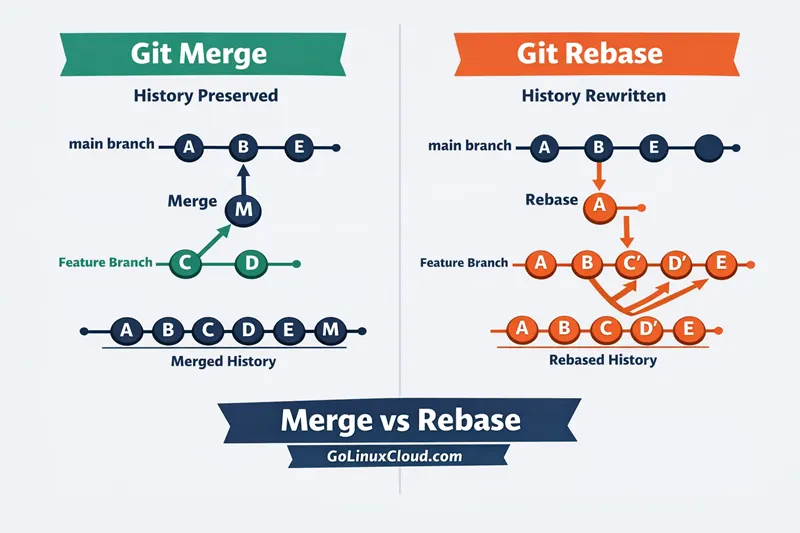
The image shows the difference between Git Merge and Git Rebase using two workflows.
On the left side, Git Merge combines two branches created using git branch basics by creating a new merge commit (M). The main branch and feature branch histories are preserved as they are. This means all commits remain visible, but the history can look slightly complex.
On the right side, Git Rebase rewrites history using git rebase by taking commits from the feature branch and placing them on top of the latest main branch. The commits are recreated (shown as C’, D’, E’), resulting in a clean and linear history without a merge commit.
In simple terms:
- Git Merge → keeps full history and is safer for team collaboration
- Git Rebase → creates a clean history but rewrites commits
Use merge when working with shared branches, and use rebase when you want a cleaner commit history before pushing changes.
When to Use Git Merge vs Rebase
Choosing between git merge and git rebase depends on your workflow, team setup, and how you want your commit history to look.
Use git merge in team collaboration
Use merge when:
- Multiple developers are working on the same branch
- You want to preserve complete commit history
- You are working with shared or remote branches
git merge feature-branchMerge is safer because it does not rewrite history when used with git merge.
Use git rebase for clean commit history
Use rebase when:
- You want a clean, linear commit history
- You are working on a local feature branch
- You want to organize commits before pushing
git rebase mainRebase helps remove unnecessary merge commits and keeps history simple when used with git rebase.
Git Merge vs Rebase in Daily Workflow
Feature branch workflow with merge
git checkout main
git pull
git merge feature-branch
git push- Keeps full history
- Adds a merge commit
- Easier for collaboration
Feature branch workflow with rebase
git checkout feature-branch
git fetch
git rebase main
git checkout main
git merge feature-branch- Rewrites commits
- Keeps history linear
- Preferred for cleaner logs
Risks and Common Mistakes
Why git rebase can be dangerous
- Rewrites commit history
- Can break shared branches
- Causes conflicts if already pushed, which you can analyze using
git diff.
Problems with messy merge history
- Too many merge commits
- Difficult to track changes
- Harder to read logs without understanding commit history using
git log.
When NOT to use rebase
Avoid rebase when:
- Working on public/shared branches
- Commits are already pushed
- Multiple developers depend on the branch
Git Merge vs Rebase vs Reset (Quick Comparison)
Difference between merge, rebase, and reset
| Feature | Merge | Rebase | Reset |
|---|---|---|---|
| History | Preserved | Rewritten | Modified |
| Safe for teams | Yes | No (shared branches) | Risky |
| Use case | Combine branches | Clean history | Undo changes |
| Command | git merge |
git rebase |
git reset |
When to use each command
- Merge → combine branches safely
- Rebase → clean commit history
- Reset → undo commits or changes using
git reset.
Frequently Asked Questions
1. What is the difference between git merge and git rebase?
2. When should I use git merge vs rebase?
3. Is git rebase dangerous?
4. Which is better git merge or rebase?
5. What is fast-forward merge vs rebase?
6. Can I use git rebase instead of merge?
7. What is git rebase vs reset?
8. Does git merge rewrite history?
9. What is the main advantage of git rebase?
10. Should beginners use git merge or rebase?
Summary
- Use git merge when working in teams and preserving history is important
- Use git rebase when you want a clean and readable commit history
- Avoid rebase on shared branches to prevent conflicts
- Use reset carefully when undoing changes
Choosing the right approach depends on your workflow and overall merge vs rebase comparison., but understanding these differences helps you manage Git repositories more effectively.