

String.prototype.indexOf and Array.prototype.indexOf both answer “where is the first match?”—they return the zero-based index of the first occurrence, or -1 when nothing matches. On strings the search is case-sensitive; on arrays the match uses strict equality (===). When you need the first index that satisfies a custom test rather than a literal value, use JavaScript findIndex instead.
Tested on: Node.js v20.18.2. A short note after each runnable snippet describes what you should see in the console.
String indexOf (substring search)
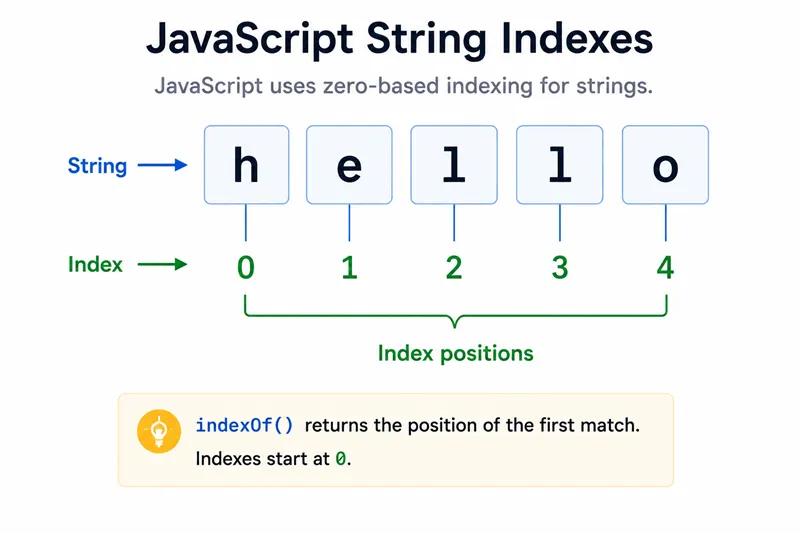
const str = "Hello, World!";
console.log(str.indexOf("World"));You should see one line logging 7.
fromIndex on strings
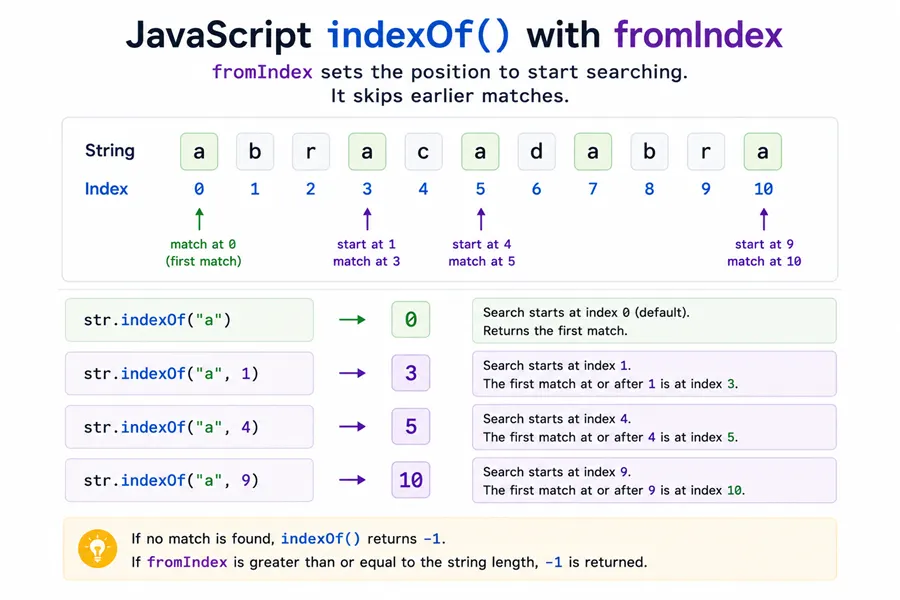
The second argument starts the search at that index (values greater than the string length yield -1).
const str = "Hello, World!";
console.log(str.indexOf("l", 4));You should see one line logging 10.
Scanning for the next occurrence
Advance fromIndex past the previous hit to walk through duplicates.
const str = "Hello, World!";
const i1 = str.indexOf("o");
const i2 = str.indexOf("o", i1 + 1);
console.log(i1);
console.log(i2);You should see 2 lines, in order: 4, 8.
Missing substring returns -1
console.log("abc".indexOf("z"));You should see one line logging -1.
Array indexOf (value search with ===)
Array indexOf compares elements with Strict Equality.
const arr = [1, 2, 3, 4, 5];
console.log(arr.indexOf(3));You should see one line logging 2.
Array indexOf with fromIndex
const arr = [1, 2, 3, 4, 5];
console.log(arr.indexOf(3, 2));You should see one line logging 2.
Duplicate values in an array
const arr = [1, 2, 3, 4, 5, 3];
const i1 = arr.indexOf(3);
const i2 = arr.indexOf(3, i1 + 1);
console.log(i1);
console.log(i2);You should see 2 lines, in order: 2, 5.
NaN is never found with indexOf
Because === does not treat NaN as equal to itself, [NaN].indexOf(NaN) is always -1. Use findIndex(Number.isNaN) or includes with careful handling if you need to locate NaN.
console.log([NaN].indexOf(NaN));You should see one line logging -1.
Negative fromIndex on arrays
For arrays, a negative fromIndex is resolved against the length: the starting index is max(array.length + fromIndex, 0).
console.log([10, 20, 30, 40].indexOf(30, -2));You should see one line logging 2.
Strings also accept a second argument, but values < 0 are clamped to 0 per the string algorithm—do not assume the same offset-from-end behavior you get on arrays.
Collecting every index with a small loop
indexOf only finds the first match. A tight loop advances fromIndex until -1:
function findAll(a, x) {
  const results = [];
  let pos = 0;
  const len = a.length;
  while (pos < len) {
    pos = a.indexOf(x, pos);
    if (pos === -1) break;
    results.push(pos);
    pos += 1;
  }
  return results;
}

console.log(JSON.stringify(findAll([1, 2, 3, 2, 1], 2)));You should see one line logging [1,3].
Related APIs (not verified here)
lastIndexOfsearches backward from the end.String.prototype.includes/Array.prototype.includesreturn booleans when you only care about presence.indexOfstringifies non-stringsearchStringvalues; it does not accept aRegExpwith pattern semantics—useString.prototype.searchorRegExpmethods for regex matching.
Summary
Whether you search javascript indexof, indexof javascript, js indexof, or index of javascript, the same pair of methods answers most questions: String.prototype.indexOf for substrings and Array.prototype.indexOf for element identity with SameValueZero, both returning the first match or -1. The usual FAQ is how to walk every duplicate—advance fromIndex past each hit in a loop, or switch strategies when you need predicates instead of exact matches.
People also ask about NaN and indexOf: NaN is never found by equality search, so use findIndex with Number.isNaN when that is the real requirement, and remember negative fromIndex on arrays starts the search near the tail per the spec. For the last occurrence rather than the first, pair this page with JavaScript lastIndexOf.
References
String.prototype.indexOf- MDNArray.prototype.indexOf- MDN
