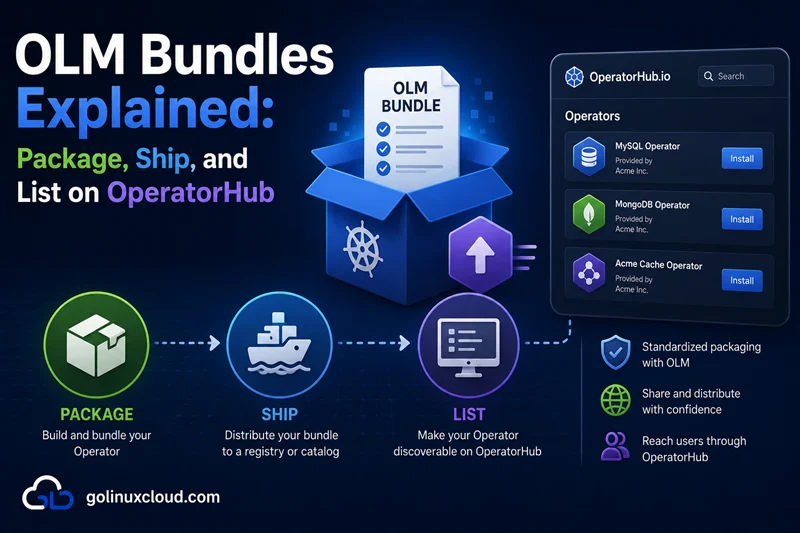
Operator Lifecycle Manager (OLM) is the Kubernetes-native way to install, upgrade, and depend on Operators as first-class cluster software. At the center of that story is the bundle — a versioned directory (and container image) that carries your ClusterServiceVersion (CSV), CRDs, and metadata OLM needs to build an InstallPlan.
This article explains the bundle layout, the CSV fields that actually matter, replaces / skips, the operator-sdk bundle commands, how catalog images aggregate bundles, how to smoke-test on kind, and how capability levels tie back to what you claim in the CSV—cross-linked with Operator capability levels I–V. For CI wiring, read CI/CD with GitHub Actions and From commit to cluster first.
This is a packaging and publishing guide. It assumes you already have an operator image, CRDs, and deployment manifests. If you are still building the reconciler, start with the controller-runtime Go tutorial first.
What you will build
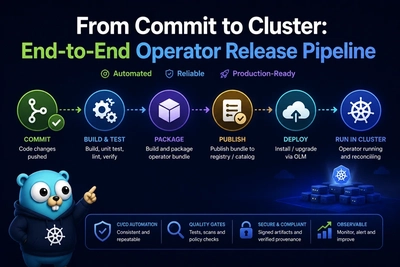
The practical release path is:
manager image + CRDs + RBAC
  -> bundle/ directory
  -> bundle image
  -> catalog image or file-based catalog
  -> CatalogSource
  -> Subscription
  -> InstallPlan
  -> ClusterServiceVersion Succeeded
I validated the examples with:
operator-sdk versionSample output:
operator-sdk version: "v1.42.2", commit: "6001c29067051e1a04e829ea033988b904d1845e", kubernetes version: "1.33.1", go version: "go1.25.7", GOOS: "linux", GOARCH: "amd64"opm was not installed in this environment, so the opm catalog commands below are shown as the expected production workflow, not locally executed output. The bundle validation and OLM object dry-runs were tested.
Step 1: Understand why OLM exists
Operator Lifecycle Manager vs plain Helm or raw YAML
Helm excels at templating releases; OLM adds a cluster-level catalog, dependency resolution, upgrade graphs, and OLM-owned CRDs such as Subscription and ClusterServiceVersion. You choose OLM when consumers install your Operator through a marketplace or when multiple operators must coordinate versions.
The four objects you will touch most often
| Object | Role |
|---|---|
| Bundle | One operator version: CSV + CRDs + metadata. |
| CatalogSource | Points OLM at a catalog image (index of bundles). |
| Subscription | Requests a channel of an operator package. |
| InstallPlan | Concrete plan OLM executes (RBAC, CSV, CRDs). |
Step 2: Create the bundle directory layout
manifests/ vs metadata/ and bundle.Dockerfile
Typical Operator SDK output:
bundle/manifests/— CSV, CRDs, optional webhook configs packaged for OLM.bundle/metadata/—annotations.yamldescribing package name, channels, default channel, and skip-range style hints.bundle.Dockerfile— builds the bundle image that ships those files.
A minimal tested layout looked like this:
find /tmp/olm-bundle-test -maxdepth 3 -type fSample output:
/tmp/olm-bundle-test/bundle.Dockerfile
/tmp/olm-bundle-test/bundle/metadata/annotations.yaml
/tmp/olm-bundle-test/bundle/manifests/demoapp-operator.clusterserviceversion.yaml
/tmp/olm-bundle-test/bundle/manifests/demoapps.example.com.crd.yaml
The important labels in bundle/metadata/annotations.yaml are:
annotations:
  operators.operatorframework.io.bundle.mediatype.v1: registry+v1
  operators.operatorframework.io.bundle.manifests.v1: manifests/
  operators.operatorframework.io.bundle.metadata.v1: metadata/
  operators.operatorframework.io.bundle.package.v1: demoapp-operator
  operators.operatorframework.io.bundle.channels.v1: alpha,stable
  operators.operatorframework.io.bundle.channel.default.v1: stable
Commit either generated bundles or only the inputs—pick one policy per repo and enforce it in CI.
Versioned paths vs single-directory bundles
SDK projects usually regenerate bundle/ for the next CSV version. Tag Git when the bundle matches the manager image digest you tested—release pipeline.
What belongs in Git vs build-only output
Many teams commit bundle/ so reviewers can diff CSV changes. Others generate in CI only—faster PRs, harder audits. Choose consciously.
Step 3: Fill the CSV fields that matter
metadata.name, spec.version, maturity, keywords, links
metadata.name must be unique in the namespace OLM installs into—usually foo-operator.v1.4.0. spec.version follows semver rules OLM understands. spec.maturity is marketing (alpha, beta, stable) and should match your support story.
Also set spec.minKubeVersion. In the tested bundle, operator-sdk bundle validate passed but warned when minKubeVersion was absent:
Warning: Value : (demoapp-operator.v0.1.0) csv.Spec.minKubeVersion is not informed. It is recommended you provide this information.That warning matters for public distribution because otherwise the bundle implies it can install on any Kubernetes version.
spec.installModes
Declare honestly which scopes you tested:
- OwnNamespace — operator watches only its install namespace.
- SingleNamespace — watches one configured namespace.
- MultiNamespace — watches a list (rare, complex RBAC).
- AllNamespaces — cluster-scoped watch; highest RBAC blast radius.
Mismatch here versus your actual WATCH_NAMESPACE wiring is a common OperatorHub rejection.
spec.customresourcedefinitions.owned
Every CRD your controller reconciles should be listed with name, version, kind, and displayName. OLM uses this to manage CRD lifecycle alongside the CSV.
spec.relatedImages
List operand images and sidecars by digest when possible so air-gapped mirrors and security scanners have a complete bill of materials.
Webhook and permission declarations
OLM materializes RBAC from the CSV clusterPermissions / permissions blocks. Keep them aligned with kubebuilder markers in code—RBAC minimum permissions.
Step 4: Model the upgrade graph
replaces vs skips
replaces: foo-operator.v1.3.0— classic single-parent upgrade edge in the graph.skips— mark intermediate broken versions users must never land on, or express diamond graph repairs.
Document upgrade paths in your changelog; OLM resolves using the catalog index.
Channel naming (stable, candidate, fast)
metadata.annotations in annotations.yaml declare channels. Users subscribe to stable for conservative clusters; candidate can float faster CSVs.
Breaking vs seamless upgrades
Seamless upgrades require compatible CRD schema transitions—see CRD version upgrades. If you need conversion webhooks, ship them before flipping stored versions.
Step 5: Generate and validate the bundle
operator-sdk bundle generate
Regenerates bundle/ from Kustomize bases or the project layout your plugin uses. Run after API or deployment manifest changes, then commit or feed artifacts to CI.
operator-sdk bundle validate
Catches missing CSV fields, invalid install modes, broken references, and many packaging mistakes before you push images. Add it to every release pipeline—GitHub Actions.
Run it against the bundle directory:
operator-sdk bundle validate ./bundleSample output from the temporary bundle validation:
time="2026-06-15T16:33:09+05:30" level=info msg="All validation tests have completed successfully"
time="2026-06-15T16:33:09+05:30" level=warning msg="Warning: Value : (demoapp-operator.v0.1.0) csv.Spec.minKubeVersion is not informed. It is recommended you provide this information."
A warning is still worth fixing. For a release candidate, treat warnings about minKubeVersion, icons, categories, capabilities, and related images as review blockers unless you have a deliberate exception.
For OperatorHub-style checks, use the current validator set rather than the older deprecated operatorhub shortcut:
operator-sdk bundle validate ./bundle \
  --select-optional name=operatorhub/v2 \
  --select-optional name=standardcapabilities \
  --select-optional name=standardcategories
When I ran the older --select-optional name=operatorhub validator, it completed successfully but emitted this deprecation warning:
Warning: Value : The "operatorhub" validator is deprecated; for equivalent validation use "operatorhub/v2", "standardcapabilities" and "standardcategories" validatorsoperator-sdk scorecard
Runs functional tests packaged as scorecard plugins against a real cluster (often kind). It is closer to “does anything work?” than bundle validate. Treat scorecard as release or nightly if it is slow.
Pinning operator-sdk version
Match the binary version to the project layout (go/v4, etc.). Pin in CI with a fixed download URL or a locked action image.
Step 6: Build a catalog and publish the bundle
What a catalog image is
A catalog image is the registry-facing artifact OLM reads to discover installable packages, channels, and versions. Older workflows used SQLite index images; current Operator Framework documentation also emphasizes file-based catalogs (FBC), where catalog contents are declarative YAML or JSON that can be rendered, diffed, and rebuilt.
opm index add / render (high level)
opm is the CLI that builds and renders catalog contents. Typical flow: start from a base catalog, add your new bundle image by tag or digest, render or validate the result, push the resulting catalog image, then point a CatalogSource at it.
Example production commands, not executed in this environment because opm was not installed:
opm render quay.io/example/demoapp-catalog:v0.1.0 > catalog.yaml
opm validate catalog.yaml
For legacy index-image workflows you may still see examples like:
opm index add \
  --bundles quay.io/example/demoapp-operator-bundle:v0.1.0 \
  --tag quay.io/example/demoapp-catalog:v0.1.0 \
  --container-tool docker
For new work, prefer the catalog format and commands used by your target platform and OperatorHub submission path.
Image tags for catalogs
Use immutable tags or digests for catalogs (my-catalog@sha256:…) so cluster admins know exactly what index they subscribed to.
Signing catalog and bundle images
Follow the same supply-chain practices as the manager image—cosign attestations optional but increasingly expected for public registries.
Step 7: Test install path on kind with OLM
Installing OLM on kind
Install a released OLM manifest compatible with your Kubernetes version. Upgrade OLM when you upgrade kind’s node version.
With Operator SDK, the usual lab command is:
operator-sdk olm installIn the kind validation, the command installed OLM CRDs and created the olm and operators namespaces, but timed out waiting for packageserver:
time="2026-06-15T16:35:40+05:30" level=info msg="Deployment \"olm/olm-operator\" successfully rolled out"
time="2026-06-15T16:35:41+05:30" level=info msg="Deployment \"olm/catalog-operator\" successfully rolled out"
time="2026-06-15T16:35:50+05:30" level=fatal msg="Failed to install OLM version \"0.28.0\": deployment/packageserver failed to rollout: context deadline exceeded"
Even after that timeout, operator-sdk olm status showed the installed OLM resources:
operator-sdk olm statusSample output excerpt:
NAME                                            NAMESPACE    KIND                        STATUS
global-operators                                operators    OperatorGroup               Installed
olm                                                          Namespace                   Installed
catalog-operator                                olm          Deployment                  Installed
olm-operator                                    olm          Deployment                  Installed
clusterserviceversions.operators.coreos.com                  CustomResourceDefinition    Installed
subscriptions.operators.coreos.com                           CustomResourceDefinition    Installed
catalogsources.operators.coreos.com                          CustomResourceDefinition    Installed
Confirm the OLM CRDs exist before applying OLM objects:
kubectl get crd clusterserviceversions.operators.coreos.com \
  catalogsources.operators.coreos.com \
  subscriptions.operators.coreos.com \
  installplans.operators.coreos.com \
  operatorgroups.operators.coreos.com
Sample output:
NAME                                          CREATED AT
clusterserviceversions.operators.coreos.com   2026-06-15T11:03:57Z
catalogsources.operators.coreos.com           2026-06-15T11:03:56Z
subscriptions.operators.coreos.com            2026-06-15T11:04:06Z
installplans.operators.coreos.com             2026-06-15T11:03:59Z
operatorgroups.operators.coreos.com           2026-06-15T11:04:04Z
If OLM pods crash or packageserver times out, inspect kubectl get pods -n olm and logs before debugging your bundle. In my test, core CRDs were usable for server-side dry-run validation even though packageserver did not finish cleanly.
CatalogSource → Subscription → CSV path
- Load a CatalogSource referencing your catalog image.
- Create an OperatorGroup scoping target namespaces.
- Create a Subscription selecting your package and channel.
- Wait for CSV
PHASE: Succeededand verify your CRD appears.
Example manifests:
apiVersion: operators.coreos.com/v1
kind: OperatorGroup
metadata:
  name: demoapp-operator-group
  namespace: demoapp-operator-system
spec:
  targetNamespaces:
    - demoapp-operator-system
---
apiVersion: operators.coreos.com/v1alpha1
kind: CatalogSource
metadata:
  name: demoapp-catalog
  namespace: olm
spec:
  sourceType: grpc
  image: quay.io/example/demoapp-catalog:v0.1.0
  displayName: DemoApp Catalog
  publisher: Example
---
apiVersion: operators.coreos.com/v1alpha1
kind: Subscription
metadata:
  name: demoapp-operator
  namespace: demoapp-operator-system
spec:
  channel: stable
  name: demoapp-operator
  source: demoapp-catalog
  sourceNamespace: olm
  installPlanApproval: Automatic
I validated those object shapes with server-side dry-run after OLM CRDs were installed:
kubectl apply --dry-run=server -f olm-install-path.yamlSample output:
operatorgroup.operators.coreos.com/demoapp-operator-group created (server dry run)
catalogsource.operators.coreos.com/demoapp-catalog created (server dry run)
subscription.operators.coreos.com/demoapp-operator created (server dry run)
When you use a real catalog image, continue with:
kubectl get installplan -n demoapp-operator-system
kubectl get csv -n demoapp-operator-system
kubectl describe subscription demoapp-operator -n demoapp-operator-system
InstallPlan failures
InstallPlan objects surface dependency conflicts, missing bundle fields, or RBAC the cluster cannot satisfy—inspect kubectl describe installplan.
Uninstall and CRD retention
OLM can orphan CRDs depending on CSV crdUpdate policies. Know whether uninstall removes custom resources or only the operator—document for users.
Step 8: Prepare OperatorHub listing metadata
Required metadata, icon, and documentation links
OperatorHub expects a square icon, README-level description, maintainer email, and links to docs and source. Missing fields fail community CI. The optional validation run against the test bundle produced this warning because no icon was set:
Warning: Value : (demoapp-operator.v0.1.0) csv.Spec.Icon not specifiedThat is acceptable for a private lab bundle but should be fixed before public listing.
Categories and support statements
Pick categories that match discovery filters. Support and capabilities text should reflect reality—reviewers compare against your reconciler features.
What reviewers look for (high level)
Security-sensitive permissions, installMode honesty, license files, and upgrade graphs that do not strand users on broken versions.
Step 9: Align capability levels and CSV claims
Mapping Level I–V to CSV text
The five levels are cumulative: Basic Install through Auto Pilot. Your CSV description and metadata should not promise Level V automation if you only ship Level I reconcile loops.
Cross-link: maturity model
Read and internalize Operator capability levels I–V before you edit alm-examples or marketing paragraphs in the CSV.
Avoiding over-claiming
If metrics or webhooks are optional features, mark them clearly or split channels so stable only advertises what you test in CI.
Step 10: Plan day-2 operations after publish
Patching CVEs in the manager image
Ship a new bundle with a bumped CSV replaces edge and updated relatedImages digests. Never retag an old bundle image in place—breaks digest immutability assumptions.
Deprecating channels
Use skips and channel metadata to steer users off legacy paths; communicate in release notes.
Step 11: Checklist before you tag a bundle release
| Step | Command / action | Pass criteria |
|---|---|---|
| Regenerate | make bundle or SDK equivalent |
Git diff reviewed |
| Validate | operator-sdk bundle validate ./bundle |
exit 0 |
| Scorecard (opt) | operator-sdk scorecard on kind |
critical suites green |
| Index | opm index add … |
catalog image pushes |
| Install | Subscription on kind | CSV Succeeded |
Frequently Asked Questions
1. What is the difference between a bundle image and a catalog image?
A bundle image packages one operator version (CSV, CRDs, metadata). A catalog image or file-based catalog aggregates bundles so OLM can resolve packages, channels, versions, and dependencies.2. Does bundle validate prove my operator works?
No. validate checks packaging rules and metadata consistency. Functional proof still comes from envtest, kind, or staging clusters—see the testing and CI/CD lessons in this series.3. Where do capability levels appear for users?
They are documented in the ClusterServiceVersion and marketing metadata, but the engineering meaning is the five Red Hat / OLM levels explained in the maturity model article—do not claim a level your reconciler and observability stack cannot support.See also
- Operator capability levels I–V
- CI/CD with GitHub Actions
- Release pipeline: commit to cluster
- CRD version upgrades and conversion webhooks
- Install Operator-SDK on Linux
- What is a Kubernetes Operator?
Upstream references
- OLM documentation
- Creating an Operator bundle
- File-based catalogs
- Operator SDK OLM integration
- Operator SDK bundle validate command
- OperatorHub.io
Bottom line: treat the bundle as the versioned packaging of your CSV + CRDs, validate it mechanically, build a catalog with opm or your platform catalog workflow, prove installs on kind, and align CSV claims with the capability level you can actually support before you ask users to click Install on OperatorHub.