
What is SQL LEFT OUTER JOIN?
A LEFT OUTER JOIN (commonly called LEFT JOIN) is a type of SQL join that returns:
- All rows from the left table
- Matching rows from the right table
- NULL values for right-table columns when no match exists
LEFT OUTER JOIN is typically used when you want complete data from one table, even if related data is missing in another table.
In simple terms:
👉 Nothing from the left table is ever lost.
Lab Environment (Sample Tables for Examples)
To make every example reproducible, we will use the following sample tables throughout this guide.
CREATE TABLE employees (
    employee_id INT PRIMARY KEY,
    name VARCHAR(50),
    department_id INT
);

INSERT INTO employees (employee_id, name, department_id) VALUES
(1, 'Aarav', 101),
(2, 'Vivaan', 102),
(3, 'Aditya', 103),
(4, 'Sai', NULL),
(5, 'Diya', 101),
(6, 'Ishaan', 104),
(7, 'Mira', NULL);

CREATE TABLE departments (
    department_id INT PRIMARY KEY,
    department_name VARCHAR(50)
);

INSERT INTO departments (department_id, department_name) VALUES
(101, 'Human Resources'),
(102, 'Finance'),
(103, 'IT'),
(105, 'Marketing');
Basic LEFT OUTER JOIN Example
Let’s retrieve all employees and their department names.
SELECT e.name, d.department_name
FROM employees e
LEFT OUTER JOIN departments d
ON e.department_id = d.department_id;
What happens here?
- All employees are returned
- Employees Sai and Mira have
NULLdepartment_id → department_name becomesNULL - Employee Ishaan has department_id
104, which does not exist → department_name becomesNULL
This is the defining behavior of LEFT OUTER JOIN.
LEFT OUTER JOIN Syntax
SELECT columns
FROM table1
LEFT OUTER JOIN table2
ON table1.common_column = table2.common_column;
Explanation
table1→ left table (all rows are preserved)table2→ right table (matched rows only)ON→ join condition- Missing matches →
NULLvalues from right table
When Should You Use LEFT OUTER JOIN?
Use LEFT OUTER JOIN when:
- You must return all rows from the primary table
- Missing relationships should not remove records
NULLvalues are acceptable and meaningful
In our lab data, this applies when:
- Employees have no department assigned (Sai, Mira)
- Employees reference a non-existent department (Ishaan)
- You still want these employees in the result set
Common LEFT OUTER JOIN Mistake (WHERE Clause Issue)
This is one of the most frequent LEFT JOIN bugs.
❌ Wrong Query (Behaves Like INNER JOIN)
SELECT e.name, d.department_name
FROM employees e
LEFT JOIN departments d
ON e.department_id = d.department_id
WHERE d.department_name = 'IT';
Why is this wrong?
The WHERE clause runs after the join and removes rows wheredepartment_name is NULL, effectively converting the LEFT JOIN into an INNER JOIN.
✅ Correct Query
SELECT e.name, d.department_name
FROM employees e
LEFT JOIN departments d
ON e.department_id = d.department_id
AND d.department_name = 'IT';
✔ This preserves unmatched employees.
SQL LEFT OUTER JOIN vs INNER JOIN vs RIGHT JOIN vs FULL JOIN
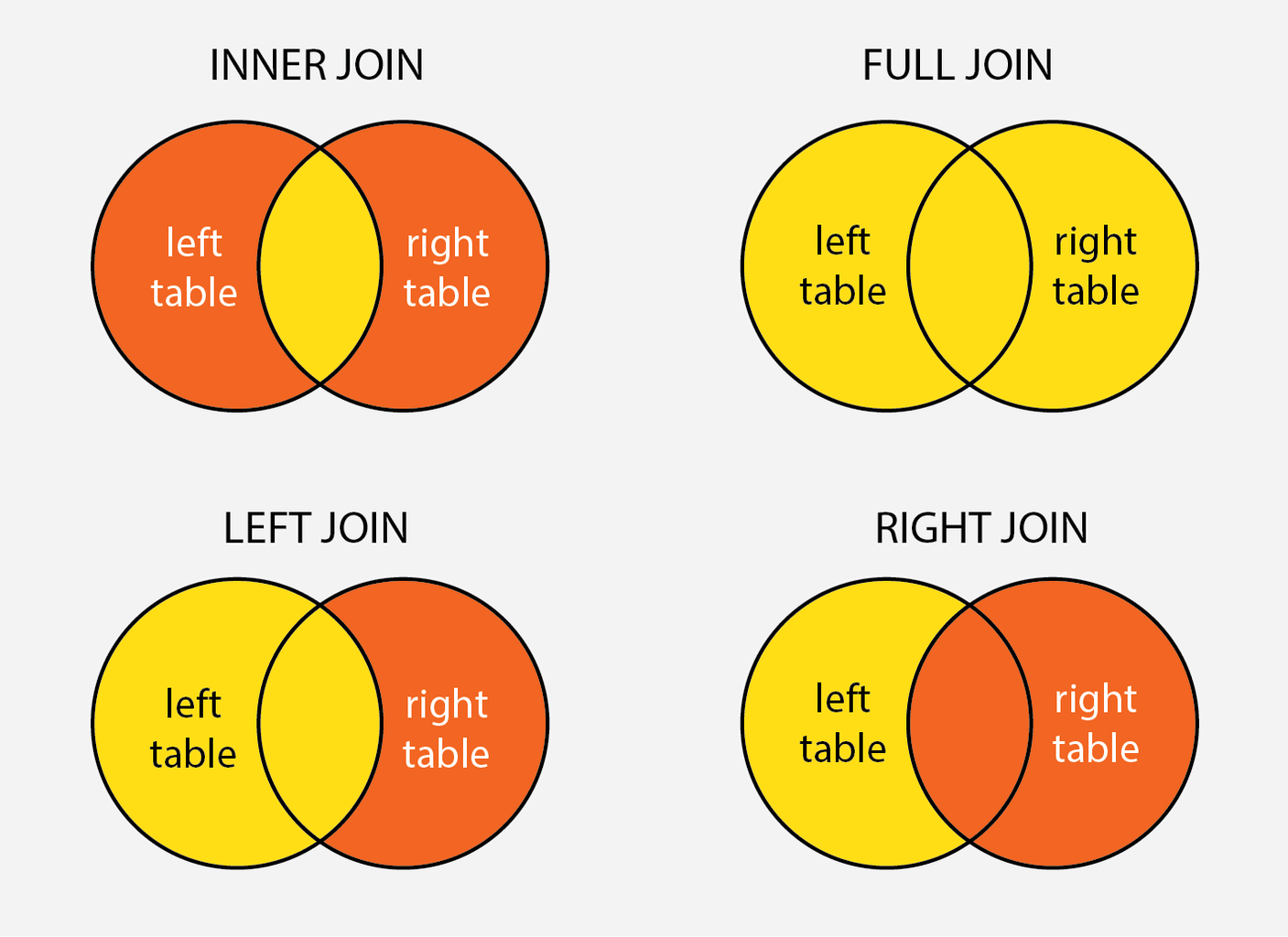
The following table highlights the practical differences between LEFT OUTER JOIN and other SQL joins.
| Criteria | LEFT OUTER JOIN | INNER JOIN | RIGHT JOIN | FULL JOIN |
|---|---|---|---|---|
| Left Table | Displayed | Displayed | Optional | Displayed |
| Right Table | Optional | Displayed | Displayed | Displayed |
| Match Required | No | Yes | No | No |
| Unmatched Rows in Left Table | Displayed with NULLs | Ignored | Ignored | Displayed with NULLs |
| Unmatched Rows in Right Table | Ignored | Ignored | Displayed with NULLs | Displayed with NULLs |
- Displayed: The records will appear in the result set.
- Optional: The records may or may not appear in the result set, based on whether a matching record is found.
- Ignored: The records will not appear in the result set.
- Displayed with NULLs: The records will appear in the result set, but with NULL values where no match is found.
Here is an image showcasing different types of SQL JOINS:
Handling NULLs in SQL LEFT OUTER JOIN
NULL handling is essential when using LEFT OUTER JOIN.
Example 1: Replace NULL Values Using COALESCE
SELECT
    e.name,
    COALESCE(d.department_name, 'No Department') AS department_name
FROM employees e
LEFT JOIN departments d
ON e.department_id = d.department_id;
Use this when you want readable output instead of NULLs.
Example 2: Find Records With Missing Matches (IS NULL)
SELECT e.name
FROM employees e
LEFT JOIN departments d
ON e.department_id = d.department_id
WHERE d.department_id IS NULL;
Returns employees without a valid department.
Example 3: Find Records With Matches (IS NOT NULL)
SELECT e.name, d.department_name
FROM employees e
LEFT JOIN departments d
ON e.department_id = d.department_id
WHERE d.department_id IS NOT NULL;
Returns only employees assigned to departments.
Example 4: IFNULL (MySQL) or NVL (Oracle)
MySQL
SELECT
    e.name,
    IFNULL(d.department_name, 'No Department') AS department_name
FROM employees e
LEFT JOIN departments d
ON e.department_id = d.department_id;
Oracle
SELECT
    e.name,
    NVL(d.department_name, 'No Department') AS department_name
FROM employees e
LEFT JOIN departments d
ON e.department_id = d.department_id;
These are database-specific alternatives to COALESCE.
Advanced Concepts in SQL LEFT OUTER JOIN
This section is intended for readers already comfortable with basic LEFT JOIN usage.
Using LEFT OUTER JOIN in Subqueries
We want to find employees who have worked on the most recent project in their department. Here, the projects table contains information about projects and their completion dates.
CREATE TABLE projects (
    project_id INT PRIMARY KEY,
    department_id INT,
    project_name VARCHAR(50),
    completion_date DATE,
    FOREIGN KEY (department_id) REFERENCES departments(department_id)
);

INSERT INTO projects (project_id, department_id, project_name, completion_date) VALUES
(1, 101, 'Project A', '2024-01-10'),
(2, 102, 'Project B', '2024-03-15'),
(3, 103, 'Project C', '2024-02-20'),
(4, 101, 'Project D', '2024-05-22'),
(5, 104, 'Project E', '2024-04-30');
Additionally we need to ensure all department IDs in the projects table are present in the departments table. So for the data we are using in this lab, the department_id 104 must be added to the departments table.
INSERT INTO departments (department_id, department_name) VALUES
(104, 'Operations');
SQL Query:
SELECT
    e.name,
    p.project_name,
    p.completion_date
FROM
    employees e
LEFT OUTER JOIN (
    SELECT
        p1.department_id,
        p1.project_name,
        p1.completion_date
    FROM
        projects p1
    INNER JOIN (
        SELECT
            department_id,
            MAX(completion_date) AS max_date
        FROM
            projects
        GROUP BY
            department_id
    ) p2
    ON
        p1.department_id = p2.department_id
        AND p1.completion_date = p2.max_date
) p
ON
e.department_id = p.department_id;- Subquery
p2: Selects the maximumcompletion_datefor eachdepartment_id. - Subquery
p1: Joins withp2to get the project details for the latest projects per department. - Main Query: Performs a
LEFT OUTER JOINbetweenemployeesand the subquerypto include all employees and their latest project details, if available.
Result:

Multiple LEFT OUTER JOINs in a Query
To demonstrate this we want to list all employees, their department names, and the names of their managers. The managers table contains information about department managers.
CREATE TABLE managers (
    manager_id INT PRIMARY KEY,
    department_id INT,
    manager_name VARCHAR(50),
    FOREIGN KEY (department_id) REFERENCES departments(department_id)
);

INSERT INTO managers (manager_id, department_id, manager_name) VALUES
(1, 101, 'Dr. Sharma'),
(2, 102, 'Ms. Nair'),
(3, 103, 'Mr. Singh'),
(4, 105, 'Ms. Gupta');
SQL Query:
SELECT
    e.name AS employee_name,
    d.department_name,
    m.manager_name
FROM
    employees e
LEFT OUTER JOIN
    departments d
ON
    e.department_id = d.department_id
LEFT OUTER JOIN
    managers m
ON
e.department_id = m.department_id;- The first LEFT OUTER JOIN retrieves department names for employees.
- The second LEFT OUTER JOIN retrieves manager names for employees.
Result:

Frequently Asked Questions and Answers on SQL Left Outer Join
What does LEFT OUTER JOIN return in SQL?
A LEFT OUTER JOIN returns all rows from the left table and only the matching rows from the right table. If no matching row exists in the right table, the result contains NULL values for the right-table columns, ensuring that left-table records are never removed.
Why does LEFT OUTER JOIN return NULL values?
LEFT OUTER JOIN returns NULL values when no matching record exists in the right table for a given row in the left table. This indicates missing or unmatched related data while still preserving the left-table row in the result set.
What is the difference between INNER JOIN and LEFT OUTER JOIN?
INNER JOIN returns only rows that have matching values in both tables, whereas LEFT OUTER JOIN returns all rows from the left table and includes matching rows from the right table when available, filling unmatched right-table columns with NULL values.
How can NULL values be handled in a LEFT OUTER JOIN?
NULL values produced by a LEFT OUTER JOIN can be handled using functions such as COALESCE, ISNULL, IFNULL, or NVL to replace NULLs with meaningful default values like labels or placeholders, depending on the database system.
Can multiple LEFT OUTER JOINs be used in a single query?
Yes, multiple LEFT OUTER JOINs can be used in a single query to combine data from several related tables while preserving rows from the main table, but careful join conditions and filtering are required to maintain correct results and performance.
Summarizing Key Takeaways
- LEFT OUTER JOIN always preserves rows from the left table
- Missing matches in the right table appear as NULL values
- WHERE clause placement can change LEFT JOIN behavior
- NULL handling is essential for clean and correct results
- LEFT OUTER JOIN is ideal for incomplete or optional relationships
- Understanding join differences improves query correctness and performance
Official SQL Documentation References
Here are some resources which can be used to learn more:
- Microsoft SQL LEFT JOIN Documentation
- PostgreSQL JOIN Documentation
- MySQL JOIN Syntax Reference
- Oracle SQL JOIN Concepts


joints or joins?
What are JOINS in SQL?
“The joints are predominantly used when a user is trying to fetch or get data from tables which have one to many or many to many relationships between them. “
SQL joins are used to extract data which are present in multiple tables of relation database, basically >joints< in SQL are the commands which are used to combine rows from two or more tables based on related column between those tables.
Fixed the typo!