

JavaScript Math.sign() tells whether a value is positive, negative, zero, negative zero, or NaN. Searches such as javascript sign, math.sign js, math.sign javascript, and javascript math sign usually mean this numeric sign method, not the JavaScript $ symbol.
Environment: Node.js v20.18.2. Each snippet is plain JavaScript; the line after it states the expected console output.
Math.sign Syntax
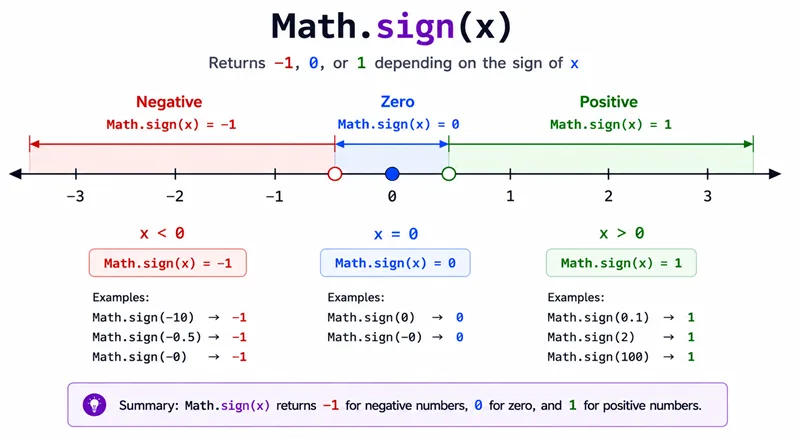
Math.sign(x)Return values:
| Input type | Result |
|---|---|
| Positive number | 1 |
| Negative number | -1 |
| Positive zero | 0 |
| Negative zero | -0 |
| Not a number | NaN |
Method 1: Check Positive and Negative Numbers
console.log(Math.sign(42));
console.log(Math.sign(-42));You should see 2 lines, in order: 1, -1.
Method 2: Check Zero and Negative Zero
console.log(Math.sign(0));
console.log(Object.is(Math.sign(-0), -0));You should see 2 lines, in order: 0, true.
Object.is() is used because -0 is a distinct JavaScript value even though it often prints like 0.
Method 3: Handle Invalid Numeric Input
console.log(Math.sign("hello"));You should see one line logging NaN.
Numeric strings such as "5" are converted to numbers, but non-numeric strings become NaN.
Common Questions About Math.sign
What does Math.sign return?
It returns 1, -1, 0, -0, or NaN depending on the numeric sign of the input.
Is JavaScript $ sign related to Math.sign?
No. The $ character is just a valid identifier character in JavaScript. Math.sign() is a numeric method.
Why does Math.sign(-0) return -0?
JavaScript preserves signed zero, and Math.sign(-0) returns -0.
Summary
Math.sign classifies the sign of a finite number and preserves signed zero semantics—pair with Object.is when -0 vs +0 matters.
JavaScript Math.sign() is the built-in way to detect whether a number is positive, negative, zero, negative zero, or NaN. It is useful for direction, numeric classification, movement, comparisons, and value normalization. Use Object.is() when you specifically need to distinguish -0 from 0.
