
You are choosing between two official Ubuntu flavors for a laptop or desktop and keep circling the same question: Kubuntu vs Ubuntu MATE—which one should you install in 2026? Both share Ubuntu packages, both install with the same underlying apt workflows, and both target everyday desktop users rather than servers. The split is almost entirely the desktop environment: Kubuntu ships KDE Plasma on Qt; Ubuntu MATE ships MATE, the continuation of the classic GNOME 2 layout on GTK.
This guide compares what each project publishes on kubuntu.org and ubuntu-mate.org, with flavor positioning from Ubuntu flavors and Ubuntu 26.04 platform figures from ubuntu.com.
Quick answer: Kubuntu vs Ubuntu MATE in 2026
Pick Kubuntu 26.04 LTS when you want the current Ubuntu LTS paired with KDE Plasma 6.6, Wayland as the default session, KDE Connect, and flavor support through April 2029—and when your hardware meets Ubuntu 26.04’s published minimums (6 GB RAM, 2 GHz dual-core CPU, 25 GB disk).
Pick Ubuntu MATE when you want a traditional desktop metaphor—menus, panels, and a GNOME 2-era workflow—with official copy emphasizing modest hardware and old machines made usable. As of this review, Ubuntu MATE’s official download page lists Ubuntu MATE 24.04.4 LTS (supported through April 2027) and Ubuntu MATE 25.10 (through July 2026), but not a 26.04 image—while Kubuntu 26.04 LTS is the flavor’s current long-term build.
Avoid Ubuntu MATE 25.10 for long-term desktop deployments unless you specifically want the interim stack and are ready to upgrade again before July 2026.
If you are comparing Ubuntu flavors more broadly, see Debian vs Ubuntu for how the Ubuntu base relates to Debian—and check your Ubuntu version after install to confirm release and codename.
| Pick this | Best reason |
|---|---|
| Kubuntu 26.04 LTS | Plasma 6.6, KDE ecosystem, LTS through 2029 |
| Ubuntu MATE 24.04.4 LTS | Traditional MATE desktop, stability until 2027 |
| Ubuntu MATE 25.10 | Newest MATE on interim Ubuntu until July 2026 |
Kubuntu vs Ubuntu MATE at a glance
| Topic | Kubuntu 26.04 LTS | Ubuntu MATE 24.04.4 LTS | Ubuntu MATE 25.10 |
|---|---|---|---|
| Codename | Resolute Raccoon | Noble Numbat (point release 24.04.4) | Questing Quokka |
| Desktop | KDE Plasma 6.6 | MATE 1.26.2 | MATE (current interim stack) |
| Toolkit | Qt 6.10.2 (+ Qt5 legacy in archive) | GTK / MATE stack | GTK / MATE stack |
| Linux kernel | 7.0 | 6.8 GA / HWE on 24.04.4 media | Per Ubuntu 25.10 base |
| Flavor support ends | April 2029 | April 2027 | July 2026 |
| Release type | LTS (aligned with Ubuntu 26.04) | LTS | Interim (9-month flavor window) |
| Default session | Plasma Wayland | Traditional MATE (X11-class workflow) | Traditional MATE |
| Positioning | Customizable, modern Plasma, KDE Connect | Traditional metaphor, modest hardware | Latest interim MATE features |
| ISO on official download page | Yes (26.04 LTS) | Yes (24.04.4 LTS) | Yes (25.10) |
| Ubuntu 26.04 flavor ISO | Yes | Not listed (as of this review) | Not listed |
Sources: Kubuntu 26.04 release notes, Kubuntu download, Ubuntu MATE 24.04 LTS release notes, Ubuntu MATE download, Ubuntu flavors, Ubuntu release cycle.
What Kubuntu and Ubuntu MATE share
Both flavors are official Ubuntu flavors: community-maintained variants backed by the full Ubuntu archive for packages and updates, as described on Ubuntu flavors.
That shared foundation means:
- The same
aptrepositories, snap store access, and most command-line tooling documented for Ubuntu apply on both—see APT command in Linux for day-to-day package work. - Security and platform upgrades on LTS lines follow the Ubuntu base underneath each flavor (kernel streams, OpenSSL, systemd, and core libraries).
- Skills transfer between flavors more easily than between unrelated distros—you are not learning a new package manager when you switch.
What does not transfer automatically is the desktop layer: panel layout, settings apps, default programs, and theming are flavor-specific.
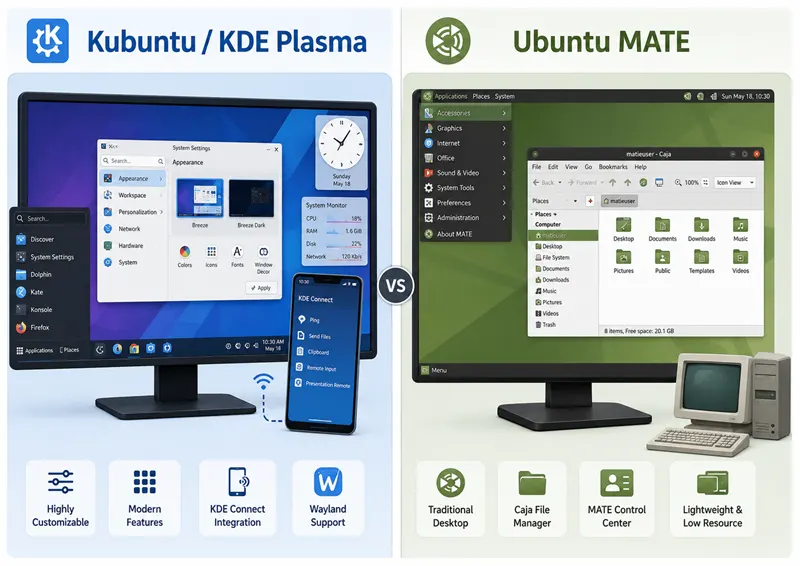
Desktop environments: KDE Plasma vs MATE
This comparison is really Plasma vs MATE on the same Ubuntu core.
Kubuntu and KDE Plasma
Kubuntu unites Ubuntu with KDE and the Plasma desktop. Canonical’s flavor blurb highlights a full application set at startup—productivity, office, email, graphics, photography, and music—and notes that Kubuntu is built with the Qt toolkit, described as fast, slick, and mobile-ready through KDE Connect (Ubuntu flavors).
KDE Plasma is marketed as simple by default (launcher, system tray, notifications, Discover for apps) and powerful when needed (KRunner, deep System Settings, professional apps like Kdenlive and Krita in the KDE ecosystem). Customization is a first-class feature: themes, widgets, panels, and community extensions from the KDE Store.
Kubuntu 26.04 LTS ships Plasma 6.6 with Qt 6.10.2, KDE Frameworks 6.24.0, and KDE Gear 25.12.3, per the 26.04 release notes.
Ubuntu MATE and the MATE desktop
Ubuntu MATE is described as a stable, easy-to-use system with a configurable desktop for users who prefer a traditional desktop metaphor. With modest hardware requirements, it is positioned for modern workstations, single-board computers, and older hardware—”Ubuntu MATE makes modern computers fast and old computers usable” (Ubuntu flavors).
The MATE Desktop Environment is the continuation of GNOME 2, providing an intuitive desktop using traditional metaphors. Core applications include Caja (file manager), Pluma (text editor), MATE Terminal, Atril (document viewer), and Engrampa (archives)—forks of classic GNOME 2 components with MATE-specific naming.
Ubuntu MATE 24.04 GA shipped MATE Desktop 1.26.2 with Linux 6.8, Firefox 125, Evolution 3.52, and LibreOffice 24.2.2, per Noble Numbat release notes; newer 24.04 point-release media may include the HWE kernel stack, so verify with uname -r after install. The 25.04 release notes mark the 10th anniversary of Ubuntu MATE as an official flavor.
Workflow contrast (what users actually feel)
| Aspect | Kubuntu (Plasma) | Ubuntu MATE |
|---|---|---|
| Visual identity | Modern, highly themable Qt desktop | Classic panels, menus, and applets |
| Settings depth | Extensive System Settings and widgets | MATE Control Center; layout presets |
| Launcher | Plasma launcher + KRunner | Traditional application menu |
| File manager | Dolphin | Caja |
| Terminal | Konsole | MATE Terminal |
| Best when you want | Fine-grained control and KDE apps | Familiar “classic PC” ergonomics |
Neither desktop is “wrong” for Linux beginners; the better fit depends on whether you enjoy tuning a rich environment or prefer a straightforward traditional layout.
Release status and support in 2026
Support length is often the deciding factor for home PCs and school labs. In mid-2026 the two flavors are not on the same LTS line.
Kubuntu
Per Kubuntu download:
| Release | Desktop highlight | Flavor support |
|---|---|---|
| 26.04 LTS | Plasma 6 | Security and maintenance through April 2029 |
| 25.10 | Plasma 6.4 | Through July 2026 |
| 24.04 LTS | Plasma 5 | Through April 2027 |
Kubuntu 26.04 LTS was released 23 April 2026, aligned with Ubuntu 26.04 LTS. It inherits Ubuntu platform upgrades—Linux kernel 7.0, updated developer toolchains, sudo-rs, and more—while shipping Plasma-specific features such as OCR in Spectacle, an integrated on-screen keyboard, and theming improvements.
Ubuntu MATE
Per Ubuntu MATE download:
| Release | Role | Flavor support |
|---|---|---|
| 24.04.4 LTS | Recommended for stability | Through April 2027 |
| 25.10 | Interim with latest features | Through July 2026 |
As of this review, Ubuntu MATE’s official download page lists 24.04.4 LTS and 25.10, but not a 26.04 image. Users who standardize on Ubuntu MATE in late 2026 either stay on 24.04.4 LTS until 2027, run 25.10 for a short interim window, or watch ubuntu-mate.org for future announcements.
How this maps to Ubuntu’s calendar
Ubuntu’s release cycle documents Ubuntu 26.04 LTS with five years of standard security maintenance (through May 2031 on the base product table) and Ubuntu 24.04 LTS through May 2029. Flavor pages publish their own end dates—Kubuntu 26.04 through April 2029 and Ubuntu MATE 24.04 through April 2027—so treat flavor sites as authoritative for the desktop ISO you actually install.
Practical takeaway
| Your priority | Lean toward |
|---|---|
| Fresh 2026 LTS installer with longest flavor window | Kubuntu 26.04 LTS |
| Stay on MATE LTS until 2027 | Ubuntu MATE 24.04.4 |
| Newest MATE on interim Ubuntu (short support) | Ubuntu MATE 25.10 |
| Match Ubuntu 26.04 platform (kernel 7.0, 6 GB RAM bar) | Kubuntu 26.04 today |
System requirements and hardware fit
Official sources describe hardware differently for the Ubuntu product line versus Ubuntu MATE positioning.
Ubuntu 26.04 LTS base (relevant to Kubuntu 26.04)
Download Ubuntu Desktop lists for Ubuntu 26.04 LTS:
- 2 GHz dual-core processor or better
- 6 GB system memory
- 25 GB of free hard drive space
- USB or DVD for installer media
- Internet access helpful
Kubuntu 26.04 builds on that base; use these figures when sizing hardware for a 26.04 install.
Ubuntu MATE positioning
Ubuntu MATE does not publish a separate RAM table on its download page. Instead, ubuntu-mate.org and Ubuntu flavors emphasize modest hardware requirements and suitability for older hardware and single-board computers. Ubuntu MATE 24.04 GA shipped with Linux 6.8 and MATE 1.26.2; newer 24.04 point-release media may ship the HWE kernel stack—verify with uname -r after install.
What to plan for in practice
| Hardware profile | Reasonable starting point |
|---|---|
| New laptop with 16 GB RAM | Either flavor; Kubuntu 26.04 showcases Plasma 6.6 and Wayland |
| 4 GB RAM PC (older) | Ubuntu MATE 24.04 LTS aligns with official “old computers usable” messaging |
| 6 GB RAM, 64-bit CPU (2024+) | Kubuntu 26.04 meets published Ubuntu 26.04 minimums |
| Raspberry Pi / SBC | Ubuntu MATE documents Pi images on ubuntu-mate.org (browse archive and device ports) |
Customization and desktop layouts
Kubuntu / Plasma
KDE’s Plasma desktop puts customization at the center: dark themes, desktop widgets, movable panels, and community extensions. Kubuntu 26.04 release notes highlight expanded global themes, refined colour schemes, and deeper widget options in Plasma 6.6.
KRunner is Plasma’s built-in launcher for opening apps, files, calculations, and more—useful when you prefer keyboard-driven workflows over hunting through menus.
Upgraders should note Kubuntu’s warning: jumping to Plasma 6.6 may require resetting the global theme in System Settings if panels or widgets misbehave after upgrade—a documented first step before removing ~/.config.
Ubuntu MATE
Ubuntu MATE ships configurable desktop layouts—the project homepage references screenshots of included layouts so you can preview Traditional, Cupertino, Redmond, and other presets before install. That fits users who want a familiar Windows- or macOS-like arrangement without hand-building panels from scratch.
MATE Control Center centralizes appearance, windows, keyboard shortcuts, and hardware settings in the classic GNOME 2 style.
Applications and software management
Kubuntu
Ubuntu flavors notes Kubuntu arrives with productivity, office, email, graphics, photography, and music applications ready at startup, with additional software from two desktop package managers—Discover (Flatpak, snaps, and distribution apps per KDE Plasma) and apt for deb packages.
Kubuntu 26.04 updates the KDE Gear suite to 25.12.3—Dolphin, Konsole, Okular, Kdenlive, and related apps per release notes. Firefox 150 and LibreOffice 26.2 are called out on the platform side; Firefox is delivered as a snap from the Snap Store on that release line.
Ubuntu MATE
Ubuntu MATE 24.04 LTS integrates App Center (replacing Software Boutique) and GNOME Firmware (replacing Firmware Updater), per Noble release notes. Default apps on 24.04 include Firefox, Evolution, Celluloid, and LibreOffice.
MATE’s core apps—Caja, Pluma, Atril, Engrampa—are documented on mate-desktop.org.
Package overlap
On any supported Ubuntu flavor, you can check whether the desktop metapackages are available with:
apt-cache policy kubuntu-desktop ubuntu-mate-desktopInstalling a second full desktop stack is useful for testing, but a clean flavor ISO is better for daily use.
Wayland, graphics, and display sessions
Kubuntu 26.04: Wayland-first
The Kubuntu 26.04 release notes state that the Plasma Wayland session is the default and fully supported, with improved security, smoother rendering, and better HiDPI support.
For legacy X11 workflows, plasma-session-x11 remains in the Ubuntu archive but is not installed by default and is not supported by the Kubuntu team. Kubuntu 25.10 release notes document installing it with sudo apt install plasma-session-x11 when you need the X11 session on interim builds.
Ubuntu MATE: traditional display stack
Ubuntu MATE’s official materials focus on the traditional MATE experience rather than a Wayland-first message. MATE’s upstream design targets the classic X11-era workflow; check ubuntu-mate.org release notes for the display stack on the specific version you install.
If Wayland maturity and HiDPI scaling on Plasma are priorities—and you accept Ubuntu 26.04’s hardware bar—Kubuntu 26.04 is the flavor explicitly documenting Wayland as default.
Platform and security features (2026 LTS vs 24.04 LTS)
When you compare Kubuntu 26.04 with Ubuntu MATE 24.04 LTS, you are also comparing Ubuntu platform generations.
Inherited on Kubuntu 26.04 (from Ubuntu 26.04 base)
Per Kubuntu 26.04 release notes:
- Linux kernel 7.0 with scheduling and crash-dump improvements
sudo-rsas defaultsudoproviderrust-coreutilsfor core command-line tools- VA-API hardware video acceleration for AMD and Intel by default
- Toolchain updates: GCC 15.2, Python 3.14, Rust 1.93, Go 1.26, OpenJDK 25, .NET 10
- APT 3.2 with a new dependency solver and history rollback commands
Ubuntu MATE 24.04 LTS platform
Per Noble Numbat release notes:
- Linux 6.8 at GA (newer 24.04.4 media may ship HWE kernels—verify with
uname -r) - MATE 1.26.2
- Ubuntu Desktop Bootstrap installer integration
- Firefox 125, LibreOffice 24.2.2
Ubuntu MATE 25.04 added optional full-disk encryption in the installer and improved dual-boot partitioning, per Plucky Puffin release notes—features that ride the newer interim Ubuntu base.
Choose Kubuntu 26.04 when you need the newest LTS platform; choose Ubuntu MATE 24.04 when you need MATE on a proven Noble base through 2027 even if kernel and desktop versions are older.
KDE Connect and mobility (Kubuntu advantage)
Ubuntu flavors and KDE Plasma highlight KDE Connect: integrate your PC with Android devices—send files, sync notifications, control media, and use the phone as a remote input. That is a differentiator if you live in both a Linux desktop and an Android phone daily.
Ubuntu MATE does not position mobile integration the same way in official flavor copy. You can still install related tools from the archive, but Kubuntu + KDE Connect is the path each project documents together.
Accessibility and inclusive design
Kubuntu 26.04 release notes call out Plasma 6.6’s integrated on-screen keyboard—touchscreen-friendly, multi-language, with tray access and automatic appearance on text fields.
KDE Plasma and Ubuntu Desktop both emphasize accessibility in product messaging; Kubuntu inherits Ubuntu’s accessibility direction while adding Plasma-specific tools.
Ubuntu MATE’s strength for many users is predictability: a traditional menu, clear panels, and layout presets that feel familiar if you are coming from older Windows or GNOME 2 systems—without Plasma’s depth of optional configuration.
Installation, upgrades, and verification
Download channels
- Kubuntu: kubuntu.org/getkubuntu — 26.04 LTS, 25.10, and previous 24.04 LTS builds listed with support dates.
- Ubuntu MATE: ubuntu-mate.org/download — 24.04.4 LTS and 25.10 with checksums.
After install: confirm release
cat /etc/os-release
lsb_release -a 2>/dev/null
You should see the flavor’s PRETTY_NAME, VERSION_ID, and VERSION_CODENAME. For a longer walkthrough, use check Ubuntu version.
Upgrades
- Kubuntu 26.04: Fresh install or upgrade from Kubuntu 24.04 LTS documented in release notes; upgrade path to 26.04 from the download page was listed as “Coming soon” at publication time—confirm on kubuntu.org before you plan an in-place upgrade.
- Ubuntu MATE 24.04: Upgrade from 22.04 LTS or 23.10 follows the Ubuntu 24.04 upgrade process linked from Noble release notes; offline upgrades are not offered—network access to an official mirror is required.
Who should choose Kubuntu
Choose Kubuntu when:
- You want KDE Plasma with deep theming, widgets, and KRunner.
- KDE Connect with your phone matters.
- You are standardizing on 26.04 LTS in 2026 and want flavor support through April 2029.
- Wayland as the default session, Plasma 6.6 features (Spectacle OCR, on-screen keyboard), and kernel 7.0 match your hardware and workflow.
- You are fine with a rich settings surface—official copy describes Kubuntu as powerful when you need more than defaults.
Who should choose Ubuntu MATE
Choose Ubuntu MATE when:
- You prefer a traditional desktop metaphor—panels, menus, and classic window management.
- Official modest hardware and older computer messaging matches your machine better than Ubuntu 26.04’s 6 GB RAM minimum.
- You want an LTS MATE build supported through April 2027 without chasing interim releases.
- Layout presets (Traditional, Redmond, Cupertino-style arrangements) sound more appealing than building a Plasma layout from scratch.
- You use Raspberry Pi or archived SBC images linked from ubuntu-mate.org/download.
Switching between flavors and common dual-boot patterns
Because both flavors use the same Ubuntu archive, advanced users sometimes install kubuntu-desktop or ubuntu-mate-desktop atop an existing Ubuntu system. That works for experiments; for daily use, a clean install of the flavor ISO avoids duplicate session managers, conflicting defaults, and orphaned meta-packages.
There is no official “convert Ubuntu MATE to Kubuntu in place” wizard—plan backups, test in a VM, and reinstall when you change your mind.
Common mistakes when comparing Kubuntu and Ubuntu MATE
- Assuming both flavors ship the same LTS version in 2026—Kubuntu lists 26.04; Ubuntu MATE’s download page lists 24.04.4 and 25.10.
- Picking a flavor for idle RAM myths instead of official minimums and positioning copy.
- Installing plasma-session-x11 on Kubuntu 26.04 expecting Kubuntu team support—it is explicitly unsupported on 26.04.
- Ignoring snap-delivered Firefox on newer Ubuntu bases when you expected only deb packages.
- Choosing Ubuntu MATE 25.10 for a multi-year lab deployment without noticing July 2026 end of support.
- Mixing both desktop metapackages on one install and blaming “Linux instability” for conflicting sessions.
Summary
Kubuntu and Ubuntu MATE are sibling official flavors: same Ubuntu packages underneath, different desktops on top. Kubuntu 26.04 LTS is the 2026 long-term choice for KDE Plasma 6.6, Wayland-by-default, KDE Connect, and support through April 2029 on hardware that meets Ubuntu 26.04’s published requirements. Ubuntu MATE remains the flavor for a traditional MATE desktop, modest hardware positioning, and configurable classic layouts—with 24.04.4 LTS supported through April 2027 and 25.10 as a short-lived interim option.
If you want the newest Ubuntu LTS platform and a highly customizable Qt desktop, install Kubuntu 26.04. If you want MATE’s familiar ergonomics and official emphasis on older hardware—and you accept the current download lineup without a 26.04 MATE ISO—Ubuntu MATE 24.04.4 LTS is the stable pick. For how Ubuntu fits next to Debian on servers and desktops, continue with Debian vs Ubuntu.
References
- Ubuntu flavors
- Ubuntu release cycle
- Download Ubuntu Desktop (26.04 requirements)
- Kubuntu home
- Kubuntu 26.04 LTS release notes
- Kubuntu download and support dates
- Kubuntu 25.10 release notes
- Ubuntu MATE home
- Ubuntu MATE download and support dates
- Ubuntu MATE 24.04 LTS release notes
- Ubuntu MATE 25.04 release notes
- KDE Plasma desktop
- MATE Desktop Environment
- On-site: Debian vs Ubuntu, check Ubuntu version, APT command in Linux
Frequently Asked Questions
1. Is Kubuntu or Ubuntu MATE better in 2026?
2. What is the main difference between Kubuntu and Ubuntu MATE?
3. Do Kubuntu and Ubuntu MATE use the same packages and repositories?
4. Which has longer support in 2026—Kubuntu or Ubuntu MATE?
5. Is Kubuntu or Ubuntu MATE better for older hardware?
uname -r after install.