
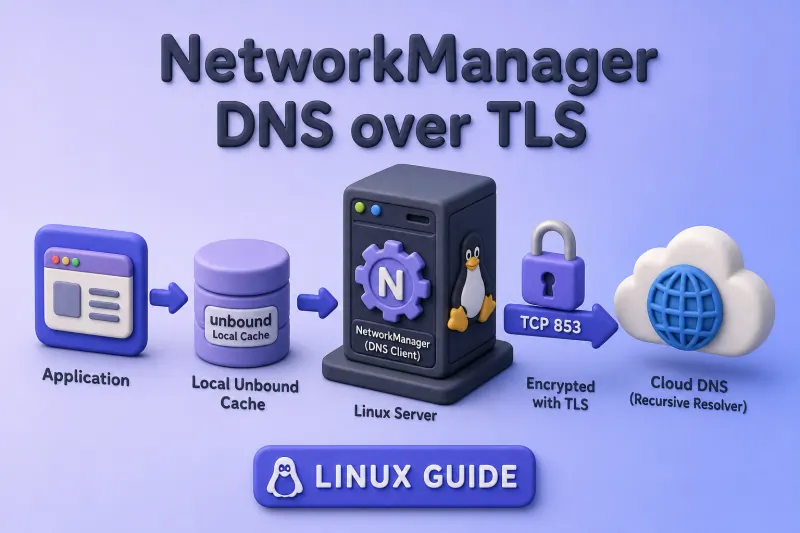
Red Hat Enterprise Linux 10.1 made encrypted system DNS generally available through NetworkManager. You can use the same configuration on compatible Enterprise Linux 10 systems that provide dnsconfd, dnsconfd-unbound, and NetworkManager with DoT URI support. Red Hat also refers to this feature as encrypted DNS or eDNS. This guide uses DNS over TLS because DoT is the encrypted DNS protocol currently implemented by RHEL.
You will configure three cooperating pieces: NetworkManager publishes global DNS settings, dnsconfd translates them for the local cache, and unbound sends upstream queries to Cloudflare (or another provider) on TCP port 853. This guide focuses on enabling DoT on an existing system. Installer, Kickstart, and custom-ISO configuration are separate workflows.
The commands below require root access or sudo.
Tested on: Rocky Linux 10.2 (Red Quartz); NetworkManager 1.56.0;
dnsconfd1.7.5.
exclusive mode refuses plaintext DNS fallback. If your network blocks TCP port 853, name resolution can fail completely after you enable DoT. Test outbound port 853 before you change production DNS. Make this change from a local console or keep an administrative shell open. If the configuration fails, disable or rename global-dot.conf, stop dnsconfd, and reload NetworkManager so connection-provided DNS can be restored.
How NetworkManager encrypts DNS traffic
On RHEL 10.1 and compatible Enterprise Linux 10 releases, the supported path looks like this:
Application → local unbound cache → DNS over TLS → upstream resolverNetworkManager owns the system DNS policy and pushes it to dnsconfd. dnsconfd configures unbound and rewrites /etc/resolv.conf so applications use the local cache on 127.0.0.1. unbound opens encrypted TCP connections to the resolver you choose. Plaintext UDP or TCP port 53 is not used on the external interface for those upstream queries when DoT is working.
| Component | Role in this tutorial |
|---|---|
| NetworkManager | Selects DNS servers and resolve-mode |
dnsconfd |
Applies NetworkManager DNS to the local cache service |
unbound |
Caches answers and speaks DoT upstream |
/etc/resolv.conf |
Points applications at 127.0.0.1 |
| Upstream resolver | Receives TLS on TCP port 853 |
Keep three limitations in mind:
- The hop from your application to
127.0.0.1is normally not encrypted. - DoT protects the resolver path; it does not hide destination IP addresses your applications contact afterward.
- DNSSEC and DoT solve different problems. DoT encrypts transport to the resolver; DNSSEC validates signed responses.
| Setting | Value used in this tutorial |
|---|---|
| NetworkManager DNS backend | dnsconfd |
| Local resolver | unbound |
| Protocol | DNS over TLS |
| Upstream port | TCP 853 |
| Resolution policy | exclusive |
| Configuration file | /etc/NetworkManager/conf.d/global-dot.conf |
Check whether the system is ready
Start with distribution, NetworkManager, and package availability. RHEL 10.1 is the release that brought this stack to general availability. Package timing can differ across Enterprise Linux 10 rebuilds; confirm dnsconfd and dnsconfd-unbound are available before you proceed.
Check the OS release:
cat /etc/redhat-releaseSample output:
Rocky Linux release 10.2 (Red Quartz)Confirm NetworkManager is new enough to publish DoT URIs:
NetworkManager --versionSample output:
1.56.0-1.el10Upstream DNS-over-TLS URI support was introduced in NetworkManager 1.52. Enterprise Linux distributions can backport features, so also confirm that the dnsconfd packages and global DoT configuration options are available.
Verify dnsconfd, dnsconfd-unbound, and the dracut helper are in AppStream:
dnf info dnsconfd dnsconfd-unbound dnsconfd-dracutSample output:
Name         : dnsconfd
Version      : 1.7.5
Release      : 1.el10
Repository   : appstream
Summary      : Local DNS cache configuration daemon

Name         : dnsconfd-unbound
Version      : 1.7.5
Release      : 1.el10
Repository   : appstream
Summary      : dnsconfd unbound module

Name         : dnsconfd-dracut
Version      : 1.7.5
Release      : 1.el10
Repository   : appstream
Summary      : dnsconfd dracut module
See which DNS servers NetworkManager receives from DHCP or static profiles:
nmcli -f GENERAL.DEVICE,IP4.DNS,IP6.DNS device showSample output:
GENERAL.DEVICE:                         enp0s3
IP4.DNS[1]:                             192.168.0.1
IP6.DNS[1]:                             fd17:625c:f037:2::3
Check whether /etc/resolv.conf is a symlink and who generated it:
ls -l /etc/resolv.confSample output before dnsconfd (regular file managed by NetworkManager):
-rw-r--r--. 1 root root 98 Jul 20 08:00 /etc/resolv.confhead -n 5 /etc/resolv.confSample output:
# Generated by NetworkManager
search example.com
nameserver 192.168.0.1
A symlink displays -> and its target. A regular file does not. The header line shows whether NetworkManager, dnsconfd, or another tool wrote the file.
Before you enable dnsconfd, confirm nothing else is already bound to port 53 and whether systemd-resolved is active:
ss -H -lntup 'sport = :53'No output is expected when no local DNS service is listening on port 53. If a listener appears, identify it before starting dnsconfd.
systemctl is-active systemd-resolvedSample output on Rocky Linux 10.2:
inactiveIf systemd-resolved is active on your host, disable and mask it before enabling dnsconfd so two managers do not fight over /etc/resolv.conf. Most RHEL-family installations show it as inactive.
Test outbound TCP port 853 before you change system DNS. A failure here means exclusive DoT will not work on that network:
openssl s_client \
  -connect 1.1.1.1:853 \
  -servername one.one.one.one \
  -verify_hostname one.one.one.one \
  -verify_return_error \
  -brief </dev/null
Sample output:
CONNECTION ESTABLISHED
Protocol version: TLSv1.3
Verification: OK
Verification: OK confirms both CA trust and hostname validation. This proves TCP port 853 and the TLS endpoint are reachable; it does not yet prove that system DNS queries use this connection. Cloudflare documents one.one.one.one, addresses 1.1.1.1 and 1.0.0.1, and TCP port 853 in its official DoT documentation. Guides that configure systemd-resolved on RHEL describe a different implementation and are a common source of confusion in search results.
Choose the DNS-over-TLS server and policy
NetworkManager encodes DoT servers with this URI form:
dns+tls://IP_ADDRESS[:PORT][#TLS_SERVER_NAME]Although the #TLS_SERVER_NAME component is optional in NetworkManager's URI grammar, include it when the resolver publishes a TLS hostname so the endpoint identity can be validated. IPv6 literal addresses must be enclosed in square brackets.
| Provider | Addresses | TLS server name |
|---|---|---|
| Cloudflare | 1.1.1.1, 1.0.0.1 |
one.one.one.one |
| Quad9 | 9.9.9.9, 149.112.112.112 |
dns.quad9.net |
The IP address avoids a bootstrap problem (you do not need plaintext DNS to find the resolver). The name after # is the TLS certificate hostname used for authentication.
This tutorial uses Cloudflare in the main configuration. Avoid mixing Cloudflare and Quad9 in the same server list because their filtering and privacy policies differ, which can produce inconsistent answers during failover.
resolve-mode |
Behaviour |
|---|---|
exclusive |
Uses only global DNS servers and forbids connection-provided DNS servers for every query |
prefer |
Uses global DNS for general queries but permits connection DNS for domains associated with that connection |
backup |
Merges global and connection DNS; general queries can therefore use connection-provided, potentially plaintext DNS |
exclusive matches the goal of encrypted DNS without a plaintext DHCP fallback for general lookups. Use prefer later if VPN or corporate split DNS must keep connection-provided resolvers for internal zones only.
Quad9 alternative — use the same file layout with:
servers=dns+tls://9.9.9.9#dns.quad9.net,dns+tls://149.112.112.112#dns.quad9.net
Configure encrypted DNS with NetworkManager
Install dnsconfd and supporting tools
Install the daemon, early-boot module, and verification utilities:
dnf install dnsconfd dnsconfd-dracut bind-utils tcpdump grubbyOn Rocky Linux 10.2, dnsconfd pulled in unbound, dnsconfd-unbound, and related packages automatically. If your rebuild lists only dnsconfd without unbound, install dnsconfd-unbound explicitly.
Create the NetworkManager DoT configuration
Create /etc/NetworkManager/conf.d/global-dot.conf:
[main]
dns=dnsconfd

[global-dns]
resolve-mode=exclusive

[global-dns-domain-*]
servers=dns+tls://1.1.1.1#one.one.one.one,dns+tls://1.0.0.1#one.one.one.one
[main] dns=dnsconfdselects thednsconfdbackend instead of the default internal plugin.[global-dns] resolve-mode=exclusiveprevents connection-provided DNS—including DHCP and VPN DNS—from being used for any query.[global-dns-domain-*]applies the listed servers as the default route for all domains.#one.one.one.oneis the TLS authentication name Cloudflare presents in its certificate.
This is global NetworkManager configuration. You do not edit every Ethernet or Wi-Fi connection profile.
Activate the configuration
Enable dnsconfd, then reload NetworkManager so it pushes the new DNS policy:
systemctl enable --now dnsconfdSample output:
Created symlink '/etc/systemd/system/multi-user.target.wants/dnsconfd.service' → '/usr/lib/systemd/system/dnsconfd.service'.systemctl reload NetworkManagerReload returns no output when it succeeds.
Confirm the daemon and cache service:
systemctl status dnsconfd --no-pagerSample output:
● dnsconfd.service - Dns local cache services configuration daemon
     Active: active (running)
Main PID: 311715 (dnsconfd)dnsconfd statusSample output:
Running cache service:
unbound
Resolving mode: exclusive
Config present in service:
{
    ".": [
        "dns+tls://1.1.1.1#one.one.one.one",
        "dns+tls://1.0.0.1#one.one.one.one"
    ]
}
State of Dnsconfd:
RUNNING
Info about servers: [
    {
        "address": "1.1.1.1",
        "port": 853,
        "name": "one.one.one.one",
        "routing_domains": [
            "."
        ],
        "protocol": "dns+tls"
    }
]
The excerpt above is trimmed; other JSON fields can vary between versions. Connection-provided servers may still appear elsewhere in the status output. Their presence does not mean they are being used; exclusive prevents them from serving any query.
Check that applications now point at the local cache:
cat /etc/resolv.confSample output:
# Generated by dnsconfd
options edns0 trust-ad
nameserver 127.0.0.1
Confirm unbound owns the loopback listener:
ss -lntup | grep '127.0.0.1:53'Sample output:
udp   UNCONN 0 0 127.0.0.1:53 0.0.0.0:* users:(("unbound",pid=311742,fd=3))
tcp   LISTEN 0 256 127.0.0.1:53 0.0.0.0:* users:(("unbound",pid=311742,fd=4))
Verify that DNS queries are encrypted
Test normal name resolution
Resolution through the local cache proves the stack is usable:
getent hosts example.comSample output:
2606:4700:10::ac42:93f3 example.com
2606:4700:10::6814:179a example.com
The addresses and record count can change over time.
dig @127.0.0.1 +short example.com AAAASample output:
2606:4700:10::ac42:93f3
2606:4700:10::6814:179a
A successful answer confirms that the local unbound listener can resolve the name. The following packet capture verifies that the upstream query uses DoT rather than plaintext port 53.
Check the active dnsconfd configuration
Refer to the dnsconfd status output from the activation step. Confirm "protocol": "dns+tls", "port": 853, "address": "1.1.1.1", and "name": "one.one.one.one" in the Info about servers section, along with resolve-mode: exclusive in the summary lines above the JSON.
Capture the actual DNS traffic
Find the interface used to reach the resolver:
ip route get 1.1.1.1Sample output:
1.1.1.1 via 10.0.2.2 dev enp0s3 src 10.0.2.15 uid 0Capture DNS-related traffic on that interface while you issue a fresh lookup:
timeout 20 tcpdump -ni enp0s3 '(port 53 or tcp port 853)'In a second terminal, query a name that is unlikely to be cached:
dig +short test-$(date +%s).example.comNo dig output is normally expected because the generated name does not exist. The purpose is to force a fresh upstream lookup that you can observe in tcpdump.
Sample tcpdump output:
08:17:45.858528 IP 10.0.2.15.55480 > 1.1.1.1.853: Flags [S], seq 3297216750, win 64240, options [mss 1460], length 0
08:17:45.874813 IP 1.1.1.1.853 > 10.0.2.15.55480: Flags [S.], seq 116130817, ack 3297216751, win 65535, length 0
08:17:45.875605 IP 10.0.2.15.55480 > 1.1.1.1.853: Flags [P.], seq 1:1546, ack 1, win 64240, length 1545
You should see TCP sessions to port 853. Because -n disables service-name resolution, the output displays port 853 numerically, not as domain-s. You should not see outbound UDP or TCP port 53 on the external interface for those upstream queries. unbound can reuse an established TLS connection, so you may see encrypted payload packets without a new TCP SYN or TLS handshake. That is normal. Traffic on lo port 53 between an application and 127.0.0.1 is expected and is not a leak.
For a deeper capture workflow, see the tcpdump command guide.
Extend encrypted DNS into early boot
Runtime NetworkManager configuration protects DNS after the installed system boots. Initramfs code that performs DNS during early boot needs matching kernel arguments and the dnsconfd-dracut module.
Confirm the dracut module is present:
rpm -ql dnsconfd-dracut | head -3Sample output:
/usr/lib/dracut/modules.d/99dnsconfd
/usr/lib/dracut/modules.d/99dnsconfd/module-setup.sh
/usr/lib/dracut/modules.d/99dnsconfd/unbound_non_empty.conf
Rebuild initramfs for every installed kernel, then add DoT parameters to every boot entry:
for kernel in $(rpm -q kernel --qf '%{VERSION}-%{RELEASE}.%{ARCH}\n'); do
  dracut -f --kver="$kernel"
donegrubby --update-kernel=ALL \
--args="rd.net.dns=dns+tls://1.1.1.1#one.one.one.one rd.net.dns=dns+tls://1.0.0.1#one.one.one.one rd.net.dns-resolve-mode=exclusive rd.net.dns-backend=dnsconfd"On IBM Z systems, run zipl after changing the kernel arguments.
Reboot, then confirm the running kernel received the arguments:
cat /proc/cmdlineSample output:
BOOT_IMAGE=(hd0,gpt2)/vmlinuz-... ro resume=UUID=... rd.net.dns=dns+tls://1.1.1.1#one.one.one.one rd.net.dns=dns+tls://1.0.0.1#one.one.one.one rd.net.dns-resolve-mode=exclusive rd.net.dns-backend=dnsconfdgrubby --info=DEFAULT shows only the default boot entry and does not prove what the currently running kernel received. Repeat the dnsconfd status and tcpdump checks after reboot. Kickstart, custom ISO, and Anaconda-only encrypted DNS installation are separate topics.
Handle private DNS servers, VPNs, and split DNS
Private DoT server with an internal CA
Place a PEM CA bundle at:
/etc/pki/dns/extracted/pem/tls-ca-bundle.pemThe file must be a PEM CA bundle containing the issuing CA chain, not the DoT server's private key. The certificate SAN must match the name after # in the URI. Replace 192.0.2.53 below with your resolver's real address; it is a documentation-only example. If the bundle trusts multiple DoT endpoints, it must include the issuing CA for each one.
Restart dnsconfd after you update the bundle:
systemctl restart dnsconfdThe URI still needs the certificate DNS name:
dns+tls://192.0.2.53#dns.example.comVPN or corporate DNS domains
exclusive ignores DNS servers pushed by a VPN connection. Internal zones may stop resolving.
Switch to resolve-mode=prefer in /etc/NetworkManager/conf.d/global-dot.conf when public queries should use DoT but specific domains must follow VPN or connection DNS. prefer only sends an internal name to the connection DNS server when that connection has a matching domain, such as ~corp.example.com. Check the VPN profile's DNS and DNS-search properties if internal names still fail. Connection DNS may still be plaintext unless that resolver also supports DoT.
Roaming systems and restricted networks
Hotel, guest, and corporate networks sometimes block TCP port 853. With exclusive, lookups fail rather than falling back to DHCP DNS. That is expected behaviour, not necessarily a broken dnsconfd install.
Troubleshoot common DNS-over-TLS failures
| Problem | Most likely check |
|---|---|
dnsconfd does not start |
Conflicting resolver on port 53 or missing package |
All queries return SERVFAIL |
TCP 853 reachability, TLS name after #, system clock, and CA trust |
| DHCP DNS still used for general lookups | resolve-mode=exclusive, dns=dnsconfd, and NetworkManager --print-config |
| Certificate-name error | TLS server name in the DoT URI |
| DoT fails after a normal reboot | Confirm dnsconfd is enabled, NetworkManager loaded global-dot.conf, and /etc/resolv.conf points to the local cache |
| DNS unavailable during initramfs or network-root boot | dnsconfd-dracut, regenerated initramfs for all kernels, and rd.net.dns* kernel arguments |
| VPN internal names fail | prefer mode, connection routing domains, and VPN DNS-search settings |
| Browser shows another DNS provider | Browser DNS over HTTPS settings |
tcpdump shows port 53 externally |
Application bypassing system resolver |
/etc/resolv.conf unexpected |
Symlink target and active NetworkManager DNS backend |
| Works on one network only | Outbound TCP 853 blocked |
Confirm NetworkManager loaded the DoT configuration:
NetworkManager --print-configLook for [main] dns=dnsconfd and the [global-dns] / [global-dns-domain-*] sections from global-dot.conf.
Use logs from the components involved. Look for certificate verification errors, port-binding failures, inability to reach port 853, or rejection of the DoT URI:
journalctl -u NetworkManager --no-pager -n 20journalctl -u dnsconfd --no-pager -n 20journalctl -u unbound --no-pager -n 20After changing connection profiles, the restart NetworkManager guide walks through applying network changes on RHEL-family systems.
References
- RHEL 10.1 release notes: DNS over TLS
- RHEL 10: Securing system DNS traffic with encrypted DNS
- NetworkManager 1.52 DNS-over-TLS support
- NetworkManager.conf global DNS and DoT URI syntax
- Cloudflare DNS over TLS
- Quad9 DNS services
- RFC 7858: DNS over TLS
Summary
On RHEL 10.1 and compatible Enterprise Linux 10 systems, set dns=dnsconfd in NetworkManager, define global dns+tls:// servers, enable dnsconfd, and reload NetworkManager. Applications read 127.0.0.1 from /etc/resolv.conf while unbound sends upstream queries over TCP port 853. Confirm behaviour with dnsconfd status and tcpdump, then extend the same policy into early boot with dnsconfd-dracut and rd.net.dns* kernel arguments when initramfs DNS matters.
