Linux uses small 4 KB memory pages by default, and the CPU caches recent virtual-to-physical translations in the Translation Lookaside Buffer (TLB). Workloads with large memory footprints—databases, JVMs, virtual machines, analytics jobs—generate many translations and can spend real time on TLB misses. Huge pages reduce that overhead by mapping much larger regions per TLB entry.
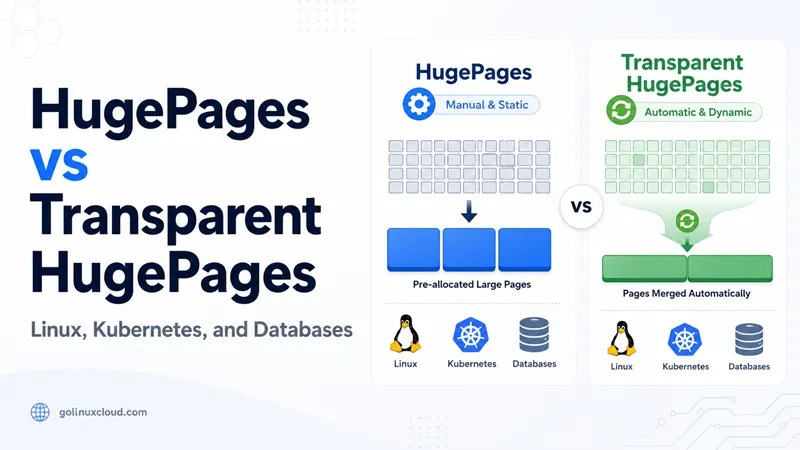
Linux offers two different ways to get huge pages, and they are often confused: explicit HugePages (static HugeTLB) and Transparent HugePages (THP). This guide compares the two, explains when to enable, disable, or tune each, how to verify what is actually active, how Kubernetes exposes huge pages as schedulable resources, and how to troubleshoot the common allocation, latency, and scheduling problems. For the broader picture of how Linux accounts for memory, see Linux memory management overview.
HugePages vs Transparent HugePages: the difference
Normal memory pages
- By default the kernel manages memory in 4 KB pages, and each active mapping needs an entry in the CPU's small Translation Lookaside Buffer (TLB).
- When a process touches gigabytes of memory, its working set no longer fits in the TLB, so the CPU repeatedly walks page tables—wasted cycles on every miss.
- Huge pages (commonly 2 MB, and 1 GB on supported CPUs) let one TLB entry cover far more memory, which lowers miss rates for memory-heavy workloads.
How to check it: read the normal page size and the default huge page size on your host.
$ getconf PAGE_SIZE
4096
$ grep Hugepagesize /proc/meminfo
Hugepagesize:       2048 kB
PAGE_SIZEis the normal page size in bytes (4096 = 4 KB).Hugepagesizeis the default huge page size the kernel will use (2 MB here).- To see every huge page size your kernel supports, list
/sys/kernel/mm/hugepages/(entries likehugepages-2048kBandhugepages-1048576kBfor 2 MB and 1 GB).
HugePages (static HugeTLB)
Explicit HugePages, also called HugeTLB pages, are a fixed pool you reserve ahead of time. You
set the pool size with vm.nr_hugepages (or on the kernel command line), and the kernel sets
that contiguous memory aside. Key properties:
- The pool is reserved up front and is not available to normal 4 KB allocations.
- Applications must explicitly use it (through
hugetlbfs,mmap(MAP_HUGETLB), or aSHM_HUGETLBshared-memory segment). - HugeTLB pages are never swapped and are not split into small pages.
- They are not overcommittable: if the free pool is empty, the allocation fails.
This predictability is exactly why databases and NFV/DPDK stacks prefer static HugePages. See configure HugePages with vm.nr_hugepages and check CPU support and change the default hugepage size.
How to check it: read the static counters in /proc/meminfo.
$ grep -i huge /proc/meminfo
HugePages_Total:     512
HugePages_Free:      512
HugePages_Rsvd:        0
Hugepagesize:       2048 kB
A non-zero HugePages_Total means a static pool is reserved; HugePages_Free shows how much
of that pool is still available. Hugepagesize is the default huge page size (2 MB here).
Transparent HugePages (THP)
THP lets the kernel back eligible anonymous memory with huge pages automatically, with no
application changes. A background thread, khugepaged, scans memory and collapses ranges of
small pages into huge pages, and a defrag policy controls how hard the kernel works to find
contiguous memory. THP has three modes:
always— the kernel uses THP for eligible mappings automatically.madvise— THP is used only for mappings that opt in withmadvise(MADV_HUGEPAGE).never— THP is disabled for normal anonymous mappings.
THP is convenient, but the automatic collapse and defragmentation work can introduce latency spikes, which is why some applications recommend turning it off.
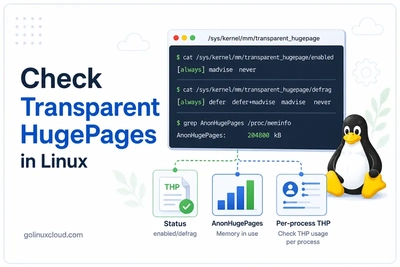
How to check it: read the active mode (and defrag policy) from sysfs. The value in square brackets is the one in effect.
$ cat /sys/kernel/mm/transparent_hugepage/enabled
always [madvise] never
$ cat /sys/kernel/mm/transparent_hugepage/defrag
always defer defer+madvise [madvise] never
Here THP is in madvise mode. Current THP usage shows up as AnonHugePages in
/proc/meminfo—it is separate from the static HugePages_Total pool above.
Comparison table
| Aspect | HugePages (static HugeTLB) | Transparent HugePages (THP) |
|---|---|---|
| Allocation | Reserved in advance (vm.nr_hugepages) |
Automatic, kernel-managed |
| Application change | Required (explicit use) | None for always; opt-in for madvise |
| Counters | HugePages_Total, HugePages_Free |
AnonHugePages, ShmemHugePages |
| Page sizes | 2 MB and 1 GB (CPU dependent) | Usually 2 MB (PMD size) |
| Swappable | No | Yes (can be split back) |
| Overcommit | No (fails if pool empty) | Yes (best effort) |
| Predictability | High, reserved | Variable, depends on fragmentation |
| Typical use | Databases, VMs, DPDK, Kubernetes huge pages | General workloads, throughput jobs |
A common mistake is reading HugePages_Total: 0 as "THP is disabled". It only means no static
pool is reserved; THP can still be active and visible as AnonHugePages.
Either mechanism being enabled does not prove a process is using it. To confirm actual usage
per process, read its smaps_rollup:
$ grep -i AnonHugePages /proc/<PID>/smaps_rollup
AnonHugePages:    524288 kB
For a full walkthrough of THP status, AnonHugePages, and per-process smaps, see
how to check Transparent HugePages in Linux.
When to use each
Use explicit HugePages for predictable, reserved memory
Reach for static HugeTLB when an application needs guaranteed, contiguous large pages and deterministic behavior:
- Best for software that manages its own shared memory: PostgreSQL (
huge_pages=on), the Oracle SGA, and large JVM heaps can all be pinned to a reserved pool. - Also a fit for virtual machines (KVM/QEMU guest memory) and packet-processing stacks (DPDK/NFV) that need stable throughput.
- Capacity planning is explicit: you size
vm.nr_hugepagesto the workload up front. - The pool cannot be overcommitted—anything that asks for more than the free pool fails outright instead of silently falling back to 4 KB pages.
Use THP when you want automatic huge page backing
THP is a sensible default for general-purpose servers and throughput-oriented jobs that do not need hard guarantees:
- Good fit for workloads with large anonymous regions that tolerate some jitter, such as batch analytics or caches.
- In
alwaysmode the kernel promotes eligible memory with no application changes. - In
madvisemode only code that callsmadvise(MADV_HUGEPAGE)receives huge pages—the safer choice when latency-sensitive and throughput-oriented workloads share the same host.
Disable or tune THP when latency matters more than throughput
For low-latency, fork-heavy, or memory-churning services, THP can hurt more than it helps:
- The background
khugepagedcollapse and defragmentation work can stall threads and produce tail-latency spikes, which is why several databases ship explicit guidance to turn THP off. - Prefer
neverormadviseover blindalways. - Vendor recommendations are version-sensitive (MongoDB's guidance, for example, has changed across releases), so confirm the advice for your exact version and test before rolling it out.
- The decision recap near the end of this guide maps common workloads to a starting recommendation.
Configure HugePages and Transparent HugePages
The commands below are the essentials you reach for most often: reserving a HugePages pool and
changing the THP mode. The full procedures—boot persistence, hugetlbfs mounting, page-size
selection, and persistent THP changes through GRUB2 or tuned—are covered in the dedicated
guides linked under each command.
Reserve explicit HugePages
Reserve at runtime (non-persistent):
sysctl -w vm.nr_hugepages=512
grep HugePages_Total /proc/meminfo
For boot-persistent reservation, hugeadm pools, hugetlbfs mounting, and choosing the page
size, follow configure HugePages with vm.nr_hugepages
and check CPU support and change the default hugepage size (2 MB vs 1 GB).
Enable, disable, or persist THP
Change the mode for the current session:
echo never > /sys/kernel/mm/transparent_hugepage/enabledThis resets on reboot. To disable THP persistently (GRUB2, tuned, systemd), follow
disable Transparent HugePages on RHEL/CentOS 7
and permanently disable Transparent HugePages on RHEL/CentOS 8 with GRUB2.
HugePages in Kubernetes
How Kubernetes exposes huge pages
Kubernetes treats huge pages as schedulable resources named by size, such as hugepages-2Mi
and hugepages-1Gi. The kubelet discovers pre-allocated huge pages on each node and reports
them as node capacity. Kubernetes never allocates huge pages on demand—the node must already
have a free pool of the requested size.
Request huge pages in a Pod
apiVersion: v1
kind: Pod
metadata:
  name: hugepages-demo
spec:
  containers:
    - name: app
      image: nginx
      resources:
        limits:
          hugepages-2Mi: 100Mi
          memory: 100Mi
        requests:
          memory: 100Mi
      volumeMounts:
        - mountPath: /hugepages
          name: hugepage
  volumes:
    - name: hugepage
      emptyDir:
        medium: HugePages
For limits and quotas on CPU, memory, and huge pages in containers, see how to limit Kubernetes resources.
Why HugePages cannot be overcommitted
Huge pages are pre-reserved and not swappable, so Kubernetes requires the request to equal the
limit and does not count huge pages against the container's regular memory limit. There is no
"best effort" huge-page allocation—either the node has enough free pages of that exact size or
scheduling fails.
Why a Pod stays Pending and how to recover
Check node allocatable huge pages:
kubectl describe node <node> | grep -i hugepagesCapacity:
hugepages-2Mi: 512Mi
Allocatable:
hugepages-2Mi: 512MiHealthy result: A node reports allocatable hugepages-2Mi / hugepages-1Gi at least as
large as the Pod's request, and the Pod is Running.
Failure means: No node has enough free huge pages of the requested size, the requested size
does not exist on any node (for example the Pod asks for 1Gi pages but nodes only pre-allocate
2Mi), or huge pages were never pre-allocated on the nodes.
Recovery: Pre-allocate huge pages on the nodes (vm.nr_hugepages or kernel command line for
1Gi pages), confirm the kubelet reports them as allocatable, match the Pod's requested page
size to what the node actually has, and ensure the request equals the limit.
Troubleshooting HugePages and THP
| Symptom | Likely cause | Fix |
|---|---|---|
THP still [always] after you "disabled" it |
A boot-time, tuned, or systemd setting re-enables it on reboot |
Persist never via GRUB2 / tuned and re-check after reboot (RHEL 8 guide) |
| App still warns about THP after disabling | Per-size THP knob or shmem_enabled still on, or the app read the setting at start |
Check all /sys/kernel/mm/transparent_hugepage/* files and restart the app |
| HugePages reserved but app does not use them | App not configured for huge pages, hugetlbfs not mounted, or NUMA imbalance |
Enable the app's huge-page option, mount hugetlbfs, balance the pool per NUMA node |
| Runtime HugePages allocation fails | Memory fragmentation leaves no contiguous free pages | Reserve at boot instead of runtime, or use vm.nr_overcommit_hugepages cautiously |
Kubernetes Pod stuck Pending |
No free huge pages of the requested size; overcommit not allowed | Pre-allocate on nodes, match page size, request == limit (see above) |
| Latency spikes after enabling THP | khugepaged collapse and defrag work on a latency-sensitive app |
Switch to madvise or never, or disable THP defrag |
THP says disabled but AnonHugePages is non-zero
THP has multiple controls. The main enabled file governs anonymous mappings, but
shmem_enabled and per-size directories under
/sys/kernel/mm/transparent_hugepage/hugepages-*kB/enabled can keep huge pages in play. After
setting never, re-check every relevant file and confirm with grep -i AnonHugePages /proc/meminfo.
Test before changing production
Apply the change in staging, drive representative load, and compare both latency percentiles
and AnonHugePages / HugePages_Free before and after. Do not roll a cluster-wide THP change
based on a single application's warning.
HugePages vs Transparent HugePages: decision recap
Use this as a starting point, then validate against your own workload and software version.
| Workload / environment | Prefer | Why |
|---|---|---|
| Redis | THP never |
Background defrag/collapse and fork-based persistence cause latency and memory spikes |
| MongoDB (7.0 and earlier) | THP never |
Vendor recommends disabling; newer releases are version-specific, so verify |
| PostgreSQL | Static HugePages, THP off or madvise |
huge_pages=on pins shared buffers to a reserved pool |
| Oracle / large JVM heaps | Static HugePages | Reserve a pool sized to the SGA or heap |
| Kubernetes huge-page workloads | Static HugePages on nodes | Schedulable hugepages-2Mi / hugepages-1Gi, no overcommit |
| Low-latency / NFV / DPDK | Static HugePages, THP never |
Deterministic, reserved memory; avoids background collapse |
| General-purpose servers | THP madvise (or always) |
Convenient default when no tenant is latency-sensitive |
Frequently Asked Questions
1. What is the difference between HugePages and Transparent HugePages?
2. Should I disable Transparent HugePages?
3. How do I check if Transparent HugePages are enabled?
4. Why is my Kubernetes Pod stuck in Pending with hugepages?
5. Can HugePages and Transparent HugePages be used at the same time?
Summary
HugePages and Transparent HugePages both reduce TLB pressure, but they are not the same tool.
Static HugePages (HugeTLB) are a reserved, predictable, non-overcommittable pool that
applications use explicitly—ideal for databases, VMs, DPDK, and Kubernetes huge-page workloads.
THP is automatic and convenient, but its background collapse and defragmentation can hurt
tail latency, which is why latency-sensitive services often run with madvise or never.
Verify reality before acting: grep -i huge /proc/meminfo for the counters,
/sys/kernel/mm/transparent_hugepage/enabled for the THP mode, and per-process smaps to prove
usage. In Kubernetes, remember that huge pages cannot be overcommitted, so a Pending Pod almost
always means the nodes do not have enough free pages of the requested size.

![10+ swapon and swapoff command examples in Linux [Cheat Sheet]](/swapon-swapoff-command/swapon_command_hu_6e7b45acb90efb95.webp)