If you are coming from Windows, it feels wrong to leave a new Ubuntu install without antivirus. Official Ubuntu help says Linux malware is rare enough that most people do not need constant background scanning—but you can install ClamAV when you want to check files you exchange with Windows or macOS users.
This guide answers whether Ubuntu requires antivirus for everyday desktop use, what security you already have (AppArmor, package signing, firewall), when ClamAV on Ubuntu is worth installing anyway, how it compares with other antivirus options, and how to run a real scan with captured output from Ubuntu 25.04.
Tested on: Ubuntu 25.04 (Plucky Puffin); kernel 6.14.0-37-generic.
Quick answer
For most home Ubuntu desktops: no, you do not need always-on antivirus. Keep the system updated, use sudo carefully, and install software from trusted sources.
Install ClamAV when you:
- Run a Samba/NAS or file server that stores files for Windows clients
- Operate a mail server that should scan attachments
- Handle untrusted downloads or USB media before sharing them cross-platform
- Have a compliance or workplace policy that requires scanning
What Ubuntu includes (and what it does not)
| Layer | On a default install? | Role |
|---|---|---|
| AppArmor | Yes | Confines applications to allowed paths and capabilities |
| Signed apt packages | Yes (official archives) | Reduces trojaned packages from Ubuntu mirrors |
| UFW firewall | Installed, often inactive until you enable it | Blocks unwanted network access—not virus scanning |
| Snap / Flatpak sandboxing | Per app | Limits what store apps can read |
| Unattended security upgrades | Optional (unattended-upgrades) |
Patches known CVEs quickly |
| ClamAV / real-time AV | No | Must be installed from apt if you want it |
Ubuntu’s marketing sometimes mentions “virus protection” on the desktop page; community staff clarify that means ClamAV is available and supported, not pre-installed like Windows Defender.
Why most Ubuntu desktops skip antivirus
Linux desktop malware exists but stays uncommon compared with Windows. Reasons you often hear:
- Fewer targets — most malware authors focus on Windows
- Permissions model — installing system-wide software needs root; daily use runs unprivileged
- Package sources —
apt, Snap, and Flatpak from official stores beat random.exedownloads - Fast patching — security fixes land in
-securityupdates
That does not make Ubuntu invulnerable. Phishing, stolen passwords, unpatched browsers, malicious scripts you curl | bash, and misconfigured public services are bigger day-to-day risks than classic file viruses on a lone laptop.
When you should install antivirus on Ubuntu
| Scenario | Why ClamAV helps |
|---|---|
| Samba / NAS server | Windows clients can store infected .exe or Office macros on shares—Linux will not “catch” them without a scanner |
| Mail gateway | Stacks like Amavis + ClamAV scan inbound mail (see mail-server tutorials) |
| Shared dual-boot disk | NTFS/exFAT partitions accessible from both OSes can carry Windows malware |
| Forensics / IR | Scan disk images or user uploads without executing them |
| Helping Windows users | Quarantine suspicious files before you forward them |
| Ubuntu NAS / Samba | Windows clients can upload malware onto shares—run periodic ClamAV on export paths |
If you only browse the web, use apt for software, and do not host files for others, scheduled ClamAV scans are optional, not mandatory.
Install ClamAV on Ubuntu
sudo apt update
sudo apt install -y clamav clamav-daemon clamav-freshclam
On Ubuntu 25.04:
Candidate: 1.4.3+dfsg-0ubuntu0.25.04.1Enable automatic virus-definition updates and the scanning daemon:
sudo systemctl enable --now clamav-freshclam clamav-daemon
systemctl is-active clamav-freshclam clamav-daemonactive
activeFirst freshclam run can take a minute while it downloads signatures. Check the engine version:
clamscan --versionClamAV 1.4.3/28041/Wed Jun 24 11:54:54 2026Run an on-demand scan
Scan a single file or directory (read-only; does not delete unless you pass --remove):
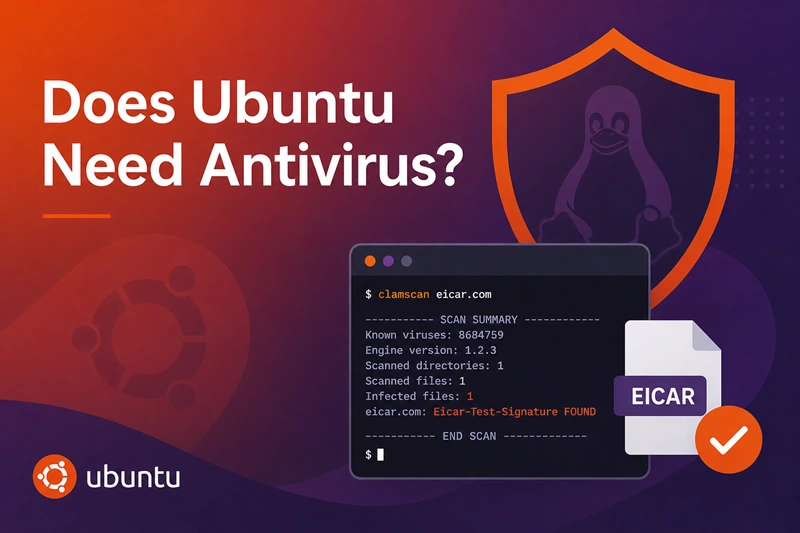
clamscan --infected --recursive /path/to/checkEICAR test (safe malware signature)
The EICAR test file is a harmless string every scanner should flag:
printf '%s\n' 'X5O!P%@AP[4\PZX54(P^)7CC)7}$EICAR-STANDARD-ANTIVIRUS-TEST-FILE!$H+H*' > /tmp/eicar.com
clamscan /tmp/eicar.com
rm -f /tmp/eicar.com
On my host:
/tmp/eicar.com: Eicar-Signature FOUND

----------- SCAN SUMMARY -----------
Infected files: 1
A normal file should report OK:
clamscan /etc/hostname/etc/hostname: OKScanning a whole home directory can take several minutes the first time—the engine loads the signature database into memory.
Optional: ClamTK graphical scanner
For a desktop GUI on top of ClamAV:
sudo apt install -y clamtkClamTK 6.07 is in universe on Plucky. Launch ClamTK from the app menu to pick folders, toggle scheduled scans, and view logs. It uses the same clamscan / freshclam backend as the terminal.
Other antivirus and security tools on Ubuntu
Nothing in the default Ubuntu repos replaces ClamAV with a Windows Defender–style desktop suite, but you have more choices than one package name. The table below is a practical map—install paths I verified on Ubuntu 25.04 are noted.
| Tool | Type | Cost | Install on Ubuntu | Real-time / on-access | Best fit |
|---|---|---|---|---|---|
ClamAV (clamav, clamav-daemon) |
Signature AV | Free | apt (universe) |
Optional daemon; mostly on-demand unless wired into mail/NAS | File/mail/NAS scanning, cross-platform malware |
| ClamTK | GUI for ClamAV | Free | apt (universe) |
Same engine as ClamAV | Desktop users who want clicks, not only clamscan |
| clamdscan | ClamAV client | Free | apt (with daemon) |
Uses running clamd for faster repeat scans |
Large trees, scripted scans |
| Amavis + ClamAV | Mail filter | Free | apt (amavisd-new, clamav) |
Scans mail at SMTP layer | Postfix/Exim gateways |
| Sophos Protection for Linux | Enterprise endpoint | Paid (Sophos Central) | Vendor .sh / agent from Sophos Central |
Yes—policies from central console | Company laptops and servers on a Sophos estate |
| ESET NOD32 for Linux | Commercial AV | Paid | Vendor .deb / installer |
Yes—on-access and scheduled | Desktops and servers needing vendor support |
| Bitdefender GravityZone | Commercial AV / EDR | Paid | Vendor agent | Yes—central GravityZone policies | Mixed Windows/Linux fleets |
| Kaspersky Endpoint Security for Linux | Commercial AV | Paid | Vendor package | Yes—managed from Security Center | Regulated or enterprise rollouts |
| rkhunter / chkrootkit | Rootkit hunter | Free | apt |
No—manual or cron | After suspected compromise, not daily AV |
| Lynis | Security audit | Free | apt |
No | Hardening baseline, not malware removal |
ClamAV ecosystem (free, in Ubuntu repos)
Beyond clamscan, these pieces matter on servers:
clamav-daemon— keeps signatures loaded;clamdscantalks to it for faster repeat scans.clamav-freshclam— updates definitions; run daily via systemd timer.clamav-milter/ Amavis — hook ClamAV into mail pipelines so attachments never reach users un scanned.python3-pyclamd— script custom scans from Python admin tools.
Community frontends (install from upstream, not Ubuntu repos) wrap the same engine with extras such as real-time folder watches—for example Qt-based projects that require ClamAV plus PolicyKit for updates. They still depend on ClamAV signatures; read their install docs if you want a Defender-like tray experience without paying for commercial AV.
Commercial endpoint antivirus on Linux
Vendors ship .deb or shell installers from their own portals—not apt install on a clean Ubuntu desktop. Typical features you pay for:
| Feature | What it usually means on Linux |
|---|---|
| On-access scanning | Files are scanned when read or written (closer to Windows real-time protection) |
| Central management | Admins push policies, exclusions, and reports from a web console |
| Scheduled scans | Full-disk or path scans without writing cron by hand |
| Web / exploit blocking | More common on managed desktops; varies by product tier |
| Support contract | Someone to call when an outbreak hits mixed OS environments |
Sophos Protection for Linux (current enterprise product) replaces the old standalone “Sophos Anti-Virus for Linux” tarball. It installs from Sophos Central, supports recent Ubuntu LTS releases per vendor docs, and targets servers and managed endpoints—not a free home Linux app. Sophos Home is aimed at Windows and macOS standalone machines.
ESET, Bitdefender, and Kaspersky publish Linux endpoint agents for customers who already license those stacks for Windows. Useful when policy says “every endpoint must run approved AV,” even if Linux malware volume is low.
What is not a Linux antivirus substitute
| Mistake | Reality |
|---|---|
| Installing Windows AV in Wine | Protects the Windows stack inside Wine, not your Ubuntu system |
| Only rkhunter / chkrootkit | Rootkit checks ≠ virus signatures; use alongside ClamAV if needed |
| VPN or “security” Snaps with no engine | Read the fine print—many are VPNs or firewalls, not file scanners |
| Assuming Snap sandbox = antivirus | Sandboxing limits blast radius; it does not scan downloads |
How to choose
| Your situation | Sensible pick |
|---|---|
| Home laptop, apt-only software | No AV or occasional ClamAV scan |
| Want a GUI, still free | ClamTK on top of ClamAV |
| NAS / Samba for Windows PCs | ClamAV cron on /srv/nas |
| Mail server on Ubuntu | Amavis + ClamAV |
| Employer mandates managed AV | Vendor Linux agent that matches your org’s console |
| Suspected rootkit | rkhunter / chkrootkit, then rebuild if findings are bad |
ClamAV on a Ubuntu NAS (scan Windows malware)
If you run a NAS server on Ubuntu, ClamAV does not replace Samba—but it can sweep /srv/nas for Windows-targeting malware your Linux host would never execute:
sudo clamscan -r --infected /srv/nas/dataRun that on a cron schedule during quiet hours. Infected hits are often Windows .exe or macro documents; quarantine or delete based on your policy, and tell Windows clients to run Defender locally too.
Rootkit scanners (not the same as antivirus)
Tools like rkhunter and chkrootkit look for signs of root compromise (modified ls, hidden processes). They do not replace ClamAV for file malware and are overkill on a fresh desktop. Consider them after a suspected breach, not as daily antivirus.
apt-cache policy rkhunter chkrootkit | grep CandidateCandidate: 1.4.6-12
Candidate: 0.58b-4Security habits that matter more than AV
- Enable
unattended-upgradesfor security patches - Turn on UFW if the machine is reachable on a network (must-have apps covers basics)
- Prefer SSH keys over password login on servers
- Avoid
curl | bashfrom unknown repos - Keep Flatpak and Snap permissions tight (Flatseal)
Antivirus is a belt; updates and least privilege are the suspenders.
Uninstall ClamAV
sudo systemctl stop clamav-daemon clamav-freshclam
sudo apt purge -y clamav clamav-daemon clamav-freshclam clamtk
sudo apt autoremove -y
Troubleshooting
| Symptom | Likely cause | Fix |
|---|---|---|
clamscan: command not found |
Package not installed | sudo apt install clamav |
LibClamAV Error: Malformed database |
Interrupted freshclam |
sudo freshclam or delete /var/lib/clamav/*.cvd and update again |
| Database timestamp “in the future” warning | Clock or timezone skew | Check timedatectl; sync with NTP |
| Scan extremely slow | Large tree + first load | Scan smaller paths; ensure clamav-daemon is running for clamdscan |
| EICAR not detected | Outdated definitions | sudo systemctl restart clamav-freshclam |
| ClamAV misses Linux-specific threats | Signature focus | ClamAV targets many families but is not a full EDR; harden the service instead |
References
- Ubuntu help: Do I need anti-virus software?
- Ubuntu security overview
- ClamAV documentation
- AppArmor on Ubuntu
Summary
Ubuntu does not require antivirus for typical desktop use the way Windows does—there is no built-in always-on scanner, and official documentation treats Linux viruses as rare. You already get AppArmor, trusted package channels, and optional UFW. For free scanning, ClamAV and ClamTK in apt cover on-demand checks, NAS sweeps, and mail stacks; commercial agents (ESET, Bitdefender, Kaspersky, Sophos Protection for Linux) add real-time scanning and central management when policy requires it. Verify ClamAV with the EICAR test; use rkhunter only for rootkit hunts, not as a replacement. Keeping the system updated still matters more than background AV on most Ubuntu laptops.