
If you installed a Go package using go get and want to remove or uninstall the package, the correct method depends on how it was added.
In this guide, you’ll learn exactly how to uninstall Go packages, whether:
- the package is a project dependency (go.mod)
- a tool installed as a binary
- or an old GOPATH-based package
⚠️ This guide explains how to remove Go packages used as project dependencies, globally installed tools, and legacy GOPATH packages—without breaking your build.. If you want to uninstall Golang completely, follow the Uninstall Golang guide instead.
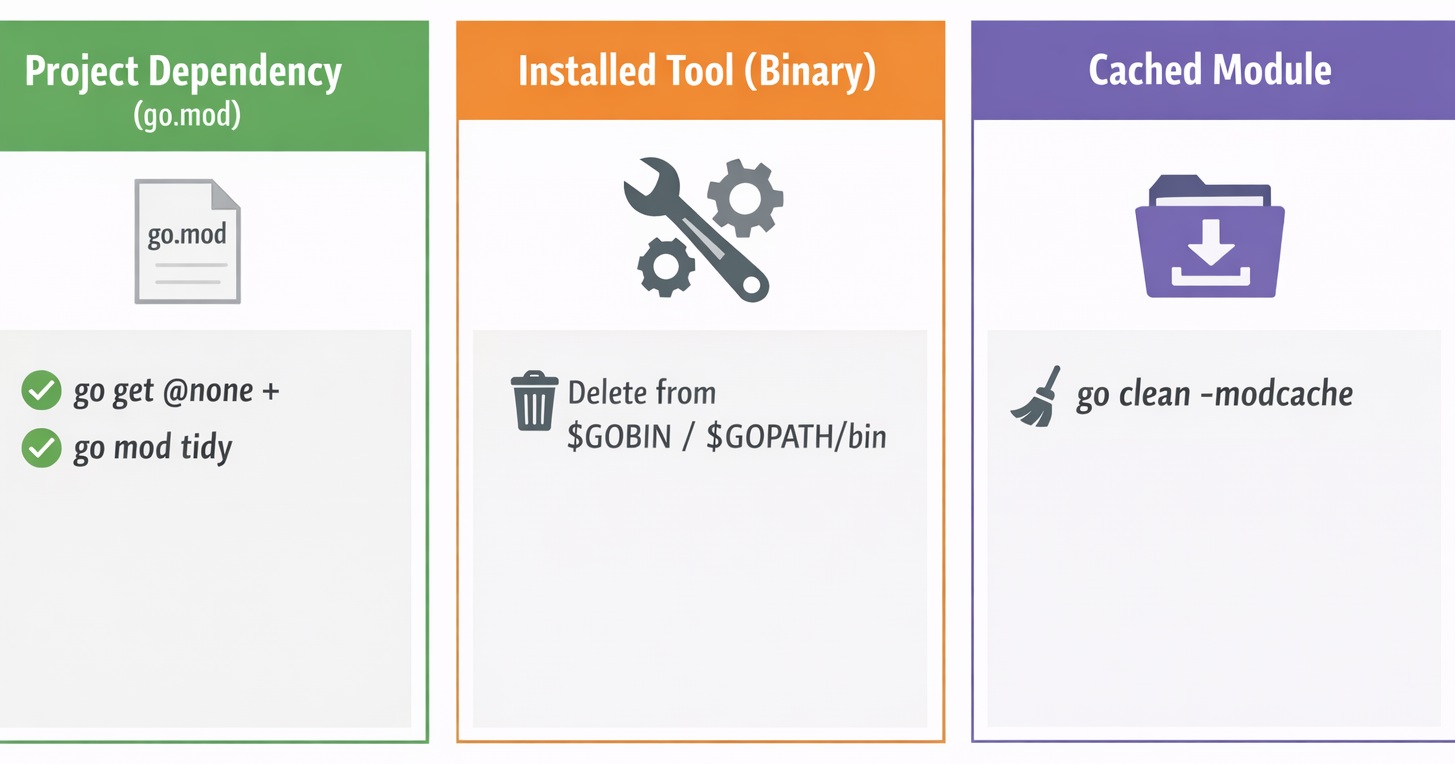
Quick answer: Remove (Uninstall) a Go package
Run these commands from the root directory of your Go project, where the
go.modfile exists.
Scenario 1: Package is NOT required by your code
# Navigate to directory containing go.mod
# Verify you are inside a Go module
go env GOMOD

# List modules used by this project
go list -m all | grep gin

# Check if your code imports the package directly
go mod why github.com/gin-gonic/gin

# If main module does NOT need it, let Go decide safely to remove the package
go mod tidy

# Explicitly remove the module (optional)
# If this package isstill required, go mod tidy will re-add it
go get github.com/gin-gonic/gin@none
go mod tidy
Go does not permanently remove a package unless no code depends on it.
The go mod tidy command recalculates the dependency graph and removes unused modules automatically. This is why deleting lines manually from go.mod is unreliable.
Scenario 2: Package is required by a dependency
# Verify module exists
go list -m all | grep helm

# Check usage using an actual imported package path
go mod why helm.sh/helm/v3/pkg/action

# If a dependency chain is shown, the package is still required
# Removing it manually will fail or be re-added by go mod tidy
Notes:
- Commands must be run from the project root containing
go.mod. You can refer go.mod file not found in current directory or any parent directory if you are unable to locatego.modfile. go list -m allshows modules used by the current project only@noneremoves the dependency,go mod tidycleansgo.modandgo.sum
No. In Go, “remove” and “uninstall” mean the same thing. Go does not provide a single uninstall command, so packages are removed based on how they were installed.
The sections below explain each step in detail.
What does “uninstalling a Go package” mean?
Go does not have a single uninstall command because a “package” can mean different things.
| Package type | Example | How it’s removed |
|---|---|---|
| Project dependency | Library listed in go.mod |
Remove module + go mod tidy |
| Installed tool | golangci-lint, dlv, air |
Delete binary from $GOBIN |
| Cached module | Downloaded module files | Clear module cache |
Check whether a package can actually be removed (Go Modules)
A Go module can be removed only when it is no longer required by:
- your own code imports, or
- any indirect dependency, or
- test/build-tag specific code paths
The fastest way to avoid confusion is to use go mod tidy as the final authority, and use go mod why only to understand usage.
1) go mod why works on package import paths, not module versions
go mod why expects a package import path like this:
go mod why helm.sh/helm/v3/pkg/action
Do not pass a module version such as helm.sh/helm/v3@v3.18.6, because go mod why is not designed to explain module version entries.
2) What “main module does not need package” actually means
If you run:
go mod why github.com/gin-gonic/gin
and you get:
(main module does not need package github.com/gin-gonic/gin)
it only means your project code does not import that package directly. The module may still be required indirectly by another dependency.
3) Use go mod tidy to decide removal
go mod tidy
- If
go mod tidyremoves the module fromgo.mod, it was unused - If the module remains (or gets re-added later), it is still required indirectly or under tests/build tags
This is why manual deletion is not reliable: if something still depends on it, go mod tidy will restore it.
4) Confirm indirect dependency when a module won’t go away
If the module remains after go mod tidy, you can validate it is still referenced indirectly using:
go mod graph | grep helm.sh/helm/v3
If it shows up in the module graph, some dependency still requires it.
Now that you are sure whether the go package can be removed or not, let's proceed with explanation of actual steps and different possible methods.
All module-related commands must be run from the root directory of your Go project, where go.mod exists.
Check this using:
go env GOMOD
- If it prints a file path → you are inside a Go module
- If it prints
/dev/null→ you are outside the project
Example:
/opt/deepak/go-tools/go.mod   ✅ correct
/dev/null                    ❌ wrong directory
The module list and uninstall behavior depend on the current project.
Method 1: Remove a Go package from go.mod (recommended)
This is the correct approach for modern Go projects.
First, list all modules used by the project:
go list -m all
For large projects, searching is faster than scanning manually:
go list -m all | grep gin
Example output:
github.com/gin-gonic/gin v1.9.1
The text before the version is the module path.
Remove the dependency:
Use @none to remove the module:
go get github.com/gin-gonic/gin@none
go mod tidy
This:
- removes unused dependencies
- updates
go.sum - keeps
go.modclean and minimal
✅ This is the proper way to uninstall a Go package used by a project.
Method 2: Uninstall a Go tool installed globally
Many users search “go uninstall package” when they actually installed a command-line tool, for example:
go install github.com/golangci/golangci-lint/cmd/golangci-lint@latest
These tools are installed as binaries, not module dependencies.
Find the binary location
go env GOBIN
go env GOPATH
If GOBIN is empty, binaries are installed in:
$GOPATH/bin
Remove the tool
rm -f "$(go env GOPATH)/bin/golangci-lint"
✔ Tool removed
✔ Project dependencies untouched
Method 3: Clear cached Go modules (optional)
Even after uninstalling a package, Go may keep cached downloads.
To remove all cached modules:
go clean -modcache
Use this if:
- you want to free disk space
- or reset all downloaded dependencies
⚠️ This does not uninstall packages from projects.
Method 4: Legacy GOPATH package removal (older setups)
If you are using an old GOPATH-based workflow (no go.mod):
Packages may exist under:
$GOPATH/src/
$GOPATH/pkg/
$GOPATH/bin/
To remove a package:
rm -rf $GOPATH/src/github.com/example/module
rm -rf $GOPATH/pkg/*
rm -f  $GOPATH/bin/tool-name
⚠️ This approach is not recommended for modern Go development.
Common mistakes (and fixes)
❌ Running commands outside the project directory
Always check go env GOMOD.
If it shows /dev/null, cd into the project first.
❌ Removing files manually while using Go Modules
Never delete module files directly.
Always use go get @none and go mod tidy.
❌ Confusing package removal with uninstalling Go itself
This article removes packages, not the Go compiler.
Use the Uninstall Golang guide for that.
Frequently Asked Questions (FAQ)
How do I remove a Go package installed with go get?
Navigate to the project containing go.mod, remove the module, and run go mod tidy to clean unused dependencies.
Does Go have an uninstall command for packages?
No, Go does not provide a single uninstall command. Package dependencies, installed tools, and cached modules are removed using different Go commands or by deleting binaries.
Why does a Go package still appear after I remove it?
A Go package may still appear because it exists in the module cache or as an installed binary, even after it is removed from the project dependencies.
Is uninstalling a Go package the same as uninstalling Golang?
No, uninstalling a Go package only removes a dependency or tool, while uninstalling Golang removes the Go compiler and runtime from the system.
How do I uninstall a Go package dependency in Go modules?
In Go, uninstalling a package means removing it from your project’s dependencies using go get @none followed by go mod tidy.
Summary
- Go packages are not uninstalled with a single command
- For project dependencies:
- remove the module
- run
go mod tidy
- For installed tools:
- delete binaries from
$GOBINor$GOPATH/bin
- delete binaries from
- For legacy GOPATH projects:
- manual cleanup is required
Once you understand what kind of package you installed, uninstalling it becomes straightforward.
References
https://pkg.go.dev/cmd/go#hdr-GOPATH_environment_variable
https://pkg.go.dev/cmd/go/internal/clean
Removing packages installed with go get - Stack Overflow