
Linux distributions generally deliver operating-system changes through one of two broad models: rolling release or fixed release.
A rolling-release system continuously moves forward as packages enter its repositories. A fixed-release system publishes distinct versions, maintains each version for a defined period, and eventually requires an upgrade to a newer release.
The difference affects much more than how often you run the package manager. It changes package freshness, upgrade planning, compatibility, recovery strategy, maintenance effort, and suitability for desktops, development systems, or production servers.
This guide compares the release models rather than declaring every rolling or fixed distribution identical. Arch Linux and openSUSE Tumbleweed use different testing and tooling, just as Fedora, Ubuntu, Debian Stable, and RHEL use different fixed-release policies.
For the wider distribution map, see Linux, Unix and Linux distributions explained. For how Enterprise Linux and Debian-family cadences differ inside fixed releases, see RHEL family vs Debian family. Package format differences between RPM and DEB are covered in RPM vs DEB packages.
Rolling Release vs Fixed Release at a Glance
| Area | Rolling release | Fixed release |
|---|---|---|
| Release model | Continuous package and platform updates | Distinct versioned releases |
| Major OS upgrade | Usually no separate major-version upgrade | Required when moving to the next release |
| Package freshness | Generally newer | Usually more conservative |
| Change frequency | Frequent incremental changes | Smaller updates within a stable release, larger changes at release upgrades |
| Support lifecycle | Commonly tied to continuing updates rather than a version end date | Defined support period for each release |
| Compatibility baseline | Continuously evolves | More stable within the supported release |
| Maintenance style | Update regularly and monitor changes | Apply routine updates and plan periodic release upgrades |
| Rollback need | Useful because changes arrive continuously | Useful for updates and especially major upgrades |
| Typical desktop fit | Developers and users wanting current software | Users prioritizing predictability |
| Typical server fit | Selected workloads with strong testing and rollback | Common choice for long-lived production |
| Examples | Arch Linux, openSUSE Tumbleweed | Debian Stable, Ubuntu, Fedora, RHEL, Rocky Linux, AlmaLinux |
- Choose a rolling release when current kernels, drivers, compilers, desktop environments, and applications matter more than preserving a long-lived package baseline.
- Choose a fixed release when predictable versions, support windows, certification, and controlled change matter more.
- Neither model removes the need for backups, testing, and security updates.
What Is a Rolling-Release Distribution?
A rolling-release distribution continuously delivers newer versions of system packages through its normal update process.
Instead of installing version 1, later upgrading to version 2, and then version 3, the installed system evolves continuously:
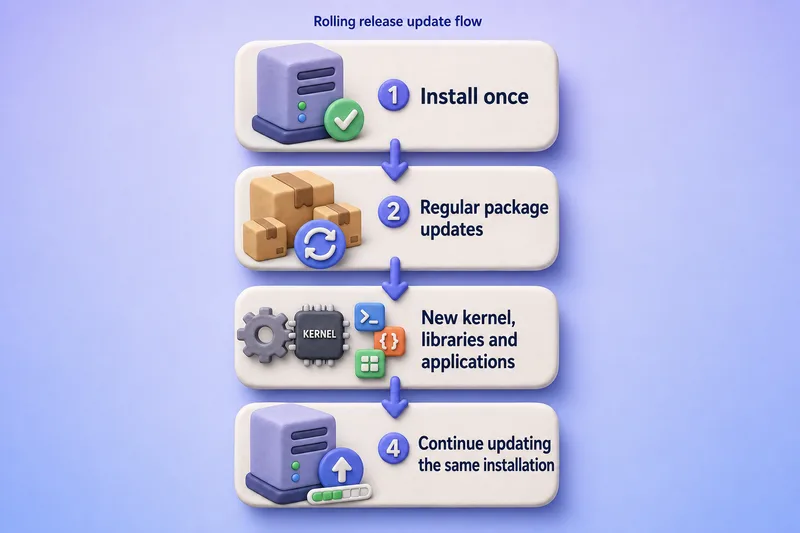
Arch Linux officially describes itself as a rolling-release system supporting one installation followed by continuous upgrades. openSUSE Tumbleweed similarly presents a continuously updated rolling distribution with tested package snapshots rather than rigid periodic releases.
Typical characteristics:
- new upstream versions arrive relatively quickly;
- kernel, compiler, library, and desktop changes can arrive through routine updates;
- there is usually no traditional major distribution upgrade;
- users should update regularly rather than leave the installation untouched for long periods;
- update announcements and manual intervention notices may matter;
- partial or selective upgrades may be unsupported;
- snapshots or filesystem rollback can reduce recovery time.
A rolling release can still use package testing repositories, staged snapshots, automated integration tests, delayed mirrors, stable upstream releases, and rollback tooling. Rolling does not mean every upstream development commit is immediately installed.
For a cross-ecosystem comparison between a rolling distribution and a conservative fixed release, see Arch Linux vs Debian.
What Is a Fixed-Release Distribution?
A fixed-release distribution publishes a defined operating-system version with a controlled package baseline.
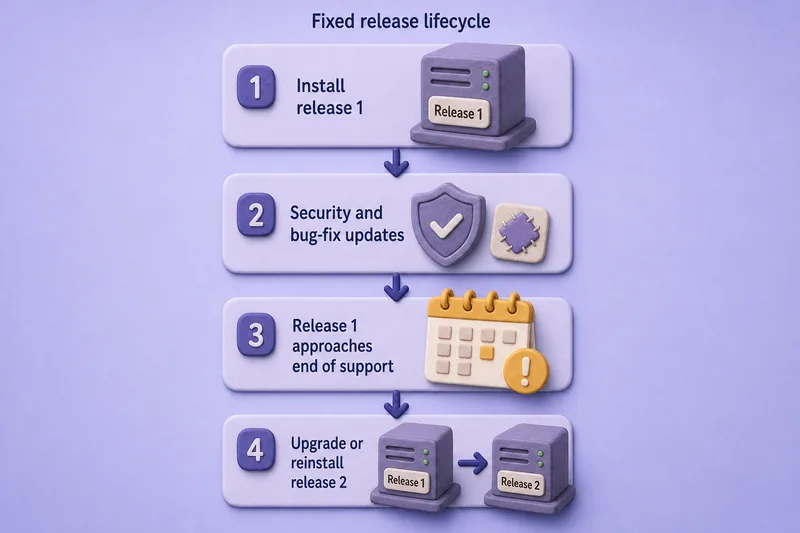
Examples include Debian Stable, Ubuntu LTS and interim releases, Fedora Linux, RHEL, Rocky Linux, and AlmaLinux.
Ubuntu publishes distinct releases approximately every six months, including interim and long-term-support releases. Fedora also uses versioned releases rather than a rolling model, even though packages can move quickly within each supported version. See Fedora vs CentOS Stream vs RHEL for how short-cycle Fedora relates to longer Enterprise Linux lifecycles.
Fixed-release behaviour generally means:
- the distribution selects and stabilizes a package baseline;
- normal updates usually focus on security fixes, bug fixes, and controlled enhancements;
- some packages may receive larger rebases during the lifecycle;
- users eventually perform a release upgrade;
- each supported fixed release normally has a defined maintenance or end-of-support period, although the strength and formality of that commitment differ by distribution;
- long-term-support and enterprise releases generally change more conservatively than short-cycle fixed releases.
Fixed release does not mean frozen forever. Kernels, browsers, drivers, cloud tools, and other components can still receive substantial updates under distribution policy.
Package Freshness, Stability and Backports
| Topic | Rolling release | Fixed release |
|---|---|---|
| Kernel versions | Usually newer | Chosen for the release, then maintained or selectively rebased |
| Desktop environments | New major releases arrive sooner | Often retained until the next OS release |
| Compilers and runtimes | Updated more frequently | Stable version lines or controlled application streams |
| Libraries | Continuously evolve | ABI and behaviour changes are more controlled |
| Security fixes | Often arrive with newer upstream versions or patches | Commonly backported to the supported version |
| Hardware enablement | New hardware support arrives sooner | May use enablement kernels or point-release updates |
| Application compatibility | Requires validation against an evolving base | Easier to validate against a fixed baseline |
| Configuration changes | Usually incremental, with occasional large transitions | More often concentrated around major release upgrades, with some changes during normal updates |
A package displaying an older upstream version is not necessarily unpatched. Fixed-release distributions often apply security and bug fixes to the maintained package without adopting the newest upstream major version.
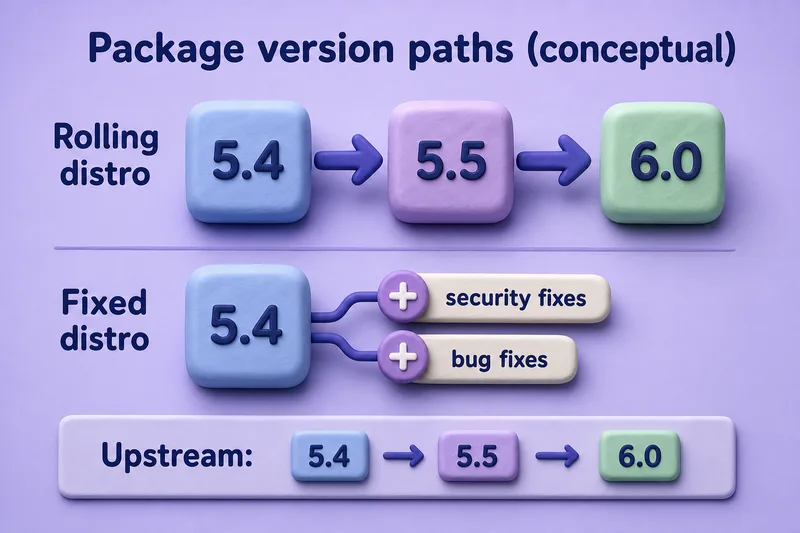
The illustration is conceptual; actual policies differ by package and distribution.
Rolling releases reduce the delay before users receive new features. Fixed releases reduce the number of behaviour and dependency changes during the supported lifecycle. Neither guarantees defect-free packages. Stability means predictable behaviour, not merely avoiding crashes.
Updates, Upgrade Risk and Maintenance Effort
Rolling release
Typical maintenance includes:
- updating regularly;
- reading distribution announcements;
- avoiding unsupported partial upgrades;
- testing changes before critical deployment;
- retaining a bootable fallback kernel;
- using filesystem or VM snapshots;
- handling occasional configuration migrations;
- rebuilding third-party kernel modules after kernel updates;
- checking community repositories after language or library transitions.
A rolling system can accumulate more risk when left unupdated for a long time because the eventual update crosses many package transitions at once.
Fixed release
Typical maintenance includes:
- installing routine security and bug-fix updates;
- monitoring end-of-support dates;
- testing point releases and kernel updates;
- planning major-version upgrades;
- validating deprecated packages and configuration changes;
- checking vendor certification for the target release;
- maintaining rollback or replacement hosts during upgrades.
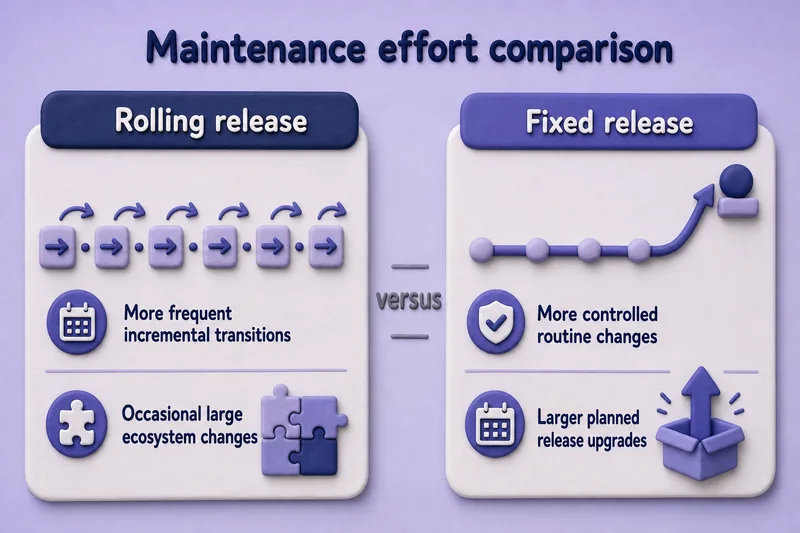
Neither model always produces fewer failures. The result depends on repository quality, testing, update frequency, third-party software, and recovery planning.
Partial Upgrades, Snapshots and Rollback
Recovery tooling is especially valuable when updates frequently change the system baseline, but it is equally important before fixed-release major upgrades and critical production updates.
A Tumbleweed repository snapshot is a tested set of package versions. A Btrfs/Snapper snapshot is a local filesystem recovery point; the two uses of “snapshot” are related to updating but are not the same thing.
- package managers expect a coherent set of repository metadata and package versions; mixing stale metadata or selectively updating core packages can create dependency conflicts;
- manually holding core libraries can create dependency conflicts;
- third-party repositories may lag behind platform transitions;
- kernel updates should retain at least one known-working kernel;
- Btrfs, LVM, ZFS, VM, and cloud snapshots offer different rollback guarantees;
- restoring only part of the filesystem can leave package state inconsistent;
- snapshots are not substitutes for application-data backups;
- databases may require application-aware backup and recovery.
| Recovery method | What it helps with | Limitation |
|---|---|---|
| Previous kernel | Kernel or driver regression | Does not roll back userspace packages |
| Filesystem snapshot | Rapid system rollback | Database consistency may not be guaranteed |
| VM snapshot | Whole-VM recovery | Can affect running databases and external state |
| Package downgrade | Individual regression | Older dependencies may no longer be available |
| Configuration backup | Restore known settings | Does not restore package binaries or data |
| Full backup | Disaster recovery | Slower than snapshots |
openSUSE Tumbleweed delivers tested repository snapshots and normally updates through zypper dup. Systems installed with an appropriate Btrfs and Snapper configuration can also use filesystem snapshots for rollback. This is an example of integrated rolling-release tooling, not a capability shared by every rolling distribution.
Rolling, Fixed and Hybrid Release Models
Not every distribution fits perfectly into one of two boxes.
| Model | Description | Examples |
|---|---|---|
| Pure rolling | The complete system continuously advances | Arch Linux, openSUSE Tumbleweed |
| Fixed short-cycle | Frequent versioned releases with short support | Fedora, Ubuntu interim |
| Fixed long-term | Stable versioned releases with extended maintenance | Debian Stable, Ubuntu LTS, RHEL |
| Rolling branch beside fixed releases | Project offers both rolling and versioned options | openSUSE Tumbleweed alongside Leap |
| Component-level rolling | Base OS remains fixed while selected applications update rapidly | Browsers, containers, Flatpak/Snap packages, application streams |
| Transactional or image-based delivery | Deploys system changes as coordinated transactions or system images; this is an update-delivery method that can accompany fixed or continuously updated releases | Depends on distribution and edition |
Transactional or atomic delivery is partly independent of release cadence. It describes how updates are deployed and rolled back, while rolling or fixed describes how the supported software baseline advances.
Important distinctions:
- Fedora is not rolling merely because it has frequent updates within each release.
- Ubuntu interim releases are still fixed releases; see Debian vs Ubuntu for how LTS and interim cadences differ.
- Debian testing is continuously changing but is primarily a development branch for future Debian Stable, not the same product model as Arch.
- CentOS Stream is continuously delivered but serves the RHEL development pipeline; see Fedora vs CentOS Stream vs RHEL rather than grouping it with desktop rolling distributions.
- containers, Flatpak, Snap, and language-version managers can provide newer applications on a fixed host.
Which Model Is Better for Desktops, Development and Servers?
| Scenario | Better starting point | Reason |
|---|---|---|
| Latest desktop environment | Rolling release | New desktop versions arrive sooner |
| Very new laptop or GPU | Rolling or recent fixed release | Newer kernel, firmware, and graphics stack |
| Software developer needing recent toolchains | Rolling, Fedora, or suitable containers | Faster compiler and runtime availability |
| Beginner desktop | Fixed LTS or well-integrated rolling distro | Depends on maintenance tolerance and hardware needs |
| Gaming desktop | Rolling or recent fixed release | Current Mesa, kernel, and drivers can help |
| Long-lived production server | Fixed long-term release | Predictable baseline and support lifecycle |
| Vendor-certified application | Fixed certified distribution | Vendor support matrix normally names versions |
| CI testing against new libraries | Rolling release | Early exposure to upcoming dependency changes |
| Appliance or embedded deployment | Fixed or image-based release | Controlled, reproducible software baseline |
| Home lab | Either | Choose based on learning goal |
| Workstation requiring minimal upgrade disruption | Rolling can avoid major upgrade events | Requires continuous maintenance |
| System updated only occasionally | Fixed release | Rolling systems generally expect regular updates |
Rolling releases can operate servers successfully, but production selection should consider vendor support, kernel-module compatibility, maintenance windows, rollback, testing environments, cluster consistency, reproducible builds, audit requirements, and staff expertise. Server does not automatically mean fixed release.
For desktop cross-family comparisons, see Arch Linux vs Ubuntu and Ubuntu vs Fedora.
Which Linux Distributions Use Each Model?
| Distribution | General model | Important qualification |
|---|---|---|
| Arch Linux | Rolling | Continuous upgrades; regular maintenance expected |
| openSUSE Tumbleweed | Rolling | Uses tested snapshots and zypper dup workflows |
| Gentoo | Rolling | Source-oriented with user-controlled build choices |
| Debian Stable | Fixed | Conservative stable release followed by LTS |
| Ubuntu LTS | Fixed long-term | Defined LTS lifecycle and optional extended coverage |
| Ubuntu interim | Fixed short-cycle | Distinct releases with shorter support |
| Fedora | Fixed short-cycle | Frequent releases and relatively fresh packages |
| RHEL | Fixed enterprise | Long lifecycle, backports, certifications, and support |
| Rocky Linux | Fixed Enterprise Linux | Tracks the corresponding EL major lifecycle |
| AlmaLinux | Fixed Enterprise Linux | ABI/application-compatible EL platform |
| CentOS Stream | Continuously delivered development platform | Not directly equivalent to Arch-style rolling release |
| Debian testing | Continuously changing development branch | Becomes the basis for the next Debian Stable |
Arch explicitly identifies as a rolling-release distribution. openSUSE describes Tumbleweed as a pure rolling release containing current stable software. These rows are examples, not an exhaustive catalog.
Which Release Model Should You Choose?
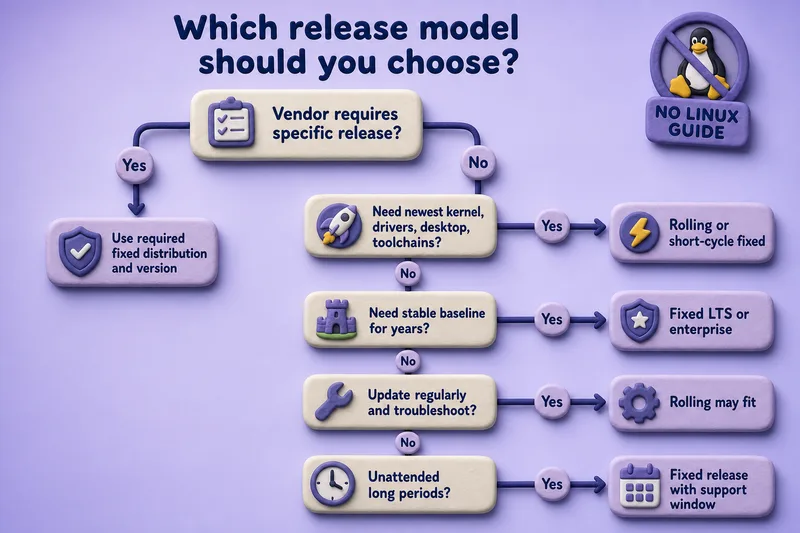
| Choose rolling release when | Choose fixed release when |
|---|---|
| Current software is a priority | Predictable versions are a priority |
| You update the system regularly | You need defined maintenance periods |
| You can read update notices and troubleshoot | You need vendor support or certification |
| Snapshots and rollback are available | You operate long-lived production systems |
| Hardware needs recent kernels and drivers | Application compatibility must remain stable |
| You prefer incremental continuous change | You prefer planned major upgrades |
| You test updates before critical deployment | Audits require a defined supported baseline |
The best model is the one whose change pattern matches your maintenance process. A well-maintained rolling system can be reliable, while an unpatched fixed release can be insecure.
Common Misconceptions
| Misconception | Reality |
|---|---|
| Rolling release means unstable development packages | Rolling distributions can ship tested stable upstream releases |
| Fixed release means packages never change | Security fixes, bug fixes, kernels, and selected rebases still arrive |
| Rolling release never requires major upgrade work | Large transitions can still require manual intervention |
| Fixed release is always more secure | Security depends on updates, repository maintenance, and configuration |
| Newer package versions are always safer | Fixed distributions frequently backport security fixes |
| Arch installation media represents a new OS version | Arch installation images are snapshots for installing the rolling system |
| Fedora is rolling because it updates frequently | Fedora uses distinct versioned releases |
| Debian testing is identical to Arch | Debian testing exists in the Debian Stable development process |
| Rolling release is never suitable for servers | It can work when change, testing, support, and rollback are properly managed |
| Snapshots replace backups | Snapshots and backups solve different recovery problems |
Rolling Release vs Fixed Release: Final Comparison
| Choose rolling release for | Choose fixed release for |
|---|---|
| Current packages and hardware support | Long-lived predictable baselines |
| Development and early compatibility testing | Production and certified applications |
| Incremental continuous updates | Scheduled release upgrades |
| Users comfortable monitoring changes | Teams requiring formal lifecycle planning |
| Systems with tested rollback procedures | Systems with vendor-defined support matrices |
Neither model is universally more stable or secure. Rolling releases spread platform change across regular updates. Fixed releases concentrate larger changes around version upgrades while maintaining a more consistent baseline between them.
Summary
A rolling-release distribution continuously updates the operating system, reducing the need for traditional major upgrades but requiring regular maintenance and attention to package transitions. A fixed-release distribution maintains a defined version for a support period and later requires a planned upgrade to a newer release.
Choose rolling when current software, hardware enablement, and continuous updates match your workflow. Choose fixed when lifecycle, certification, predictable dependencies, and long-term application compatibility matter more. In either model, reliability depends on timely updates, trusted repositories, tested changes, backups, and rollback planning.
References
- Arch Linux — rolling release model
- Arch Linux system maintenance
- openSUSE Tumbleweed
- openSUSE Tumbleweed upgrade
- Fedora release life cycle
- Ubuntu release cycle
- Debian releases
- Debian LTS
- RHEL life cycle policy
