
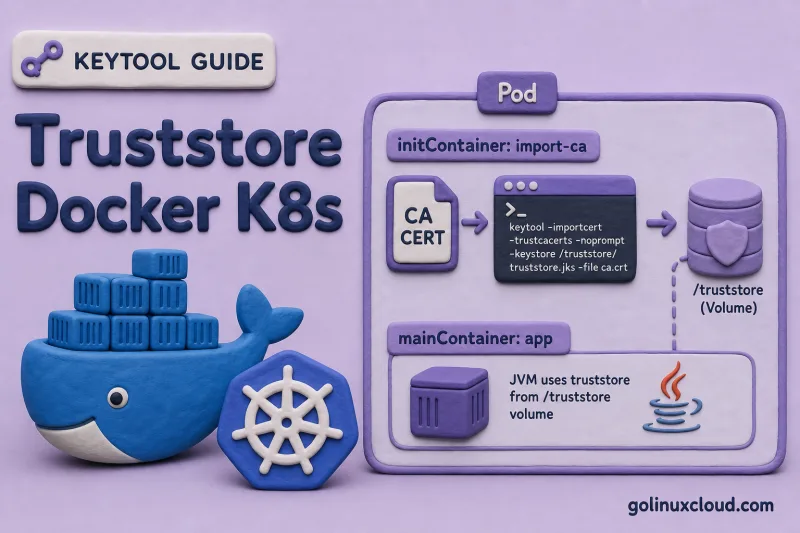
Java applications inside Docker images and Kubernetes pods inherit the JDK cacerts bundle. That is fine for public HTTPS APIs, but internal services signed by a private CA trigger PKIX path building failed until you add the CA to a truststore the JVM actually loads.
This guide builds truststore.p12 with keytool -importcert, bakes it into a Docker image with JAVA_TOOL_OPTIONS, and shows a Kubernetes initContainer that imports a CA from a Secret into a volume the application container mounts. The keytool import commands were tested locally on Ubuntu; pulling arbitrary base images may fail in restricted networks — the patterns still apply when you build on a CI host with registry access.
Tested on: Ubuntu 26.04 LTS; OpenJDK 25.0.3; kernel 7.0.0-27-generic.
Why not edit cacerts in the image?
Container images ship a JDK cacerts bundle maintained by the distro or base-image vendor. Editing it inside the image couples every JVM process to your manual imports and breaks the next time the base image refreshes OpenJDK packages.
A dedicated PKCS12 file isolates trust to one service and matches how Spring Boot and Tomcat expect trust material.
Read Use custom Java truststore instead of editing cacerts for the full comparison. For the client error text, see Fix Java PKIX path building failed.
Prerequisites
Gather these on your build host before you touch a Dockerfile or Deployment manifest:
keytoolon your build host — Install keytool on Ubuntu.- A PEM or DER CA certificate (
ca.crt) from your internal PKI or lab CA. - For Kubernetes examples: a cluster with Secrets support and
kubectlaccess.
This lab reuses the demo CA from other guides in this series. Export the CA as PEM — that file is what Docker and Kubernetes copy into the image or Secret:
mkdir -p ~/truststore-k8s-lab
cd ~/truststore-k8s-lab

keytool -genkeypair -alias demo-ca -keyalg RSA -keysize 2048 -validity 3650 \
  -dname "CN=Demo Lab CA,O=Lab,C=US" -ext "bc=ca:true" \
  -keystore ca.p12 -storetype PKCS12 -storepass changeit

keytool -exportcert -alias demo-ca -keystore ca.p12 -storepass changeit -rfc > ca.pem
head -2 ca.pem-----BEGIN CERTIFICATE-----
MIIDXTCCAkWgAwIBAgIUXYZ...The PEM file is the input for every importcert step below — no private key, safe to mount as a Kubernetes Secret.
Build truststore.p12 with keytool (local)
Import the CA PEM into a fresh PKCS12 file. The first import creates the store; later imports add more trustedCertEntry rows under new aliases.
keytool -importcert -alias demo-ca -file ca.pem \
  -keystore truststore.p12 -storetype PKCS12 -storepass changeit -noprompt
List entries — expect only trustedCertEntry rows, never PrivateKeyEntry:
keytool -list -keystore truststore.p12 -storepass changeitKeystore type: PKCS12
Your keystore contains 1 entry
demo-ca, Jul 2, 2026, trustedCertEntry,This truststore.p12 is the artifact you copy into Docker images or let an initContainer write at pod start. Repeat -importcert with a new -alias for each additional CA. To import into the system bundle on a VM instead of a file, see Import certificate into cacerts on Linux — containers should still prefer a custom file.
Docker pattern: RUN keytool and JAVA_TOOL_OPTIONS
Bake the truststore at image build time so every java process in the container inherits the same CA without a wrapper script. JAVA_TOOL_OPTIONS is read automatically by the JVM launcher.
Dockerfile fragment (OpenJDK 21+ base; adjust tag to your registry mirror):
FROM eclipse-temurin:21-jre
COPY ca.pem /tmp/ca.pem
RUN keytool -importcert -alias demo-ca -file /tmp/ca.pem \
-keystore /opt/java/truststore.p12 -storetype PKCS12 \
-storepass changeit -noprompt \
&& rm /tmp/ca.pem
ENV JAVA_TOOL_OPTIONS="-Djavax.net.ssl.trustStore=/opt/java/truststore.p12 -Djavax.net.ssl.trustStorePassword=changeit -Djavax.net.ssl.trustStoreType=PKCS12"
COPY app.jar /app/app.jar
WORKDIR /app
ENTRYPOINT ["java", "-jar", "app.jar"]| Piece | Role |
|---|---|
RUN keytool -importcert |
Creates /opt/java/truststore.p12 at image build time |
JAVA_TOOL_OPTIONS |
Applies truststore flags to every JVM in the container |
-noprompt |
Non-interactive import for CI/CD |
docker pull and remote base images may fail in air-gapped or restricted lab networks. Build on a host that can reach your registry, or copy a pre-built truststore.p12 with COPY truststore.p12 /opt/java/truststore.p12 and skip the RUN keytool layer.
JAVA_TOOL_OPTIONS is commonly used in containers because the JVM launcher picks it up at startup. On modern JDKs, JDK_JAVA_OPTIONS is another launcher-focused option, but JAVA_TOOL_OPTIONS remains widely used for -Djavax.net.ssl.* flags.
Spring Boot outbound HTTPS — prefer SSL bundles for client-side trust on Spring Boot 3.1+:
spring.ssl.bundle.jks.internal.truststore.location=file:/opt/java/truststore.p12
spring.ssl.bundle.jks.internal.truststore.password=changeit
spring.ssl.bundle.jks.internal.truststore.type=PKCS12Attach that bundle to the specific RestClient, WebClient, or JDBC client that calls your internal API. server.ssl.* configures embedded server TLS only — it does not fix outbound PKIX errors by itself.
After you build the image, confirm the truststore survived the layer:
docker run --rm my-app:local keytool -list -keystore /opt/java/truststore.p12 -storepass changeitKeystore type: PKCS12
Your keystore contains 1 entry
demo-ca, Jul 2, 2026, trustedCertEntry,If the list is empty or the path is missing, the RUN keytool layer failed silently in CI — check build logs for keytool error.
Kubernetes pattern: initContainer and Secret
When the CA rotates or differs per environment, build the truststore at pod start instead of baking it into the app image. Store the CA PEM in a Secret; an initContainer runs keytool -importcert into a shared volume.
Create the Secret from the PEM you exported earlier:
kubectl create secret generic demo-ca --from-file=ca.pem=ca.pem
kubectl get secret demo-ca -o jsonpath='{.data.ca\.pem}' | base64 -d | head -2-----BEGIN CERTIFICATE-----
MIIDXTCCAkWgAwIBAgIUXYZ...The initContainer and app container share an emptyDir volume — the init writes truststore.p12, the app mounts it read-only:
apiVersion: apps/v1
kind: Deployment
metadata:
name: java-app
spec:
selector:
matchLabels:
app: java-app
template:
metadata:
labels:
app: java-app
spec:
volumes:
- name: truststore-vol
emptyDir: {}
- name: ca-pem
secret:
secretName: demo-ca
defaultMode: 0444
initContainers:
- name: build-truststore
image: eclipse-temurin:21-jre
command:
- /bin/sh
- -c
- |
keytool -importcert -alias demo-ca -file /ca/ca.pem \
-keystore /trust/truststore.p12 -storetype PKCS12 \
-storepass changeit -noprompt
volumeMounts:
- name: truststore-vol
mountPath: /trust
- name: ca-pem
mountPath: /ca
readOnly: true
containers:
- name: app
image: my-app:local
env:
- name: JAVA_TOOL_OPTIONS
value: "-Djavax.net.ssl.trustStore=/trust/truststore.p12 -Djavax.net.ssl.trustStorePassword=changeit -Djavax.net.ssl.trustStoreType=PKCS12"
volumeMounts:
- name: truststore-vol
mountPath: /trust
readOnly: trueWhy emptyDir for the generated PKCS12 file:
- The initContainer creates a writable keystore without checking a binary Secret into Git.
- The application container mounts the same volume read-only.
- You can swap the CA Secret and roll the Deployment without rebuilding the app image.
Use a projected volume when you want to mount multiple existing sources — such as Secret plus ConfigMap — into one directory. For an initContainer that writes a new truststore.p12, emptyDir is the simple pattern.
Production: password from a Kubernetes Secret
The lab YAML hardcodes changeit for clarity. In production, source the truststore password from a Secret in both the initContainer and the app container so keytool -storepass and JAVA_TOOL_OPTIONS stay in sync.
The following is a production-style snippet; merge it into the full Deployment manifest above.
initContainers:
- name: build-truststore
image: eclipse-temurin:21-jre
env:
- name: TRUSTSTORE_PASSWORD
valueFrom:
secretKeyRef:
name: java-truststore-password
key: password
command:
- /bin/sh
- -c
- |
keytool -importcert -alias demo-ca -file /ca/ca.pem \
-keystore /trust/truststore.p12 -storetype PKCS12 \
-storepass "$TRUSTSTORE_PASSWORD" -nopromptApp container — define TRUSTSTORE_PASSWORD before JAVA_TOOL_OPTIONS so Kubernetes can expand $(TRUSTSTORE_PASSWORD) in the value field:
env:
- name: TRUSTSTORE_PASSWORD
valueFrom:
secretKeyRef:
name: java-truststore-password
key: password
- name: JAVA_TOOL_OPTIONS
value: "-Djavax.net.ssl.trustStore=/trust/truststore.p12 -Djavax.net.ssl.trustStorePassword=$(TRUSTSTORE_PASSWORD) -Djavax.net.ssl.trustStoreType=PKCS12"$(TRUSTSTORE_PASSWORD) inside env.value when TRUSTSTORE_PASSWORD is defined earlier in the same env list. Order matters: define the Secret-backed password variable first, then define JAVA_TOOL_OPTIONS. If the reference is misspelled or defined later, Kubernetes leaves it unresolved as a literal string.
When the app runs as a non-root user and cannot read /trust/truststore.p12, set pod-level fsGroup or adjust file permissions from the initContainer:
spec:
template:
spec:
securityContext:
fsGroup: 1000Place securityContext.fsGroup on spec.template.spec, not on an individual container, so both init and app containers share the same volume group ownership.
For server-side HTTPS keystores in Kubernetes, mount the PKCS12 keystore Secret separately — see Spring Boot HTTPS with keytool and Tomcat SSL with keytool.
Verify trust from a pod
Exec into the running pod and list the mounted truststore before you blame application code for PKIX errors:
kubectl exec -it deploy/java-app -- keytool -list -keystore /trust/truststore.p12 -storepass changeitkeytool, verify the truststore from the initContainer image, use an ephemeral debug container, or temporarily use a JDK/JRE image with keytool during troubleshooting.
Keystore type: PKCS12

Your keystore contains 1 entry

demo-ca, Jul 2, 2026, trustedCertEntry,Confirm demo-ca appears as trustedCertEntry, then confirm the JVM received the truststore flags:
kubectl exec -it deploy/java-app -- printenv JAVA_TOOL_OPTIONS-Djavax.net.ssl.trustStore=/trust/truststore.p12 -Djavax.net.ssl.trustStorePassword=changeit -Djavax.net.ssl.trustStoreType=PKCS12Optionally ask the JVM which truststore settings it parsed:
kubectl exec -it deploy/java-app -- java -XshowSettings:properties -version 2>&1 | grep -E 'trustStore|trustStoreType'You should see /trust/truststore.p12 and PKCS12 in the output. Then hit your internal HTTPS endpoint from the app logs or a debug pod with the same JAVA_TOOL_OPTIONS.
If the app still fails PKIX validation:
- Confirm the URL hostname matches the server certificate SAN.
- Ensure no second truststore property overrides
JAVA_TOOL_OPTIONS. - List the keystore inside the running container — an empty file means the initContainer exited before
keytoolfinished.
Troubleshooting
| Problem | Fix |
|---|---|
| Truststore exists but PKIX remains | Check printenv JAVA_TOOL_OPTIONS inside the pod and confirm trustStoreType=PKCS12 is present |
| Public HTTPS breaks after setting custom truststore | Your custom truststore replaced cacerts; build a composite truststore if the app needs both public and private CAs |
| InitContainer works once but CA rotation is not picked up | Restart or roll the Deployment; emptyDir is recreated per Pod |
| App runs as non-root and cannot read truststore | Adjust initContainer file permissions, or set pod-level fsGroup when your cluster policy allows it |
| Secret updated but file did not change in running pod | Roll the Pod; the initContainer only runs at Pod startup |
Security notes
Truststores hold public CA certificates, but they still define which TLS peers your JVM accepts. Treat updates with the same care as other cluster secrets.
- Replace
changeitwith a Secret-managed password in production; passjavax.net.ssl.trustStorePasswordthrough Kubernetes Secrets, not plain Deployment YAML in Git. See the production Secret example above. - Restrict who can update the CA Secret — a malicious CA entry lets your app trust an attacker-controlled HTTPS endpoint.
- Prefer cert-manager or your PKI rotation process over manual
kubectl create secretfor long-lived clusters.
References
- Oracle keytool documentation (official)
- Kubernetes — Init Containers (official)
- Spring Boot SSL bundles
- Java keystore vs truststore
- Use custom truststore vs cacerts
- keytool cheat sheet
Summary
Containerized Java apps need an explicit truststore when they call HTTPS services behind a private CA. Build truststore.p12 with keytool -importcert, point the JVM at it through JAVA_TOOL_OPTIONS (including trustStoreType=PKCS12), or configure Spring Boot 3.1+ SSL bundles for specific outbound clients. In Kubernetes, let an initContainer import a CA PEM from a Secret into an emptyDir volume your app mounts read-only. I verified the import locally produces a trustedCertEntry for demo-ca. Pair this truststore workflow with server keystores from the Spring Boot and Tomcat guides when both inbound and outbound TLS matter.
