
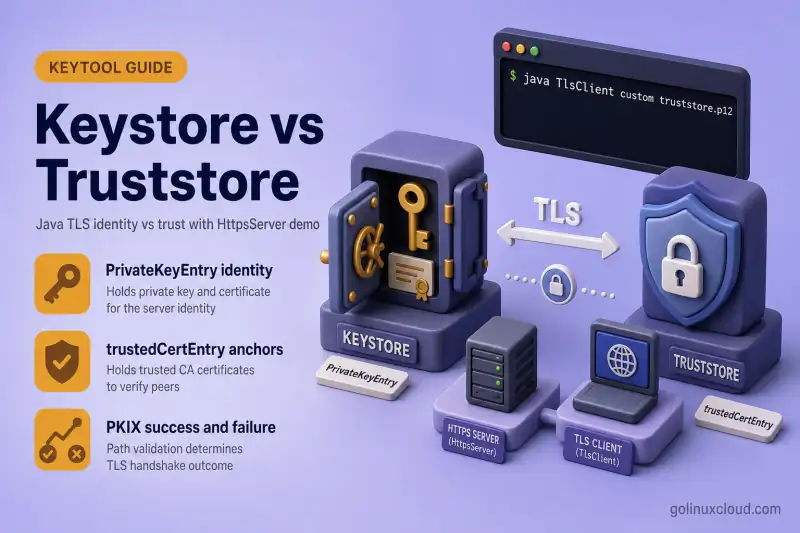
Java TLS configuration confuses two similarly named files: a keystore and a truststore. Both are often PKCS12 (.p12) files managed with keytool, but they solve opposite problems. The keystore proves who you are (server HTTPS certificate, mTLS client identity). The truststore decides who you trust when you connect outward or when a peer presents a certificate signed by a private CA.
This guide explains the difference in plain language, maps Oracle keytool entry types (PrivateKeyEntry vs trustedCertEntry), contrasts cacerts with a custom truststore, and walks through a minimal Java HTTPS server plus HttpClient on Ubuntu. You will see a real PKIX path building failed error when the truststore is missing, then a successful HTTP 200 after pointing the client at the right file.
Tested on: Ubuntu 26.04 LTS (Resolute Raccoon); OpenJDK 25.0.3; kernel 7.0.0-27-generic.
Quick answer: keystore vs truststore
| Store | Holds | Typical entry type | Java property (client/server) |
|---|---|---|---|
| Keystore | Your private key + cert chain | PrivateKeyEntry |
javax.net.ssl.keyStore |
| Truststore | Trusted CA / peer public certs | trustedCertEntry |
javax.net.ssl.trustStore |
cacerts |
JDK default trust anchors | trustedCertEntry |
Default when trustStore unset |
The server loads a keystore so it can present a certificate. The client loads a truststore (or cacerts) so it can validate the server chain.
In mutual TLS, both sides use both concepts. The server still needs a keystore to prove its identity, but it also needs a truststore to validate client certificates. The client needs a truststore to validate the server and a keystore to present its own client certificate.
Prerequisites
- OpenJDK 11+ (25 tested here; 21 LTS also works). Install with Install keytool on Ubuntu.
keytoolandopensslonPATH.- A free TCP port — this lab uses
8443on127.0.0.1.
PrivateKeyEntry vs trustedCertEntry
Oracle’s keytool documentation describes keystore entry types. The two you see in everyday TLS work:
| Entry type | Contains | Created by | Role |
|---|---|---|---|
PrivateKeyEntry |
Private key + certificate chain | keytool -genkeypair, or PKCS12 import with a key |
Identity — HTTPS server, mTLS client |
trustedCertEntry |
Public certificate only | keytool -importcert of a .crt/.pem without a key |
Trust anchor — CA in a truststore, or intermediate stored for chain building |
List entry types on any file:
keytool -list -keystore server.p12 -storepass changeitSample output from the lab server keystore:
Keystore type: PKCS12

Your keystore contains 2 entries

ca, Jul 2, 2026, trustedCertEntry,
server, Jul 2, 2026, PrivateKeyEntry,
The server alias is what KeyManagerFactory uses to present the TLS certificate. The ca entry in the same file helps Java build the chain toward the private CA — it is not a substitute for a client truststore, even though PKIX can appear to work if you misuse the server file on the client (covered below).
Truststore with CA only:
keytool -list -keystore truststore.p12 -storepass changeitYour keystore contains 1 entry
demo-ca, Jul 2, 2026, trustedCertEntry,No PrivateKeyEntry — clients can validate the server, but cannot impersonate the server.
Truststore vs cacerts
Every JDK ships a default truststore:
KEYTOOL=$(readlink -f "$(command -v keytool)")
JAVA_HOME=$(dirname "$(dirname "$KEYTOOL")")
ls -l "$JAVA_HOME/lib/security/cacerts"
keytool -list -cacerts -storepass changeit | head -6Keystore type: JKS
Your keystore contains 113 entries
debian:ac_raiz_fnmt-rcm.pem, Jul 2, 2026, trustedCertEntry,| cacerts | Custom truststore | |
|---|---|---|
| Location | $JAVA_HOME/lib/security/cacerts |
Any path you choose (truststore.p12) |
| Default password | changeit |
You set at creation |
| Contents | Public CAs (Mozilla/Debian bundle) | Usually your private CA only |
| Best for | Public HTTPS (google.com, etc.) | Internal APIs signed by a private CA |
| Editing in production | Discouraged — affects all JVM apps on that JDK | Preferred — mount per app or per container |
When javax.net.ssl.trustStore is unset, the JVM uses cacerts. That is why connections to public sites work out of the box, while internal HTTPS signed by your own CA fails until you add the CA to a custom truststore (or incorrectly edit cacerts).
For production guidance on avoiding global JDK changes, see Use custom Java truststore instead of editing cacerts.
Lab layout: build server keystore and client truststore
Create a working directory and a small private CA, then a server keystore and a separate truststore. Password changeit everywhere in this lab.
mkdir -p ~/java-tls-lab && cd ~/java-tls-lab
STOREPASS=changeit

openssl genrsa -out ca.key 4096
openssl req -new -x509 -days 3650 -key ca.key -out ca.crt \
  -subj "/CN=Demo TLS CA/O=Java TLS Lab/C=US"
Generate the server key pair inside PKCS12:
keytool -genkeypair -alias server -keyalg RSA -keysize 2048 -validity 825 \
  -keystore server.p12 -storetype PKCS12 -storepass "$STOREPASS" \
  -dname "CN=localhost, O=Java TLS Lab, C=US" \
  -ext "san=dns:localhost,ip:127.0.0.1"
keytool -certreq -alias server -keystore server.p12 -storetype PKCS12 -storepass "$STOREPASS" \
  -file server.csr
Sign the CSR with SAN (required for Java hostname checks against 127.0.0.1):
printf '%s\n' 'subjectAltName=DNS:localhost,IP:127.0.0.1' > san.cnf
openssl x509 -req -in server.csr -CA ca.crt -CAkey ca.key -CAcreateserial \
  -out server.crt -days 825 -extfile san.cnf
keytool -importcert -alias ca -keystore server.p12 -storetype PKCS12 -storepass "$STOREPASS" \
  -file ca.crt -noprompt
keytool -importcert -alias server -keystore server.p12 -storetype PKCS12 -storepass "$STOREPASS" \
  -file server.crt -noprompt
Build the client truststore — only the CA public certificate:
keytool -importcert -alias demo-ca -keystore truststore.p12 -storetype PKCS12 -storepass "$STOREPASS" \
  -file ca.crt -noprompt
Confirm the private CA is not in cacerts:
keytool -list -cacerts -storepass changeit -alias demo-ca 2>&1 | head -2keytool error: java.lang.Exception: Alias <demo-ca> does not existThat missing alias is exactly why the default JVM trust path fails against this server.
Java HTTPS server (uses the keystore)
Save as TlsServer.java. The server loads server.p12 as the keystore (KeyManagerFactory) and does not need a custom truststore for a simple one-way TLS echo.
import com.sun.net.httpserver.HttpsServer;
import com.sun.net.httpserver.HttpsConfigurator;

import javax.net.ssl.KeyManagerFactory;
import javax.net.ssl.SSLContext;
import java.io.OutputStream;
import java.net.InetSocketAddress;
import java.nio.charset.StandardCharsets;
import java.nio.file.Files;
import java.nio.file.Path;
import java.security.KeyStore;

public class TlsServer {
    private static final String HOST = "127.0.0.1";
    private static final int PORT = 8443;
    private static final char[] STORE_PASS = "changeit".toCharArray();

    public static void main(String[] args) throws Exception {
        String keystorePath = args.length > 0 ? args[0] : "server.p12";

        KeyStore ks = KeyStore.getInstance("PKCS12");
        try (var in = Files.newInputStream(Path.of(keystorePath))) {
            ks.load(in, STORE_PASS);
        }

        KeyManagerFactory kmf = KeyManagerFactory.getInstance(KeyManagerFactory.getDefaultAlgorithm());
        kmf.init(ks, STORE_PASS);

        SSLContext sslContext = SSLContext.getInstance("TLS");
        sslContext.init(kmf.getKeyManagers(), null, null);

        HttpsServer server = HttpsServer.create(new InetSocketAddress(HOST, PORT), 0);
        server.setHttpsConfigurator(new HttpsConfigurator(sslContext));
        server.createContext("/", exchange -> {
            byte[] body = "OK from Java TLS server\n".getBytes(StandardCharsets.UTF_8);
            exchange.getResponseHeaders().set("Content-Type", "text/plain; charset=utf-8");
            exchange.sendResponseHeaders(200, body.length);
            try (OutputStream os = exchange.getResponseBody()) {
                os.write(body);
            }
        });
        server.setExecutor(null);
        server.start();

        System.out.println("TLS server listening on https://" + HOST + ":" + PORT + "/");
        System.out.println("Keystore: " + keystorePath);
    }
}
Compile and start:
javac TlsServer.java
java TlsServer server.p12
Sample output:
TLS server listening on https://127.0.0.1:8443/
Keystore: server.p12
Leave this terminal running. The server binds 127.0.0.1 — use that IP in the client URL so the certificate IP SAN matches (using localhost alone can hit IPv6 ::1 and timeout if the server is IPv4-only).
Java HTTPS client (uses the truststore)
Save as TlsClient.java. Pass custom truststore.p12 to load a truststore; omit that to rely on JVM cacerts.
import javax.net.ssl.SSLContext;
import javax.net.ssl.TrustManagerFactory;
import java.io.InputStream;
import java.net.URI;
import java.net.http.HttpClient;
import java.net.http.HttpRequest;
import java.net.http.HttpResponse;
import java.nio.charset.StandardCharsets;
import java.nio.file.Files;
import java.nio.file.Path;
import java.security.KeyStore;
import java.time.Duration;

public class TlsClient {
    private static final String URL = "https://127.0.0.1:8443/";
    private static final char[] STORE_PASS = "changeit".toCharArray();

    public static void main(String[] args) throws Exception {
        String mode = args.length > 0 ? args[0] : "default";
        String trustStorePath = args.length > 1 ? args[1] : null;

        HttpClient.Builder builder = HttpClient.newBuilder()
                .connectTimeout(Duration.ofSeconds(5));

        if ("custom".equals(mode) && trustStorePath != null) {
            KeyStore ts = KeyStore.getInstance("PKCS12");
            try (InputStream in = Files.newInputStream(Path.of(trustStorePath))) {
                ts.load(in, STORE_PASS);
            }
            TrustManagerFactory tmf = TrustManagerFactory.getInstance(TrustManagerFactory.getDefaultAlgorithm());
            tmf.init(ts);
            SSLContext ctx = SSLContext.getInstance("TLS");
            ctx.init(null, tmf.getTrustManagers(), null);
            builder.sslContext(ctx);
            System.out.println("Using custom truststore: " + trustStorePath);
        } else {
            System.out.println("Using JVM default truststore (cacerts)");
        }

        HttpClient client = builder.build();
        HttpRequest request = HttpRequest.newBuilder()
                .uri(URI.create(URL))
                .timeout(Duration.ofSeconds(10))
                .GET()
                .build();

        HttpResponse<String> response = client.send(request, HttpResponse.BodyHandlers.ofString(StandardCharsets.UTF_8));
        System.out.println("HTTP status: " + response.statusCode());
        System.out.println("Body: " + response.body().trim());
    }
}javac TlsClient.javaWith TlsServer still running in another terminal, run the client twice: first with only the JVM default trust anchors, then with the lab truststore.p12 that contains the demo CA.
Test 1 — default cacerts only (expect failure)
Here the client does not load any custom file. Java falls back to the JDK cacerts bundle, which has public CAs but not the private Demo TLS CA from the lab. Run:
java TlsClient defaultOn Ubuntu 26.04 with OpenJDK 25, the handshake failed before any HTTP response:
Using JVM default truststore (cacerts)
Exception in thread "main" javax.net.ssl.SSLHandshakeException: (certificate_unknown) PKIX path building failed: sun.security.provider.certpath.SunCertPathBuilderException: unable to find valid certification path to requested target
The server certificate is valid cryptographically — the client simply does not trust the issuing CA. This is the same class of error you see calling an internal HTTPS API from Java without importing the corporate root. Fix it by giving the client a truststore that contains that CA, not by disabling certificate checks.
Test 2 — custom truststore.p12 (expect success)
Pass custom and the path to truststore.p12 so TlsClient loads only the demo CA as a trustedCertEntry. The server keystore is unchanged; only the client's trust material differs:
java TlsClient custom truststore.p12The TLS handshake completed and the client printed the server response:
Using custom truststore: truststore.p12
HTTP status: 200
Body: OK from Java TLS server
That confirms the truststore role: the client needed the CA public certificate, not the server's private key.
You can achieve the same result without changing client code by setting JVM system properties before main runs:
java \
  -Djavax.net.ssl.trustStore=truststore.p12 \
  -Djavax.net.ssl.trustStorePassword=changeit \
  -Djavax.net.ssl.trustStoreType=PKCS12 \
  TlsClient default
Here TlsClient still prints Using JVM default truststore (cacerts) because the code path checks its own args, but the JVM loads truststore.p12 for PKIX validation. Use this pattern for jars you cannot recompile.
What goes wrong when stores are swapped
Keystore and truststore use the same file format, so it is easy to point the wrong file at the wrong role. These two deliberate mistakes show why the distinction matters in production.
This behavior happens only because the lab imported ca.crt into server.p12 before importing the signed server certificate. A typical server keystore that holds only a PrivateKeyEntry will not work as a client truststore.
Using server.p12 as the client truststore
Point the client at the server's identity file instead of truststore.p12:
java TlsClient custom server.p12Surprisingly, this can still return HTTP 200:
Using custom truststore: server.p12
HTTP status: 200
Body: OK from Java TLS server
PKIX succeeded because server.p12 also contains a trustedCertEntry for the demo CA — the client found a trust anchor inside the server file. That does not make it safe: server.p12 holds the server's private key. Shipping it to every client leaks identity material. Clients should receive truststore.p12 (public CA only).
Using truststore.p12 as the server keystore
Start the HTTPS server with the client trust file, which has no PrivateKeyEntry:
java TlsServer truststore.p12The process may still print TLS server listening, but TLS cannot present a server certificate. When the client connects, the handshake dies:
Request failed: javax.net.ssl.SSLHandshakeException: Remote host terminated the handshakeThe truststore has trust anchors, not an identity. Tomcat and Spring Boot show the same symptom when server.ssl.key-store points at a CA bundle instead of the server PKCS12.
JVM and framework properties
| Property / config | Role |
|---|---|
javax.net.ssl.keyStore |
Path to identity keystore |
javax.net.ssl.keyStorePassword |
Keystore password |
javax.net.ssl.keyStoreType |
PKCS12 (default on modern JDK) |
javax.net.ssl.trustStore |
Path to truststore |
javax.net.ssl.trustStorePassword |
Truststore password |
javax.net.ssl.trustStoreType |
PKCS12 (set explicitly on Java 8 or mixed JDK fleets) |
Spring Boot server.ssl.key-store |
Embedded server identity keystore |
Spring Boot server.ssl.trust-store |
Embedded server trust material, mainly useful with client-auth/mTLS |
Spring Boot spring.ssl.bundle.jks.<name>.truststore.* |
Preferred modern way to define client-side trust material |
Alias selection matters: Spring Boot server.ssl.key-alias must match the PrivateKeyEntry alias (server in this lab). Tomcat uses certificateKeyAlias on the connector. See keytool cheat sheet for -list and -changealias.
Debug TLS with javax.net.debug
When the client should use a custom truststore but PKIX still fails, confirm which anchors Java loaded. Oracle’s JSSE Reference Guide documents javax.net.debug:
java \
  -Djavax.net.debug=ssl,handshake,trustmanager \
  -Djavax.net.ssl.trustStore=truststore.p12 \
  -Djavax.net.ssl.trustStorePassword=changeit \
  -Djavax.net.ssl.trustStoreType=PKCS12 \
  TlsClient default
Look for trustmanager lines that list certificates from your truststore.p12 rather than the default cacerts path. If the output shows an empty truststore, check that the file path exists — see custom truststore vs cacerts.
Troubleshooting
| Symptom | Likely cause | Fix |
|---|---|---|
PKIX path building failed |
Private CA not in truststore | Import CA into truststore.p12; set trustStore and trustStoreType=PKCS12 |
unable to find valid certification path |
Same as above, or missing intermediate | Import intermediate CA as trustedCertEntry; use -trustcacerts when importing replies |
No subject alternative names present or No subject alternative names matching IP address 127.0.0.1 found |
Signed cert lacks SAN for the hostname or IP you connect to | Sign CSR with -extfile / SAN; see lab san.cnf |
Connect timeout to localhost |
IPv6 ::1 vs server on 127.0.0.1 |
Use https://127.0.0.1:8443/ or bind all interfaces |
| Server starts but handshake fails | Truststore used as keystore | Point server at PKCS12 with PrivateKeyEntry |
| Wrong alias on server | Server or framework selected the wrong PrivateKeyEntry |
keytool -list; set framework-specific alias such as Spring Boot server.ssl.key-alias or Tomcat certificateKeyAlias |
Edited wrong cacerts |
Multiple JDK installs | readlink -f $(which keytool) and use that JAVA_HOME |
cacerts fixes demos quickly but couples every JVM app on that JDK to your change. Prefer a custom truststore per application or container — see Use custom Java truststore instead of editing cacerts.
References
- keytool — Oracle documentation
- Java Secure Socket Extension (JSSE) Reference Guide
- Spring Boot SSL bundles
- On-site: keytool command cheat sheet, Install keytool on Ubuntu, Use custom Java truststore vs cacerts, OpenSSL cheat sheet, PKI concepts
Summary
A Java keystore holds identity (PrivateKeyEntry — private key plus chain). A truststore holds trust anchors (trustedCertEntry — typically CA certificates). The JDK cacerts file is the default truststore for public CAs; private CAs need a custom truststore. In the lab, the client failed with PKIX path building failed on default cacerts and succeeded with truststore.p12, while swapping stores showed why you must not use a server keystore as a client trust bundle.
