
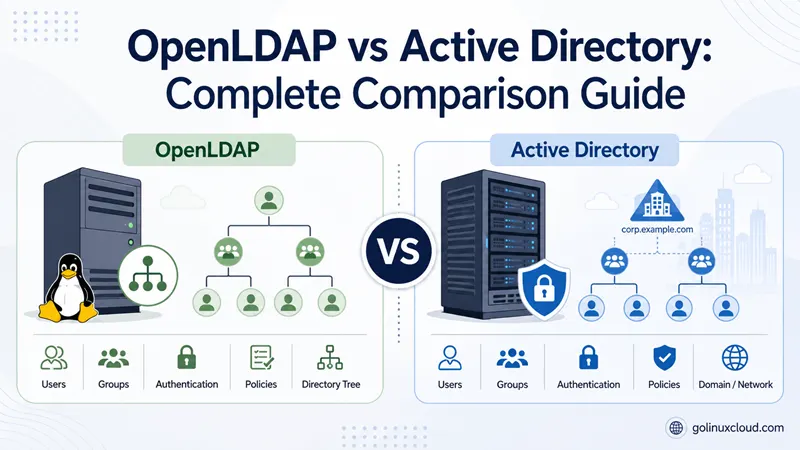
You are choosing a directory for a new project—or untangling search results that mix up LDAP, OpenLDAP, LDAPS, and Active Directory. This page is for Linux admins, Windows admins crossing into Unix, and architects who need a straight comparison without vendor pitch decks.
I organized it the way I wish someone had explained it to me: define the terms first, compare OpenLDAP and Microsoft AD on the dimensions that matter in production (auth, GPO, cost, replication), then cover Samba AD when you want domain-controller features on Linux. OpenLDAP examples here align with our Rocky Linux 9 lab from the install guide; AD behavior is cross-checked against Microsoft AD DS documentation. If you have never touched LDAP before, read the basics of OpenLDAP first, then come back.
Tested on: Rocky Linux 9.4 (Blue Onyx); OpenLDAP 2.6.x from
openldap-servers(lab per install guide).
Quick answer: OpenLDAP vs Active Directory
| If your priority is… | Lean toward |
|---|---|
| Windows desktops, Office, Entra ID, native GPO | Microsoft Active Directory |
| Free LDAP for Linux apps, mail, VPN, dev/test | OpenLDAP |
| AD-compatible domain on Linux (no Windows Server DC) | Samba Active Directory DC |
| Integrated Linux identity with Kerberos + web UI | FreeIPA (related option) |
OpenLDAP is a lightweight, open-source LDAP server. Active Directory is Microsoft’s directory platform for Windows domains: LDAP plus Kerberos, DNS, Group Policy, and decades of Windows integration. They overlap when apps authenticate via LDAP—but AD does far more on Windows endpoints.
Terms you need before comparing
Most comparison articles blur vocabulary. Align on these five labels before you read feature tables.
LDAP (Lightweight Directory Access Protocol)
LDAP is an open standard protocol (RFC 4511). Applications use it to search a directory, bind (authenticate), and add or modify entries when ACLs allow. LDAP is not software—it is the wire format, like HTTP is not Apache.
OpenLDAP
OpenLDAP is an open-source LDAP server (slapd) plus client tools. It runs on Linux, BSD, macOS, and Windows. After install the database is empty: you design the tree (DIT), load schemas, and create entries. See install OpenLDAP on Rocky Linux for a modern cn=config workflow.
LDAPS (LDAP over TLS)
LDAPS is not a competitor to OpenLDAP or Active Directory. It is LDAP encrypted with TLS—usually port 636, or STARTTLS upgraded on port 389. Both OpenLDAP and Active Directory support LDAPS. When people write “Active Directory vs OpenLDAPS,” they usually mean AD versus OpenLDAP accessed securely—not a product named “OpenLDAPS.”
Production OpenLDAP should use TLS; our guides cover OpenLDAP TLS on Rocky Linux and TLS certificates on Ubuntu.
Active Directory (AD)
Active Directory Domain Services (AD DS) is Microsoft’s directory for Windows networks. A domain controller hosts the AD database, authenticates users, replicates with other DCs, and integrates with Group Policy, DNS, and Kerberos. AD implements LDAP so third-party apps can query it—but AD is much larger than “an LDAP server.”
Samba Active Directory (AD DC)
Samba can act as an Active Directory–compatible domain controller on Linux—LDAP, Kerberos, DNS, and SYSVOL for logon scripts and GPO. That is different from OpenLDAP alone. Samba embeds its own LDAP backend (samba_dsdb); it does not replace OpenLDAP in the same role. For setup steps, see Samba Active Directory on CentOS and Samba AD on Rocky Linux. Official reference: Samba as an AD DC.
How directory services fit in your network
Think of a directory as a central phone book plus access control for the organization.
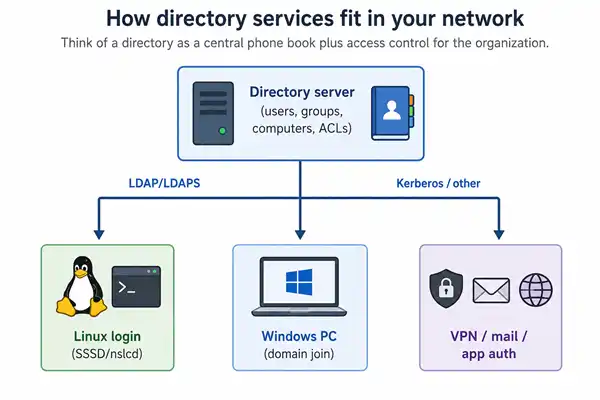
A typical login flow: the user enters credentials; the client talks to the directory (LDAP bind, Kerberos AS-REQ, or both); the server accepts or rejects; the OS or app applies authorization (group membership, GPO, file ACLs). Both OpenLDAP and AD store identity at the center. AD additionally pushes Windows configuration through Group Policy—OpenLDAP does not.
OpenLDAP vs Active Directory at a glance
| Topic | OpenLDAP | Microsoft Active Directory |
|---|---|---|
| Type | Open-source LDAP server | Commercial directory platform (AD DS) |
| License cost | Free (support is your time) | Windows Server + CALs |
| Primary OS | Linux/Unix (runs anywhere) | Windows Server on DCs |
| Out-of-box structure | Empty; you build the DIT | Default containers (Users, Computers, Domain Controllers) |
| Management UI | CLI, LDIF, third-party GUIs | AD Users and Computers, PowerShell, RSAT |
| LDAP | Native, RFC-oriented | Yes, with Microsoft-specific quirks |
| Kerberos | Via external KDC (MIT, Heimdal, Samba, AD) | Built-in AD KDC (default for Windows logon) |
| NTLM | No | Yes (legacy Windows auth) |
| DNS integration | Optional; not built-in | AD-integrated DNS is standard |
| Group Policy (GPO) | No | Core feature for Windows clients |
| Windows domain join | No (use Samba AD or Microsoft AD) | Native |
| macOS / Linux join | LDAP auth via SSSD, nslcd, PAM | Join via SSSD, Winbind, or Entra (cloud) |
| Schema | Flexible; you load/customize schemas | Fixed AD schema; extensions via Schema MMC |
| Replication | Multi-master / mirror (configure yourself) | Automatic between DCs |
| Typical use | Linux auth, apps, appliances, dev | Corporate Windows estates |
Sources: OpenLDAP Administrator's Guide, Microsoft AD DS documentation.
Architecture, authentication, and schema quirks
How each product lays out data
AD organizes objects in a fixed domain model:
Forest
 └── Tree (trust boundaries)
      └── Domain (e.g. corp.example.com)
           └── Organizational Units (OU)
                ├── Users
                ├── Groups
                ├── Computers
                └── Policies (linked GPOs)
Forest is the top security boundary; domain is the authentication boundary (users log in as [email protected]); OU is where admins delegate control and attach GPOs. Computers join the domain; users receive Kerberos tickets and GPO settings at logon.
OpenLDAP ships with no predefined tree. A common domain-component layout:
dc=example,dc=com
 ├── ou=People
 │    └── uid=jsmith,ou=People,dc=example,dc=com
 ├── ou=Groups
 └── ou=Services
Every entry has a Distinguished Name (DN) and objectClasses defined by schema. Our LDAP terminologies guide walks through cn, ou, and dc. AD gives you a working structure on day one; OpenLDAP forces upfront design—which pays off for custom apps but takes more LDAP knowledge.
How logins work
OpenLDAP authentication is an LDAP bind:
- Client connects to
ldap://server:389orldaps://server:636. - Client sends a bind with a DN and password (or SASL / client cert).
slapdverifies credentials against the stored hash (for example{SSHA}).- On success, the client may search for groups and attributes.
Linux client paths: configure LDAP client authentication, LDAP client on RHEL 8 with SSSD, or OpenLDAP with nslcd. OpenLDAP stores passwords in userPassword when your schema allows it—standard LDAP.
Windows clients default to Kerberos against AD: the client requests a ticket from the KDC, the user proves identity, the client receives a Ticket-Granting Ticket (TGT), and apps use Kerberos or NTLM for resources. LDAP binds on AD are common for apps that do not speak Kerberos, using [email protected] or a full DN.
Why generic LDAP scripts fail on Active Directory
Apps written for “generic LDAP” often break on AD without tweaks:
| Behavior | OpenLDAP (typical) | Active Directory |
|---|---|---|
| User object class | inetOrgPerson, posixAccount |
user |
| Group object class | groupOfNames, posixGroup |
group |
| Password attribute | userPassword |
unicodePwd (special encoding rules) |
| Password change over LDAP | Standard ldapmodify |
Often requires SSL; special delete/add format |
| Large multi-valued attributes | Return all values | Range retrieval (for example member;1-1000) |
Microsoft documents LDAP policies such as MaxPageSize (1000) on DCs—pagination is required for big searches.
See OpenLDAP respond (lab example)
On a Rocky Linux 9 host with OpenLDAP configured per our install guide, a simple anonymous or authenticated search looks like this:
ldapsearch -x -LLL -b "dc=example,dc=com" "(uid=jsmith)" cn mailTypical trimmed output when the user exists:
dn: uid=jsmith,ou=People,dc=example,dc=com
cn: Jane Smith
mail: [email protected]
That is the shape you get from a standards-first LDAP server: DN plus attributes, no Kerberos ticket exchange. Windows interactive logon against AD follows a different path even though both servers can answer LDAP queries.
Protocols, ports, management, and Group Policy
Ports and protocols
| Protocol / service | Typical port | OpenLDAP | Active Directory |
|---|---|---|---|
| LDAP | 389 | Yes | Yes |
| LDAPS / STARTTLS | 636 / 389 | Yes (TLS guide) | Yes |
| Kerberos | 88 | External KDC | Built-in |
| DNS (SRV records) | 53 | Your choice | AD-integrated |
| SMB / RPC (DC core) | 445, dynamic RPC | No (Samba AD: yes) | Yes |
| Global Catalog | 3268/3269 | No | Yes (multi-domain forests) |
OpenLDAP is LDAP-centric. AD is multi-protocol by design—which is why it feels heavier but also why Windows logon works smoothly in a domain.
Day-to-day administration
OpenLDAP: configuration via ldapmodify on cn=config (modern distros) or LDIF files; no official GUI from the OpenLDAP project; backup is database files plus config LDIF; replication via master-slave or multi-master. Strength is full control over schema and ACLs; cost is a steep learning curve—typos in LDIF can lock you out.
Active Directory: Active Directory Users and Computers for users and groups; Group Policy Management Console for GPO; PowerShell (Get-ADUser, Set-ADAccountPassword) for automation; replication mostly automatic between DCs. Strength is GUI and Windows integration; cost is licensing and hybrid-cloud complexity (on-prem AD plus Microsoft Entra ID).
Group Policy—the gap Windows teams feel first
Group Policy Objects (GPO) are the biggest functional gap when Windows-centric shops consider OpenLDAP alone. AD GPO can enforce password rules, software deployment, drive mappings, security baselines, and certificate auto-enrollment. OpenLDAP stores who users are and which groups they belong to—not how Windows configures itself.
Workarounds on Linux-centric estates: Samba AD DC (GPO compatible with Windows clients—see Samba AD setup); Ansible or Puppet for policy outside the directory; FreeIPA for Linux HBAC and sudo rules (not full Windows GPO).
Cost, platform fit, and when each option wins
| Cost area | OpenLDAP | Active Directory |
|---|---|---|
| Software license | $0 | Windows Server Standard/Datacenter |
| Client access | N/A for LDAP apps | Often CALs per user or device |
| Hardware / VMs | Any Linux server | Windows Server VMs (higher RAM/disk typical) |
| Admin skill | LDAP, TLS, replication | AD, DNS, GPO, PowerShell |
| Hybrid cloud add-ons | Your choice (FreeIPA, etc.) | Microsoft Entra ID, Intune (subscriptions) |
OpenLDAP saves license money; it does not eliminate operational cost. AD costs licenses but bundles features that would otherwise require multiple products on Linux.
OpenLDAP shines for Linux-first data centers, appliances and network gear that authenticate against LDAP, mail and VPN stacks, custom schemas, and labs where Windows domains are overkill—pair with replication and TLS in production.
Active Directory shines for domain-joined Windows desktops, Microsoft 365 / Entra hybrid identity, legacy apps expecting AD or Kerberos, GPO-driven compliance, and vendor matrices that require domain join. Linux in AD shops: realmd and SSSD, adcli and SSSD, or Winbind; Samba shares via integrate Samba with Active Directory.
Real-world scenarios
Startup with 40 Linux servers and no Windows desktops: pick OpenLDAP; centralize SSH and app auth with SSSD; add TLS and replication as you grow.
300 Windows laptops with M365 and Intune planned: pick Microsoft AD (on-prem or cloud-forward with Entra). OpenLDAP does not replace GPO or Entra sync. Linux servers can still join the AD domain.
School with mixed lab, tight budget, Linux DC: pick Samba AD DC on Rocky or AlmaLinux—domain join and GPO without Windows Server licenses. That is Samba’s AD stack, not OpenLDAP standalone.
SaaS-only company with no on-prem servers: cloud IdP becomes source of truth; LDAP appears only if a legacy app requires it—often via a small OpenLDAP or cloud LDAP bridge.
Migrating users from old LDAP hardware: use patterns in OpenLDAP migration examples.
Samba AD vs OpenLDAP vs Microsoft AD
Searches for “OpenLDAP Samba vs Active Directory” usually mean: what is the Linux path to AD-like features?
| Capability | OpenLDAP | Samba AD DC | Microsoft AD |
|---|---|---|---|
| LDAP directory | Yes (standalone) | Yes (integrated backend) | Yes |
| Kerberos KDC | No (external) | Yes (Heimdal) | Yes |
| Windows domain join | No | Yes | Yes |
| Group Policy | No | Yes (compatible) | Yes (native) |
| Runs on Linux | Yes | Yes | No (DC on Windows Server) |
| License | Free | Free (Samba) | Paid |
OpenLDAP is the best pure LDAP server; pair with MIT Kerberos if you need tickets without full AD. Samba AD DC is the best free AD-compatible domain on Linux (official Samba AD DC docs). Microsoft AD is the best Windows ecosystem depth and vendor support.
You can coexist: OpenLDAP or Samba for Unix identities, Microsoft AD for Windows, synced with scripts or identity bridges—higher complexity, common after acquisitions.
FreeIPA (install FreeIPA) is another Linux identity stack (LDAP, Kerberos, DNS, CA, HBAC) but is not Active Directory–compatible for Windows domain join. Choose FreeIPA for Linux-native identity; choose Samba AD for Windows client domain join without Windows Server.
Replication, security, and choosing a path
Replication and high availability
OpenLDAP: Syncrepl for master-slave read-only replicas; multi-master for writable copies with conflict planning; manual ServerID, contextCSN, and TLS for replication traffic—see mirror and multi-master guides.
Active Directory: multi-master replication between DCs by default; sites and subnets optimize topology; FSMO roles for specific single-master tasks; clients auto-discover DCs via DNS SRV records. AD replication is more opinionated and automated; OpenLDAP is flexible but DIY.
Security comparison
| Security topic | OpenLDAP | Active Directory |
|---|---|---|
| Transport encryption | TLS/LDAPS/STARTTLS (configure explicitly) | LDAPS + Kerberos encryption |
| Account lockout | ppolicy overlay or external policy | Built-in GPO/password policy |
| MFA | External (PAM, VPN, app-level) | Entra ID, smart card, Windows Hello (hybrid) |
| Admin tiering | Your ACL design | Enterprise tiered admin model |
| Attack surface | LDAP ports | LDAP + Kerberos + RPC + SMB |
Harden OpenLDAP with TLS, strong ACLs, and no anonymous binds in production. Harden AD with tiered admins, prompt DC patching, and standard Kerberoasting monitoring.
Misconceptions and decision flow
“LDAP vs Active Directory—which is better?” is the wrong question. LDAP is a protocol; AD is a product that uses LDAP. Compare OpenLDAP vs AD or LDAP apps vs AD.
“OpenLDAPS is a fork of OpenLDAP.” No—LDAPS means LDAP over TLS on both servers.
“If I install OpenLDAP, Windows PCs can join my domain.” Not without Samba AD or Microsoft AD.
“AD is just LDAP with a GUI.” AD includes Kerberos KDC, DNS, SYSVOL, GPO engine, and RPC—far beyond LDAP.
“OpenLDAP is outdated.” It remains the default LDAP server for Linux infrastructure and thousands of appliances; cloud IdPs did not remove LDAP from many stacks.
Need Windows domain join + GPO on Windows clients?
 │
 ├─ Yes → Can you run Windows Server DCs?
 │         ├─ Yes → Microsoft Active Directory
 │         └─ No  → Samba Active Directory DC
 │
 └─ No  → Need only LDAP for apps / Linux SSH?
           ├─ Yes → OpenLDAP (+ TLS + replication)
           └─ Need Kerberos + Linux policy UI?
                    → Consider FreeIPA (not AD-compatible)
Integration cheat sheet
| Goal | Suggested path |
|---|---|
| Linux → OpenLDAP auth | LDAP client + SSSD |
| Linux → Microsoft AD | realmd or adcli |
| Secure LDAP | OpenLDAP TLS |
| AD-like domain on Linux | Samba AD |
| Import existing users | OpenLDAP migration |
| Full OpenLDAP learning path | OpenLDAP tutorial hub |
References
Official documentation:
- OpenLDAP documentation
- Active Directory Domain Services overview
- Samba Active Directory Domain Controller
- LDAP protocol (RFC 4511)
- Kerberos authentication overview (Microsoft)
On-site next steps:
- Basics of OpenLDAP — terminologies and how LDAP works
- Install OpenLDAP on Rocky Linux 9 — hands-on server setup
- Samba Active Directory on CentOS — AD-compatible DC on Linux
- Join Linux to Windows AD with adcli — when you keep Microsoft AD
Summary
LDAP is the protocol; OpenLDAP and Active Directory are directory implementations at very different scope levels. OpenLDAP wins on cost, flexibility, and Linux or app integration—you trade away Windows Group Policy and native domain join. Active Directory wins on Windows desktop management, the Kerberos ecosystem, and Microsoft cloud hybrid—you trade licensing and platform coupling. LDAPS is encrypted LDAP on whichever server you run, not a separate product fight. When you need Active Directory features on Linux without Windows Server, Samba AD DC is the usual answer; when you need a standards-first LDAP server, OpenLDAP remains the default.
If you are new to LDAP, start with the beginner tutorial. When you are ready to deploy, follow the OpenLDAP tutorial hub. If your shop is Windows-heavy but you must run the DC on Linux, jump to Samba Active Directory and compare that path against keeping Microsoft AD and joining Linux clients with SSSD.
