

group_vars and host_vars keep Ansible variables organized; inventory patterns decide which hosts actually run your tasks. Together they answer two everyday questions: what values apply to each machine, and which machines should this command touch?
This guide shows where to put group and host variables, when inline inventory is enough, how Ansible merges values per host, and how patterns with --limit keep runs scoped. You need inventory basics and the project layout first. I tested on Rocky Linux 10 with ansible-core 2.16.
Tested on: Rocky Linux 10.2 (Red Quartz); kernel 6.12.0-211.16.1.el10_2.0.1.x86_64; ansible-core 2.16.16.
~/ansible-project, inventory group lab, and playbooks in playbooks/. Use your own host names and paths if yours differ.
What are group_vars and host_vars in Ansible?
group_vars stores variables for an inventory group. host_vars stores variables for one inventory hostname.
Both are usually YAML files Ansible loads automatically when they sit in the right directories beside your inventory source. They keep inventory/hosts readable—connection details and host names stay in inventory; application settings move into variable files.
inventory/
├── hosts
├── group_vars/
│   ├── all.yml
│   └── web.yml
└── host_vars/
    └── web1.yml
Variables in inventory/group_vars/web.yml apply to every host in [web]. Variables in inventory/host_vars/web1.yml apply only to web1.
Ansible commonly uses .yml or .yaml files here. The host_group_vars plugin also accepts .json or files with no extension. Hidden files and backup files such as file.yml~ are ignored.
Why Variable Placement Matters in Ansible
Beginners often put every variable inside inventory/hosts. That works for a two-line lab, then becomes hard to read, review in Git, and troubleshoot.
Good placement makes projects predictable:
- Inventory describes which hosts exist and how to connect.
group_varsholds values shared by a group or by all hosts.host_varsholds real exceptions for one machine.
When ten hosts share web_package: httpd, one group_vars/web.yml beats ten repeated lines in inventory. Keep YAML structure valid—see YAML syntax if quoting trips you up.
Inventory Variables vs group_vars vs host_vars
| Location | Best for | Avoid using for |
|---|---|---|
| Inline inventory variables | Small connection details (ansible_host, ansible_user) |
Large application config |
[group:vars] / YAML vars: |
Simple group defaults in tiny labs | Long variable lists, complex types in INI |
group_vars/all.yml |
Values shared by every host | Secrets in plain text |
group_vars/group.yml |
Group-specific packages, ports, paths | Host-specific exceptions |
host_vars/host.yml |
One-host overrides | Common values repeated on many hosts |
| Vault-encrypted files | Passwords, API keys, tokens | Normal non-secret defaults |
Inventory should mainly describe hosts and connections. Larger configuration values usually belong in group_vars and host_vars.
Recommended Project Layout for group_vars and host_vars
ansible-project/
├── ansible.cfg
├── inventory/
│   ├── hosts
│   ├── group_vars/
│   │   ├── all.yml
│   │   ├── web.yml
│   │   └── db.yml
│   └── host_vars/
│       ├── web1.yml
│       └── db1.yml
├── playbooks/
└── roles/inventory/group_vars/all.yml— every hostinventory/group_vars/web.yml—[web]onlyinventory/group_vars/db.yml—[db]onlyinventory/host_vars/web1.yml—web1only
File names must match inventory group or host names. If inventory lists web1 ansible_host=192.168.56.110, the host vars file is host_vars/web1.yml—not the IP address.
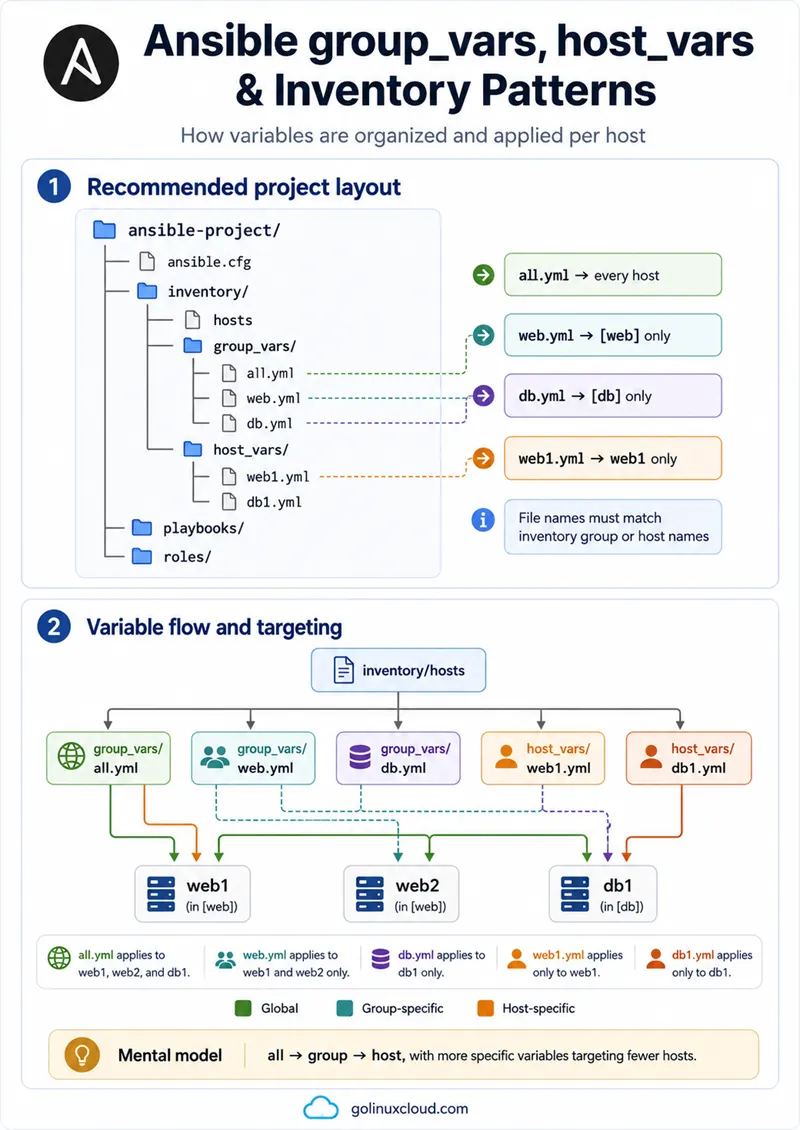
How group_vars Works
group_vars is for variables shared by a group. It cuts repetition in inventory and keeps group settings in one place.
For ad hoc commands there is no playbook path, so place group_vars under inventory/group_vars/ next to inventory/hosts.
group_vars/ and host_vars/ can also be loaded relative to a playbook directory during ansible-playbook runs, but inventory-local vars are easier to reason about for ad hoc commands and course labs.
group_vars/all.yml
Applies to every host in inventory. Typical values:
ansible_python_interpreter- timezone or locale defaults
- common service defaults shared fleet-wide
Do not put values here if only one group needs them. Use group_vars/all.yml only for values that truly apply to every inventory host—if only web hosts need a value, put it in group_vars/web.yml. Do not store plaintext secrets in all.yml—encrypt sensitive group_vars with Ansible Vault.
Example:
# inventory/group_vars/all.yml
ansible_python_interpreter: /usr/bin/python3
timezone: UTC
group_vars/group_name.yml
One file per group—filename must match the group name:
# inventory/group_vars/web.yml
web_package: httpd
web_port: 80# inventory/group_vars/db.yml
db_package: postgresql-serverUse for packages, ports, deployment paths, and service names that every host in the group shares.
group_vars/group_name/ directory
Split a large group into multiple files under a subdirectory:
inventory/group_vars/
└── web/
    ├── packages.yml
    ├── service.yml
    └── app.yml
Useful when a group accumulates many variables. Avoid splitting too early—one web.yml is easier until the file is genuinely hard to navigate.
Variables for parent and child groups
Parent group variables can flow to hosts in child groups. More specific child group or host values override broader ones.
[web]
web1 ansible_host=192.168.56.110

[db]
db1 ansible_host=192.168.56.112

[prod:children]
web
db
If group_vars/prod.yml sets environment: production, hosts in web and db inherit it unless a child group or host overrides it. For the full precedence stack, see Ansible variable precedence.
How host_vars Works
host_vars is for one host only. Use it for exceptions—not as the default place for every variable.
host_vars/hostname.yml
# inventory/host_vars/web1.yml
web_port: 8080
Use when one web server listens on a different port, one node has a unique mount path, or a single host needs a package list the rest of the group does not.
Host aliases and host_vars file names
Inventory:
[web]
web1 ansible_host=192.168.56.110
Host vars file:
Sample output:
inventory/host_vars/web1.ymlweb1 is the inventory hostname Ansible uses in output and file names. ansible_host is only the SSH target address.
When to use host_vars
Use host_vars when:
- Only one host needs the variable
- The value is a genuine exception
- Putting it in group vars would affect too many machines
Avoid host_vars when:
- The same key appears on many hosts—use
group_varsinstead - You are spreading logic across dozens of one-line host files
group_vars vs host_vars
| Requirement | Use |
|---|---|
| Same value for all hosts | inventory/group_vars/all.yml |
| Same value for all web servers | inventory/group_vars/web.yml |
| Same value for all database servers | inventory/group_vars/db.yml |
| One host needs a different value | inventory/host_vars/hostname.yml |
| Secret value | Vault-encrypted file under group_vars/ |
| Short connection detail | Inventory line or ansible.cfg |
| Long application config | group_vars or role defaults/ |
Prefer group_vars for shared values. Reach for host_vars only for exceptions.
Variable Placement Best Practices
- Keep connection variables (
ansible_user,ansible_host) in inventory oransible.cfgwhen they are stable. - Put fleet-wide defaults in
inventory/group_vars/all.ymlonly when every host in inventory needs the value. - Put role defaults inside roles when building reusable automation.
- Put environment-specific values in the matching inventory tree (
group_vars/prod/, separate inventory files). - Encrypt secrets with Ansible Vault—never commit plain-text passwords.
- Avoid duplicating the same key on many host lines.
- Split large
group_varsfiles only when navigation becomes painful. - Add comments only where they explain non-obvious intent.
Common Special Variables in group_vars and host_vars
| Variable | Purpose | Usually placed in |
|---|---|---|
ansible_user |
SSH login user | inventory or inventory/group_vars/lab.yml |
ansible_host |
Target IP or DNS | inventory or host_vars |
ansible_port |
SSH port | inventory or group_vars |
ansible_ssh_private_key_file |
SSH key path | ansible.cfg, group_vars |
ansible_become |
Enable privilege escalation | group file or inventory; use all only if every host needs it |
ansible_python_interpreter |
Python on managed node | group file or host_vars when paths differ |
| App variables | Application configuration | group_vars or role defaults/ |
This is not a complete list of special variables—only the ones beginners set in inventory trees daily.
How Ansible Loads Inventory Variables
Ansible builds variables per host. At inventory scope, think from broad to specific:
| Scope | Example | Notes |
|---|---|---|
all group vars |
inventory/group_vars/all.yml |
Applies to every host |
| Parent group vars | inventory/group_vars/prod.yml |
Applies through child groups |
| Child group vars | inventory/group_vars/web.yml |
Overrides broader parent values |
| Host vars | inventory/host_vars/web1.yml |
Overrides group values for that host |
Inline inventory variables and files under group_vars/ / host_vars/ both contribute to host variables. Child group variables override parent group variables, and host variables override group variables for the same key.
Playbook vars, role defaults, facts, registered variables, and extra vars add more layers later. This article focuses only on inventory-level placement.
group_vars/all.yml sets app: {port: 80} and host_vars/web1.yml sets app: {debug: true}, web1 may lose port: 80 unless you repeat the full app tree in the host file. Run ansible-inventory --host HOST after edits to see the final merged result, not what YAML intuition alone suggests.
Verify Variables with ansible-inventory
ansible-inventory shows how Ansible sees groups, hosts, and merged variables before you run playbooks.
Sample project for the commands below:
# inventory/hosts
[web]
web1 ansible_host=192.168.56.110
web2 ansible_host=192.168.56.111

[db]
db1 ansible_host=192.168.56.112

[prod:children]
web
db
Show the inventory graph
cd ~/ansible-project
ansible-inventory --graph
Sample output:
@all:
  |--@ungrouped:
  |--@prod:
  |  |--@web:
  |  |  |--web1
  |  |  |--web2
  |  |--@db:
  |  |  |--db1
The graph confirms group membership and parent/child relationships after you edit inventory.
Show variables for one host
ansible-inventory --host web1Sample output:
{
    "ansible_host": "192.168.56.110",
    "ansible_python_interpreter": "/usr/bin/python3",
    "extra_packages": [
        "mod_ssl"
    ],
    "timezone": "UTC",
    "web_port": 8080
}
Here web_port: 8080 from host_vars/web1.yml overrides web_port: 80 from group_vars/web.yml for web1 only.
Show full inventory as JSON
ansible-inventory --listShows every group and the merged _meta.hostvars block—useful when several files contribute to one host.
Optional—graph plus variables on one screen:
ansible-inventory --graph --varsWhy group_vars or host_vars Are Not Loading
| Symptom | Likely cause | Fix |
|---|---|---|
Variable missing from ansible-inventory --host web1 |
File name does not match host or group | Use web1.yml for inventory host web1 |
| Group variable missing | Group file name does not match group | Use web.yml for [web] |
| Vars work in playbook but not ad hoc command | Vars are beside playbook, not inventory | Put vars under inventory/group_vars/ and inventory/host_vars/ |
| YAML file ignored | Bad extension or hidden/backup file | Use .yml, .yaml, .json, or no extension |
| Wrong variable value appears | Host var or child group overrides it | Check ansible-inventory --host HOST |
What are Ansible Inventory Patterns?
Patterns tell Ansible which hosts to target. You use them in:
- Ad hoc commands:
ansible PATTERN -m module - Playbooks:
hosts: PATTERN - Runtime filters:
--limit PATTERN
A pattern can name one host, one group, several groups, exclusions, intersections, or wildcards. INI and YAML inventory syntax is covered in the inventory files guide; this section focuses on targeting.
Basic Inventory Patterns
Target all hosts
ansible all -m ansible.builtin.pingRuns against every host in inventory—common for baselines and connectivity checks.
Target one host
ansible web1 -m ansible.builtin.pingUseful when debugging one server.
Target one group
ansible web -m ansible.builtin.pingRuns only on members of [web].
Target multiple groups
ansible web:db --list-hostsSample output:
hosts (3):
    web1
    web2
    db1
The colon means OR—hosts in web or db.
Advanced Inventory Patterns
Exclude hosts or groups
ansible 'web:!web2' --list-hostsSample output:
hosts (1):
    web1
! excludes hosts or groups. Quote patterns when the shell might interpret !.
Other examples: all:!db, web:!web2.
Use intersection patterns
ansible 'web:&prod' --list-hosts& matches hosts in both groups—useful when the same machine belongs to role groups and environment groups.
Use wildcards
ansible 'web*' --list-hostsMatches inventory names that fit the pattern. Verify with --list-hosts before destructive modules.
Use regular expressions
Regex patterns start with ~:
ansible '~web[0-9]+' --list-hostsUse regex only when simple groups or wildcards cannot express the target clearly. Prefer simple group names in labs.
Target hosts by position
Ansible can also target hosts by position inside a group, such as web[0] for the first host in the web group or web[0:1] for a slice. Treat this as advanced—explicit host names or clear groups are easier for beginners.
Use --limit with Ansible Commands and Playbooks
--limit narrows the target at runtime without editing inventory. The same pattern works for ad hoc commands and ansible-playbook:
ansible all -m ansible.builtin.ping --limit web1ansible-playbook playbooks/site.yml --limit webansible-playbook playbooks/site.yml --limit 'web:!web2'Always confirm the final host list before risky plays—especially with exclusions.
ansible 'web:!web2' --list-hostsFor playbooks, --list-hosts intersects with the playbook hosts: value:
ansible-playbook playbooks/site.yml --limit web1 --list-hostsInventory Patterns vs --limit
| Feature | Inventory pattern | --limit |
|---|---|---|
| Where used | Ad hoc command or playbook hosts: |
Command line |
| Purpose | Defines target selection | Narrows target selection |
| Best for | Normal targeting | Temporary restriction |
| Stored in playbook? | Yes, when used in hosts: |
No |
| Good example | hosts: web |
--limit web1 |
Playbook hosts: sets the intended audience. --limit intersects with that set—if the playbook targets web, --limit db only affects hosts that are in both the playbook target and db.
Safe Host Targeting Examples
| Goal | Pattern / limit |
|---|---|
| Run on all hosts | all |
| Run only web group | web |
| Run on web and db | web:db |
| Run on all except db | all:!db |
| Run on production web hosts | web:&prod |
| Run on one host only | --limit web1 |
| Run on web except one host | --limit 'web:!web2' |
| Check targets first | ansible PATTERN --list-hosts |
| Check groups first | ansible-inventory --graph |
Common group_vars, host_vars and Pattern Mistakes
| Mistake | Result | Fix |
|---|---|---|
host_vars file uses IP instead of alias |
Variables not loaded | Match inventory hostname |
| Group vars file name ≠ group name | Variables not applied | web.yml for [web] |
| YAML indentation error | Parse warning, ignored file, or missing variable | Validate YAML syntax |
| Every variable in inventory | Unreadable inventory | Move to group_vars |
host_vars for shared values |
Duplication | Use group_vars |
| Plaintext secrets in vars files | Credential leak | Ansible Vault |
| Wrong pattern syntax | No hosts matched | Test with --list-hosts |
Unquoted ! pattern |
Shell interprets ! |
Quote the pattern |
--limit outside playbook target |
No matching hosts | Understand intersection |
Skipping ansible-inventory --graph |
Wrong group assumed | Graph after inventory edits |
Ansible can warn or fail on unmatched patterns depending on host_pattern_mismatch in ansible.cfg.
Recommended Structure for This Course
On rocky1, extend ~/ansible-project:
ansible-project/
├── ansible.cfg
├── inventory/
│   ├── hosts
│   ├── group_vars/
│   │   ├── all.yml
│   │   ├── lab.yml
│   │   └── web.yml
│   └── host_vars/
│       └── rocky2.yml
├── playbooks/
└── roles/
Starter inventory/hosts:
[lab]
rocky2 ansible_host=192.168.56.109

[lab:vars]
ansible_user=ansible
ansible_become=true
Recommendations:
- Use
inventory/group_vars/all.ymlfor values every lab node shares. - Use
inventory/group_vars/lab.ymlfor lab-wide app settings. - Use
inventory/host_vars/rocky2.ymlonly whenrocky2truly differs. - Run
ansible-inventory --graphafter changing groups. - Run
ansible-inventory --host rocky2when a variable does not apply. - Use
--limitas a temporary safety filter—not a substitute for clean inventory.
What comes next
- Ansible variables — strings, lists, dictionaries, and access
- Ansible playbook examples —
hosts:and vars in plays - Ansible Vault — encrypt
group_varssecrets
References
- Using variables
- How to build your inventory
- Patterns: selecting hosts and groups
- ansible-inventory command
Summary
group_vars stores variables for groups; host_vars stores variables for individual inventory hostnames. Place both under inventory/ beside inventory/hosts, use group_vars for shared values and host_vars for exceptions, and verify with ansible-inventory --graph and ansible-inventory --host. Inventory patterns choose which hosts run a command; --limit narrows that set at runtime. Check patterns with ansible --list-hosts before destructive tasks.
