
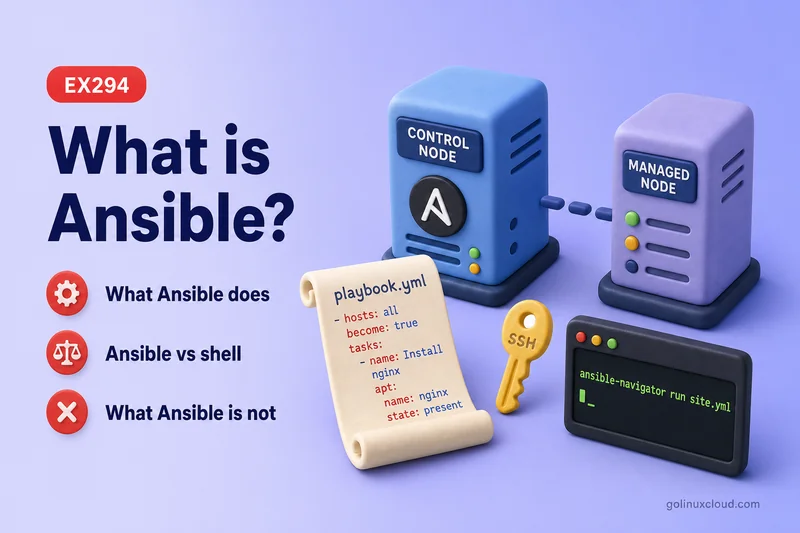
Ansible is agentless automation: you install it on a control node, define automation in YAML, and connect to managed systems using SSH for Linux and Unix hosts or transports such as WinRM and PSRP for Windows. Managed hosts never run a permanent Ansible daemon.
This page explains what Ansible is, why teams use it, how a run flows from control node to target, and where inventory, modules, playbooks, roles, collections, and vault fit. Commands were run on Rocky Linux 10 with ansible-core 2.16.
| Term | Meaning |
|---|---|
| Control node | Machine where Ansible is installed and commands run |
| Managed node | Host, VM, server, or device Ansible manages |
| Inventory | List of managed nodes and groups |
| Module | Unit of work Ansible runs on a target |
| Playbook | YAML file containing plays and tasks |
| Role | Reusable directory structure for tasks, files, templates, and handlers |
| Collection | Packaged Ansible content such as modules, plugins, roles, and docs |
Tested on: Rocky Linux 10.2 (Red Quartz); kernel 6.12.0-211.16.1.el10_2.0.1.x86_64; ansible-core 2.16.16.
~/ansible-project, inventory group lab, and playbooks in playbooks/. Use your own host names and paths if yours differ.
What is Ansible?
Ansible is an IT automation tool that configures systems, deploys software, and orchestrates tasks from a central control node. You write what should be true—a package installed, a service running, a file present—and Ansible makes the managed host match that state.
It is push-based by default: you run ansible or ansible-playbook on the control node, Ansible reads inventory, connects to each target over the configured transport, runs modules, and reports ok, changed, or failed per host. No agent listens on managed hosts between runs.
Ansible is not a monitoring product, a ticket system, or a substitute for knowing Linux. It automates administration you already understand—packages, users, services, firewalls, storage—not the need to read logs and troubleshoot when something breaks.
Why is Ansible Used?
Teams reach for Ansible when the same configuration steps repeat across many servers:
- Bootstrap new VMs with users, SSH keys, and baseline packages
- Enforce compliance—SELinux context, firewall rules, sudoers
- Deploy application configs from templates instead of editing files by hand
- Patch or upgrade services in a controlled, logged sequence
Compared with logging into fifty hosts manually, Ansible gives you one playbook, version control in Git, and a recap that shows which hosts changed. Compared with custom shell scripts, modules understand desired state and idempotency—you re-run safely after a partial failure.
Red Hat uses Ansible heavily for enterprise Linux automation, and the same engine works on any reachable host with the right connection plugin and Python for most Linux modules.
How Ansible Works
A typical run follows the same path whether you use an ad hoc command or a playbook:
- You execute Ansible on the control node.
- Ansible loads ansible.cfg and inventory to decide which hosts to touch.
- A connection plugin (usually SSH) opens a session to each managed node.
- Ansible copies module code to the target, runs it with Python, and collects JSON results.
- Handlers run if a task reported
changedand notified them. - Ansible prints a per-host recap and exits.
From rocky1, a connectivity check against rocky2 looks like this:
cd ~/ansible-project
ansible rocky2 -m ansible.builtin.ping
Sample output:
rocky2 | SUCCESS => {
    "ansible_facts": {
        "discovered_interpreter_python": "/usr/bin/python3"
    },
    "changed": false,
    "ping": "pong"
}
pong means SSH works, the remote user can log in, and Python is available—ansible.builtin.ping is a module check, not ICMP echo.
Ansible Architecture
Ansible splits into a control plane (your project on the control node) and targets (managed nodes). The diagram maps each architecture topic below to where it lives during a run.
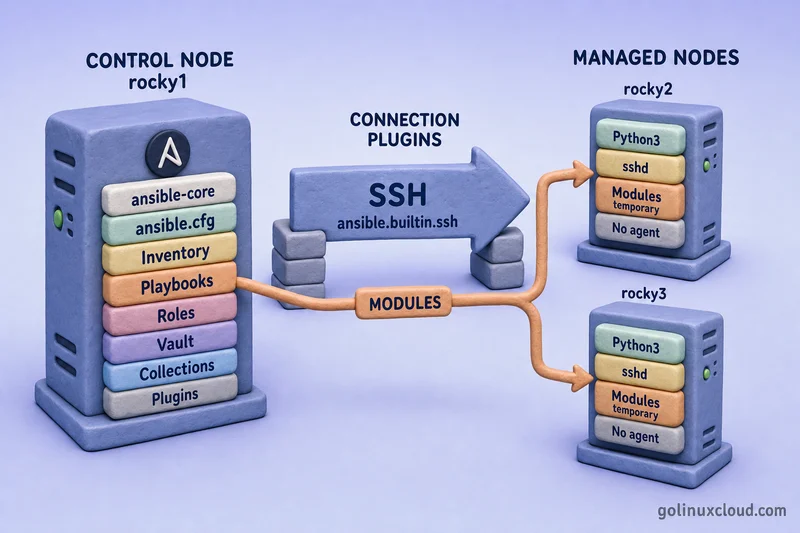
Read the diagram in three bands:
| Diagram zone | Architecture topics shown |
|---|---|
Left — rocky1 control node |
Control node, inventory, playbooks, roles, vault, collections, plugins (engine-side) |
| Center — connection layer | Connection plugins (ansible.builtin.ssh in the lab) |
Right — rocky2 / rocky3 |
Managed nodes — Python, SSH, modules run temporarily, no agent |
- Control node —
ansible-core, your project files, and optional navigator; nothing here is required on targets. - Inventory — host list and variables; tells Ansible which machines each play hits.
- Playbooks & roles — YAML automation and reusable role trees stored on the controller.
- Collections & plugins — collections supply modules; plugins extend Ansible (connection, filter, lookup, …) on the control side.
- Vault — encrypted secrets in the project, decrypted only when you run playbooks.
- Connection plugins — SSH (default here) carries tasks to managed nodes.
- Managed nodes — receive module code per task; modules execute, return JSON, and Ansible cleans up.
The subsections below expand each label on the diagram.
Control Node
The control node is the only machine that runs Ansible software. In this course that is rocky1—you keep ansible.cfg, inventory, playbooks, roles, vault files, and collections there.
You need Python 3, ansible-core (install guide), and network reachability to managed hosts. Optional ansible-navigator adds a TUI and execution environments for the same playbooks—configure it in ansible-navigator.yml and run plays through how to run Ansible playbooks.
ansible.cfg sets defaults so you do not repeat -i, -u, and --become on every command—see the ansible.cfg guide.
Managed Nodes
Managed nodes are servers Ansible changes—rocky2 while rocky1 stays the controller. They do not install ansible-core, ansible-playbook, or navigator.
For Linux targets you typically need sshd, Python 3, a user the control node can SSH as (the ansible user from lab setup), and passwordless sudo when tasks use become. Module code is copied for each task and removed afterward—nothing keeps listening for Ansible.
Inventory
Inventory lists hostnames, groups, and variables. Static INI or YAML files are the usual starting point:
[lab]
rocky2 ansible_host=192.168.56.109

[lab:vars]
ansible_user=ansible
ansible_become=true
Put ansible_host on each host line (or in host_vars/) so every machine keeps its own address. Use [lab:vars] for settings shared by the whole group—login user, become defaults, common package names—not per-host IPs.
Ansible resolves rocky2 to 192.168.56.109, applies group vars, and uses the list when a play says hosts: lab. Deep dive: Ansible inventory files.
Connection Plugins
Connection plugins define how Ansible reaches a host. The default on Linux is ansible.builtin.ssh—normal OpenSSH from the control node.
Other plugins cover WinRM and PSRP for Windows, local for localhost, and paramiko where needed. You select a plugin per host or group with ansible_connection in inventory when SSH is not the right transport.
Modules
Modules are units of work: install a package, manage a service, copy a file, create a user. Each module accepts parameters and returns JSON with changed, failed, and module-specific fields.
Built-in modules live in ansible.builtin.*. Extra modules ship in collections such as ansible.posix or community.general.
Playbooks
Playbooks are YAML files with one or more plays. Each play targets a host pattern and lists tasks; each task calls one module with parameters.
Playbooks are how you automate full scenarios—packages, firewall, templates, users—in one version-controlled file. Start with YAML syntax and playbook structure, then runnable playbook examples.
Plugins
Plugins extend Ansible itself—not the target system. Common types:
| Plugin type | Role |
|---|---|
| Connection | How to reach hosts (SSH, WinRM, …) |
| Inventory | Dynamic or constructed inventory sources |
| Filter | Transform variables in templates (| upper) |
| Lookup | Fetch values from files, vault, or external stores |
| Callback | Change playbook output formatting |
You touch connection and filter plugins early; inventory and callback plugins matter more in larger deployments.
Collections
Collections are versioned packages of modules, roles, plugins, and documentation. ansible-core ships ansible.builtin; you add ansible.posix, community.general, and others with EPEL RPMs or ansible-galaxy collection install on the control node.
On exams and production playbooks, use FQCN names (ansible.builtin.dnf, not bare dnf) so Ansible knows which collection provides the module.
Ansible Control Node vs Managed Node
| Control node | Managed node | |
|---|---|---|
| Ansible installed? | Yes (ansible-core, optional navigator) |
No |
| Holds inventory and playbooks? | Yes | No (unless a task copies files there) |
| Initiates SSH? | Yes (outbound) | Accepts SSH |
| Runs module code? | Only for localhost targets |
Yes, during each task |
| Course example | rocky1 |
rocky2 |
Do not install Ansible on managed nodes. Prepare them once with SSH, Python, and sudo—then drive all automation from the control node.
Ansible Inventory Explained
Inventory answers two questions for every run: which hosts, and what variables apply to them.
| Source | Format | Typical use |
|---|---|---|
| Static file | INI or YAML | Labs, small fleets, EX294-style projects |
| Directory | inventory/hosts + group_vars/ |
Team repos with layered variables |
| Dynamic script | JSON from cloud API | Auto-scaling groups in AWS, Azure, VMware |
Host variables override group variables; more specific groups override parents. Per-host connection settings such as ansible_host and ansible_port belong on the host line or in host_vars/; shared settings such as ansible_user fit group_vars/ or [group:vars].
Example static inventory:
[lab]
rocky2 ansible_host=192.168.56.109

[lab:vars]
ansible_user=ansible
Your project keeps inventory beside ansible.cfg so ansible rocky2 -m ping works without -i on every command.
Ansible Modules Explained
A module call is one action on one host. Ad hoc from the shell:
ansible rocky2 -m ansible.builtin.dnf -a "name=httpd state=present" -bThe same work in a playbook task:
- name: Ensure httpd is installed
  ansible.builtin.dnf:
    name: httpd
    state: present
become: true| Short name (legacy) | Preferred FQCN |
|---|---|
ping |
ansible.builtin.ping |
dnf |
ansible.builtin.dnf |
service |
ansible.builtin.service |
copy |
ansible.builtin.copy |
firewalld |
ansible.posix.firewalld |
sefcontext |
community.general.sefcontext |
If Ansible reports it cannot resolve a module, install the collection on the control node—not on managed nodes. Read options offline with ansible-doc ansible.builtin.dnf.
Ad hoc reference: Ansible ad-hoc commands.
Ansible Playbooks Explained
A playbook chains tasks into a scenario. This play targets rocky2, escalates with become, and covers package, firewall, and service work:
---
- name: Basic httpd on rocky2
  hosts: rocky2
  become: true
  tasks:
    - name: Install httpd
      ansible.builtin.dnf:
        name: httpd
        state: present

    - name: Allow httpd through firewalld
      ansible.posix.firewalld:
        service: httpd
        permanent: true
        state: enabled
        immediate: true

    - name: Enable and start httpd
      ansible.builtin.service:
        name: httpd
        state: started
        enabled: true
Save as site.yml on the control node and run:
ansible-playbook site.ymlAnsible loads inventory, matches hosts: rocky2, runs tasks in order, and prints a recap per host.
| Term | Meaning |
|---|---|
| Task | One module call with parameters |
| Play | Tasks applied to one host pattern |
| Playbook | YAML file with one or more plays |
What Makes Ansible Agentless?
Agentless means managed nodes do not run a permanent Ansible service. Each task:
- Opens SSH (or another connection)
- Pushes module code temporarily
- Executes with Python on the target
- Returns JSON and removes the module payload
You patch and harden managed nodes like any other Linux server—no extra daemon to monitor or upgrade for Ansible itself. The trade-off: the control node must reach targets when you run automation, and most modules expect Python on the target (bootstrap options with raw exist for edge cases).
What is Idempotency in Ansible?
Idempotency means applying the same automation again should not keep changing a system that already matches the desired state.
Run ansible.builtin.ping twice on a healthy host—the second run still succeeds with "changed": false:
ansible rocky2 -m ansible.builtin.pingSample output:
"changed": false,
    "ping": "pong"
State-aware modules such as ansible.builtin.dnf with state: present check before installing; ansible.builtin.service checks before restarting. After a successful playbook, a repeat run often shows changed=0 in the recap:
PLAY RECAP *********************************************************************
rocky2                     : ok=3    changed=0    unreachable=0    failed=0
Prefer modules over ansible.builtin.shell unless no module fits—shell tasks usually run every time unless you add your own guards.
Ad Hoc Commands vs Playbooks
Ad hoc (ansible) |
Playbook (ansible-playbook) |
|
|---|---|---|
| Best for | Quick checks, one-off fixes | Repeatable scenarios, many tasks |
| Defined in | Shell one-liner | YAML file in Git |
| Idempotency | Depends on module you pick | Same modules, easier to review |
| Course example | ansible rocky2 -m ping |
site.yml with httpd tasks |
Use ad hoc commands to verify SSH, gather one fact, or restart one service during troubleshooting. Use playbooks for anything you will run again, share with a team, or submit in an exam brief.
Ansible Roles and Collections
Roles and collections solve different problems. Roles organize your own automation into reusable folders inside the project. Collections package modules, plugins, and sometimes roles as installable content on the control node.
Ansible roles
A role is a standard directory layout Ansible loads automatically. Instead of one long site.yml with every task, you split work into roles/webserver/, roles/db/, and so on.
Typical layout:
roles/webserver/
├── defaults/main.yml    # default variables (easy to override)
├── vars/main.yml        # role variables (higher precedence)
├── tasks/main.yml       # tasks Ansible runs
├── handlers/main.yml    # restart/reload handlers
├── templates/           # .j2 files rendered to targets
├── files/               # static files copied as-is
└── meta/main.yml        # role dependencies
A play references the role by directory name:
---
- name: Web tier on lab hosts
  hosts: lab
  become: true
  roles:
    - webserver
Ansible runs roles/webserver/tasks/main.yml, applies defaults from defaults/main.yml, and picks up handlers and templates from the matching folders. Override a default in inventory without editing the role:
# group_vars/lab.yml
web_package: httpd
web_port: 8080
Roles shine when the same stack deploys to dev and prod—you change variables, not task lists. Structure deep dive: Ansible roles directory.
Ansible collections
Collections are versioned packages that extend what Ansible can execute. They ship modules, plugins, and often roles under a namespace:
| FQCN part | Example | Meaning |
|---|---|---|
| Namespace | ansible |
Publisher |
| Collection | posix |
Package name |
| Plugin/module | firewalld |
Specific module |
In a playbook you call ansible.posix.firewalld instead of bare firewalld so Ansible knows which collection provides the code.
Install on the control node (not on managed nodes):
ansible-galaxy collection install ansible.posixOr use an EPEL RPM on Rocky Linux (ansible-collection-ansible-posix)—see install Ansible. List installed collections:
ansible-galaxy collection listSample output:
# /usr/share/ansible/collections/ansible_collections
Collection    Version
------------- -------
ansible.posix 2.1.0
Collections can also contain roles under ansible_collections/NAMESPACE/NAME/roles/, but most beginners meet collections first for extra modules (community.general, ansible.utils).
Roles vs collections
| Role | Collection | |
|---|---|---|
| Lives where | Your project roles/ tree (or Galaxy role install) |
~/.ansible/collections/ or /usr/share/ansible/collections/ |
| Main purpose | Reuse your tasks, templates, handlers | Distribute modules, plugins, and upstream roles |
| Referenced as | roles: - webserver in a play |
FQCN in tasks: ansible.builtin.dnf, ansible.posix.mount |
| Typical source | You author it, or ansible-galaxy role install |
ansible-galaxy collection install, EPEL RPM, bundled in PyPI ansible package |
Use roles to keep your playbooks readable; use collections so modules beyond ansible.builtin are available on the control node.
Ansible Variables, Facts and Templates
Variables, facts, and templates are how playbooks adapt to each host without hard-coding hostnames, paths, or OS names in every task.
Variables
Variables hold values you reuse—package names, ports, file paths, feature flags. Ansible merges them from several sources; more specific scopes usually win over broader ones (inventory host vars beat group vars; play vars beat role defaults in many cases).
| Source | Example location | Typical content |
|---|---|---|
| Inventory | group_vars/lab.yml, host_vars/rocky2.yml |
ansible_user, web_port, environment tags |
| Playbook | vars: block in a play |
Values shared by all tasks in that play |
| Role | roles/webserver/defaults/main.yml |
Sensible defaults you override per group |
| Registered tasks | register: result on a prior task |
Command output, file checksums, API JSON |
| Vault | !vault blobs in vars files |
Passwords and API keys |
Define variables in a play instead of repeating literals:
vars:
  web_package: httpd
  web_port: 80
tasks:
  - name: Install web package
    ansible.builtin.dnf:
      name: "{{ web_package }}"
      state: present
Double curly braces {{ }} are Jinja2 expressions—Ansible evaluates them on the control node before or during the task.
Set per-host values on the host line or in host_vars/:
[lab]
rocky2 ansible_host=192.168.56.109# host_vars/rocky2.yml
web_port: 8080Shared values for every host in the group go under [lab:vars] or group_vars/lab.yml:
[lab:vars]
ansible_user=ansible
web_package=httpd
Capture output from one task for the next with register:
- name: Check if httpd config exists
  ansible.builtin.stat:
    path: /etc/httpd/conf/httpd.conf
  register: httpd_conf

- name: Report status
  ansible.builtin.debug:
    msg: "Config present: {{ httpd_conf.stat.exists }}"
Precedence rules and extra patterns: Ansible variables.
Facts
Facts are variables Ansible discovers about a managed host—OS family, IP addresses, memory, mount points. Most plays gather them automatically with gather_facts: true (the default). The ansible.builtin.setup module collects them.
List distribution-related facts for rocky2:
ansible rocky2 -m ansible.builtin.setup -a "filter=ansible_distribution*"Sample output:
rocky2 | SUCCESS => {
    "ansible_facts": {
        "ansible_distribution": "Rocky",
        "ansible_distribution_major_version": "10",
        "ansible_distribution_version": "10.2",
        ...
    },
    "changed": false
}
Check OS family for conditional tasks:
ansible rocky2 -m ansible.builtin.setup -a "filter=ansible_os_family"Sample output:
rocky2 | SUCCESS => {
    "ansible_facts": {
        "ansible_os_family": "RedHat",
        ...
    },
    "changed": false
}
Use facts in when so one playbook covers multiple distros:
- name: Install web package on Red Hat family
  ansible.builtin.dnf:
    name: "{{ web_package }}"
    state: present
  when: ansible_os_family == "RedHat"
Custom facts live under /etc/ansible/facts.d/ on managed nodes; setup picks them up on the next run. Deep dive: Ansible facts.
Templates
Templates are Jinja2 text files (.j2) rendered on the control node, then copied to targets. Use them when a config file should differ per host—hostname, port, environment banner—while sharing one template in Git.
Example templates/motd.j2:
Welcome to {{ inventory_hostname }}
OS: {{ ansible_distribution }} {{ ansible_distribution_version }}
Managed by Ansible
Deploy with the template module:
- name: Deploy motd from template
  ansible.builtin.template:
    src: motd.j2
    dest: /etc/motd
    owner: root
    group: root
    mode: "0644"
Ansible substitutes {{ inventory_hostname }} and fact variables before writing /etc/motd on the target. Pair templates with handlers so services restart only when the rendered file changes.
Common Jinja2 tools in Ansible: {% if %}, {% for %}, filters such as | default('httpd') and | upper. Walkthrough with real configs: Jinja2 templates in Ansible.
Ansible Handlers
Handlers are special tasks that run only when another task notifies them—and only if that task reported changed. The usual pattern is: deploy a config file, then restart or reload the service if the file actually changed.
Without handlers you might restart httpd after every playbook run, even when the template was already correct.
tasks:
  - name: Deploy httpd config
    ansible.builtin.template:
      src: httpd.conf.j2
      dest: /etc/httpd/conf/httpd.conf
    notify: Restart httpd

handlers:
  - name: Restart httpd
    ansible.builtin.service:
      name: httpd
      state: restarted
The notify value must match the handler name exactly. If the template task returns ok with changed: false, Ansible skips the handler. If the file changes, Ansible queues the handler and runs it once at the end of the play—even when several tasks notify the same handler.
| Regular task | Handler | |
|---|---|---|
| Runs | Every play unless skipped with when |
Only when notified and notifier changed |
| Typical use | Install, copy, template, user | Restart, reload, cache clear |
| Order | Top to bottom in tasks |
After tasks in the play |
Full patterns, edge cases, and role examples: Ansible handlers.
Ansible Vault
Ansible Vault encrypts sensitive content in your repo—passwords, API keys, private keys—so playbooks can stay in Git without plain-text secrets. Vault is built into ansible-core and works on the control node.
| Approach | Typical use |
|---|---|
Inline variable (ansible-vault encrypt_string) |
One secret in group_vars or a play |
Whole file (ansible-vault create or encrypt) |
Several related secrets in one file |
Official Vault docs warn against typing secret content directly on the command line—it can end up in shell history. Use --stdin-name and enter the value at the prompt:
ansible-vault encrypt_string --ask-vault-pass --stdin-name 'db_password'Type the secret when prompted, press Ctrl+D, and Ansible prints the encrypted db_password block. For a password file workflow:
ansible-vault encrypt_string --vault-password-file ~/.vault_pass --stdin-name 'db_password'The vault password is prompted securely (or read from your vault password file), but the secret value must also be supplied through stdin or prompt mode to avoid shell history exposure.
Copy the db_password: !vault | block into group_vars/ or play vars. Run playbooks that use encrypted vars:
ansible-playbook site.yml --ask-vault-passFull walkthrough with playbook examples: Ansible vault tutorial.
Ansible Galaxy
Ansible Galaxy is a public hub where authors publish roles and collections. The ansible-galaxy CLI on your control node downloads that content into ~/.ansible/ or paths you configure—it does not run playbooks for you.
| Galaxy delivers | You install with | Ends up as |
|---|---|---|
| Collection (modules, plugins, roles) | ansible-galaxy collection install NAMESPACE.NAME |
~/.ansible/collections/ or system path |
| Role (tasks, templates, handlers) | ansible-galaxy role install NAMESPACE.ROLE |
~/.ansible/roles/ or roles_path |
Install a collection from Galaxy when no distro RPM exists:
ansible-galaxy collection install ansible.utilsList what Ansible already sees (RPM plus Galaxy installs):
ansible-galaxy collection listSample output on a Rocky 10 lab with EPEL ansible.posix:
# /usr/share/ansible/collections/ansible_collections
Collection    Version
------------- -------
ansible.posix 2.1.0
Search Galaxy before you install a role someone else wrote:
ansible-galaxy role search nginx --author geerlingguyInstall a role into your project roles/ tree:
ansible-galaxy role install geerlingguy.nginx -p ./rolesReference it from a playbook with roles: - geerlingguy.nginx or copy the role into your own namespace when you need to customize it.
On RHEL family hosts you can often install collections as system RPMs (ansible-collection-ansible-posix) instead of Galaxy—see install Ansible Method 2. Galaxy fills gaps when you need a newer version or a collection that is not packaged yet.
Galaxy is a distribution channel, not part of the engine. You still author inventory and playbooks locally; Galaxy only fetches reusable content to the control node.
Ansible Community Package vs ansible-core
| Package | What you get |
|---|---|
ansible-core |
Engine, CLI tools, ansible.builtin modules |
ansible (PyPI community package) |
ansible-core plus many bundled collections |
| Collection RPMs (EPEL) | Individual collections as system packages on RHEL family |
On Rocky Linux 10 the reliable path is dnf install ansible-core, then add collections as needed—see install Ansible. The old dnf install ansible metapackage did not resolve on the tested Rocky 10.2 repo set; verify with dnf search ansible on your host.
ansible-navigator and dev tools are separate PyPI installs (ansible-dev-tools or ansible-navigator[ansible-core]), not part of ansible-core itself.
Ansible vs Red Hat Ansible Automation Platform
| ansible-core (open source) | Ansible Automation Platform (AAP) | |
|---|---|---|
| Interface | CLI, optional navigator TUI | Web controller, API, RBAC |
| Content | Your Git repos, Galaxy | Private automation hub, signed collections |
| Execution | Your control node / EE images | Managed controllers, job templates, schedules |
| Support | Community / vendor docs | Red Hat subscription |
EX294 and most learning labs focus on command-line automation with ansible-core, inventory, playbooks, roles, vault, and collections. AAP wraps the same concepts for teams that need central job history, access control, and curated content—not a replacement for knowing playbooks.
Ansible vs Shell Scripts
Shell scripts list commands in order. Ansible modules describe desired state. The difference shows up when you run the same automation twice.
Example: install and enable httpd
A small Bash script on rocky2 might look like this:
#!/bin/bash
dnf install -y httpd
systemctl enable --now httpd
Run it again tomorrow and both commands execute again—dnf may exit cleanly if the package is already there, but the script never reports whether anything actually changed, and you still invoked package and service tools on every host.
The same goal with Ansible modules in a playbook:
- name: Ensure httpd package is installed
  ansible.builtin.dnf:
    name: httpd
    state: present
  become: true

- name: Enable and start httpd
  ansible.builtin.service:
    name: httpd
    state: started
    enabled: true
  become: true
Or as one ad hoc task from the control node:
ansible rocky2 -m ansible.builtin.dnf -a "name=httpd state=present" -bOn the first run, when httpd was not installed yet, Ansible reported a change:
rocky2 | CHANGED => {
    "changed": true,
    "msg": "Installed: httpd-2.4.62-...",
    "rc": 0
}
Run the same command again after httpd is already present:
ansible rocky2 -m ansible.builtin.dnf -a "name=httpd state=present" -bSample output:
rocky2 | SUCCESS => {
    "changed": false,
    "msg": "Nothing to do",
    "rc": 0,
    "results": []
}
"changed": false and "Nothing to do" mean Ansible checked state instead of blindly re-installing. Across ten hosts, the recap line ok=10 changed=0 tells you the fleet already matched the playbook—something a shell loop rarely gives you without extra scripting.
| Approach | You write | Second identical run |
|---|---|---|
| Shell script | Imperative commands (dnf install, systemctl) |
Commands execute again; you infer whether work was needed |
| Ansible module | Desired state (state: present, state: started) |
Usually ok with changed: false when already correct |
Use ansible.builtin.command or ansible.builtin.shell when no module exists—for example a vendor installer with no Ansible module yet. For packages, services, files, users, and firewalls, prefer modules so every host returns structured JSON you can scan in one recap.
Is Ansible Infrastructure as Code?
Yes. Ansible playbooks are commonly used as Infrastructure as Code because they describe system configuration in version-controlled YAML files. Ansible is strongest for configuration management, application deployment, and orchestration. For cloud resource provisioning, teams often combine Terraform for infrastructure creation with Ansible for operating system and application configuration.
Ansible vs Terraform, Puppet and Chef
| Tool | Primary focus | Agent on nodes? |
|---|---|---|
| Ansible | Configuration, app deploy, ad hoc ops | No (SSH push) |
| Terraform | Infrastructure as code (cloud APIs) | No |
| Puppet / Chef | Long-running config management | Yes (agent) |
Terraform provisions VMs, networks, and DNS records; Ansible configures what runs inside those VMs. Teams often use both—Terraform for cloud shape, Ansible for OS and application state. Puppet and Chef continuously enforce catalog state with agents; Ansible pushes when you run a playbook unless you schedule runs with AWX/AAP or cron.
Ansible fits intermittent administration and exam-style briefs; it is not a full cloud provisioning tool on its own.
Common Use Cases of Ansible
| Use case | Example modules / patterns |
|---|---|
| OS baseline | user, group, authorized_key, dnf |
| Web stack | template, service, firewalld |
| Security | sefcontext, selinux, firewalld, vault for secrets |
| Storage | filesystem, mount, lvol |
| Containers / images | ansible.builtin.command, collections for Podman/K8s |
| Network devices | Collections with network_cli connection |
EX294-style briefs usually combine packages, services, users, SELinux, firewalld, storage, and templates in one playbook—exactly the building blocks above.
Advantages and Limitations of Ansible
| Advantages | Limitations |
|---|---|
| Agentless SSH model | Needs connectivity from control node at run time |
| Readable YAML playbooks | Large unmanaged YAML can become hard to refactor |
| Large module ecosystem | Wrong collection or missing FQCN causes module errors |
| Idempotent modules | Raw shell tasks are not idempotent by default |
| Works with Git and CI | Not a continuous drift detector without scheduled runs |
| Same skills on laptop and server | Windows control node not supported natively |
Ansible excels at push automation from a control node you already trust—not at replacing monitoring, ticketing, or deep Linux troubleshooting skills.
How to Start Learning Ansible
Follow this order in the GoLinuxCloud Ansible track:
- EX294 practice lab setup — VMs, SSH, sudo
- Install ansible-core on the control node only
- ansible.cfg and project directory structure
- Inventory files and ad-hoc commands
- Playbook examples, then roles, handlers, and vault
Run ansible rocky2 -m ansible.builtin.ping from your project directory before you write multi-task playbooks—if ping fails, fix SSH and inventory first.
Optional map: RHCE EX294 exam objectives.
References
- Ansible getting started — basic concepts
- Ansible architecture and workflow
- Red Hat Ansible Automation Platform
Summary
Ansible is agentless automation from a control node to managed hosts over SSH, WinRM, PSRP, or other connection plugins. Inventory names targets, modules perform work, playbooks describe ordered desired state, and roles and collections keep large projects maintainable. Facts, variables, templates, handlers, and vault cover real-world scenarios; ansible-core is the engine most labs install, with Ansible Automation Platform as the enterprise control plane.
