
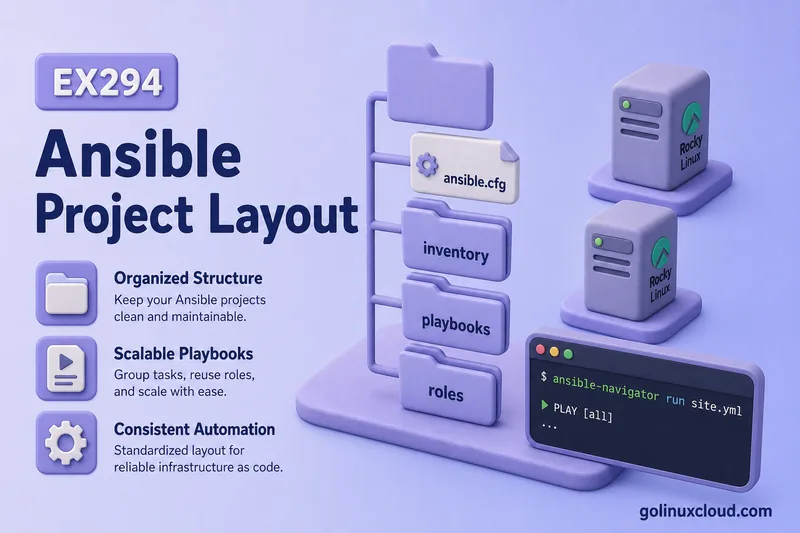
An Ansible project directory is the folder on your control node that holds ansible.cfg, inventory, playbooks, roles, and variables together. One root path keeps paths predictable: you cd there, run Ansible, and the same tree works on your laptop, a lab VM, or a teammate’s machine.
This guide covers why layout matters, what each folder is for, common mistakes, and two reference trees—a small lab you can copy and a larger environment-based layout. Commands were tested on Rocky Linux 10 with ansible-core 2.16. Pair the tree with YAML syntax and playbook structure before you scale past one playbook file.
Tested on: Rocky Linux 10.2 (Red Quartz); kernel 6.12.0-211.16.1.el10_2.0.1.x86_64; ansible-core 2.16.16.
~/ansible-project, inventory group lab, and playbooks in playbooks/. Use your own host names and paths if yours differ.
What is an Ansible Project Directory Structure?
The project directory structure is how you organize Ansible content on the control node: configuration at the root, inventory that names hosts, playbooks you run, roles for reusable automation, and variable files that feed templates and tasks.
Ansible does not mandate one official tree, but conventions are strong enough that teams—and exams such as RHCE EX294—expect a recognizable layout. The project root is the directory that contains ansible.cfg; everything else hangs off that anchor.
Why Directory Structure Matters in Ansible
Without a consistent layout:
- You repeat
-i,-u, and--becomebecauseansible.cfgis missing or you run commands from the wrong directory. - Playbooks reference
../files/paths that break when a teammate clones the repo. - Variables land in random YAML files and stop applying because
inventory/group_vars/lab.ymlwas namedvars.yml. - Roles are not found because they sit outside
roles_path.
A standard tree fixes those problems. You archive one directory per lab, put it in Git, and onboard new contributors without explaining where the httpd template lives.
Basic Ansible Project Layout for Beginners
Day one needs only three pieces:
| Path | Purpose |
|---|---|
ansible.cfg |
Defaults—inventory path, remote user, become |
inventory/ |
Hosts and groups |
playbooks/ |
YAML files you run with ansible-playbook |
That is enough for ad hoc commands and simple plays. Add roles/, inventory/group_vars/, and inventory/host_vars/ when tasks repeat or variables multiply.
Recommended Ansible Project Directory Structure
A practical full layout for growing projects:
ansible-project/
├── ansible.cfg
├── ansible-navigator.yml   # optional, for navigator/EE settings
├── inventory/
│   ├── hosts
│   ├── group_vars/
│   │   └── lab.yml
│   └── host_vars/
│       └── rocky2.yml
├── playbooks/
│   ├── site.yml
│   ├── web.yml
│   └── users.yml
├── roles/
│   └── webserver/
│       ├── tasks/
│       ├── handlers/
│       ├── templates/
│       ├── files/
│       ├── vars/
│       ├── defaults/
│       └── meta/
├── requirements.yml
├── README.md
└── .gitignore
Place inventory/group_vars/ and inventory/host_vars/ under inventory/ so ad hoc commands such as ansible rocky2 -m ping resolve variables without a playbook. Navigator settings: ansible-navigator.yml.
The annotated diagram matches this tree and labels each folder, including the expanded webserver role structure:
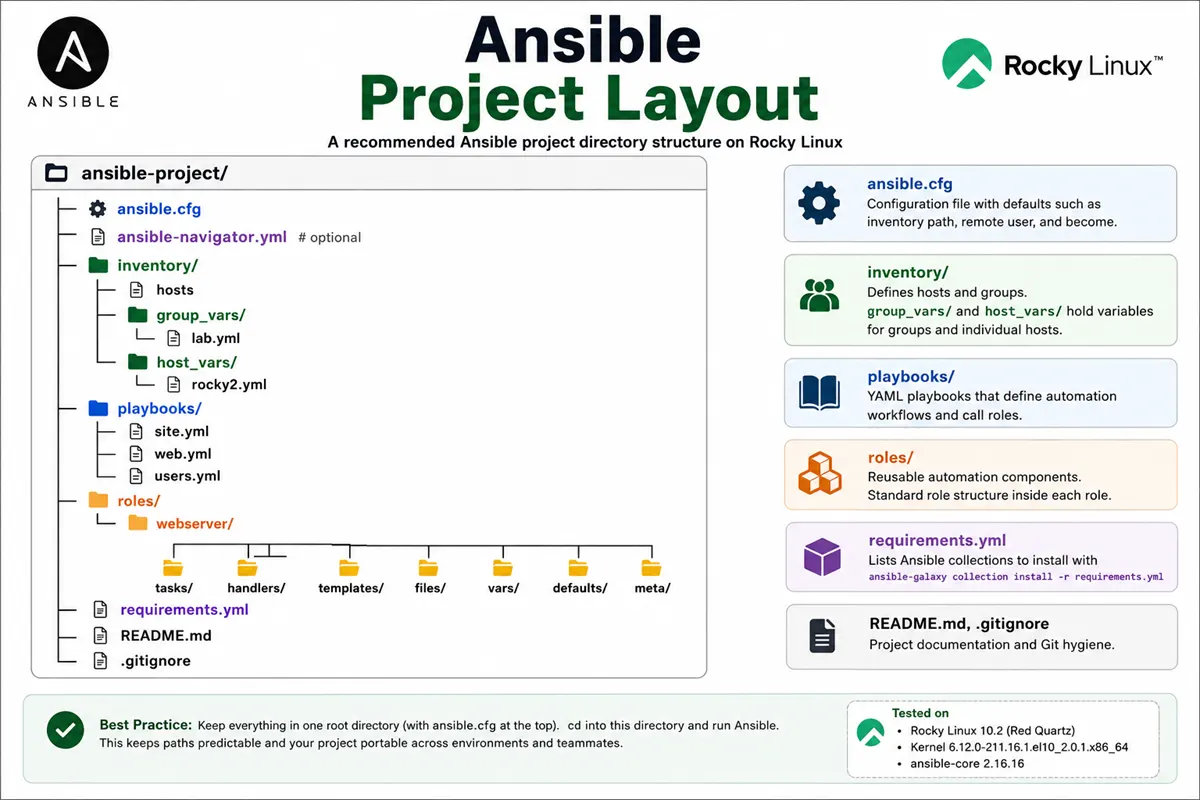
Role internals (tasks/, handlers/, …) are standardized inside each role folder—see Ansible roles directory structure.
Small Lab Project Structure
Minimal tree used on rocky1 in this course—copy this layout first:
~/ansible-project/
├── ansible.cfg
├── ansible-navigator.yml   # optional
├── inventory/
│   ├── hosts
│   ├── group_vars/
│   └── host_vars/
├── playbooks/
│   └── ping-lab.yml
├── roles/
└── requirements.yml
Create missing directories:
mkdir -p ~/ansible-project/{inventory/group_vars,inventory/host_vars,playbooks,roles}List the tree:
find ~/ansible-project -print | sortSample output:
/home/ansible/ansible-project
/home/ansible/ansible-project/ansible.cfg
/home/ansible/ansible-project/inventory
/home/ansible/ansible-project/inventory/group_vars
/home/ansible/ansible-project/inventory/host_vars
/home/ansible/ansible-project/inventory/hosts
/home/ansible/ansible-project/playbooks
/home/ansible/ansible-project/playbooks/ping-lab.yml
/home/ansible/ansible-project/roles
Confirm Ansible uses the project config:
cd ~/ansible-project
ansible --version
Sample output:
ansible [core 2.16.16]
  config file = /home/ansible/ansible-project/ansible.cfg
  ...
Verify active settings and inventory loading:
ansible-config dump --only-changed
ansible-inventory --list
ansible-config dump --only-changed shows non-default values from your project ansible.cfg. ansible-inventory --list confirms hosts, groups, and variables from inventory/hosts, inventory/group_vars/, and inventory/host_vars/ are merged correctly.
Sample output from ansible-config dump --only-changed:
DEFAULT_HOST_LIST(/home/ansible/ansible-project/ansible.cfg) = ['/home/ansible/ansible-project/inventory/hosts']
DEFAULT_REMOTE_USER(/home/ansible/ansible-project/ansible.cfg) = ansible
Sample output from ansible-inventory --list (abbreviated):
{
    "_meta": {
        "hostvars": {
            "rocky2": {
                "ansible_host": "192.168.56.109",
                "ansible_user": "ansible"
            }
        }
    },
    "lab": {
        "hosts": [
            "rocky2"
        ]
    }
}
Root-Level Files in an Ansible Project
Files at the project root anchor the repo. Details for ansible.cfg live in the ansible.cfg guide.
| File | Purpose |
|---|---|
ansible.cfg |
Project defaults—inventory path, remote user, roles path |
inventory/ |
Hosts, groups, inventory/group_vars/, and inventory/host_vars/ |
requirements.yml |
Pin collections; install with ansible-galaxy collection install -r requirements.yml |
ansible-navigator.yml |
Optional navigator UI and execution-environment settings |
README.md |
Run instructions for humans—Ansible does not read it at runtime |
.gitignore |
Exclude retries, logs, artifacts, and vault passwords (sample below) |
requirements.yml does not install collections by itself—you must run ansible-galaxy collection install -r requirements.yml on the control node after editing the file.
Example .gitignore:
*.retry
.ansible/
ansible-navigator.log
artifacts/
.vault_pass
__pycache__/
Never commit vault password files or plain-text production secrets.
Inventory Directory Structure
Inventory answers which hosts and which variables apply. Layout choices depend on fleet size.
Single inventory file
Best for labs and small fleets—one inventory/hosts:
[lab]
rocky2 ansible_host=192.168.56.109

[lab:vars]
ansible_user=ansible
Put ansible_host on each host line (or in inventory/host_vars/rocky2.yml), not in [lab:vars], when hosts have different addresses.
Multiple environment inventories
Larger teams split by environment. A small dev vs prod tree keeps variables beside each inventory:
inventories/
├── dev/
│   ├── hosts
│   ├── group_vars/
│   │   └── lab.yml
│   └── host_vars/
│       └── rocky2.yml
└── prod/
    ├── hosts
    ├── group_vars/
    │   └── web.yml
    └── host_vars/
        └── web1.yml
Point ansible.cfg at one file, or pass -i inventories/prod/hosts per run. Some teams use separate ansible.cfg snippets or wrapper scripts per environment. The dev/ tree mirrors the single-file lab layout; prod/ adds group-specific vars without mixing secrets across environments.
Inventory variables layout
Keep variable directories next to the inventory source. For a single-file lab inventory:
inventory/
├── hosts
├── group_vars/
│   └── lab.yml
└── host_vars/
    └── rocky2.yml
Ansible loads group_vars/ and host_vars/ through the default host_group_vars vars plugin. Placement can be inventory-related or playbook-related depending on how you run commands; for ad hoc commands such as ansible rocky2 -m ping there is no playbook, so keeping vars under inventory/ is clearer.
Group file name must match the group name (lab.yml for [lab]):
# inventory/group_vars/lab.yml
web_package: httpd
ntp_servers:
  - 0.pool.ntp.org
Host vars override group vars for the same key:
# inventory/host_vars/rocky2.yml
ansible_host: 192.168.56.109
web_port: 8080
Deep dive: Ansible inventory files.
Playbooks Directory Structure
Keep runnable YAML under playbooks/ so the project root stays for config and inventory.
Site playbook
site.yml (or playbooks/site.yml) is the main entry point—it imports or includes role-based plays for the whole stack:
---
- import_playbook: web.yml
- import_playbook: db.yml
Task-specific playbooks
Focused files for one job: httpd.yml, users.yml, patching.yml. Easier to run and review than one giant file.
Environment-specific playbooks
When dev and prod differ, name plays clearly (deploy-dev.yml, deploy-prod.yml) or use the same playbook with -e environment=prod and matching inventory/group_vars/. Avoid copying entire playbooks when variables can carry the difference.
Run from the project root:
cd ~/ansible-project
ansible-playbook playbooks/ping-lab.yml
Sample output:
PLAY [Ping lab hosts] **********************************************************

TASK [Ping] ********************************************************************
ok: [rocky2]

PLAY RECAP *********************************************************************
rocky2                     : ok=1    changed=0    unreachable=0    failed=0
Next: Ansible playbook examples.
Roles Directory Structure
Each role is a subdirectory of roles/ with a fixed internal layout:
roles/webserver/
├── defaults/main.yml
├── vars/main.yml
├── tasks/main.yml
├── handlers/main.yml
├── templates/
├── files/
├── meta/main.yml
└── README.md
tasks
tasks/main.yml lists module calls—the work Ansible runs when the role is applied.
handlers
handlers/main.yml holds notified tasks (usually service restarts).
templates
Jinja2 .j2 files rendered with ansible.builtin.template.
files
Static files copied with ansible.builtin.copy without templating.
vars
Role variables with higher precedence than defaults/.
defaults
Low-precedence variables users override in inventory or play vars.
meta
Role metadata and role dependencies (dependencies: in meta/main.yml).
Invoke from a playbook:
roles:
  - webserver
Where to Put Variables in an Ansible Project
Variables can live in several places; pick a convention and keep it consistent.
| Location | Scope | When to use |
|---|---|---|
Inline in inventory/hosts |
Group or host | Small labs—[lab:vars] for shared settings |
inventory/group_vars/ |
All hosts in a group | Shared packages, DNS, NTP (lab.yml for [lab]) |
inventory/host_vars/ |
One inventory hostname | Per-host IP, ports, rack labels |
roles/*/defaults/ |
Role with low precedence | Sensible defaults users override |
roles/*/vars/ |
Role with higher precedence | Values that should not be overridden casually |
vars: in a playbook |
That play only | Short-lived or play-specific values |
group_vars vs host_vars: use group vars for settings every lab host shares (ansible_user, web_package). Use host vars for anything unique to one machine (ansible_host, web_port). Host vars beat group vars for the same key.
Avoid a random root-level vars/ directory unless you explicitly import those files—Ansible does not load them automatically. Prefer inventory/group_vars/ naming so the host_group_vars plugin picks up files by group name.
files vs templates Directory
Both hold content the control node pushes to targets; the module you choose differs.
| Directory | Module | When to use |
|---|---|---|
files/ |
ansible.builtin.copy |
Static content—binaries, certs, fixed motd text |
templates/ |
ansible.builtin.template |
Config that needs {{ variables }} or {% if %} |
Ansible resolves local src paths for modules such as copy and template through its task/search path—not simply the project root—and local paths behave differently from remote paths on managed hosts.
If your playbooks live under playbooks/, keep playbook-specific files under playbooks/files/ and templates under playbooks/templates/, or move them into a role under roles/name/files/ and roles/name/templates/:
playbooks/
├── site.yml
├── files/
└── templates/

roles/webserver/
├── files/
└── templates/
Avoid a root-level files/ or templates/ directory unless your main playbook also lives at the project root or you reference those paths explicitly. See Jinja2 templates.
Collections Directory Structure
Collections install to paths in collections_path (often ~/.ansible/collections plus system RPM paths). You rarely commit collection source into the project; you pin versions in requirements.yml and install on the control node.
Optional project-local path:
# ansible.cfg
collections_path = ./collections:~/.ansible/collections:/usr/share/ansible/collections
Then collections/ansible_collections/... can live in the repo for air-gapped labs. Most teams rely on Galaxy or EPEL RPMs on the controller—see install Ansible.
Vault Files and Secrets Structure
Encrypt sensitive variables under inventory:
inventory/group_vars/
├── lab.yml
└── lab_vault.yml    # encrypted with ansible-vault
Or vault-only vars under inventory/group_vars/lab/vault.yml in directory-style inventory. Run playbooks with --ask-vault-pass or --vault-password-file ~/.vault_pass (chmod 600). Start with Ansible Vault; for splitting encrypted group_vars and host_vars safely in Git, see Vault with group_vars and host_vars.
Never store .vault_pass in the repo—list it in .gitignore.
Artifacts, Logs and Temporary Files
Ansible and navigator create files you usually exclude from Git:
| File / dir | Source |
|---|---|
*.retry |
Failed playbook host retry list |
ansible-navigator.log |
Navigator TUI session log |
.ansible/ |
Local ansible data under home or project |
artifacts/ |
Navigator run artifacts (if configured) |
Add them to .gitignore. Delete or rotate logs on shared lab VMs when disk matters.
Git-Friendly Ansible Project Structure
Practices that keep repos safe and cloneable:
- One project root with
ansible.cfg, inventory, and playbooks requirements.ymlfor collection versionsREADME.mdwith run instructions.gitignorefor retries, logs, vault passwords,.ansible/- Encrypted vault for secrets; no plaintext passwords in YAML
- Relative paths in
ansible.cfgand playbooks
Tag releases or use branches when production inventory diverges from dev.
Larger Environment-Based Project Structure
When dev, staging, and prod diverge:
ansible-automation/
├── ansible.cfg
├── requirements.yml
├── inventories/
│   ├── dev/
│   │   ├── hosts
│   │   └── group_vars/
│   └── prod/
│       ├── hosts
│       └── group_vars/
├── playbooks/
│   ├── site.yml
│   └── patch.yml
├── roles/
│   ├── common/
│   └── webserver/
├── library/              # rare: custom modules
└── filter_plugins/       # rare: custom filters
Run against prod explicitly:
ansible-playbook -i inventories/prod/hosts playbooks/site.ymlSame roles and playbooks; inventory and vars change per environment.
Common Ansible Directory Structure Mistakes
| Mistake | Why it hurts | Fix |
|---|---|---|
| Running Ansible outside project root | Wrong ansible.cfg and inventory |
cd to directory containing ansible.cfg |
ansible_host in [group:vars] |
Every host gets the same IP | Per-host line or inventory/host_vars/ |
group_vars/foo.yml but group is [lab] |
Variables not loaded | File under inventory/group_vars/ must match group name |
Role outside roles_path |
Could not find role |
Put role under roles/; check ansible.cfg |
| Playbook paths from wrong cwd | File not found | Run from project root; use playbooks/name.yml |
| Secrets in Git plaintext | Credential leak | ansible-vault encrypt; .gitignore vault pass |
Editing only /etc/ansible/hosts |
Mixes system and project config | Use project inventory/ |
Recommended Structure for This Course
On rocky1, use ~/ansible-project (or ~/ex294-project if you already created that name) with:
| Path | Course use |
|---|---|
inventory/hosts |
rocky2 managed host; per-host ansible_host |
inventory/group_vars/ / inventory/host_vars/ |
Variables without cluttering inventory |
playbooks/ |
Course playbooks and ping-lab.yml |
roles/ |
Role tasks as labs progress |
requirements.yml |
Pin ansible.posix, community.general when needed |
Aligns with what is Ansible architecture and RHCE EX294 objectives.
What comes next
- Ansible inventory files — groups, children, variables
- Ansible ad-hoc commands — modules from the CLI
- Ansible playbook examples — multi-task workflows
References
Summary
An Ansible project is one directory on the control node with ansible.cfg at the root, inventory/ (including inventory/group_vars/ and inventory/host_vars/), playbooks/ for runnable YAML, and roles/ with role-level files/ and templates/ as automation grows. Pin collections in requirements.yml, keep secrets in vault, and cd to the project root before every run. Start with the small lab tree on rocky1; split inventories by environment when fleets scale.
