
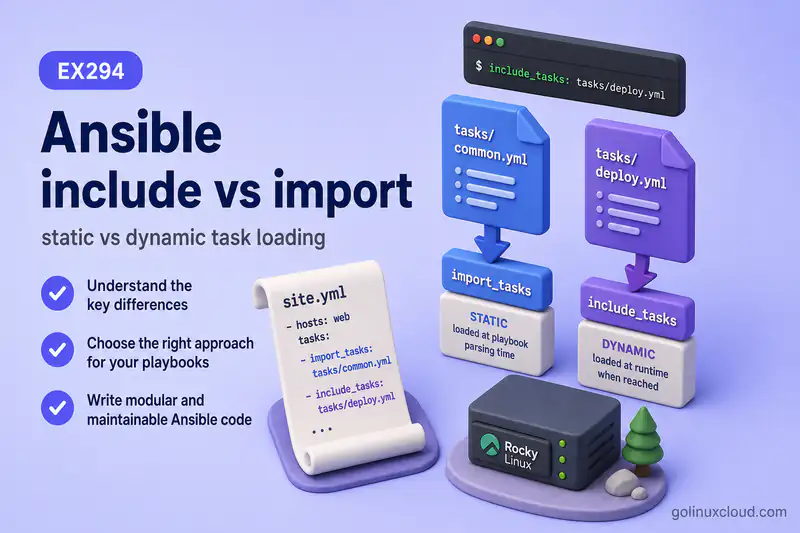
Ansible lets you reuse task lists in separate YAML files. The two main modules are import_tasks (static) and include_tasks (dynamic). They look similar in playbooks, but they behave differently with conditionals, loops, tags, and ansible-playbook --list-tasks.
Do not confuse include_tasks with include_vars: include_tasks loads tasks to execute, while include_vars loads variable data.
This guide explains when to use each, how loading type affects execution, and tested examples you can run on a lab host. It does not compare role design or repeat block/rescue patterns. Store reusable task files under tasks/ in the project directory structure tree.
Tested on: Rocky Linux 10.2 (Red Quartz); kernel 6.12.0-211.16.1.el10_2.0.1.x86_64; ansible-core 2.16.16.
~/ansible-project, inventory group lab, and playbooks in playbooks/. Use your own host names and paths if yours differ.
What are include_tasks and import_tasks in Ansible?
Both modules pull tasks from an external file into a play:
ansible.builtin.import_tasks— static import; tasks are merged at parse timeansible.builtin.include_tasks— dynamic include; the include runs during execution
The official reuse guide groups static reuse under import_* and dynamic reuse under include_*.
Why Split Tasks into Separate Files?
Split large playbooks into focused files:
tasks/install.yml— packages and prerequisitestasks/config.yml— templates and settingstasks/validate.yml— smoke checkstasks/cleanup.yml— optional teardown
The main playbook stays readable; each file owns one slice of work.
include_tasks vs import_tasks: Quick Difference
| Feature | import_tasks |
include_tasks |
|---|---|---|
| Loading type | Static | Dynamic |
| Parsed | Before execution | During execution |
| Best for | Predictable task reuse | Runtime task selection |
| Loops on statement | Not suitable | Suitable |
| Runtime variables in file name | Limited | Good fit |
| Tags inheritance | More straightforward | Needs care / apply |
Can use apply |
No | Yes |
| Task listing | More predictable | Less predictable |
| Common use | Fixed task file | Conditional or looped task file |
What is import_tasks?
import_tasks inlines the task file when Ansible loads the playbook. The imported tasks behave like tasks written directly in the play—for listing, tagging, and many conditionals.
Use it when the task file path is fixed and you want predictable parse-time behavior.
What is include_tasks?
include_tasks runs as a task. Ansible reads and executes the file when the include is reached. That makes runtime decisions possible: OS-specific files, loops over file names, or conditional includes.
Use it when the file choice depends on variables, facts, or loop data.
Static vs Dynamic Task Loading
Static imports are resolved up front. Dynamic includes stay as a single task until execution reaches them.
Practical impact:
--list-tasksshows imported inner tasks; it often lists only the include wrapper for dynamic includeswhenonimport_tasksfilters imported tasks;whenoninclude_tasksfilters the include statement- Loops belong on
include_tasks, notimport_tasks
Syntax of import_tasks and include_tasks
Create shared task files:
mkdir -p ~/ansible-project/playbooks/tasks
cat > ~/ansible-project/playbooks/tasks/install.yml << 'EOF'
---
- name: Install slice task
  ansible.builtin.debug:
    msg: "install task file ran for {{ task_label | default('unknown') }}"
EOF
Static import:
- name: Import fixed install tasks
  ansible.builtin.import_tasks: tasks/install.yml
  vars:
    task_label: import-demo
Dynamic include:
- name: Include install tasks
  ansible.builtin.include_tasks: tasks/install.yml
  vars:
    task_label: include-demo
Pass data with vars: on the statement. The 2.7 porting guide states that include_tasks and import_tasks no longer accept inline variables—always use vars:.
Conditions with import_tasks and include_tasks
when placement differs:
vars:
  run_install: false
tasks:
  - name: Import install tasks when run_install is true
    ansible.builtin.import_tasks: tasks/install.yml
    when: run_install

  - name: Include install tasks when run_install is true
    ansible.builtin.include_tasks: tasks/install.yml
    when: run_install
Create the condition demo:
cat > ~/ansible-project/playbooks/condition-demo.yml << 'EOF'
---
- name: condition placement demo
  hosts: lab
  gather_facts: false
  vars:
    run_install: false
  tasks:
    - name: Import install tasks when run_install is true
      ansible.builtin.import_tasks: tasks/install.yml
      when: run_install

    - name: Include install tasks when run_install is true
      ansible.builtin.include_tasks: tasks/install.yml
      when: run_install
EOF
Run it:
cd ~/ansible-project
ansible-playbook playbooks/condition-demo.yml
Sample output:
TASK [Install slice task] ******************************************************
skipping: [rocky2]

TASK [Include install tasks when run_install is true] **************************
skipping: [rocky2]
With import_tasks, the imported task Install slice task is skipped directly. With include_tasks, the include statement itself is skipped.
Important condition difference
With import_tasks, the when condition is copied to every task inside the imported file. If the first imported task changes the variable used by when, later imported tasks may be skipped.
With include_tasks, the when condition is checked once on the include statement. If the include is selected, the tasks inside the file run normally unless they have their own when.
The official conditionals guide recommends include_tasks when an earlier task in the file may change the condition variable (for example via set_fact). Use import_tasks when you want the condition attached to every imported task and evaluated separately for each task at runtime.
Loops with import_tasks and include_tasks
Loop over task files with include_tasks:
vars:
  task_files:
    - install
    - config
    - validate
tasks:
  - name: Include task files in a loop
    ansible.builtin.include_tasks: "tasks/{{ item }}.yml"
    loop: "{{ task_files }}"
    vars:
      task_label: "loop-{{ item }}"
Do not loop import_tasks. Ansible rejects it:
cat > ~/ansible-project/playbooks/import-loop-fail.yml << 'EOF'
---
- name: import loop fail demo
  hosts: lab
  gather_facts: false
  tasks:
    - name: Import in loop (wrong pattern)
      ansible.builtin.import_tasks: "tasks/{{ item }}.yml"
      loop:
        - install
        - config
EOFansible-playbook playbooks/import-loop-fail.ymlSample output:
ERROR! You cannot use loops on 'import_tasks' statements. You should use 'include_tasks' instead.The import_tasks module docs state that loops and conditionals generally apply to imported tasks; if you need them on the statement itself, use include_tasks.
Tags with import_tasks and include_tasks
Static imports inherit tags on the import statement. Dynamic includes tag only the include task unless you use apply:.
| Pattern | Tag behavior |
|---|---|
import_tasks with tags: |
Imported tasks inherit the tag |
include_tasks with tags: |
Only the include task gets the tag unless apply: is used |
Tagged static import:
- name: Import fixed install tasks
  ansible.builtin.import_tasks: tasks/install.yml
  tags:
    - install
Tagged dynamic include (wrapper always, inner tag via apply):
- name: Include deploy tasks
  ansible.builtin.include_tasks:
    file: tasks/deploy.yml
    apply:
      tags:
        - deploy
  tags:
    - always
See Ansible tags for full --tags runtime behavior. Compare with --list-tasks:
ansible-playbook playbooks/import-tagged-demo.yml --list-tasksSample output:
tasks:
      Install slice task	TAGS: [install]
The import tag reaches the inner task at parse time.
ansible-playbook playbooks/include-tagged-demo.yml --list-tasksSample output:
tasks:
      Include deploy tasks	TAGS: [always]
The include wrapper is listed with always; inner deploy tasks are applied at runtime through apply: and do not appear as separate lines here.
Variables with import_tasks and include_tasks
Pass variables into the included file with vars: on either statement:
- name: Import with vars
  ansible.builtin.import_tasks: tasks/install.yml
  vars:
    task_label: web-tier

- name: Include with vars
  ansible.builtin.include_tasks: tasks/install.yml
  vars:
    task_label: app-tier
vars: on import_tasks or include_tasks is the supported way to pass parameters into the task file. Scope and precedence for larger projects are covered in the variables guide.
include_tasks with apply Keyword
Use apply when task-level keywords such as tags must reach tasks inside a dynamic include. For tagged runs, tag the include wrapper with always so Ansible reaches the include statement, then apply the real tag to the inner tasks:
- name: Include deploy tasks
  ansible.builtin.include_tasks:
    file: tasks/deploy.yml
    apply:
      tags:
        - deploy
  tags:
    - always
Now ansible-playbook site.yml --tags deploy can reach the include statement and run the included tasks tagged deploy.
Without apply, tags on include_tasks select only the include statement. With apply, keywords are forwarded to tasks loaded from the file. You can tag both wrapper and inner tasks with the same name, but always + apply is clearer for many dynamic include patterns.
import_tasks vs include_tasks in --list-tasks and --start-at-task
--list-tasks is more predictable with static imports because inner tasks exist at parse time. Dynamic includes may not list inner task names until runtime.
--start-at-task generally cannot jump into tasks hidden behind runtime includes until Ansible reaches and expands those includes during the play. It works best with task names visible in --list-tasks from static imports. For heavily dynamic playbooks, prefer static imports for operational tooling, or name include tasks clearly and test start-at behavior on a lab run.
Handler Behavior with Included and Imported Tasks
Tasks loaded by import_tasks or include_tasks can notify handlers defined in the play or role, just like normal tasks.
Imports and includes can also appear under handlers:, but their behavior differs:
Pattern in handlers: |
Behavior |
|---|---|
import_tasks |
Handlers inside the imported file are imported as normal handlers and can be notified by name |
include_tasks |
The include itself is the handler; notifying it runs all tasks inside the included file |
| Handler defined inside a dynamic include | Cannot be notified directly |
For simple playbooks, define handlers normally under handlers: or inside role handlers. Use imported or included handler files only when you have a clear reason. See the handlers guide for notify and flush behavior.
When to Use import_tasks
Choose import_tasks when:
- The task file path is fixed
- You want inner tasks visible in
--list-tasks - Tags should inherit to imported tasks without
apply - You do not need to loop over file names
When to Use include_tasks
Choose include_tasks when:
- The file name depends on variables or facts (OS-specific tasks)
- You loop over multiple task files
- The include itself should be conditional
- You need runtime file selection
Common Examples
Import a fixed task file
cat > ~/ansible-project/playbooks/import-demo.yml << 'EOF'
---
- name: import_tasks demo
  hosts: lab
  gather_facts: false
  tasks:
    - name: Import fixed install tasks
      ansible.builtin.import_tasks: tasks/install.yml
      vars:
        task_label: import-demo
EOFansible-playbook playbooks/import-demo.ymlSample output:
TASK [Install slice task] ******************************************************
ok: [rocky2] => {
    "msg": "install task file ran for import-demo"
}
Include OS-specific task files
cat > ~/ansible-project/playbooks/tasks/redhat.yml << 'EOF'
---
- name: RedHat family task file
  ansible.builtin.debug:
    msg: "redhat-specific tasks"
EOF- name: Include OS-specific task file
ansible.builtin.include_tasks: "tasks/{{ ansible_facts.os_family | lower }}.yml"
when: ansible_facts.os_family == "RedHat"Include task files in a loop
Add companion task files, then the playbook:
cat > ~/ansible-project/playbooks/tasks/config.yml << 'EOF'
---
- name: Configure slice task
ansible.builtin.debug:
msg: "config task file ran"
EOF
cat > ~/ansible-project/playbooks/tasks/validate.yml << 'EOF'
---
- name: Validate slice task
ansible.builtin.debug:
msg: "validate task file ran"
EOF
cat > ~/ansible-project/playbooks/include-demo.yml << 'EOF'
---
- name: include_tasks demo
hosts: lab
gather_facts: true
vars:
task_files:
- install
- config
- validate
tasks:
- name: Include OS-specific task file
  ansible.builtin.include_tasks: "tasks/{{ ansible_facts.os_family | lower }}.yml"
  when: ansible_facts.os_family == "RedHat"
- name: Include task files in a loop
ansible.builtin.include_tasks: "tasks/{{ item }}.yml"
loop: "{{ task_files }}"
vars:
task_label: "loop-{{ item }}"
EOFansible-playbook playbooks/include-demo.ymlSample output:
TASK [Include task files in a loop] ********************************************
included: /home/ansible/ansible-project/playbooks/tasks/install.yml for rocky2 => (item=install)
included: /home/ansible/ansible-project/playbooks/tasks/config.yml for rocky2 => (item=config)
included: /home/ansible/ansible-project/playbooks/tasks/validate.yml for rocky2 => (item=validate)
Ansible loads each file as the loop advances.
Apply tags to included tasks
Use always on the include wrapper and apply: tags on inner tasks (see the apply section above) so ansible-playbook site.yml --tags deploy reaches the include and runs tagged inner tasks.
Pass variables to a task file
Use vars: on the import or include statement (see syntax section).
Split install, configure and validate tasks
tasks:
  - name: Import install slice
    ansible.builtin.import_tasks: tasks/install.yml
    tags: [install]
  - name: Import config slice
    ansible.builtin.import_tasks: tasks/config.yml
    tags: [config]
  - name: Import validate slice
    ansible.builtin.import_tasks: tasks/validate.yml
    tags: [verify]
Run slices with ansible-playbook site.yml --tags install—see the tags guide for runtime selection.
Common Mistakes
| Symptom | Likely cause | Fix |
|---|---|---|
You cannot use loops on import_tasks |
Looped a static import | Use include_tasks in the loop |
| Later imported tasks skip unexpectedly | when on import_tasks was copied to every imported task and a previous imported task changed the condition variable |
Use include_tasks when the condition should be checked once |
--tags deploy does not load dynamic include |
Include wrapper was not selected during tag filtering | Tag wrapper with always and use apply: tags for inner tasks |
--tags runs include but skips inner tasks |
Tags on dynamic include do not inherit | Use import_tasks, inner task tags, or apply: with always on wrapper |
when on import does not skip the include line |
Condition applies to imported tasks | Expected for import_tasks; use include_tasks to gate the statement |
--list-tasks missing inner names |
Dynamic includes are runtime-only | Use import_tasks when parse-time visibility matters |
| Cannot notify handler inside included task file | Handler was defined inside a dynamic include | Define handler normally, import handler tasks statically, or notify the include handler itself |
| Inline vars on module line fail | Deprecated syntax | Use vars: on the statement |
| Too many one-task files | Over-splitting tiny playbooks | Merge until a file represents a real slice |
Best Practices
- Name task files by purpose:
install,config,validate, nottasks1.yml. - Prefer
import_tasksfor fixed, operations-friendly playbooks. - Prefer
include_tasksfor OS branches, loops, and runtime file choice. - Pass parameters with
vars:; document expected variables at the top of each task file. - Run
--list-tasksafter adding imports to confirm what operators will see. - Combine static slices with tags for partial runs without duplicating playbooks.
Recommended Usage
- Keep the main playbook as orchestration; put repeatable work in
tasks/*.yml. - Default to
import_tasksfor stable slices (install, config, verify). - Switch to
include_taskswhen the file path is templated or looped. - When tag inheritance matters on dynamic includes, use
always+apply:or static imports. - Link forward to roles when reuse grows beyond flat task files.
Summary
import_tasks statically merges a task file at parse time—best for predictable listing, tagging, and fixed paths. include_tasks loads a task file during execution—best for loops, conditionals on the include, and runtime file names. Choose static imports for operations clarity; choose dynamic includes for flexible control. Pass variables with vars:, respect tag inheritance differences, and never loop import_tasks.
References
- Reusing Ansible artifacts — static vs dynamic reuse
- import_tasks module — static import behavior
- include_tasks module — dynamic include and
apply - Ansible tags — tag inheritance on imports vs includes
- Ansible loops — looping over items and files
- Ansible when conditionals —
whenon tasks and includes - Run Ansible playbooks —
--list-tasksand--start-at-task
