
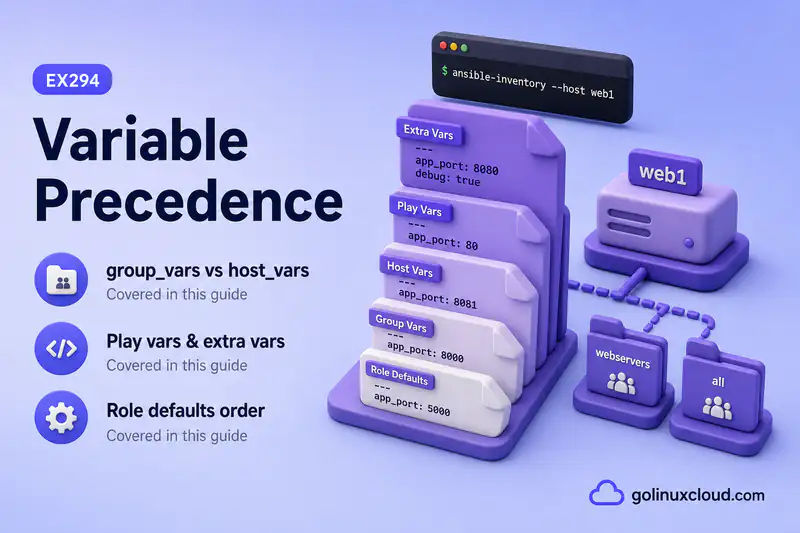
The same variable name can live in group_vars/all.yml, group_vars/web.yml, host_vars/web1.yml, play vars:, a role, and on the command line with -e. When those definitions disagree, Ansible does not guess—you need to know which value wins.
This guide walks through variable precedence with a traceable example, a practical precedence table, where group_vars and host_vars sit in the stack, and how to see the winning value with ansible-inventory and debug. Read Ansible variables and group_vars and host_vars patterns first. I ran everything on Rocky Linux 10 with ansible-core 2.16 from rocky1.
Tested on: Rocky Linux 10.2 (Red Quartz); kernel 6.12.0-211.16.1.el10_2.0.1.x86_64; ansible-core 2.16.16.
~/ansible-project, inventory group lab, and playbooks in playbooks/. Use your own host names and paths if yours differ.
What is Ansible Variable Precedence?
Variable precedence is Ansible’s rule for picking one value when the same variable name appears in multiple places. You might set app_port in group_vars/all.yml, again in group_vars/web.yml, and again in host_vars/web1.yml. For host web1, only one app_port is active during a run.
Ansible merges variables from inventory, playbooks, roles, and runtime options. The merge is not a free-form mix of every file—later, more explicit sources override earlier, broader ones. That is why a typo in host_vars can silently change a package name or port even when group_vars looks correct.
Why Variable Precedence Matters
When precedence surprises you, playbooks look “random”:
- A task installs the wrong package because
web_packageinhost_varsbeatgroup_vars. - Staging values leak into production because
group_vars/all.ymlwas broader than you thought. - A one-off
-e app_env=debughides the real value until you remove the flag. - Role
vars/blocks your play-level override and you chase the wrong file.
Knowing where to place defaults—and where to put exceptions—keeps paths, ports, users, and service names predictable across ad hoc commands and playbooks.
Simple Variable Precedence Example
Create a small project under ~/ansible-project (or a temp directory for practice):
ansible-project/
├── ansible.cfg
├── inventory/
│   ├── hosts.yml
│   ├── group_vars/
│   │   ├── all.yml
│   │   └── web.yml
│   └── host_vars/
│       └── web1.yml
├── playbooks/
│   └── precedence-demo.yml
├── vars/
│   └── play_vars.yml
└── roles/
    └── webserver/
ansible.cfg points at the inventory and roles path:
[defaults]
inventory = inventory/hosts.yml
host_key_checking = False
roles_path = roles
Inventory:
# inventory/hosts.yml
all:
  children:
    web:
      hosts:
        web1:
          ansible_host: 127.0.0.1
          ansible_connection: local
        web2:
          ansible_host: 127.0.0.1
          ansible_connection: local
The same key in three inventory layers:
# inventory/group_vars/all.yml
app_port: 8080
app_env: staging
web_package: httpd# inventory/group_vars/web.yml
app_port: 8081
app_env: development# inventory/host_vars/web1.yml
app_port: 9090
app_env: productionFrom the project root, ask Ansible what web1 sees before any playbook runs:
cd ~/ansible-project
ansible-inventory --host web1
Sample output:
{
    "ansible_connection": "local",
    "ansible_host": "127.0.0.1",
    "app_env": "production",
    "app_port": 9090,
    "web_package": "httpd"
}
For web1, app_port is 9090 from host_vars/web1.yml. That beats 8081 in group_vars/web.yml and 8080 in group_vars/all.yml. The same pattern applies to app_env.
Check web2, which has no host_vars file:
ansible-inventory --host web2Sample output:
{
    "ansible_connection": "local",
    "ansible_host": "127.0.0.1",
    "app_env": "development",
    "app_port": 8081,
    "web_package": "httpd"
}
web2 inherits app_port: 8081 from the more specific group file group_vars/web.yml, not the all default.
Ansible Variable Precedence Order
Ansible’s official variable precedence list is long. For day-to-day playbook and inventory work, this simplified order is enough:
| Priority | Variable location | Notes |
|---|---|---|
| 1 (lowest) | Role defaults | roles/name/defaults/main.yml |
| 2 | Inventory group variables | Inline [group:vars] or YAML group vars: |
| 3 | group_vars/all.yml |
Broad default for every host |
| 4 | group_vars/group_name.yml |
Group-specific value |
| 5 | host_vars/hostname.yml |
Host-specific; beats group vars for that host |
| 6 | Play variables | vars: on the play |
| 7 | vars_files / include_vars |
External files loaded by the play or tasks |
| 8 | Role vars | roles/name/vars/main.yml — hard to override |
| 9 (highest) | Extra vars with -e |
Runtime overrides for the current run |
This is a simplified practical order for beginners. Ansible has a longer detailed precedence list, but this order is enough for most playbook, inventory, group_vars, host_vars, and role examples in this course.
Lowest Precedence: Role Defaults
Role defaults are the friendly starting point inside a role. They are meant to be overridden by inventory, playbooks, or extra vars.
# roles/webserver/defaults/main.yml
app_port: 80
web_package: nginx
If inventory sets web_package: httpd in group_vars/all.yml, the inventory value wins over the role default nginx. Defaults are where you document “sensible out-of-the-box” values, not secrets or environment-specific policy—see Ansible roles for defaults vs vars/ inside a role.
Inventory Variables
Inventory can define variables inline on hosts or groups, or in group_vars and host_vars files beside the inventory source. See inventory files for INI and YAML layouts.
Variables in inventory file
Small connection details belong on the host line or under a host in YAML:
web1:
  ansible_host: 192.168.56.110
  ansible_user: ansible
Keep large application settings out of the host list—move them to group_vars or host_vars.
group_vars/all.yml
Values every host should inherit:
ntp_server: time.example.com
web_package: httpd
Think of all as the widest net. If only the web group needs a value, put it in group_vars/web.yml instead.
group_vars/group_name.yml
Group-specific settings:
# inventory/group_vars/web.yml
app_port: 8081
firewall_profile: web
Every host in [web] picks this up unless host_vars or a later source overrides the same key.
host_vars/hostname.yml
One-host exceptions. The file name must match the inventory hostname (web1.yml for host web1, not the IP address):
# inventory/host_vars/web1.yml
app_port: 9090
For the same key, host_vars beats group_vars on that host—shown in the simple example above.
Play Variables
Play vars: apply to hosts in that play for the current run. They override many inventory-level values when the key collides.
# playbooks/play-vars-web2.yml
---
- name: Play vars vs inventory on web2
  hosts: web2
  vars:
    app_port: 7000
    app_env: play_level
  tasks:
    - name: Show values on web2
      ansible.builtin.debug:
        msg:
          app_port: "{{ app_port }}"
          app_env: "{{ app_env }}"
Run it:
ansible-playbook playbooks/play-vars-web2.ymlSample output:
ok: [web2] => {
    "msg": {
        "app_env": "play_level",
        "app_port": 7000
    }
}
Inventory had app_port: 8081 and app_env: development for web2. Play vars: replaced both for this play.
vars_files and include_vars
vars_files loads YAML at play time. include_vars loads a file from a task. Both sit above play vars: in the simplified table when Ansible merges the same key.
# vars/play_vars.yml
play_file_var: from_vars_files
app_env: vars_files_override# playbooks/precedence-demo.yml
---
- name: Variable precedence demo
hosts: web1
vars:
app_env: play_override
vars_files:
- ../vars/play_vars.yml
roles:
- webserver
tasks:
- name: Show merged variables for web1
ansible.builtin.debug:
msg:
app_port: "{{ app_port }}"
app_env: "{{ app_env }}"
web_package: "{{ web_package }}"
play_file_var: "{{ play_file_var }}"ansible-playbook playbooks/precedence-demo.ymlSample output:
ok: [web1] => {
    "msg": {
        "app_env": "vars_files_override",
        "app_port": 9090,
        "play_file_var": "from_vars_files",
        "web_package": "httpd"
    }
}
app_env came from vars/play_vars.yml, not play vars:. app_port stayed 9090 because host_vars still beat play-level sources for that key. Keep vars_files short and named by purpose—vars/web.yml, not vars/stuff.yml.
Role Defaults vs Role Vars
| Location | Purpose | Override difficulty |
|---|---|---|
roles/name/defaults/main.yml |
Suggested defaults | Easy—inventory and play vars win |
roles/name/vars/main.yml |
Values the role owns | Hard—wins over inventory and play vars |
Use defaults for ports, package names, and paths consumers should be able to change. Use role vars sparingly for internal constants the role must enforce.
Role Vars and Why They Override Many Variables
Role vars load with high precedence. They are appropriate when a role must guarantee a value, but frustrating when you expected a play or inventory override to work.
# roles/webserver/vars/main.yml
role_var_example: from_role_vars
During the role, role_var_example stays from_role_vars unless extra vars or another very high source replaces it. If a play-level vars: “does nothing,” check whether the role defines the same key under vars/.
Extra Vars with -e
Extra vars from the command line win for the current run. They are perfect for one-off debugging—not for permanent configuration.
ansible-playbook playbooks/precedence-demo.yml -e app_port=3000 -e app_env=extra_varsSample output:
ok: [web1] => {
    "msg": {
        "app_env": "extra_vars",
        "app_port": "3000",
        "play_file_var": "from_vars_files",
        "web_package": "httpd"
    }
}
Both app_port and app_env came from -e, overriding inventory, play, and vars_files values. Remove the flags on the next run or you will wonder why the playbook “ignored” your YAML.
You can pass JSON or file-based extra vars when needed:
ansible-playbook site.yml -e '{"deploy_version": "2.4.1"}'
ansible-playbook site.yml -e @/tmp/overrides.yml
group_vars vs host_vars Precedence
For the same key on one host:
| Source | Scope | Typical winner |
|---|---|---|
group_vars/all.yml |
Every host | Loses to more specific group or host |
group_vars/web.yml |
Hosts in web |
Loses to host_vars on that host |
host_vars/web1.yml |
web1 only |
Wins over group vars for web1 |
Put shared values in group_vars. Put genuine one-host exceptions in host_vars. Details and file naming: group_vars and host_vars patterns.
Parent Group vs Child Group Variables
Parent group variables flow to child groups. More specific child group values override broader parent values for hosts in that child group.
# inventory/hosts.yml (excerpt)
all:
  children:
    prod:
      children:
        web:
          hosts:
web1: {}# inventory/group_vars/prod.yml
app_env: production# inventory/group_vars/web.yml
app_env: developmentA host in web uses development because the child group file is more specific than prod for that key. Parent/child structure is inventory design—precedence still follows “broader first, more specific wins.”
Play Vars vs Inventory Vars
Inventory vars define what a host “is” in your fleet. Play vars reshape values for one play without editing inventory.
| Situation | Prefer |
|---|---|
| Value applies every time this host runs | group_vars or host_vars |
| Value applies only in one playbook play | play vars: |
| Temporary override for one run | -e |
If ad hoc commands need the value, keep it in inventory (group_vars / host_vars), not only in play vars:.
Role Defaults vs Inventory Vars
Role defaults lose to inventory. That is intentional—you ship a reusable role, and each environment supplies package names, users, or paths through inventory.
In the demo, roles/webserver/defaults/main.yml sets web_package: nginx, but group_vars/all.yml sets httpd. Tasks see httpd. If you see the default instead, the inventory file is missing, misnamed, or not beside the inventory source—see project layout.
Role Vars vs Extra Vars
Role vars beat inventory and play vars. Extra vars beat role vars for the current run.
Use role vars only when the role must own the value. Use -e when you need a guaranteed temporary override while testing.
How to Check the Final Variable Value
Three checks, from fast to exact:
ansible-inventory --host HOSTNAME— merged inventory-side variables before the play.debugtask inside the play — what tasks actually see after play vars, roles, andvars_filesload. For a full inspection workflow, see debug Ansible playbooks.- Ad hoc module call for a single key:
ansible web1 -m ansible.builtin.debug -a "var=app_port"Sample output:
web1 | SUCCESS => {
    "app_port": 9090
}
Run all commands from the directory that contains ansible.cfg.
Debug Variable Precedence with ansible-inventory
List hosts and groups:
ansible-inventory --graphDump merged vars for one host (YAML is easier to read on narrow terminals):
ansible-inventory --host web1 -yList everything (large on big inventories):
ansible-inventory --listIf --host shows the value you expect but a playbook does not, the override is probably in play vars:, vars_files, a role, or -e—not in inventory.
Common Variable Precedence Mistakes
| Mistake | Why it hurts | Fix |
|---|---|---|
| Same variable in five places | You edit the wrong file | Pick one owner per key; use host_vars only for exceptions |
Heavy use of role vars/ |
Play and inventory overrides silently fail | Move consumer-facing keys to defaults/ |
Permanent config in -e |
Value disappears when CI omits the flag | Put durable settings in group_vars or host_vars |
host_vars/192.168.1.10.yml |
File never loads | Name the file after inventory hostname (web1.yml) |
| Variables beside playbooks only | Ad hoc commands miss them | Keep group_vars and host_vars under inventory/ |
Expecting play vars: in ad hoc runs |
Ad hoc has no play | Use inventory or -e for command-line testing |
Best Practices for Variable Placement
- Put fleet-wide defaults in
inventory/group_vars/all.yml. - Put group policy in
inventory/group_vars/group_name.yml. - Put one-host exceptions in
inventory/host_vars/hostname.yml. - Put play-only toggles in play
vars:or a dedicatedvars_filesentry. - Put reusable role knobs in
roles/name/defaults/, notvars/, unless the role must enforce the value. - Use
-efor drills and CI parameters, not long-lived settings. - After changing YAML, run
ansible-inventory --host HOSTbefore a long playbook.
Recommended Variable Precedence Strategy for This Course
On the EX294 lab project:
inventory/group_vars/all.yml— packages, paths, and users shared by every host.inventory/group_vars/lab.yml— lab-only overrides when you split groups.inventory/host_vars/rocky2.yml— real exceptions for one managed node.- Play
vars:— lesson-specific toggles in tutorial playbooks. -e— practice overrides while learning precedence, then remove them.
When a value looks wrong, walk the simplified table from bottom to top. The highest source that defines the key wins.
References
- Ansible: Using variables — official precedence list
- Ansible: Special variables —
hostvars,groups, and related magic variables - Ansible inventory — hosts, groups, and vars plugins
Summary
Ansible variable precedence decides which value wins when the same name appears in role defaults, inventory, group_vars, host_vars, play vars:, vars_files, role vars, and extra vars. For most work, remember: broader inventory defaults first, more specific host_vars next, play-level files above that, role vars high, and -e on top for the current run. Use ansible-inventory --host and debug to verify before you trust a long playbook.
