
OpenLDAP returns Error 49 when a bind identity cannot be authenticated.
Common command-line output includes:
ldap_bind: Invalid credentials (49)Applications and SSSD logs may show variations such as:
ldap_simple_bind_s failed: Invalid credentialspam_sss(sshd:auth): authentication failureAuthentication failureOpenLDAP uses distinct result codes for authentication and authorization:
| Result code | Meaning |
|---|---|
| 49: Invalid credentials | The bind DN or credentials could not be authenticated |
| 50: Insufficient access | The identity lacks authorization for a requested operation |
If authentication succeeds but the operation is denied, follow Fix OpenLDAP Insufficient Access Error 50.
Error 49 usually points to:
- An incorrect bind DN
- An incorrect password
- A bind DN that does not exist
- A missing or unusable
userPassword - An ACL that prevents authentication against
userPassword - A locked or expired account
- An invalid SSSD service-bind password
SSSD and PAM can also report a generic authentication failure when no LDAP bind reaches slapd. In that case, the failure is occurring in the client authentication path rather than being an OpenLDAP Error 49. The SSSD sections later in this guide show how to distinguish the two cases.
This guide first tests the password directly against OpenLDAP and then follows the request through SSSD, PAM, and SSH. It does not replace OpenLDAP client authentication with SSSD for installation, Manage OpenLDAP users and groups for routine password commands, or OpenLDAP password policy with ppolicy for policy design.
The procedure applies to OpenLDAP 2.6 and SSSD across the RHEL family:
- Red Hat Enterprise Linux
- Rocky Linux
- AlmaLinux
- Oracle Linux
- CentOS Stream
Tested on: Rocky Linux 10.2 with
openldap-servers2.6.10-1.el10_2 from EPEL 10.2 and the RHEL-family SSSD packages.
The lab uses:
| Setting | Value |
|---|---|
| OpenLDAP server | ldap-server.example.com |
| OpenLDAP client | ldap-client.example.com |
| Directory suffix | dc=example,dc=com |
| Users OU | ou=people,dc=example,dc=com |
| Test user | uid=jdoe,ou=people,dc=example,dc=com |
| Data administrator | cn=admin,dc=example,dc=com |
| LDAP transport | StartTLS on port 389 |
| Client authentication | SSSD and PAM |
Complete these lessons first:
- Install and Configure OpenLDAP on the RHEL Family
- Secure OpenLDAP with TLS
- OpenLDAP client authentication with SSSD
- Manage OpenLDAP users and groups
- OpenLDAP ACL configuration
- OpenLDAP password policy with ppolicy
Use this table to open the matching fix.
| Error or symptom | Most likely cause | Go to |
|---|---|---|
ldapwhoami returns Error 49 |
Wrong user DN or password | Fix 1: Verify the Bind DN and Password |
| User search succeeds but the user bind fails | Wrong password, missing userPassword, ACL, or policy |
Fix 2: Verify the User Entry and Password |
| Administrator bind returns Error 49 | Wrong olcRootDN or olcRootPW |
Fix 3: Reset the OpenLDAP Root DN Password |
| Password is correct but bind still returns 49 | userPassword ACL lacks anonymous auth |
Fix 4: Correct the userPassword Authentication ACL |
| User was working and suddenly fails | Account locked, expired, or marked for reset | Fix 5: Check ppolicy Lockout and Expiration |
getent and id fail on the client |
SSSD identity or service-bind problem | Fix 6: Correct the SSSD LDAP Service Bind |
getent works but password login fails |
User authentication or PAM problem | Fix 7: Troubleshoot SSSD User Authentication |
| New password works directly but not through SSSD | Cached credentials, offline mode, or wrong server | Fix 8: Refresh SSSD Identity Cache and Confirm Online State |
ldapwhoami works but SSH still fails |
PAM, access provider, authselect, or SSH configuration | Fix 9: Troubleshoot PAM and SSH Login |
| SSSD reports access denied after successful authentication | Authorization rather than Error 49 | Fix 9: Troubleshoot PAM and SSH Login |
Diagnose Error 49 Before Changing Passwords
Separate the authentication path into layers:
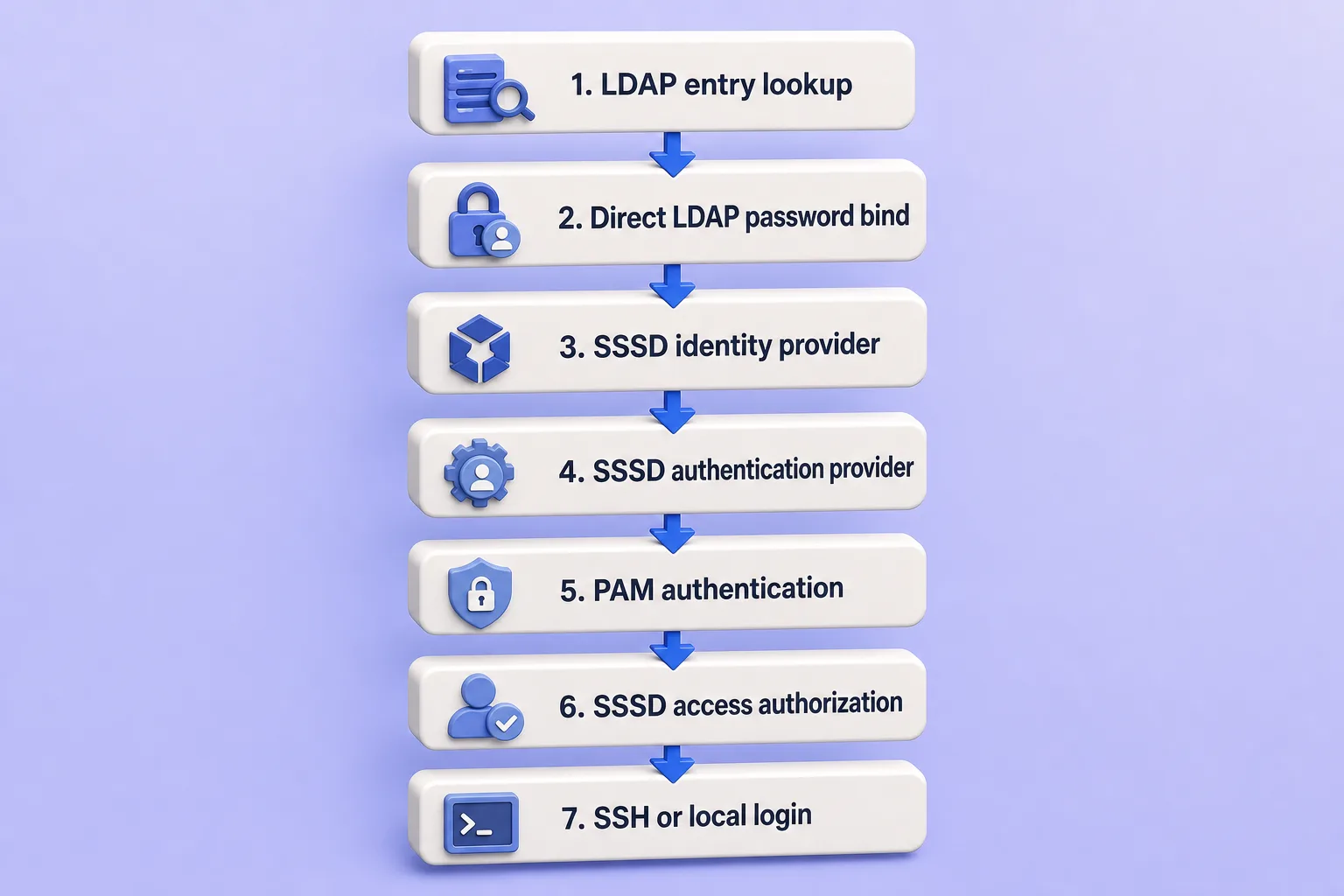
Use this diagnostic sequence:
| Test | What it proves |
|---|---|
| TLS handshake | Client can establish a trusted encrypted connection |
| LDAP search for the user | The account exists at the expected DN |
ldapwhoami as the user |
The LDAP DN and password work |
getent passwd |
SSSD and NSS can retrieve identity data |
id |
UID, primary GID and supplementary groups resolve |
sssctl user-checks |
PAM and SSSD access evaluation |
| Forced SSH password login | End-to-end password authentication |
Verify TLS first
A TLS or hostname error is not Error 49. Confirm certificate trust before troubleshooting passwords.
openssl s_client -starttls ldap -connect ldap-server.example.com:389 -servername ldap-server.example.com -CAfile /etc/openldap/certs/example-ldap-ca.crt -verify_return_error </dev/nullSample output:
Verify return code: 0 (ok)Search for the user without testing the password
Use an administrator or permitted service account to confirm the account exists and copy the exact DN.
ldapsearch -x -ZZ -H ldap://ldap-server.example.com -D "cn=admin,dc=example,dc=com" -W -b "ou=people,dc=example,dc=com" -LLL "(uid=jdoe)" dn uid uidNumber gidNumberSample output:
dn: uid=jdoe,ou=people,dc=example,dc=com
uid: jdoe
uidNumber: 10001
gidNumber: 10001
Test the password directly
Use the complete DN returned by the search. Password binds are easiest to confirm with ldapwhoami before you trace SSSD or PAM.
ldapwhoami -x -ZZ -H ldap://ldap-server.example.com -D "uid=jdoe,ou=people,dc=example,dc=com" -WInterpret the result:
| Result | Meaning |
|---|---|
| User DN is returned | OpenLDAP credentials are valid |
| Error 49 | Continue with server-side credential checks |
| TLS failure | Fix TLS rather than the password |
| Cannot contact server | Fix network, DNS or slapd |
| Error 53 or a password-policy message | Check forced-password-change or other password-policy restrictions |
When the password is wrong, OpenLDAP returns:
ldap_bind: Invalid credentials (49)When the password is correct, ldapwhoami returns the authenticated DN:
dn:uid=jdoe,ou=people,dc=example,dc=comldapwhoami succeeds with the same user DN and LDAP server, OpenLDAP has validated the credentials. Do not reset the LDAP password again while troubleshooting a later PAM or SSH failure.
Fix 1: Verify the Bind DN and Password
Use the complete LDAP distinguished name:
uid=jdoe,ou=people,dc=example,dc=comDo not assume these are equivalent bind identities:
jdoe
uid=jdoe
[email protected]
uid=jdoe,ou=people,dc=example,dc=com
OpenLDAP simple bind normally expects the complete DN unless an overlay or application first searches for the DN.
Search for the actual account:
ldapsearch -x -ZZ -H ldap://ldap-server.example.com -D "cn=admin,dc=example,dc=com" -W -b "dc=example,dc=com" -LLL "(uid=jdoe)" dnCheck for:
- Incorrect OU
- Incorrect suffix
- Misspelled
uid - Account renamed from an old UID
- Duplicate usernames under multiple subtrees
- Client using an old cached DN
- Special DN characters that require escaping
Use -W rather than placing the password in a command:
ldapwhoami -x -ZZ -H ldap://ldap-server.example.com -D "uid=jdoe,ou=people,dc=example,dc=com" -WAvoid -w PlainTextPassword because shell expansion, command history, process listings, and screenshots can expose or alter the password.
Fix 2: Verify the User Entry and Password
If the user entry exists but direct bind fails, verify whether it contains userPassword.
Run this only as a protected administrator:
ldapsearch -x -ZZ -H ldap://ldap-server.example.com -D "cn=admin,dc=example,dc=com" -W -b "uid=jdoe,ou=people,dc=example,dc=com" -s base -LLL userPasswordDo not publish the returned password hash.
Possible cases:
| Result | Meaning |
|---|---|
No userPassword |
The account cannot authenticate with an LDAP password |
| Hash is present | Password may be wrong, locked, expired, or inaccessible to bind |
| Multiple values | Review the user entry and password-policy behavior |
| Unexpected plaintext value | Reset the password through ldappasswd |
| Unsupported or damaged hash | Reset the password safely |
Reset the user password:
ldappasswd -x -ZZ -H ldap://ldap-server.example.com -D "cn=admin,dc=example,dc=com" -W -S "uid=jdoe,ou=people,dc=example,dc=com"The command prompts for the new password and confirmation.
Immediately verify it directly:
ldapwhoami -x -ZZ -H ldap://ldap-server.example.com -D "uid=jdoe,ou=people,dc=example,dc=com" -WDo not diagnose SSSD until this direct bind succeeds.
Fix 3: Reset the OpenLDAP Root DN Password
Use this section when the configured database administrator returns Error 49.
Discover the MDB configuration:
MDB_DN=$(sudo ldapsearch -Q -LLL -Y EXTERNAL -H ldapi:/// -b cn=config '(&(objectClass=olcMdbConfig)(olcSuffix=dc=example,dc=com))' dn | awk '/^dn: / {sub(/^dn: /, ""); print; exit}')Stop if discovery fails. An empty $MDB_DN would query the root DSE instead of the MDB configuration entry:
if [[ -z "$MDB_DN" ]]; then
    echo "No MDB database was found for dc=example,dc=com" >&2
    exit 1
fi

printf 'MDB database DN: %s\n' "$MDB_DN"
Verify the suffix and root DN:
sudo ldapsearch -Q -LLL -Y EXTERNAL -H ldapi:/// -b "$MDB_DN" -s base olcSuffix olcRootDNSample output:
dn: olcDatabase={2}mdb,cn=config
olcSuffix: dc=example,dc=com
olcRootDN: cn=admin,dc=example,dc=com
Use the exact returned olcRootDN in later bind tests. OpenLDAP treats olcRootDN and olcRootPW as the database superuser identity and credentials, and that identity bypasses normal access restrictions on its database.
Generate a new password hash:
slappasswdCreate a private reset-root-password.ldif file:
umask 077

cat > reset-root-password.ldif <<EOF
dn: ${MDB_DN}
changetype: modify
replace: olcRootPW
olcRootPW: REPLACE_WITH_GENERATED_HASH
EOF
Replace REPLACE_WITH_GENERATED_HASH with the hash from slappasswd, then apply through cn=config:
sudo ldapmodify -Q -Y EXTERNAL -H ldapi:/// -f reset-root-password.ldifTest the root DN:
ldapwhoami -x -ZZ -H ldap://ldap-server.example.com -D "cn=admin,dc=example,dc=com" -WSample output when the password is correct:
dn:cn=admin,dc=example,dc=comRemove the LDIF after a successful verification:
rm -f reset-root-password.ldifDo not manually edit /etc/openldap/slapd.d/.
Fix 4: Correct the userPassword Authentication ACL
A password bind requires authentication access to userPassword.
Recommended rule:
to attrs=userPassword
    by self =xw
    by anonymous auth
    by * none
Each simple bind begins without an authenticated LDAP identity. OpenLDAP must compare the supplied password with userPassword. General read access to password hashes is neither required nor safe. When authentication access is denied, OpenLDAP can still return Error 49.
Discover the MDB database DN:
MDB_DN=$(sudo ldapsearch -Q -LLL -Y EXTERNAL -H ldapi:/// -b cn=config '(&(objectClass=olcMdbConfig)(olcSuffix=dc=example,dc=com))' dn | awk '/^dn: / {sub(/^dn: /, ""); print; exit}')Validate the result before querying olcAccess:
if [[ -z "$MDB_DN" ]]; then
    echo "No MDB database was found for dc=example,dc=com" >&2
    exit 1
fi

printf 'MDB database DN: %s\n' "$MDB_DN"
Inspect the current ACL order:
sudo ldapsearch -Q -LLL -o ldif-wrap=no -Y EXTERNAL -H ldapi:/// -b "$MDB_DN" -s base olcAccessEnsure the userPassword rule appears before broad rules such as to *.
Bad order:
{0}to *
    by users read
    by * none

{1}to attrs=userPassword
    by anonymous auth
    by self write
    by * none
Correct order:
{0}to attrs=userPassword
    by self =xw
    by anonymous auth
    by * none

{1}to *
    by users read
    by * none
Use OpenLDAP ACL configuration with practical examples for safe indexed replacement and rollback.
Fix 5: Check ppolicy Lockout and Expiration
When ppolicy is enabled, Error 49 can hide:
- Temporary account lockout
- Permanent administrative lock
- Password expiration
- Exhausted grace logins
- Password reset requiring a change
- Password validity start or end time
Test authentication while requesting the password-policy response control:
ldapwhoami -x -ZZ -e ppolicy -H ldap://ldap-server.example.com -D "uid=jdoe,ou=people,dc=example,dc=com" -WOpenLDAP returns the password-policy control only when the client requests it. That can expose account lockout or forced-change details that would otherwise appear only as Invalid credentials.
Inspect policy state using a permitted password administrator:
ldapsearch -x -ZZ -H ldap://ldap-server.example.com -D "uid=pwdadmin,ou=system,dc=example,dc=com" -W -b "uid=jdoe,ou=people,dc=example,dc=com" -s base -LLL pwdChangedTime pwdFailureTime pwdAccountLockedTime pwdGraceUseTime pwdReset pwdStartTime pwdEndTimeSample output when the account is locked or requires a password change:
dn: uid=jdoe,ou=people,dc=example,dc=com
pwdReset: TRUE
When lockout is active, pwdAccountLockedTime may also be present.
Interpret:
| Attribute | Meaning |
|---|---|
pwdFailureTime |
Recent failed authentication attempts |
pwdAccountLockedTime |
Account is or was locked |
pwdChangedTime |
Used to calculate password age |
pwdGraceUseTime |
Expired-password grace logins consumed |
pwdReset: TRUE |
Indicates that the password was reset administratively; with the applicable password policy, the user can be required to change it before normal operations continue |
pwdStartTime |
Password is not valid before this time |
pwdEndTime |
Password is not valid after this time |
Do not delete policy attributes without understanding the configured policy. Use OpenLDAP password policy with ppolicy for the tested unlock, expiry, and forced-change procedures.
Fix 6: Correct the SSSD LDAP Service Bind
SSSD can use a service identity to search for users and groups:
ldap_default_bind_dn = uid=sssd-reader,ou=service-accounts,dc=example,dc=com
ldap_default_authtok_type = password
ldap_default_authtok = REPLACE_WITH_SECRET
This token is stored in SSSD's root-only configuration. Do not copy the value into commands, logs or screenshots.
These credentials are for LDAP searches. They are not the end user's login password.
Test the exact service bind from ldap-client:
ldapwhoami -x -ZZ -H ldap://ldap-server.example.com -D "uid=sssd-reader,ou=service-accounts,dc=example,dc=com" -WTest the search SSSD needs:
ldapsearch -x -ZZ -H ldap://ldap-server.example.com -D "uid=sssd-reader,ou=service-accounts,dc=example,dc=com" -W -b "ou=people,dc=example,dc=com" -LLL "(uid=jdoe)" uid uidNumber gidNumber homeDirectory loginShellIf this returns Error 49:
- Verify the service-account DN.
- Reset its password.
- Update
ldap_default_authtok. - Protect
/etc/sssd/sssd.confwithroot:rootownership and mode0600. - Validate the configuration.
- Restart SSSD.
sudo chown root:root /etc/sssd/sssd.confsudo chmod 600 /etc/sssd/sssd.confsudo sssctl config-checkSample output:
Issues identified by validators: 0sudo systemctl restart sssdWhen anonymous LDAP searches are intentionally used, remove stale service-bind settings rather than retaining an invalid bind DN and token.
Fix 7: Troubleshoot SSSD User Authentication
First confirm identity lookup:
getent passwd jdoeWhen SSSD has not resolved the user yet, the command returns no output.
Check UID and group membership:
id jdoeInterpret:
| Result | Meaning |
|---|---|
| Both fail | Fix LDAP identity lookup before password authentication |
| Both succeed | User identity is available; continue with authentication |
| Direct LDAP bind fails | Fix OpenLDAP credentials or policy |
| Direct LDAP bind succeeds | Continue with SSSD/PAM troubleshooting |
Review the relevant domain configuration:
[domain/example.com]
id_provider = ldap
auth_provider = ldap
chpass_provider = ldap

ldap_uri = ldap://ldap-server.example.com
ldap_search_base = dc=example,dc=com

ldap_id_use_start_tls = true
ldap_tls_cacert = /etc/openldap/certs/example-ldap-ca.crt
ldap_tls_reqcert = hard

cache_credentials = true
Validate the configuration:
sudo sssctl config-checkCheck SSSD state:
systemctl status sssd --no-pagersudo sssctl domain-status example.comCheck the authentication and account phases separately:
sudo sssctl user-checks -a auth -s sshd jdoesudo sssctl user-checks -a acct -s sshd jdoeThe first focuses on authentication. The second checks whether the account is allowed to use the SSH PAM service.
Fix 8: Refresh SSSD Identity Cache and Confirm Online State
A password recently changed on the LDAP server may not behave as expected when:
- SSSD is offline
- The client cannot reach the server
- A cached password is still being used
- SSSD is contacting another replica
- Identity data contains an old DN after a rename
- The new password was never successfully authenticated online
Check domain status:
sudo sssctl domain-status example.comConfirm the client reaches the intended LDAP server:
getent hosts ldap-server.example.comTest the new password directly against that server:
ldapwhoami -x -ZZ -H ldap://ldap-server.example.com -D "uid=jdoe,ou=people,dc=example,dc=com" -Wsssctl cache-expire invalidates cached identity information. It does not change the LDAP password or repair a locked or expired account. Confirm that the SSSD domain is online before testing the new password; otherwise SSSD may use offline cached credentials instead of contacting OpenLDAP.
Expire only the affected user first:
sudo sssctl cache-expire -u jdoeRestart SSSD when configuration or online state changed:
sudo systemctl restart sssdAvoid immediately deleting /var/lib/sss/db/*. Removing SSSD databases also removes cached identities and cached credentials. Use that only for a diagnosed database-level problem while the LDAP server is reachable.
Fix 9: Troubleshoot PAM and SSH Login
When direct LDAP authentication succeeds, Error 49 is no longer the primary cause.
Verify the selected authselect profile:
authselect currentSample output:
Profile ID: sssdConfirm SSSD is selected and PAM files are valid:
sudo authselect checkVerify SSH uses PAM:
sudo sshd -T | grep -E 'usepam|passwordauthentication|kbdinteractiveauthentication'Sample output:
usepam yes
passwordauthentication yes
kbdinteractiveauthentication no
Force a password-based SSH test so a key does not bypass password authentication:
ssh -o PubkeyAuthentication=no -o PreferredAuthentications=password,keyboard-interactive [email protected]Ensure at least one intended password or keyboard-interactive authentication method is enabled.
Check access authorization:
sudo sssctl user-checks -a acct -s sshd jdoeReview:
access_providersimple_allow_userssimple_allow_groupssimple_deny_userssimple_deny_groups/etc/security/access.conf- SSH
AllowUsers,DenyUsers,AllowGroups, andDenyGroups - User shell
- Account UID relative to
UID_MIN
Do not interpret an SSSD account-access denial as an incorrect LDAP password.
Verify the Fix End to End
Use the tests in order.
1. Direct OpenLDAP bind
ldapwhoami -x -ZZ -H ldap://ldap-server.example.com -D "uid=jdoe,ou=people,dc=example,dc=com" -W2. SSSD identity lookup
getent passwd jdoeid jdoe3. SSSD PAM checks
sudo sssctl user-checks -a auth -s sshd jdoesudo sssctl user-checks -a acct -s sshd jdoe4. End-to-end password login
ssh -o PubkeyAuthentication=no -o PreferredAuthentications=password,keyboard-interactive [email protected]5. Expected negative test
Enter a deliberately incorrect password once and confirm:
- The direct bind fails with Error 49.
- The correct password still succeeds.
- The account is not unintentionally locked by repeated testing.
If one of the steps above still fails, use the log collection section next.
Collect Logs If Error 49 Remains
Use this section when the verification sequence above still fails and you need coordinated client and server evidence.
Start with temporary SSSD debug level 6:
sudo sssctl debug-level 6Expire the affected user:
sudo sssctl cache-expire -u jdoeRemove old SSSD troubleshooting logs:
sudo sssctl logs-removeRecord timestamps and reproduce one failure:
datessh -o PubkeyAuthentication=no -o PreferredAuthentications=password,keyboard-interactive [email protected]dateReview client logs:
sudo journalctl -u sssd --since "10 minutes ago" --no-pagersudo journalctl -u sshd --since "10 minutes ago" --no-pagerWhen /var/log/secure exists, search it for PAM and SSSD authentication messages:
if [[ -f /var/log/secure ]]; then
    sudo grep -iE 'pam_sss|authentication failure|invalid credentials|offline' /var/log/secure
fi
The SSSD component logs under /var/log/sssd/ and the system journal remain the primary troubleshooting sources.
Review SSSD component logs:
/var/log/sssd/sssd_example.com.log
/var/log/sssd/sssd_pam.log
/var/log/sssd/sssd_nss.log
On ldap-server, review the same time window:
sudo journalctl -u slapd --since "10 minutes ago" --no-pagerInterpret the log location:
| Log result | Likely layer |
|---|---|
slapd records bind Error 49 |
OpenLDAP DN, password, ACL, or ppolicy |
| SSSD domain log cannot bind service DN | Invalid ldap_default_bind_dn credentials |
| SSSD PAM log reports auth failure | User password or authentication-provider problem |
| SSSD reports offline | Network, DNS, TLS, or LDAP-server availability |
pam_sss succeeds but account phase denies |
Access-provider or PAM authorization |
| No SSSD authentication request appears | SSH or PAM is not invoking SSSD |
Restore the debug level used before troubleshooting. When the host normally uses the default level, run:
sudo sssctl debug-level 2Do not leave highly verbose authentication logging enabled indefinitely.
Troubleshoot Remaining Error 49 Cases
| Symptom | Most likely cause | Recommended check |
|---|---|---|
| User DN cannot be found | Wrong base DN, UID, or renamed account | Search from the directory suffix |
| User exists but bind fails | Wrong password, missing userPassword, ACL, or policy |
Test with ldapwhoami |
| Root DN returns Error 49 | Wrong olcRootDN or olcRootPW |
Query MDB config and reset olcRootPW |
| All user passwords fail | Broken userPassword ACL or policy change |
Inspect ACL order and ppolicy |
| Only one account fails | User password or policy state | Inspect that user entry |
| Bind fails after rename | Client or SSSD still uses the old DN | Search and expire the cached user |
Direct bind works but getent fails |
Identity-provider or search-bind failure | Test the SSSD reader account |
getent works but SSH fails |
Authentication, PAM, access, or SSH issue | Use sssctl user-checks |
| Old password works only offline | Cached credentials | Restore server connectivity and authenticate online |
| New password works on one server only | Replication delay or wrong LDAP URI | Test each provider directly |
| Locked user sees only Error 49 | Client did not request the password-policy response control | Repeat the direct bind with ldapwhoami -e ppolicy, then inspect the entry as the password administrator |
SSSD cannot authenticate over ldap:// |
StartTLS is absent or failed | Verify ldap_id_use_start_tls and CA trust |
| Service bind fails | Wrong ldap_default_authtok |
Test the exact service DN directly |
| Password change fails but login works | chpass_provider, ACL, or pwdReset issue |
Test ldappasswd and SSSD chpass settings |
| SSH key login works but password login fails | Keys bypassed password authentication | Force password authentication |
su from root succeeds without a password |
Root bypassed the authentication test | Test from SSH or a non-root session |
| Logs show access denied after auth success | Authorization issue, not Error 49 | Review the SSSD access provider |
No request reaches slapd |
SSSD offline, wrong server, TLS, or PAM bypass | Check client logs and network path |
References
- OpenLDAP 2.6 Administrator's Guide — LDAP result codes
- OpenLDAP 2.6 Administrator's Guide — Access Control
- ldapwhoami(1)
- ldapsearch(1)
- ldappasswd(1)
- sssd-ldap(5) — upstream SSSD source
- sssd.conf(5)
- sssctl(8)
- Red Hat Enterprise Linux 10 — Troubleshooting SSSD
Summary
You learned how to diagnose OpenLDAP Error 49 by separating direct LDAP authentication from SSSD identity lookup, PAM authentication, access authorization, and SSH. You verified the exact bind DN, reset user and root DN passwords safely, corrected userPassword authentication ACLs, checked ppolicy lockout and expiration state, tested the SSSD service bind, distinguished identity lookup from password authentication, refreshed stale identity cache while confirming online state, validated PAM and SSH settings, repeated end-to-end verification, collected coordinated SSSD and slapd logs when failures remained, and worked through the remaining symptom table.
