

If you are starting the OpenLDAP tutorial course, this is the first technical lesson. Before you install packages or write LDIF on a lab VM, you need a shared vocabulary: what LDAP is, how entries sit in a tree, what a DN means, and how a current OpenLDAP deployment is put together.
This page is conceptual. It explains terminology and architecture using one example directory throughout. Installation, TLS, ACLs, and user management are separate lessons—you will open them when you are ready to type commands on a server.
Primary test environment: Rocky Linux 10.2; OpenLDAP 2.6.10 client utilities. Examples apply to any OpenLDAP 2.6 deployment.
What Are LDAP and OpenLDAP?
LDAP (Lightweight Directory Access Protocol) is an open standard for accessing and updating directory data over a network. Clients send LDAP operations; a directory server stores entries in a tree and enforces schema and access rules. The LDAP technical specification set is described in RFC 4510; the wire protocol itself is RFC 4511. Distinguished names follow RFC 4514; search filters follow RFC 4515.
OpenLDAP is an open-source implementation of that protocol. The suite includes:
slapd— the stand-alone LDAP directory server daemon- Client programs —
ldapsearch,ldapadd,ldapmodify,ldapdelete,ldapcompare,ldapwhoami, and others - Libraries used by applications and the server
- Optional components such as
lloadd(a load balancer for multipleslapdinstances)
LDAP is not the same thing as OpenLDAP, and OpenLDAP is not a complete identity platform like Active Directory or FreeIPA. It is a directory server you integrate with Linux clients (often via SSSD), applications, and your own security design. Other LDAP-speaking products exist—see OpenLDAP vs Active Directory for how OpenLDAP compares to broader identity platforms.
| Term | Meaning |
|---|---|
| LDAP | Protocol for accessing directory services |
| OpenLDAP | Open-source LDAP server and tool suite |
| Directory service | Hierarchical store optimized for lookup and search |
| LDIF | Text format for representing LDAP entries and changes |
slapd |
OpenLDAP directory server daemon |
How LDAP Works
LDAP follows a client/server model. A typical connection and request flow looks like this:
- The client opens a TCP connection or local Unix socket to the directory server.
- If the URL uses StartTLS on
ldap://, the client negotiates TLS before sending a simple-bind password (RFC 4513). - The client may bind to establish an authenticated identity. Anonymous searches are possible when server ACLs permit them—you do not always send Bind first.
- The client issues operations: search, compare, add, modify, delete, modify DN, or other extended operations, such as password modify or Who Am I.
- The server checks the bind identity (if any), evaluates access control lists (ACLs), validates entries against schema, and reads or writes the database.
- The server returns matching data or a result code. The client sends Unbind or closes the connection.
Applications often show “username and password” in a login form, but LDAP itself binds with a Distinguished Name (or SASL identity), not necessarily a short login name. Applications normally receive a short username such as alice, search the configured user base for an entry such as (uid=alice), obtain the user’s full DN, and then attempt a Bind using that DN. SSSD uses options such as ldap_user_name and ldap_user_search_base to identify and locate user entries. Its authentication flow depends on the configured identity and authentication providers, so these settings should not be confused with ldap_user_uid_number, which maps the numeric Unix UID attribute (uidNumber).
LDAP client and server flow
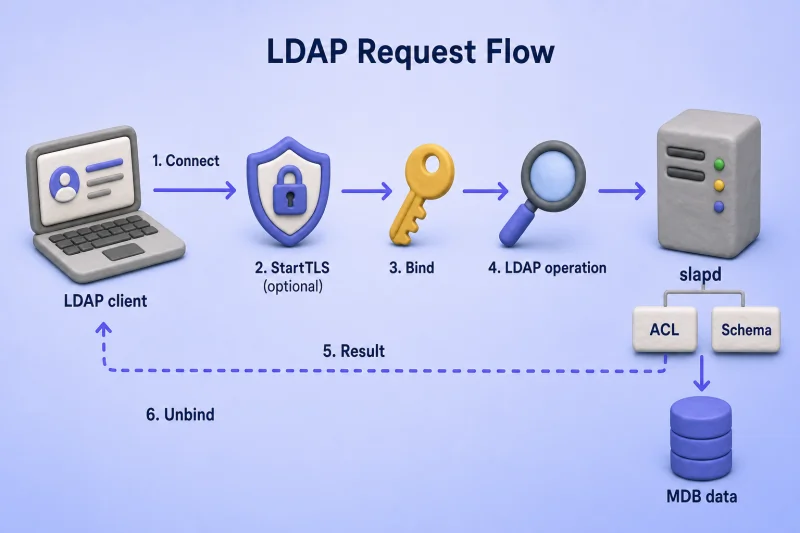
The diagram maps the six stages from the numbered list above onto one request path. Read it left to right: the client sends LDAP messages; slapd enforces policy and reads or writes the database; the answer returns on the same TCP connection (or local ldapi:// socket).
| Stage | Client action | Server action |
|---|---|---|
| 1. Connect | Opens ldap://, ldaps://, or ldapi:// to slapd |
Accepts the connection; no identity is established yet |
| 2. StartTLS (optional) | Sends the StartTLS extended operation on ldap:// |
Upgrades the channel to TLS before a simple-bind password is sent |
| 3. Bind | Sends Bind with a DN/SASL identity (or binds anonymously) | Verifies credentials or records an anonymous identity for ACL evaluation |
| 4. Operation | Sends Search, Compare, Add, Modify, Delete, Modify DN, or another extended operation | Checks ACLs for the bound identity, validates attributes against schema, then queries or updates the backend |
| 6. Unbind | Sends Unbind or closes the socket | Releases the connection |
A single ldapsearch run follows this path even when the tool prints only the search results. With StartTLS, the sequence is connect → StartTLS → bind → search → unbind. With ldaps://, TLS starts at connect (step 1), so StartTLS is skipped. Local administration over ldapi:/// often uses SASL EXTERNAL instead of a password bind.
Each LDAP operation travels in its own LDAP message and is identified by a message ID. A client may have several operations outstanding on one connection, although command-line tools usually run one at a time. The server does not automatically forward every failed lookup to another host; referrals and proxy backends are advanced topics. A noSuchObject result normally means the target DN or search base could not be found (RFC 4511). A valid search base with a filter that matches nothing still returns success with zero entries—that is not the same as noSuchObject.
LDAP URLs and connection methods
| URL / method | Typical use |
|---|---|
ldap://server:389 |
Unencrypted LDAP transport. Do not send simple-bind passwords over it; enable StartTLS or use ldaps://. |
ldap://server:389 + StartTLS |
Connect on port 389, run the StartTLS extended operation, then bind and search over the encrypted channel |
ldaps://server:636 |
LDAP over TLS from the first byte when the connection opens |
ldapi:/// |
Local Unix-domain socket; often used with SASL EXTERNAL for cn=config administration on the server host |
A sensible sequence on ldap:// is: connect → StartTLS (if used) → Bind → Search or update → Unbind. Certificate creation, trust stores, and firewall rules belong in the Configure OpenLDAP TLS on RHEL-Based Linux guide—not here.
LDAP Entries, Attributes and the Directory Information Tree
An LDAP directory stores entries, not SQL-style rows. Each entry is one object: a user, group, organizational unit, service account, or device record.
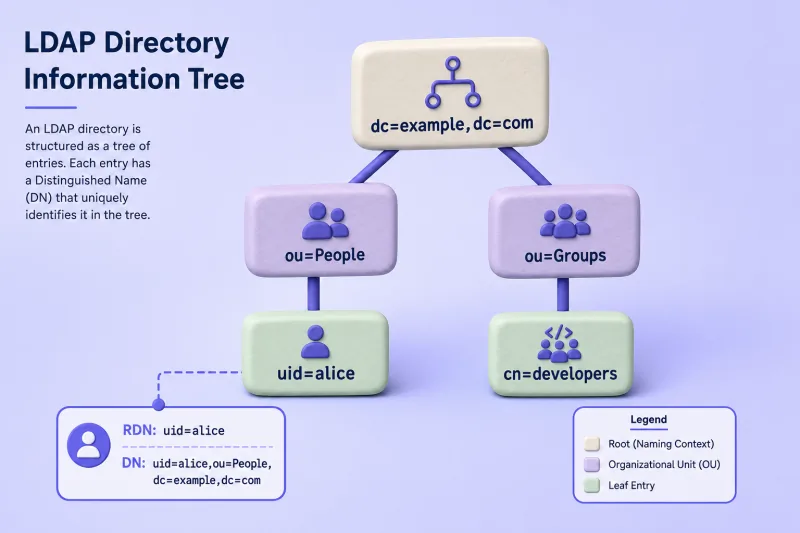
Example tree (used throughout this lesson)
We use one layout for every naming and schema example:
dc=example,dc=com
├── ou=People
│   └── uid=alice
└── ou=Groups
    └── cn=developers
LDAP entries
An entry combines:
- A DN — locates the entry in the DIT at its current position
- One or more
objectClassvalues — schema rules for the entry - Attributes — data fields allowed by those object classes
LDAP attributes
A minimal view of Alice’s attributes:
cn: Alice Smith
sn: Smith
uid: alice
mail: [email protected]
Key ideas:
- Attribute type — the name (
mail,uid,cn) - Attribute value — the data (
[email protected]) - Single-valued vs multi-valued — some attributes allow only one value; others allow many (for example multiple
mailaddresses) - Attribute type names such as
uidandUIDare case-insensitive; whether values are case-sensitive depends on the syntax and matching rule for that attribute - Syntax — schema defines valid value formats (printable string, integer, distinguished name, and so on)
Attribute names come from schema; you cannot add random fields without defining them in a schema extension (covered in a later custom-schema lesson).
Directory Information Tree (DIT)
The Directory Information Tree (DIT) is the hierarchy of entries exposed by a directory service. It may contain several naming contexts served by different databases or servers. In this lab, one MDB database manages the naming context rooted at dc=example,dc=com. Terms tied to our example:
| Term | Meaning | Example |
|---|---|---|
| Database suffix | Top of the naming context managed by one OpenLDAP database (olcSuffix) |
dc=example,dc=com |
| Search base DN | Entry from which one particular search begins | ou=People,dc=example,dc=com |
| Parent DN | DN directly above an entry | ou=People,dc=example,dc=com |
| Child | Entry one level below its parent | uid=alice,ou=People,dc=example,dc=com |
| Subtree | Everything under a given DN | All entries under ou=People,... |
| Root DSE | Server-specific entry at the root of the DIT; it is not part of the database suffix or another naming context | Empty DN: "" |
The suffix and a search base can share the same DN in a simple lab, but they answer different questions. The suffix defines what the database owns; each search chooses where to start. Possible search bases in our example include:
dc=example,dc=com
ou=People,dc=example,dc=com
uid=alice,ou=People,dc=example,dc=com
Centralized Linux login is a common motivation: instead of a local account in /etc/passwd on every host, many machines read users from one DIT through Linux Name Service Switch (NSS) and SSSD. The protocol is LDAP; OpenLDAP hosts the tree.
DN, RDN, Base DN and LDAP Naming
Distinguished names locate entries in the DIT.
What is a Distinguished Name?
Full DN for Alice:
uid=alice,ou=People,dc=example,dc=comNo other entry in the directory should share this DN while Alice remains at that location.
A DN uniquely identifies the entry at its current location, but it is not necessarily permanent. Renaming or moving the entry with a Modify DN operation changes its DN. OpenLDAP also maintains operational attributes such as entryUUID for persistent identification across renames.
What is a Relative Distinguished Name?
The RDN is the leftmost component—the name relative to the parent:
uid=aliceIf two entries share a parent, their RDNs must differ (for example uid=bob vs uid=alice under the same ou=People).
Most RDNs contain one attribute-value pair, such as uid=alice, but LDAP also permits multi-valued RDNs such as cn=Alice Smith+uid=alice. cn is an attribute type—it is not another name for RDN. An RDN may use cn, uid, ou, or another permitted naming attribute.
DN versus RDN
| Term | Example | Purpose |
|---|---|---|
| RDN | uid=alice |
Identifies the entry under its parent |
| Parent DN | ou=People,dc=example,dc=com |
Locates the container |
| Full DN | uid=alice,ou=People,dc=example,dc=com |
Addresses one specific entry |
| Database suffix | dc=example,dc=com |
Top of the naming context for the database |
| Search base DN | ou=People,dc=example,dc=com (example) |
Starting point for one search operation |
Common naming attributes
| Attribute | Typical use |
|---|---|
dc |
Domain component in a DNS-style suffix (dc=example,dc=com) |
ou |
Organizational unit container (ou=People) |
cn |
Common name (users, groups, services) |
uid |
User identifier (common for POSIX accounts) |
RDN is a role in the DN string, not an attribute name. A user entry might use uid=alice or cn=Alice Smith as its RDN depending on how you name entries. You do not need every X.500 attribute on day one—these four naming attributes appear in almost every Linux-centric OpenLDAP design.
LDAP Schema, Attributes and Object Classes
Schema defines what entries may contain: allowed object classes, required and optional attributes, matching rules, and syntax.
What is an objectClass?
Object classes group attribute rules:
| Kind | Role |
|---|---|
| Structural | Defines the primary type and valid structural inheritance chain (person, inetOrgPerson, organizationalUnit) |
| Auxiliary | Adds attributes to an existing structural entry (posixAccount) |
| Abstract | Base class used through inheritance rather than instantiated by itself (top) |
An entry can list several object classes, but its structural classes must belong to one valid inheritance chain. In the Alice example below, inetOrgPerson is the effective structural class, inheriting from organizationalPerson, person, and top. posixAccount is auxiliary and adds Unix account attributes.
MUST and MAY attributes
Each object class declares:
- MUST — required attributes (or inherited from superior classes)
- MAY — optional attributes
For inetOrgPerson, common attributes include cn, sn, and mail. Adding posixAccount brings uidNumber, gidNumber, homeDirectory, and loginShell into play for Configure OpenLDAP Client with SSSD on RHEL-Based Linux.
Common OpenLDAP schemas
Later course lessons load these standard schemas:
| Schema | Common purpose |
|---|---|
core |
Fundamental LDAP objects and attributes |
cosine |
Common Internet and X.500 attributes |
inetorgperson |
Person / employee style user entries |
nis |
POSIX users, groups, and related attributes |
Defining your own attributes and object classes is possible but belongs in a dedicated custom-schema article—not here.
Common LDAP Operations
LDAP defines a small set of operations. Unbind and Abandon are connection-control operations, not authentication methods. Unbind ends the session gracefully; Abandon asks the server to stop processing an outstanding request.
| Operation | Purpose | Common OpenLDAP tool |
|---|---|---|
| Bind | Establish or change the authentication identity on an existing connection | ldapwhoami, or bind options accepted by LDAP tools |
| Search | Find entries and read attributes | ldapsearch |
| Compare | Test whether one entry contains a specific attribute value without retrieving the value | ldapcompare |
| Add | Create a new entry | ldapadd |
| Modify | Change attributes on an existing entry | ldapmodify |
| Delete | Remove an entry | ldapdelete |
| Modify DN | Rename or move an entry | ldapmodrdn |
| Extended | Invoke protocol features outside the original core operations | Password modify, Who Am I (ldapwhoami) |
| Unbind | Gracefully end the LDAP session | Client library / tool exit |
| Abandon | Ask server to drop an outstanding operation | Client API |
OpenLDAP tracks Bind, Search, Compare, Extended, Unbind, and other operations separately in its server statistics.
Search base, scope and filter
Every LDAP search specifies three elements:
| Element | Meaning | Example |
|---|---|---|
| Search base DN | Where this search begins in the DIT | ou=People,dc=example,dc=com |
| Scope | How deep to search from that base | base (one entry), one (immediate children), sub (whole subtree) |
| Filter | Which entries match | (uid=alice) |
Conceptual search for Alice under ou=People:
Search base: ou=People,dc=example,dc=com
Scope:       subtree
Filter:      (uid=alice)
The same idea in one ldapsearch invocation (run this after you complete the install lesson):
ldapsearch -x -H ldap://ldap.example.com -b "ou=People,dc=example,dc=com" "(uid=alice)"When slapd is running and the entry exists, the command prints the DN and attributes. Filters use LDAP filter syntax; parentheses matter—(uid=alice) is valid, uid=alice alone is not.
OpenLDAP 2.6 Architecture
Current OpenLDAP deployments normally use the slapd-config configuration database (cn=config) and the MDB backend for the primary directory database. Distribution package versions vary—some supported releases still ship older branches or omit the server package from default repositories. Legacy slapd.conf flat files are deprecated in the 2.6 guide, which also warns against editing LDIF files inside slapd.d directly. Replication no longer uses a separate slurpd daemon.
slapd directory server
slapd is the process you enable with systemctl. It:
- Listens for LDAP, LDAPS, and local
ldapiconnections - Handles bind, search, compare, extended, and update operations
- Enforces schema and ACLs
- Stores data in configured backends
- Supports overlays (password policy,
memberof,syncprovfor replication, and others)
Optional lloadd can distribute client connections across multiple slapd instances. For the first lab, one slapd server is enough. Replication and load balancing matter after the basic directory works.
cn=config configuration database
Server configuration is stored as LDAP entries under:
cn=configImportant branches include:
- Global settings (TLS defaults, logging)
cn=module{*},cn=config— dynamically loaded modules (when not built in)cn=schema,cn=config— schema definitionsolcDatabase={*},cn=config— database and overlay definitions
Administrators apply changes with ldapadd and ldapmodify (often via ldapi:/// and SASL EXTERNAL as root). Offline maintenance uses tools such as slapcat, slapadd, and slapmodify. The OpenLDAP cn=config and MDB guide walks through discovery, backup, and safe ldapmodify examples on RHEL-family systems.
| Component | Stores |
|---|---|
cn=config |
Server configuration (modules, DB definitions, ACLs, overlays) |
| MDB database | Users, groups, sudo rules, and application entries |
MDB database backend
MDB (back-mdb) is the recommended primary backend for directory data on OpenLDAP 2.6. Berkeley DB (bdb / hdb) backends were removed in OpenLDAP 2.5+. OpenLDAP stores directory entries such as users and groups in the configured MDB data directory; the exact filesystem path depends on the distribution package. Tuning olcDbMaxSize and indexes is day-2 work—see OpenLDAP cn=config and MDB explained with ldapmodify.
Backends, modules, and overlays
Backends and overlays may be compiled into slapd or loaded dynamically as modules, depending on how the package was built. Overlays hook extra logic onto a database:
| Overlay | Typical use |
|---|---|
syncprov |
Provider-consumer replication (traditionally called master-slave) and multi-provider replication (traditionally called multi-master) |
ppolicy |
Password expiration, lockout, and history |
memberof |
Reverse group membership for DN-valued member attributes (see note below) |
refint |
Referential integrity when group members are deleted |
The standard memberof overlay works with DN-valued group membership attributes such as member. It does not automatically produce the result many admins expect from a traditional RFC2307 posixGroup that stores usernames in memberUid. See Configure OpenLDAP memberOf and referential integrity overlays for the DN-based workflow.
Overlays are configured under olcDatabase={n}mdb,cn=config, not inside user entries.
Replication note (historical)
OpenLDAP 2.6 replication uses syncrepl between slapd instances. slurpd was the old standalone replication daemon from the slapd.conf era—do not plan around it today.
Practical LDAP Entry Example
A POSIX identity entry for Alice (LDIF-style):
dn: uid=alice,ou=People,dc=example,dc=com
objectClass: top
objectClass: person
objectClass: organizationalPerson
objectClass: inetOrgPerson
objectClass: posixAccount
cn: Alice Smith
sn: Smith
uid: alice
uidNumber: 10001
gidNumber: 10001
homeDirectory: /home/alice
loginShell: /bin/bash
mail: [email protected]| Line | Meaning |
|---|---|
dn: |
LDIF record identifier that names the entry; it is not a stored user attribute |
objectClass |
Schema rules applied to the entry (inetOrgPerson structural, posixAccount auxiliary) |
uid |
Login / account name |
uidNumber / gidNumber |
Numeric IDs used by Linux NSS and SSSD |
homeDirectory |
Home directory path on client systems |
loginShell |
Default shell |
This entry contains the identity attributes required for a POSIX account, but it does not yet include userPassword. It is suitable for demonstrating directory and Unix identity data, not password authentication by itself. A simple password bind succeeds only after you add userPassword (or configure an external authentication mechanism).
The entry also requires parent containers (ou=People), loaded schemas, and a server install before you can add it with ldapadd. Server installation is in the OpenLDAP install guide for RHEL-based Linux; day-to-day user and group LDIF work is in Manage OpenLDAP users and groups.
LDAP Authentication, Authorization and Security Basics
Directory security splits into several layers:
| Concept | Meaning |
|---|---|
| Authentication | Proving who the client is (bind identity) |
| Authorization | What that identity may read or change (ACLs) |
| Confidentiality | Protecting data in transit (TLS / LDAPS / STARTTLS) |
| Integrity | Detecting tampering (TLS, signed SASL mechanisms) |
LDAP bind methods
| Method | Summary |
|---|---|
| Anonymous bind | Empty DN and empty password—often restricted in production |
| Unauthenticated bind | Non-empty DN with empty password—treat as failed authentication in applications |
| Simple bind | DN plus password—negotiate TLS (StartTLS or LDAPS) before sending the password on the wire |
| SASL EXTERNAL | Local ldapi:/// access mapped to Unix UID (common for cn=config admin) |
Use the term simple bind, not “basic authentication,” to avoid confusion with HTTP Basic auth.
How applications authenticate a short username
Many forum questions trace back to this pattern:
- The application binds with a restricted service account (or searches anonymously if ACLs allow).
- It searches under the configured user base—for example
(uid=alice). - LDAP returns Alice’s full DN.
- The application opens a new connection (or re-binds) using Alice’s DN and password.
- After a successful bind, it reads groups or authorization attributes.
Some applications skip the search step and construct the DN from a template instead:
uid={username},ou=People,dc=example,dc=comThat works only when every user lives at a predictable path. The failure depends on what is wrong:
- A search base that does not exist can return LDAP error 32 (
noSuchObject). - A malformed DN can return error 34 (
invalidDNSyntax). - A valid filter that matches no users normally returns an empty result, not an LDAP error.
- An incorrect Bind DN or password commonly returns error 49 (
invalidCredentials).
Access control lists
ACLs (olcAccess in cn=config) decide whether an identity may search, read, compare, authenticate against userPassword, write, or delete. ACL order matters; mistakes surface as LDAP error 50 (insufficient access) or error 49 (invalid credentials) when auth is denied. Syntax, ordering, and practical examples are in OpenLDAP ACL Configuration with Practical Examples.
When Should You Use OpenLDAP?
OpenLDAP fits well when you need:
- Centralized Linux user and group storage
- Application authentication or lookup (web apps, VPN, mail, Git)
- Shared sudo rules or SSH public keys in LDAP (covered in dedicated client-integration lessons)
- Network or application metadata in a searchable tree
- Full control over schema, replication, and ACL design without vendor licensing
OpenLDAP alone is weaker when you need:
- Integrated Kerberos, DNS, and host enrollment in one product → consider FreeIPA
- Windows domain join and Group Policy → Active Directory or Samba AD
- Built-in host-based access rules, Kerberos enrollment, and a web administration interface → FreeIPA or commercial IAM
For product-level comparisons, read OpenLDAP vs Active Directory and OpenLDAP vs 389 Directory Server when you are choosing between LDAP servers on enterprise Linux. After you decide, continue with the OpenLDAP tutorial or the 389 Directory Server tutorial.
Summary and Next Steps
You now have a map of how the pieces connect:
- LDAP is the protocol; OpenLDAP implements it with
slapdand client tools. - Entries hold attributes; object classes and schema define what is valid.
- The DIT is the tree; DN and RDN locate entries; suffix and search base answer different questions.
- LDAP operations (bind, search, compare, extended, add, modify, delete) are how clients work with the tree.
cn=configholds server configuration; MDB normally holds your directory data on current OpenLDAP releases.- Overlays add replication, password policy, and membership behavior—with caveats such as
memberofandposixGroup.
Next lesson: Install and Configure OpenLDAP on RHEL-Based Linux—you will enable slapd, load schema, create ou=People and ou=Groups, and add your first real entries in the course lab.
References
- OpenLDAP 2.6 Administrator's Guide
- Configuring slapd with slapd-config
- OpenLDAP backends (MDB)
- OpenLDAP schema specification
- RFC 4510 — LDAP Technical Specification Road Map
- RFC 4511 — LDAP: The Protocol
- RFC 4513 — LDAP Authentication Methods
- RFC 4514 — String Representation of Distinguished Names
- RFC 4515 — LDAP Search Filters
- OpenLDAP software overview
