
OpenLDAP returns Error 50 when the authenticated identity does not have enough permission to complete an LDAP operation.
Common messages include:
ldap_add: Insufficient access (50)Modify, delete, and bind failures use the same numeric code:
ldap_modify: Insufficient access (50)ldap_delete: Insufficient access (50)ldap_bind: Insufficient access (50)When ldapadd lacks parent children/write, OpenLDAP adds a more specific hint:
ldap_add: Insufficient access (50)
        additional info: no write access to parent
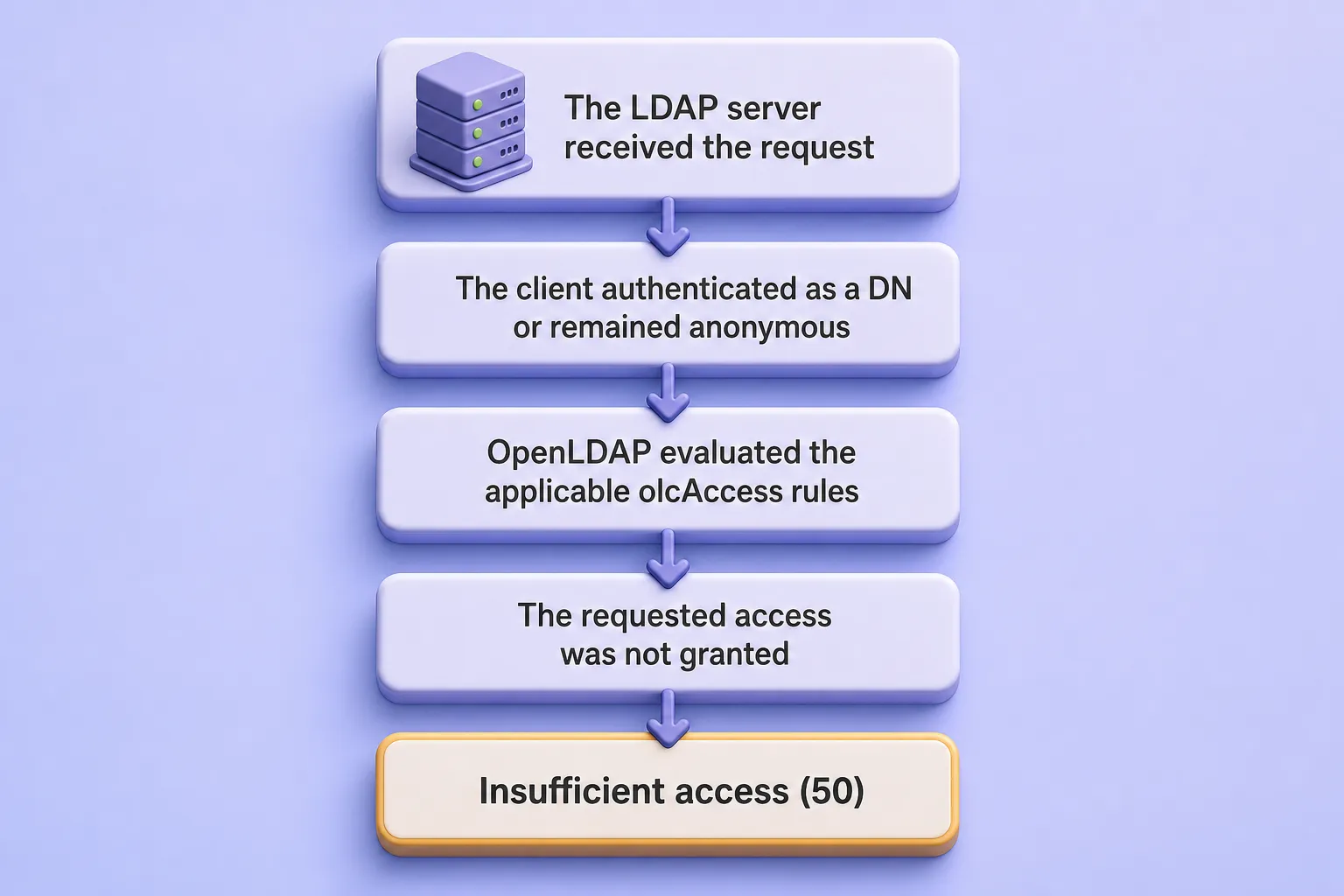
In each case the numeric code 50 means authorization failed after bind evaluation. The additional info line often names the missing entry or children permission.
This guide diagnoses and fixes Error 50 for anonymous or incorrect binds, ldapadd, ldapmodify, ldapdelete, ldapmodrdn, password changes, cn=config edits, group-based administrators, SSSD readers, and replication accounts. When the bind itself fails with Error 49 before ACL evaluation, start with Fix OpenLDAP invalid credentials Error 49. It does not replace OpenLDAP ACL examples for full policy design.
The procedure applies to OpenLDAP 2.6 across the RHEL family, including Red Hat Enterprise Linux, Rocky Linux, AlmaLinux, Oracle Linux, and CentOS Stream.
Tested on: Rocky Linux 10.2 with
openldap-servers2.6.10-1.el10_2 from EPEL 10.2.
The lab uses:
| Setting | Value |
|---|---|
| OpenLDAP server | ldap-server.example.com |
| OpenLDAP client | ldap-client.example.com |
| Directory suffix | dc=example,dc=com |
| Data administrator | cn=admin,dc=example,dc=com |
| Configuration database | cn=config |
| Data backend | MDB |
| LDAP transport | StartTLS on port 389 |
Complete these lessons first:
- Install and Configure OpenLDAP on the RHEL Family
- Secure OpenLDAP with TLS
- OpenLDAP cn=config and MDB explained
- OpenLDAP ACL configuration with practical examples
- Manage OpenLDAP users and groups
write or manage access to users or *. First identify the exact bind identity, target database, and missing operation-specific permission.
Pick the row that matches your failure message or symptom. Each link takes you to the fix section for that case. Complete Diagnose Error 50 Before Changing ACLs first if you have not already confirmed the bind identity and target database.
| Error or symptom | Most likely cause | Go to |
|---|---|---|
ldapadd run without -D fails |
Anonymous or wrong bind identity | Fix 1: Anonymous or Incorrect Bind |
ldapadd -Y EXTERNAL fails on the data suffix |
SASL peercred is not the data root DN | Fix 2: SASL EXTERNAL Cannot Write to the Data Suffix |
cn=config modification returns Error 50 |
Data administrator used instead of root SASL EXTERNAL | Fix 3: Insufficient Access to cn=config |
no write access to parent |
Missing children/write on the parent |
Fix 4: ldapadd No Write Access to Parent |
| Modify works but Add fails | Missing entry/write or children/write |
Fix 4: ldapadd No Write Access to Parent |
| Attribute modification fails | Missing attribute or target-entry permission | Fix 5: ldapmodify Insufficient Access |
| User cannot change password | Incorrect userPassword ACL or ACL order |
Fix 6: Password Change Insufficient Access |
| Delete fails | Missing target entry/write or parent children/write |
Fix 7: Delete, Rename and Move Errors |
| Rename or move fails | Missing target entry/write or old/new parent children/write |
Fix 7: Delete, Rename and Move Errors |
ACL works as cn=admin but not delegated admin |
Root DN bypasses ACLs | Fix 8: Delegated Group Administrator Does Not Match |
| Group-based ACL does not match | Wrong group model, member DN or rule order | Fix 8: Delegated Group Administrator Does Not Match |
| SSSD or replication account receives Error 50 | Service account lacks required search/read access | Fix 9: SSSD and Replication Access Errors |
| ACL was changed but failure remains | Wrong database or earlier ACL matched first | Apply and Verify the ACL Fix |
slapacl -u differs from the real operation |
Fake target lacks group or attribute data | Verify with slapacl |
Diagnose Error 50 Before Changing ACLs
Complete these checks once before you edit ACLs, no matter which fix section you opened from the table above. You need three facts: which identity authenticated, which database contains the target DN, and which permission the failed operation requires.
Confirm the Bind Identity
Confirm the DN used by a password bind:
ldapwhoami -x -ZZ -H ldap://ldap-server.example.com -D "cn=admin,dc=example,dc=com" -WSample output:
dn:cn=admin,dc=example,dc=comA root shell over the local LDAPI socket uses a different identity:
sudo ldapwhoami -Q -Y EXTERNAL -H ldapi:///Sample output:
dn:gidNumber=0+uidNumber=0,cn=peercred,cn=external,cn=authThese are not interchangeable:
cn=admin,dc=example,dc=comgidNumber=0+uidNumber=0,cn=peercred,cn=external,cn=authThe first identity is the configured data-database administrator. The second is the local SASL peer-credential identity used by sudo ldapmodify -Y EXTERNAL -H ldapi:///.
Identify the Target Database
| Target DN | Database | Normal administration method |
|---|---|---|
cn=config |
Configuration database | Root SASL EXTERNAL over ldapi:/// |
cn=schema,cn=config |
Configuration database | Root SASL EXTERNAL |
olcDatabase={N}mdb,cn=config |
Configuration database | Root SASL EXTERNAL |
ou=people,dc=example,dc=com |
MDB data database | Data root DN or delegated administrator |
uid=jdoe,ou=people,... |
MDB data database | Data root DN, self, or delegated administrator |
cn=developers,ou=groups,... |
MDB data database | Data root DN or delegated administrator |
Inspect the Data Root DN and Current ACLs
Discover the MDB database DN dynamically. The ldapsearch command covers -b, -s, and SASL EXTERNAL binds used here:
MDB_DN=$(sudo ldapsearch -Q -LLL -Y EXTERNAL -H ldapi:/// -b cn=config '(&(objectClass=olcMdbConfig)(olcSuffix=dc=example,dc=com))' dn | awk '/^dn: / {sub(/^dn: /, ""); print; exit}')Store the result in a shell variable so later ldapsearch and ldapmodify commands target the correct database entry.
Print the discovered value:
printf 'MDB database DN: %s\n' "$MDB_DN"Confirm the variable holds a value such as olcDatabase={2}mdb,cn=config before you query it.
Stop if discovery returned nothing:
if [[ -z "$MDB_DN" ]]; then
    echo "No MDB database was found for dc=example,dc=com" >&2
    exit 1
fi
Stop here when no MDB database matches the suffix filter.
Sample output:
MDB database DN: olcDatabase={2}mdb,cn=configQuery the suffix root DN and current ACLs:
sudo ldapsearch -Q -LLL -o ldif-wrap=no -Y EXTERNAL -H ldapi:/// -b "$MDB_DN" -s base olcSuffix olcRootDN olcAccessSample output on the lab server:
dn: olcDatabase={2}mdb,cn=config
olcSuffix: dc=example,dc=com
olcRootDN: cn=admin,dc=example,dc=com
olcAccess: {0}to dn.subtree="ou=people,dc=example,dc=com" by dn.exact="uid=pwdadmin,ou=system,dc=example,dc=com" write by * none
...
olcAccess: {9}to dn.subtree="dc=example,dc=com" by users read by * none
Use the exact olcRootDN shown by your server. The data root DN bypasses ACLs for its MDB database and does not automatically administer cn=config.
Create a protected backup directory before you change ACLs:
sudo install -d -m 0700 /root/openldap-error50-backupOnly root should be able to read ACL exports stored in this directory.
Export cn=config:
sudo slapcat -F /etc/openldap/slapd.d -n 0 -l /root/openldap-error50-backup/cn-config-before-acl.ldifKeep this LDIF as the restore point if an ACL edit prevents slapd from starting.
Save the current ACL list for comparison:
sudo ldapsearch -Q -LLL -o ldif-wrap=no -Y EXTERNAL -H ldapi:/// -b "$MDB_DN" -s base olcAccess | sudo tee /root/openldap-error50-backup/olcAccess-before.ldif >/dev/nullThis file captures the numbered ACL list before you change it. The tee command runs under sudo so the redirect can write beneath /root. Build a usable restore file before you edit live ACLs, as shown in OpenLDAP ACL examples.
Understand the Required Permission
Use this table when you compare a failing operation with slapacl or olcAccess:
| Operation | Required permission |
|---|---|
| Add | Parent children/write and new entry entry/write; when olcAddContentAcl: TRUE, submitted attributes are also checked against ACLs |
| Modify | Write permission on the attributes being modified |
| Delete | Target entry/write and parent children/write |
| Rename | Target entry/write, old and new parent children/write |
| Move | Target entry/write, old and new parent children/write |
| Password bind | auth on userPassword |
| Password change | self =xw or equivalent write permission |
Fix 1: Anonymous or Incorrect Bind
Use this section when your command never supplies -D, uses the wrong administrator DN, or binds as a user who only has read access.
Error 8 means the server requires an authenticated identity before accepting the modification. Error 50 means the request was evaluated using the anonymous or otherwise unsuitable bind identity and that identity lacked authorization.
A common failing command omits the bind DN:
ldapadd -x -ZZ -H ldap://ldap-server.example.com -f add-user.ldifOn the lab server, that anonymous request returned stronger authentication required instead of Error 50:
ldap_add: Strong(er) authentication required (8)
        additional info: modifications require authentication
Error 8 and Error 50 both mean the operation did not run with a suitable administrator identity. When anonymous binds are permitted, OpenLDAP may return Error 50 after evaluating the request against ACLs as the anonymous identity.
Retry with the data-database root DN:
ldapadd -x -ZZ -H ldap://ldap-server.example.com -D "cn=admin,dc=example,dc=com" -W -f add-user.ldifValidate the bind before you repeat the failing operation:
ldapwhoami -x -ZZ -H ldap://ldap-server.example.com -D "cn=admin,dc=example,dc=com" -WThe command should print the same DN you passed to -D. A mismatch means the bind identity is still wrong.
| Mistake | Correction |
|---|---|
No -D was supplied |
Add the correct administrator DN |
| Wrong suffix in the bind DN | Query olcRootDN |
Using cn=admin when the server uses cn=Manager |
Use the configured value |
| Using a user DN that has only read permission | Bind as root DN or grant delegated rights |
Using the data admin to modify cn=config |
Use SASL EXTERNAL — see Fix 3 |
Using -Y EXTERNAL for data entries |
Use the data root DN or add a narrow ACL — see Fix 2 |
Using -w password in published commands |
Prefer -W or a protected secret file |
Do not change ACLs until the intended identity can bind successfully.
Fix 2: SASL EXTERNAL Cannot Write to the Data Suffix
Use this section when you run ldapadd or ldapmodify as root on the server with -Y EXTERNAL -H ldapi:///, the command reaches slapd, and the data entry is still rejected — often with no write access to parent — even though cn=config changes work from the same shell.
That happens because SASL EXTERNAL does not bind as cn=admin,dc=example,dc=com. It binds as the local peer-credential identity:
gidNumber=0+uidNumber=0,cn=peercred,cn=external,cn=authThat identity normally administers cn=config. It does not automatically receive write access to entries below dc=example,dc=com. For routine data changes, bind as the configured data root DN instead of expecting peercred to inherit data-suffix rights.
On the lab server, this command failed with the parent error:
sudo ldapadd -Q -Y EXTERNAL -H ldapi:/// -f add-user.ldifThe SASL peer-credential identity authenticated successfully but lacked parent children/write access:
ldap_add: Insufficient access (50)
        additional info: no write access to parent
The fix is not by users write. For normal data operations, bind as the configured data root DN:
ldapadd -x -ZZ -H ldap://ldap-server.example.com -D "cn=admin,dc=example,dc=com" -W -f add-user.ldifAdd a narrow peercred ACL on the data database only when you intentionally want local root to administer directory data without a simple bind. For delegated administration, use group.exact or dn.exact rules instead of granting broad peercred write access to the suffix.
If you need to test whether peercred can create children under a container, use slapacl with the peer-credential DN against the parent OU. The data root DN bypasses ACL evaluation and is the reliable path for emergency data changes.
Fix 3: Insufficient Access to cn=config
Use this section when ldapmodify or ldapadd targets cn=config, olcDatabase={N}mdb,cn=config, or another configuration entry, but you bound as the data administrator. The data root DN bypasses ACLs on the MDB suffix database only — it does not administer the separate configuration database.
The data administrator:
cn=admin,dc=example,dc=comdoes not administer:
cn=configAn incorrect attempt on the lab server returned:
ldap_modify: Insufficient access (50)Use local SASL EXTERNAL for cn=config changes:
sudo ldapmodify -Q -Y EXTERNAL -H ldapi:/// -f change-config.ldifRun this from a root shell on the LDAP server so SASL EXTERNAL maps to the peer-credential identity with manage access on cn=config.
Verify access to the configuration database:
sudo ldapsearch -Q -LLL -Y EXTERNAL -H ldapi:/// -b cn=config -s base dnA successful query returns dn: cn=config, which confirms SASL EXTERNAL can reach the configuration database.
Inspect the configuration-database ACL:
sudo ldapsearch -Q -LLL -o ldif-wrap=no -Y EXTERNAL -H ldapi:/// -b "olcDatabase={0}config,cn=config" -s base olcAccess olcRootDNSample output on the lab server:
dn: olcDatabase={0}config,cn=config
olcAccess: {0}to * by dn.base="gidNumber=0+uidNumber=0,cn=peercred,cn=external,cn=auth" manage by * none
If SASL EXTERNAL itself receives Error 50:
- Confirm the command runs with
sudo. - Confirm the LDAPI socket is enabled.
- Check the exact SASL identity with
ldapwhoami. - Inspect the
olcDatabase={0}configACL. - Restore or repair the configuration using OpenLDAP cn=config and MDB explained.
Do not recommend directly editing files beneath /etc/openldap/slapd.d/ as the routine fix.
Fix 4: ldapadd No Write Access to Parent
Use this section when ldapadd authenticated successfully but returned Insufficient access (50) with no write access to parent, or when add fails while modify on the same OU still works. OpenLDAP is denying the operation because the bind identity lacks children/write on the parent container or entry/write on the new entry. When olcAddContentAcl is TRUE, submitted attributes are also checked against ACLs.
If the failure came from ldapadd -Y EXTERNAL, complete Fix 2 first. The steps below assume you are already binding as the intended administrator or delegated user.
Every add requires parent children/write and new entry entry/write:
Add:
uid=jdoe,ou=people,dc=example,dc=com

Requires:
entry/write on uid=jdoe,ou=people,dc=example,dc=com
children/write on ou=people,dc=example,dc=com
When olcAddContentAcl is enabled on the MDB database, OpenLDAP also checks write permission on each attribute in the LDIF. Inspect the current setting:
sudo ldapsearch -Q -LLL -Y EXTERNAL -H ldapi:/// -b "$MDB_DN" -s base olcAddContentAclAn ACL that grants attribute write access alone may still produce:
ldap_add: Insufficient access (50)
        additional info: no write access to parent
Check parent access with slapacl
Test whether the bind identity may create children under ou=people:
sudo slapacl -F /etc/openldap/slapd.d -D "uid=jdoe,ou=people,dc=example,dc=com" -b "ou=people,dc=example,dc=com" "children/write"Sample output on the lab server:
authcDN: "uid=jdoe,ou=people,dc=example,dc=com"
write access to children: DENIED
DENIED confirms the bind identity lacks children/write on the parent OU.
The data root DN bypasses ACL evaluation on its database:
sudo slapacl -F /etc/openldap/slapd.d -D "cn=admin,dc=example,dc=com" -b "ou=people,dc=example,dc=com" "children/write"Sample output:
authcDN: "cn=admin,dc=example,dc=com"
write access to children: ALLOWED
The data root DN bypasses normal ACL evaluation, so ALLOWED here is expected even when delegated users are denied.
Check target-entry access
For an existing entry, test entry/write on the target DN:
sudo slapacl -F /etc/openldap/slapd.d -D "uid=admin1,ou=people,dc=example,dc=com" -b "uid=jdoe,ou=people,dc=example,dc=com" "entry/write"A delegated administrator who lacks entry access will see DENIED for entry/write even when attribute rules look correct. Modify can succeed while add still fails when attribute access exists but entry or children does not.
Narrow ACL pattern for delegated user administration
Grant only the missing container rights:
to dn.base="ou=people,dc=example,dc=com"
   attrs=children
    by group.exact="cn=directory-admins,ou=groups,dc=example,dc=com" write
    by * none
Grant entry access on user entries created beneath the container:
to dn.children="ou=people,dc=example,dc=com"
   attrs=entry
    by group.exact="cn=directory-admins,ou=groups,dc=example,dc=com" write
    by users read
    by * none
Optional subtree rule for ongoing user and group administration:
to dn.subtree="ou=people,dc=example,dc=com"
    by group.exact="cn=directory-admins,ou=groups,dc=example,dc=com" write
    by self read
    by users read
    by * none
Use equivalent rules for ou=groups,dc=example,dc=com, ou=policies,dc=example,dc=com, and other delegated containers.
Do not use:
by users writebecause that grants every authenticated LDAP user write access. For the complete delegated-administration policy, see OpenLDAP ACL examples. Apply the change using Apply and Verify the ACL Fix.
Fix 5: ldapmodify Insufficient Access
Use this section when ldapmodify returns Error 50 on an attribute change such as mail or telephoneNumber, and the problem is not a password change. The bind identity may be correct, but OpenLDAP still denies the modification because the target entry, the attribute, or an earlier matching rule blocks the request.
A typical failing command looks like this:
ldapmodify -x -ZZ -H ldap://ldap-server.example.com -D "uid=jdoe,ou=people,dc=example,dc=com" -W -f change-mail.ldifStart with the bind identity shown in the command, then work through these checks:
- Does the user have access to the target entry?
- Does
selfmatch the complete target DN? - Is the target attribute listed in a self-service rule?
- Does an earlier broad ACL prevent the self-service ACL from being reached?
- Is an implicit deny being applied?
Modify checks attribute access on an existing entry. It does not require parent children/write. If add fails while modify works, compare the required permission table and test entry/write separately.
Example self-service rule:
to dn.subtree="ou=people,dc=example,dc=com"
   attrs=mail,telephoneNumber,displayName
    by self write
    by group.exact="cn=directory-admins,ou=groups,dc=example,dc=com" write
    by users read
    by * none
Password changes use different ACL semantics. When userPassword modification fails, continue with Fix 6.
Fix 6: Password Change Insufficient Access
Use this section when ldappasswd or a userPassword modify through ldapmodify returns Error 50, even though other attributes on the same entry work. Password rules are separate from general attribute rules: binds need auth on userPassword, self-service changes need by self =xw or equivalent write permission, and the userPassword rule must appear before any broad to * rule that would block it.
A working password ACL usually looks like this:
to attrs=userPassword
    by self =xw
    by group.exact="cn=directory-admins,ou=groups,dc=example,dc=com" write
    by anonymous auth
    by * none
by anonymous authallows OpenLDAP to verify credentials during a simple Bind without allowing the password value to be read. It does not grant general LDAP Compare access.by self =xwallows self-service password changes.- A delegated password administrator needs explicit
writeonuserPassword. - Place the
userPasswordrule before any broadto *rule that would block it.
Test with:
ldappasswd -x -ZZ \
  -H ldap://ldap-server.example.com \
  -D "uid=jdoe,ou=people,dc=example,dc=com" \
  -W \
  -S
When ACL evaluation denies the change, the command returns Error 50 before the new password hash is stored.
If password policy is enabled, Error 50 may also involve password-administrator ACLs, pwdReset, policy operational attributes, or an earlier password ACL that blocks the intended rule. Keep lockout and expiration behavior in OpenLDAP password policy with ppolicy.
Fix 7: Delete, Rename and Move Errors
Use this section when ldapdelete, ldapmodrdn, or a superior change returns Error 50 on an entry you can otherwise read or modify. These operations check entry/write on the target entry and children/write on the parent container. A move also requires children/write on the new parent.
The table below summarizes what each operation evaluates:
| Operation | Target entry |
Old parent children |
New parent children |
Attribute write |
|---|---|---|---|---|
| Add | Write | Write | Not applicable | Only when olcAddContentAcl: TRUE |
| Modify | Access to the entry | No | No | Write on modified attributes |
| Delete | Write | Write | Not applicable | No |
| Rename in same OU | Write | Write | Same parent | No separate attribute permission |
| Move to another OU | Write | Write | Write | No separate attribute permission |
Use Manage OpenLDAP users and groups for the operational commands once the ACL permits the action.
Delete Fails
The entry you want to remove:
uid=jdoe,ou=people,dc=example,dc=comrequires:
entry/writeon the userchildren/writeonou=people
Test both permissions with slapacl before you broaden the ACL.
Rename Within the Same OU Fails
Renaming uid=jdoe to uid=john.doe requires:
entry/writeon the target entrychildren/writeon its parent
The parent children/write requirement still applies because rename changes the RDN beneath the same superior. OpenLDAP checks the new RDN for schema and naming validity, but that is distinct from requiring a separate ACL grant on the naming attribute.
Move to Another OU Fails
Moving from ou=people to ou=contractors requires:
entry/writeon the userchildren/writeon the old parentchildren/writeon the new parent
Test both parent OUs with slapacl when move operations return Error 50.
Fix 8: Delegated Group Administrator Does Not Match
Use this section when the same operation works as cn=admin,dc=example,dc=com but fails for uid=admin1 or another delegated administrator bound through a group.exact rule. The data olcRootDN skips normal ACL evaluation, so a successful test with cn=admin does not prove your delegated policy is correct. You must bind as the delegated user and confirm group membership, ACL syntax, and rule order.
Verify that the delegated user is actually a member of the authorization group:
ldapsearch -x -ZZ -H ldap://ldap-server.example.com -D "cn=admin,dc=example,dc=com" -W -b "cn=directory-admins,ou=groups,dc=example,dc=com" -s base -LLL objectClass memberThe delegated administrator DN must appear exactly as a member value in the result.
Expected model:
objectClass: groupOfNames
member: uid=admin1,ou=people,dc=example,dc=com
The ACL must reference the complete group DN:
by group.exact="cn=directory-admins,ou=groups,dc=example,dc=com" writeCheck:
- The member value is a complete DN.
- The authenticated administrator DN exactly matches that value.
- The ACL uses
groupOfNameswithmember, not RFC2307memberUid. - The group rule appears before a broader matching rule.
After the group entry looks correct, repeat the failing operation while bound as the delegated administrator — not as cn=admin. DN-based group membership belongs with Configure OpenLDAP memberOf and referential integrity overlays. POSIX posixGroup authorization is a separate design.
Fix 9: SSSD and Replication Access Errors
Use this section when a dedicated service account — such as uid=sssd-reader for SSSD lookups or uid=replicator for Syncrepl — receives Error 50 while normal user administration still works. These accounts are ordinary LDAP identities. They need explicit olcAccess permission for the entries and attributes each client reads. This section shows how to test the exact bind each service uses. Full account design and schema choices stay in the linked SSSD and replication guides.
SSSD Reader Receives Error 50
SSSD fails during user or group lookup when its bind DN cannot search or read the attributes configured in sssd.conf. Test the same bind, URI, and search filter SSSD uses:
ldapsearch -x -ZZ -H ldap://ldap-server.example.com -D "uid=sssd-reader,ou=service-accounts,dc=example,dc=com" -W -b "ou=people,dc=example,dc=com" -LLL "(uid=jdoe)" uid uidNumber gidNumber homeDirectory loginShellError 50 here means the service account lacks search, read, or entry access to the attributes SSSD needs.
Grant only the attributes required by the selected SSSD schema. Do not give SSSD read access to userPassword, pwdHistory, or pwdFailureTime unless a specifically tested feature requires additional policy-state access. Client setup belongs in OpenLDAP client authentication with SSSD. Centralized sudo policy belongs in Store Linux sudo rules in OpenLDAP with SSSD.
Replication Account Receives Error 50
Syncrepl fails when the replication bind DN cannot search and read the full scope it must synchronize. The replicator needs a read rule that matches before broader deny rules take effect:
to *
    by dn.exact="uid=replicator,ou=service-accounts,dc=example,dc=com" read
    by * break
The replicator receives read and stops at this rule. For every other identity, by * break continues evaluation at the next olcAccess rule instead of denying access here.
Place it before broader rules and verify the account using the same URI, TLS mode, and search base used by Syncrepl. Keep full replication ACL configuration in OpenLDAP provider-consumer replication and OpenLDAP multi-provider replication.
Apply and Verify the ACL Fix
Use this section after you identify the missing permission in one of the fixes above and are ready to change olcAccess. Work through the steps in order: confirm you have a backup, check rule order, apply one indexed change, repeat the operation that failed, confirm unrelated access is still denied, and inspect logs if needed.
Back Up the Current Policy
If you have not already exported the current policy, repeat the backup commands under Inspect the Data Root DN and Current ACLs.
Check Numeric ACL Order
OpenLDAP evaluates olcAccess values in numerical order:
{0}
{1}
{2}
...
The first matching to rule controls the request unless break changes the flow.
Bad order:
{0}to *
    by users read
    by * none

{1}to attrs=userPassword
    by self write
    by anonymous auth
    by * none
The broad {0}to * rule matches first, so the password rule is never evaluated.
Correct order:
{0}to attrs=userPassword
    by self =xw
    by anonymous auth
    by * none

{1}to *
    by users read
    by * none
List every numbered olcAccess value on the data database before you choose an insertion point:
sudo ldapsearch -Q -LLL -o ldif-wrap=no -Y EXTERNAL -H ldapi:/// -b "$MDB_DN" -s base olcAccessNote the {N} index you plan to replace or the position where a new rule should appear.
Replace One Indexed ACL Value Safely
Use the numeric index when replacing one rule:
dn: REPLACE_WITH_MDB_DN
changetype: modify
delete: olcAccess
olcAccess: {3}
-
add: olcAccess
olcAccess: {3}to dn.subtree="ou=people,dc=example,dc=com"
  by group.exact="cn=directory-admins,ou=groups,dc=example,dc=com" write
  by self read
  by users read
  by * none
Replace REPLACE_WITH_MDB_DN with the value stored in $MDB_DN before you apply the LDIF.
Do not use replace: olcAccess with a single indexed value unless you intentionally replace and review the complete ACL policy.
Apply the change:
sudo ldapmodify -Q -Y EXTERNAL -H ldapi:/// -f fix-access.ldifA successful modify exits without an LDAP error.
Confirm the new rule index and order immediately:
sudo ldapsearch -Q -LLL -o ldif-wrap=no -Y EXTERNAL -H ldapi:/// -b "$MDB_DN" -s base olcAccessThe {N} values should reflect the intended order before you retest the live operation.
Repeat the Exact Failed Operation
Repeat the exact ldapadd, ldapmodify, ldapdelete, ldapmodrdn, ldappasswd, or ldapsearch command that previously failed, using the same URI, TLS mode, and bind DN.
On the lab server, the same ldapadd LDIF succeeded when bound as the data root DN after EXTERNAL produced Error 50.
Repeat ldapwhoami first when the failure might still be an identity problem.
Test an Expected Denial
A delegated administrator should be able to add beneath the delegated OU, modify permitted entries, rename within scope, and delete test entries. The same administrator should not be able to modify cn=config, modify entries outside the delegated subtree, or read password hashes.
Confirm unrelated access remains denied after your fix.
Verify with slapacl
Run slapacl with the same bind DN as the failing live command. Test attribute, entry, and parent permissions separately.
Check whether the delegated administrator may change the mail attribute:
sudo slapacl -F /etc/openldap/slapd.d -D "uid=admin1,ou=people,dc=example,dc=com" -b "uid=jdoe,ou=people,dc=example,dc=com" "mail/write"Confirm write access to the user entry itself:
sudo slapacl -F /etc/openldap/slapd.d -D "uid=admin1,ou=people,dc=example,dc=com" -b "uid=jdoe,ou=people,dc=example,dc=com" "entry/write"Confirm the administrator may add or remove entries under ou=people:
sudo slapacl -F /etc/openldap/slapd.d -D "uid=admin1,ou=people,dc=example,dc=com" -b "ou=people,dc=example,dc=com" "children/write"Each test should print ALLOWED only for the permissions your ACL was meant to grant.
slapacl -u uses a fake entry and cannot accurately test rules that depend on real target attributes or group.exact membership. Prefer a live operation when group-based ACLs are involved.
Enable Temporary ACL Logging
olcLogLevel belongs on the global cn=config entry, not on the MDB database. Check the current value first:
sudo ldapsearch -Q -LLL -Y EXTERNAL -H ldapi:/// -b cn=config -s base olcLogLevelWhen acl is not already enabled, add it temporarily:
sudo ldapmodify -Q -Y EXTERNAL -H ldapi:/// <<'EOF'
dn: cn=config
changetype: modify
add: olcLogLevel
olcLogLevel: acl
EOF
Monitor the server while you repeat the failing operation:
sudo journalctl -u slapd -fWatch for ACL evaluation lines that name the matched rule and the permission that was denied.
Remove the temporary value afterward:
sudo ldapmodify -Q -Y EXTERNAL -H ldapi:/// <<'EOF'
dn: cn=config
changetype: modify
delete: olcLogLevel
olcLogLevel: acl
EOF
Troubleshoot Remaining Error 50 Cases
Use this table when your case did not match one of the main fixes above.
| Symptom | Most likely cause | Recommended check |
|---|---|---|
ldapadd fails immediately |
Anonymous or wrong bind DN | Run ldapwhoami |
no write access to parent |
Missing parent children/write |
Test parent with slapacl |
| Add fails despite attribute write | Missing target entry/write |
Test entry/write |
| Modify works but add fails | Attribute access exists; entry or children does not |
Compare operation requirements |
| Delete fails | Missing target entry or parent children access |
Test both |
| Rename fails | Missing target entry/write or parent children/write |
Test the target entry and parent |
| Move fails | Missing target entry/write or old/new parent children/write |
Test the target and both parent OUs |
| Password bind fails | No auth access to userPassword |
Review password ACL order |
| Password reset fails | Administrator lacks write or manage permission | Review ACL and ppolicy |
cn=config modification fails |
Data administrator was used | Use root SASL EXTERNAL |
| SASL EXTERNAL data add fails | Peercred identity is not the data root DN | Use the data root DN or delegated ACL |
| Group administrator does not match | Wrong group type or member DN | Inspect groupOfNames/member |
| SSSD search fails | Read account lacks search, read, or entry access | Test exact SSSD bind |
| Replication fails | Replicator cannot read full synchronization scope | Test replication search |
| Later ACL never applies | Earlier broad to rule matched |
Review numbered order |
ACL works only as cn=admin |
Root DN bypasses normal ACLs | Test a delegated identity |
| Error remains after ACL update | Wrong MDB database was modified | Rediscover database by suffix |
slapacl -u says allowed but live request fails |
Dry run lacked real group or target content | Run a full live test |
| Server returns Error 53 instead | Database may be read-only | Check olcReadOnly |
| File permission changes do not help | Error is LDAP authorization, not filesystem DAC | Inspect olcAccess |
Parse the offline configuration when startup fails after an ACL edit:
sudo slaptest -F /etc/openldap/slapd.d -uA successful check prints config file testing succeeded.
Review recent server messages when a live operation still fails:
sudo journalctl -u slapd -n 100 --no-pagerSearch the output for insufficient access, no write access, or ACL debug lines from the time of the failed request.
References
- OpenLDAP 2.6 Administrator's Guide — Access Control
- slapd.access(5)
- slapd-config(5)
- slapacl(8)
- ldapwhoami(1)
- ldapadd(1)
- ldapmodify(1)
- ldapdelete(1)
- ldapmodrdn(1)
- ldappasswd(1)
Summary
You learned how to choose the matching symptom from the quick-fix table, confirm the actual authenticated identity, distinguish cn=config from the data database, find the configured data root DN, understand operation-specific permissions, fix anonymous binds, SASL EXTERNAL data-suffix failures, cn=config access, ldapadd parent errors, ldapmodify attribute failures, password ACL problems, delete/rename/move requirements, delegated group administrators, SSSD and replication readers, apply ACL changes in the correct order, and verify the fix with live operations, expected denials, slapacl, and logs.
