
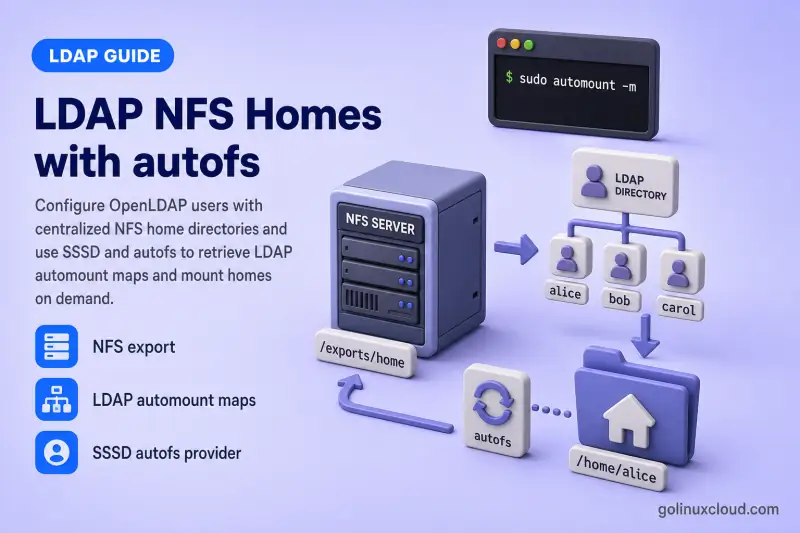
This guide configures centralized home directories for OpenLDAP users.
OpenLDAP stores the user identity and automount maps, NFS stores the home-directory files, and autofs mounts the correct NFS directory only when the user accesses it.
You will learn how to:
- Prepare an NFS home-directory export
- Match NFS ownership with LDAP UID and GID values
- Load the OpenLDAP automount schema
- Create
auto.masterandauto.homemaps in LDAP - Grant SSSD read access to automount entries
- Configure the SSSD autofs provider
- Configure the
automountNSS source - Mount
/home/USERNAMEon demand - Verify SSH login and file ownership
- Troubleshoot LDAP, SSSD, autofs, and NFS separately
The procedure applies to the RHEL family:
- Red Hat Enterprise Linux
- Rocky Linux
- AlmaLinux
- Oracle Linux
- CentOS Stream
Tested on: Rocky Linux 10.2 with OpenLDAP 2.6.10, SSSD 2.12.0, NFSv4, and autofs.
The lab uses:
| Setting | Value |
|---|---|
| OpenLDAP and NFS server | ldap-server.example.com |
| SSSD and autofs client | ldap-client.example.com |
| LDAP suffix | dc=example,dc=com |
| Test user | jdoe |
| LDAP home directory | /home/jdoe |
| NFS storage directory | /srv/nfs/home/jdoe |
| NFS export root | /srv/nfs/home |
| Automount container | ou=automount,dc=example,dc=com |
| Master map | auto.master |
| Home map | auto.home |
| LDAP transport | StartTLS |
In production, place LDAP and NFS on separate hosts when you prefer. This lab combines both roles on ldap-server.example.com so the export, schema, maps, and storage stay reproducible on one server.
Complete these guides first:
- Configure an OpenLDAP client with SSSD
- Manage OpenLDAP users and groups
- OpenLDAP ACL configuration
- Configure OpenLDAP TLS with StartTLS
/home path managed by autofs. In this design, autofs provides /home/USERNAME; oddjob-mkhomedir must not create a competing local directory.
This article owns NFS export, automount schema, LDAP maps, the SSSD autofs provider, and on-demand home mounting. User lookup, PAM authentication, and SSH client setup stay in OpenLDAP client authentication with SSSD. Routine homeDirectory and user creation stay in Manage OpenLDAP users and groups.
Understand the LDAP, NFS and autofs Architecture
When jdoe logs in or accesses /home/jdoe, the request crosses three layers:
1. SSSD resolves jdoe from OpenLDAP
2. autofs asks SSSD for auto.master
3. auto.master maps /home to auto.home
4. auto.home maps jdoe to the NFS export
5. autofs mounts ldap-server.example.com:/srv/nfs/home/jdoe
6. The user sees /home/jdoe on the client
Use this component table to keep the paths separate:
| Component | Stores or controls |
|---|---|
posixAccount |
Username, UID, GID, and /home/jdoe |
| NFS server | Actual files under /srv/nfs/home/jdoe |
auto.master |
Associates /home with auto.home |
auto.home |
Maps usernames to NFS directories |
| SSSD autofs provider | Retrieves and caches LDAP maps |
| autofs | Mounts and unmounts NFS paths on demand |
The most important path distinction is:
| Layer | Path |
|---|---|
LDAP homeDirectory |
/home/jdoe |
| NFS server path | /srv/nfs/home/jdoe |
| Client mount path | /home/jdoe |
Do not store /srv/nfs/home/jdoe in the LDAP user's homeDirectory. That path exists only on the NFS server.
Creating automount entries does not create the NFS export, user directory, or permissions. Verify a manual NFS mount before you add autofs so NFS and automount failures stay easy to separate.
Prepare the LDAP User and NFS Home Directory
Start from a working LDAP client where POSIX lookups already succeed. Confirm the account with getent before you touch NFS exports or autofs maps:
getent passwd jdoeid jdoeConfirm the LDAP entry contains the expected POSIX attributes:
ldapsearch -x -ZZ -H ldap://ldap-server.example.com -D "cn=admin,dc=example,dc=com" -W -b "ou=people,dc=example,dc=com" -LLL "(uid=jdoe)" dn uid uidNumber gidNumber homeDirectorySample output:
dn: uid=jdoe,ou=people,dc=example,dc=com
uid: jdoe
uidNumber: 10001
gidNumber: 10001
homeDirectory: /home/jdoe
The client should resolve the same numeric identity through SSSD.
Configure the NFS server
On ldap-server.example.com, install the NFS server packages:
sudo dnf install -y nfs-utilsCreate the export root and the user directory with numeric ownership that matches LDAP:
sudo install -d -m 0755 /srv/nfs/homesudo install -d -m 0700 -o 10001 -g 10001 /srv/nfs/home/jdoeAdd the export in /etc/exports:
/srv/nfs/home 192.168.122.0/24(rw,sync,root_squash)Use a subnet or host list that matches your client network. rw allows user writes, sync commits data synchronously, and root_squash maps remote root to an unprivileged NFS user.
Enable NFS and open the firewall:
sudo systemctl enable --now nfs-serversudo firewall-cmd --permanent --add-service=nfssudo firewall-cmd --reloadApply the export:
sudo exportfs -ravVerify the active export:
sudo exportfs -vSample output:
/srv/nfs/home 192.168.122.0/24(sync,wdelay,hide,no_subtree_check,sec=sys,rw,secure,root_squash,no_all_squash)Test NFS before autofs
On ldap-client.example.com, install the NFS client tools:
sudo dnf install -y nfs-utilsCreate a temporary mount point:
sudo install -d -m 0755 /mnt/test-homeMount the user's home directly over NFSv4:
sudo mount -t nfs4 ldap-server.example.com:/srv/nfs/home/jdoe /mnt/test-homeConfirm the mount source:
findmnt /mnt/test-homeSample output:
TARGET         SOURCE                                     FSTYPE OPTIONS
/mnt/test-home ldap-server.example.com:/srv/nfs/home/jdoe nfs4   rw,relatime,vers=4.2,rsize=524288,wsize=524288,namlen=255,hard,proto=tcp,timeo=600,retrans=2,sec=sys,clientaddr=192.168.56.108,local_lock=none,addr=192.168.56.108
Check ownership and write access as the LDAP user:
ls -ldn /mnt/test-homesudo -u jdoe touch /mnt/test-home/nfs-testls -ln /mnt/test-home/nfs-testUnmount the test mount:
sudo umount /mnt/test-homeDo not continue to LDAP automount maps until this manual mount works.
Load the OpenLDAP automount Schema
Use the RFC2307bis-style automount schema in this guide:
automountMapautomountautomountMapNameautomountKeyautomountInformation
Check whether the schema is already loaded:
sudo ldapsearch -Q -LLL -Y EXTERNAL -H ldapi:/// -b cn=schema,cn=config '(&(objectClass=olcSchemaConfig)(olcObjectClasses=*automountMap*))' dnWhen the search returns a schema entry such as cn=automount-rfc2307bis,cn=schema,cn=config, skip the import step.
The autofs package still ships /usr/share/doc/autofs/autofs.schema, but the package documentation marks that file as outdated. It also does not provide the automountMapName and automountKey attributes used here. Discover packaged documentation with:
rpm -ql autofs | grep -Ei 'README.*schema|autofs\.schema'Sample output on Rocky Linux 10.2:
/usr/share/doc/autofs/README.autofs-schema
/usr/share/doc/autofs/autofs.schema
Back up cn=config before loading a new schema:
sudo install -d -m 0700 /root/openldap-autofs-backupsudo slapcat -F /etc/openldap/slapd.d -n 0 -l /root/openldap-autofs-backup/cn-config-before-automount-schema.ldifCreate a direct cn=config schema LDIF. These definitions match the RFC2307bis draft automount model used in this guide:
sudo tee /root/automount-rfc2307bis.ldif >/dev/null <<'EOF'
dn: cn=automount-rfc2307bis,cn=schema,cn=config
objectClass: olcSchemaConfig
cn: automount-rfc2307bis
olcAttributeTypes: ( 1.3.6.1.1.1.1.31 NAME 'automountMapName'
 DESC 'automount Map Name'
 EQUALITY caseExactMatch
 SYNTAX 1.3.6.1.4.1.1466.115.121.1.15
 SINGLE-VALUE )
olcAttributeTypes: ( 1.3.6.1.1.1.1.32 NAME 'automountKey'
 DESC 'Automount Key value'
 EQUALITY caseExactMatch
 SYNTAX 1.3.6.1.4.1.1466.115.121.1.15
 SINGLE-VALUE )
olcAttributeTypes: ( 1.3.6.1.1.1.1.33 NAME 'automountInformation'
 DESC 'Automount information'
 EQUALITY caseExactMatch
 SYNTAX 1.3.6.1.4.1.1466.115.121.1.15
 SINGLE-VALUE )
olcObjectClasses: ( 1.3.6.1.1.1.2.16 NAME 'automountMap'
 SUP top STRUCTURAL
 MUST automountMapName
 MAY description )
olcObjectClasses: ( 1.3.6.1.1.1.2.17 NAME 'automount'
 SUP top STRUCTURAL
 DESC 'Automount information'
 MUST ( automountKey $ automountInformation )
 MAY description )
EOF
Protect the LDIF before you import it:
sudo chmod 600 /root/automount-rfc2307bis.ldifImport the schema through the local cn=config socket:
sudo ldapadd -Q -Y EXTERNAL -H ldapi:/// -f /root/automount-rfc2307bis.ldifA successful import prints adding new entry "cn=automount-rfc2307bis,cn=schema,cn=config".
Validate the offline configuration:
sudo slaptest -F /etc/openldap/slapd.d -uCreate LDAP auto.master and auto.home Maps
Use this directory structure:
dc=example,dc=com
└── ou=automount
    ├── automountMapName=auto.master
    │   └── automountKey=/home
    └── automountMapName=auto.home
        └── automountKey=*
Create automount-home-maps.ldif:
dn: ou=automount,dc=example,dc=com
objectClass: top
objectClass: organizationalUnit
ou: automount
description: Central autofs maps

dn: automountMapName=auto.master,ou=automount,dc=example,dc=com
objectClass: top
objectClass: automountMap
automountMapName: auto.master

dn: automountKey=/home,automountMapName=auto.master,ou=automount,dc=example,dc=com
objectClass: top
objectClass: automount
automountKey: /home
automountInformation: auto.home

dn: automountMapName=auto.home,ou=automount,dc=example,dc=com
objectClass: top
objectClass: automountMap
automountMapName: auto.home

dn: automountKey=*,automountMapName=auto.home,ou=automount,dc=example,dc=com
objectClass: top
objectClass: automount
automountKey: *
automountInformation: -fstype=nfs4,rw,hard,_netdev,nosuid,nodev ldap-server.example.com:/srv/nfs/home/&
The wildcard entry works like this:
User accesses:    /home/jdoe
* becomes:        jdoe
& becomes:        jdoe
NFS location:     ldap-server.example.com:/srv/nfs/home/jdoe
Add the entries over StartTLS:
ldapadd -x -ZZ -H ldap://ldap-server.example.com -D "cn=admin,dc=example,dc=com" -W -f automount-home-maps.ldifVerify the master map:
ldapsearch -x -ZZ -H ldap://ldap-server.example.com -D "cn=admin,dc=example,dc=com" -W -b "automountMapName=auto.master,ou=automount,dc=example,dc=com" -LLL "(objectClass=automount)" automountKey automountInformationSample output:
dn: automountKey=/home,automountMapName=auto.master,ou=automount,dc=example,dc=com
automountKey: /home
automountInformation: auto.home
Verify the home map:
ldapsearch -x -ZZ -H ldap://ldap-server.example.com -D "cn=admin,dc=example,dc=com" -W -b "automountMapName=auto.home,ou=automount,dc=example,dc=com" -LLL "(objectClass=automount)" automountKey automountInformationSample output:
dn: automountKey=*,automountMapName=auto.home,ou=automount,dc=example,dc=com
automountKey: *
automountInformation: -fstype=nfs4,rw,hard,_netdev,nosuid,nodev ldap-server.example.com:/srv/nfs/home/&
Do not mix object classes and attributes across schema models. These combinations are invalid:
automountMap + nisMapEntry
nisMap + automountInformation
automount + cn
Grant SSSD Access to Automount Maps
The SSSD service account must be able to search and read ou=automount,dc=example,dc=com.
Recommended ACL direction:
to dn.subtree="ou=automount,dc=example,dc=com"
    by dn.exact="uid=sssd-reader,ou=service-accounts,dc=example,dc=com" read
    by group.exact="cn=directory-admins,ou=groups,dc=example,dc=com" write
    by * none
Place the rule before a broader deny rule. Use OpenLDAP ACL configuration for indexed replacement and rollback.
Test with the exact SSSD bind identity:
ldapsearch -x -ZZ -H ldap://ldap-server.example.com -D "uid=sssd-reader,ou=service-accounts,dc=example,dc=com" -W -b "ou=automount,dc=example,dc=com" -LLL "(|(objectClass=automountMap)(objectClass=automount))" automountMapName automountKey automountInformationInterpret the result:
| Error | Meaning |
|---|---|
| Error 49 | SSSD reader DN or password is invalid |
| Error 50 | ACL blocks automount-map access |
| Error 32 | Wrong automount search base |
| Empty result | Schema, object class, or search filter mismatch |
If the reader bind succeeds but searches fail after you enabled TLS hardening from Configure OpenLDAP TLS with StartTLS, confirm the client uses StartTLS or LDAPS before you change automount entries.
Configure SSSD and autofs on RHEL Family Clients
Install the required packages on ldap-client.example.com:
sudo dnf install -y autofs nfs-utils sssd sssd-ldapExtend the existing /etc/sssd/sssd.conf from OpenLDAP client authentication with SSSD. Append autofs to the existing services value and preserve every responder that is already configured. Do not replace the working identity, authentication, TLS, or bind settings unless you are correcting them deliberately.
Example when the client already uses sudo and ssh:
[sssd]
# Before:
# services = nss, pam, sudo, ssh

# After:
services = nss, pam, sudo, ssh, autofs
domains = example.com

[autofs]

[domain/example.com]
autofs_provider = ldap
ldap_autofs_search_base = ou=automount,dc=example,dc=com

ldap_schema = rfc2307
ldap_autofs_map_master_name = auto.master
ldap_autofs_map_object_class = automountMap
ldap_autofs_map_name = automountMapName
ldap_autofs_entry_object_class = automount
ldap_autofs_entry_key = automountKey
ldap_autofs_entry_value = automountInformation
The lab client previously contained only nss and pam:
[sssd]
services = nss, pam, autofs
domains = example.com
Keep the existing id_provider, auth_provider, ldap_uri, search bases, bind account, and TLS settings from the SSSD client guide. Add only the [autofs] section and the autofs_provider plus ldap_autofs_* options shown above.
The explicit automount mappings matter because ldap_schema = rfc2307 otherwise defaults SSSD toward nisMap, nisObject, nisMapName, and nisMapEntry for automount lookups.
Protect and validate the configuration:
sudo chown root:root /etc/sssd/sssd.confsudo chmod 600 /etc/sssd/sssd.confsudo sssctl config-checkSample output:
Issues identified by validators: 0Verify that sss is present in the automount NSS database. Preserve the order generated by the active authselect profile rather than forcing a different order:
grep '^automount:' /etc/nsswitch.confTypical current RHEL-family output:
automount: sss filesWhen sss is missing:
- Inspect the active
authselectprofile. - Update the custom profile when one is in use.
- Avoid directly editing an
authselect-managed/etc/nsswitch.conf.
Check the selected profile and disable only the conflicting home-directory feature:
authselect currentWhen with-mkhomedir is listed, disable it so PAM does not create local /home/USERNAME directories:
sudo authselect disable-feature with-mkhomedirConfirm that only with-mkhomedir was removed:
authselect currentConfirm that the active profile supports with-mkhomedir before you disable it. Do not replace a custom, IdM-generated, or domain-join-generated profile with the stock sssd profile solely for this article.
Restart SSSD and autofs:
sudo systemctl restart sssdsudo systemctl enable --now autofssudo systemctl restart autofsThe automounter reads its master map at startup, so restart autofs after you change SSSD automount settings or LDAP master-map entries.
Verify On-Demand NFS Home Directories
Confirm the LDAP user still resolves:
getent passwd jdoeThe home path should remain the client mount point:
jdoe:*:10001:10001:Jane Doe:/home/jdoe:/bin/bashDisplay the automount maps known to the client:
sudo automount -mThe output should include the LDAP-backed /home map:
Mount point: /home

source(s):

  instance type(s): sss
  map: auto.home

  * | -fstype=nfs4,rw,hard,_netdev,nosuid,nodev ldap-server.example.com:/srv/nfs/home/&
Before access, the path may not be mounted yet:
findmnt /home/jdoeTrigger the mount:
ls -la /home/jdoeVerify the mount source:
findmnt /home/jdoeOn a separate client host, expect an NFS source such as ldap-server.example.com:/srv/nfs/home/jdoe.
Test write access:
sudo -u jdoe touch /home/jdoe/autofs-testConfirm the file on the NFS server:
ls -ln /srv/nfs/home/jdoe/autofs-testSample output:
-rw-r--r--. 1 10001 10001 0 Jul 14 21:54 /srv/nfs/home/jdoe/autofs-testTest an end-to-end login:
After login:
pwdExpected result:
/home/jdoetouch login-testls -ln login-testA wildcard map can still attempt a mount for a path such as /home/nonexistent-user even when no LDAP account exists. Login authorization remains a separate SSSD identity and access decision.
Provision and Maintain Shared Home Directories
When you add a new LDAP user, complete both steps:
1. Create the posixAccount entry in OpenLDAP
2. Create the matching directory on the NFS server
Example NFS provisioning:
sudo install -d -m 0700 -o 10002 -g 10002 /srv/nfs/home/asmithRecommended checks:
LDAP uidNumber matches NFS owner UID
LDAP gidNumber matches NFS owner GID
LDAP homeDirectory is /home/USERNAME
NFS directory is /srv/nfs/home/USERNAME
Directory mode is appropriate
User resolves on ldap-client
Manual NFS mount works
Autofs mount works
For a wildcard auto.home map, you do not need a separate LDAP automount entry for every user. Creating the LDAP account and the NFS directory is enough.
Use explicit map entries instead of * when:
- Users have different NFS servers
- Users have different export roots
- Some accounts must not receive shared homes
- Different mount options are required
- Storage is divided by department or location
Backup boundaries:
- LDAP backups preserve automount maps.
- NFS data requires a separate filesystem backup.
- Restoring LDAP alone does not restore user files.
- Restoring NFS files alone does not restore UID and GID identity definitions.
See OpenLDAP backup and restore for directory data protection.
Troubleshoot LDAP, SSSD, autofs and NFS
When a deleted or modified LDAP automount map still appears on the client, invalidate the SSSD autofs cache before you retest:
sudo systemctl stop autofsPauses the automounter so cached maps are not read while you clear SSSD state.
sudo sss_cache -AExpires all SSSD caches, including autofs maps, after LDAP map changes.
To expire one map only:
sudo sss_cache -a auto.homeTargets a single map when other autofs data should stay cached.
Restart autofs and verify the current map:
sudo systemctl start autofsReloads the master map after the cache clear.
sudo automount -mLists active maps and mount points when getent works but the home path does not mount.
ls -la /home/jdoeConfirms the home directory mounted with the expected ownership after autofs reports the map.
Restart SSSD separately only when its configuration or provider state changed. Restart autofs after master-map changes because the automounter reads that map during startup.
| Symptom | Likely layer | Check |
|---|---|---|
getent passwd jdoe fails |
SSSD identity | LDAP user search and SSSD domain logs |
User resolves but /home/jdoe does not mount |
autofs or map lookup | automount -m and SSSD autofs logs |
automount -m has no LDAP maps |
SSSD autofs configuration | services = ... autofs, search base, and schema mappings |
| SSSD reader gets Error 49 | LDAP authentication | Fix OpenLDAP Error 49 |
| SSSD reader gets Error 50 | LDAP ACL | Read permission on ou=automount |
| Map exists but is not found | Schema mapping mismatch | Compare object classes and attribute mappings |
| Manual NFS mount fails | NFS or network | exportfs, firewall, and server logs |
| Mount works as root but user cannot write | UID/GID or directory permissions | Compare numeric ownership |
| User gets another user's files | UID collision | Search LDAP for duplicate uidNumber |
/home/jdoe is a local directory |
mkhomedir conflict |
Remove the local directory after preserving data |
| Deleted or modified map remains visible | SSSD autofs cache | Stop autofs, run sss_cache -A, and start autofs |
| Master-map change is not recognized | autofs master-map state | Invalidate the SSSD map cache and restart autofs |
| Mount hangs when NFS is unavailable | NFS hard mount waiting for server | Restore server connectivity |
| NFS works only when SELinux is permissive | SELinux policy denial | Check recent AVC messages and correct the NFS policy or context instead of disabling SELinux |
| SSH authenticates but home access fails | Storage, not credentials | Test manual NFS mount and ownership |
Useful client commands:
sudo automount -mLists active autofs maps and mount points when identity lookup works but the home path is missing.
findmnt -t nfs,nfs4Shows whether the home path is actually an NFS mount or still a local directory.
sudo journalctl -u autofs -n 100 --no-pagerRecent automounter errors when map lookup or mount requests fail.
sudo journalctl -u sssd -n 100 --no-pagerSSSD autofs provider and LDAP reader errors when maps do not appear in automount -m.
When the SSSD log files exist, review:
sudo grep -iE 'autofs|automount|ldap|offline|error' /var/log/sssd/sssd_autofs.log /var/log/sssd/sssd_example.com.logFocused autofs and LDAP messages when the journal output is too noisy.
Useful NFS-server commands:
sudo exportfs -vConfirms the export path, client access, and options when manual mounts fail.
sudo journalctl -u nfs-server -n 100 --no-pagerNFS server startup and export errors when clients cannot reach the share.
sudo ss -ltnp | grep ':2049'Verifies the NFS service is listening when connectivity or firewall issues are suspected.
Enable temporary autofs debugging through the supported distribution configuration when you need deeper traces. Restore the normal debug level afterward.
References
- Red Hat Enterprise Linux 10 — Mounting file systems on demand
- Red Hat Enterprise Linux 10 — Deploying an NFS server
- Red Hat Enterprise Linux 10 — Troubleshooting SSSD
- sssd-ldap(5) — upstream SSSD source
- sssd-ldap-attributes(5)
- sssd.conf(5)
- autofs(5)
- auto.master(5)
- exports(5)
Summary
You configured an LDAP POSIX user with /home/USERNAME, created an NFS-backed home directory with matching UID and GID, loaded the RFC2307bis automount schema, created LDAP auto.master and auto.home maps, granted the SSSD reader access to ou=automount, enabled the SSSD LDAP autofs provider with explicit attribute mappings, verified the automount NSS source includes sss, invalidated stale autofs map cache when needed, verified on-demand mounting through autofs, and separated LDAP identity backup from NFS file backup.
