
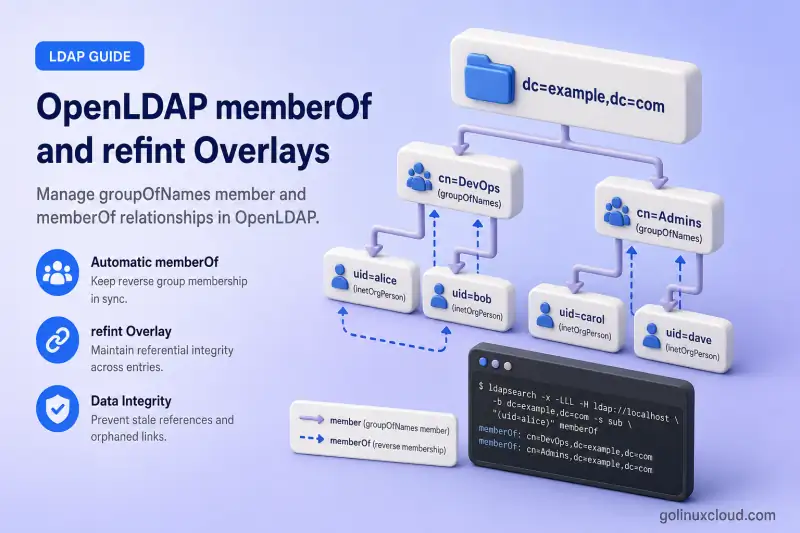
This guide configures the OpenLDAP memberOf and referential integrity (refint) overlays for DN-based group membership.
You will learn how to:
- Create DN-based
groupOfNamesgroups - Store members using the
memberattribute - Generate reverse
memberOfvalues automatically - Remove stale group references when users are deleted
- Update group references when users are renamed
- Test rename and deletion behavior on disposable accounts
- Populate
memberOffor existing memberships
The procedure applies to OpenLDAP 2.6 across the RHEL family, including Red Hat Enterprise Linux, Rocky Linux, AlmaLinux, Oracle Linux, and CentOS Stream. OpenLDAP removed the deprecation of slapo-memberof in OpenLDAP 2.6.8, so the overlay remains a valid 2.6 topic.
Tested on: Rocky Linux 10.2 with
openldap-servers2.6.10-1.el10_2 from EPEL 10.2.
The lab uses:
| Setting | Value |
|---|---|
| OpenLDAP server | ldap-server.example.com |
| Base DN | dc=example,dc=com |
| Users OU | ou=people,dc=example,dc=com |
| Groups OU | ou=groups,dc=example,dc=com |
| Group object class | groupOfNames |
| Membership attribute | member |
| Reverse membership | memberOf |
| Example DN-based group | cn=app-developers,ou=groups,dc=example,dc=com |
The lab also contains cn=developers as an RFC2307 posixGroup with memberUid for SSSD. This lesson adds a separate groupOfNames entry so the two membership models do not collide on the same DN. If member versus memberUid terminology is new, read LDAP and OpenLDAP basics first.
Complete these lessons first:
- Install and Configure OpenLDAP on the RHEL Family
- Secure OpenLDAP with TLS
- OpenLDAP cn=config and MDB explained
- Manage OpenLDAP users and groups
- OpenLDAP backup and restore
memberOf overlay requires DN-valued membership such as groupOfNames with member. It does not directly generate reverse membership from RFC2307 posixGroup entries that use username-based memberUid.
memberof on each consumer where applications need the generated memberOf attribute. Exclude memberOf from syncrepl with exattrs, because each server maintains its own generated values. Enable olcMemberOfAddCheck: TRUE when replicated Add operations may arrive before the member entries they reference. Keep olcMemberOfDangling set to ignore when using add-check. Follow OpenLDAP provider-consumer replication or OpenLDAP multi-provider replication before applying this configuration to providers and consumers.
Understand member, memberOf, and refint
DN-based groups store membership on the group entry. The memberof overlay mirrors that relationship onto each member entry as an operational memberOf attribute.
Group entry
cn=app-developers,ou=groups,dc=example,dc=com
    |
    | member
    v
uid=jdoe,ou=people,dc=example,dc=com
    |
    | generated by memberOf overlay
    v
memberOf: cn=app-developers,ou=groups,dc=example,dc=com| Component | Purpose |
|---|---|
groupOfNames |
DN-based LDAP group |
member |
Stores the complete DN of each group member |
memberOf |
Reverse membership generated on the member entry |
memberof overlay |
Maintains memberOf when group membership changes |
refint overlay |
Updates member references after rename or deletion |
Administrators modify the group’s member values. Applications can search the user’s generated memberOf values. Do not manually maintain memberOf.
memberOf is operational, so a search must request it explicitly. A query that returns only uid and cn omits memberOf even when the overlay has already generated it.
refint maintains the forward member reference. It does not write memberOf directly—that remains the job of the memberof overlay after refint fixes the group entry.
Compare the two common group models:
| Group model | Membership value | Suitable for memberOf |
|---|---|---|
groupOfNames |
Full user DN in member |
Yes |
posixGroup |
Username in memberUid |
No |
| RFC2307bis-style group | Full user DN in member |
Yes |
POSIX account management with memberUid belongs in Manage OpenLDAP users and groups. ACL rules that reference groupOfNames membership belong in OpenLDAP ACL examples.
Back Up cn=config and Discover the MDB Database
Export cn=config before you load modules or attach overlays. Store the backup in a root-only directory:
sudo install -d -m 0700 /root/openldap-memberof-backupDump the live configuration database to LDIF:
sudo slapcat -F /etc/openldap/slapd.d -n 0 -l /root/openldap-memberof-backup/cn-config-before-memberof.ldifThe command exits silently on success when the LDIF file is written.
Discover the MDB database DN for your suffix instead of assuming olcDatabase={2}mdb,cn=config:
MDB_DN=$(
  sudo ldapsearch \
    -Q \
    -LLL \
    -Y EXTERNAL \
    -H ldapi:/// \
    -b cn=config \
    '(&(objectClass=olcMdbConfig)(olcSuffix=dc=example,dc=com))' dn |
  awk '/^dn: / {sub(/^dn: /, ""); print; exit}'
)
Print the discovered value so later LDIF files use the correct parent DN:
printf 'MDB database DN: %s\n' "$MDB_DN"Stop if discovery returned nothing. An empty $MDB_DN produces overlay LDIF with a missing parent DN:
if [[ -z "$MDB_DN" ]]; then
    echo "No MDB database was found for dc=example,dc=com" >&2
    exit 1
fi
Sample output on the lab server:
MDB database DN: olcDatabase={2}mdb,cn=configList existing module loads and overlays before you add new ones:
sudo ldapsearch \
  -Q \
  -LLL \
  -Y EXTERNAL \
  -H ldapi:/// \
  -b cn=config \
  '(|(objectClass=olcModuleList)(objectClass=olcOverlayConfig))' \
  dn olcModuleLoad olcOverlay
Sample output on the lab server before this lesson adds memberof and refint:
dn: cn=module{0},cn=config
olcModuleLoad: {0}syncprov.la
olcModuleLoad: {1}ppolicy.so

dn: olcOverlay={0}syncprov,olcDatabase={2}mdb,cn=config
olcOverlay: {0}syncprov

dn: olcOverlay={1}ppolicy,olcDatabase={2}mdb,cn=config
olcOverlay: {1}ppolicy
Your server may show different ordering prefixes or fewer overlays. Treat the discovered $MDB_DN and module-list DN as authoritative.
Configure the memberOf and refint Overlays
Confirm the installed package ships the overlay modules:
rpm -ql openldap-servers | grep -E '/(memberof|refint).*\.(so|la)$'Sample output:
/usr/lib64/openldap/memberof.la
/usr/lib64/openldap/memberof.so
/usr/lib64/openldap/refint.la
/usr/lib64/openldap/refint.so
Load only modules that are not already present. Discover the module-list DN first:
MODULE_DN=$(
  sudo ldapsearch -Q -LLL -Y EXTERNAL -H ldapi:/// -b cn=config '(objectClass=olcModuleList)' dn |
  awk '/^dn: / {sub(/^dn: /, ""); print; exit}'
)
Fail fast when no module-list entry exists:
if [[ -z "$MODULE_DN" ]]; then
    echo "No olcModuleList entry was found under cn=config" >&2
    exit 1
fi
When memberof.la is missing from that entry, add it with ldapmodify through the LDAPI socket:
sudo ldapmodify -Q -Y EXTERNAL -H ldapi:/// <<EOF
dn: $MODULE_DN
changetype: modify
add: olcModuleLoad
olcModuleLoad: memberof.la
EOF
Repeat the same pattern for refint.la when it is not already loaded.
Loading a module makes the overlay available; it does not attach the overlay to a database. Module management patterns are covered in OpenLDAP cn=config and MDB explained.
Configure memberOf
Attach the memberof overlay to the discovered MDB database. Replace $MDB_DN with the value from the previous section:
dn: olcOverlay=memberof,REPLACE_WITH_MDB_DN
objectClass: olcOverlayConfig
objectClass: olcMemberOfConfig
olcOverlay: memberof
olcMemberOfGroupOC: groupOfNames
olcMemberOfMemberAD: member
olcMemberOfMemberOfAD: memberOf
olcMemberOfDangling: ignore| Setting | Role |
|---|---|
olcMemberOfGroupOC |
Group object class that carries member |
olcMemberOfMemberAD |
Forward membership attribute |
olcMemberOfMemberOfAD |
Generated reverse attribute |
olcMemberOfDangling |
Controls behavior when a member DN does not exist |
olcMemberOfDangling value |
Behaviour |
|---|---|
ignore |
Allows the operation and may leave a dangling group reference |
drop |
Discards changes that would produce dangling references |
error |
Rejects the modification with an LDAP error |
ignore is reasonable for this lab, particularly because olcMemberOfAddCheck requires the default ignore behavior.
Apply the overlay with LDAPI:
sudo ldapadd -Q -Y EXTERNAL -H ldapi:/// -f memberof-overlay.ldifA successful add prints the new overlay DN and exits without further output.
Configure referential integrity
The refint overlay performs internal modifications as the database olcRootDN. Confirm that value is set on the target MDB database before you attach the overlay:
sudo ldapsearch \
  -Q \
  -LLL \
  -Y EXTERNAL \
  -H ldapi:/// \
  -b "$MDB_DN" \
  -s base \
  olcRootDN
Sample output on the lab server:
dn: olcDatabase={2}mdb,cn=config
olcRootDN: cn=admin,dc=example,dc=com
A root password is not required for these internal operations, but the MDB database must have an olcRootDN configured. The configured DN does not need to exist as an entry in the directory.
If the search returns no olcRootDN, configure one on the MDB database before attaching refint.
Attach a separate refint overlay on the same database:
dn: olcOverlay=refint,REPLACE_WITH_MDB_DN
objectClass: olcOverlayConfig
objectClass: olcRefintConfig
olcOverlay: refint
olcRefintAttribute: member
olcRefintNothing: cn=empty-group-placeholder,ou=service-accounts,dc=example,dc=com
olcRefintAttribute must use DN syntax. List only forward references such as member. Do not include memberOf; that attribute is generated by memberof, not maintained as a writable reference.
olcRefintNothing is a placeholder DN that refint can insert when the last real member would otherwise be removed from a groupOfNames entry. Create that entry first:
dn: cn=empty-group-placeholder,ou=service-accounts,dc=example,dc=com
objectClass: top
objectClass: organizationalRole
cn: empty-group-placeholder
description: Placeholder DN for refint when a groupOfNames would otherwise have zero members
Add the placeholder with an administrator bind over StartTLS, then attach the refint overlay through LDAPI:
ldapadd -x -ZZ \
  -H ldap://ldap-server.example.com \
  -D "cn=admin,dc=example,dc=com" \
  -W \
-f empty-group-placeholder.ldifsudo ldapadd -Q -Y EXTERNAL -H ldapi:/// -f refint-overlay.ldifVerify both overlays are attached to the MDB database:
sudo ldapsearch \
  -Q \
  -LLL \
  -Y EXTERNAL \
  -H ldapi:/// \
  -b "$MDB_DN" \
  '(objectClass=olcOverlayConfig)' \
  dn olcOverlay
You should see memberof and refint listed under the same olcDatabase={…}mdb DN as your suffix.
Confirm the loaded modules and attached overlays together:
sudo ldapsearch \
  -Q \
  -LLL \
  -Y EXTERNAL \
  -H ldapi:/// \
  -b cn=config \
  '(|(objectClass=olcModuleList)(objectClass=olcOverlayConfig))' \
  dn olcModuleLoad olcOverlay
Sample output after this lesson’s configuration on the lab server:
dn: cn=module{0},cn=config
olcModuleLoad: {0}syncprov.la
olcModuleLoad: {1}ppolicy.so
olcModuleLoad: {2}memberof.la
olcModuleLoad: {3}refint.la

dn: olcOverlay={0}syncprov,olcDatabase={2}mdb,cn=config
olcOverlay: {0}syncprov

dn: olcOverlay={1}ppolicy,olcDatabase={2}mdb,cn=config
olcOverlay: {1}ppolicy

dn: olcOverlay={2}memberof,olcDatabase={2}mdb,cn=config
olcOverlay: {2}memberof

dn: olcOverlay={3}refint,olcDatabase={2}mdb,cn=config
olcOverlay: {3}refint
Create and Verify a groupOfNames Group
Create a DN-based group with at least one member value:
dn: cn=app-developers,ou=groups,dc=example,dc=com
objectClass: top
objectClass: groupOfNames
cn: app-developers
description: Application development team
member: uid=jdoe,ou=people,dc=example,dc=com
Add the group over StartTLS:
ldapadd -x -ZZ \
  -H ldap://ldap-server.example.com \
  -D "cn=admin,dc=example,dc=com" \
  -W \
  -f app-developers-group.ldif
Sample output:
adding new entry "cn=app-developers,ou=groups,dc=example,dc=com"Confirm the forward membership on the group entry:
ldapsearch -x -ZZ \
  -H ldap://ldap-server.example.com \
  -D "cn=admin,dc=example,dc=com" \
  -W \
  -b "cn=app-developers,ou=groups,dc=example,dc=com" \
  -s base \
  -LLL \
  cn member
Sample output:
dn: cn=app-developers,ou=groups,dc=example,dc=com
cn: app-developers
member: uid=jdoe,ou=people,dc=example,dc=com
Request memberOf explicitly on the member entry:
ldapsearch -x -ZZ \
  -H ldap://ldap-server.example.com \
  -D "cn=admin,dc=example,dc=com" \
  -W \
  -b "uid=jdoe,ou=people,dc=example,dc=com" \
  -s base \
  -LLL \
  uid memberOf
Sample output:
dn: uid=jdoe,ou=people,dc=example,dc=com
uid: jdoe
memberOf: cn=app-developers,ou=groups,dc=example,dc=com
Compare with a search that omits memberOf from the requested attribute list:
ldapsearch -x -ZZ \
  -H ldap://ldap-server.example.com \
  -D "cn=admin,dc=example,dc=com" \
  -W \
  -b "uid=jdoe,ou=people,dc=example,dc=com" \
  -s base \
  -LLL \
  uid cn
Sample output:
dn: uid=jdoe,ou=people,dc=example,dc=com
cn: John Doe
uid: jdoe
The overlay generated memberOf, but the second query never asked for it.
Create a disposable test user
Before you add another group member, create a throwaway account for the rename and deletion tests later in this guide:
dn: uid=memberof-test,ou=people,dc=example,dc=com
objectClass: top
objectClass: inetOrgPerson
uid: memberof-test
cn: memberOf Test User
sn: Test User
Add the entry:
ldapadd -x -ZZ \
  -H ldap://ldap-server.example.com \
  -D "cn=admin,dc=example,dc=com" \
  -W \
  -f memberof-test-user.ldif
Add another member
Add the test user to cn=app-developers with ldapmodify:
ldapmodify -x -ZZ \
  -H ldap://ldap-server.example.com \
  -D "cn=admin,dc=example,dc=com" \
  -W \
  -f add-member.ldif
Use an LDIF such as:
dn: cn=app-developers,ou=groups,dc=example,dc=com
changetype: modify
add: member
member: uid=memberof-test,ou=people,dc=example,dc=com
Search the new user for the generated reverse link, but keep the membership in place for the rename and deletion tests in the next section. Deleting the disposable user later should cause refint to remove the group reference automatically.
ldapsearch -x -ZZ \
  -H ldap://ldap-server.example.com \
  -D "cn=admin,dc=example,dc=com" \
  -W \
  -b "uid=memberof-test,ou=people,dc=example,dc=com" \
  -s base \
  -LLL \
  uid memberOf
Test Referential Integrity
Run rename and deletion tests with disposable accounts. Do not experiment on production identities.
Rename a user
Rename the test user you added to cn=app-developers with ldapmodrdn. The -r flag removes the old RDN value so the entry does not retain both uid values:
ldapmodrdn -x -ZZ -r \
  -H ldap://ldap-server.example.com \
  -D "cn=admin,dc=example,dc=com" \
  -W \
  "uid=memberof-test,ou=people,dc=example,dc=com" \
  "uid=memberof-renamed"
Verify that the group’s member value now points at the new DN:
ldapsearch -x -ZZ \
  -H ldap://ldap-server.example.com \
  -D "cn=admin,dc=example,dc=com" \
  -W \
  -b "cn=app-developers,ou=groups,dc=example,dc=com" \
  -s base \
  -LLL \
  member
Sample output after rename on the lab server:
dn: cn=app-developers,ou=groups,dc=example,dc=com
member: uid=jdoe,ou=people,dc=example,dc=com
member: uid=memberof-renamed,ou=people,dc=example,dc=com
Confirm the renamed user still carries the generated memberOf value:
ldapsearch -x -ZZ \
  -H ldap://ldap-server.example.com \
  -D "cn=admin,dc=example,dc=com" \
  -W \
  -b "uid=memberof-renamed,ou=people,dc=example,dc=com" \
  -s base \
  -LLL \
  uid memberOf
Sample output:
dn: uid=memberof-renamed,ou=people,dc=example,dc=com
uid: memberof-renamed
memberOf: cn=app-developers,ou=groups,dc=example,dc=com
Delete a user
Delete the test user:
ldapdelete -x -ZZ \
  -H ldap://ldap-server.example.com \
  -D "cn=admin,dc=example,dc=com" \
  -W \
  "uid=memberof-renamed,ou=people,dc=example,dc=com"
Verify that the deleted DN no longer appears in the group:
ldapsearch -x -ZZ \
  -H ldap://ldap-server.example.com \
  -D "cn=admin,dc=example,dc=com" \
  -W \
  -b "cn=app-developers,ou=groups,dc=example,dc=com" \
  -s base \
  -LLL \
  member
Sample output:
dn: cn=app-developers,ou=groups,dc=example,dc=com
member: uid=jdoe,ou=people,dc=example,dc=com
Delete the final group member
When the directory entry referenced by the final real member value is deleted, refint must remove that DN from the group. Because groupOfNames requires at least one member, olcRefintNothing supplies the configured placeholder DN. This behavior applies to cleanup performed by refint; directly deleting the final member value from the group can still fail schema validation.
Version note: The tested OpenLDAP 2.6.10 package predates the upstream 2.6.11 fix for a memberof and refint interaction during subtree renames. The leaf-user rename tested above is valid, but avoid moving or renaming complete OUs on 2.6.10 without dedicated testing. Prefer OpenLDAP 2.6.11 or later when subtree rename behavior is required.
The new-membership, rename, and deletion tests now confirm that both overlays work on this database. You can proceed with backfilling memberships that existed before memberof was enabled.
Populate memberOf for Existing Groups
Enabling the overlay does not backfill memberOf for memberships that already existed. The overlay reacts to member changes; it does not scan the entire directory on startup.
Do not manually add memberOf values to user entries.
Recommended backfill workflow:
- Back up the directory with OpenLDAP backup and restore.
- Export every
groupOfNamesentry and itsmembervalues. - Process one group at a time.
- Remove and re-add each existing
membervalue through normal LDAP modifications. - Keep at least one valid member, or a documented placeholder, in single-member groups.
- Verify the generated
memberOfvalues. - Remove any temporary placeholder memberships.
List current DN-based groups:
ldapsearch -x -ZZ \
  -H ldap://ldap-server.example.com \
  -D "cn=admin,dc=example,dc=com" \
  -W \
  -b "ou=groups,dc=example,dc=com" \
  -LLL \
  "(objectClass=groupOfNames)" \
  dn member
Sample output:
dn: cn=app-developers,ou=groups,dc=example,dc=com
member: uid=jdoe,ou=people,dc=example,dc=com
Re-touch one membership in a single ldapmodify operation:
dn: cn=app-developers,ou=groups,dc=example,dc=com
changetype: modify
delete: member
member: uid=jdoe,ou=people,dc=example,dc=com
-
add: member
member: uid=jdoe,ou=people,dc=example,dc=com
After the modify succeeds, search the user again for memberOf and confirm the group DN appears.
olcMemberOfAddCheck checks each online Add operation for existing groups that already reference the new DN. This commonly helps when replication or ldapadd creates entries out of order. It does not make slapadd process the overlay because slapadd bypasses normal overlay operations. It is not a substitute for a planned backfill of entries that were already present before the overlay existed.
Keep any automated backfill script short, run it against a backup copy first, and verify a sample of users and groups before you touch production data.
Troubleshoot memberOf and refint
| Symptom | Likely cause | Recommended action |
|---|---|---|
memberOf is not returned |
The attribute was not requested explicitly | Repeat the search with memberOf in the attribute list |
New membership does not generate memberOf |
The overlay is missing or attached to the wrong database | Query overlays under $MDB_DN and reapply memberof on the suffix database |
Existing users have no memberOf |
Memberships predate the overlay | Backfill by re-touching each member value |
posixGroup membership is ignored |
memberUid stores usernames, not DNs |
Use groupOfNames or RFC2307bis member for this overlay |
User deletion leaves stale member values |
refint is missing or not monitoring member |
Add refint with olcRefintAttribute: member on the same database |
| Rename does not update group membership | refint is attached to the wrong database or attribute |
Confirm olcRefintAttribute uses DN syntax and matches your group model |
| Last-member deletion fails | groupOfNames requires at least one member |
Configure olcRefintNothing with a documented placeholder DN |
| Module cannot be loaded | Wrong filename or module already loaded | Compare rpm -ql openldap-servers output with olcModuleLoad |
No such object (32) during overlay add |
Wrong numbered MDB DN | Rediscover $MDB_DN from cn=config instead of copying an example |
Parse the offline configuration when a module or overlay change fails at startup:
sudo slaptest -F /etc/openldap/slapd.d -uA successful check prints config file testing succeeded.
Review recent slapd messages when membership changes fail at runtime:
sudo journalctl -u slapd -n 100 --no-pagerReferences
- OpenLDAP 2.6 Administrator's Guide — Overlays
- slapo-memberof(5)
- slapo-refint(5)
- ldapmodify(1)
- ldapsearch(1)
Summary
You configured DN-based groupOfNames groups with member forward references, enabled the memberof overlay to generate operational memberOf values, added refint to clean up member references after renames and deletions, verified both overlays on disposable test data, backfilled existing memberships by re-touching member values, and confirmed the behavior with explicit ldapsearch attribute requests.
