We wrote this as a step-by-step runbook you can follow alongside the official doc Debugging DNS resolution. The article adds more detailed coverage on things to check to troubleshoot Kubernetes DNS-related issues based on different issues reported in the community as well as based on our own experience.
For the examples below, I reproduced selected failure scenarios in a disposable kind cluster so the recovery steps can be shown safely.
export KUBECONFIG=/tmp/kind-demo.kubeconfig
kind get kubeconfig --name demo > "$KUBECONFIG"
Tested with: kubectl client v1.36.1; API server v1.35.0; kernel 6.14.0-37-generic; kind cluster
demo.
Please be careful: We do not edit CoreDNS
ConfigMap,Deployment, or RBAC in production without a rollback plan. We reproduce risky changes in kind, minikube, or a disposable cluster first—and we suggest you do the same.
How Kubernetes DNS works
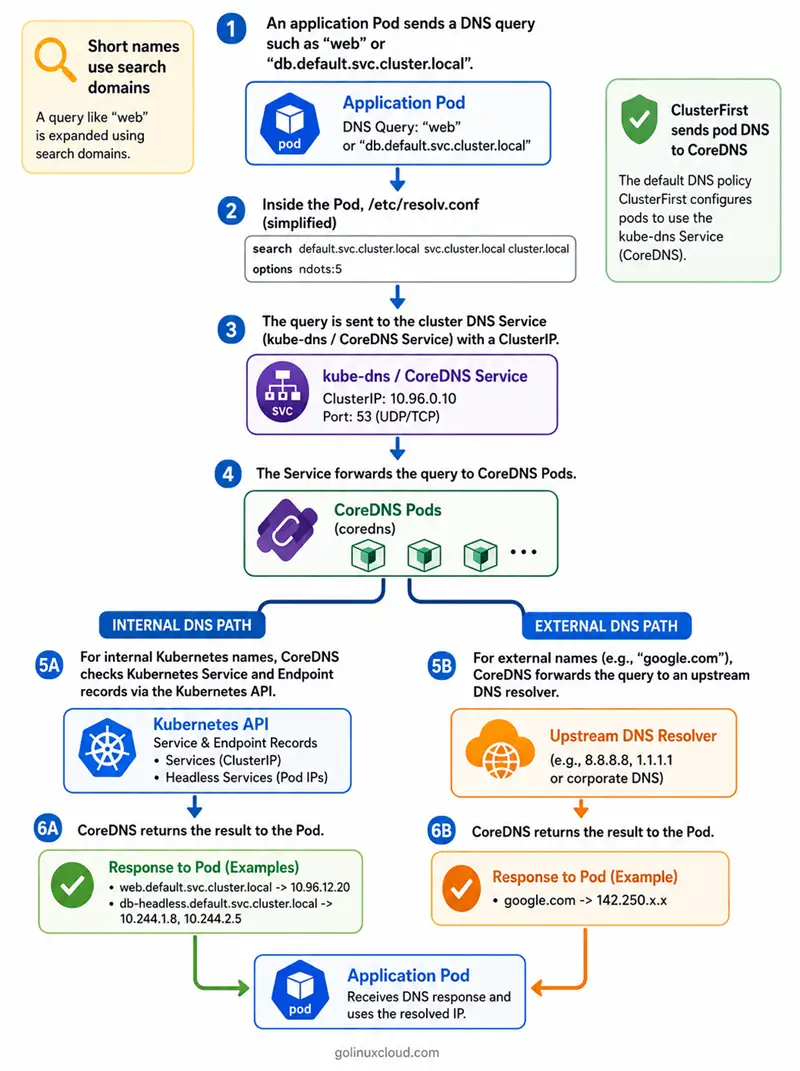
Here is the picture we keep in our heads when we debug:
- The kubelet writes your Pod’s
/etc/resolv.confwith the cluster DNS Service ClusterIP (Kubernetes still often names that Servicekube-dns) plussearchdomains such asdefault.svc.cluster.local. - Your Pod’s resolver sends traffic to that IP on the ports the Service publishes (almost always UDP and TCP port 53; you may also see something like 9153 for metrics).
- kube-proxy or your CNI datapath delivers that traffic to CoreDNS Pods behind the Service.
- CoreDNS answers in-cluster names using the Kubernetes API and forwards everything else upstream according to the Corefile.
Remember: unqualified service names resolve in the Pod’s own namespace first. Headless Services (clusterIP: None) return Pod IPs—so endpoint readiness still matters for what you get back.
If you want deeper theory, we still lean on DNS for Services and Pods and our Kubernetes Services tutorial.
Which IP and ports does cluster DNS use?
Your Pod only knows what the kubelet put in /etc/resolv.conf (nameserver + search). Run these on every cluster to confirm what the Service actually publishes—some platforms rename things, but port 53 is still the norm for DNS:
kubectl get svc kube-dns -n kube-system -o wideThen list each listener with name, port, and protocol:
kubectl get svc kube-dns -n kube-system -o jsonpath='{range .spec.ports[*]}{.name}{"\t"}{.port}{"\t"}{.protocol}{"\n"}{end}'The jsonpath output below is a sample from a kind cluster named demo—yours may list different names or extra ports, but you should still see DNS on port 53 in most installs:
dns	53	UDP
dns-tcp	53	TCP
metrics	9153	TCP
When you compare this Service to a healthy Pod, the nameserver line in /etc/resolv.conf should match this Service’s clusterIP. If you ever see a non-53 DNS port (uncommon for plain kube-dns, more common with NodeLocal DNSCache or sidecars), your NetworkPolicy and probes must allow that port—re-run the same jsonpath after any change.
From a debug Pod, you can force the port explicitly with dig to prove “UDP 53 really reaches CoreDNS.” Use your Pod name and namespace if you did not create dns-kind-demo in Step 1:
kubectl exec -it dns-kind-demo -n default -- dig +timeout=2 @10.96.0.10 -p 53 kubernetes.default.svc.cluster.local +shortSwap 10.96.0.10 for your kube-dns ClusterIP, and adjust -p if your Service publishes DNS on something other than 53.
Find your cluster domain
Almost every in-cluster FQDN in this guide ends in cluster.local (for example kubernetes.default.svc.cluster.local). That suffix is the cluster domain, and it is configurable—some clusters use cluster.internal or a custom value. If you copy FQDNs with the wrong domain, lookups return NXDOMAIN even though DNS is healthy. Confirm yours with one of the options below, then substitute it wherever this guide writes cluster.local.
Option 1 — From a Pod's search line (no special access needed). The suffix after svc. is your cluster domain. This is the same /etc/resolv.conf you read in Step 2:
kubectl exec dns-kind-demo -n default -- grep '^search' /etc/resolv.confsearch default.svc.cluster.local svc.cluster.local cluster.localOption 2 — From the CoreDNS Corefile. The kubernetes plugin declares the zone it serves, which is the cluster domain:
kubectl get configmap coredns -n kube-system -o jsonpath='{.data.Corefile}' | grep -i kuberneteskubernetes cluster.local in-addr.arpa ip6.arpa {Option 3 — From the kubelet config (clusterDomain). This is the value the kubelet hands to Pods. It is most useful when you suspect a node-level mismatch:
kubectl get configmap kubelet-config -n kube-system -o yaml | grep clusterDomainclusterDomain: cluster.localOn older clusters the ConfigMap may be named kubelet-config-1.xx; if you have node access, the same field lives in /var/lib/kubelet/config.yaml.
Option 4 — Confirm with a lookup. Prove the domain actually resolves end to end by querying the API Service with the domain you found:
kubectl exec dns-kind-demo -n default -- nslookup kubernetes.default.svc.cluster.localA clean answer confirms the domain is correct. An NXDOMAIN here usually means the domain string is wrong, not that DNS is down—re-check Options 1–3.
Community symptom map (errors → likely cause → where to dig)
When you hit an error, find the row that matches your screen, then use the Go to steps column to jump into the numbered walkthrough below.
| Error or symptom | Most probable cause | Go to steps |
|---|---|---|
;; connection timed out; no servers could be reached |
No ready CoreDNS behind kube-dns, policy block, or wrong port |
2–7, 9 |
Readiness probe failed / HTTP 503 on CoreDNS |
Readiness failing; API watch / config | 7–8 |
plugin/kubernetes: Failed to watch |
API path, RBAC, or control plane pressure | 7–8 |
plugin/loop: Loop detected |
Resolver loop via stub /etc/resolv.conf or Corefile |
8 |
plugin/forward: no nameservers found |
Broken forward or node resolver chain |
8, 10 |
NXDOMAIN for a name you expect |
Namespace, short name, or empty endpoints | 3, 12 |
Only hostNetwork Pods break |
dnsPolicy |
11 |
| DNS fails after NetworkPolicy | Egress to CoreDNS / port 53 blocked | 9 |
| Internal OK, external flaky on cloud | Throttling, saturation, conntrack | 10 |
Lookups slow / many external NXDOMAIN |
ndots and search expansion |
13 |
If the error you see is a raw resolver substring rather than a CoreDNS message, use this second lookup to jump straight to the right step:
| Substring | What it usually means | Jump to |
|---|---|---|
Temporary failure in name resolution |
Generic libc failure | Step 2–Step 4, then Step 6–Step 9 |
getaddrinfo EAI_AGAIN |
Transient resolver failure | Same as above |
lookup ... on <IP>:53: no such host |
NXDOMAIN at cluster DNS |
Step 3, Step 12 |
SERVFAIL |
Downstream / upstream failure | Step 7–Step 8, Step 10 |
read udp ... i/o timeout |
Path or upstream slowness | Step 6–Step 7, Step 9–Step 10 |
Useful references:
What the official checklist does not always spell out
Watch for these gaps once you have worked through the upstream checklist:
- NetworkPolicy is namespace-scoped: if you add a deny in
team-a, it blocks Pods inteam-auntil you add egress there—it does not magically live inkube-systemunless you also locked down system namespaces. - TCP and UDP port 53: some clients retry over TCP; allowing only UDP is a common partial fix, so open both if you are unsure.
ndotsandsearch: defaultndots:5can make the resolver try many in-cluster suffixes before an external FQDN; use trailing dots or carefuldnsConfigafter you confirm in-cluster names still resolve.hostNetwork: when host networking is on and cluster DNS misbehaves, reach fordnsPolicy: ClusterFirstWithHostNet.- Alpine / musl vs glibc: resolver behavior differs; if only Alpine breaks, compare against a glibc-based debug image.
- EKS and cloud limits: on EKS, ENI DNS throttling can look like “random external DNS” while CoreDNS itself looks fine—do not chase the wrong layer.
Step-by-step Kubernetes DNS troubleshooting
Follow these in order, unless you already proved a later step (for example, both internal and external lookups already work from whichever Pod you use—either the debug Pod from Step 1 or any existing Pod that has nslookup/dig).
Step 1 — Create a temporary Pod with DNS tools (optional)
Create a Pod inside the cluster where you can run nslookup, dig, and small shell checks for everything that follows.
Most of the checks below need nslookup or dig (and a shell) inside the cluster. A tiny Pod built from an image like jessie-dnsutils gives you those tools without rebuilding your app image. You can skip this step if the Pod you are debugging already ships those tools, or if you prefer to kubectl exec into an existing jump Pod—just reuse that Pod’s name and namespace in every kubectl exec in Step 2–Step 4 and Step 10.
kubectl apply -f - <<'EOF'
apiVersion: v1
kind: Pod
metadata:
  name: dns-kind-demo
  namespace: default
spec:
  containers:
    - name: shell
      image: registry.k8s.io/e2e-test-images/jessie-dnsutils:1.3
      command: ["sleep", "600"]
  restartPolicy: Never
EOF
kubectl wait --for=condition=Ready pod/dns-kind-demo -n default --timeout=120s
Pass: Pod is Ready.
Fail: ImagePullBackOff—pick an image already on the node or fix registry auth.
Step 2 — Check /etc/resolv.conf inside the Pod
kubectl exec into the Pod you picked for the rest of the guide (from Step 1 or your own) and print /etc/resolv.conf. That file is what your workload’s libc actually uses for search, ndots, and the cluster DNS IP.
If you followed the Step 1 manifest, the Pod is dns-kind-demo in default; otherwise plug in your Pod name and namespace.
kubectl exec dns-kind-demo -n default -- cat /etc/resolv.confThe output below is a sample from a kind cluster named demo (the same kubeconfig block shown at the top). You should verify that you have a sensible nameserver pointing at your cluster DNS Service IP (Step 5 shows how to read that Service), and that search / options look reasonable for your environment.
search default.svc.cluster.local svc.cluster.local cluster.local nsn-intra.net
nameserver 10.96.0.10
options ndots:5
On a default install, that nameserver should match the kube-dns ClusterIP you will read in Step 5. If yours points somewhere unexpected, jump to Step 11 and compare dnsPolicy, dnsConfig, or mesh overrides.
This guide uses cluster.local throughout, but the cluster domain is configurable. The search line above already hints at it—the suffix after svc. is your cluster domain (here, cluster.local). Before copying any FQDNs, confirm yours using Find your cluster domain, and substitute it everywhere this guide writes cluster.local.
Step 3 — Verify in-cluster lookup (kubernetes.default)
Stay in the same Pod as Step 2 and run nslookup kubernetes.default. That name should resolve the kubernetes Service in default through your cluster DNS, so a quick answer proves pods can reach CoreDNS for standard in-cluster records.
kubectl exec dns-kind-demo -n default -- nslookup kubernetes.defaultWhen things are healthy, you get a quick answer with clear Server: / Address: lines.
The failure below is a sample captured while CoreDNS was not Ready on a kind demo cluster. Your error text might differ slightly, but a timeout here usually means nothing useful is listening behind the cluster DNS IP yet, NetworkPolicy is blocking port 53, or you are hitting the wrong port.
;; connection timed out; no servers could be reached

command terminated with exit code 1
If you see a timeout like that, keep going through Step 4–Step 7 before you touch application code.
Step 4 — Verify external lookup from the same Pod
Still in that same Pod, resolve a public name such as example.com through cluster DNS so CoreDNS must forward upstream according to the Corefile. Together with Step 3, this tells you whether the whole cluster DNS path is broken or only the upstream / external path.
kubectl exec dns-kind-demo -n default -- nslookup example.com| Step 3 | Step 4 | What it points to |
|---|---|---|
| Fail | Fail | No path to cluster DNS or broad egress loss—check Endpoints, CoreDNS, and NetworkPolicy (Step 6–Step 9). |
| Fail | Pass | Unusual for a pure timeout; still read CoreDNS logs and the API path (Step 7). |
| Pass | Fail | Chase upstream forward, the node resolver, or egress to public DNS (Step 8, Step 10). |
| Pass | Pass | Cluster DNS looks fine from this Pod; if your app Pod still fails, diff Pod specs in Step 11. |
Step 5 — Verify kube-dns Service IP and ports
Confirm the kube-dns Service (Kubernetes still uses that name for cluster DNS in most installs) exists in kube-system, then note its ClusterIP and ports (almost always UDP and TCP 53). Keep that IP next to /etc/resolv.conf from Step 2 and beside whatever you allow in NetworkPolicy in Step 9.
kubectl get svc kube-dns -n kube-system -o wide
kubectl get svc kube-dns -n kube-system -o jsonpath='{range .spec.ports[*]}{.name}{"\t"}{.port}{"\t"}{.protocol}{"\n"}{end}'
The output below is a sample from a kind demo cluster—your CLUSTER-IP, port list, and age will differ. You should confirm three things: there is a stable virtual IP, DNS is on UDP/TCP port 53 in the usual case, and that IP lines up with the nameserver you saw in Step 2 when nothing custom is in play.
NAME       TYPE        CLUSTER-IP   EXTERNAL-IP   PORT(S)                  AGE
kube-dns   ClusterIP   10.96.0.10   <none>        53/UDP,53/TCP,9153/TCP   18d
If the Service is missing, reinstall or restore the addon manifest from whatever provisioned the cluster (kubeadm, kind node image, GKE/AKS/EKS add-on), then compare the restored clusterIP back to Step 2.
Step 6 — Check Endpoints and EndpointSlices for kube-dns
A ClusterIP is only useful if CoreDNS Pods are Ready and show up as Endpoints (or EndpointSlices). This step proves traffic to that virtual IP can actually land on a listener.
kubectl get endpoints kube-dns -n kube-system
kubectl get endpointslices -n kube-system -l kubernetes.io/service-name=kube-dns
The output below is a sample failure: an empty ENDPOINTS column means nothing is registered behind the Service—often CoreDNS is not Ready yet, labels do not match the selector, or every replica is down.
NAME       ENDPOINTS   AGE
kube-dns               18d
Healthy result: Endpoints / EndpointSlices show ready CoreDNS Pod IPs for UDP/TCP 53.
Failure means: The kube-dns Service exists, but no ready CoreDNS backend is available behind it.
Recovery: Check CoreDNS readiness, logs, the Service selector, Pod labels, and RBAC before restarting CoreDNS. In practice, work through this in order (the same order you will see in issues and docs):
- Confirm CoreDNS Pods exist:
kubectl get pods -n kube-system -l k8s-app=kube-dns. - If Pods are
0/1Ready, fix readiness first in Step 7—empty Endpoints usually follow readiness, not the other way around. - If Pods are
1/1but Endpoints stay empty, compare the Service selector against Pod labels (kubectl get svc kube-dns -n kube-system -o yamlvskubectl get pods -n kube-system --show-labels). - Only after the root cause is fixed, you can run
kubectl rollout restart deployment/coredns -n kube-systemas a last nudge—threads warn this hangs if readiness never clears, so check RBAC and the API path first using Debugging DNS resolution.
Step 7 — Inspect CoreDNS Pods, Events, and logs
List the CoreDNS Pods, then read their Events and logs for RBAC / API watch failures, readiness loops, loop, or forward errors. This is where you usually find the story behind “kubectl get pods looks fine but DNS still fails.”
kubectl get pods -n kube-system -l k8s-app=kube-dns
kubectl describe pod -n kube-system -l k8s-app=kube-dns
kubectl logs -n kube-system -l k8s-app=kube-dns --tail=100
The listing below is a sample from a kind demo run: 0/1 Ready while Running usually means readiness never went green, so the Service may have no endpoints.
NAME                       READY   STATUS    RESTARTS   AGE
coredns-67565fcb96-frfjg   0/1     Running   0          54m
coredns-67565fcb96-lb6wt   0/1     Running   0          54m
coredns-7d764666f9-fgzpp   0/1     Running   30         18d
An Event line like this is the kind you are looking for:
Warning Unhealthy ... kubelet Readiness probe failed: HTTP probe failed with statuscode: 503And these log lines point you toward RBAC / API checks:
[ERROR] plugin/kubernetes: Failed to watch
[INFO] plugin/ready: Plugins not ready: "kubernetes"
Once you have the logs, work through these in order:
- RBAC — run
kubectl get clusterrolebinding | grep corednsand confirmsystem:corednscan list/watch Services, Endpoints, and Namespaces (the upstream doc spells out the rules). If RBAC was tightened, reconcile against a known-good manifest from your installer version—always dry-run first in production. - API reachability from
kube-system— consider control plane overload, firewalls, or a brokenkubernetesService; compare withkubectl get svc kubernetes -n defaultplus apiserver logs if you have access. - Corefile syntax — run
kubectl get configmap coredns -n kube-system -o yaml, since a bad stanza blocks readiness. Save a copy, revert to the default Corefile from a fresh kubeadm/kind template for that version, thenkubectl rollout restart deployment/coredns -n kube-system. - Loop / stub resolver — when logs show
plugin/loop: Loop detected, follow the Linux resolver guidance in Debugging DNS resolution (kubelet--resolv-conf, avoid chaining through127.0.0.53into cluster DNS). For more cases, search loop detected coredns kubernetes.
Step 8 — Check CoreDNS Corefile and forward rule
When Step 7 logs mention forward, SERVFAIL, or no nameservers, dump the live coredns ConfigMap and check that the upstreams match what your nodes can reach on UDP/TCP 53. Outside a lab, always snapshot the old ConfigMap before you change anything.
kubectl get configmap coredns -n kube-system -o yamlA healthy Corefile has a forward . /etc/resolv.conf stanza or explicit upstream IPs that your nodes can actually reach on UDP/TCP 53.
If the logs show plugin/forward: no nameservers found, the CoreDNS Pod’s view of /etc/resolv.conf may be empty or stub-only. Fix the node resolver (systemd-resolved, cloud-init, etc.), restart CoreDNS, and for similar reports read coredns/coredns issues · forward.
Use this patch flow only in a lab, and save the old ConfigMap first:
kubectl get configmap coredns -n kube-system -o yaml > /tmp/coredns-backup.yaml
# edit locally, then:
kubectl apply -f /tmp/coredns-edited.yaml
kubectl rollout restart deployment/coredns -n kube-system
kubectl rollout status deployment/coredns -n kube-system --timeout=180s
Step 9 — Check NetworkPolicy and allow DNS egress
If your workloads sit behind a default-deny egress policy, DNS stops working until you explicitly allow UDP/TCP port 53 (or whatever DNS port Step 5 showed) toward the CoreDNS Service. Policies are enforced in the app namespace, not magically inside kube-system.
Remember: NetworkPolicy applies per namespace to Pods in that namespace. A deny in payments is solved by egress rules in payments (or wherever the app actually runs), not by editing kube-system alone.
To find the culprit, list every policy first, then describe the suspicious namespace:
kubectl get networkpolicy -A
kubectl describe networkpolicy -n <your-app-namespace>
Apply this minimal policy beside the app deny to allow DNS to CoreDNS in kube-system. Rename the namespaces to match yours, and confirm kube-system carries kubernetes.io/metadata.name (Kubernetes 1.24+):
apiVersion: networking.k8s.io/v1
kind: NetworkPolicy
metadata:
  name: allow-dns-egress
  namespace: payments   # namespace of the Pods that need DNS
spec:
  podSelector: {}       # tighten to app: your-label in production
  policyTypes:
    - Egress
  egress:
    - to:
        - namespaceSelector:
            matchLabels:
              kubernetes.io/metadata.name: kube-system
          podSelector:
            matchLabels:
              k8s-app: kube-dns
      ports:
        - protocol: UDP
          port: 53
        - protocol: TCP
          port: 53
Apply it with kubectl apply -f allow-dns.yaml.
Be aware that some CNIs evaluate egress before or after Service DNAT differently. If allowing egress to the CoreDNS Pods by namespaceSelector / podSelector does not work, allow the kube-dns ClusterIP directly with an ipBlock to that IP (or follow your CNI’s own DNS egress example). Calico/Cilium examples differ, so check that vendor’s doc rather than assuming the selector-based policy above works everywhere.
To verify, re-run Step 3 from an app Pod in that namespace. If it is still blocked, line up the port numbers from Step 5 with the ports list in the policy.
Step 10 — Diagnose external-only failures
When Step 3 passes but Step 4 fails, cluster DNS is answering Kubernetes names while upstream forwarding, node DNS, or cloud limits are broken. Fix that layer before you rewrite application code.
- From the same Pod you used in Step 2–Step 4 (swap name/namespace if you are not on
dns-kind-demo/default), and if policy allows, run a public resolver test explicitly:
kubectl exec dns-kind-demo -n default -- dig +timeout=3 @8.8.8.8 example.com +short- This bypasses CoreDNS and tests direct egress to a public resolver. It may fail intentionally in private clusters, corporate networks, or clusters that block public DNS. In that case, test the resolver your CoreDNS Corefile actually forwards to instead of
8.8.8.8. - If that works but
nslookup example.comwithout@fails, focus on the Corefileforwardrule and on/etc/resolv.confinside the CoreDNS Pod.
- This bypasses CoreDNS and tests direct egress to a public resolver. It may fail intentionally in private clusters, corporate networks, or clusters that block public DNS. In that case, test the resolver your CoreDNS Corefile actually forwards to instead of
- Re-read CoreDNS logs for
SERVFAIL,i/o timeout, or upstream rate messages that only show up on external names. - On EKS, read the worker / throttling guidance next: AWS: Troubleshoot DNS failures with EKS, then scale CoreDNS or add NodeLocal DNSCache the way AWS documents.
Step 11 — Compare a working Pod and failing Pod
When your debug or utility Pod resolves fine but the application Pod does not, the cause is almost always dnsPolicy, a custom dnsConfig, hostNetwork, or a mesh sidecar. Diff the YAML between a Pod where DNS works (often dns-kind-demo from Step 1, or any healthy Pod) and the broken Pod:
kubectl get pod dns-kind-demo -n default -o yaml > /tmp/dns-good.yaml
kubectl get pod <broken-pod> -n <ns> -o yaml > /tmp/dns-bad.yaml
diff -u /tmp/dns-good.yaml /tmp/dns-bad.yaml | head -80
Scan the diff for dnsPolicy, dnsConfig, hostNetwork, and mesh sidecars. A common fix: for hostNetwork: true workloads, set dnsPolicy: ClusterFirstWithHostNet.
Do not patch a running application Pod for this in production. Pod spec fields like dnsPolicy are owned by the controller, so even if a patch appears to apply, the Deployment, DaemonSet, StatefulSet, or Job controller will recreate Pods from its own template and drop your change. Update the workload template instead, then restart it:
spec:
  template:
    spec:
      hostNetwork: true
dnsPolicy: ClusterFirstWithHostNetkubectl rollout restart deployment/<name> -n <ns>Field details: Kubernetes Pods guide.
Step 12 — Fix Service, namespace, and headless Service issues
You reach this step when Step 3–Step 7 look healthy but you still hit wrong names—short vs FQDN, cross-namespace forms, headless Services with no Ready endpoints, or StatefulSet serviceName mismatches.
When cluster DNS is healthy but the service name is still wrong, run:
kubectl get svc,endpointslice -n <namespace>
kubectl get endpoints <service-name> -n <namespace> -o yaml
Common fixes from real incidents:
- Use a fully qualified domain name (FQDN) such as
my-svc.other-ns.svc.cluster.local, or the two-label formmy-svc.other-nsacross namespaces—not baremy-svcunless you truly meant the same namespace. - For headless Services, confirm Pods are
Readyand selectors match; only enablepublishNotReadyAddresseswhen you intentionally need DNS before Ready. - For a
StatefulSet, verifyserviceNamematches the headless Service name.
For more depth on Services, see our Kubernetes Services tutorial.
Step 13 — Diagnose slow DNS, ndots, and search expansion
Use this step when DNS technically works, but lookups feel slow, external names generate many NXDOMAIN responses, or CoreDNS query volume looks higher than expected.
The usual cause is the default resolver setting options ndots:5. Because example.com has fewer than 5 dots, the resolver treats it as a relative name first and walks the cluster search domains before it asks for the absolute name:
example.com.default.svc.cluster.local
example.com.svc.cluster.local
example.com.cluster.local
example.com
That rarely breaks DNS, but it adds latency and extra CoreDNS load when an app makes many external lookups. Check the resolver settings, then compare a normal lookup with the trailing-dot form (the trailing dot marks the name as already absolute, so no search expansion happens):
kubectl exec dns-kind-demo -n default -- cat /etc/resolv.conf
kubectl exec dns-kind-demo -n default -- dig example.com
kubectl exec dns-kind-demo -n default -- dig example.com.
Healthy result: Internal names such as kubernetes.default and external names both resolve quickly.
Failure means: External lookups work but are slow, CoreDNS logs show many NXDOMAIN queries for external domains with cluster suffixes, or apps log intermittent EAI_AGAIN / resolver timeouts under load—while internal service names stay fine.
Recovery:
- For stable external hosts, use the trailing-dot FQDN form where the client allows it (
api.example.com.) to skip search expansion. - Across namespaces, use the full Service name (
redis.backend.svc.cluster.local) instead of ambiguous short names. - If a workload mostly calls external names, lower
ndotsfor that workload only through its template—do not change it cluster-wide without testing both internal and external names first:
spec:
  template:
    spec:
      dnsConfig:
        options:
          - name: ndots
value: "2"- For high DNS traffic, conntrack pressure, or heavy CoreDNS load, add NodeLocal DNSCache to keep lookups local to each node.
If short service names stop resolving after ndots tuning, revert the change and use explicit FQDNs instead.
Cleanup
If you created dns-kind-demo in Step 1, delete it when you are done:
kubectl delete pod dns-kind-demo -n default --ignore-not-foundSummary
To close a DNS incident: read which DNS IP and ports your cluster publishes, match your symptom to the map above, then walk Step 1–Step 13 in order—debug Pod → resolver file → internal vs external tests → Service and ports → Endpoints → CoreDNS (events, logs, RBAC, Corefile) → NetworkPolicy egress in the app namespace → upstream / cloud → per-Pod DNS → Service naming. This runbook extends Debugging DNS resolution with the port, policy, and recovery detail the short doc skips. For more depth on our site: Kubernetes Services tutorial, Kubernetes networking tutorial, Kubernetes tutorial hub.