
Repeated wrong passwords are one of the fastest ways to compromise LDAP accounts. Password-based account lockout counts failed simple binds, stores the state in operational attributes on the user entry, and rejects further authentication until the lockout expires or an administrator clears it.
This guide covers:
- Enabling lockout and setting thresholds and unlock behaviour
- Understanding
nversusn+1timing withpasswordLegacyPolicy - Inspecting lockout attributes and testing automatic unlock and counter reset
- Manual recovery, local-policy overrides, and replicating lockout operational state
Password complexity, expiration, and hashing belong in password policy and password storage schemes. Manual disabling and inactivity policies belong in disable user accounts.
Before you start:
- Global, subtree, and user password policy — policy precedence and
localpwpcreation - Manage users and groups — create test users; manual
account lockis a different mechanism - TLS, STARTTLS, and LDAPS — test binds over encrypted LDAP
- dsconf commands —
pwpolicyandlocalpwpconfiguration
nsAccountLock, inactivity-based disabling, password expiration, grace logins, or temporary-password rules. Those topics have dedicated chapters linked above.
Tested on: Rocky Linux 10.2; 389 Directory Server 3.2.0.
Lockout tests use instance ldap2 on ldap2.example.com with suffix dc=lab,dc=example,dc=com, LDAP port 1389, and LDAPS port 1636. That keeps the exercise away from other password-policy work on ldap1 in the same lab. The test user is uid=lockout-test,ou=people,dc=lab,dc=example,dc=com.
Record the baseline before you change policy
I'll save the current global policy and legacy setting before enabling lockout for the lab:
dsconf ldap2 pwpolicy get > /root/ldap2-pwpolicy-before-lockout.txtI'll record the legacy threshold setting separately because it controls whether lockout triggers on the nth or n+1th failed attempt:
dsconf ldap2 config get passwordLegacyPolicy > /root/ldap2-legacy-policy-before-lockout.txtRestore the values you recorded at the end of the exercise. Do not assume the defaults on your instance match another host.
How password-based account lockout works
When account lockout is enabled, each failed simple bind increments a counter on the user entry. After the configured threshold is reached or exceeded, Directory Server locks the account and rejects further binds until automatic unlock time passes or an administrator clears the operational state.
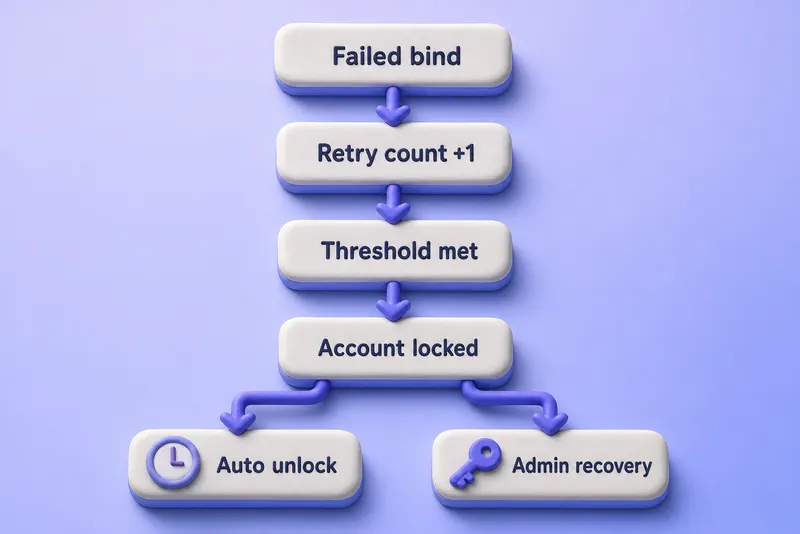
The figure is a decision path, not a timing diagram. Whether lock state triggers on the nth or n+1th failed attempt depends on passwordLegacyPolicy, and the bind that crosses the threshold may still return invalid credentials (49) before later binds return constraint violation (19). The recovery branch on the right applies when --pwdunlock off or an administrator clears operational attributes before the timer expires.
Directory Server stores the state in operational attributes on the user entry:
| Attribute | Purpose |
|---|---|
passwordRetryCount |
Number of failed bind attempts |
retryCountResetTime |
Time after which the failed-attempt count can reset |
accountUnlockTime |
Time when a locked account becomes usable again |
A successful bind after the reset window clears passwordRetryCount. While the account is locked, even the correct password is rejected.
Distinguish account lockout from other account states
| Feature | Trigger |
|---|---|
| Password account lockout | Repeated failed password binds |
| Manual account disabling | Administrator locks the account |
| Account inactivity | User has not logged in for a configured period |
| Password expiration | Password exceeds its maximum age |
Manual disabling and inactivity-based policies are covered in disable user accounts. dsidm account lock and dsidm account unlock manage manual nsAccountLock state; they are not the same workflow as password-policy lockout recovery.
Check the current account lockout policy
Read the global password policy on the Directory Server host:
dsconf ldap2 pwpolicy getSample output on the tested host before lockout was enabled for the exercise:
passwordlockout: off
passwordunlock: on
passwordlockoutduration: 3600
passwordmaxfailure: 3
passwordresetfailurecount: 600
Filter the lockout-related lines when you only need those settings:
dsconf ldap2 pwpolicy get | grep -Ei 'lockout|maxfailure|resetfailure|unlock|pwdisglobal'I'll read the legacy threshold setting separately because it changes when lockout state is triggered:
dsconf ldap2 config get passwordLegacyPolicySample output:
passwordLegacyPolicy: ondsconf ldap2 pwpolicy get shows the global policy only. To see which policy applies to a specific user, inspect local policies with dsconf ldap2 localpwp get "USER_DN" when nsslapd-pwpolicy-local is enabled.
Configure the global account lockout policy
I'll enable lockout with short lab-friendly durations so you can reproduce the tests quickly:
dsconf ldap2 pwpolicy set --pwdlockout on --pwdmaxfailures 3 --pwdresetfailcount 30 --pwdunlock on --pwdlockoutduration 30Sample output:
Successfully updated global password policyThe Successfully updated global password policy line confirms the lockout settings were written to the global policy.
| Option | Lab value | Meaning |
|---|---|---|
--pwdlockout |
on |
Enables failed-bind lockout |
--pwdmaxfailures |
3 |
Failed-attempt threshold |
--pwdresetfailcount |
30 |
Reset window for the failed-attempt count in seconds |
--pwdunlock |
on |
Automatically unlock locked accounts |
--pwdlockoutduration |
30 |
Keep the account locked for 30 seconds |
Verify the active settings:
dsconf ldap2 pwpolicy getSample output:
passwordlockout: on
passwordunlock: on
passwordlockoutduration: 30
passwordmaxfailure: 3
passwordresetfailurecount: 30
Use stricter values in production. The lab values exist only to make automatic unlock and counter-reset tests finish in under a minute.
Understand n vs n+1 lockout behaviour
Check the legacy setting before you explain the real attempt limit to operators:
dsconf ldap2 config get passwordLegacyPolicy| Setting | When lock state is triggered for threshold 3 |
|---|---|
passwordLegacyPolicy=on |
After the fourth failed password verification |
passwordLegacyPolicy=off |
After the third failed password verification |
The bind that triggers the lock can still return invalid credentials (49). A later bind against the already locked account returns constraint violation (19). Capture the complete sequence on your installed release before you document the exact response transition.
On the tested host with legacy mode enabled, attempts 1–3 returned 49, attempt 3 also stored accountUnlockTime, and attempt 4 returned 19. With legacy mode disabled, attempts 1–2 returned 49 and attempt 3 returned 19.
To demonstrate strict n behaviour temporarily:
dsconf ldap2 config replace passwordLegacyPolicy=offRun the failed-bind test sequence, then restore legacy mode before you continue with the rest of the lab:
dsconf ldap2 config replace passwordLegacyPolicy=onThe restore returns the server to the n+1 lock-state behaviour used in the earlier baseline.
Alternative unlock and reset settings
The sections below change individual settings for explanation. They are not part of the linear lockout test unless you restore the lab baseline afterward.
Automatically unlock after a longer duration
Production example:
dsconf ldap2 pwpolicy set --pwdunlock on --pwdlockoutduration 1800When --pwdunlock is on, Directory Server sets accountUnlockTime and the account becomes usable again after the configured duration.
Require administrator intervention
dsconf ldap2 pwpolicy set --pwdunlock offWhen automatic unlock is disabled, --pwdlockoutduration is ignored and the account stays locked until an administrator clears the operational attributes or resets the password. Indefinite lockout increases the impact of intentional denial-of-service attacks against known user names.
After you review indefinite lockout, restore the automatic-unlock lab settings:
dsconf ldap2 pwpolicy set --pwdunlock on --pwdlockoutduration 30 --pwdresetfailcount 30Longer failure-counter reset window
Production example:
dsconf ldap2 pwpolicy set --pwdresetfailcount 600The failure-counter reset interval is not the same as lockout duration. The reset window only clears an unfinished sequence before the account locks.
Example progression:
Attempt 1 fails
Attempt 2 fails
No more attempts for longer than the reset window
Next failed attempt starts a new count at 1
The counter-reset and automatic-unlock tests later in this guide use --pwdresetfailcount 30 and --pwdlockoutduration 30 from the lab baseline.
Apply lockout to a subtree or individual user
Before you discuss a local lockout policy, inspect the fine-grained policy switches:
dsconf ldap2 config get nsslapd-pwpolicy-local nsslapd-pwpolicy-inherit-globalSample output on the tested host:
nsslapd-pwpolicy-local: off
nsslapd-pwpolicy-inherit-global: off
Account-lockout settings can be defined in a local password policy for a subtree or a single user when nsslapd-pwpolicy-local is on. Typical targets include ou=Contractors,ou=people,dc=lab,dc=example,dc=com or uid=service1,ou=ServiceAccounts,dc=lab,dc=example,dc=com.
Inspect an existing local policy:
dsconf ldap2 localpwp get "uid=user1,ou=people,dc=lab,dc=example,dc=com"Set lockout options on a local policy when one already exists:
dsconf ldap2 localpwp set "POLICY_DN" --pwdlockout on --pwdmaxfailures 5 --pwdresetfailcount 300Local policies override the global policy for the entry or subtree to which they apply. Global password-syntax settings can be inherited when nsslapd-pwpolicy-inherit-global is enabled, but do not assume every lockout setting is merged automatically. Configure and verify the lockout threshold, reset interval, unlock behaviour, and duration explicitly in each local policy.
Creation, precedence, and removal of local policies belong in password policy.
Test failed login lockout
I'll create a disposable test user and store both the valid and invalid test passwords in protected files:
install -m 600 /dev/null /root/lockout-test.pwI'll create a second protected file for the deliberately wrong password used in failed-bind tests:
install -m 600 /dev/null /root/lockout-test-bad.pwPopulate the files through an editor or another approved local secret-entry method. The lab uses uid=lockout-test,ou=people,dc=lab,dc=example,dc=com.
Point LDAP clients at the issuing CA before you connect over LDAPS:
export LDAPTLS_CACERT=/root/ldap2-ca-chain.pemAttempt a failed bind over LDAPS:
ldapwhoami -x -H ldaps://ldap2.example.com:1636 -D "uid=lockout-test,ou=people,dc=lab,dc=example,dc=com" -y /root/lockout-test-bad.pwSample output on the first failed attempt:
ldap_bind: Invalid credentials (49)Repeat until the account locks. With passwordLegacyPolicy=on and --pwdmaxfailures 3, attempts 1–3 returned 49 and attempt 4 returned:
ldap_bind: Constraint violation (19)
	additional info: Exceed password retry limit. Please try later.
Then bind with the correct password from the protected file:
ldapwhoami -x -H ldaps://ldap2.example.com:1636 -D "uid=lockout-test,ou=people,dc=lab,dc=example,dc=com" -y /root/lockout-test.pwSample output while the account remains locked:
ldap_bind: Constraint violation (19)
	additional info: Exceed password retry limit. Please try later.
Do not run lockout tests against production users or application service accounts. Simple-bind credentials must not be transmitted over unencrypted LDAP.
Inspect the account lockout attributes
Request the operational attributes explicitly as Directory Manager over LDAPS with ldapsearch:
ldapsearch -LLL -o ldif-wrap=no -x -H ldaps://ldap2.example.com:1636 -D "cn=Directory Manager" -y /root/ldap2-dm.pw -b "uid=lockout-test,ou=people,dc=lab,dc=example,dc=com" -s base passwordRetryCount retryCountResetTime accountUnlockTimeSample output after the third failed bind with legacy mode enabled, before the fourth bind:
dn: uid=lockout-test,ou=people,dc=lab,dc=example,dc=com
passwordRetryCount: 3
retryCountResetTime: 20260716071047Z
accountUnlockTime: 20260716071048Z
passwordRetryCount appears after the first failed bind. retryCountResetTime appears once failed authentication begins. accountUnlockTime appears when the account enters the locked state, which can occur on the same attempt that still returns 49 when legacy mode is enabled.
Correlate the same attempts in the access log:
/var/log/dirsrv/slapd-ldap2/accessLook for repeated bind results with result code 49 followed by result code 19 when the account locks.
Verify automatic unlocking and counter reset
Confirm the lab baseline from the previous section is still active before you run these checks.
For automatic unlock:
- Lock the test account.
- Confirm that the correct password is rejected with constraint violation (19).
- Wait until
accountUnlockTimepasses. - Bind with the correct password again over LDAPS.
- Confirm successful authentication.
- Inspect the lockout attributes again.
On the tested host, a locked test account bound successfully again after waiting 32 seconds with --pwdlockoutduration 30.
For failure-counter reset:
- Clear the operational attributes and perform two failed binds.
- Wait longer than
--pwdresetfailcount. - Attempt another invalid bind.
- Confirm that
passwordRetryCountstarts a new sequence.
On the tested host, two failed binds left passwordRetryCount: 2. After a 32-second pause, the next failed bind stored passwordRetryCount: 1.
Recover a locked account manually
Password-policy lockout is separate from manual nsAccountLock state. On the tested release, dsidm ldap2 account unlock reported Account is already active while passwordRetryCount and accountUnlockTime remained on the entry and binds still failed.
Use this tested administrative recovery workflow:
- Confirm the account is locked because of password retries rather than manual inactivation.
- Search the entry and note which lockout attributes are present.
- Build a delete modification that includes only those attributes.
- Submit the modification as Directory Manager over LDAPS.
- Search again and verify removal.
- Test the correct password from the protected file.
Search the entry first:
ldapsearch -LLL -o ldif-wrap=no -x -H ldaps://ldap2.example.com:1636 -D "cn=Directory Manager" -y /root/ldap2-dm.pw -b "uid=lockout-test,ou=people,dc=lab,dc=example,dc=com" -s base passwordRetryCount retryCountResetTime accountUnlockTimeInclude only attributes shown by the preceding ldapsearch. Do not blindly delete all three attributes when one or more are absent. The upstream recovery procedure identifies passwordRetryCount and accountUnlockTime as the primary lockout attributes to clear.
When all three attributes are present on the entry, clear them with ldapmodify over LDAPS:
ldapmodify -x -H ldaps://ldap2.example.com:1636 -D "cn=Directory Manager" -y /root/ldap2-dm.pw <<'EOF'
dn: uid=lockout-test,ou=people,dc=lab,dc=example,dc=com
changetype: modify
delete: passwordRetryCount
-
delete: retryCountResetTime
-
delete: accountUnlockTime
EOF
After the attributes are removed, the test user bound successfully again on the tested host.
Do not use dsidm account unlock as the primary recovery path for password-policy lockout unless you verify that behaviour on your exact Directory Server version.
Configure account lockout in a replication topology
Directory Server evaluates lockout on every server, but passwordRetryCount, retryCountResetTime, and accountUnlockTime are not replicated by default. Without synchronization, a user can continue failed attempts against another replica.
Run this on each supplier to allow password-policy operational state such as retry counters and unlock time to replicate:
dsconf ldap2 pwpolicy set --pwdisglobal onThat setting does not replicate the configuration under cn=config.
Every authentication server must separately use compatible values for:
passwordLockoutpasswordMaxFailurepasswordResetFailureCountpasswordUnlockpasswordLockoutDurationpasswordLegacyPolicynsslapd-pwpolicy-local- Applicable local policy entries and inheritance settings
Compare policy on each supplier before you test cross-replica lockout:
dsconf supplier1 pwpolicy getI'll read the global password policy on the second supplier so I can confirm the lockout thresholds match:
dsconf supplier2 pwpolicy getThe legacy setting must also match on every supplier, or the same failed-attempt count can lock on one server and not another:
dsconf supplier1 config get passwordLegacyPolicyRead the same legacy setting on the second supplier:
dsconf supplier2 config get passwordLegacyPolicyEnable --pwdisglobal on on every supplier, then review fractional replication exclusions on each agreement:
dsconf ldap2 repl-agmt get --suffix "dc=lab,dc=example,dc=com" AGREEMENT_NAME | grep nsDS5ReplicatedAttributeListEnsure the three lockout attributes are not excluded.
Replication is asynchronous. Enabling lockout-attribute replication improves consistency but does not create an instantaneous, centralized rate limiter. Concurrent attempts sent rapidly to different suppliers can occur before replicated counters converge.
Test in a real multi-supplier topology through the actual load-balancer path:
- Fail a bind against supplier 1.
- Read
passwordRetryCounton supplier 1. - Read the same attribute on supplier 2.
- Confirm that the values converge.
- Complete the remaining failed attempts through different servers.
- Confirm that the account is locked consistently.
The lab host used for this guide did not have a replication agreement configured for dc=lab,dc=example,dc=com, so those steps were not executed here.
Monitor and audit account lockouts
Review:
/var/log/dirsrv/slapd-ldap2/access
/var/log/dirsrv/slapd-ldap2/errors
/var/log/dirsrv/slapd-ldap2/security
The security log is intended for security and authentication-related events and is enabled by default in current RHDS releases. Access-log writes may be buffered, so an event might not appear in the access log immediately. Use the security log and the systemd journal through journalctl when you need a quicker view:
journalctl -u dirsrv@ldap2 --since "10 minutes ago"Monitor for:
- Repeated invalid credentials (49)
- Constraint-violation lockout responses (19)
- Frequently locked users
- Service accounts repeatedly submitting old passwords
- Attempts distributed across several replicas
- Unexpected automatic-unlock failures
Avoid logging clear-text passwords in scripts or test commands.
Troubleshoot account lockout problems
| Symptom | Likely cause | Fix |
|---|---|---|
| Account locks after one more attempt than expected | passwordLegacyPolicy=on |
Document n+1 lock-state timing or set passwordLegacyPolicy=off |
| First LDAP 19 appears later than expected | Lock state and denial response are separate events | Capture the full 49/19 sequence on your release |
passwordRetryCount does not increase |
Lockout disabled, wrong effective policy, or bind did not reach this server | Confirm --pwdlockout on, check global versus local policy, and retest on the inspected replica |
| Correct password still fails | Account is locked | Inspect accountUnlockTime, wait for automatic unlock, or clear the operational attributes |
| Account never unlocks automatically | --pwdunlock off or clock skew |
Confirm passwordunlock: on, review --pwdlockoutduration, and verify server time |
| Counter resets sooner or later than expected | Wrong --pwdresetfailcount or time sync issue |
Review the configured window and compare retryCountResetTime with the server clock |
| Account locks on one replica but works on another | Lockout attributes not replicated or policy mismatch | Align policy on every supplier, enable --pwdisglobal on, and review fractional replication exclusions |
| Service account repeatedly locks | Application still using an old password | Fix the application credentials before raising the failure threshold |
| Account is inactive but has no retry-count attributes | Manual disable or Account Policy inactivity | Use disable user accounts troubleshooting, not password-lockout recovery |
Account lockout security recommendations
- Use a threshold that slows guessing without making denial-of-service attacks trivial.
- Prefer temporary lockout for ordinary users.
- Monitor permanent lockout configurations closely.
- Document whether your deployment uses
norn+1lock-state timing. - Keep short reset and lockout durations in test environments only.
- Configure consistent lockout policy on every authentication server and replicate operational lockout attributes.
- Exclude trusted monitoring probes from password-based health checks when they would consume failure counters.
- Test with disposable users, not Directory Manager.
- Investigate repeated service-account failures instead of continuously clearing lockout state.
Summary
- Enable account lockout with
--pwdlockout on. - Set the failure threshold and counter-reset interval.
- Choose temporary or indefinite lockout with
--pwdunlock. - Verify
passwordLegacyPolicyto understand when lock state is triggered. - Inspect
passwordRetryCount,retryCountResetTime, andaccountUnlockTime. - Test failed binds, automatic unlock, and conditional
ldapmodifyrecovery over LDAPS. - Configure consistent lockout policy on every authentication server, replicate the operational lockout attributes, and test convergence through the actual load-balancer path.
What's Next
- Disable user accounts — manual
nsAccountLockand inactivity policies - Password policy — complexity and expiration that precede lockout tuning
- Delegated administration — who may clear lockout state
References
- Red Hat Directory Server 13 — Configuring a password-based account lockout policy
- Red Hat Directory Server 13 — User management and authentication
- Red Hat Directory Server 13 — Core server configuration attributes
- 389 Directory Server — How to reset an account after too many login attempts
