
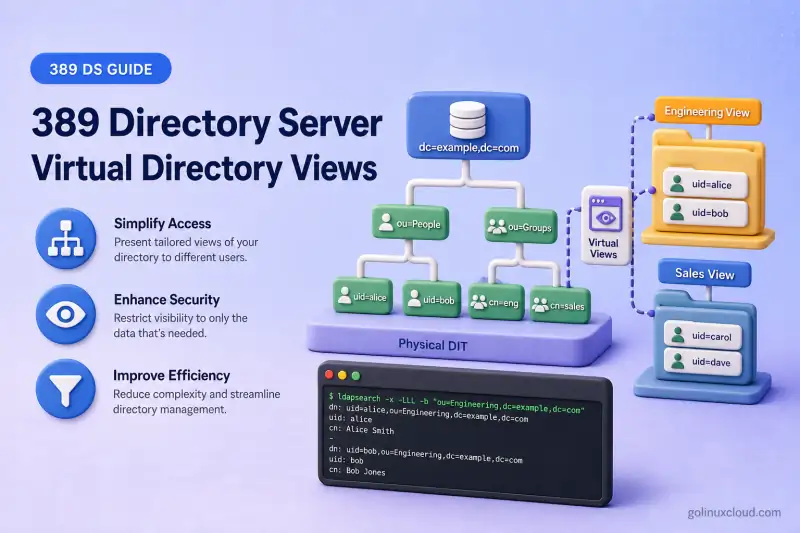
A physical directory tree stores each entry in one place. When managers browse by department, location, or employment type, a flat ou=People subtree forces every application to build its own filters instead of navigating folders.
dc=example,dc=com
└── ou=People
    ├── uid=user1
    ├── uid=user2
    └── uid=user3
Virtual directory views solve that layout problem. A view entry carries the nsView object class and an nsViewFilter attribute. Clients that search from the view DN see matching users grouped under ou=Views even though those users remain under ou=people in the physical DIT. The same user can appear in several views when several filters match.
Before you start:
- Install 389 Directory Server — running instance
ldap1with suffixdc=example,dc=com - Manage users and groups —
uid=user1,uid=user2, anduid=user3underou=people
nsView and nsViewFilter. It does not cover suffix and backend creation, generic LDAP filter tutorials, full index management, roles or Class of Service configuration, or Virtual List View (VLV) controls. VLV is an unrelated paging feature.
Tested on: Rocky Linux 10.2; 389 Directory Server 3.2.0.
How virtual directory views work
A view is a normal directory entry, often an organizationalUnit, with the auxiliary nsView object class and, on leaf views, an nsViewFilter LDAP filter.
| Component | Purpose |
|---|---|
nsView |
Marks an entry as part of a virtual hierarchy |
nsViewFilter |
Selects which physical entries appear through this view |
| View entry | Acts as the LDAP search base for the virtual subtree |
| Nested view | Adds another filter below a parent view |
| Physical entry | Stays at its original DN; the view does not move it |
Search base: ou=Engineering,ou=Departments,ou=Views,dc=example,dc=com
                           |
                           v
nsViewFilter: (departmentNumber=Engineering)
                           |
                           v
Matching users returned from ou=people (real DNs preserved)
Directory Server evaluates view filters against the physical tree. The views plug-in must be enabled. It is on by default in 3.2.0. View processing runs only when the client search base is inside a view hierarchy. Searching dc=example,dc=com alone does not surface virtual groupings.
Views vs physical directory containers
| Physical OU | Virtual view |
|---|---|
| Entry DN determines placement | Entry attributes determine placement |
| Moving an entry changes its DN | Changing an attribute changes view membership |
| Entry has one physical location | Entry can appear in several views |
| Child entries are stored below the OU | Matching entries remain elsewhere in the DIT |
Views do not create duplicate user entries. A search through ou=Engineering,ou=Departments,ou=Views,dc=example,dc=com returns uid=user1,ou=people,dc=example,dc=com. That is the physical DN, not a copy under the view branch.
Plan the virtual hierarchy
This lab keeps users in ou=people and builds department views under ou=Views:
dc=example,dc=com
├── ou=People
│   ├── uid=user1  [departmentNumber=Engineering, employeeType=employee]
│   ├── uid=user2  [departmentNumber=Engineering, employeeType=contractor]
│   └── uid=user3  [departmentNumber=Sales, employeeType=employee]
└── ou=Views
    └── ou=Departments
        ├── ou=Engineering
        │   └── ou=Contractors   (nested view)
        └── ou=Sales
Confirm the filter attributes exist on the target entries before you create views with ldapsearch:
ldapsearch -LLL -x -H ldap://127.0.0.1:389 -D "cn=Directory Manager" -y /root/dm.pw -b "ou=people,dc=example,dc=com" "(uid=user*)" dn departmentNumber employeeTypeSample output:
dn: uid=user1,ou=people,dc=example,dc=com
departmentNumber: Engineering
employeeType: employee

dn: uid=user2,ou=people,dc=example,dc=com
departmentNumber: Engineering
employeeType: contractor

dn: uid=user3,ou=people,dc=example,dc=com
departmentNumber: Sales
employeeType: employee
Users created with dsidm in this lab carry nsOrgPerson, not inetOrgPerson. Match nsViewFilter to attributes and object classes that actually exist on the entries, or use attribute-only filters such as (departmentNumber=Engineering).
Create the parent view containers
Parent containers in a view tree also need the nsView object class, even when they do not define an nsViewFilter. The shipped Example-views.ldif follows that pattern for ou=Location Views and similar branches.
I'll write the parent containers to a file:
cat > /tmp/views-parents.ldif <<'EOF'
dn: ou=Views,dc=example,dc=com
objectClass: top
objectClass: organizationalUnit
objectClass: nsView
ou: Views
description: Virtual directory view containers

dn: ou=Departments,ou=Views,dc=example,dc=com
objectClass: top
objectClass: organizationalUnit
objectClass: nsView
ou: Departments
description: Department-based virtual views
EOF
Add both entries with ldapadd:
ldapadd -x -H ldap://127.0.0.1:389 -D "cn=Directory Manager" -y /root/dm.pw -f /tmp/views-parents.ldifSample output:
adding new entry "ou=Views,dc=example,dc=com"

adding new entry "ou=Departments,ou=Views,dc=example,dc=com"
Both parent containers now carry nsView, which nested views require on every ancestor in the chain.
Create a filtered view
I'll create the Engineering department view with a filter on departmentNumber:
cat > /tmp/engineering-view.ldif <<'EOF'
dn: ou=Engineering,ou=Departments,ou=Views,dc=example,dc=com
objectClass: top
objectClass: organizationalUnit
objectClass: nsView
ou: Engineering
description: Engineering department view
nsViewFilter: (departmentNumber=Engineering)
EOF
Add the Engineering view:
ldapadd -x -H ldap://127.0.0.1:389 -D "cn=Directory Manager" -y /root/dm.pw -f /tmp/engineering-view.ldifSample output:
adding new entry "ou=Engineering,ou=Departments,ou=Views,dc=example,dc=com"Add the Sales view with the same object classes and a different filter:
cat > /tmp/sales-view.ldif <<'EOF'
dn: ou=Sales,ou=Departments,ou=Views,dc=example,dc=com
objectClass: top
objectClass: organizationalUnit
objectClass: nsView
ou: Sales
description: Sales department view
nsViewFilter: (departmentNumber=Sales)
EOF
Load the Sales view, then add the entry:
ldapadd -x -H ldap://127.0.0.1:389 -D "cn=Directory Manager" -y /root/dm.pw -f /tmp/sales-view.ldifSample output:
adding new entry "ou=Sales,ou=Departments,ou=Views,dc=example,dc=com"Search entries through a view
Use the view DN as the search base. Returned DNs point at the physical location under ou=people:
ldapsearch -LLL -x -H ldap://127.0.0.1:389 -D "cn=Directory Manager" -y /root/dm.pw -b "ou=Engineering,ou=Departments,ou=Views,dc=example,dc=com" -s sub "(objectClass=nsOrgPerson)" dn uid departmentNumberSample output:
dn: uid=user1,ou=people,dc=example,dc=com
uid: user1
departmentNumber: Engineering

dn: uid=user2,ou=people,dc=example,dc=com
uid: user2
departmentNumber: Engineering
The DNs remain under ou=people. The view only changes how clients discover those entries. A subtree search from dc=example,dc=com does not present this virtual hierarchy. You must search from the view branch.
If you filter on inetOrgPerson while entries carry only nsOrgPerson, the view search returns no users even when departmentNumber matches. Align the client filter with the stored object classes or search with (uid=*) when verifying membership.
Create nested views
I'll add a child view under Engineering for contractors. The child filter combines with every ancestor nsViewFilter, so the effective selection is conceptually (&(departmentNumber=Engineering)(employeeType=contractor)).
cat > /tmp/contractors-view.ldif <<'EOF'
dn: ou=Contractors,ou=Engineering,ou=Departments,ou=Views,dc=example,dc=com
objectClass: top
objectClass: organizationalUnit
objectClass: nsView
ou: Contractors
description: Engineering contractors
nsViewFilter: (employeeType=contractor)
EOF
Add the nested view:
ldapadd -x -H ldap://127.0.0.1:389 -D "cn=Directory Manager" -y /root/dm.pw -f /tmp/contractors-view.ldifSample output:
adding new entry "ou=Contractors,ou=Engineering,ou=Departments,ou=Views,dc=example,dc=com"Search from the nested view base:
ldapsearch -LLL -x -H ldap://127.0.0.1:389 -D "cn=Directory Manager" -y /root/dm.pw -b "ou=Contractors,ou=Engineering,ou=Departments,ou=Views,dc=example,dc=com" -s sub "(uid=*)" dn employeeType departmentNumberSample output:
dn: uid=user2,ou=people,dc=example,dc=com
employeeType: contractor
departmentNumber: Engineering
Only user2 matches both the Engineering parent filter and the contractor child filter.
Update view membership
View membership follows attribute values. Change a user department and the entry moves between views without a DN change.
I'll modify user2 from Engineering to Sales:
ldapmodify -x -H ldap://127.0.0.1:389 -D "cn=Directory Manager" -y /root/dm.pw <<'EOF'
dn: uid=user2,ou=people,dc=example,dc=com
changetype: modify
replace: departmentNumber
departmentNumber: Sales
EOF
Confirm the user no longer appears under Engineering:
ldapsearch -LLL -x -H ldap://127.0.0.1:389 -D "cn=Directory Manager" -y /root/dm.pw -b "ou=Engineering,ou=Departments,ou=Views,dc=example,dc=com" -s sub "(uid=user2)" dnAn empty result means the Engineering view no longer lists user2.
Search the Sales view:
ldapsearch -LLL -x -H ldap://127.0.0.1:389 -D "cn=Directory Manager" -y /root/dm.pw -b "ou=Sales,ou=Departments,ou=Views,dc=example,dc=com" -s sub "(uid=user2)" dn departmentNumberSample output:
dn: uid=user2,ou=people,dc=example,dc=com
departmentNumber: Sales
The physical DN is unchanged; only view membership moved with the attribute update.
Index attributes used by views
View searches rely on operational attributes entryid and parentid, plus every attribute referenced in nsViewFilter. Missing indexes can force partially unindexed scans.
List existing indexes on the userroot backend:
dsconf ldap1 backend index list userrootAdd an equality index for departmentNumber when your views filter on that attribute:
dsconf ldap1 backend index add --attr departmentNumber --index-type eq userrootAdd an equality index for entryid when it is not already present:
dsconf ldap1 backend index add --attr entryid --index-type eq userrootReindex the backend after adding indexes:
dsconf ldap1 backend index reindex userroot --waitMatch the index type to the filter operator:
| Filter pattern | Suggested index |
|---|---|
(attribute=value) |
Equality (eq) |
(attribute=*) |
Presence (pres) |
(attribute=value*) |
Substring (sub) |
(attribute~=value) |
Approximate (approx) |
parentid is indexed by default. For nested views that filter on employeeType, add an equality index for that attribute as well. Full index planning belongs in the dedicated indexing chapter.
Check whether a view search is indexed
Run the equivalent filter against the physical suffix and read the access log on instance ldap1:
ldapsearch -x -H ldap://127.0.0.1:389 -D "cn=Directory Manager" -y /root/dm.pw -b "dc=example,dc=com" "(departmentNumber=Engineering)" dn >/dev/nullInspect the latest search result line:
tail -3 /var/log/dirsrv/slapd-ldap1/access | grep RESULTSample output:
[15/Jul/2026:18:32:39 +0530] conn=800 op=1 RESULT err=0 tag=101 nentries=3 wtime=0.000396511 optime=0.002996513 etime=0.003389623 notes=U details="Partially Unindexed Filter"notes=U with Partially Unindexed Filter means Directory Server could not use indexes for part of the filter and may scan a large portion of the backend. Add the missing indexes, reindex, and repeat the search until the note disappears or the remaining cost is acceptable for your data size.
Understand view limitations
Keep these constraints in mind when you design client integrations:
- A view search is limited to one backend. All returned entries must live in the same suffix and backend as the view container.
- Clients must use the view DN as the search base; the virtual hierarchy does not appear when browsing only the physical tree.
- Returned entries keep their real DNs. Applications that walk up the DN by stripping components may not match view navigation expectations.
numSubordinateson a view entry may not reflect virtual children the way a physical OU would.- Prefer stable, administrator-controlled attributes in
nsViewFilter. Frequently changing or multi-valued attributes make membership harder to predict.
Views require careful access-control design. Directory Server does not provide explicit view-specific ACL handling. When permissions must follow a virtual hierarchy, Red Hat recommends using role-based access control at the view parent and assigning roles to the appropriate parts of the view tree. Test access using the same search base and bind identities that applications will use.
ou=People and another subtree live in different backends, one view hierarchy cannot present both. Plan separate view trees per backend or keep related entries under one suffix.
Views with roles and Class of Service
Roles and Class of Service can be defined within a view hierarchy. Entries that are both logically included by the view and physically within the applicable scope are affected. The resulting role assignments or CoS-generated values can also be visible when clients query the same entries through the flat physical DIT. This guide does not configure those features. See roles vs groups and Class of Service when you need managed roles or virtual attributes alongside views.
Modify or remove a view
To change membership rules, update nsViewFilter with ldapmodify:
ldapmodify -x -H ldap://127.0.0.1:389 -D "cn=Directory Manager" -y /root/dm.pw <<'EOF'
dn: ou=Engineering,ou=Departments,ou=Views,dc=example,dc=com
changetype: modify
replace: nsViewFilter
nsViewFilter: (departmentNumber=Eng)
EOF
Search the view again to confirm the new membership. Delete child views before removing a parent view when nested branches exist. Removing a view entry does not delete the physical users displayed through it. It only removes the virtual grouping.
Remove an index only after you confirm no other filter or application still needs that attribute on the backend.
Troubleshoot virtual directory views
| Symptom | Likely cause | Fix |
|---|---|---|
| View returns no user entries | Parent container missing nsView, wrong filter syntax, or filter uses object class or attributes the entries do not carry |
Add objectClass: nsView on every ancestor view container; test nsViewFilter with a physical-DIT ldapsearch under the suffix |
| Only child view entries appear | Client filter excludes target object class, or one-level search at a parent that delegates members to child views | Use subtree scope from the leaf view DN; match filters to nsOrgPerson or attribute-only tests |
| Entries from another backend missing | View cannot span backends | Keep all filtered entries in the same backend and suffix |
| Wrong entries appear | nsViewFilter too broad or typo in attribute value |
Test the filter directly: ldapsearch -b dc=example,dc=com "(your-filter)" |
| Search is slow | Missing entryid, parentid, or filter-attribute indexes |
Add indexes with dsconf ldap1 backend index add, reindex, and recheck the access log for notes=U |
View works in ldapsearch but not in an application |
Application search base still points at the physical OU, or the app relies on DN traversal or numSubordinates |
Point the app base DN at the view entry and test navigation behaviour |
Summary
- Virtual views group existing entries by attribute filter without moving or copying them.
nsViewmarks view containers;nsViewFilteron leaf views selects members from the physical DIT.- Nested views combine parent and child filters into one effective selection.
- Clients must search from the view DN; returned entries keep their real DNs under
ou=people. - All entries in a view must reside in the same backend. Views cannot span backends.
- Index
entryid,parentid, and every attribute used innsViewFilterto avoid partially unindexed scans.
What's Next
- Database chaining — populate virtual views from remote servers
- Class of Service — virtual attributes inside view hierarchies
- LDAP referrals — compare client-side redirects with views
References
- Using views to create a virtual directory hierarchy — Red Hat Directory Server 13, Section 4.3 (view architecture, nested filters, backend limits, access control, and client compatibility)
- Creating indexes to improve the performance of views — Red Hat Directory Server 13, Section 4.3.7 (
entryid,parentid, andnsViewFilterattributes) - Virtual Directory Information Tree Views — design notes and
Example-views.ldifpattern
