
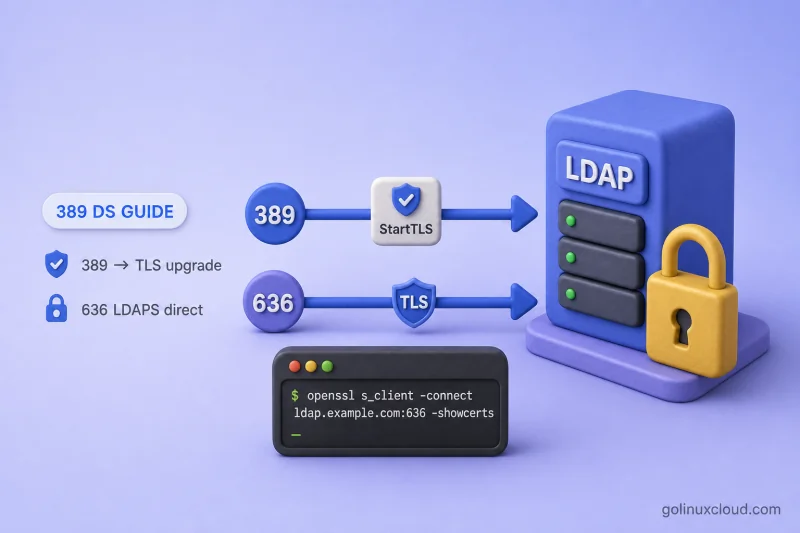
Directory Server can protect LDAP credentials and directory data in transit with TLS. Clients connect in two common ways:
- STARTTLS on the LDAP port, normally
389, upgrading an existing connection to TLS - LDAPS on the secure port, normally
636, where encryption begins before LDAP traffic
This guide shows how to inspect the current certificate configuration, import server and CA material, enable LDAPS, configure client trust, and verify both LDAPS and STARTTLS on my Rocky Linux 10.2 lab host.
Before you start:
- Install 389 Directory Server — lab instance
ldap1, suffixdc=example,dc=com - dsconf commands — online configuration
- dsctl commands — certificate import and instance restart
- Manage users and groups — test user
uid=user1
Tested on: Rocky Linux 10.2; 389 Directory Server 3.2.0.
The lab uses instance ldap1 on ldap1.example.com with LDAP port 389 and LDAPS port 636. A second instance, ldap2, listens on 1389 and 1636 and has its own NSS database and server certificate. When both instances were created by dscreate on the same host, their server certificates may be issued by the same host-level Self-Signed-CA stored under /etc/dirsrv/ssca/.
STARTTLS vs LDAPS in 389 Directory Server
| Method | URI | Port | How encryption starts |
|---|---|---|---|
| LDAP | ldap:// |
389 | No encryption by default |
| STARTTLS | ldap:// |
389 | Existing LDAP connection upgrades to TLS |
| LDAPS | ldaps:// |
636 | TLS begins before LDAP traffic |
STARTTLS clients must treat a failed TLS upgrade as fatal. If the client continues on plain LDAP after StartTLS fails, credentials and directory data can still travel in cleartext. Use ldapsearch -ZZ or equivalent client settings that require a successful StartTLS negotiation.
Both paths use the same server certificate (Server-Cert in this lab). They differ only in when the TLS handshake runs relative to the first LDAP message.
LDAPS (direct TLS on port 636)          STARTTLS (upgrade on port 389)
--------------------------------          ---------------------------------

  LDAP client                               LDAP client
       |                                         |
       |  TCP connect                            |  TCP connect
       v                                         v
  Port 636                                  Port 389
       |                                         |
       |  TLS handshake begins                   |  Plain LDAP (optional root DSE)
       |  immediately — no prior LDAP            |  traffic may occur first
       v                                         v
  Encrypted channel                         StartTLS extended operation
       |                                         |
       |  LDAP bind / search / modify            |  TLS handshake upgrades
       v                                         |  the existing connection
  Directory Server (ldap1)                     v
                                          Encrypted channel
                                               |
                                               |  LDAP bind / search / modify
                                               v
                                          Directory Server (ldap1)
Read the diagram left to right for each column. LDAPS wraps every LDAP operation in TLS from the first byte. STARTTLS keeps port 389 available for plain LDAP until the client sends the StartTLS extended request; only after a successful upgrade should the client send credentials or sensitive directory operations.
Understand the TLS certificate components
| Component | Purpose |
|---|---|
| Server certificate | Identifies the Directory Server host to clients |
| Private key | Proves ownership of the server certificate |
| CA certificate | Lets clients validate the server certificate chain |
| Intermediate CA | Connects the server certificate to a trusted root |
| NSS database | Stores certificates and private keys for the instance |
| Certificate nickname | Names the active server or CA entry in the NSS database |
389 Directory Server stores keys and certificates in the instance NSS database under /etc/dirsrv/slapd-<instance>/ (cert9.db, key4.db). The private key for Server-Cert remains in key4.db; Server-Cert.crt is only the public certificate PEM copy. dscreate also writes ca.crt for the issuing CA. Certificate lifecycle, replacement, online refresh, and NSS backup are covered in certificate management.
Plan the certificate names and hostnames
| Setting | Lab example |
|---|---|
| Instance | ldap1 |
| Server FQDN | ldap1.example.com |
| LDAP port | 389 |
| LDAPS port | 636 |
| Server certificate nickname | Server-Cert |
| CA nickname | Self-Signed-CA |
Clients must connect using a hostname that appears in the certificate Subject Alternative Name. The dscreate certificate on this lab includes ldap1.example.com in the SAN.
Inspect the current TLS configuration
Read the security settings for ldap1:
dsconf ldap1 security getSample output:
nsslapd-security: on
nsslapd-securelistenhost:
nsslapd-secureport: 636
nssslclientauth: allowed
nsslapd-require-secure-binds: off
nsslapd-ssl-check-hostname: on
nsslapd-validate-cert: warn
sslversionmin: TLS1.2
sslversionmax: TLS1.3
nsslapd-security: on enables the TLS security configuration and secure listener. nsslapd-secureport: 636 is the implicit-TLS LDAPS port. nssslclientauth: allowed accepts client certificates but does not require them. nsslapd-require-secure-binds: off means simple binds are not yet globally restricted to TLS. nsslapd-validate-cert: warn lets the instance start with an expired server certificate while logging a warning. Validating LDAP clients can still reject the connection. sslversionmin and sslversionmax set the current protocol boundaries.
nsslapd-ssl-check-hostname applies when Directory Server acts as a TLS client for outbound connections, such as replication. It does not control whether an external ldapsearch client verifies the server certificate hostname.
List installed server certificates:
dsconf ldap1 security certificate listSample output:
Certificate Name: Server-Cert
Subject DN: CN=ldap1.example.com,givenName=6d6a490c-bebd-41c4-8552-20cb270367ed,O=testing,L=389ds,ST=Queensland,C=AU
Issuer DN: CN=ssca.389ds.example.com,O=testing,L=389ds,ST=Queensland,C=AU
Expires: 2028-07-15 08:12:48
Trust Flags: u,u,u
The u flag indicates that the corresponding private key is present in the NSS database.
List CA certificates trusted by the server:
dsconf ldap1 security ca-certificate listSample output:
Certificate Name: Self-Signed-CA
Subject DN: CN=ssca.389ds.example.com,O=testing,L=389ds,ST=Queensland,C=AU
Issuer DN: CN=ssca.389ds.example.com,O=testing,L=389ds,ST=Queensland,C=AU
Expires: 2028-07-15 06:33:15
Trust Flags: CT,,
C marks a trusted CA for TLS. T additionally trusts the CA for client-certificate authentication. The three comma-separated groups represent TLS, email, and object-signing trust.
Confirm listener ports:
dsconf ldap1 config get nsslapd-port nsslapd-secureport nsslapd-securitySample output:
nsslapd-port: 389
nsslapd-secureport: 636
nsslapd-security: on
A default dscreate instance already created Self-Signed-CA, issued Server-Cert, and enabled TLS. Inspect the on-disk PEM copies when you need files for client trust or comparison:
ls -l /etc/dirsrv/slapd-ldap1/ca.crt /etc/dirsrv/slapd-ldap1/Server-Cert.crtSample output:
-rw-rw----. 1 dirsrv root 1959 Jul 15 13:42 /etc/dirsrv/slapd-ldap1/ca.crt
-rw-rw----. 1 dirsrv root 2113 Jul 15 13:42 /etc/dirsrv/slapd-ldap1/Server-Cert.crt
Both files should exist and be readable by root. ca.crt contains the issuing CA certificate. Server-Cert.crt contains the public server certificate and does not include its private key.
Choose a dscreate self-signed CA or a CA-signed certificate
dscreate self-signed CA
The default dscreate lab setup uses a locally generated, self-signed CA named Self-Signed-CA. That CA issues the instance certificate named Server-Cert. Use this model for:
- Initial labs
- Local testing
- Short-lived development environments
Every client must explicitly trust the issuing CA. Export the CA with dsctl ldap1 tls export-cert or copy /etc/dirsrv/slapd-ldap1/ca.crt.
CA-signed certificate
Use a CA-signed server certificate for:
- Production deployments
- Multiple LDAP clients and operating-system identity stacks
- Replication and chaining partners
- Automated enterprise trust
Certificate-authority setup and enterprise PKI design stay outside this guide. Import the signed certificate and CA chain using the workflows below after your CA returns the signed material.
Create a certificate signing request
I'll generate a CSR when I need a CA-signed replacement for Server-Cert. Include the hostname clients use in the subject or SAN list:
dsctl ldap1 tls generate-server-cert-csr -s "CN=ldap1.example.com,O=Example,ST=Queensland,C=AU" ldap1.example.comSample output:
/etc/dirsrv/slapd-ldap1/Server-Cert.csrReview the CSR before you submit it to the CA with OpenSSL:
openssl req -in /etc/dirsrv/slapd-ldap1/Server-Cert.csr -noout -textThe command prints the subject, public key, and requested SAN entries. CSR reuse, renewal timing, and replacing an active certificate belong in certificate management. Do not import a new Server-Cert until you understand the impact on connected clients.
Import a PEM certificate and private key
When an external CA or tool such as Let's Encrypt returns PEM files, import the leaf server certificate and private key together:
dsctl ldap1 tls import-server-key-cert /path/server.crt /path/server.keyfullchain.pem to import-server-key-cert. Import the leaf server certificate and private key first, then import each intermediate or root CA certificate separately. For Certbot files, this normally means using cert.pem with privkey.pem, not fullchain.pem.
Example with Certbot file names:
dsctl ldap1 tls import-server-key-cert /etc/letsencrypt/live/ldap1.example.com/cert.pem /etc/letsencrypt/live/ldap1.example.com/privkey.pemA successful import may return little or no output. Verify the result with the following commands:
dsconf ldap1 security certificate listI'll confirm the active nickname and validity details with the TLS helper next:
dsctl ldap1 tls show-server-certBoth commands should identify Server-Cert and show the expected subject, issuer, validity period, and SAN (ldap1.example.com in this lab).
When you generated the CSR with dsctl ldap1 tls generate-server-cert-csr, the matching private key already exists in the instance NSS database. Import only the signed certificate returned by the CA:
dsctl ldap1 tls import-server-cert /path/server.crtThis imports the signed certificate and associates it with the private key created during CSR generation. The default certificate nickname is Server-Cert; specify another nickname only when the CSR was generated for that nickname.
A successful import may return no output. Confirm the active certificate afterward:
dsctl ldap1 tls show-server-certImport the matching private key only when Directory Server did not already generate it internally. Use import-server-key-cert for that case.
Import the CA certificate chain
Import the root or intermediate CA that signed the server certificate:
dsconf ldap1 security ca-certificate add --file /path/ca.crt --name "Example-CA"When the CA provides multiple certificates in one PEM file, split them into individual PEM files and import each certificate with a unique nickname. Then import an intermediate from a Certbot deployment:
dsconf ldap1 security ca-certificate add --file /etc/letsencrypt/live/ldap1.example.com/chain.pem --name "Issuing-CA"If chain.pem itself contains more than one certificate, import each intermediate separately rather than treating the bundle as a single server certificate.
Set trust flags so Directory Server trusts the CA for TLS server authentication:
dsconf ldap1 security ca-certificate set-trust-flags "Example-CA" --flags "CT,,"Trust flags control whether the CA is trusted for TLS (C) and for client-certificate authentication (T). The lab Self-Signed-CA created by dscreate already shows CT,,.
List CAs after import:
dsconf ldap1 security ca-certificate listEnable TLS and the LDAPS port
On a new instance without TLS, I'll enable security and set the secure port:
dsconf ldap1 config replace nsslapd-secureport=636 nsslapd-security=onConfirm which certificate the secure listener uses:
dsconf ldap1 security rsa getSample output:
nssslactivation: on
nssslpersonalityssl: Server-Cert
nsssltoken: internal (software)
If RSA is disabled or nssslpersonalityssl does not contain the required certificate nickname, configure it:
dsconf ldap1 security rsa set --tls-allow-rsa-certificates on --nss-token "internal (software)" --nss-cert-name Server-Certnssslpersonalityssl identifies the certificate that Directory Server presents to LDAPS and STARTTLS clients. The certificate nickname must match the entry shown by dsconf ldap1 security certificate list.
Restart the instance so the secure listener loads the active certificate:
dsctl ldap1 restartSample output:
Instance "ldap1" has been restartedDirectory Server reads the certificate nickname from the RSA encryption-module configuration when the secure listener starts. Verify that nssslpersonalityssl points to Server-Cert before restarting the instance. The lab instance already has nsslapd-security: on from dscreate; use the commands above when you build TLS on an instance that started without LDAPS.
This restart is required for listener configuration changes. Current 389 Directory Server releases also support online certificate refresh for certificate replacement alone. That workflow belongs in certificate management.
Allow LDAP and LDAPS through firewalld
When firewalld is active and clients connect from another host, allow the ports used by this guide with firewalld:
firewall-cmd --permanent --add-port=389/tcpI'll open the LDAPS port the same way so remote clients can connect on 636/tcp:
firewall-cmd --permanent --add-port=636/tcpReload firewalld so both port rules take effect immediately:
firewall-cmd --reloadSample output:
success
success
success
Port 389/tcp supports LDAP and STARTTLS. Port 636/tcp supports direct LDAPS. Open only the ports required by your client design and skip these commands when another firewall system controls access.
Verify LDAP and LDAPS listeners
Confirm both listeners are open with ss:
ss -lntp | grep -E ':389|:636'Sample output:
LISTEN 0 128 *:636 *:* users:(("ns-slapd",pid=250580,fd=9))
LISTEN 0 128 *:389 *:* users:(("ns-slapd",pid=250580,fd=8))
Check instance status:
dsctl ldap1 statusSample output:
Instance "ldap1" is runningPort 389 accepts plain LDAP and STARTTLS. Port 636 accepts LDAPS. If the instance fails to start, read /var/log/dirsrv/slapd-ldap1/errors for NSS or certificate-loading errors before you test clients.
Configure client CA trust
Export the issuing CA for client testing:
dsctl ldap1 tls export-cert Self-Signed-CA --output-file /tmp/389ds-selfsigned-ca.pemConfirm the exported CA:
openssl x509 -in /tmp/389ds-selfsigned-ca.pem -noout -subject -issuer -fingerprint -sha256Sample output:
subject=C=AU, ST=Queensland, L=389ds, O=testing, CN=ssca.389ds.example.com
issuer=C=AU, ST=Queensland, L=389ds, O=testing, CN=ssca.389ds.example.com
sha256 Fingerprint=21:F9:70:79:B6:0F:55:45:01:94:C0:C6:89:2A:E7:44:20:A9:EE:37:1C:8D:49:61:13:32:27:21:EB:C7:11:06
Matching subject and issuer indicate a locally self-signed CA.
Each Directory Server instance has its own server certificate and NSS database. However, instances created by dscreate on the same host may share the same host-level Self-Signed-CA. Compare the CA fingerprints before installing another trust anchor:
openssl x509 -in /etc/dirsrv/slapd-ldap1/ca.crt -noout -fingerprint -sha256I'll print the fingerprint for ldap2 on the same host so I can compare the two issuing CAs:
openssl x509 -in /etc/dirsrv/slapd-ldap2/ca.crt -noout -fingerprint -sha256Sample output:
sha256 Fingerprint=21:F9:70:79:B6:0F:55:45:01:94:C0:C6:89:2A:E7:44:20:A9:EE:37:1C:8D:49:61:13:32:27:21:EB:C7:11:06
sha256 Fingerprint=21:F9:70:79:B6:0F:55:45:01:94:C0:C6:89:2A:E7:44:20:A9:EE:37:1C:8D:49:61:13:32:27:21:EB:C7:11:06
Matching fingerprints mean trusting either exported CA certificate is sufficient for both instances on this host.
Temporary client test
Point OpenLDAP clients at the CA file for one command:
LDAPTLS_CACERT=/tmp/389ds-selfsigned-ca.pem ldapwhoami -x -H ldaps://ldap1.example.com:636 -D "cn=Directory Manager" -y /root/dm.pwSample output:
dn: cn=directory managerWithout LDAPTLS_CACERT, the same command often fails with a generic error:
ldap_sasl_bind(SIMPLE): Can't contact LDAP server (-1)That message frequently means certificate verification failed, not that the host is unreachable.
System-wide LDAP client trust
On RHEL-family systems, copy the CA to the system trust store and refresh anchors:
cp /tmp/389ds-selfsigned-ca.pem /etc/pki/ca-trust/source/anchors/389ds-selfsigned-ca.pemI'll rebuild the system trust store so OpenSSL and other OS clients pick up the new anchor:
update-ca-trustAfter system trust is configured, clients that use the OS store can validate LDAPS without LDAPTLS_CACERT. Use LDAPTLS_CACERT or TLS_CACERT in /etc/openldap/ldap.conf when only the LDAP client stack should trust the CA.
Test LDAPS
Search the suffix over LDAPS with a trusted CA. The ldapsearch command covers -H, -ZZ, and TLS environment variables when you test other URIs:
LDAPTLS_CACERT=/tmp/389ds-selfsigned-ca.pem ldapsearch -LLL -x -H ldaps://ldap1.example.com:636 -D "cn=Directory Manager" -y /root/dm.pw -b "dc=example,dc=com" -s base "(objectClass=*)" dnSample output:
dn: dc=example,dc=comVerify the TLS handshake independently with CA trust and hostname verification:
openssl s_client -connect ldap1.example.com:636 -servername ldap1.example.com -CAfile /tmp/389ds-selfsigned-ca.pem -verify_hostname ldap1.example.com -verify_return_error </dev/nullSample output (cipher and protocol lines vary by OpenSSL version):
Verification: OK
Verify return code: 0 (ok)
Without -CAfile, or before the CA is installed in the system trust store, OpenSSL reports a certificate-chain verification error such as Verify return code: 19 (self-signed certificate in certificate chain). With the exported CA and the correct hostname, the expected result is Verify return code: 0 (ok).
Test STARTTLS
Require StartTLS on port 389:
LDAPTLS_CACERT=/tmp/389ds-selfsigned-ca.pem ldapsearch -LLL -x -H ldap://ldap1.example.com:389 -ZZ -D "cn=Directory Manager" -y /root/dm.pw -b "dc=example,dc=com" -s base "(objectClass=*)" dnSample output:
dn: dc=example,dc=com| Option | Behaviour |
|---|---|
-Z |
Request StartTLS; the client may continue depending on configuration |
-ZZ |
Require successful StartTLS; fail if the upgrade does not succeed |
Without a trusted CA, StartTLS fails during the TLS handshake:
ldap_start_tls: Connect error (-11)
	additional info: error:0A000086:SSL routines::certificate verify failed (self-signed certificate in certificate chain)
Test the StartTLS handshake with OpenSSL:
openssl s_client -connect ldap1.example.com:389 -starttls ldap -servername ldap1.example.com -CAfile /tmp/389ds-selfsigned-ca.pem -verify_hostname ldap1.example.com -verify_return_error </dev/nullSample output:
Verification: OK
Verify return code: 0 (ok)
The output shows the same server certificate presented on LDAPS, confirming that STARTTLS and LDAPS share the active Server-Cert.
Test with a normal LDAP user
Repeat the tests as a directory user, not only as Directory Manager. This confirms TLS works for application-style simple binds.
LDAPS:
LDAPTLS_CACERT=/tmp/389ds-selfsigned-ca.pem ldapwhoami -x -H ldaps://ldap1.example.com:636 -D "uid=user1,ou=people,dc=example,dc=com" -y /root/user1.pwSample output:
dn: uid=user1,ou=people,dc=example,dc=comI'll repeat the bind over STARTTLS to confirm normal users can authenticate after the TLS upgrade on port 389:
LDAPTLS_CACERT=/tmp/389ds-selfsigned-ca.pem ldapwhoami -x -H ldap://ldap1.example.com:389 -ZZ -D "uid=user1,ou=people,dc=example,dc=com" -y /root/user1.pwSample output:
dn: uid=user1,ou=people,dc=example,dc=comThis test assumes user1 and /root/user1.pw exist from Manage users and groups or the self-service ACI chapter.
Review TLS logs and configuration
Check the instance error log for certificate loading and TLS initialization:
grep -i "Security Initialization\|SSL\|TLS" /var/log/dirsrv/slapd-ldap1/errors | tail -6Sample output:
[16/Jul/2026:06:35:05 +0530] - INFO - Security Initialization - slapd_ssl_init2 - Configured SSL version range: min: TLS1.2, max: TLS1.3
[16/Jul/2026:06:35:05 +0530] - INFO - Security Initialization - slapd_ssl_init2 - NSS adjusted SSL version range: min: TLS1.2, max: TLS1.3
Inspect the access log for LDAPS and StartTLS connections:
grep -i "SSL connection\|start_tls\|TLS1" /var/log/dirsrv/slapd-ldap1/access | tail -4Sample output:
[16/Jul/2026:06:43:26 +0530] conn=89 fd=83 slot=83 SSL connection from 192.168.56.108 to 192.168.56.108
[16/Jul/2026:06:43:27 +0530] conn=92 op=0 EXT oid="1.3.6.1.4.1.1466.20037" name="start_tls_plugin"
[16/Jul/2026:06:43:28 +0530] conn=92 TLS1.3 128-bit AES-GCM
Look for certificate-loading and TLS-negotiation problems in the server error log. CA verification and hostname mismatch errors usually appear on the client first. Test with openssl s_client -CAfile ... -verify_hostname ... -verify_return_error when ldapsearch reports a generic failure.
Verify the completed TLS setup
| Test | Expected result |
|---|---|
| Plain LDAP root DSE query | Works unless later restricted by anonymous-access policy |
| STARTTLS with trusted CA | Works |
| STARTTLS without trusted CA | Fails certificate validation |
| LDAPS with trusted CA | Works |
| LDAPS using a hostname not present in the certificate SAN | Fails when the LDAP client performs hostname verification |
| Normal user bind over TLS | Works with valid credentials |
| Expired server certificate | With nsslapd-validate-cert=warn, the instance starts and logs a warning; validating clients normally reject the TLS connection |
Troubleshoot TLS, STARTTLS, and LDAPS
| Symptom | Likely cause | Fix |
|---|---|---|
| Port 636 is not listening | nsslapd-security off, wrong secure port, or missing Server-Cert |
Enable security, confirm certificate nickname, restart instance, read error log |
| Port 636 listens but presents the wrong certificate or TLS initialization fails | nssslpersonalityssl points to the wrong NSS nickname |
Run dsconf ldap1 security rsa get and set --nss-cert-name Server-Cert |
Can't contact LDAP server on LDAPS |
Client does not trust the issuing CA | Export CA; set LDAPTLS_CACERT; install OS trust anchor |
| Certificate hostname verification fails | Client hostname missing from SAN | Reissue certificate with correct SAN; connect using matching FQDN |
| Unknown or untrusted CA | Wrong CA file or incomplete chain | Import root and intermediate CAs; set CT,, trust flags |
| Private key does not match certificate | Mixed files from different CSRs | Import matching cert/key pair with import-server-key-cert |
import-server-key-cert reports that the certificate may be a chain file |
A bundle such as fullchain.pem contains more than one certificate |
Import the leaf certificate with its private key, then import each CA certificate separately |
OpenSSL connects but does not show Verify return code: 0 (ok) |
Missing -CAfile, incomplete chain, or hostname not in SAN |
Use -CAfile, -verify_hostname, and -verify_return_error; import missing intermediate certificates |
| STARTTLS fails but LDAPS works | Missing CA trust on port 389 client, or -Z instead of -ZZ |
Add CA trust; use -ZZ; test with openssl s_client -starttls ldap |
| LDAPS works locally but not remotely | Firewall, listening address, DNS, or SAN mismatch | Open 636/tcp; confirm the listening address, DNS resolution, and certificate SAN; test from a remote client |
| Instance fails after certificate import | Wrong nickname, corrupt PEM, or NSS permissions | Verify PEM files; confirm Server-Cert; inspect /var/log/dirsrv/slapd-ldap1/errors |
When LDAP result codes appear after a successful TLS handshake, continue diagnosis in fix LDAP error 50 for authorization failures.
What's Next
- TLS ciphers and protocol versions — tighten cipher suites after LDAPS works
- Require secure LDAP connections — enforce TLS for simple binds and minimum SSF
- Certificate management — renewal, backup, and NSS recovery
References
- Red Hat Directory Server 13 — Securing RHDS
- Red Hat Directory Server 13 — Core server configuration attributes
- 389 Directory Server — Howto: TLS/StartTLS
Summary
- Inspect
dsconf ldap1 security get, certificate lists, and listener ports before you change TLS material. - Import the server certificate, private key, and CA chain with
dsctl tlsanddsconf security. - Configure the CA trust flags, RSA certificate nickname,
nsslapd-security, and secure port636, then restart the instance. - Configure client CA trust with
LDAPTLS_CACERTor the OS trust store. - Test LDAPS and STARTTLS with
-ZZ,openssl s_client -CAfile ... -verify_hostname ... -verify_return_error, and a normal LDAP user bind. - Read TLS lines in the instance error and access logs when verification fails.
