
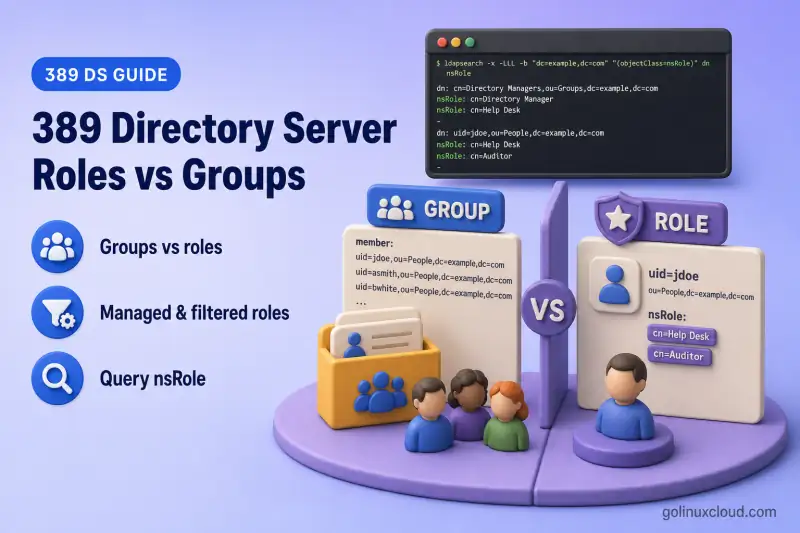
Groups and roles both represent membership in 389 Directory Server, but they store and evaluate that membership differently.
- Groups: Static groups store member DNs on the group entry. Dynamic groups define membership through
memberURLand can optionally return server-computedmembervalues when dynamic lists are enabled. - Roles identify which roles an individual entry possesses through the computed
nsRoleattribute. - Both can represent static or dynamically determined membership.
- The correct choice depends on client compatibility, lookup direction, performance, and administration requirements.
Before you start:
- Install 389 Directory Server — running instance with a suffix (lab:
ldap1,dc=example,dc=com) - Manage users and groups —
ou=People,ou=Groups, and at least one static group - dsidm command cheat sheet — role subcommands
Tested on: Rocky Linux 10.2; 389 Directory Server 3.2.0.
Roles vs groups at a glance
| Area | Groups | Roles |
|---|---|---|
| Membership direction | Static groups reference member DNs on the group entry; dynamic groups define membership through memberURL |
Directory Server calculates the roles that apply to each matching entry and exposes those role DNs through nsRole |
| User-side lookup | For static groups, enable the MemberOf plug-in to maintain reverse membership on user entries; dynamic groups are not supported by MemberOf | Query the computed nsRole operational attribute |
| Static membership | Static groups (groupOfNames, groupOfUniqueNames) |
Managed roles |
| Dynamic membership | Dynamic groups (groupOfURLs / memberURL) |
Filtered roles |
| Nesting | Depends on group and client design | Nested roles |
| Evaluation cost | Static groups are generally less expensive; dynamic groups can require search-time filter evaluation | More server-side processing |
| Client compatibility | Widely supported | Client must understand or query nsRole |
Roles move membership evaluation toward the server. Static groups usually require less search-time processing because their member values are stored. Filtered roles and dynamic groups require the server or client to evaluate membership filters.
How groups work in 389 Directory Server
389 Directory Server supports several common group models:
| Group model | Object class | Membership attribute | Behavior |
|---|---|---|---|
| Static group | groupOfNames |
member (full DNs) |
Explicit membership list on the group entry |
| Unique static group | groupOfUniqueNames |
uniqueMember (full DNs) |
Same pattern with a different object class |
| Dynamic group | groupOfURLs |
memberURL |
Stores an LDAP URL that defines membership. Clients evaluate the URL under traditional behavior; with dynamic lists enabled, Directory Server returns computed member values at search time |
| Reverse lookup (optional) | — | memberOf on user entries |
Maintained by the MemberOf plug-in for supported static groups when enabled; existing memberships may require a fixup task |
389 Directory Server 3.2.0 supports server-side dynamic lists. Enable them with:
dsconf ldap1 backend config set --enable-dynamic-lists onThe change takes effect immediately and does not require a restart. Confirm the configuration with:
dsconf ldap1 backend config get | grep nsslapd-dynamic-listsRelevant output:
nsslapd-dynamic-lists-enabled: on
nsslapd-dynamic-lists-oc: groupOfURLs
nsslapd-dynamic-lists-url-attr: memberUrl
nsslapd-dynamic-lists-attr: member
The server then evaluates memberURL when the dynamic-group entry is searched and returns matching DNs through the computed member attribute. These values are calculated at search time and do not cause the MemberOf plug-in to add memberOf to matching users.
This lab assumes cn=developers already exists from the users and groups chapter. On my lab host that entry is a groupOfNames group with member DNs.
Confirm the group still lists its member with ldapsearch:
ldapsearch -x -H ldap://127.0.0.1:389 -D "cn=Directory Manager" -y /root/dm.pw -b "cn=developers,ou=Groups,dc=example,dc=com" -s base memberSample output:
dn: cn=developers,ou=Groups,dc=example,dc=com
member: uid=user1,ou=people,dc=example,dc=com
Membership lives on the group entry. To discover which static groups a user belongs to, search group entries for matching member values, or enable the MemberOf plug-in so the server maintains memberOf on the user entry when static group membership changes. MemberOf does not populate reverse membership for dynamic groupOfURLs groups.
How roles work
Role definitions are LDAP subentries. The server evaluates them and exposes matching role DNs on member entries through the operational nsRole attribute.
| Attribute or object | Purpose |
|---|---|
nsRoleDN |
Assigns an entry to a managed role |
nsRoleFilter |
Defines membership for a filtered role |
nsRole |
Computed operational attribute showing role membership |
| Role definition entry | Defines the role and its type (nsManagedRoleDefinition, nsFilteredRoleDefinition, or nsNestedRoleDefinition) |
nsRole is computed by the Roles plug-in at search time. Directory Server does not store it as an ordinary user attribute you edit directly.
The Roles plug-in is normally enabled by default. It begins returning meaningful nsRole values after you create role-definition subentries within the relevant directory subtree.
Role scope follows the location of the role definition. Role definitions must be placed within the subtree they should govern. Because the lab users are below ou=People,dc=example,dc=com, the following role definitions are created directly below ou=People.
Create and test a managed role
A managed role is similar to a static group because administrators assign each member explicitly. The difference is where that assignment is represented: groups store user DNs on the group entry, while managed roles place the role DN in nsRoleDN on each member entry.
I'll create the managed-role definition as a subentry under ou=People:
dn: cn=Application Administrators,ou=People,dc=example,dc=com
objectClass: top
objectClass: LDAPsubentry
objectClass: nsRoleDefinition
objectClass: nsSimpleRoleDefinition
objectClass: nsManagedRoleDefinition
cn: Application Administrators
description: Managed role for application administrators
Create the managed role entry with ldapadd:
ldapadd -x -H ldap://127.0.0.1:389 -D "cn=Directory Manager" -y /root/dm.pw -f managed-role.ldifSample output:
adding new entry "cn=Application Administrators,ou=People,dc=example,dc=com"The adding new entry line means Directory Server accepted the managed-role definition.
I'll assign uid=user1 to the role. Save the modify LDIF as user1-managed-role.ldif, then apply it:
dn: uid=user1,ou=people,dc=example,dc=com
changetype: modify
add: nsRoleDN
nsRoleDN: cn=Application Administrators,ou=People,dc=example,dc=com
Apply the modify with ldapmodify:
ldapmodify -x -H ldap://127.0.0.1:389 -D "cn=Directory Manager" -y /root/dm.pw -f user1-managed-role.ldifSample output:
modifying entry "uid=user1,ou=people,dc=example,dc=com"That modify line confirms nsRoleDN was stored on the user entry.
Request nsRole explicitly. Operational attributes are not returned unless you ask for them:
ldapsearch -x -H ldap://127.0.0.1:389 -D "cn=Directory Manager" -y /root/dm.pw -b "uid=user1,ou=people,dc=example,dc=com" -s base nsRoleSample output:
dn: uid=user1,ou=people,dc=example,dc=com
nsRole: cn=application administrators,ou=people,dc=example,dc=com
The server computed the managed role DN on the user entry. Role DNs in nsRole may appear with normalized casing.
dsidm creates the role below the effective base DN. Use -b to select the subtree explicitly:
dsidm ldap1 -b "ou=People,dc=example,dc=com" role create-managed --cn "Operations Managers"Sample output:
Successfully created Operations ManagersAssign members with nsRoleDN the same way whether you use ldapadd or dsidm.
Create and test a filtered role
A filtered role assigns membership through an LDAP filter, comparable to a dynamic group. Entries that match nsRoleFilter receive the role automatically.
I'll create a second lab user for the filtered-role test. The next step adds departmentNumber on that account:
dsidm ldap1 user create --uid user2 --cn "User Two" --displayName "User Two" --uidNumber 10002 --gidNumber 10002 --homeDirectory /home/user2Sample output:
Successfully created user2I'll add the filtered-role definition. Save the LDIF as filtered-role.ldif, then load it:
dn: cn=IT Department Role,ou=People,dc=example,dc=com
objectClass: top
objectClass: LDAPsubentry
objectClass: nsRoleDefinition
objectClass: nsComplexRoleDefinition
objectClass: nsFilteredRoleDefinition
cn: IT Department Role
nsRoleFilter: (departmentNumber=IT)
description: Filtered role for IT department members
Load the role definition with ldapadd:
ldapadd -x -H ldap://127.0.0.1:389 -D "cn=Directory Manager" -y /root/dm.pw -f filtered-role.ldifSample output:
adding new entry "cn=IT Department Role,ou=People,dc=example,dc=com"Set departmentNumber on the test user. Save as user2-department.ldif, then apply the modify:
dn: uid=user2,ou=people,dc=example,dc=com
changetype: modify
add: departmentNumber
departmentNumber: IT
Apply the attribute change with ldapmodify:
ldapmodify -x -H ldap://127.0.0.1:389 -D "cn=Directory Manager" -y /root/dm.pw -f user2-department.ldifSample output:
modifying entry "uid=user2,ou=people,dc=example,dc=com"Verify the computed role on the matching user:
ldapsearch -x -H ldap://127.0.0.1:389 -D "cn=Directory Manager" -y /root/dm.pw -b "uid=user2,ou=people,dc=example,dc=com" -s base nsRole departmentNumberSample output:
dn: uid=user2,ou=people,dc=example,dc=com
departmentNumber: IT
nsRole: cn=it department role,ou=people,dc=example,dc=com
You did not add user2 to the role manually. Directory Server assigned the role because the user entry matched (departmentNumber=IT).
Change the attribute and confirm membership updates automatically. Save as user2-sales.ldif, then apply the modify:
dn: uid=user2,ou=people,dc=example,dc=com
changetype: modify
replace: departmentNumber
departmentNumber: Sales
Apply the department change with ldapmodify:
ldapmodify -x -H ldap://127.0.0.1:389 -D "cn=Directory Manager" -y /root/dm.pw -f user2-sales.ldifSample output:
modifying entry "uid=user2,ou=people,dc=example,dc=com"Query nsRole again:
ldapsearch -x -H ldap://127.0.0.1:389 -D "cn=Directory Manager" -y /root/dm.pw -b "uid=user2,ou=people,dc=example,dc=com" -s base nsRoleSample output:
dn: uid=user2,ou=people,dc=example,dc=comThe IT filtered role no longer applies because the entry no longer matches the filter.
dsidm ldap1 role create-filtered prompts for nsRoleFilter interactively when the filter is omitted. Use ldapadd or ldapmodify when you need a repeatable LDIF file with an explicit filter.
Create a nested role
A nested role combines other role definitions. A user who matches any contained role also receives the nested role.
Add the managed role back to user1, then I'll create the nested role. Reapply user1-managed-role.ldif:
dn: uid=user1,ou=people,dc=example,dc=com
changetype: modify
add: nsRoleDN
nsRoleDN: cn=Application Administrators,ou=People,dc=example,dc=com
Apply the modify with ldapmodify:
ldapmodify -x -H ldap://127.0.0.1:389 -D "cn=Directory Manager" -y /root/dm.pw -f user1-managed-role.ldifSample output:
modifying entry "uid=user1,ou=people,dc=example,dc=com"Create the nested role that references the managed and filtered roles. Save as nested-role.ldif, then load it:
dn: cn=Combined IT and App Admins,ou=People,dc=example,dc=com
objectClass: top
objectClass: LDAPsubentry
objectClass: nsRoleDefinition
objectClass: nsComplexRoleDefinition
objectClass: nsNestedRoleDefinition
cn: Combined IT and App Admins
nsRoleDN: cn=Application Administrators,ou=People,dc=example,dc=com
nsRoleDN: cn=IT Department Role,ou=People,dc=example,dc=com
description: Nested role combining managed and filtered roles
Load the nested role with ldapadd:
ldapadd -x -H ldap://127.0.0.1:389 -D "cn=Directory Manager" -y /root/dm.pw -f nested-role.ldifSample output:
adding new entry "cn=Combined IT and App Admins,ou=People,dc=example,dc=com"Restore user2 to the IT department for the nested-role demonstration. Reapply user2-department.ldif:
dn: uid=user2,ou=people,dc=example,dc=com
changetype: modify
replace: departmentNumber
departmentNumber: IT
Apply the attribute change with ldapmodify:
ldapmodify -x -H ldap://127.0.0.1:389 -D "cn=Directory Manager" -y /root/dm.pw -f user2-department.ldifSample output:
modifying entry "uid=user2,ou=people,dc=example,dc=com"Query user1 (managed role member):
ldapsearch -x -H ldap://127.0.0.1:389 -D "cn=Directory Manager" -y /root/dm.pw -b "uid=user1,ou=people,dc=example,dc=com" -s base nsRoleSample output:
dn: uid=user1,ou=people,dc=example,dc=com
nsRole: cn=application administrators,ou=people,dc=example,dc=com
nsRole: cn=combined it and app admins,ou=people,dc=example,dc=com
Query user2 (filtered role member):
ldapsearch -x -H ldap://127.0.0.1:389 -D "cn=Directory Manager" -y /root/dm.pw -b "uid=user2,ou=people,dc=example,dc=com" -s base nsRoleSample output:
dn: uid=user2,ou=people,dc=example,dc=com
nsRole: cn=combined it and app admins,ou=people,dc=example,dc=com
nsRole: cn=it department role,ou=people,dc=example,dc=com
Each user receives the nested role through a different child role. user1 qualifies through the managed role assignment; user2 qualifies through the filtered role match.
List role definition subentries (hidden from ordinary subtree searches):
ldapsearch -x -H ldap://127.0.0.1:389 -D "cn=Directory Manager" -y /root/dm.pw -b "ou=People,dc=example,dc=com" -s sub "(&(objectClass=ldapSubentry)(objectClass=nsRoleDefinition))" dn nsRoleFilterSample output:
dn: cn=Application Administrators,ou=People,dc=example,dc=com
dn: cn=IT Department Role,ou=People,dc=example,dc=com
nsRoleFilter: (departmentNumber=IT)
dn: cn=Combined IT and App Admins,ou=People,dc=example,dc=com
Query group and role membership
Compare the lookup direction for each model:
| Question | Approach |
|---|---|
| Group → members | Read stored member or uniqueMember values for static groups. For dynamic groups, read computed member values when dynamic lists are enabled; otherwise evaluate the search represented by memberURL |
| User → static groups | Search group entries for the user DN, or request memberOf when MemberOf is configured |
| User → dynamic groups | Evaluate applicable memberURL filters; MemberOf does not provide this relationship |
| User → roles | Request nsRole from the user entry |
| Role → users | Search user entries with (nsRole=<role-DN>) |
Read static group members from the group entry:
ldapsearch -x -H ldap://127.0.0.1:389 -D "cn=Directory Manager" -y /root/dm.pw -b "cn=developers,ou=Groups,dc=example,dc=com" -s base memberSample output:
dn: cn=developers,ou=Groups,dc=example,dc=com
member: uid=user1,ou=people,dc=example,dc=com
On this lab host, memberOf is empty until you configure the MemberOf plug-in for static groups:
ldapsearch -x -H ldap://127.0.0.1:389 -D "cn=Directory Manager" -y /root/dm.pw -b "uid=user1,ou=people,dc=example,dc=com" -s base memberOfSample output:
dn: uid=user1,ou=people,dc=example,dc=comThe DN is returned, but no memberOf attribute appears until MemberOf is enabled and has processed existing group memberships.
Find every user who possesses the IT filtered role:
ldapsearch -x -H ldap://127.0.0.1:389 -D "cn=Directory Manager" -y /root/dm.pw -b "ou=People,dc=example,dc=com" -s sub "(nsRole=cn=IT Department Role,ou=People,dc=example,dc=com)" dnSample output:
dn: uid=user2,ou=people,dc=example,dc=comOnly entries that currently possess the role DN in their computed nsRole values appear in this result.
Operational attributes such as nsRole and memberOf must appear in the attribute list. A wildcard * request does not return them. Requesting + returns all operational attributes supported for the entry, but naming nsRole or memberOf explicitly is normally better when an application needs only those attributes. See LDAP basics for DN and search-scope fundamentals; use man ldapsearch on the host or the ldapsearch(1) mirror for attribute selection syntax.
When should you use groups?
Choose groups when:
- Existing applications expect
member,uniqueMember, or POSIX group object classes. - Client compatibility with standard LDAP group structures is important.
- Applications, audit tools, or exports must read membership from conventional LDAP group entries.
- Lower server-side evaluation cost is preferred.
- Operating-system or application authorization expects POSIX or
groupOfNamessemantics.
Static groups remain the default choice for application integration and Linux identity mapping.
When should you use roles?
Choose roles when:
- Applications primarily ask which memberships a user possesses.
- Membership should be derived from entry attributes (filtered roles).
- Managed and filtered membership should share one user-side lookup (
nsRole). - Nested membership is central to the directory design.
- Role-based account activation or inactivation is required.
Directory Server can inactivate an entire role, causing members to receive a computed nsAccountLock: true state. That can simplify temporary suspension of a department or administrative role, but ACIs must prevent users from removing the attributes that make them members of the inactive role.
Roles fit authorization models that query the user entry rather than enumerate group entries.
Security and performance considerations
- Restrict who can modify
nsRoleDNon managed roles—users who can remove their own assignment bypass role-based lockout unless ACIs prevent it. - Protect attributes referenced in
nsRoleFilterso users cannot change their department, title, or other filter fields to gain unintended roles. - Filtered and nested roles consume more server resources than reading a static
memberlist because Directory Server evaluates filters and role relationships at search time. - Test filtered and nested roles against realistic directory sizes before deploying them in production.
- Index attributes used in
nsRoleFilterwhen the filter runs against large subtrees. - Add an equality index on
nsRoleDNfor managed-role membership searches, and on filter attributes such asdepartmentNumberfor filtered roles. These indexes are not required for a small lab, but they matter when role searches run across large datasets:
dsconf ldap1 backend index add --index-type eq --attr nsRoleDN --reindex userrootThe command creates the equality index and starts reindexing the selected backend.
dsconf ldap1 backend index add --index-type eq --attr departmentNumber --reindex userrootThe second command follows the same pattern for the filtered-role filter attribute.
Replace userroot with your backend name from dsconf ldap1 backend suffix list. Reindexing can take longer on large backends; the lab finishes quickly because the suffix is small.
ACI examples for nsRoleDN and filter attributes belong in ACI examples.
Can roles replace groups completely?
Usually not. Many LDAP applications and authorization systems expect standard group object classes and membership attributes, not nsRole. Linux identity mapping still belongs to POSIX or RFC2307bis-style groups.
Use both models where each fits: groups for application compatibility and POSIX integration; roles for server-computed membership and user-centric authorization queries.
Summary
| Requirement | Recommended model |
|---|---|
| Traditional application membership | Static group |
| Attribute-based group membership | Dynamic group or filtered role |
| Query memberships from the user entry | Roles through nsRole, or supported static groups through MemberOf |
| POSIX/Linux group integration | POSIX group |
| Explicit role assignment | Managed role |
| Combine several role definitions | Nested role |
Groups store membership on the group entry; roles compute nsRole on the member entry. Managed roles provide explicit membership comparable to static groups, while filtered roles provide attribute-based membership comparable to dynamic groups. Choose groups for compatibility and roles when user-side membership evaluation justifies the additional server cost.
What's Next
- Class of Service — virtual attributes across a subtree
- Manage users and groups — baseline
dsidmuser and group workflow - Disable user accounts — lock roles or individual users
References
- Red Hat Directory Server 13 — Using groups in Directory Server (§3.1) — static and dynamic groups,
memberURL, and MemberOf behavior - Red Hat Directory Server 13 — Using roles in Directory Server (§3.2) — managed, filtered, nested roles,
nsRole, indexing, and security guidance - 389 Directory Server — Users and groups with dsidm — upstream directory data workflows
- dsidm(8) on Arch Linux — web-accessible copy; use
man dsidmon the host as the primary reference - ldapsearch(1) on Arch Linux — web-accessible copy; use
man ldapsearchon the host as the primary reference - 389 Directory Server 3.2.0 release — tested release
