
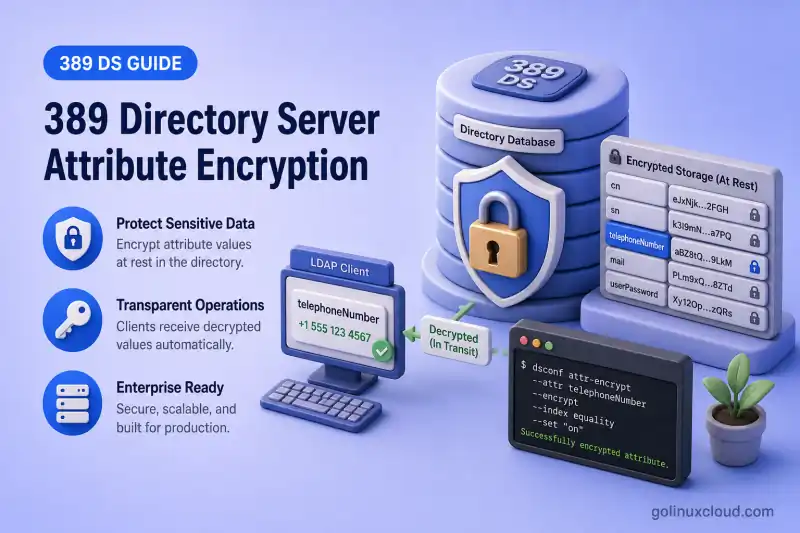
Attribute encryption stores selected LDAP attribute values and their equality and presence index data in encrypted form inside the backend database. Authorized clients still receive plaintext over LDAP. The server decrypts values during reads. The protection target is data at rest on disk, not the LDAP wire protocol.
Typical candidates include personal or government identifiers:
telephoneNumber
employeeNumber
governmentIdentifier
Avoid uid as the main example. When uid is part of the entry DN, the value remains visible in the distinguished name even if you encrypt the attribute.
Before you start:
- Install 389 Directory Server — instance
ldap1onldap1.example.com - TLS, StartTLS, and LDAPS — TLS must be enabled before attribute encryption
- Suffixes and backends — backend
userroot, suffixdc=example,dc=com - Backup and restore — certificate database and LDIF export planning
- Index design — equality indexes on encrypted attributes
Tested on: Rocky Linux 10.2; 389 Directory Server 3.2.0.
Attribute encryption vs LDAP TLS
| Protection | Purpose |
|---|---|
| LDAP TLS or LDAPS | Encrypts LDAP traffic between client and server |
| Attribute encryption | Encrypts selected values in database files and indexes |
| Filesystem encryption | Protects the complete disk or filesystem |
| ACI | Controls which authenticated identities may read an attribute |
Attribute encryption complements TLS and ACIs. TLS does not remove the need to protect stolen database files, and ACIs do not encrypt data stored on disk.
How 389 Directory Server encrypts attributes
Encryption is configured per backend (suffix), not for the whole instance at once.
| Step | What happens |
|---|---|
| Configuration | You add attribute names with dsconf backend attr-encrypt --add-attr |
| Symmetric keys | Directory Server generates symmetric encryption keys for the backend’s configured cipher and uses them to protect attributes enabled for encryption |
| Key wrapping | Those keys are wrapped using the server TLS certificate public key |
| Reads and writes | The server encrypts on write and decrypts on read for authorized LDAP clients |
| Indexes | Equality and presence index values for encrypted attributes are encrypted too |
If you lose the TLS private key that wraps the symmetric keys, encrypted data can become unrecoverable. Treat the certificate database and private key as part of your encryption recovery plan.
Choose attributes suitable for encryption
| Attribute | Encrypt? | Reason |
|---|---|---|
employeeNumber |
Yes | Sensitive identifier stored only as a value |
telephoneNumber |
Possibly | Personal contact data |
uid |
Usually no | Often exposed in the entry DN |
cn |
Usually no | Frequently searched and commonly used in DNs |
userPassword |
Not the main use case | Passwords already use password-storage schemes |
Attribute encryption supports equality and presence indexes. Test application searches on a lab copy before you encrypt production data. Substring or approximate matching may not apply to encrypted attributes the way operators expect.
This guide encrypts telephoneNumber on backend userroot for entries under ou=people,dc=example,dc=com.
Verify TLS and back up encryption keys
Attribute encryption requires TLS on the instance. Confirm security settings on ldap1:
dsconf ldap1 security getSample output (trimmed):
nsslapd-security: on
nsslapd-secureport: 636
When nsslapd-security is on, you can configure encrypted attributes. Complete TLS setup, trust chains, and client trust configuration live in the TLS chapter.
Before you change encryption settings, back up:
- The instance NSS certificate database under
/etc/dirsrv/slapd-ldap1/ - The server private key material referenced by that database
- Any certificate database PIN or password file your deployment uses
- A recoverable LDIF or database backup of the affected backend
Inspect currently encrypted attributes
List backends and suffixes to confirm the backend name:
dsconf ldap1 backend suffix listSample output:
dc=example,dc=com (userroot)Check whether any attributes are already encrypted on that backend:
dsconf ldap1 backend attr-encrypt --list userrootSample output before configuration:
There are no encrypted attributes for this backendYou can pass the suffix DN (dc=example,dc=com) instead of userroot when the command accepts either form.
Export existing directory data
Export the backend while the instance is online. Use -E whenever you export data before enabling, disabling, or changing attribute encryption. That flag decrypts any already-encrypted attributes in the temporary LDIF so the file is consistent plaintext for reimport.
Write the LDIF under the instance ldif directory so the dirsrv user can create the file:
dsconf ldap1 backend export -E -l /var/lib/dirsrv/slapd-ldap1/ldif/attr-encrypt-export.ldif userrootSample output:
The export task has finished successfullyThe export task completes without printing the output path; the LDIF lands at the path you passed to -l.
Confirm sensitive values appear in plaintext in the export with grep:
grep telephoneNumber /var/lib/dirsrv/slapd-ldap1/ldif/attr-encrypt-export.ldifSample output:
telephoneNumber: +1-555-0103
telephoneNumber: +1-555-0101
Treat the LDIF as sensitive. Restrict permissions and store it only long enough for the reimport workflow.
Enable encryption for an attribute
I'll add telephoneNumber to the encryption list for userroot:
dsconf ldap1 backend attr-encrypt --add-attr telephoneNumber userrootSample output:
Successfully added encrypted attributeVerify the configuration:
dsconf ldap1 backend attr-encrypt --list userrootSample output:
dn: cn=telephoneNumber,cn=encrypted attributes,cn=userroot,cn=ldbm database,cn=plugins,cn=config
cn: telephoneNumber
nsEncryptionAlgorithm: AES
Enabling the configuration protects new writes, but values already stored in the backend files are not converted until you reimport the exported data.
Reimport existing data with encryption enabled
Confirm the export contains the full suffix before you stop the instance:
grep -m1 '^dn: dc=example,dc=com$' /var/lib/dirsrv/slapd-ldap1/ldif/attr-encrypt-export.ldifSample output:
dn: dc=example,dc=comCount the entries in the export:
grep -c '^dn:' /var/lib/dirsrv/slapd-ldap1/ldif/attr-encrypt-export.ldifThe count should match the number of entries you expect for a complete backend export, not a partial subtree.
dsctl ldif2db replaces the contents of the selected backend; it does not merge the LDIF with existing entries. Confirm that the export contains the complete suffix and keep a verified backup before continuing.
Stop the instance before offline import:
dsctl ldap1 stopSample output:
Instance "ldap1" has been stoppedImport the export with encryption applied to configured attributes:
dsctl ldap1 ldif2db --encrypted userroot /var/lib/dirsrv/slapd-ldap1/ldif/attr-encrypt-export.ldifSample output:
ldif2db successfulThe --encrypted flag tells the import path to encrypt attributes listed in the backend encryption configuration.
Start the instance:
dsctl ldap1 startSample output:
Instance "ldap1" has been startedConfirm the server is running:
dsctl ldap1 statusSample output:
Instance "ldap1" is runningVerify encrypted attribute access
Authorized LDAP clients should still receive plaintext values. Search for a user entry with ldapsearch:
ldapsearch -LLL -x -H ldap://ldap1.example.com:389 -D "cn=Directory Manager" -y /root/dm.pw -b "uid=user1,ou=people,dc=example,dc=com" telephoneNumber employeeNumberSample output:
dn: uid=user1,ou=people,dc=example,dc=com
telephoneNumber: +1-555-0101
employeeNumber: EMP-1001
The server decrypts telephoneNumber before returning it. employeeNumber remains unencrypted in this lab because only telephoneNumber was added to the encryption list.
Test an equality search against the encrypted attribute:
ldapsearch -LLL -x -H ldap://ldap1.example.com:389 -D "cn=Directory Manager" -y /root/dm.pw -b "ou=people,dc=example,dc=com" "(telephoneNumber=+1-555-0101)" uid telephoneNumberSample output:
dn: uid=user1,ou=people,dc=example,dc=com
uid: user1
telephoneNumber: +1-555-0101
Equality matching remains supported for encrypted attributes. Configure an equality index when applications search the attribute regularly; otherwise, the server may perform an unindexed search.
You can verify the index configuration with:
dsconf ldap1 backend index get --attr telephoneNumber userrootSample output (trimmed):
dn: cn=telephoneNumber,cn=index,cn=userroot,cn=ldbm database,cn=plugins,cn=config
cn: telephoneNumber
nsIndexType: eq
nsIndexType: pres
Confirm encryption remains enabled:
dsconf ldap1 backend attr-encrypt --list userrootVerify that encryption is configured, the encrypted import completed successfully, and LDAP reads and equality searches still work. Do not inspect or modify raw LMDB files directly.
For LDAPS client tests, import the server CA into the client trust store as described in the TLS chapter. Self-signed lab certificates may require a one-off LDAPTLS_REQCERT=never only for local testing, not for production scripts.
Remove residual plaintext data
After a successful import and verification, reduce exposure from temporary plaintext copies:
- Delete the plaintext LDIF as soon as rollback is no longer required, and remove any snapshots, backups, or copied versions according to your data-retention process:
shred -u /var/lib/dirsrv/slapd-ldap1/ldif/attr-encrypt-export.ldifshred is a best-effort example only. It does not guarantee erasure on SSDs, copy-on-write filesystems, snapshots, or storage with remapped blocks. Red Hat notes that plaintext data can sometimes be recovered even after files are deleted.
- Stop the instance and remove the LMDB guardian page-pool file when it exists:
dsctl ldap1 stopRemove the guardian file that may still hold plaintext page-pool data:
rm -f /var/lib/dirsrv/slapd-ldap1/db/guardianStart ldap1 again after the guardian cleanup:
dsctl ldap1 startOn some imports the guardian file may not be present; remove it only when the path exists.
- Plan for other plaintext surfaces called out in Red Hat documentation: process memory, swap space, older backups, and replication logs. Attribute encryption does not encrypt those areas automatically.
Encrypt additional attributes or multiple backends
Add each attribute separately on the backend that stores it:
dsconf ldap1 backend attr-encrypt --add-attr employeeNumber userrootExport the backend again with -E, then repeat the offline --encrypted import and verification for every attribute you add to a backend that already contains data.
When an instance serves multiple suffixes, configure encryption on each backend that holds the sensitive attribute. Enabling encryption on userroot does not encrypt attributes stored under a different backend.
Avoid encrypting every attribute. Encryption adds operational overhead and affects how you search and recover data.
Disable attribute encryption safely
Removing the configuration alone does not rewrite existing ciphertext back to plaintext in place. Export decrypted data, remove the setting, and reimport.
Export with decryption:
dsconf ldap1 backend export -E -l /var/lib/dirsrv/slapd-ldap1/ldif/attr-encrypt-disable.ldif userrootRemove the attribute from the encryption list:
dsconf ldap1 backend attr-encrypt --del-attr telephoneNumber userrootSample output:
Successfully deleted encrypted attributeStop the instance and import without --encrypted:
dsctl ldap1 stopImport the decrypted LDIF into userroot:
dsctl ldap1 ldif2db userroot /var/lib/dirsrv/slapd-ldap1/ldif/attr-encrypt-disable.ldifBring the instance back online:
dsctl ldap1 startVerify attr-encrypt --list reports no encrypted attributes and that LDAP searches return expected values.
Renew or replace the TLS certificate safely
Directory Server wraps attribute-encryption keys with the server TLS certificate. The impact depends on whether the private key changes.
| Scenario | Attribute-encryption impact |
|---|---|
| Certificate renewal with the same private key | Lower risk; wrapped keys remain compatible |
| Certificate replacement with a new private key | Wrapped symmetric-key entries in dse.ldif no longer match; requires the special workflow below |
Before any certificate work, export affected backends with -E and back up the NSS database and private key.
Attribute encryption requires a special certificate-replacement workflow when the private key changes. After installing a certificate with a new private key:
- Export with
-E(if not already done). - Install the new certificate and private key. See certificate management (initial TLS setup remains in TLS, StartTLS, and LDAPS).
- Stop the instance.
- Edit
/etc/dirsrv/slapd-ldap1/dse.ldifand remove the AES and 3DES wrapped-key entries for every backend. For example, removecn=AES,cn=encrypted attribute keys,cn=userroot,cn=ldbm database,cn=plugins,cn=configand the matchingcn=3DES,...entry. Red Hat warns that leaving any entry containingnsSymmetricKeyindse.ldifcan prevent Directory Server from starting after key replacement. - Reimport the decrypted LDIF with
dsctl ldif2db --encrypted. - Start the instance and verify LDAP reads and equality searches.
Follow the complete procedure in Red Hat Directory Server 13. Updating TLS certificates used for attribute encryption exactly; an incomplete key transition can prevent the server from starting.
If decryption fails after certificate replacement, restore the previous certificate database and private key from backup, or recover from a verified -E export.
Attribute encryption and replication
Keep these points in mind when replicas are involved:
- Configure the same encrypted attributes on each replica backend that stores the data.
- Protect replication connections with TLS between suppliers and consumers.
- Attribute encryption does not encrypt every replication-related file on disk.
- Encrypt replication changelogs separately when your threat model requires it. See the replication chapters for changelog settings.
- Test replica initialization and encrypted imports on lab hosts such as
ldap1.example.comandldap2.example.combefore production rollout.
Troubleshoot attribute encryption
| Symptom | Likely cause | Fix |
|---|---|---|
dsconf reports TLS is not configured |
nsslapd-security off or incomplete TLS setup |
Enable TLS per the TLS chapter; confirm with dsconf ldap1 security get |
| Existing values still appear unencrypted at rest | Configuration enabled without reimport | Export with -E and run dsctl ldif2db --encrypted while the instance is stopped |
| Server cannot decrypt attributes after certificate change | New private key without wrapped-key cleanup in dse.ldif |
Follow the RHDS certificate-replacement workflow; remove AES/3DES nsSymmetricKey entries before reimport |
| Equality search slow or hits limits | Unindexed search on encrypted attribute | Add or confirm an equality index with dsconf backend index get; see indexing |
| Attribute value visible in the DN | Value used as RDN component | Choose a non-RDN attribute for encryption; DNs are always visible to clients |
ldif2db fails |
Wrong backend name, LDIF path, permissions, or instance still running | Confirm userroot, stop the instance, use a path readable by dirsrv, and add --encrypted when encryption is enabled |
| Export task permission denied | Output path not writable by dirsrv |
Write LDIF files under /var/lib/dirsrv/slapd-ldap1/ldif/ |
What's Next
- ACI examples — control who reads encrypted attributes
- TLS, STARTTLS, and LDAPS — transport encryption complements attribute encryption
- Certificate management — NSS keys used by the encryption plug-in
References
- Red Hat Directory Server 13 — Managing attribute encryption
- Red Hat Directory Server 13 — Updating TLS certificates used for attribute encryption
- Red Hat Directory Server 13 — Exporting and importing data
- 389 Directory Server — Attribute Encryption Design
man dsconfanddsconf ldap1 backend attr-encrypt --helpon the administration host
Summary
- Enable TLS and back up the certificate database and private key.
- Export existing backend data with
-Eto an LDIF file under the instanceldifdirectory. - Enable encryption for the selected attribute with
dsconf backend attr-encrypt --add-attr. - Stop the instance and reimport with
dsctl ldif2db --encrypted. - Verify LDAP reads, equality searches, and
attr-encrypt --list. - Remove or protect plaintext LDIF exports and other residual plaintext surfaces.
- Preserve the TLS private key material required to recover encrypted data.
