
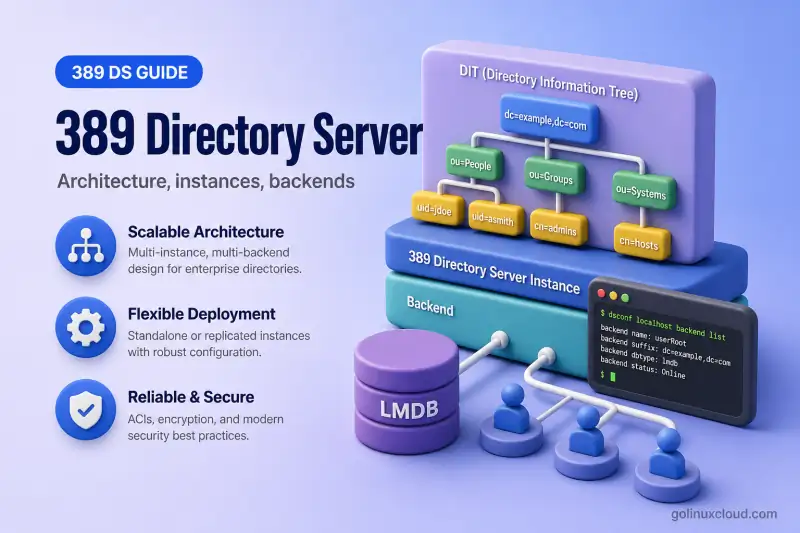
Before you install packages or create an instance, you need a clear picture of how 389 Directory Server is put together: what an instance is, how suffixes map to backends, where configuration lives, and how an LDAP request moves through the server.
389 Directory Server is an LDAP directory server. It stores entries in a hierarchical Directory Information Tree (DIT) and answers standard LDAP operations from clients and applications. This page is conceptual. It explains architecture and terminology using inspection commands only. Installation, user management, ACIs, indexing, plug-in configuration, backup, and replication each have dedicated guides linked below.
Before you start:
- LDAP and OpenLDAP basics — LDAP vocabulary via the OpenLDAP tutorial if terms are new
- OpenLDAP vs 389 Directory Server — product comparison when migrating or choosing a server
- Install 389 Directory Server — optional running instance for the inspection commands in this guide
Tested on: Rocky Linux 10.2; 389 Directory Server 3.2.0.
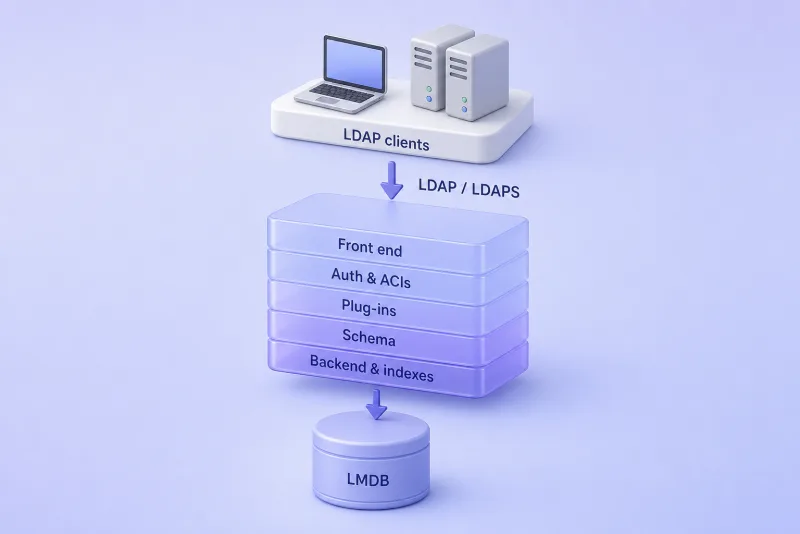
Read the stack top to bottom. External clients never touch the database files directly. They speak LDAP or LDAPS to ns-slapd, which handles policy and processing in-process before any read or write reaches the backend storage layer.
389 Directory Server components at a glance
The figure shows where each major concern lives inside one running instance. The front end terminates TCP connections and parses LDAP messages. Authentication and ACIs decide who is connected and what they may access. Plug-ins and schema sit in the middle of the path so extensions and attribute rules apply before backend code runs. Only the bottom layer persists entries through the configured database backend.
| Component | Purpose |
|---|---|
ns-slapd |
Directory Server process |
| Instance | Independently configured Directory Server deployment |
| Directory Information Tree | Hierarchical collection of LDAP entries |
| Suffix | Root DN of a managed directory subtree |
| Mapping tree | Routes a target DN to a backend, referral, or chaining backend |
| Backend | Connects a suffix to its database and indexes |
| LMDB | Default database technology for current new instances |
cn=config |
LDAP configuration tree |
| Schema | Defines permitted attributes and object classes |
| Plug-ins | Add server capabilities and processing logic |
| Replication agreement | Controls synchronization between servers |
Directory Server instances and ns-slapd
A single Linux host can run multiple Directory Server instances. Each instance is a separate deployment with its own:
ns-slapdprocess and network listenerscn=configdata, database files, and logs- TLS material, backends, and suffixes
Instance names are fixed at creation time.
An instance is not the same thing as a suffix, a backend, or the DIT. Think of the instance as the container; suffixes and backends live inside it.
List registered instances on the host:
dsctl -lThe command prints one line per instance identifier:
slapd-localhostCheck whether the instance process is running:
dsctl slapd-localhost statusInstance "localhost" is runningA running ns-slapd process does not by itself prove the LDAP listener is reachable. Query the Root DSE with a base-scope ldapsearch command. That is the special entry with an empty DN that advertises naming contexts, supported LDAP versions, and other server capabilities:
ldapsearch -x -H ldap://localhost:10389 -s base -b "" namingContexts supportedLDAPVersiondn:
namingContexts: dc=example,dc=com
supportedLDAPVersion: 2
supportedLDAPVersion: 3The namingContexts values list suffixes this instance publishes. Use your instance port if it differs from the lab value 10389.
On RPM-based distributions, systemd tracks each instance as dirsrv@INSTANCE. Inspect the unit with systemctl:
systemctl status dirsrv@localhost --no-pagerThe active line confirms ns-slapd is running and shows the configuration directory passed on the command line:
● [email protected] - 389 Directory Server localhost.
     Active: active (running)
   Main PID: 7506 (ns-slapd)
             └─7506 /usr/sbin/ns-slapd -D /etc/dirsrv/slapd-localhost -i /run/dirsrv/slapd-localhost.pid
dsctl uses the slapd-INSTANCE name; systemd uses dirsrv@INSTANCE where INSTANCE is the short name from dscreate (here localhost). Both refer to the same deployment.
Directory Information Tree, entries, DNs and suffixes
Directory data is a tree of entries. Each entry has a Distinguished Name (DN) that describes its position in the hierarchy. The leftmost component of a DN is the Relative Distinguished Name (RDN). That is the name of the entry relative to its parent.
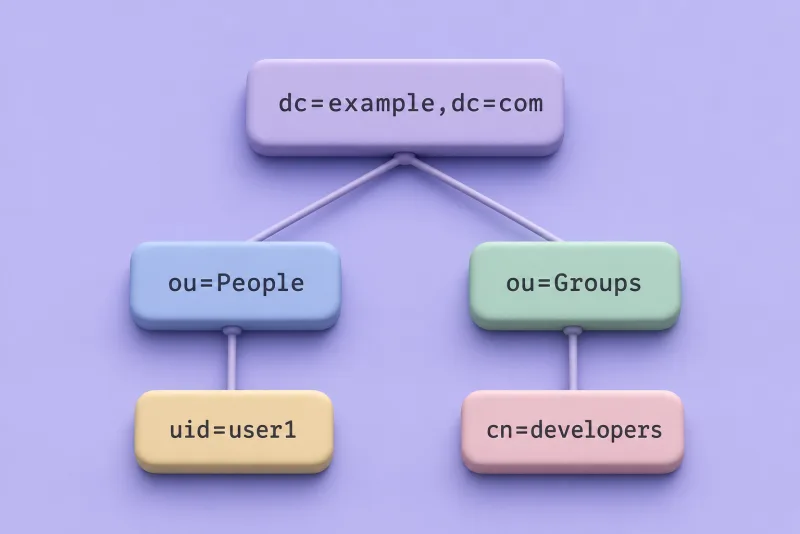
The tree is one naming context rooted at dc=example,dc=com. Branches such as ou=People group related entries; leaf entries such as uid=user1 are the objects applications bind to or search for.
Key terms:
- Entry — one LDAP object stored in the directory.
- Distinguished Name — full path to an entry, for example
uid=user1,ou=People,dc=example,dc=com. - Relative Distinguished Name — leftmost RDN component, for example
uid=user1. - Parent and child — entries above and below in the tree.
- Naming context or suffix — the root DN of data managed by a backend, for example
dc=example,dc=com.
For each operation, the server uses the mapping tree to locate the backend responsible for the target DN. Referrals or chaining can direct the operation to another directory server.
How suffixes, backends and databases relate
Three layers are easy to confuse; keeping them separate prevents costly mistakes during planning and troubleshooting.
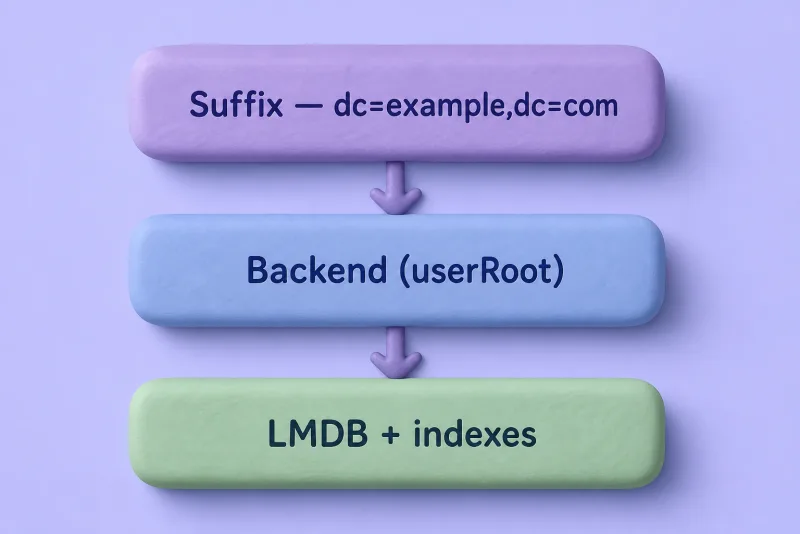
The suffix is what clients see in DNs and search bases. The backend is the server configuration object that owns that namespace, its indexes, and its database namespace. On current LMDB-based instances, LMDB provides the underlying storage implementation used by those backends. It is not necessarily one independently named data.mdb file per suffix.
- A suffix is the LDAP namespace—the naming context clients bind and search under.
- A backend is server-side configuration that serves that suffix.
- The database stores the entries belonging to that backend.
- Indexes accelerate searches on selected attributes.
Internally, 389 Directory Server maintains mapping-tree entries under cn=mapping tree,cn=config. A mapping-tree entry normally maps a suffix such as dc=example,dc=com to its database backend. It can also route requests to a referral or chaining backend. That routing layer is why the suffix and backend are related but remain separate configuration objects.
List suffixes configured on a running instance:
dsconf slapd-localhost backend suffix listdc=example,dc=com (userroot)The parenthesized name (userroot) is the backend identifier used in further dsconf commands. Inspect backend settings for that suffix:
dsconf slapd-localhost backend suffix get userrootdn: cn=userroot,cn=ldbm database,cn=plugins,cn=config
nsslapd-suffix: dc=example,dc=com
nsslapd-state: backend
nsslapd-readonly: off
nsslapd-require-index: offThe nsslapd-suffix line confirms which naming context this backend serves. To see which database implementation the instance uses, read the backend configuration:
dsconf slapd-localhost backend config get | grep nsslapd-backend-implementnsslapd-backend-implement: mdbA value of mdb means LMDB; bdb means Berkeley DB. On a stopped instance you can read the same attribute from dse.ldif:
grep nsslapd-backend-implement /etc/dirsrv/slapd-localhost/dse.ldifnsslapd-backend-implement: mdbBackend creation and suffix design are covered in Suffixes and backends. This guide only shows how to discover what already exists.
data.mdb and lock.mdb commonly appear under the instance database directory on LMDB-based installs. Verify nsslapd-backend-implement on your instance before assuming LMDB.
Configuration tree and schema
Server configuration is represented as LDAP entries under cn=config. That tree holds global settings, backend definitions, plug-in configuration, logging, password policies, and replication agreements. Administrators normally change it with dsconf (or LDAP tools) rather than by editing database files while the server is online. The on-disk dse.ldif file under the instance configuration directory is the persisted form of much of this data.
Schema is separate from ordinary suffix data. Schema definitions are loaded as server schema. They are not user entries stored in a suffix backend. Schema defines what directory entries are allowed to contain:
- Attribute types and their syntax
- Object classes
- Required and optional attributes per object class
- Matching rules used in searches and comparisons
A typical person entry might look like this in LDIF:
dn: uid=user1,ou=People,dc=example,dc=com
objectClass: inetOrgPerson
uid: user1
cn: User One
sn: One
Object classes determine which attributes the entry may carry. Custom schema design and extension are covered in Schema design and extensions, not here.
Read one global listener setting through dsconf:
dsconf slapd-localhost config get nsslapd-portnsslapd-port: 10389This lab instance listens on a non-default port so it can coexist with other LDAP services. Production installs typically use 389 and 636.
How an LDAP request is processed
The easiest way to connect these components is to follow a typical LDAP operation from the client to the backend. The exact processing path varies between Bind, search, add, modify, delete, and extended operations. The figure below is a conceptual path, not a fixed sequence used identically for every operation.
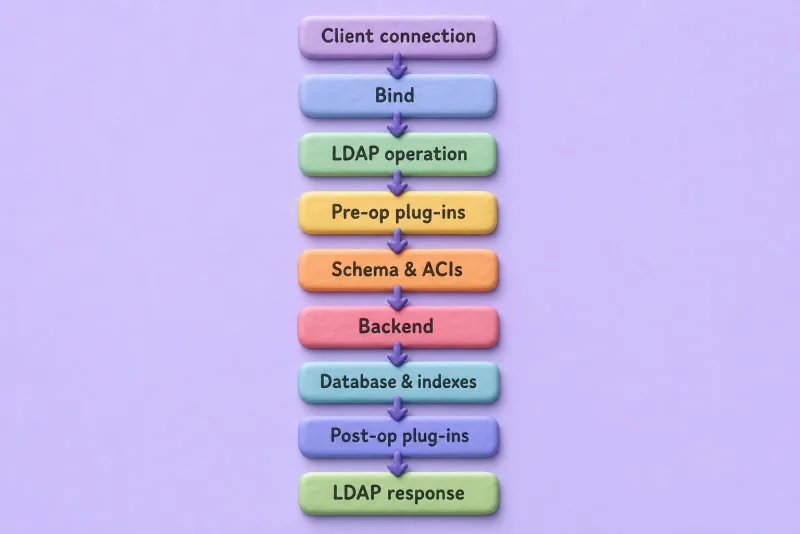
A new LDAP connection initially has an anonymous authorization identity. If the client sends a Bind request, the server authenticates the supplied credentials and associates the resulting identity with the connection. Subsequent searches or updates are then allowed or denied according to ACIs and other server policies. Schema and ACIs gate the operation before the backend opens a transaction against the database. Post-operation plug-ins run after the backend step when a feature needs to react to a completed change.
A Bind establishes or changes the connection identity. A search evaluates ACIs and indexes before returning entries. An add or modify validates schema, enforces ACIs, then writes through the backend transaction layer. Anonymous operations remain possible when ACIs permit them. Bind is not mandatory before every search (RFC 4513).
Plug-ins can hook in before, during, or after backend work. For example, a pre-operation plug-in might reject a modify; a post-operation plug-in might update derived attributes after a group membership change. Replication plug-ins participate when changes must be recorded or forwarded to another server.
You do not need to know internal worker-thread APIs to administer the server. You do need to know where connection identity, ACIs, schema, plug-ins, and backends sit in the chain. That is where misconfiguration surfaces as bind failures, insufficient access, or slow searches.
Plug-in architecture
Many 389 Directory Server capabilities are implemented as plug-ins rather than as changes to core ns-slapd code. Plug-ins register for specific events or database types and extend the request path described above.
| Plug-in | Purpose |
|---|---|
| MemberOf | Maintains reverse group membership |
| Referential Integrity | Updates references when entries are renamed or deleted |
| DNA | Allocates unique numeric values |
| Auto Membership | Assigns entries to groups using rules |
| Managed Entries | Creates related entries automatically |
| Retro Changelog | Exposes change records to LDAP clients |
| Replication | Synchronizes suffix data between instances |
The Retro Changelog plug-in is separate from the internal changelog maintained for replication. Enabling a plug-in may be only the first step. Depending on the plug-in, you may also need to configure its suffix scope, managed attributes, filters, or configuration entries. The MemberOf plug-in, for example, maintains reverse membership attributes when group membership changes; if it is enabled on the wrong backend or missing required attributes, groups look correct in LDAP but applications still cannot resolve membership.
List installed plug-ins on a running instance:
dsconf slapd-localhost plugin listThe command prints a long catalog of syntax, database, and feature plug-ins. A short excerpt from the lab instance includes entries such as MemberOf Plugin, Distributed Numeric Assignment Plugin, and Auto Membership Plugin. Individual plug-in chapters in the course cover configuration and verification for each feature.
Access control and authentication
Authentication and authorization are separate stages in the request path. The authorization identity on the connection starts as anonymous until a successful Bind changes it. That identity determines how ACIs evaluate each operation.
- Authentication verifies the identity presented during a bind—who is connecting.
- Authorization decides what that identity may read or write—which entries and attributes are visible or modifiable.
- ACI (Access Control Instruction) is the 389 Directory Server rule format for granting or denying access to directory data.
- Directory Manager, also called the root DN, is a special server administrative identity rather than a normal entry stored beneath the directory suffix. Regular data ACIs do not restrict its privileges. Access to this identity can instead be limited through settings such as the RootDN Access Control plug-in.
Supported bind styles you will encounter in planning and integration work include:
- Anonymous bind
- Simple bind with a DN and password
- SASL mechanisms where configured
- Certificate-based authentication for TLS client auth
Full ACI syntax and examples belong in ACI examples and SASL GSSAPI and Kerberos. This guide only maps where they fit in the architecture.
Replication architecture
Replication keeps directory data consistent across multiple instances. 389 Directory Server uses role-based replication terminology:
| Role | Behaviour |
|---|---|
| Supplier | Accepts updates and replicates them to other servers |
| Hub | Receives updates and forwards them without accepting normal client writes |
| Consumer | Holds a read-only replicated copy |
Replication is configured per suffix. A replication agreement describes one replication direction. The supplier initiates replication to the agreement target. Multi-supplier replication allows more than one writable supplier for the same suffix; legacy documentation sometimes called this multi-master, but current 389 Directory Server docs use multi-supplier. In a two-supplier topology, you normally configure one agreement from supplier A to supplier B and another from supplier B to supplier A.
Multi-supplier replication is eventually consistent, so replicas can temporarily return different results while changes propagate.
Replication improves availability and read scalability, but it does not replace backups. An accidental delete or incorrect modification can be replicated to every replica. Recovery therefore depends on tested backups or another documented recovery procedure, not merely on the presence of a replication changelog. Configuration commands and topology examples are in the replication chapters, not here.
Administration tools and runtime layout
The same 389 Directory Server administration tools are used across distributions. Package names, filesystem ownership, service integration, and security profiles are the parts most likely to differ.
| Tool | Primary purpose |
|---|---|
dscreate |
Create an instance |
dsctl |
Control and maintain a local instance offline or locally |
dsconf |
Configure a running server over LDAP |
dsidm |
Manage users, groups, and other directory data |
Cockpit (cockpit-389-ds) |
Optional browser-based administration |
dsctl manages local instance lifecycle and maintenance. dsconf changes server configuration. dsidm works with directory entries once organizational units and users exist.
List POSIX users through dsidm. This example binds as Directory Manager, although an appropriately authorized directory account can also be used:
dsidm -b dc=example,dc=com -D "cn=Directory Manager" -W slapd-localhost user listBecause this example binds as cn=Directory Manager, enter the Directory Manager password when prompted. On a lab instance with sample entries, the command prints short user names:
demo_userThat output confirms dsidm is talking to directory data, not to cn=config.
Typical instance paths (RPM-based layouts)
Paths below match a standard 389-ds-base install on the RHEL family. Debian and Ubuntu use the same logical layout under slapd-INSTANCE directories, but group ownership and AppArmor profiles may differ. Check your distribution package documentation if paths do not match.
| Purpose | Typical location |
|---|---|
| Instance configuration | /etc/dirsrv/slapd-INSTANCE/ |
| Database data | /var/lib/dirsrv/slapd-INSTANCE/db/ |
| Logs | /var/log/dirsrv/slapd-INSTANCE/ |
| Instance service | [email protected] |
The lab instance stores LMDB files such as data.mdb under /var/lib/dirsrv/slapd-localhost/db/ for this deployment layout. Access, error, and audit logs live under /var/log/dirsrv/slapd-localhost/.
Never edit LMDB database files directly. For normal configuration changes, use dsconf instead of editing dse.ldif. Do not modify dse.ldif while the instance is running; manual offline changes should be limited to documented recovery or migration procedures and performed only after taking a backup.
What's Next
- Install 389 Directory Server — install the package and create your first instance
- Create an instance with a dscreate INF file — repeatable instance provisioning
- Suffixes and backends — add directory trees inside an instance
Summary
At runtime, one instance equals one ns-slapd process that holds cn=config, schema, plug-ins, and one or more suffix backends with their indexes and database storage. On the tested current instance that storage uses LMDB, although upgraded older deployments may use a different backend implementation. Optional replication agreements sit on top of that stack. The overview figure at the top of this page shows the same relationships in vertical form.
References
Port389 currently points administrators toward Red Hat Directory Server documentation for deployment and administration, while upstream release and installation notes cover distribution-specific differences.
- 389 Directory Server architecture (Port389) — server front end, plug-ins, DIT, and database back end
- Using LMDB (Port389) — LMDB backend parameters and
nsslapd-backend-implement - Migrating Berkeley DB to LMDB (Port389) — backend migration overview
- Planning and designing Directory Server (Red Hat Directory Server 13) — topology, suffix, and replication design
- Configuring and managing replication (Red Hat Directory Server 13) — supplier, consumer, hub, and multi-supplier procedures
- RFC 4511 — LDAP protocol operations
- RFC 4512 — LDAP directory information models, entries, schema, and naming contexts
- RFC 4513 — LDAP authentication methods and connection identity
- RFC 4514 — distinguished-name string format
