
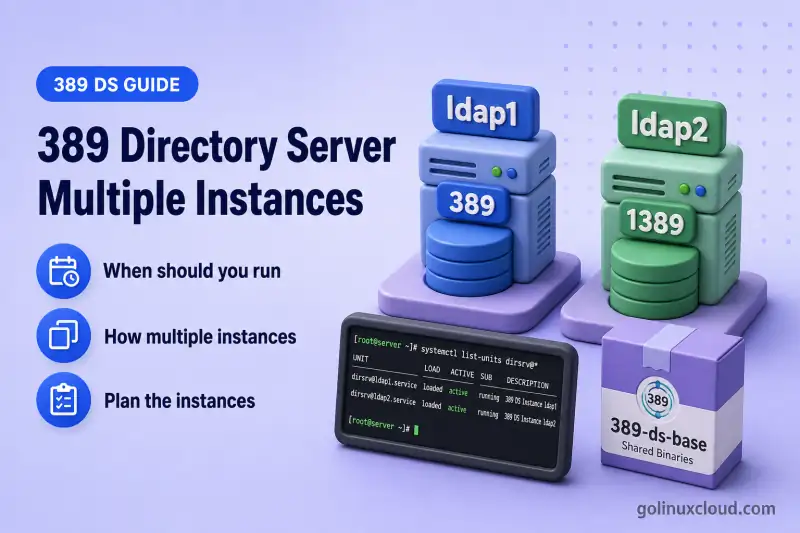
One 389 Directory Server package can host several independent ns-slapd servers on the same machine. Each instance keeps its own configuration, databases, logs, certificate database, and dirsrv@INSTANCE service; binaries and the systemd template are shared.
Tested on: Rocky Linux 10.2; 389 Directory Server 3.2.0.
A typical two-instance layout on one host looks like this:
389 Directory Server package
├── Instance: ldap1
│   ├── LDAP port 389
│   ├── LDAPS port 636
│   └── Suffix: dc=example,dc=com
└── Instance: ldap2
    ├── LDAP port 1389
    ├── LDAPS port 1636
    └── Suffix: dc=lab,dc=example,dc=com
Each box under the package is a separate ns-slapd server. It is not a suffix inside a shared process.
Before you start:
- Install 389 Directory Server — at least one running instance (lab:
ldap1on ports389/636) - Create an instance with a dscreate INF file — INF syntax for the second instance
- A unique instance name (for example
ldap2) and free LDAP/LDAPS ports (lab:1389and1636)
When should you run multiple instances?
Multiple instances fit the same host when you need logically separate directories without provisioning another machine.
| Scenario | Why a second instance helps |
|---|---|
| Development, testing, and staging | Same packages and tools, different data and policies |
| Application isolation | Distinct schema extensions, ACIs, or naming contexts per app |
| Upgrade or migration rehearsal | Exercise a new version or backend change against a copy |
| Application-level administrative separation | Separate Directory Manager credentials, configuration, data, and logs while retaining one shared host-security boundary |
| Temporary lab environments | Spin up an extra listener set, then remove it when finished |
Separate hosts or containers are a better fit when you need:
- Strong security isolation between directories
- Large production workloads with independent resource limits
- Unrelated operating-system maintenance windows
- High-availability replication across distinct machines
This guide stays on the single-host, multi-instance pattern.
How multiple instances are isolated
389 Directory Server keeps instance-specific resources apart while sharing the installed software.
| Component | Instance-specific? |
|---|---|
| Instance name | Yes |
ns-slapd process |
Yes |
| Listener address-and-port | Yes (must be unique per binding) |
| Configuration | Yes |
| Database and indexes | Yes |
| Logs | Yes |
| Certificate/key database and server certificate | Yes |
| Bootstrap self-signed CA infrastructure | Shared by the host installation |
systemd service enablement (dirsrv@INSTANCE) |
Yes |
systemd service template ([email protected]) |
Shared |
| Installed binaries | Shared |
| SELinux policy | Shared |
Key rules:
- Instance names must be unique.
- Listener address-and-port combinations must be unique.
- When all instances listen on every interface, each needs different LDAP and LDAPS ports.
- Suffixes can match or differ. Each instance has its own database files. Distinct suffixes (for example
dc=example,dc=comvsdc=lab,dc=example,dc=com) simplify labs.
Advanced option: bind a listener to a specific local address with nsslapd-listenhost so two instances can share a port number on different IP addresses. That requires explicit DNS, firewall, and certificate planning. This guide uses all-interfaces listeners and non-default ports instead.
Plan the instances
Write the plan down before you run dscreate again. When both instances listen on all interfaces, the second cannot reuse ports 389 or 636 while the first holds them.
| Setting | First instance | Second instance |
|---|---|---|
| Instance name | ldap1 |
ldap2 |
| LDAP port | 389 |
1389 |
| LDAPS port | 636 |
1636 |
| Backend | userroot |
userroot |
| Suffix | dc=example,dc=com |
dc=lab,dc=example,dc=com |
| Service | dirsrv@ldap1 |
dirsrv@ldap2 |
The backend name userroot belongs to each instance separately. The [backend-userroot] section in an INF file creates a backend inside the instance being provisioned, not a shared database across instances.
Inspect existing instances and ports
Before you create ldap2, confirm:
- Which instances already exist (
dsctl -l) - Which ports
ns-slapdalready holds (ss-lntp) - Which
dirsrv@*units are loaded (systemctllist-units) - That your planned ports are free (
1389and1636in this lab)
Strip the slapd- prefix from dsctl -l output when you pass the name to dsctl, dsconf, or dsidm.
List registered instances:
dsctl -lSample output when only the first instance exists:
slapd-ldap1The slapd- prefix is directory metadata; commands use the short name ldap1.
See which TCP ports ns-slapd processes already hold:
ss -lntp | grep ns-slapdSample output with one instance listening on the default ports:
LISTEN 0 128 *:636 *:* users:(("ns-slapd",pid=17814,fd=9))
LISTEN 0 128 *:389 *:* users:(("ns-slapd",pid=17814,fd=8))
Those lines tell you 389 and 636 are taken. Plan different ports for the next instance.
List systemd template units for Directory Server:
systemctl list-units 'dirsrv@*'Sample output when only ldap1 exists:
UNIT                 LOAD   ACTIVE SUB     DESCRIPTION
  [email protected] loaded active running 389 Directory Server ldap1.

1 loaded units listed. Pass --all to see loaded but inactive units, too.
Each row represents a loaded instance unit. Confirm ACTIVE=active and SUB=running; add --all to include inactive units. After you add ldap2, this command lists a second row when that unit is loaded.
Confirm the planned second-instance ports are free before you create it:
ss -lnt | grep -E ':1389|:1636'When neither port is in use, the command prints nothing. Because grep found no match, an exit status of 1 is expected in this case. That is not a successful exit code 0.
A clearer check that prints an explicit result:
if ss -lnt | grep -Eq ':(1389|1636)([[:space:]]|$)'; then echo "Port 1389 or 1636 is already in use"; else echo "Ports 1389 and 1636 are available"; fiSample output when the ports are free:
Ports 1389 and 1636 are availableThe [[:space:]]|$ boundary avoids accidentally matching a longer port number such as 13890.
For more dsctl inspection commands, see the 389 dsctl commands cheat sheet.
Create the second instance
Use a dscreate INF file so you can review instance_name, ports, and suffix before anything is written to disk. Copy your first-instance INF and change only what must differ:
[general]
full_machine_name = ldap1.example.com

[slapd]
instance_name = ldap2
port = 1389
secure_port = 1636

[backend-userroot]
suffix = dc=lab,dc=example,dc=com
Notes on the INF deltas for the second instance:
full_machine_nameis the host identity, not the instance name. On one machine, both instances normally share the same value.- Keep the same Directory Manager password policy and certificate settings as
ldap1unless your design requires otherwise. - For a separate client-facing DNS name (for example
ldap2.example.com): add the DNS alias, setfull_machine_nameaccordingly, and issue a matching server certificate. Do not mix that design with the shared-hostname approach without completing DNS and TLS planning.
Full template, dry-run validation (dscreate from-file -n), and parameter reference: Create a 389 Directory Server instance with a dscreate INF file.
Create the instance from the INF file:
dscreate from-file /root/ldap2.infSample output:
Starting installation ...
Validate installation settings ...
Create file system structures ...
Create self-signed certificate database ...
Perform SELinux labeling ...
Create database backend: dc=lab,dc=example,dc=com ...
Perform post-installation tasks ...
Completed installation for instance: slapd-ldap2
The completion line confirms the new instance name. dscreate also enables and starts dirsrv@ldap2 when start = True in [general].
Verify both instances
Run these checks after dscreate finishes:
dsctl -l— both instance names appeardsctl ldap1 statusanddsctl ldap2 status— each reports runningsystemctl list-units 'dirsrv@*'— both units showACTIVE=activeandSUB=runningps -ef | grep '[n]s-slapd'— separate PIDs and config pathsss -lntp | grep ns-slapd— each PID owns its own port pairldapsearchagainst each suffix on its assigned port
List instances again:
dsctl -lSample output:
slapd-ldap1
slapd-ldap2
Both names confirm the second instance landed on disk alongside the first.
Check each instance with dsctl:
dsctl ldap1 statusSample output:
Instance "ldap1" is runningRepeat the status check for the second instance:
dsctl ldap2 statusSample output:
Instance "ldap2" is runningConfirm systemd sees both units:
systemctl list-units 'dirsrv@*'Sample output:
UNIT                 LOAD   ACTIVE SUB     DESCRIPTION
  [email protected] loaded active running 389 Directory Server ldap1.
  [email protected] loaded active running 389 Directory Server ldap2.

2 loaded units listed. Pass --all to see loaded but inactive units, too.
Confirm ACTIVE=active and SUB=running on each row before you treat an instance as healthy. Drill into one unit when you need the listener ports from the journal:
systemctl status dirsrv@ldap1 --no-pagerSample output:
● [email protected] - 389 Directory Server ldap1.
     Active: active (running) since Wed 2026-07-15 14:19:30 IST; 24min ago
   Main PID: 17814 (ns-slapd)
     Status: "slapd started: Ready to process requests"
             └─17814 /usr/sbin/ns-slapd -D /etc/dirsrv/slapd-ldap1 -i /run/dirsrv/slapd-ldap1.pid

Jul 15 14:19:30 ldap1.example.com ns-slapd[17814]: ... Listening on All Interfaces port 389 for LDAP requests
The Active: active (running) line and the journal entry for port 389 belong to ldap1 only.
Repeat the same check for ldap2 to confirm its non-default listener ports:
systemctl status dirsrv@ldap2 --no-pagerSample output:
● [email protected] - 389 Directory Server ldap2.
     Active: active (running) since Wed 2026-07-15 14:41:04 IST; 3min ago
   Main PID: 26435 (ns-slapd)
     Status: "slapd started: Ready to process requests"
             └─26435 /usr/sbin/ns-slapd -D /etc/dirsrv/slapd-ldap2 -i /run/dirsrv/slapd-ldap2.pid

Jul 15 14:41:04 ldap1.example.com ns-slapd[26435]: ... Listening on All Interfaces port 1389 for LDAP requests
Jul 15 14:41:04 ldap1.example.com ns-slapd[26435]: ... Listening on All Interfaces port 1636 for LDAPS requests
ldap2 reports ports 1389 and 1636. Those are not the defaults 389 and 636.
Inspect running processes. Each instance has its own ns-slapd command line with a distinct -D config path:
ps -ef | grep '[n]s-slapd'Sample output:
dirsrv 17814 1 0 14:19 ? 00:00:01 /usr/sbin/ns-slapd -D /etc/dirsrv/slapd-ldap1 -i /run/dirsrv/slapd-ldap1.pid
dirsrv 26435 1 0 14:41 ? 00:00:00 /usr/sbin/ns-slapd -D /etc/dirsrv/slapd-ldap2 -i /run/dirsrv/slapd-ldap2.pid
Map listeners to those PIDs:
ss -lntp | grep ns-slapdSample output:
LISTEN 0 128 *:636  *:* users:(("ns-slapd",pid=17814,fd=9))
LISTEN 0 128 *:389  *:* users:(("ns-slapd",pid=17814,fd=8))
LISTEN 0 128 *:1636 *:* users:(("ns-slapd",pid=26435,fd=9))
LISTEN 0 128 *:1389 *:* users:(("ns-slapd",pid=26435,fd=8))
PID 17814 owns 389/636; PID 26435 owns 1389/1636. Match port to PID before you change firewall rules or client URIs.
Test each suffix on its own port with anonymous base-object search:
ldapsearch -x -H ldap://127.0.0.1:389 -b "dc=example,dc=com" -s base "(objectclass=*)" dnSample output:
# example.com
dn: dc=example,dc=com

# numEntries: 1
Query the second instance suffix on port 1389:
ldapsearch -x -H ldap://127.0.0.1:1389 -b "dc=lab,dc=example,dc=com" -s base "(objectclass=*)" dnSample output:
# lab.example.com
dn: dc=lab,dc=example,dc=com

# numEntries: 1
Each command returns exactly one suffix entry on the port you specified. That confirms clients must target the correct URI, not just the host name.
Allow remote access to the second instance
Local ldapsearch does not open nonstandard ports for remote clients. On firewalld, two details matter for the second instance:
- The
ldap/ldapsservices cover ports389and636only. They do not cover1389or1636. - Open the actual ports assigned to each instance.
Add the second-instance ports with firewalld:
firewall-cmd --permanent --add-port={1389/tcp,1636/tcp}That registers both ports in the permanent firewalld configuration.
firewall-cmd --reloadReload applies the permanent rules to the running firewall.
Verify the ports are listed:
firewall-cmd --list-portsSample output:
1389/tcp 1636/tcpYour list may include other ports. Confirm 1389/tcp and 1636/tcp appear before remote clients connect.
Opening 1389/tcp only makes plain LDAP or StartTLS reachable; it does not encrypt the connection automatically. Do not send Directory Manager or user passwords over port 1389 without StartTLS. Prefer trusted LDAPS on port 1636 or configure StartTLS before remote simple binds. Opening firewall ports is a connectivity step, not TLS protection.
dscreatelabels SELinux ports during creation.- If you change listener ports later with
dsconf, assign the new ports theldap_port_ttype before restart — see the troubleshooting table.
Understand instance-specific files and services
Every instance name expands into its own directory tree and service unit. Stopping, restarting, or troubleshooting always uses that instance name. It does not use a shared global service.
| Purpose | First instance | Second instance |
|---|---|---|
| Configuration | /etc/dirsrv/slapd-ldap1/ |
/etc/dirsrv/slapd-ldap2/ |
| Database | /var/lib/dirsrv/slapd-ldap1/ |
/var/lib/dirsrv/slapd-ldap2/ |
| Logs | /var/log/dirsrv/slapd-ldap1/ |
/var/log/dirsrv/slapd-ldap2/ |
| Service | dirsrv@ldap1 |
dirsrv@ldap2 |
A restart of dirsrv@ldap2 does not interrupt ldap1 because systemd manages separate units backed by separate processes.
Manage each instance independently
Pass the instance name to select which server you affect:
dsctl— local/offline work: status, backup, LDIF export, removaldsconf— online config via LDAPI/SASL EXTERNAL (local instance name) or LDAP/LDAPS (URI)dsidm— directory data inside the named instance
Restart one instance without touching the other:
dsctl ldap2 restartSample output:
Instance "ldap2" has been restartedRead online configuration from each running server with dsconf:
dsconf ldap1 config get nsslapd-port nsslapd-secureport nsslapd-localhostSample output:
nsslapd-port: 389
nsslapd-secureport: 636
nsslapd-localhost: ldap1.example.com
Those values belong to ldap1 only. Query ldap2 the same way:
dsconf ldap2 config get nsslapd-port nsslapd-secureport nsslapd-localhostSample output:
nsslapd-port: 1389
nsslapd-secureport: 1636
nsslapd-localhost: ldap1.example.com
Both instances report the same host identity (ldap1.example.com); only the listener ports differ.
Command references: dsctl, dsconf, dsidm cheat sheets.
Configure separate connection profiles
Separate ~/.dsrc sections reduce mistakes about ports, suffixes, and bind identities. Tools select the [INSTANCE] section that matches the instance name you pass to dsconf or dsidm.
Create or update a profile for ldap2:
dsctl ldap2 dsrc create --uri ldap://127.0.0.1:1389 --basedn dc=lab,dc=example,dc=com --binddn "cn=Directory Manager" --pwdfile /root/dm.pw --do-itSample output:
Updating "/root/.dsrc" with:

    [ldap2]
    uri = ldap://127.0.0.1:1389
    basedn = dc=lab,dc=example,dc=com
    binddn = cn=Directory Manager
    pwdfile = /root/dm.pw
Successfully updated: /root/.dsrc
Display the profiles you maintain:
dsctl ldap2 dsrc displaySample output:
[ldap1]
basedn = dc=example,dc=com
binddn = cn=Directory Manager
pwdfile = /root/dm.pw

[ldap2]
uri = ldap://127.0.0.1:1389
basedn = dc=lab,dc=example,dc=com
binddn = cn=Directory Manager
pwdfile = /root/dm.pw
Profile tips:
- Give
ldap1its own section withuri = ldap://127.0.0.1:389and matchingbasedn. - Use separate password files when Directory Manager passwords differ;
/root/dm.pwassumes both instances share the same password. - Protect password files with
chmod 600; see the chmod command for octal modes.
Plan resources and security
Each instance allocates its own memory, disk, file descriptors, and certificate database. Instances on one host are not a strong security boundary. root on the host can reach every instance's files, certificate database, LDAPI socket, and service.
| Concern | What to plan per instance |
|---|---|
| Memory | LMDB cache and worker settings are per instance—not shared |
| Disk | Database, logs, and backups grow independently under each slapd-INSTANCE tree |
| File descriptors | Connection peaks on one instance do not borrow from another, but the host kernel limit is still shared |
| TLS | Self-signed or CA-issued certificates and nsslapd-localhost values are per instance |
| Firewall | Open only the nonstandard LDAP/LDAPS ports clients need—1389/1636 will not match a rule that allows 389 alone |
| Monitoring | Track each dirsrv@INSTANCE unit, error log, and disk use separately |
| Host capacity | Skip extra instances when CPU, RAM, or I/O are already saturated |
Backups are also instance-specific. See the next section and the dedicated backup and restore chapter before you rely on multi-instance layouts in production.
Back up or remove one instance safely
Backups target one instance at a time. There is no cluster-wide backup on the host. Export or back up ldap2 before you change or remove it, even when ldap1 must stay online.
Before removal:
- Confirm the instance name with
dsctl -l - Export LDIF or run a backup for that instance only
- Verify no application still connects to its LDAP or LDAPS ports
- Remove only the intended instance
dsctl defaults to a dry run so you do not delete the wrong server by accident:
dsctl ldap2 removeSample output:
Not removing: if you are sure, add --do-itAdding --do-it:
- Deletes that instance's configuration, database, logs, and certificate database
- Removes the instance-specific systemd enablement link under
dirsrv.target.wants - Does not uninstall the shared package or touch other instances
Treat removal as destructive. Full procedures: backup and restore and the dsctl cheat sheet.
Troubleshoot multiple-instance problems
| Symptom | Likely cause | Fix |
|---|---|---|
Instance already exists during dscreate |
The chosen instance_name is already on disk |
Run dsctl -l; pick a new name or remove the old test instance with dsctl INSTANCE remove --do-it when you intend to recreate it |
| LDAP or LDAPS port bind failure | Another instance or service owns the port on the same address | Run ss -lntp; assign free port and secure_port values in the INF file, or bind instances to different local addresses |
| SELinux denial after changing listener ports | New ports not labeled ldap_port_t |
Assign the SELinux port type for the new LDAP/LDAPS ports before restart; see Red Hat Directory Server administration guidance |
dsconf or dsidm changes the wrong directory |
Wrong instance name, URI, port, or .dsrc section |
Pass the correct instance name; set --uri in .dsrc when ports differ; verify basedn matches the target suffix |
| One instance starts but another fails | Instance-specific config, SELinux, or certificate error | Inspect that unit only: journalctl -u dirsrv@ldap2; read /var/log/dirsrv/slapd-ldap2/errors |
| Application reads stale or unexpected entries | Client points at the wrong port or suffix | Confirm LDAP URI includes the instance port; search the expected base DN; check TLS certificate identity for LDAPS |
When ldap2 fails while ldap1 stays healthy, start with the failing unit's journal through journalctl. Shared package problems are rare compared with per-instance port or config mistakes:
journalctl -u dirsrv@ldap2 --no-pager -n 8Sample output:
Jul 15 14:41:04 ldap1.example.com ns-slapd[26435]: ... slapd started.  Listening on All Interfaces port 1389 for LDAP requests
Jul 15 14:41:04 ldap1.example.com ns-slapd[26435]: ... Listening on All Interfaces port 1636 for LDAPS requests
Jul 15 14:41:04 ldap1.example.com systemd[1]: Started [email protected] - 389 Directory Server ldap2..
Look for Listening on All Interfaces port lines that confirm the intended LDAP and LDAPS ports. A bind error that mentions an address already in use means you need free ports in the INF file or must stop the conflicting listener.
Summary
Running multiple 389 Directory Server instances on one host is supported and common in labs:
- Install the package once; create each instance with
dscreate. - Give every instance a unique name; when all instances listen on every interface, assign unique LDAP and LDAPS ports.
- Keep configuration, databases, logs, certificate databases, and systemd enablement separate; share only package-level infrastructure.
- Pass the instance name to
dsctl,dsconf, anddsidm; use.dsrcprofiles when ports and suffixes differ. - Open nonstandard listener ports in the host firewall before remote clients connect.
- Back up an instance before you remove it. Deletion is limited to that instance but is not reversible without a backup.
What's Next
- Non-root instance layout — alternate filesystem layout for unprivileged installs
- LDAP referrals — redirect clients between instances
- Suffixes and backends — add suffixes inside each instance
References
- 389 Directory Server documentation — upstream project documentation
- Red Hat Directory Server 13 — Management, configuration, and operations — instance management, ports,
.dsrc, and firewall - Red Hat Directory Server 13 — File locations overview — instance-specific and shared directories
- Red Hat Directory Server 13 — Installing Directory Server — installation, instance creation, and post-install connectivity
- dscreate(8) man page — INF-file instance creation
- dsctl(8) man page — local instance management and removal
