
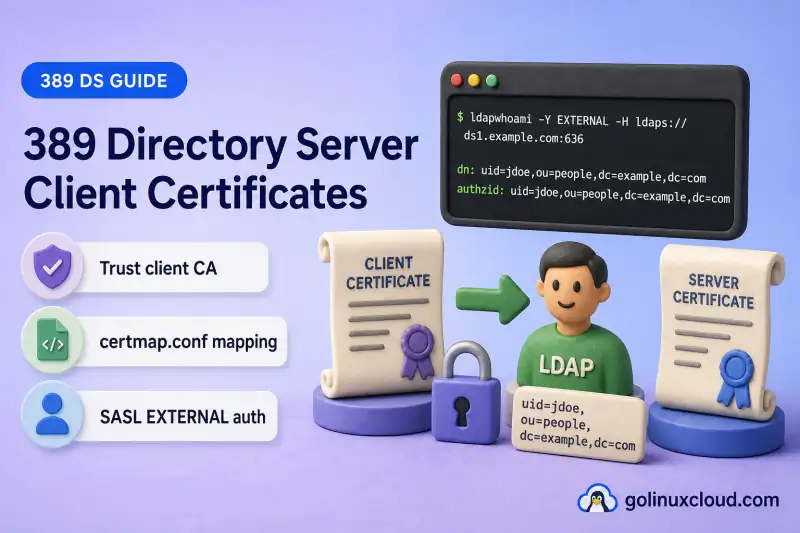
Client certificate authentication lets LDAP clients prove their identity with a TLS client certificate instead of transmitting a directory password. Directory Server validates the certificate against a trusted client CA, maps the certificate subject to one LDAP entry through certmap.conf, and completes authentication with SASL EXTERNAL.
In this guide, we'll trust the client CA, configure certificate mapping, test optional and mandatory client certificates, enable userCertificate verification, and verify SASL EXTERNAL over LDAPS and STARTTLS. Server certificate deployment belongs in TLS, STARTTLS, and LDAPS. Secure-bind enforcement belongs in require secure LDAP connections.
Before you start:
- TLS, STARTTLS, and LDAPS — working LDAPS, STARTTLS, and server CA trust
- Certificate management — CA import, trust flags, and NSS concepts
- Manage users and groups — test user
uid=user1 - dsconf commands — online security configuration
certmap.conf, SASL EXTERNAL, and optional or mandatory client certificates. It does not cover server certificate renewal, cipher policy, Kerberos SASL GSSAPI, or certificate-authenticated replication agreements.
Tested on: Rocky Linux 10.2; 389 Directory Server 3.2.0.
All tests run on instance ldap1 on ldap1.example.com. A second instance is not required because client certificate authentication is configured per instance through that instance's NSS database and certmap.conf.
How client certificate authentication works
When a client connects with LDAPS or negotiates StartTLS, the TLS handshake establishes certificate identity before SASL EXTERNAL runs.
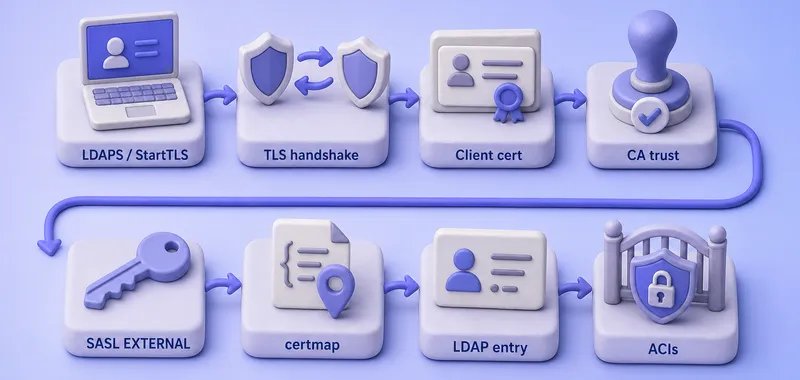
The diagram is a sequence, not a protocol specification. In optional client-cert mode the handshake can complete without a client certificate; in required mode the client must present one. certmap.conf must resolve to exactly one LDAP entry, or SASL EXTERNAL fails even when the certificate chain is valid.
Authentication and authorization are separate steps:
- The certificate and
certmap.confidentify the LDAP user entry. - ACIs determine what the mapped identity may access after authentication succeeds.
Understand server certificates and client certificates
| Certificate | Presented by | Purpose |
|---|---|---|
| Server certificate | Directory Server | Proves the LDAP server identity to clients |
| Client certificate | LDAP client | Proves the client identity to Directory Server |
| Server issuing CA | Trusted by the client | Validates the LDAP server certificate |
| Client issuing CA | Trusted by Directory Server | Validates client certificates |
The same CA can issue both certificate types, but separate CAs or certificate profiles are common in production.
Prepare the test environment
| Item | Lab example |
|---|---|
| Directory Server | ldap1.example.com |
| Instance | ldap1 |
| Suffix | dc=example,dc=com |
| Test user | uid=user1,ou=people,dc=example,dc=com |
| Client certificate subject | CN=user1,[email protected] |
| Client CA nickname | Example Client CA |
Before you configure client authentication, confirm that:
- LDAPS works with server CA trust
- Required STARTTLS works with
-ZZ - The client certificate has a matching private key
- The certificate is within its validity period
- The client CA file is available for import
- Certificate subject values correspond to attributes stored on the LDAP user entry
Record the current client-authentication configuration
Before you change client authentication, back up certmap.conf and record the current server settings:
cp -a /etc/dirsrv/slapd-ldap1/certmap.conf /etc/dirsrv/slapd-ldap1/certmap.conf.before-client-authI'll read the TLS security settings next so I know the starting nssslclientauth mode before I enable client certificates:
dsconf ldap1 security getI'll also record the certificate-mapping and bind-policy attributes that this guide changes later:
dsconf ldap1 config get nsslapd-certmap-basedn nsslapd-force-sasl-external nsslapd-require-secure-bindsRecord nssslclientauth and the three configuration attributes before changing them. The rollback procedure later restores these recorded values rather than assuming that allowed, off, or an empty base DN was the original state.
Inspect the client certificate
Review the certificate fields that certmap.conf will use before you import the client CA with OpenSSL:
openssl x509 -in /root/clientca/user1-client.crt -noout -subject -issuer -serial -dates -ext subjectAltName -ext extendedKeyUsageSample output:
subject=CN=user1, [email protected], O=Example, C=AU
issuer=CN=Example Client CA,O=Example,C=AU
serial=22FD4690965F68B657D80D0F2149EA344C4547EF
notBefore=Jul 16 03:49:25 2026 GMT
notAfter=Jul 16 03:49:25 2027 GMT
X509v3 Extended Key Usage:
    TLS Web Client Authentication
Confirm the subject DN, issuer DN, validity period, and Client Authentication extended key usage. The values used in FilterComps must match the LDAP entry attributes exactly. A certificate CN=user1 does not match an LDAP cn: User One value. Use a unique attribute such as mail when common names differ.
Import and trust the client CA
List client CAs already trusted by the instance:
dsctl ldap1 tls list-client-caI'll import the client issuing CA:
dsconf ldap1 security ca-certificate add --file /root/clientca/client-ca.crt --name "Example Client CA"Sample output:
Successfully added CA certificateSet trust flags so Directory Server trusts the CA for TLS client authentication:
dsconf ldap1 security ca-certificate set-trust-flags "Example Client CA" --flags "CT,,"Sample output:
Successfully edited certificate trust flagsVerify the client CA is trusted for client-certificate authentication:
dsctl ldap1 tls list-client-caSample output excerpt:
Example Client CAReview every CA returned by dsctl ldap1 tls list-client-ca. Certificates from issuers without an explicit certmap block inherit the default mapping, including default:VerifyCert on.
Two trust flags matter when you import a client CA:
C— trusts the CA for TLST— additionally trusts the CA for client-certificate authentication
Import only the client CAs you intend to accept. Do not import every public root CA.
Add the LDAP attribute used for certificate mapping
The lab client certificate carries [email protected] in its subject. I'll add the matching mail value to uid=user1 before configuring certmap.conf:
cat > /tmp/add-user1-certificate-mail.ldif <<'EOF'
dn: uid=user1,ou=people,dc=example,dc=com
changetype: modify
add: mail
mail: [email protected]
EOF
Apply the change over LDAPS:
LDAPTLS_CACERT=/tmp/389ds-selfsigned-ca.pem ldapmodify -x -H ldaps://ldap1.example.com:636 -D "cn=Directory Manager" -y /root/dm.pw -f /tmp/add-user1-certificate-mail.ldifSample output:
modifying entry "uid=user1,ou=people,dc=example,dc=com"Verify that the mapping filter returns exactly one entry:
LDAPTLS_CACERT=/tmp/389ds-selfsigned-ca.pem ldapsearch -LLL -x -H ldaps://ldap1.example.com:636 -D "cn=Directory Manager" -y /root/dm.pw -b "ou=people,dc=example,dc=com" "([email protected])" dnSample output:
dn: uid=user1,ou=people,dc=example,dc=comContinue only when the filter returns exactly one DN. Zero matches cause certificate mapping to fail, while multiple matches make the certificate identity ambiguous.
Restrict certificate searches to the user container before you edit certmap.conf:
dsconf ldap1 config replace nsslapd-certmap-basedn=ou=people,dc=example,dc=comSample output:
Successfully replaced value(s) for 'nsslapd-certmap-basedn': 'ou=people,dc=example,dc=com'Understand certmap.conf
Directory Server reads certificate mapping rules from:
/etc/dirsrv/slapd-ldap1/certmap.confGeneral format:
certmap ALIAS ISSUER_DN
ALIAS:PARAMETER VALUE
You can define a default mapping, issuer-specific mappings, and different subject-to-entry rules for separate certificate profiles.
Understand the certificate mapping parameters
| Parameter | Purpose |
|---|---|
DNComps |
Builds a search base from certificate subject components |
FilterComps |
Builds an LDAP filter from certificate subject values |
VerifyCert |
Requires the presented certificate to match userCertificate |
CmapLdapAttr |
Locates the user by comparing the certificate subject DN with an LDAP attribute that stores that DN; when used, Directory Server does not generate the normal FilterComps filter |
Certificate email addresses commonly appear in the subject as emailAddress or E. When mail appears in FilterComps, Directory Server maps the certificate email value to the LDAP mail attribute.
Configure a basic subject-to-user mapping
Save the following mapping for the lab client CA:
certmap default default
default:DNComps
default:FilterComps mail
default:VerifyCert on

certmap example CN=Example Client CA,O=Example,C=AU
example:DNComps
example:FilterComps mail
example:VerifyCert off
The default mapping applies to client-trusted issuers that do not match a specific issuer block. default:VerifyCert on requires exact certificate matching for those issuers. The lab's example block explicitly sets example:VerifyCert off, so the initial test uses subject mapping only. Store the DER certificate now to prepare for enabling example:VerifyCert on later.
An empty DNComps line tells Directory Server not to use the certificate subject as the search base. With nsslapd-certmap-basedn already set, the server searches only the intended user subtree.
For this certificate subject:
CN=user1,[email protected]Directory Server generates a filter equivalent to:
The filter must return exactly one LDAP entry. Prefer a unique attribute combination such as mail rather than a non-unique cn alone.
Enable optional client certificate authentication before the first restart:
dsconf ldap1 security set --tls-client-auth=allowedRestart the instance after editing certmap.conf and enabling client authentication so the secure listener reloads the mapping file:
dsctl ldap1 restartSample output:
Instance "ldap1" has been restartedConfirm the certificate search base
Verify the search base you set before editing certmap.conf:
dsconf ldap1 config get nsslapd-certmap-basednSample output:
nsslapd-certmap-basedn: ou=people,dc=example,dc=comUse the narrowest base DN that contains every certificate-authenticated account. This avoids searching unrelated subtrees when the certificate subject cannot form a valid base DN.
Configure issuer-specific mappings
Use separate certmap blocks when different CAs issue certificates with different subject formats:
certmap employees CN=Employee Client CA,O=Example
employees:DNComps
employees:FilterComps mail,employeeNumber

certmap contractors CN=Contractor Client CA,O=Example
contractors:DNComps
contractors:FilterComps mail,cn
Issuer-specific mappings inherit unspecified settings from the default mapping. Use the exact issuer DN from the client certificate:
openssl x509 -in /root/clientca/user1-client.crt -noout -issuerSample output:
issuer=CN=Example Client CA,O=Example,C=AURestart the instance after changing certmap.conf, then retest each issuer-specific mapping.
Verify an administrative recovery path
Before you add userCertificate over LDAPI, confirm that local administrative access works on this instance. LDAPI listening, autobind, identity mapping, and authorization are separate server settings:
ldapwhoami -Y EXTERNAL -H ldapi://%2frun%2fslapd-ldap1.socketSample output:
SASL/EXTERNAL authentication started
SASL username: gidNumber=0+uidNumber=0,cn=peercred,cn=external,cn=auth
SASL SSF: 0
dn: cn=Directory Manager
Confirm access to cn=config:
ldapsearch -LLL -Y EXTERNAL -H ldapi://%2frun%2fslapd-ldap1.socket -b cn=config -s base cnSample output:
dn: cn=config
cn: config
This LDAPI connection becomes the documented recovery path before you require client certificates or enable forced SASL EXTERNAL later.
Store the client certificate in LDAP
Because the lab issuer currently has example:VerifyCert off, the first SASL EXTERNAL test does not require userCertificate. This guide stores the DER certificate in advance so exact matching can be enabled safely in the next step.
Convert the client certificate to DER format:
openssl x509 -in /root/clientca/user1-client.crt -out /root/clientca/user1-client.der -outform DERSave the following as /tmp/add-user-certificate.ldif:
dn: uid=user1,ou=people,dc=example,dc=com
changetype: modify
add: userCertificate
userCertificate:< file:///root/clientca/user1-client.der
Apply the change over LDAPI so Directory Manager credentials are not affected by a mapped client certificate on the same connection:
ldapmodify -Y EXTERNAL -H ldapi://%2frun%2fslapd-ldap1.socket -f /tmp/add-user-certificate.ldifSample output:
modifying entry "uid=user1,ou=people,dc=example,dc=com"Directory Server compares presented certificates with the binary userCertificate value using DER format when VerifyCert on is active.
Test SASL EXTERNAL over LDAPS
Point the OpenLDAP client at the server CA, client certificate, and private key:
export LDAPTLS_CACERT=/tmp/389ds-selfsigned-ca.pemI'll point the client at the user certificate file so Directory Server can request it during the TLS handshake:
export LDAPTLS_CERT=/root/clientca/user1-client.crtThe matching private key must be exported too, or the client cannot complete the mutual TLS exchange:
export LDAPTLS_KEY=/root/clientca/user1-client.keyAuthenticate with SASL EXTERNAL while example:VerifyCert off remains in certmap.conf:
ldapwhoami -H ldaps://ldap1.example.com:636 -Y EXTERNALSample output:
SASL/EXTERNAL authentication started
SASL username: c=AU,o=Example,[email protected],cn=user1
SASL SSF: 0
dn: uid=user1,ou=people,dc=example,dc=com
SASL SSF: 0 means the EXTERNAL mechanism did not negotiate an additional SASL integrity or encryption layer. The transport is still protected by LDAPS. SASL EXTERNAL uses the identity established by the external TLS layer rather than creating a second security layer.
The mapped LDAP DN confirms that certmap.conf matched exactly one entry.
Search as the mapped user:
ldapsearch -LLL -H ldaps://ldap1.example.com:636 -Y EXTERNAL -b "uid=user1,ou=people,dc=example,dc=com" -s base mail cn uidSample output:
dn: uid=user1,ou=people,dc=example,dc=com
mail: [email protected]
cn: User One
uid: user1
Test SASL EXTERNAL over STARTTLS
After the StartTLS request, the client presents its certificate during the TLS handshake. SASL EXTERNAL then uses the certificate identity established by that handshake. See the LDAPS explanation above for the meaning of SASL SSF: 0.
ldapwhoami -H ldap://ldap1.example.com:389 -ZZ -Y EXTERNALSample output:
SASL/EXTERNAL authentication started
SASL username: c=AU,o=Example,[email protected],cn=user1
SASL SSF: 0
dn: uid=user1,ou=people,dc=example,dc=com
Test both LDAPS and STARTTLS when your environment supports both connection methods.
Enable exact certificate matching for the lab issuer
After subject mapping succeeds, require an exact certificate match for certificates issued by Example Client CA:
example:VerifyCert onRestart the instance so Directory Server reloads the updated certmap.conf mapping rule:
dsctl ldap1 restartSample output:
Instance "ldap1" has been restartedRetest SASL EXTERNAL over LDAPS:
ldapwhoami -H ldaps://ldap1.example.com:636 -Y EXTERNALSample output:
SASL/EXTERNAL authentication started
SASL username: c=AU,o=Example,[email protected],cn=user1
SASL SSF: 0
dn: uid=user1,ou=people,dc=example,dc=com| Mapping mode | Validation |
|---|---|
| Subject mapping only | Trusted certificate subject maps to one LDAP entry |
VerifyCert on |
Presented certificate must also match the DER certificate stored on that entry |
Test authorization after authentication
After ldapwhoami succeeds, confirm that normal ACIs still apply. A successful certificate bind does not grant administrative access by itself.
Search a permitted attribute:
ldapsearch -LLL -H ldaps://ldap1.example.com:636 -Y EXTERNAL -b "uid=user1,ou=people,dc=example,dc=com" -s base mailSample output:
dn: uid=user1,ou=people,dc=example,dc=com
mail: [email protected]
Attempt an operation the mapped user should not perform and confirm Directory Server returns an appropriate LDAP result such as error 50 when ACIs deny the action.
A certificate mapped to uid=user1 does not gain administrative privileges merely because forced EXTERNAL is enabled later.
Require client certificates
After every certificate-authenticated client and application has been tested, require client certificates on TLS connections:
dsconf ldap1 security set --tls-client-auth=requiredRestart the instance so the secure listener begins requiring a client certificate during the TLS handshake:
dsctl ldap1 restart| Connection | Expected result |
|---|---|
| Trusted client certificate with a unique mapping and SASL EXTERNAL | Authentication succeeds |
| TLS connection without a client certificate | TLS handshake fails when client authentication is required |
| Certificate from an untrusted CA | TLS handshake fails |
| Expired or invalid client certificate | TLS handshake fails |
| Trusted certificate with no LDAP mapping | TLS handshake succeeds, but SASL EXTERNAL authentication fails |
| Trusted certificate mapping to multiple entries | TLS handshake succeeds, but SASL EXTERNAL authentication fails |
| Trusted certificate followed by a password bind | Password bind can be evaluated when forced EXTERNAL is off; certificate identity is used when forced EXTERNAL is on |
With --tls-client-auth=required, every TLS client must present a certificate issued by a trusted client CA. This requirement is enforced during the TLS handshake. However, unless nsslapd-force-sasl-external=on is enabled, a client that successfully presented a certificate can still submit another supported bind method afterward. nsslapd-require-secure-binds=on blocks unencrypted simple binds; it does not block password binds over LDAPS or STARTTLS.
Directory Server supports allowed for optional client certificates and required when every applicable TLS client must present one.
Block unencrypted password binds
When port 389 remains available, enable secure-bind enforcement so a client cannot avoid TLS and submit a simple password bind over plain LDAP:
dsconf ldap1 config replace nsslapd-require-secure-binds=onThis setting rejects unencrypted authenticated simple binds. It does not prevent a client from using a password bind after establishing LDAPS or STARTTLS. Keep the complete secure-bind and SSF discussion in require secure LDAP connections.
Restart the instance after changing secure-bind policy:
dsctl ldap1 restartForce the certificate-derived identity
Enable forced SASL EXTERNAL only after every administrative recovery path has been tested:
dsconf ldap1 config replace nsslapd-force-sasl-external=onWith this setting, Directory Server ignores other bind methods and uses the certificate-derived identity. Test all applications first because password, anonymous, or other bind credentials submitted on the certificate-bearing TLS connection are ignored.
Restart the instance after enabling forced EXTERNAL:
dsctl ldap1 restartDecide whether to use VerifyCert
Use VerifyCert on when:
- Every authorized client certificate is individually recorded in LDAP
- Immediate per-certificate revocation through directory data is required
- Strict certificate-to-entry binding is mandatory
Subject mapping alone may be more practical when:
- Certificates renew frequently
- The issuing CA is tightly controlled
- Revocation is handled through the PKI
- Updating
userCertificateon every renewal would be costly
When a client presents a certificate, Directory Server validates its chain and issuer trust during the TLS handshake. VerifyCert on adds the exact LDAP-entry certificate comparison.
Handle certificate renewal
When VerifyCert is off, a renewed certificate can continue to map through the same subject attributes if the issuer and mapped values remain valid.
When VerifyCert is on:
- Add or replace the DER certificate in
userCertificate - Test the renewed certificate with SASL EXTERNAL
- Remove the obsolete certificate value
- Confirm the old certificate can no longer authenticate where required
Link to certificate management for CA and server certificate lifecycle operations.
Review access and error logs
Inspect the instance logs after certificate authentication tests:
grep -iE 'EXTERNAL|certmap|client cert' /var/log/dirsrv/slapd-ldap1/access | tail -6Sample output:
[16/Jul/2026:09:20:12 +0530] conn=4 op=0 BIND dn="" method=sasl version=3 mech=EXTERNAL
[16/Jul/2026:09:20:18 +0530] conn=1 op=0 BIND dn="" method=sasl version=3 mech=EXTERNAL
Also review /var/log/dirsrv/slapd-ldap1/errors and /var/log/dirsrv/slapd-ldap1/security for certificate validation failures, mapping filter problems, untrusted issuers, and exact certificate verification errors.
Troubleshoot client certificate authentication
| Symptom | Likely cause | Fix |
|---|---|---|
| Server does not request a client certificate | nssslclientauth is off or TLS is disabled |
Set --tls-client-auth=allowed or required; confirm LDAPS or STARTTLS works |
| Certificate issuer is not trusted | Client CA missing or wrong trust flags | Import the client CA; set CT,, trust flags |
| SASL EXTERNAL returns no identity | Missing cert/key, invalid certificate, or TLS failure | Check LDAPTLS_CERT, LDAPTLS_KEY, validity, and server CA trust |
| Certificate maps to no LDAP entry | Subject values do not match LDAP attributes | Compare certificate subject, FilterComps, DNComps, and nsslapd-certmap-basedn; run the filter manually |
| Certificate maps to multiple entries | Ambiguous filter | Use more selective attributes; narrow the search base |
Authentication fails after enabling VerifyCert on |
Missing or wrong DER userCertificate value |
Store the exact DER certificate on the mapped entry |
| LDAPS EXTERNAL works but STARTTLS EXTERNAL fails | StartTLS negotiation failed, port 389 is unavailable, or the client did not offer its certificate during the upgraded TLS handshake |
Use -ZZ; verify port 389; confirm LDAPTLS_CERT and LDAPTLS_KEY; inspect the TLS and error logs |
| Password binds behave unexpectedly | Forced EXTERNAL or required client auth enabled | Review nsslapd-force-sasl-external, --tls-client-auth, and secure bind policy |
When the error log shows a search such as (&(MAIL=...)(CN=...)) err 32, the mapping used the certificate subject as the base DN instead of the intended subtree. Add an empty DNComps line and set nsslapd-certmap-basedn.
Roll back safely
Clear client-certificate environment variables from the shell:
unset LDAPTLS_CERT LDAPTLS_KEYRestore the client-authentication mode recorded before the change:
dsconf ldap1 security set --tls-client-auth=<recorded-value>Restore the recorded forced EXTERNAL and secure-bind values:
dsconf ldap1 config replace nsslapd-force-sasl-external=<recorded-value>I'll restore the secure-bind setting from the same baseline snapshot:
dsconf ldap1 config replace nsslapd-require-secure-binds=<recorded-value>When nsslapd-certmap-basedn was originally absent, clear it:
dsconf ldap1 config delete nsslapd-certmap-basednIf dsconf returns error 53, clear the attribute with an empty replace instead:
dsconf ldap1 config replace nsslapd-certmap-basedn=When it originally had a value, restore the recorded DN instead of clearing it:
dsconf ldap1 config replace nsslapd-certmap-basedn="ou=original,dc=example,dc=com"Restore the backed-up mapping file:
cp -a /etc/dirsrv/slapd-ldap1/certmap.conf.before-client-auth /etc/dirsrv/slapd-ldap1/certmap.confRemove only the lab mail and userCertificate values added by this exercise. Do not delete pre-existing attribute values. Keep /root/clientca/user1-client.der until rollback is complete because the LDIF uses that exact DER value to identify the certificate to remove:
cat > /tmp/remove-user1-client-auth.ldif <<'EOF'
dn: uid=user1,ou=people,dc=example,dc=com
changetype: modify
delete: mail
mail: [email protected]
-
delete: userCertificate
userCertificate:< file:///root/clientca/user1-client.der
EOF
Apply the rollback modify over LDAPI so the mapped certificate cannot interfere with the connection:
ldapmodify -Y EXTERNAL -H ldapi://%2frun%2fslapd-ldap1.socket -f /tmp/remove-user1-client-auth.ldifDelete Example Client CA only when no remaining user, application, replication agreement, or other certificate workflow depends on that CA:
dsconf ldap1 security ca-certificate del "Example Client CA"Restart the instance and retest password authentication over TLS, SASL EXTERNAL, LDAPS, and STARTTLS:
dsctl ldap1 restartWhat's Next
- SASL GSSAPI and Kerberos — alternative strong authentication mechanisms
- Certificate management — renew server and client CA material
- Require secure LDAP connections — minimum SSF alongside client certificates
References
- Red Hat Directory Server 13 — Securing RHDS
- Red Hat Directory Server 13 — Core server configuration attributes
- 389 Directory Server — Howto: CertMapping
- certmap.conf(5)
Summary
- Back up
certmap.confand recordnssslclientauth,nsslapd-certmap-basedn,nsslapd-force-sasl-external, andnsslapd-require-secure-binds. - Import and trust the client issuing CA; review every CA returned by
dsctl ldap1 tls list-client-ca. - Add LDAP attributes that match certificate subject values and verify the mapping filter returns exactly one entry.
- Set
nsslapd-certmap-basedn, configurecertmap.confwithdefault:VerifyCert onand issuer-specific rules, and enable optional client authentication. - Verify LDAPI administrative access, then store the DER certificate in
userCertificatebefore changing the lab issuer toexample:VerifyCert on; the initial test withexample:VerifyCert offuses subject mapping only. - Test SASL EXTERNAL over LDAPS and STARTTLS, then enable
example:VerifyCert onand retest. - Require client certificates, then enable secure binds, then enable forced EXTERNAL last.
- Confirm that normal ACIs still enforce authorization after authentication.
