
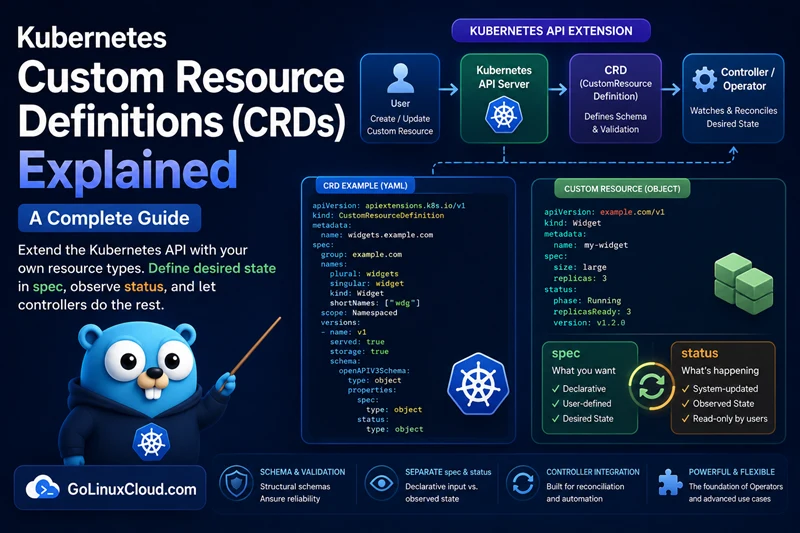
A Custom Resource Definition (CRD) is what makes the Kubernetes API
extensible. Without changing a single line of Kubernetes source code,
restarting the API server, or holding any special privilege beyond cluster
admin, you can teach a cluster about a new object type — BackupPolicy,
PostgresCluster, Certificate, anything — and from that moment on,
kubectl, RBAC, audit logs, and watches treat it as if Kubernetes had
always shipped with it.
This guide walks through what a CRD actually is, the structural schema rules
that the v1 API requires, the spec / status subresource split, the
kubectl UX knobs (printer columns, shortNames, categories), versioning
with conversion webhooks, and the validation mistakes that turn a CRD into
a debugging nightmare.
If you have not yet read What is a Kubernetes Operator? or Operator vs Controller vs CRD, those two articles set up the vocabulary used below.
At a glance, every production-grade CRD is made of the same parts:
- API coordinates —
group,versions[].name,names.kind,scope. - A structural OpenAPI v3 schema that the API server validates against.
- Optional subresources —
status(so users and controllers do not race) andscale(sokubectl scaleworks). kubectlUX knobs —additionalPrinterColumns,shortNames,categories.- Optional conversion config for multi-version CRDs.
The rest of this article unpacks each of those, ending with the five mistakes that most often break a CRD in production.
How a CRD Schema Works
A CRD does not create Custom Resources. Instead, it teaches the Kubernetes API server what a valid custom resource should look like.
Think of a CRD as a schema contract between users and the API server. The schema defines:
- Which fields are allowed.
- Which fields are required.
- The type of each field.
- Default values.
- Validation rules such as ranges, enums, and regular expressions.
When a user submits a Custom Resource (CR), the API server validates it against the CRD schema before storing it in etcd.
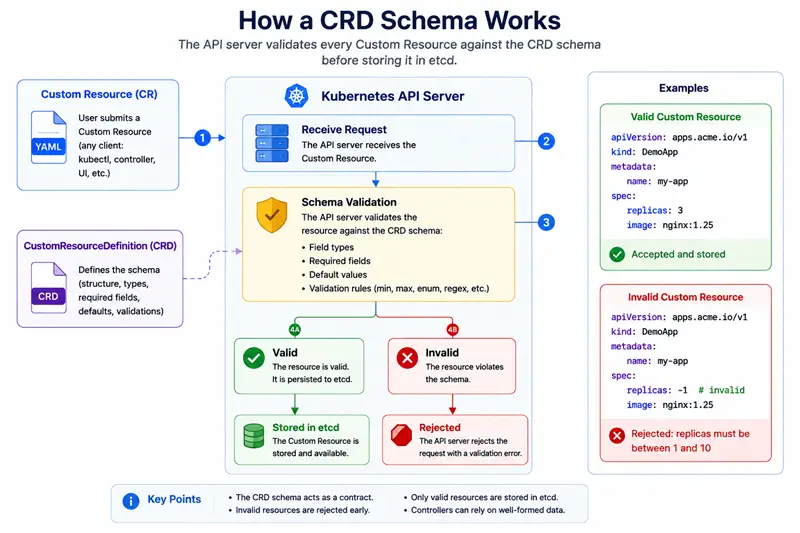
The flow is simple:
- A user submits a Custom Resource.
- The API server loads the schema from the CRD.
- The CR is validated against that schema.
- If validation succeeds, the object is stored in etcd.
- If validation fails, the request is rejected.
For example, suppose a CRD defines this schema:
spec:
  type: object
  required:
    - replicas
  properties:
    replicas:
      type: integer
      minimum: 1
      maximum: 10
A valid Custom Resource would be accepted:
apiVersion: apps.acme.io/v1
kind: DemoApp
metadata:
  name: my-app
spec:
  replicas: 3
However, this resource would be rejected because the value violates the schema:
apiVersion: apps.acme.io/v1
kind: DemoApp
metadata:
  name: my-app
spec:
  replicas: -1
The API server returns a validation error before the object is stored. This is one of the biggest advantages of CRDs: invalid configuration is stopped at the API boundary instead of forcing every controller to handle bad input.
In practice, a well-designed CRD acts as the first line of defense for your Operator. The stronger the schema, the simpler and more reliable the controller becomes.
A complete, annotated CRD
Here is a working CRD YAML example for a hypothetical BackupPolicy resource, with every section that matters in production. Treat this as a reference card — every block in it is explained in detail in the sections that follow, so skim it now and come back to specific lines as each concept is covered:
apiVersion: apiextensions.k8s.io/v1
kind: CustomResourceDefinition
metadata:
  name: backuppolicies.acme.io          # MUST be <plural>.<group>
spec:
  group: acme.io
  scope: Namespaced                     # or Cluster
  names:
    kind: BackupPolicy                  # PascalCase, used in YAML
    listKind: BackupPolicyList
    plural: backuppolicies              # used in REST paths and kubectl
    singular: backuppolicy
    shortNames: [bp]                    # kubectl get bp
    categories: [all, backup]           # kubectl get all
  versions:
  - name: v1
    served: true
    storage: true
    subresources:
      status: {}                        # enables /status endpoint
      scale:
        specReplicasPath: .spec.replicas
        statusReplicasPath: .status.replicas
    additionalPrinterColumns:
    - name: Schedule
      type: string
      jsonPath: .spec.schedule
    - name: Retention
      type: integer
      jsonPath: .spec.retentionDays
    - name: Age
      type: date
      jsonPath: .metadata.creationTimestamp
    schema:
      openAPIV3Schema:
        type: object
        required: [spec]
        properties:
          spec:
            type: object
            required: [schedule, retentionDays]
            properties:
              schedule:
                type: string
                pattern: '^(@(yearly|annually|monthly|weekly|daily|hourly))$|^(\*|[0-9,\-\*/]+)\s+(\*|[0-9,\-\*/]+)\s+(\*|[0-9,\-\*/]+)\s+(\*|[0-9,\-\*/]+)\s+(\*|[0-9,\-\*/]+)$'
              retentionDays:
                type: integer
                minimum: 1
                maximum: 365
              replicas:
                type: integer
                default: 1
                minimum: 0
              targetBucket:
                type: string
                format: uri
          status:
            type: object
            properties:
              lastBackupTime:
                type: string
                format: date-time
              phase:
                type: string
                enum: [Pending, Running, Succeeded, Failed]
              conditions:
                type: array
                items:
                  type: object
                  properties:
                    type:    { type: string }
                    status:  { type: string, enum: ["True","False","Unknown"] }
                    reason:  { type: string }
                    message: { type: string }
Every section above is doing real work. The rest of this article unpacks each one.
Group, version, kind, scope - the API coordinates
Kubernetes resources are addressed by a four-tuple, and CRDs follow the same rule:
| Field | Example | Note |
|---|---|---|
group |
acme.io |
Pick a domain you own to avoid collisions. core (no group) is reserved for built-ins. |
versions[].name |
v1, v1beta1, v1alpha1 |
Standard maturity prefixes. Only one version is storage: true. |
names.kind |
BackupPolicy |
PascalCase; matches kind: in the CR YAML. |
scope |
Namespaced or Cluster |
Cluster-scoped resources have no metadata.namespace. |
The metadata name is a strict format: <plural>.<group>. The API server
will refuse to apply a CRD whose metadata.name does not match
spec.names.plural + "." + spec.group.
Scope gotcha: the CRD object itself is always cluster-scoped, even when
spec.scope: Namespaced. Thescopefield only controls whether the custom resources created from the CRD are namespaced or cluster-wide. That is why installing a CRD requires cluster-admin permissions while creating CRs from it can be delegated namespace by namespace through ordinary RBAC.
Structural schema (OpenAPI v3) - mandatory and unforgiving
Since Kubernetes 1.16, the apiextensions.k8s.io/v1 API requires every CRD
to ship a structural schema - an OpenAPI v3.0 document with these
non-negotiable rules:
- The root has
type: object. - Every field of every
propertiesobject specifies atype. - Every
itemsof every array specifies atype. - No
anyOf,oneOf,allOfat the top of a property's spec (they're allowed insidetype-constrained branches). - No bare
additionalProperties: true- you must constrain it.
The reward for following these rules is that the API server can:
- Validate every Custom Resource at admission time.
- Prune unknown fields silently, so a typo'd
replciasdoes not silently break your reconciler. - Default missing optional fields from
default:markers. - Publish the schema in OpenAPI v3, so
kubectl explain <kind>works.
The official CRD documentation covers the structural-schema rules and edge cases in depth.
Validation primitives you will use constantly:
| Keyword | Effect |
|---|---|
required: [foo, bar] |
Reject the CR if foo or bar are missing. |
minimum, maximum |
Numeric bounds. |
minLength, maxLength |
String length bounds. |
enum: [A, B, C] |
Restrict to a fixed set of values. |
pattern: '^[a-z0-9-]+$' |
Regex match. |
format: date-time / uri / email |
Built-in OpenAPI formats. |
default: 1 |
Auto-fill missing optional fields. |
A weak schema is the #1 cause of broken Operators - if the API server accepts garbage, your controller has to handle it gracefully, and most controllers do not. Spend the time on validation up front.
CEL validation (x-kubernetes-validations)
OpenAPI keywords like minimum, enum, and pattern cover single-field
constraints. For cross-field rules — "if A is set then B must be set", or
"maxReplicas must be greater than or equal to minReplicas" — Kubernetes
exposes the Common Expression Language (CEL) through
x-kubernetes-validations. It has been stable since Kubernetes 1.29 and is
the recommended replacement for ad-hoc validating webhooks when all you need
is field-level logic:
spec:
  type: object
  properties:
    minReplicas: { type: integer, minimum: 0 }
    maxReplicas: { type: integer, minimum: 0 }
  x-kubernetes-validations:
  - rule: "self.maxReplicas >= self.minReplicas"
    message: "maxReplicas must be greater than or equal to minReplicas"
  - rule: "!has(self.targetBucket) || self.targetBucket.startsWith('s3://')"
    message: "targetBucket must be an s3:// URI when set"
The rules run at admission time, on the API server, with no extra pods or webhook certificates to manage. Reach for a validating webhook only when the decision needs data from outside the CR itself.
Free-form fields (x-kubernetes-preserve-unknown-fields)
Most CRDs use a strict schema where every field must be explicitly defined.
For example:
spec:
  properties:
    replicas:
      type: integer
If a user submits an unknown field:
spec:
  replcias: 3
the API server rejects or prunes it.
However, some Operators need to accept arbitrary user input that cannot be described in advance. Helm-based Operators are a common example because chart values can vary between releases and products.
For these cases, Kubernetes allows a section of the schema to be treated as free-form data:
spec:
  properties:
    values:
      type: object
      x-kubernetes-preserve-unknown-fields: true
Now users can submit arbitrary content:
spec:
  values:
    image:
      repository: nginx
      tag: latest
    customSetting:
      foo: bar
      nested:
        enabled: true
The API server stores the content exactly as provided without pruning unknown fields.
spec and status - two subresources for one object
When subresources.status: {} is enabled, the API server exposes the
custom resource at two URLs that are updated independently:
| Endpoint | Who writes | What lives here |
|---|---|---|
/apis/<group>/<version>/.../backuppolicies/<name> |
Users (kubectl apply) |
metadata, .spec |
/apis/<group>/<version>/.../backuppolicies/<name>/status |
Controllers (Status().Update()) |
.status only |
This split is what makes the desired-state vs actual-state model
implementable without races - a user editing .spec cannot accidentally
clobber a controller's .status update, because the updates do not share
an etcd transaction.
In controller-runtime code, the difference is one method call:
r.Update(ctx, &cluster)         // writes /spec   (rarely done by controllers)
r.Status().Update(ctx, &cluster) // writes /status (the common case)
The scale subresource is a separate optional split - enable it if you
want kubectl scale <kind> --replicas=N to work against your CR. Most
Operators benefit from this.
Printer columns, short names, categories - the kubectl UX
These three knobs determine how readable your custom resources are at the command line:
-
additionalPrinterColumnsadd fields tokubectl get's default table output. Without them,kubectl get backuppoliciesshows onlyNAMEandAGE. With three printer columns you can also surfaceSchedule,Retention,Phase,LastBackupTime- any JSON path. -
shortNamessave typing.bpinstead ofbackuppolicies. -
categoriesadd your CR to logical groups.categories: [all]makeskubectl get allinclude your resource alongside Pods, Deployments, and Services. Most Operators use this to surface their CRs in the user's first exploration of a namespace.
Spending five minutes on these three knobs is the single biggest UX win you can give your CRD's users. Compare:
$ kubectl get bp
NAME           SCHEDULE    RETENTION   AGE
nightly-prod   @daily      30          3d
versus the default output without printer columns:
$ kubectl get backuppolicies.acme.io
NAME           AGE
nightly-prod   3d
The second forces every user to kubectl get bp -o yaml to see anything
useful.
Versioning, served versions, and storage versions
A multi-version CRD exposes more than one entry under spec.versions. Three
properties on each entry decide what happens:
| Field | Meaning |
|---|---|
served: true |
Clients can read and write this version through the API server. Any version that you want to expose must be served. |
storage: true |
This is the single version that Kubernetes persists in etcd. Exactly one entry must have storage: true. |
conversion.strategy |
How Kubernetes translates between served versions on read and write. |
There are two valid conversion strategies:
-
None(default) — all served versions must have identical wire shapes. The API server just relabels theapiVersionfield on read. Use this when you only want to rename a version (for example promotev1beta1tov1) without changing any fields. -
Webhook— the API server delegates conversion to your Operator through an HTTPS endpoint. Use this for breaking schema changes: splitting a field, renaming a field, nesting fields, or restructuring.spec. The webhook is called on every read and write that crosses a version boundary.
The conversion-webhook mechanics — hub-and-spoke conversion, TLS setup,
caBundle wiring, and the CRD migration step that rewrites existing
objects in the new storage version — are involved enough to deserve their
own deep dive: CRD version upgrades with conversion webhooks.
For Foundations purposes, the rule of thumb is:
Ship
v1alpha1while iterating, promote tov1beta1once you have a stable user base, and promote tov1only when you can commit to no further breaking changes.
Working with CRDs from the command line
In production, CRDs almost never arrive through kubectl apply -f mycrd.yaml
typed by a human. They ride along with the thing that uses them — usually a
Helm chart, an Operator bundle, an OLM ClusterServiceVersion, or an
Argo CD / Flux application. The YAML itself is the same; only the delivery
mechanism differs.
Once they are installed, the same kubectl verbs that work for built-ins
like Pods, ConfigMaps, and
Secrets work for custom resources:
kubectl get crd                               # list installed CRDs
kubectl get crd backuppolicies.acme.io -o yaml
kubectl explain backuppolicy.spec             # human-readable schema
kubectl apply -f my-backuppolicy.yaml         # create / update a CR
kubectl get bp                                # short name + printer cols
kubectl describe bp nightly-prod              # CR + events
kubectl delete bp nightly-prod                # cascade-delete owned children
kubectl explain is the most underused tool in the Operator ecosystem —
it consumes your published OpenAPI schema directly, so a richly-validated
CRD becomes self-documenting at the CLI. If kubectl explain bp.spec is
empty or unhelpful, your schema is too loose — fix that before shipping.
If you are following along on a local cluster like
Minikube, kubectl get crd | wc -l will
typically show 0 right after install. After installing an Operator (say,
the Prometheus Operator) you will see
that number jump to 10+ — each one is a CRD shipped by the Operator
bundle.
CRD lifecycle: install, update, and delete
A CRD is just another Kubernetes object, but a few lifecycle details trip up newcomers:
- Install / update is online. Applying or updating a CRD takes effect almost immediately — the API server picks up the new schema and starts validating against it within seconds. No restart, no rollout.
- Schema tightening can break existing CRs. If you add a new
requiredfield or a stricterpattern, custom resources that were valid yesterday will fail on the nextkubectl apply. Add new constraints behind a new version, or default the field, rather than retrofitting them onto an existing version. - Deletion cascades.
kubectl delete crd backuppolicies.acme.ioremoves the CRD and everyBackupPolicyin every namespace, and the Operator that watched them stops receiving events. If those CRs own other objects viaownerReferences, those owned objects are garbage collected too. Always back up custom resources before deleting a CRD in production:
kubectl get backuppolicies.acme.io --all-namespaces -o yaml > backuppolicies-backup.yaml- Finalizers can block deletion. If your Operator sets a finalizer on its CRs, deleting the CRD will hang until that finalizer is removed — uninstall the Operator first so it can drain its finalizers, then delete the CRD.
The five mistakes that ruin a CRD
In rough order of how often they ship to production:
-
Weak validation. Accepting
replicas: -3orschedule: "yes please"forces your reconciler to defend against garbage. Useminimum,maximum,enum,pattern, andrequiredeverywhere. -
Missing
subresources.status: {}. Without it, every status update triggers a generation bump, yourGenerationChangedPredicateno longer works, and you end up with reconcile hot loops. -
No printer columns. Users will judge your Operator by what
kubectl getshows them in the first five seconds. Surface the three most meaningful fields - Phase, Ready, LastBackupTime - viaadditionalPrinterColumns. -
Cluster scope when Namespaced will do. Cluster-scoped resources inherit cluster-admin level RBAC concerns. Use Namespaced unless your resource genuinely spans namespaces (e.g. ClusterIssuer, ClusterRole).
-
Schema lacking
default:values. Defaults are applied server-side at admission. Without them, every reconcile starts by filling in missing optional fields - either by mutating.spec(a write storm) or by re-computing the same defaults every loop. Put defaults in the schema.
Frequently Asked Questions
1. What is a Custom Resource Definition (CRD) in Kubernetes?
2. What is the difference between a Custom Resource (CR) and a Custom Resource Definition (CRD)?
3. Can a CRD work without a controller or Operator?
4. How do I create a CRD in Kubernetes?
5. What is a structural schema in a CRD?
6. What is the difference between spec and status in a CRD?
7. How do I version a CRD?
8. Are CRDs namespaced or cluster-scoped?
9. What happens when I delete a CRD that has existing custom resources?
What's next?
CRDs are half of an Operator; the controller that watches them is the other half. Recommended next reads:
- The Kubernetes reconcile loop explained — the watch → cache → workqueue → Reconcile pipeline.
- Operator vs Controller vs CRD — the relationship summarised, with a Go code skeleton showing all three pieces wired together.
- Desired state vs actual state —
why the
.spec/.statussplit exists in the first place. - Status subresource and Conditions —
the next-level deep dive into the
.statushalf of your CRD. - CEL validation in CRDs (practical rules) —
cross-field rules, immutability with
oldSelf, and when CEL replaces or complements webhooks. - CRD version upgrades with conversion webhooks —
the deep dive on multi-version CRDs: served vs storage versions,
hub-and-spoke conversion, webhook TLS setup, and CRD migration with
kube-storage-version-migrator. - Ready to build one for real? Install Operator-SDK on Linux,
then run
operator-sdk create apito generate the CRD from Go type definitions instead of writing the YAML by hand.
