
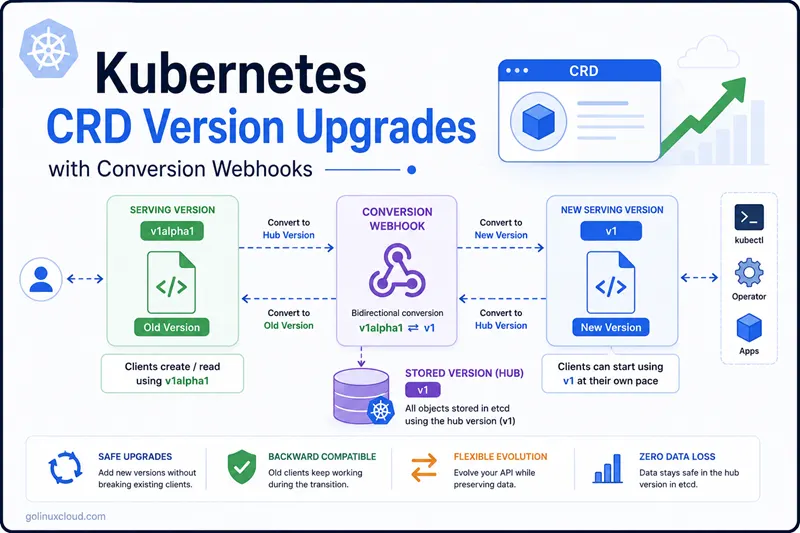
A Kubernetes CRD upgrade is much easier to reason about when you treat it as an API migration, not as a YAML rename. Evolving a multi-version CRD safely means combining three things: a clear served and storage version contract, a conversion webhook that translates between them using the hub-and-spoke pattern, and a CRD migration step that rewrites existing objects in the new storage version.
For CEL and OpenAPI validation on a single served version, see CEL validation in CRDs—this article focuses on multi-version wire shapes and conversion.
This article uses a self-created DemoApp operator. The old API version, v1alpha1, has flat fields:
spec:
  image: nginx:1.27
  replicas: 2
  port: 8080
The new API version, v1, nests the same data:
spec:
  workload:
    image: nginx:1.27
    replicas: 2
  service:
    port: 8080
  paused: false
That is a real schema change. The same logical fields still exist, but their wire format is different. Kubernetes cannot safely convert those versions with conversion.strategy: None, so the CRD needs a conversion webhook.
How CRD Versioning Works
Unlike Deployments or ConfigMaps, a CRD can expose multiple API versions at the same time.
This allows existing clients to continue using an older API version while new clients adopt a newer schema. A multi-version CRD achieves this by separating three concerns: which served versions are exposed to users, which storage version is persisted in etcd, and how objects are converted between them.
A CRD upgrade therefore involves three independent contracts. Keeping them separate avoids one of the most common misconceptions about CRD upgrades: updating the CRD YAML does not automatically migrate existing objects. A real CRD migration only happens when each stored object is rewritten in the new storage version.
| Contract | Purpose |
|---|---|
served |
Controls which API versions clients can read and write. |
storage |
Controls the single version persisted in etcd. |
conversion |
Controls how Kubernetes translates between served versions. |
Exactly one version must have storage: true. Even if a CRD serves multiple versions simultaneously, Kubernetes always stores objects in a single canonical version inside etcd:
spec:
  versions:
  - name: v1
    served: true
    storage: true
  - name: v1alpha1
    served: true
    storage: false
The following diagram shows what happens when a client interacts with a CRD that serves both v1alpha1 and v1, while v1 is the storage version:
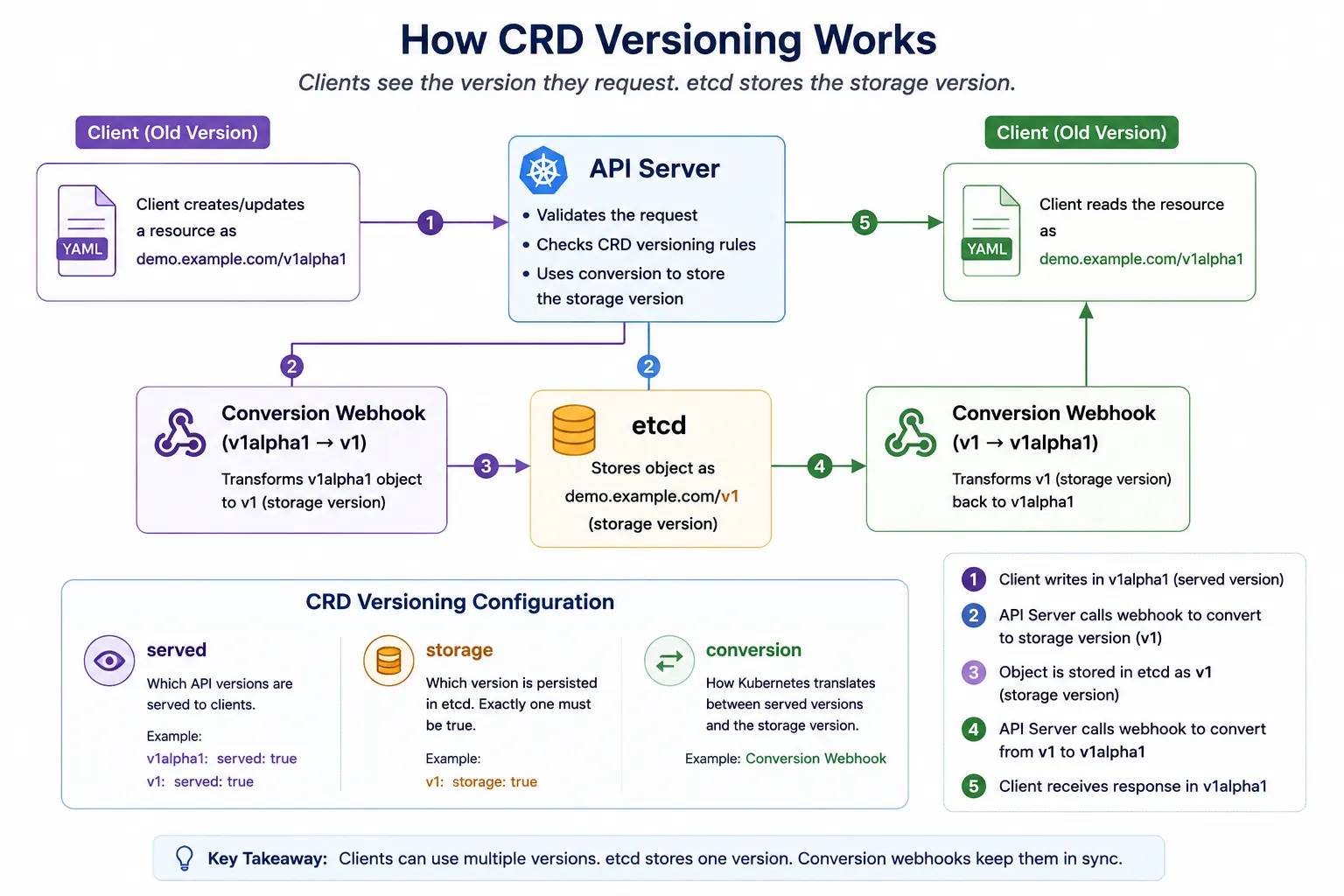
As shown in the diagram:
- A client creates or updates a resource using the older
v1alpha1API. - The API server accepts the request and invokes the conversion webhook.
- The webhook converts the object to the storage version (
v1). - Kubernetes stores the converted object in etcd as
v1. - Later, another client requests the resource as
v1alpha1. - The API server invokes the conversion webhook again.
- The stored
v1object is converted back tov1alpha1before being returned.
The important point is that clients always see the version they requested, while etcd always stores the version selected by the CRD.
In other words:
servedcontrols what clients can use.storagecontrols what etcd stores.conversionbridges the gap between them.
Think of
servedas the API presented to users,storageas the canonical format stored in etcd, andconversionas the translator that allows multiple API versions to coexist.
When You Need a Conversion Webhook
A multi-version CRD supports two valid values for conversion.strategy. Picking the right one before you start writing code avoids a lot of rework later:
| Strategy | When to use | Behavior |
|---|---|---|
None |
All served versions share the exact same wire shape and only add optional fields that can be safely pruned or defaulted. | Kubernetes returns the stored object unchanged, just relabeled with the requested API version. No conversion code runs. |
Webhook |
Any served version has renamed, nested, split, merged, or otherwise differently shaped fields. | Kubernetes calls the configured conversion webhook on every read or write that crosses versions, so the object is reshaped on the fly. |
The DemoApp CRD in this article changes shape between v1alpha1 and v1 — flat fields become nested under workload and service, and a brand new paused field appears in v1. That is a real schema change, so the CRD upgrade in this guide uses the Webhook strategy.
The controller binary does not automatically switch versions when the CRD changes. It watches whichever Go type is compiled into the manager. In this walkthrough, the controller is updated to watch api/v1.DemoApp, while the API server continues serving older v1alpha1 clients through the conversion webhook.
Prerequisites
- Go 1.24 or newer.
operator-sdk,kubectl,kind, Docker, andopenssl— see OpenSSL.- A Kubernetes cluster where you can create CRDs, Services, Deployments, Secrets, and patch CRD
caBundle.
The examples were verified with these tool versions:
$ operator-sdk version
operator-sdk version: "v1.42.2", ... kubernetes version: "1.33.1"

$ go version
go version go1.24.4 linux/amd64

$ kind version
kind v0.31.0 go1.25.5 linux/amd64
Step 1 - Scaffold the DemoApp Operator
The project starts as a normal Operator SDK scaffold. The important detail is --project-name demoapp: when scaffolding inside a dot-prefixed or temporary directory, passing an explicit DNS-safe project name avoids invalid Kubernetes object names.
mkdir -p ~/validation/demoapp
cd ~/validation/demoapp

operator-sdk init --plugins=go/v4 --domain example.com --repo github.com/example/demoapp --owner "Demo Team" --project-name demoapp
Expected output:
Writing kustomize manifests for you to edit...
Writing scaffold for you to edit...
Get controller runtime:
$ go get sigs.k8s.io/[email protected]
Update dependencies:
$ go mod tidy
Next: define a resource with:
$ operator-sdk create api
Create the older version first because it generates the controller scaffold. Both API versions represent the same resource, so only one controller should exist.
operator-sdk create api --group demo --version v1alpha1 --kind DemoApp --resource --controller

operator-sdk create api --group demo --version v1 --kind DemoApp --resource --controller=false
Then create the conversion webhook. Here v1 is the hub and v1alpha1 is the spoke, so all conversion logic is written between those two versions:
operator-sdk create webhook --group demo --version v1 --kind DemoApp --conversion --spoke v1alpha1Expected output:
internal/webhook/v1/demoapp_webhook.go
internal/webhook/v1/demoapp_webhook_test.go
api/v1/demoapp_conversion.go
Scaffolding for spoke version: v1alpha1
Creating spoke conversion file at: api/v1alpha1/demoapp_conversion.go
Webhook server has been set up for you.
Step 2 - Define Both Schemas
This example intentionally changes the API shape, not just the version name. The old version uses flat fields that are easy for early users to write:
// api/v1alpha1/demoapp_types.go
type DemoAppSpec struct {
	Image    string `json:"image"`
	Replicas int32  `json:"replicas"`
	Port     int32  `json:"port,omitempty"`
}

type DemoAppStatus struct {
	AvailableReplicas int32 `json:"availableReplicas,omitempty"`
}
The new version groups the same data into a more extensible structure. workload now contains pod-level settings, service contains network exposure settings, and paused is a new field that did not exist in v1alpha1:
// api/v1/demoapp_types.go
type DemoAppSpec struct {
	Workload WorkloadSpec `json:"workload"`
	Service  ServiceSpec  `json:"service,omitempty"`
	Paused   bool         `json:"paused,omitempty"`
}

type WorkloadSpec struct {
	Image    string `json:"image"`
	Replicas int32  `json:"replicas"`
}

type ServiceSpec struct {
	Port int32 `json:"port,omitempty"`
}

type DemoAppStatus struct {
	AvailableReplicas int32 `json:"availableReplicas,omitempty"`
}
The generated v1 type should already have the storage and hub markers. These markers tell controller-gen that v1 is the persisted CRD version and the hub type for conversion:
// +kubebuilder:storageversion
// +kubebuilder:conversion:hub
// +kubebuilder:subresource:status
type DemoApp struct {
	metav1.TypeMeta   `json:",inline"`
	metav1.ObjectMeta `json:"metadata,omitempty"`

	Spec   DemoAppSpec   `json:"spec,omitempty"`
	Status DemoAppStatus `json:"status,omitempty"`
}
Step 3 - Implement the Conversion
Kubebuilder uses hub-and-spoke conversion for a multi-version CRD. One version is the hub (usually the storage version), and every other served version converts to and from that hub. This avoids writing direct converters for every possible version pair as the API grows.
Without hub-and-spoke conversion, three API versions would require six pairwise converters:
- v1alpha1 ↔ v1beta1
- v1alpha1 ↔ v1
- v1beta1 ↔ v1
As more versions are added, the number of conversion paths grows rapidly. Hub-and-spoke keeps every version converting only to and from the hub.
The hub only needs a marker method:
// api/v1/demoapp_conversion.go
func (*DemoApp) Hub() {}
The spoke version implements ConvertTo and ConvertFrom. In this example, the converter maps spec.image to spec.workload.image, spec.replicas to spec.workload.replicas, and spec.port to spec.service.port:
// api/v1alpha1/demoapp_conversion.go
package v1alpha1

import (
	"sigs.k8s.io/controller-runtime/pkg/conversion"

	demov1 "github.com/example/demoapp/api/v1"
)

// ConvertTo converts this DemoApp (v1alpha1) to the Hub version (v1).
func (src *DemoApp) ConvertTo(dstRaw conversion.Hub) error {
	dst := dstRaw.(*demov1.DemoApp)

	dst.ObjectMeta = src.ObjectMeta
	dst.Spec.Workload.Image = src.Spec.Image
	dst.Spec.Workload.Replicas = src.Spec.Replicas
	dst.Spec.Service.Port = src.Spec.Port
	if dst.Spec.Service.Port == 0 {
		dst.Spec.Service.Port = 8080
	}
	dst.Status.AvailableReplicas = src.Status.AvailableReplicas

	return nil
}

// ConvertFrom converts the Hub version (v1) to this DemoApp (v1alpha1).
func (dst *DemoApp) ConvertFrom(srcRaw conversion.Hub) error {
	src := srcRaw.(*demov1.DemoApp)

	dst.ObjectMeta = src.ObjectMeta
	dst.Spec.Image = src.Spec.Workload.Image
	dst.Spec.Replicas = src.Spec.Workload.Replicas
	dst.Spec.Port = src.Spec.Service.Port
	dst.Status.AvailableReplicas = src.Status.AvailableReplicas

	return nil
}
The paused field exists only in v1, so it is intentionally dropped when a client reads the object as v1alpha1. That is a lossy conversion. Real production APIs should explicitly document every lossy conversion because older clients cannot preserve fields they do not understand. Otherwise users may unknowingly lose data when reading and writing through an older API version.
Step 4 - Update the Controller to Use v1
The generated controller initially watches v1alpha1 because that was the first API version created. After introducing v1, change the controller to watch the hub/storage version. This keeps the reconciler code aligned with the current API shape:
// internal/controller/demoapp_controller.go
import demov1 "github.com/example/demoapp/api/v1"

func (r *DemoAppReconciler) SetupWithManager(mgr ctrl.Manager) error {
	return ctrl.NewControllerManagedBy(mgr).
		For(&demov1.DemoApp{}).
		Named("demoapp").
		Complete(r)
}
This does not break v1alpha1 clients. They can still submit and read old-version objects while the controller works with the v1 Go type internally. The API server performs the translation before objects reach the controller cache.
Step 5 - Add Unit Tests
Conversion bugs usually appear as data loss: a field is forgotten, a default is applied incorrectly, or a new field cannot be represented in the old version. Unit tests should cover the exact field mappings and any expected defaults.
Start with old-to-new conversion:
// api/v1alpha1/demoapp_conversion_test.go
func TestConvertToHub(t *testing.T) {
	src := &DemoApp{
		ObjectMeta: metav1.ObjectMeta{Name: "demoapp-sample", Namespace: "default"},
		Spec: DemoAppSpec{
			Image:    "nginx:1.27",
			Replicas: 3,
			Port:     9090,
		},
		Status: DemoAppStatus{AvailableReplicas: 2},
	}

	dst := &demov1.DemoApp{}
	if err := src.ConvertTo(dst); err != nil {
		t.Fatalf("ConvertTo returned error: %v", err)
	}

	if dst.Spec.Workload.Image != "nginx:1.27" {
		t.Fatalf("image mismatch: got %q", dst.Spec.Workload.Image)
	}
	if dst.Spec.Workload.Replicas != 3 {
		t.Fatalf("replicas mismatch: got %d", dst.Spec.Workload.Replicas)
	}
	if dst.Spec.Service.Port != 9090 {
		t.Fatalf("port mismatch: got %d", dst.Spec.Service.Port)
	}
}
Also test defaults and reverse conversion. The default test proves that older objects without spec.port become valid v1 objects, while the reverse test proves that new-version data remains readable by old clients:
func TestConvertToHubDefaultsPort(t *testing.T) {
	src := &DemoApp{Spec: DemoAppSpec{Image: "nginx:1.27", Replicas: 1}}

	dst := &demov1.DemoApp{}
	if err := src.ConvertTo(dst); err != nil {
		t.Fatalf("ConvertTo returned error: %v", err)
	}

	if dst.Spec.Service.Port != 8080 {
		t.Fatalf("default port mismatch: got %d", dst.Spec.Service.Port)
	}
}

func TestConvertFromHub(t *testing.T) {
	src := &demov1.DemoApp{
		ObjectMeta: metav1.ObjectMeta{Name: "demoapp-sample", Namespace: "default"},
		Spec: demov1.DemoAppSpec{
			Workload: demov1.WorkloadSpec{Image: "nginx:1.28", Replicas: 4},
			Service:  demov1.ServiceSpec{Port: 8081},
			Paused:   true,
		},
		Status: demov1.DemoAppStatus{AvailableReplicas: 4},
	}

	dst := &DemoApp{}
	if err := dst.ConvertFrom(src); err != nil {
		t.Fatalf("ConvertFrom returned error: %v", err)
	}

	if dst.Spec.Image != "nginx:1.28" || dst.Spec.Replicas != 4 || dst.Spec.Port != 8081 {
		t.Fatalf("unexpected converted spec: %#v", dst.Spec)
	}
}
Run the conversion unit tests:
go test ./api/...Expected output from the tested run:
?   	github.com/example/demoapp/api/v1	[no test files]
ok  	github.com/example/demoapp/api/v1alpha1	0.018s
The broader go test ./... command was also checked during validation. The conversion and webhook packages passed. The scaffolded controller envtest required local Kubebuilder control-plane binaries, and the generated e2e suite tried to build an image from Docker Hub, which can fail in restricted or rate-limited environments. Keep those tests in CI once the required envtest binaries and image registry access are available; the full output is captured in the separate validation log.
Step 6 - Generate the CRD Manifest
After changing Go API types and conversion markers, regenerate both code and manifests. make generate refreshes generated Go helpers such as deep-copy methods. make manifests refreshes CRDs, RBAC, and webhook configuration:
make generate
make manifests
Expected output from the tested run:
bin/controller-gen object:headerFile="hack/boilerplate.go.txt" paths="./..."
bin/controller-gen rbac:roleName=manager-role crd webhook paths="./..." output:crd:artifacts:config=config/crd/bases
The generated CRD should contain both served versions and strategy: Webhook. The Service name and namespace shown here are the rendered Kustomize values, after the demoapp- name prefix and demoapp-system namespace are applied:
spec:
  group: demo.example.com
  conversion:
    strategy: Webhook
    webhook:
      clientConfig:
        service:
          name: demoapp-webhook-service
          namespace: demoapp-system
          path: /convert
      conversionReviewVersions:
      - v1
  versions:
  - name: v1
    served: true
    storage: true
  - name: v1alpha1
    served: true
    storage: false
The generated schemas should show the shape change. This is an important review step because it confirms that Kubernetes will validate each version according to its own wire format:
# v1
spec:
  properties:
    workload:
      properties:
        image:
          type: string
        replicas:
          format: int32
          type: integer
    service:
      properties:
        port:
          format: int32
type: integer# v1alpha1
spec:
properties:
image:
type: string
replicas:
format: int32
type: integer
port:
format: int32
type: integerStep 7 - Run the Webhook
The conversion webhook runs inside the same manager binary as the controller. Kubernetes reaches it through an HTTPS Service, and controller-runtime registers the /convert handler when the manager starts.
Operator SDK wires the manager like this:
webhookServer := webhook.NewServer(webhook.Options{
	TLSOpts: webhookTLSOpts,
})

mgr, err := ctrl.NewManager(ctrl.GetConfigOrDie(), ctrl.Options{
	Scheme:        scheme,
	WebhookServer: webhookServer,
})

if os.Getenv("ENABLE_WEBHOOKS") != "false" {
	if err := webhookv1.SetupDemoAppWebhookWithManager(mgr); err != nil {
		setupLog.Error(err, "unable to create webhook", "webhook", "DemoApp")
		os.Exit(1)
	}
}
The webhook server must present a certificate trusted by the Kubernetes API server. The scaffolded deployment patch mounts the TLS Secret into the manager pod and passes the certificate directory through --webhook-cert-path:
- op: add
  path: /spec/template/spec/containers/0/args/-
  value: --webhook-cert-path=/tmp/k8s-webhook-server/serving-certs

- op: add
  path: /spec/template/spec/containers/0/volumeMounts/-
  value:
    mountPath: /tmp/k8s-webhook-server/serving-certs
    name: webhook-certs
    readOnly: true

- op: add
  path: /spec/template/spec/volumes/-
  value:
    name: webhook-certs
    secret:
      secretName: webhook-server-cert
For a demo environment, a self-signed serving certificate is enough (install OpenSSL on Ubuntu if openssl is missing). The certificate must include Subject Alternative Names for the rendered webhook Service DNS names. If the SAN does not match the Service name in the CRD, the API server rejects the TLS connection:
cat > webhook-openssl.cnf <<'EOF'
[ req ]
distinguished_name = req_distinguished_name
x509_extensions = req_ext
prompt = no

[ req_distinguished_name ]
CN = demoapp-webhook-service.demoapp-system.svc

[ req_ext ]
subjectAltName = @alt_names

[ alt_names ]
DNS.1 = demoapp-webhook-service.demoapp-system.svc
DNS.2 = demoapp-webhook-service.demoapp-system.svc.cluster.local
EOF

openssl req -x509 -newkey rsa:2048 -nodes \
  -keyout tls.key \
  -out tls.crt \
  -days 365 \
  -config webhook-openssl.cnf \
  -extensions req_ext

kubectl create namespace demoapp-system
kubectl -n demoapp-system create secret tls webhook-server-cert \
  --cert=tls.crt \
  --key=tls.key
The API server validates the webhook certificate using spec.conversion.webhook.clientConfig.caBundle. Patch the CRD with the base64-encoded public certificate:
kubectl patch crd demoapps.demo.example.com --type=merge \
  -p "{\"spec\":{\"conversion\":{\"webhook\":{\"clientConfig\":{\"caBundle\":\"$(base64 -w0 < tls.crt)\"}}}}}"
Deploy the manager after the Secret exists, then wait for the deployment to become available:
make deploy IMG=demoapp-crd-upgrade:validation
kubectl -n demoapp-system rollout status deployment/demoapp-controller-manager --timeout=120s
Expected output from the tested run:
customresourcedefinition.apiextensions.k8s.io/demoapps.demo.example.com created
service/demoapp-webhook-service created
deployment.apps/demoapp-controller-manager created
deployment "demoapp-controller-manager" successfully rolled out
The webhook logs should show that controller-runtime registered and started the conversion endpoint:
Initializing webhook certificate watcher using provided certificates
Registering webhook {"path": "/convert"}
Conversion webhook enabled {"GVK": "demo.example.com/v1, Kind=DemoApp"}
Starting webhook server
Serving webhook server {"host": "", "port": 9443}
The normal production shape is the Service-based clientConfig shown in the CRD. During the local kind validation for this article, Service DNS from the API server to the webhook timed out, while direct TLS to a host-network endpoint succeeded. That environment-specific workaround is documented in the validation log; regular clusters should keep the Service-based webhook configuration.
Step 8 - Validate Conversion in the Cluster
The cluster test should prove both conversion directions through the Kubernetes API server. A unit test proves the Go functions work, but it does not prove that the CRD, caBundle, Service, Secret, and webhook server are wired correctly.
Start by applying an old-version object:
# config/samples/demo_v1alpha1_demoapp.yaml
apiVersion: demo.example.com/v1alpha1
kind: DemoApp
metadata:
  name: demoapp-sample
spec:
  image: nginx:1.27
  replicas: 2
port: 8080kubectl apply -f config/samples/demo_v1alpha1_demoapp.yamlExpected output from the tested run:
demoapp.demo.example.com/demoapp-sample createdRead it back as v1. This forces v1alpha1 -> v1 conversion because the object was submitted in the old shape but the client is asking for the new shape:
kubectl get demoapp.v1.demo.example.com demoapp-sample \
  -o jsonpath='{.apiVersion}{"\n"}{.spec.workload.image}{"\n"}{.spec.workload.replicas}{"\n"}{.spec.service.port}{"\n"}'
Expected output from the tested run:
demo.example.com/v1
nginx:1.27
2
8080
Read the same object as v1alpha1 to confirm old clients still see the flat schema:
kubectl get demoapp.v1alpha1.demo.example.com demoapp-sample \
  -o jsonpath='{.apiVersion}{"\n"}{.spec.image}{"\n"}{.spec.replicas}{"\n"}{.spec.port}{"\n"}'
Expected output from the tested run:
demo.example.com/v1alpha1
nginx:1.27
2
8080
Now patch it through the v1 API. This updates the storage-version shape and sets paused, a field that old clients cannot represent:
kubectl patch demoapp.v1.demo.example.com demoapp-sample \
  --type=merge \
  -p '{"spec":{"workload":{"image":"nginx:1.28","replicas":3},"service":{"port":9090},"paused":true}}'
Expected output from the tested run:
demoapp.demo.example.com/demoapp-sample patchedRead it through v1alpha1. This forces v1 -> v1alpha1 conversion and confirms that the fields shared by both versions are still visible in the old shape:
kubectl get demoapp.v1alpha1.demo.example.com demoapp-sample \
  -o jsonpath='{.apiVersion}{"\n"}{.spec.image}{"\n"}{.spec.replicas}{"\n"}{.spec.port}{"\n"}'
Expected output from the tested run:
demo.example.com/v1alpha1
nginx:1.28
3
9090
The paused field does not appear in v1alpha1 because that version has no equivalent field. That is the expected lossy part of this conversion, and it is why lossy fields should be documented before promoting a new API.
Finally, check the versions Kubernetes has stored in etcd for this CRD:
kubectl get crd demoapps.demo.example.com -o jsonpath='{.status.storedVersions}{"\n"}'Expected output from the tested run:
["v1"]Step 9 - Roll Out Safely and Run the CRD Migration
A CRD upgrade is not complete the moment you flip storage: true on the new version. Existing rows in etcd are still written in the old storage version until a CRD migration rewrites them. Use this order in production:
- Add the new version as
served: true, storage: false. - Deploy the conversion webhook while the old storage version still works.
- Verify old-to-new and new-to-old conversion with unit tests and cluster tests.
- Switch
storage: trueto the new version. - Migrate stored objects so etcd rows are rewritten in the new storage version.
- Keep the old version
served: truethrough your deprecation window. - Set the old version to
served: false. - Remove the old version only after
status.storedVersionsno longer contains it.
If status.storedVersions still contains the old version, do not remove that old version from spec.versions.
For real CRD migrations in production, use kube-storage-version-migrator. It walks every existing custom resource and rewrites it in the new storage version so etcd no longer contains stale rows from the old version:
kubectl apply -k github.com/kubernetes-sigs/kube-storage-version-migrator/manifests

kubectl apply -f - <<'EOF'
apiVersion: migration.k8s.io/v1alpha1
kind: StorageVersionMigration
metadata:
  name: demoapps-v1
spec:
  resource:
    group: demo.example.com
    resource: demoapps
EOF
After every object has been rewritten, patch the CRD status:
kubectl patch crd demoapps.demo.example.com --subresource=status --type=merge -p '{"status":{"storedVersions":["v1"]}}'Common Pitfalls
Leaving conversion logic as TODOs.
The generated files compile with TODO conversion methods. That does not mean the API is safe. Add real tests before you deploy the CRD.
Forgetting caBundle.
The API server validates the webhook serving certificate using the CRD caBundle. If it is empty or mismatched, conversion fails.
Wrong certificate SAN.
The certificate must contain the exact Service DNS name from the rendered CRD, for example demoapp-webhook-service.demoapp-system.svc.
Testing only one direction.
Creating old and reading new is not enough. Patch or create through the new version and read through the old version too.
Hiding lossy fields.
If a v1 field has no v1alpha1 equivalent, say so. In this article spec.paused is dropped when a client reads v1alpha1.
Removing old versions too early.
Changing storage: true does not rewrite existing objects by itself. Migrate stored objects and verify status.storedVersions before removing an old version.
Further Reading
- Kubernetes: Versions in CustomResourceDefinitions
- Kubernetes: Webhook conversion
- Kubebuilder: Multi-version tutorial - conversion
- Storage migration: kube-storage-version-migrator
- Internal: and
Frequently Asked Questions
1. What is a CRD conversion webhook?
2. When do I need a conversion webhook?
3. What is the storage version?
4. Can I use self-signed certificates for a demo conversion webhook?
5. What is the difference between a served version and a storage version?
6. How do I migrate existing CRD objects to a new storage version?
Summary
The reliable CRD upgrade pattern for a multi-version CRD is:
- Keep both the old and new served versions exposed together.
- Pick exactly one storage version.
- Translate every other served version through that storage version using hub-and-spoke conversion.
- Unit test both conversion directions.
- Run the webhook with a trusted TLS certificate and a matching
caBundle. - Verify real API reads and writes through every served version.
- Run a real CRD migration with
kube-storage-version-migratorbefore retiring the old version.
That is how you evolve a multi-version CRD without stranding existing custom resources — clean served and storage version contracts, hub-and-spoke conversion through a single webhook, and a real CRD migration step before you remove the old version.
