
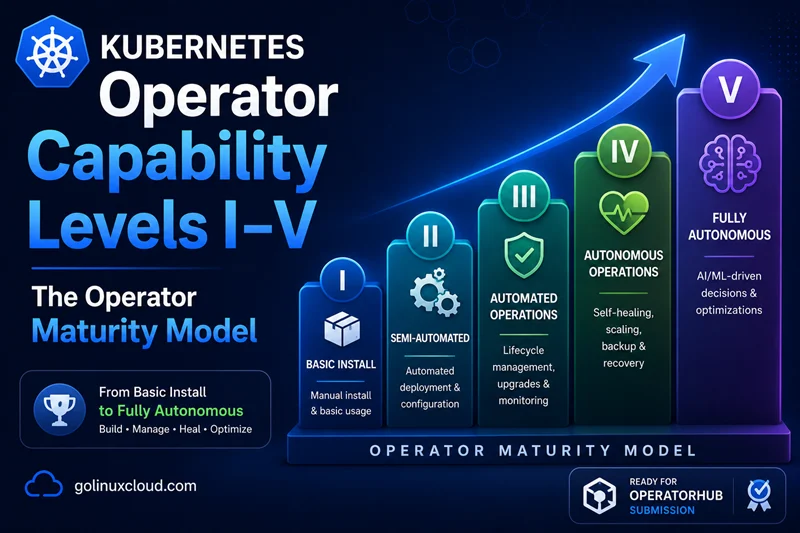
The Kubernetes Operator pattern is open-ended: an Operator that only installs a workload is a valid Operator, and so is an Operator that runs the full autonomous lifecycle of a globally-replicated database. Red Hat's Operator Capability Maturity Model is the five-tier rubric the ecosystem uses to talk about where on the spectrum a given Operator sits.
If you are planning a roadmap from prototype to production, or evaluating
The step below resolves a command name with which; see the which command for PATH lookup, -a, and portable command -v alternatives.
which Operator to adopt for a stateful workload, this model is the
standard vocabulary. It is also the field OperatorHub and Operator
Lifecycle Manager (OLM) read off the Operator's ClusterServiceVersion
annotations to label every entry in the public catalog.
For how an Operator is structured (Singleton, Capability, Lifecycle, Auto-Pilot, Sidecar, GitOps), see the companion article Kubernetes Operator design patterns — pattern and level are independent axes.
TL;DR — the five levels at a glance
The five levels are cumulative. An Operator is described by the highest level it fully satisfies; everything below is implied.
| Level | Name | What it does | Canonical examples |
|---|---|---|---|
| I | Basic Install | Renders and installs the managed workload from a CRD. | A Helm-converted Operator on day one. |
| II | Seamless Upgrades | Upgrades the workload and the Operator itself without manual intervention. | Most well-maintained CNCF Operators (cert-manager, ingress-nginx). |
| III | Full Lifecycle | Day-2 operations: backups, restores, failover, application reconfiguration. | Prometheus Operator, Strimzi, Argo CD. |
| IV | Deep Insights | Built-in observability: metrics, alerts, logs, tracing, dashboards. | Zalando Postgres Operator, Elastic Cloud on Kubernetes. |
| V | Auto Pilot | Self-tuning, self-scaling, autonomous failure recovery. | KEDA, Vertical Pod Autoscaler, Karpenter, the most mature DB Operators. |
The level is declared on the Operator's
ClusterServiceVersion(CSV) viametadata.annotations["capabilities"]: "Auto Pilot"(or one ofBasic Install/Seamless Upgrades/Full Lifecycle/Deep Insights). OperatorHub reads that value verbatim and prints it on the catalog page.
How OperatorHub and OLM use the capability value
OLM reads the declared capability level off the Operator's
ClusterServiceVersion (CSV) annotation; OperatorHub.io prints it
verbatim on the catalog page, where it drives the badge, the search
filters, and the category listing users see before they install.
apiVersion: operators.coreos.com/v1alpha1
kind: ClusterServiceVersion
metadata:
  name: my-operator.v1.4.0
  annotations:
    capabilities: "Deep Insights"
    categories: "Database & Storage"
    repository: "https://github.com/acme/my-operator"
    containerImage: "quay.io/acme/my-operator:v1.4.0"
    description: "Operator for ACME Database, Level IV (Deep Insights)."
Valid capabilities values: "Basic Install", "Seamless Upgrades",
"Full Lifecycle", "Deep Insights", "Auto Pilot". Be honest —
over-claiming gets you a downgrade request on the community-operators
review PR, and under-claiming hurts discoverability.
Bundle artefacts you must ship per level
Each level you climb adds artefacts your OLM bundle must (or should) carry. The CSV annotation is only the label; these are what make the label true.
| Level | New artefacts in the OLM bundle |
|---|---|
| I | CRD manifest(s), ClusterServiceVersion with install.spec.deployments and install.spec.permissions. |
| III | Finalizer logic registered on every CR with side-effects; backup / restore CRDs with their own RBAC; optional ServiceMonitor for the controller. |
| IV | PrometheusRule manifests (recommended alerts); ServiceMonitor for both controller and managed workload; structured-log discipline documented in the CSV description; Grafana dashboard JSON shipped alongside the bundle. |
| V | HPA / VPA / KEDA ScaledObject stubs the operator manages; MutatingWebhookConfiguration and ValidatingWebhookConfiguration for auto-protect rules; documented maintenance-window CRD; failure-injection test results published in the repository. |
A CSV at any level that is missing the artefacts above does not automatically fail OLM install — OLM only validates structural correctness. It will, however, fail the
community-operatorsreview if the level claim does not match what the bundle ships.
Verifying a claim with operator-sdk scorecard
community-operators runs operator-sdk scorecard on every submission.
It exercises the bundle against a real cluster (or envtest-style
harness) and grades the result. The built-in test suite covers:
- basic-check-spec — every CR carries a
.specand the controller reconciles it. - olm-bundle-validation — the CSV, CRDs, and package manifest are internally consistent.
- olm-crds-have-resources — every CRD field is documented in the CSV
customresourcedefinitions.ownedlist. - olm-crds-have-validation — every CRD has an OpenAPI v3 schema with
meaningful constraints (this is where missing
required:blocks get caught). - olm-spec-descriptors / olm-status-descriptors — every important spec / status field has a UI descriptor for the OperatorHub form.
Scorecard does not run a backup or trigger an auto-failover; it cannot
verify Levels III–V end-to-end. Authors typically wire a custom test
suite (operator-sdk scorecard --selector=suite=custom) that runs
failure-injection and HA-failover checks against the bundle. Published
scorecard output in your repository is the most credible evidence of a
level claim.
Level I - Basic Install
The bar: the Operator can be installed and the user can create a single CRD that brings the managed workload up to a running state. No commitment yet on upgrades, day-2 ops, metrics, or autonomous behaviour.
What an Operator must do to qualify:
- One or more CRDs registered cleanly via the CRD manifest in the OLM
bundle (or
kubectl applyfor non-OLM installs). - A reconciler that translates a user-applied CR into the underlying Deployments, Services, ConfigMaps, Secrets, and RBAC.
- A
ClusterServiceVersion(CSV, if using OLM) that lists the deployment spec for the controller itself and the permissions it needs.
What is not required at this level:
- Upgrading the controller binary or the workload version.
- Cleaning up partial installs (a finalizer is nice-to-have, not mandatory).
- Status conditions (most Level I Operators do publish
Readyanyway - see status and conditions).
Examples of Level I Operators: typically a freshly-shipped Operator that wraps an existing Helm chart and is "v0.1.0" on day one — see Helm Operator vs Flux vs Argo CD for the distinction between an Operator that wraps a chart and a GitOps tool that simply applies one. Once it starts shipping upgrade paths, it graduates to Level II.
Level II - Seamless Upgrades
The bar: the Operator (and the workload it manages) can move between versions safely, without user intervention, without data loss, and without needing the user to read release notes for breaking-change instructions.
What an Operator must do to qualify:
- A versioned API (
v1alpha1,v1beta1,v1) and a published policy on how versions are deprecated. See CRD version upgrades and conversion webhooks for the served-vs-storage version mechanics and the conversion-webhook pattern you will need if your.specchanges between versions. - A controller binary update path - typically through OLM channels
(
alpha,beta,stable) - that the cluster admin can subscribe to. - A workload update path that reconciles to the new image / configuration
on its own. For stateless workloads this is usually a
Deployment.spec.templaterewrite; for stateful workloads it requires more care (rolling restarts, ordered upgrades). - Backward compatibility of the CRD schema across at least two minor versions, or a documented migration path.
What is not required at this level:
- Backing up before upgrades (Level III).
- Reverting an upgrade (Level III).
- Detecting that an upgrade is even needed without user input.
Examples of Level II Operators: cert-manager, ingress-nginx, most CNCF control-plane Operators. They ship regularly, can be upgraded by bumping the catalog version, and do not require runbooks for routine updates.
Level III - Full Lifecycle
The bar: the Operator handles every operational task that an SRE would otherwise do by hand: backup, restore, failover, application reconfiguration, fleet management.
What an Operator must do to qualify:
- Backup the managed workload's state on a schedule and to a configurable destination (S3, GCS, NFS, etc.). The schedule, retention, and target are exposed as CRD fields, not Operator-internal config.
- Restore from a snapshot - either into the existing instance or into a fresh one for clone / PITR / disaster recovery.
- Failover for HA workloads - detect when the primary is unhealthy, promote a standby, fence the old primary, and update connection endpoints. This requires deep coordination with the data plane and is the line at which most "Operators" stop being Operators and become Distributed Systems projects.
- Reconfigure on the fly: changing the workload's parameters
(Postgres
shared_buffers, Kafkanum.partitions, JVM heap size) triggers a controlled rolling apply, with rollback on failure. The Operator must also detect unsolicited config drift — somebodykubectl edit-ing the underlying Deployment — and reconcile back to the desired state. See Drift detection patterns in operators. - Heavy use of finalizers and owner-references / cascade deletion because deletion at this level means safely tearing down a stateful workload — taking a final backup, fencing endpoints, dropping cloud resources, and garbage-collecting every child object.
Examples of Level III Operators: Prometheus Operator (rule reloads, storage migrations), Strimzi (broker rolling restarts, topic management), Argo CD (Application reconciliation with rollback), Elastic Cloud on Kubernetes (config changes, snapshot/restore).
Level IV - Deep Insights
The bar: the Operator exposes enough observability that operators of the cluster can understand whether the workload is healthy without opening every Pod's logs.
What an Operator must do to qualify:
- Prometheus metrics at
/metricsfrom the controller itself (reconcile counts, requeue rate, error rate by reason, in-flight reconciles) and from the managed workload if the Operator can reach it. controller-runtime ships with built-in metrics; expose the endpoint and document the metric names. - Recommended alerts shipped as part of the Operator - typically as
PrometheusRulemanifests inside the OLM bundle that the cluster admin can opt in to. Cover the cases the Operator knows about better than the cluster admin does: reconcile error rate, failed backups, lagging replicas, certificate expiry. - Log discipline: structured logs at appropriate verbosities. Use
controller-runtime's
lograndlog.IntoContext/log.FromContexthelpers so the request-scoped logger carries the reconcile key on every line. - Tracing (optional but increasingly expected) - OpenTelemetry traces for long-running reconciles with reasonable span granularity.
- Status and conditions on the CRD giving end-users a first-class API to query "is this thing healthy?" - see status and conditions.
Examples of Level IV Operators: Zalando Postgres Operator (publishes Prometheus metrics, ships PrometheusRule alerts, has comprehensive status conditions), Elastic Cloud on Kubernetes, MongoDB Community Operator with the MongoDB Exporter integration.
Level V - Auto Pilot
The bar: the Operator self-tunes, self-scales, and recovers from failures without user intervention. The user expresses intent (desired state) — SLO, target latency, budget — and the Operator translates that intent into the hundreds of low-level decisions that would otherwise be a tuning project.
What an Operator must do to qualify:
- Auto-scale the managed workload based on observed metrics. This is
exactly the Auto-Pilot pattern
- typically a proportional or model-based controller closing the loop on a metric stream.
- Auto-recover from failures the Operator can detect. A primary going unreachable triggers an automatic failover, not a paged alert.
- Auto-tune workload parameters - cache sizes, replica counts, JVM options, connection-pool dimensions - against telemetry, with override fields on the CRD for the cases when an operator wants to pin a value.
- Auto-upgrade with a policy: respect maintenance windows, take a backup first, abort on health-check failure, roll back without user involvement.
- Auto-protect: detect anti-patterns the user could trigger (deleting a CRD with active dependents, scaling below quorum) and prevent or pause until the operator confirms. This usually means shipping validating admission webhooks alongside the controller.
What "Auto Pilot" does not mean:
- Making security decisions without a human (rotating secrets is fine; granting new RBAC is not).
- Acting on input the Operator cannot validate (running arbitrary user commands; calling third-party APIs the cluster admin did not bless).
- Removing the override fields - every Level V Operator must still let an operator pin a value when a real incident demands it.
Examples of Level V (or close to it) Operators: KEDA (event-driven auto-scaling), Vertical Pod Autoscaler, Karpenter (node provisioning), Zalando Postgres Operator with auto-failover, CloudNativePG.
A note: very few public Operators self-declare Level V. The honest position for most projects is "Level III, working toward IV" - and the honest evaluation as a consumer is to read what the Operator actually does, not the level it labels itself.
Analogy: car automation levels
If you have ever heard the phrase "my car has Level 2 driver assistance" or "a Level 5 self-driving car", you have already met this idea. The automotive industry defines a 0–5 scale:
- Level 0 — no automation. You do everything.
- Level 1 — cruise control. The car holds one variable for you.
- Level 2 — partial automation (lane-keep + adaptive cruise). The car helps but you must watch.
- Level 3 — conditional automation. The car drives, but hands you back control in tricky situations.
- Level 4 — high automation. The car drives without you in defined areas.
- Level 5 — full automation. No steering wheel needed.
The Operator maturity model is exactly this idea applied to running workloads. At Level I the Operator installs the workload (cruise control). At Level III it handles backups, restores, and failover (conditional automation). At Level V the Operator self-tunes, self-scales, and self-heals (full self-driving). Most production Operators today sit between Level III and IV — full self-driving (Level V) for stateful workloads is genuinely hard and rare.
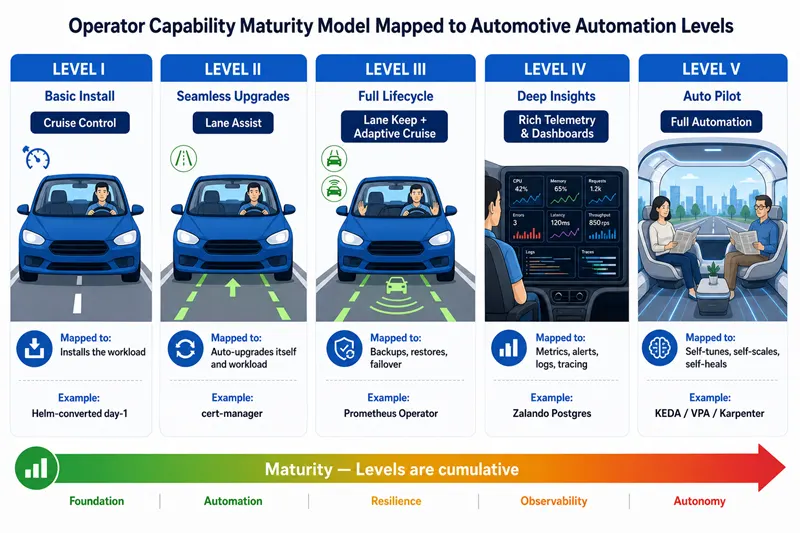
Each level is cumulative: a Level III Operator also satisfies Levels I and II. The canonical examples — cert-manager (II), Prometheus Operator (III), Zalando Postgres (IV), KEDA / Karpenter (V) — anchor the levels in operators you can install today.
Capability level vs design pattern
The level tells a user how much the Operator does; the design pattern tells them how it is structured. They are independent axes of the same artefact:
| What it answers | Read off… | |
|---|---|---|
| Capability level (I–V) | How much operational work is automated? | The capabilities annotation on the CSV |
| Design pattern (Singleton / Capability / Lifecycle / Auto-Pilot / Sidecar / GitOps) | How is the controller built? | The Operator's CRD layout and reconciler shape |
A Sidecar-Injecting Operator at Level II (Istio shipping safe upgrades) looks nothing like a Lifecycle Operator at Level II (Zalando Postgres shipping safe upgrades) — both are valid claims, both serve different needs.
When picking an Operator to adopt, evaluate the pattern first (does this shape fit my workload?), then the level (does it automate enough day-2 tasks for what I am willing to operate?). When building one, lock in the pattern first and climb the levels iteratively within it — trying to retrofit a different pattern halfway through is the most expensive refactor an Operator project ever undertakes.
Common misconceptions about capability levels
A handful of myths trip up first-time authors and adopters:
| Myth | Reality |
|---|---|
| "Higher level = better Operator." | Higher means more automated, not higher quality. A Level III Postgres Operator with rock-solid failover semantics is more valuable in production than a Level V one with buggy auto-tune. |
| "The level is independently graded." | It is self-declared in the CSV annotation. The community-operators PR runs operator-sdk scorecard for sanity checks, but the higher levels are not exhaustively validated. |
| "OLM is required to declare a level." | The rubric is a vocabulary, not a runtime requirement. Operators shipping via Helm or raw YAML routinely publish their level in README badges and release notes. |
| "Level V means the operator decides everything." | Level V never includes security decisions (rotating secrets is fine; granting new RBAC is not) and never removes the operator's ability to pin a value when an incident demands it. |
| "Cumulative means I can skip levels." | The model is cumulative upwards — a Level III Operator implies Levels I and II — but you cannot claim Level IV (Deep Insights) without first satisfying Level III (Full Lifecycle). |
A realistic Level V checklist
For a stateful workload Operator (database, message broker, search cluster), aiming for Level V typically means a checklist along these lines:
- CRDs versioned with at least one alpha → beta → v1 migration shipped with a conversion webhook.
- OLM bundle published to a public catalog (community-operators or vendor catalog).
- Multi-replica controller deployment with leader-election.
- Finalizers on every CRD with side-effects.
-
Ready/Progressing/Available/Degradedconditions on the CRD status, withobservedGenerationset on every condition write. - Prometheus metrics from the controller (reconcile time, error rate, requeue rate) and from the workload.
- Shipped
PrometheusRuleandGrafana dashboardmanifests. - Automated backups to S3 / GCS / Azure Blob with documented restore-time targets.
- Automatic primary failover within a documented RTO.
- Online upgrade path - controller and workload - with rollback.
- Auto-tune at least one operationally significant parameter (cache size, connection-pool dimension, JVM heap) against telemetry, with a documented override field.
- End-to-end tests covering install, upgrade, backup, restore, failover.
- Operator scorecard suite (
operator-sdk scorecard) passing all built-in tests.
Twelve items is a substantial engineering project - usually multiple quarters of work. Most public Operators sit somewhere between Level III and Level IV and that is a perfectly respectable place to be.
Choosing the right level
If you are adopting an Operator
For most stateful workloads inside a single organisation, the right answer is not "the highest-numbered level on the badge". It is "the Operator that handles backup, upgrade, and HA failover well, regardless of declared level". A Level III Operator that gets the failover semantics right is more valuable in production than a Level V one with buggy auto-tune.
When choosing an Operator, weight in this order:
- Failover and data-safety semantics. Read the docs and the issues.
- Upgrade story. Has the project shipped multiple breaking-API upgrades and ridden through them?
- Observability. Can you set up alerts in the first hour?
- Auto-tune (Level V features) — nice to have, almost never the reason an Operator wins or loses an evaluation.
The declared level is a hint, not a guarantee. Read the failure modes.
If you are building an Operator
For authors, the declared level matters in a different way — it drives discoverability on OperatorHub and sets the buyer's expectations:
- It is a buyer's heuristic, not a grade. The level tells potential adopters which operational tasks you have committed to automating. It does not certify code quality, test coverage, or vendor support — but it is the first filter most cluster admins apply.
- It drives search placement. OperatorHub.io filters and ranks by
the
capabilitiesannotation. An Operator labelled"Deep Insights"appears in a different result set than one labelled"Basic Install". Under-claiming hurts adoption; over-claiming gets you a downgrade request on thecommunity-operatorsreview PR. - Ship the level you actually satisfy today, not the level you aim for. Levels are cumulative: ship at III today and upgrade the badge when IV's artefacts (PrometheusRule, ServiceMonitor, etc.) are in place. That gives you a clean release-note story and steady upward progress instead of a marketing claim followed by a downgrade.
Most public Operators sit somewhere between Level III and Level IV. That is a perfectly respectable place to be.
Frequently Asked Questions
1. What are the five Kubernetes operator capability levels?
2. What is the Operator Capability Maturity Model?
3. What does Level I (Basic Install) mean for a Kubernetes operator?
4. What does Level V (Auto Pilot) mean for a Kubernetes operator?
5. What is OLM and how does it relate to capability levels?
6. How do I submit a Kubernetes Operator to OperatorHub?
7. Do I need OLM to ship a Kubernetes operator?
8. Are Kubernetes operator capability levels independently verified?
9. Can I declare a capability level without using OLM?
What's next?
You have completed the Foundations chapter of the Kubernetes Operators course. Natural next reads:
- Kubernetes Operator design patterns — the orthogonal axis: how the Operator is structured (Singleton / Capability / Lifecycle / Auto-Pilot / Sidecar / GitOps), independent of how mature it is.
- What is a Kubernetes Operator? — the starting article in this course; revisit it now that you know the full capability spectrum.
- The controller-runtime architecture — the Go library you will use to actually implement every level above Basic Install.
- Kubernetes status subresource and Conditions — the surface you must publish for Levels II and above.
- Kubernetes finalizers explained — the safe-deletion primitive required for Level III and above.
- Ready to start building one? Move on to Chapter 2 of this course — install Operator-SDK on Linux, then scaffold your first Operator project, and walk through the Level I → II → III progression with working code.
