
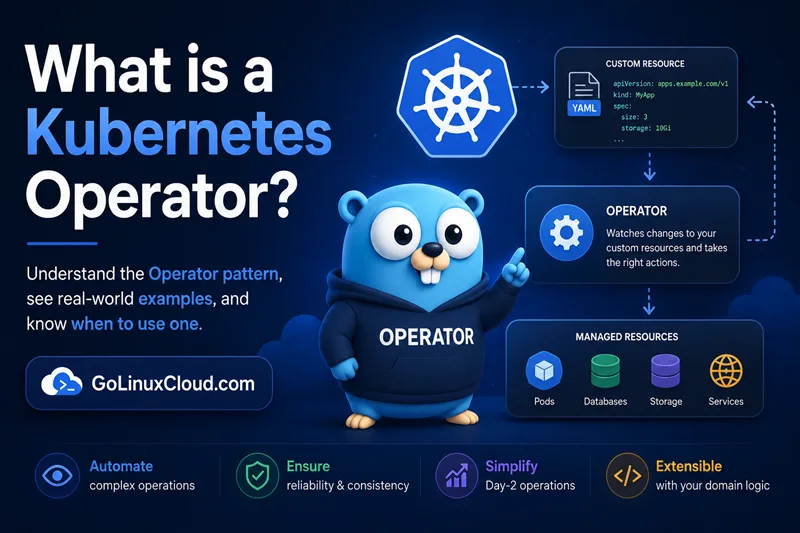
If you have ever heard the phrase "Kubernetes Operator" and thought "is that a person, a robot, or some kind of Kubernetes plugin?" — you are in the right place. The short answer: it is a small program that runs inside your cluster and takes care of an application the same way a senior on-call engineer would, except it never sleeps, never forgets the runbook, and never paged you at 3 a.m.
In plain English:
A Kubernetes Operator is a small piece of software, running inside the cluster, that knows how to install, run, and look after a specific application (like Postgres or Prometheus) — automatically.
That's the whole idea. The rest of this article unpacks why the pattern exists, how it works under the hood, and when you actually need one. By the end you will be able to read any Operator's documentation without getting lost in jargon like "reconcile loop", "CRD", or "controller-runtime".
A simple analogy: think of it as a smart thermostat
Before we touch a single line of YAML, picture the thermostat in your house.
You tell the thermostat: "keep this room at 72 °F." That is the desired state. The thermostat then checks the actual temperature every minute. If the room is too warm, it turns on the AC. If it is too cold, it turns on the heater. It never asks you again — it just keeps nudging reality toward what you asked for.
A Kubernetes Operator does the exact same thing, but for an application in a cluster. You tell it "I want a 3-replica Postgres cluster with nightly backups." It then checks the cluster every second or so. If only 2 replicas are running, it creates the missing one. If a backup didn't fire last night, it triggers one. You never have to micromanage the steps.
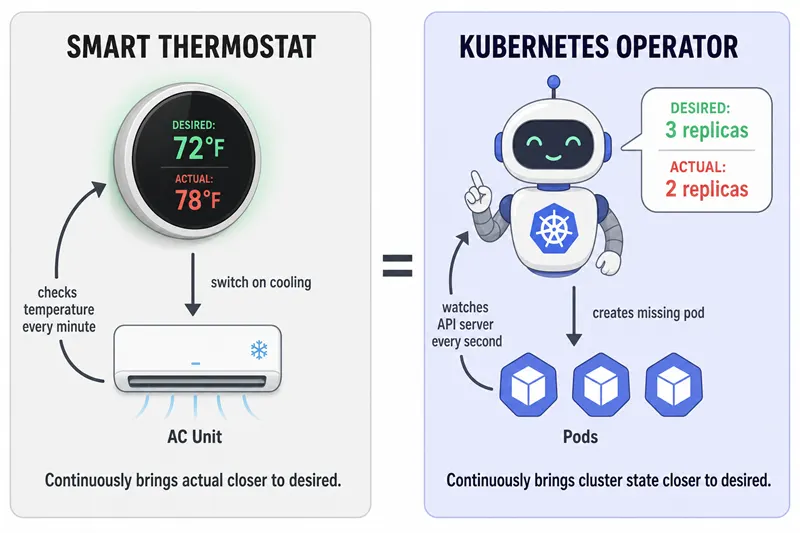
A Kubernetes Operator is essentially a thermostat for your application — desired state in, continuous corrections out.
That picture — desired vs actual, plus a loop that closes the gap — is the single most important mental model in this entire tutorial. Everything else is detail.
What is a Kubernetes Operator? (the 60-second definition)
Now that the analogy is in place, here is the precise definition you will see in books, conference talks, and the official Operator Framework documentation:
A Kubernetes Operator is a piece of software that:
- Adds a new object type to Kubernetes through something called a
Custom Resource Definition (CRD) — for example, a new
kind: PostgresClusterthat didn't exist before. Don't worry about CRDs for now; we'll cover them just below. Think of them as "new kinds of LEGO bricks you teach Kubernetes about." - Watches the Kubernetes API server for those new objects.
- Reconciles — every time someone creates, edits, or deletes one, the Operator inspects the cluster and takes the smallest action needed to make reality match what the YAML asked for.
The pay-off is huge: stateful, multi-step applications suddenly become declarative. You write a 20-line YAML that says "I want a 3-node Postgres cluster with nightly backups and HA failover," and the Operator performs the hundreds of API calls required to make that real — and to keep it real, forever, without your intervention.
Life with vs life without an Operator
The fastest way to feel why this pattern matters is to walk through one example with and without an Operator. Let's use a familiar one: running Postgres with 1 primary, 2 replicas, nightly backups, and TLS.
Without an Operator, you (or your team) need to:
- Write StatefulSets, Services, ConfigMaps, Secrets, and PersistentVolumeClaims by hand.
- Bootstrap the primary, configure streaming replication, and join replicas in the correct order.
- Schedule and verify nightly
pg_basebackupjobs. - Manually run a failover script when the primary crashes.
- Rotate TLS certificates every 90 days.
- Test that none of the above broke during an upgrade.
If you miss any step, the database loses data or won't recover from a node restart. This is the world many teams lived in before 2017.
With an Operator, you write one small piece of YAML — usually a single custom resource — and the Operator does the rest. The runbook lives inside the cluster as code, not in a Confluence page that nobody updates.
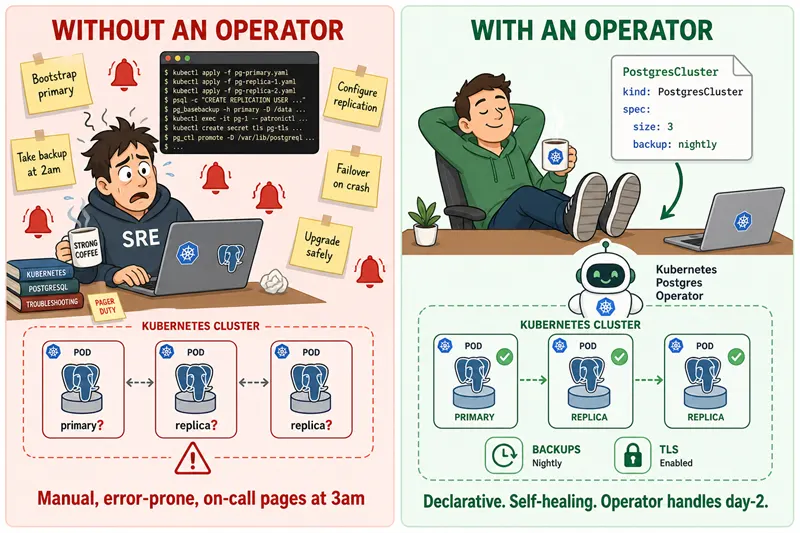
Without an Operator: you are the runbook. With an Operator: the runbook runs itself.
This is why teams running Kafka, Postgres, Redis, or Elasticsearch in production almost always reach for an Operator. The cost of not having one shows up at 3 a.m.
Why are they called "operators"?
The pattern is named after the human cluster operator — the SRE who used to SSH into a node, restart a database replica, edit a config, rotate a certificate, and re-balance shards. Everything that human did from a runbook got translated into code.
The Operator pattern was introduced by CoreOS in 2016 and the slogan from that announcement still summarises it perfectly:
"Operators are a way of packaging, deploying, and managing a Kubernetes application."
Red Hat acquired CoreOS in 2018 and the Operator Framework — which includes Operator SDK, the Operator Lifecycle Manager (OLM), and OperatorHub.io — is now stewarded by the CNCF Operator Framework community. So when someone says "there's an Operator for that," they mean: somebody already wrote the runbook, packaged it as a Pod, and you can install it with one command.
How does a Kubernetes Operator actually work?
Let's slow this down and walk through the lifecycle, step by step, using our Postgres example.
-
You write a Custom Resource (CR) in YAML. Something tiny, like:
yamlapiVersion: postgresql.cnpg.io/v1 kind: Cluster metadata: name: my-db spec: instances: 3 storage: size: 10GiThat's only 8 lines. No StatefulSets, no Services, no replication scripts — just what you want.
-
You run
kubectl apply -f. The Kubernetes API server stores the object because a CRD has already told it thatkind: Clusteris a valid type. -
The Operator (which is itself a Pod running in your cluster) sees the change. It maintains a long-lived watch on the API server.
-
The reconcile loop fires. The Operator's
Reconcile()function reads the current cluster state ("how many Postgres pods exist? are they healthy? is there a backup CronJob?") and compares it against the spec ("the user wants 3 instances and 10 Gi of storage."). -
The Operator creates whatever is missing. Behind the scenes it spins up StatefulSets, Services, Secrets, PVCs, backup CronJobs, and any other plain Kubernetes resource needed.
-
It keeps watching. When a pod crashes, when the user edits the CR, when the storage class changes, when a backup fails — the loop runs again.
That last point is the magic. An Operator is not a one-shot install script;
it is a process that never stops watching. This is what people mean by
"continuous reconciliation" and it is the single biggest difference between
an Operator and tools like Helm or kubectl apply.
The typical Kubernetes resources an Operator manages on your behalf are:
- Deployments and StatefulSets
- Services (so other apps can reach the database)
- PersistentVolumeClaims (for storage)
- Secrets and ConfigMaps (for credentials and config)
- Ingress resources or LoadBalancer Services (for external access)
- CronJobs (for backups and other scheduled tasks)
- ServiceMonitors or other monitoring CRs
Unlike Helm — which renders a YAML bundle once at install time and then walks
away — an Operator stays inside the cluster and keeps watching. If
someone runs kubectl delete pod on your database primary, the Operator
restores it. If someone edits a ConfigMap by hand, the Operator overwrites
it with the value from the CR. Drift is corrected automatically.
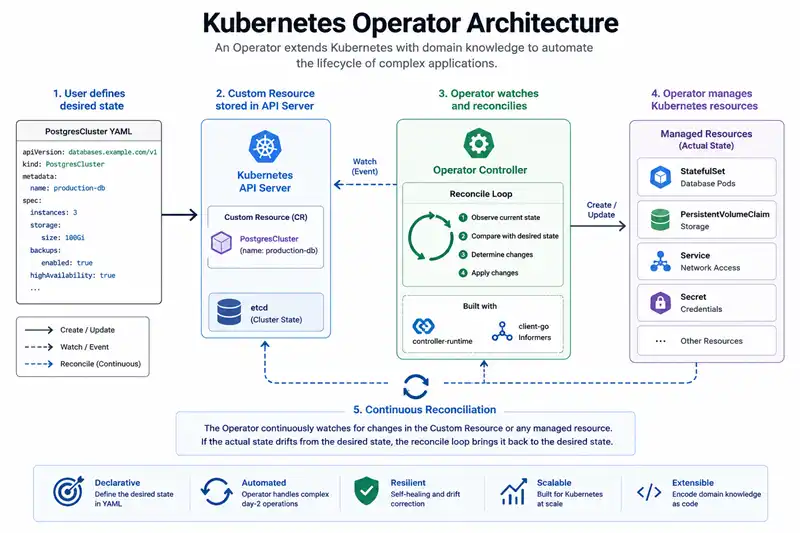
The full picture: the Operator reads the desired state from the CR and continuously shapes the underlying Kubernetes resources to match it.
But first — what is a "Custom Resource"?
We have used the words Custom Resource and CRD a few times. Let's lock them in, because half the confusion around Operators evaporates the moment this clicks.
Kubernetes ships with built-in object types: Pod, Deployment, Service,
ConfigMap, Secret, Job, and so on. These are resources. You can list
them, edit them, delete them, and kubectl describe them.
A Custom Resource Definition (CRD) is a small YAML file you apply to the
cluster that says: "hey API server, please also accept a new kind of object
called PostgresCluster, with these fields, and this schema validation."
The moment that CRD is installed, kubectl get postgresclusters becomes a
real command — just like kubectl get pods — and you can kubectl apply -f
a custom resource against it.
A Custom Resource (CR) is just an instance of that new type. The same
way a Pod is an instance of the built-in Pod type, your my-db object is
an instance of the PostgresCluster type.
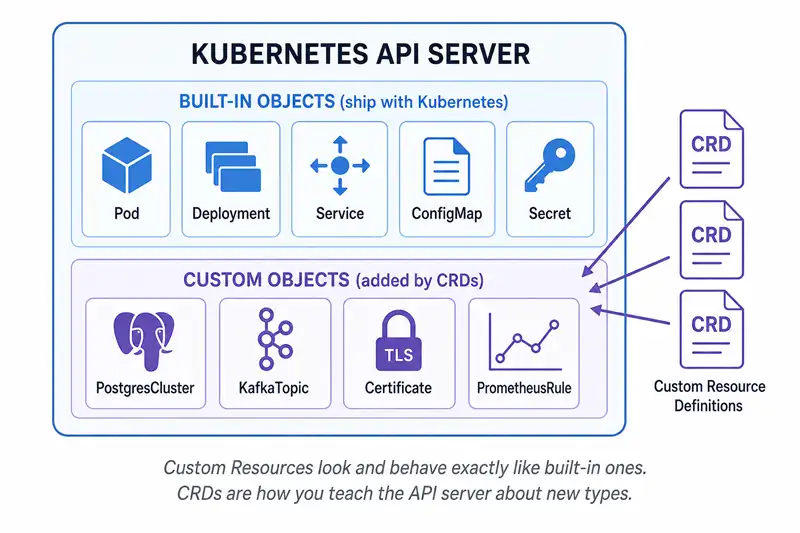
Custom Resources sit right next to the built-in ones. CRDs are how you teach the Kubernetes API server about a new "kind".
So an Operator is really two halves working together:
- The CRD is the vocabulary — it lets users describe what they want
using a new noun like
PostgresCluster. - The controller is the verb — it actually does what the vocabulary describes.
Strip away either half and the magic disappears. A CRD with no controller just gives you a fancy object type the API server stores but nothing acts on. A controller with no CRD has nothing application-specific to watch and is just a generic controller.
For a deeper dive, our next article in the series — Custom Resource Definitions Explained — walks through writing one from scratch.
Operator vs Controller vs CRD — the difference
These three terms are constantly confused, even in conference talks. Here they are in one sentence each:
| Term | What it is | Built into Kubernetes? |
|---|---|---|
| CRD (Custom Resource Definition) | A schema that teaches the API server about a new object type. Pure YAML, no code. | Yes — apiextensions.k8s.io/v1 |
| Controller | Any control loop that watches the API server and reconciles state. The Deployment, ReplicaSet, and Job controllers are built-in examples. | Many are — dozens ship with kube-controller-manager |
| Operator | A controller that uses a CRD to manage an application (Postgres, Prometheus, Kafka, …) and encodes its domain expertise. | No — you install one per application |
Every Operator is a controller. Every Operator uses a CRD. But only the combination — CRD + controller + domain knowledge of a specific application — earns the name Operator.
A deeper comparison lives in Operator vs Controller vs CRD — the difference explained.
When do you actually need a Kubernetes Operator?
Operators are powerful but not free — they add a moving piece to your cluster and require their own monitoring. Use one when at least two of the following apply:
- The application is stateful (databases, message brokers, caches).
- The lifecycle has multiple ordered steps ("provision storage → bootstrap primary → join replicas → run smoke test → mark ready").
- Day-2 operations matter (failover, backup, upgrade, certificate rotation, slow rolling restart). "Day 2" is just jargon for "everything that happens after the install button is clicked."
- You need continuous drift correction, not a one-shot install.
- The application has business rules that pure YAML can't express ("never upgrade a primary while a replica is lagging").
Use Helm or kustomize instead when the workload is stateless,
installs once, and is happy with a kubectl rollout restart when its config
changes. The two are not mutually exclusive — many teams use Helm to install
the Operator and then let the Operator manage the application.
| Tool | Good at | Not good at |
|---|---|---|
| Helm / kustomize | One-shot install of templated YAML | Continuous reconciliation, multi-step workflows |
| Custom controller | Cluster-wide policies, light glue | Application-specific lifecycles |
| Operator | Full day-1 + day-2 automation of an application | Trivial stateless deployments (overkill) |
| GitOps (Argo / Flux) | Drift detection on declarative manifests | Imperative steps like "promote replica X" |
A useful rule of thumb: if your install runbook is longer than 3 commands, or if you would page a human to upgrade or fail over the workload, an Operator probably belongs on the shortlist.
Real-world Kubernetes Operator examples
You have almost certainly run an Operator already — most managed Kubernetes distributions ship with several pre-installed:
- Prometheus Operator — manages
Prometheus, Alertmanager, and the
ServiceMonitor/PodMonitor/PrometheusRuleCRDs. Probably the single most-installed Operator in the CNCF ecosystem. - cert-manager — issues and renews TLS
certificates from Let's Encrypt, Venafi, Vault, and internal CAs via
IssuerandCertificateCRDs. - CloudNativePG — production-grade Postgres Operator: primary election, streaming replication, point-in-time recovery, and rolling upgrades.
- Strimzi — Apache Kafka Operator with
Kafka,KafkaTopic, andKafkaUserCRDs. - Argo CD — GitOps controller with the
ApplicationandApplicationSetCRDs. - etcd-operator — the original Operator from CoreOS that gave the pattern its name.
All of these expose two surfaces: a CRD you write YAML against, and a controller Pod doing the work. If you want to browse hundreds more, head to OperatorHub.io — every entry there follows the same pattern.
The five Operator capability levels
If you start reading Operator documentation you will keep seeing the phrase "Level 4 Operator" or "Capability Level III". This is a maturity model defined by the Operator Framework and it tells you, at a glance, how much the Operator can do.
| Level | Name | What it can do |
|---|---|---|
| I | Basic Install | Provision the application from a CR. Nothing more. |
| II | Seamless Upgrades | In-place upgrades between minor versions. |
| III | Full Lifecycle | Backup, restore, scale, fail-over. |
| IV | Deep Insights | Metrics, alerting, logging, workload analysis. |
| V | Auto Pilot | Auto-scaling, auto-healing, auto-tuning based on telemetry. |
Most production Operators live at Level III. Reaching Level V usually requires months of soak time and rich telemetry. As a user, you mainly care about this number when comparing two Operators that manage the same application — Level III with active maintainers beats Level V that hasn't shipped a release in a year.
Kubernetes Operator glossary (quick reference)
If you only remember three terms, remember these:
- Custom Resource (CR) — the YAML you write. An instance of a custom
type, e.g. a
PostgresClusteryoukubectl apply. - Custom Resource Definition (CRD) — the schema that registers the new
type with Kubernetes. Without this,
kubectldoesn't know what aPostgresClusteris. - Reconcile — the function the Operator runs on every change. It reads the cluster, compares it to the CR, and takes the smallest action that closes the gap.
Once those click, the rest of the vocabulary slots in:
- Controller — the control loop that watches and reconciles.
- Manager — the
controller-runtimeobject that hosts one or more controllers and handles caching, leader election, and metrics. - Watch — a long-lived API connection that streams changes to a resource type into the Operator's local cache.
- Finalizer — a string on
metadata.finalizersthat blocks deletion until the Operator runs cleanup logic (so akubectl delete postgresclusterdoesn't leave orphaned PVCs behind).
Every term in that second list gets its own chapter later in this course — the reconcile loop deep dive, CRDs explained, and finalizers in Kubernetes are the natural next reads.
Frequently Asked Questions
1. What is the purpose of a Kubernetes Operator?
2. What is the difference between a Kubernetes Operator and a Controller?
3. Is Helm a Kubernetes Operator?
4. What is the difference between an Operator and a Deployment?
5. Do I need to write a Kubernetes Operator?
6. Who created the Kubernetes Operator pattern?
What's next?
You now have the mental model. The next step depends on where you are in the journey:
- Just exploring the pattern? Read Operator vs Controller vs CRD next, then the reconcile loop explained.
- Ready to build one? Jump to Install Operator-SDK on Linux and you will have a running Operator inside an hour.
- Picking a language? Compare Operator SDK vs Kubebuilder, or skip Go entirely and try a Python Operator with KOPF.
