
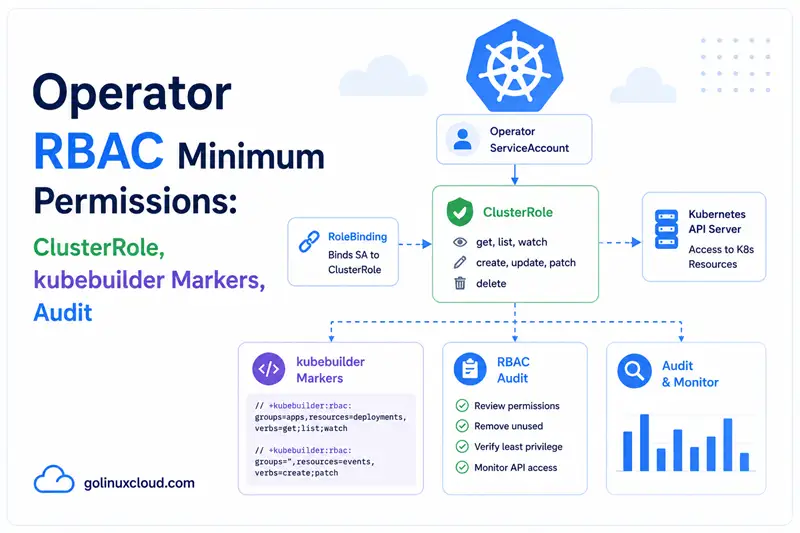
The operator's ServiceAccount is the single most powerful identity
in the cluster after cluster-admin. Every reconcile API call uses
it. Get the RBAC wrong in one direction — too few permissions — and
your operator silently fails certain operations (status updates,
finalizer removal). Get it wrong in the other direction — too many
permissions — and a single CVE in your operator binary turns into
a cluster-takeover. This article is the practical guide to getting
it exactly right.
We'll cover the +kubebuilder:rbac marker system, the must-have
permissions for /status and /finalizers subresources, the lease
permissions for leader election, when to choose Role over
ClusterRole, and how to audit a running operator.
TL;DR — operator RBAC in 60 seconds
Every reconciler should carry markers like this, listing exactly the API calls it makes:
// +kubebuilder:rbac:groups=cache.example.com,resources=memcacheds,verbs=get;list;watch;create;update;patch;delete
// +kubebuilder:rbac:groups=cache.example.com,resources=memcacheds/status,verbs=get;update;patch
// +kubebuilder:rbac:groups=cache.example.com,resources=memcacheds/finalizers,verbs=update
// +kubebuilder:rbac:groups=apps,resources=deployments,verbs=get;list;watch;create;update;patch;delete
// +kubebuilder:rbac:groups=core,resources=services,verbs=get;list;watch;create;update;patch;delete
// +kubebuilder:rbac:groups=core,resources=events,verbs=create;patch
func (r *MemcachedReconciler) Reconcile(ctx context.Context, req ctrl.Request) (ctrl.Result, error) {
    // ...
}
Then:
make manifests   # regenerates config/rbac/role.yaml
make deploy
That covers ~95% of operators. The two markers most often missed are
/status (for r.Status().Update) and /finalizers (for
SetControllerReference to set blockOwnerDeletion: true). The
rest of this article unpacks the markers, when to choose Role over
ClusterRole, how to audit a running operator, and the six pitfalls
that ship to production.
A quick analogy: the apartment building keycard
A keycard system at an apartment building gives residents access:
- Keycard "Apartment 401" — opens only door 401 and shared spaces (laundry, lobby). Most residents have this.
- Keycard "Apartment 401 + storage room" — covers slightly more for residents who pay extra for storage.
- Building manager keycard — opens every door, including maintenance closets, the boiler room, the front desk. Powerful and rare.
The bad practice: hand every resident a building-manager keycard "just in case they need maintenance access". Now any lost keycard becomes a building-wide security incident.
| Keycard | Operator RBAC |
|---|---|
| Apartment-only keycard | Role scoped to one namespace |
| Apartment + storage | Role scoped to one namespace, more verbs |
| Building manager keycard | ClusterRole with * verbs everywhere |
| "Just in case" extras | The wildcard verbs nobody can justify |
| Lost keycard | Compromised operator pod |
| Building-wide incident | Cluster takeover |
The principle: every operator's keycard should open exactly the doors its reconcile loop walks through. No fewer (it'll get stuck), no more (it becomes a blast radius).
Prerequisites
- A scaffolded operator with the default
kubebuilder/operator-sdklayout —config/rbac/and the+kubebuilder:rbacmarkers are where this article lives. - Familiarity with the controller-runtime architecture — the Manager is the process holding the ServiceAccount token, so every reconcile API call goes through this RBAC.
- An understanding of
owner references and GC —
the
/finalizerssubresource RBAC is its enabling permission. - Familiarity with leader election — leases need their own permissions (covered in Step 6).
- Optional: Server-Side Apply —
SSA requires
patchon every resource your operator owns; the same markers cover it without extra rules.
Why operator RBAC matters
Three reasons getting RBAC right is worth the upfront effort, not something to bolt on after the first security review:
1. Two silent failure modes, one loud one
Underprivileged RBAC produces the silent failures.
r.Status().Update returns forbidden and the reconcile retries
forever with the same error — no visible CR transition, no event,
the reconciler just spins. Missing /finalizers is even worse:
SetControllerReference silently drops blockOwnerDeletion, so
Foreground deletion stops blocking on your CR and parent objects
disappear with their children still alive. Overprivileged RBAC
produces the loud failure: every CVE in your operator binary
escalates to a cluster-wide blast radius the moment someone
exfiltrates the ServiceAccount token.
2. The operator's ServiceAccount is the most powerful identity in the cluster after cluster-admin
A typical operator has get;list;watch;create;update;patch;delete
on every kind it manages — Deployments, Services, ConfigMaps,
Secrets, CRDs — across every namespace it watches. That is more
power than most human users get. Treat the
+kubebuilder:rbac markers as a public security contract, not as
a configuration detail.
3. RBAC is the easiest part of the operator to audit at runtime
Audit logs filter on
system:serviceaccount:<ns>:<sa> and produce a complete record of
every API call. kubectl auth can-i --as <sa> answers "did I grant
X?" interactively. Combined, the two tools let you reduce the
generated ClusterRole to exactly the set of calls observed in
production over a month — see auditing a running
operator below. Few other
operator concerns have this level of after-the-fact observability;
use it.
Step 1: How kubebuilder markers work
A marker is a // +kubebuilder:rbac:... comment. The
controller-gen tool (run by make manifests) parses every Go
source file in the project, collects all markers, and synthesises
config/rbac/role.yaml.
The structure:
+kubebuilder:rbac:groups=<api-group>,resources=<resources>,verbs=<verbs>groups— API group, comma-separated;""(empty) forcore/v1resources like Pods and Services.resources— resource kinds plural, comma-separated. Add/statusor/finalizersfor subresources.verbs— semicolon-separated list of verbs:get,list,watch,create,update,patch,delete,deletecollection.
Additional optional fields:
namespace=...— scope the generated rule to a single namespace (rare; the binding usually handles scope).urls=["..."]— for non-resource URLs like/metrics. Rare.
Generation regenerates config/rbac/role.yaml from scratch every
time. Never edit that file by hand — your changes will be lost.
Edit the markers and re-run.
For the full marker reference, the kubebuilder docs are authoritative.
Step 2: The minimum verbs for the CR
For your own CRD, what verbs do you actually need?
| Verb | Used by |
|---|---|
get |
r.Get(ctx, key, &cr) at the start of every reconcile |
list |
r.List(ctx, &crList) if you list CRs |
watch |
The informer (mandatory) |
create |
r.Create(ctx, &cr) — usually not, unless you generate CRs |
update |
r.Update(ctx, &cr) — finalizer add/remove, spec mutations |
delete |
r.Delete(ctx, &cr) — almost never |
For most operators that simply react to CRs (don't create or delete
them), the minimum is get;list;watch;update. Add create only if
you generate CRs from other CRs (composite operators), and delete
only if you cascade-delete CRs (rare; GC usually handles this).
That said, get;list;watch;create;update;patch;delete is the safe
default that kubebuilder scaffolds. Tighten later if security
review demands it.
Step 3: /status and /finalizers subresources
These two subresources are the most-missed RBAC entries:
/status — for r.Status().Update
If your reconciler ever calls:
if err := r.Status().Update(ctx, &mem); err != nil {
    return ctrl.Result{}, err
}
…you need the /status permission:
// +kubebuilder:rbac:groups=cache.example.com,resources=memcacheds/status,verbs=get;update;patchWithout it, the status update fails with memcacheds.cache.example.com "x" is forbidden. Every operator that surfaces state on
.status (which is every operator following best practice) needs
this marker.
For the writer-side pattern — equality.Semantic.DeepEqual guard,
ObservedGeneration, the four KEP-1623 condition types — see
status subresource and Conditions.
/finalizers — for blockOwnerDeletion and finalizer edits
If your reconciler:
- Calls
controllerutil.AddFinalizer(...)orcontrollerutil.RemoveFinalizer(...)— see finalizers in Kubernetes for the full lifecycle. - Uses
SetControllerReference(which setsblockOwnerDeletion: true) — see owner references and GC.
…you need /finalizers:
// +kubebuilder:rbac:groups=cache.example.com,resources=memcacheds/finalizers,verbs=updateWithout it, two things break:
- Adding/removing finalizers fails with
forbidden. SetControllerReferencesilently dropsblockOwnerDeletion, so Foreground deletion doesn't block on your CR.
The second failure is silent — the operator looks fine, garbage
collection looks fine, but the GC behaviour subtly breaks. This is
why missing /finalizers is the most insidious RBAC bug.
For the GC interaction, see owner references and GC.
Step 4: Owned resources
For every resource your operator creates (Deployments, Services,
ConfigMaps, etc.), add the same get;list;watch;create;update;patch;delete:
// +kubebuilder:rbac:groups=apps,resources=deployments,verbs=get;list;watch;create;update;patch;delete
// +kubebuilder:rbac:groups=core,resources=services,verbs=get;list;watch;create;update;patch;delete
// +kubebuilder:rbac:groups=core,resources=configmaps,verbs=get;list;watch;create;update;patch;delete
watch is necessary because Owns(&Deployment{})
sets up an informer.
For the Deployment's /status (if you read deploy status to compute
your CR's status), you only need get:
// +kubebuilder:rbac:groups=apps,resources=deployments/status,verbs=getget not get;update — your operator should never write to other
controllers' status fields. That's their responsibility.
Step 5: Events
Most operators emit Kubernetes Events for visibility:
r.Recorder.Event(&mem, corev1.EventTypeNormal, "Reconciled", "All good")This requires:
// +kubebuilder:rbac:groups=core,resources=events,verbs=create;patchcreate for new events; patch for the event recorder's
de-duplication (it patches an existing event to bump its count
instead of creating duplicates).
Kubebuilder scaffolds this marker on the default reconciler. If you disabled the event recorder you can remove it.
The metrics endpoint's RBAC (kube-rbac-proxy)
If you ship Prometheus metrics
behind a kube-rbac-proxy sidecar (the kubebuilder default), you
need a second RBAC surface — the one Prometheus uses to
scrape your operator. The proxy authenticates incoming scrape
requests with TokenReview against the API server, and the
scraping ServiceAccount needs:
apiVersion: rbac.authorization.k8s.io/v1
kind: ClusterRole
metadata:
  name: metrics-reader
rules:
- nonResourceURLs: ["/metrics"]
  verbs: ["get"]
The Prometheus ServiceAccount is then bound to this ClusterRole.
This is the only common operator scenario where you need
nonResourceURLs — the rest of the markers in this article are
all resource-scoped.
Step 6: Leader election permissions
Leader election uses Leases (coordination.k8s.io/v1) in the
operator's namespace. Kubebuilder scaffolds a separate
leader_election_role.yaml:
apiVersion: rbac.authorization.k8s.io/v1
kind: Role
metadata:
  name: leader-election-role
rules:
- apiGroups: ["coordination.k8s.io"]
  resources: ["leases"]
  verbs: ["get","list","watch","create","update","patch","delete"]
- apiGroups: [""]
  resources: ["configmaps"]
  verbs: ["get","list","watch","create","update","patch","delete"]
- apiGroups: [""]
  resources: ["events"]
  verbs: ["create","patch"]
Three things to notice:
- It's a
Role, notClusterRole. Leases are namespace-scoped; the lease is in the operator's own namespace. - It includes
configmapsfor legacy compatibility. The default lock backend isleases, but if you ever switch toconfigmaps, the permission is already there. - It's a separate Role from the main
ClusterRole. That makes it easy to revoke leader election permissions independently — e.g. when running a single-replica test deployment without leader election.
For the leader election machinery, see operator leader election.
Step 7: Role vs ClusterRole
| Choice | When |
|---|---|
| Role + RoleBinding | The operator works in one namespace and never touches anything outside |
| ClusterRole + RoleBinding | The operator can manage resources in many namespaces but only those granted via the binding |
| ClusterRole + ClusterRoleBinding | The operator manages cluster-scoped resources or works cluster-wide |
The most flexible pattern is ClusterRole + RoleBinding per managed namespace:
# ClusterRole - the catalog of permissions
apiVersion: rbac.authorization.k8s.io/v1
kind: ClusterRole
metadata: { name: memcached-operator }
rules: [...]
---
# RoleBinding - grant only in "team-a" namespace
apiVersion: rbac.authorization.k8s.io/v1
kind: RoleBinding
metadata: { name: memcached-operator, namespace: team-a }
roleRef: { kind: ClusterRole, name: memcached-operator, apiGroup: rbac.authorization.k8s.io }
subjects: [{ kind: ServiceAccount, name: memcached-operator-controller-manager, namespace: memcached-operator-system }]
Adding a new namespace = a new RoleBinding. No edits to the ClusterRole. Clean multi-tenancy.
For more on this pattern see operator multi-tenancy patterns.
Step 8: The generated ClusterRole YAML
After make manifests, config/rbac/role.yaml should look
something like:
apiVersion: rbac.authorization.k8s.io/v1
kind: ClusterRole
metadata:
  name: manager-role
rules:
- apiGroups: ["cache.example.com"]
  resources: ["memcacheds"]
  verbs: ["get","list","watch","create","update","patch","delete"]
- apiGroups: ["cache.example.com"]
  resources: ["memcacheds/finalizers"]
  verbs: ["update"]
- apiGroups: ["cache.example.com"]
  resources: ["memcacheds/status"]
  verbs: ["get","patch","update"]
- apiGroups: ["apps"]
  resources: ["deployments"]
  verbs: ["get","list","watch","create","update","patch","delete"]
- apiGroups: [""]
  resources: ["services","configmaps"]
  verbs: ["get","list","watch","create","update","patch","delete"]
- apiGroups: [""]
  resources: ["events"]
  verbs: ["create","patch"]
Review-worthy questions for every rule:
- Is the API group correct? (
""for core,"apps"for Deployments, etc.) - Are the verbs the minimum the operator actually uses?
- Does the same kind appear in both this ClusterRole and the leader-election Role? If yes, that's intentional (operator both reads its own ServiceAccount-namespace and the namespaces it manages).
If a rule looks too broad (e.g. verbs: ["*"] or resources: ["*"])
and you can't justify it, narrow it. Then run a build-and-deploy
cycle in dev and watch for forbidden errors. Iterate until tests
pass with the minimum surface.
Step 9: Auditing a running operator
Two reliable techniques.
kubectl auth can-i
Interactive permission check:
kubectl auth can-i list deployments \
  --as system:serviceaccount:memcached-operator-system:memcached-operator-controller-manager \
  -n team-a
# yes / no
--as impersonates the ServiceAccount (your account needs
impersonation rights). For each rule in your ClusterRole, do a
can-i check to confirm the binding is in place.
Audit logs
If audit logging is enabled on the API server, every call by the operator's ServiceAccount user appears:
user:
  username: system:serviceaccount:memcached-operator-system:memcached-operator-controller-manager
verb: update
objectRef: { resource: memcacheds, subresource: status, ... }
Aggregate these to find what your operator actually does in production — often you'll discover you granted permissions you don't use:
Drop duplicate adjacent lines with sort -u or pipe through uniq; see the sort command for stable ordering before deduplication.
# Pseudo-aggregation
grep 'system:serviceaccount:memcached-operator-system' audit.log |
  jq '.verb + " " + .objectRef.resource' | sort -u
That set is what your operator needs. Anything extra in your ClusterRole is dead permission.
Step 10: A complete example for a typical operator
// MemcachedReconciler reconciles a Memcached object.
// +kubebuilder:rbac:groups=cache.example.com,resources=memcacheds,verbs=get;list;watch;update
// +kubebuilder:rbac:groups=cache.example.com,resources=memcacheds/status,verbs=get;update;patch
// +kubebuilder:rbac:groups=cache.example.com,resources=memcacheds/finalizers,verbs=update
// +kubebuilder:rbac:groups=apps,resources=deployments,verbs=get;list;watch;create;update;patch;delete
// +kubebuilder:rbac:groups=apps,resources=deployments/status,verbs=get
// +kubebuilder:rbac:groups="",resources=services,verbs=get;list;watch;create;update;patch;delete
// +kubebuilder:rbac:groups="",resources=configmaps,verbs=get;list;watch;create;update;patch;delete
// +kubebuilder:rbac:groups="",resources=secrets,verbs=get;list;watch
// +kubebuilder:rbac:groups="",resources=events,verbs=create;patch
type MemcachedReconciler struct {
    client.Client
    Scheme   *runtime.Scheme
    Recorder record.EventRecorder
}
Notes:
- CR:
get;list;watch;updateonly. We don't create or delete CRs. - Deployment: full CRUD because we manage them.
- Deployment status:
getonly — we read it, never write. - Services & ConfigMaps: full CRUD.
- Secrets:
get;list;watchonly — we read mounted secrets but never modify them. - Events:
create;patchfor the event recorder.
That's a tight, defensible RBAC surface. Run kubectl auth can-i
against each rule in production to verify.
Common pitfalls
1. Missing /finalizers permission
SetControllerReference silently drops blockOwnerDeletion. GC
foreground deletion doesn't block. Subtle, eventually surfaces as
deleted resources reappearing. Fix: add the marker for every CRD
kind your operator reconciles.
2. Missing /status permission
r.Status().Update fails with forbidden. Reconcile keeps retrying
the same error forever. Fix: add the /status marker; restart the
operator (RBAC reload is via Manager restart).
3. Granting verbs: ["*"]
Every CVE in your operator binary becomes a cluster takeover. Audit
caught it. Fix: list each verb the operator uses explicitly. If you
need a complete set, list all of them — never *.
4. Forgetting core/events
Event recorder fails silently. No user-visible events on the CR. Fix: add the events marker.
5. ClusterRoleBinding to system:masters
The operator becomes a cluster admin. Anyone with API access to the operator's ServiceAccount token has root on the cluster. Fix: never bind to system:masters; use the specific ClusterRole.
Pitfall cheat sheet
| Symptom | Root cause | Fix |
|---|---|---|
Garbage-collected children reappear; kubectl delete cr doesn't block |
Pitfall 1 — missing <crd>/finalizers marker; SetControllerReference silently dropped blockOwnerDeletion |
Add +kubebuilder:rbac:groups=...,resources=<plural>/finalizers,verbs=update and redeploy |
r.Status().Update fails with <resource> "x" is forbidden, reconciler loops on the same error |
Pitfall 2 — missing <crd>/status marker |
Add the /status marker; restart the operator pod (RBAC refresh requires Manager restart) |
Audit report flags the operator as */*/* privileged |
Pitfall 3 — verbs: ["*"] or resources: ["*"] was left in a marker |
List every verb explicitly; even an exhaustive list is safer than a wildcard |
| Events appear in operator logs but not on the CR | Pitfall 4 — missing core/events marker; recorder silently drops events |
Add +kubebuilder:rbac:groups=core,resources=events,verbs=create;patch |
Operator behaves as cluster-admin from one ServiceAccount token |
Pitfall 5 — ClusterRoleBinding pointed at cluster-admin or system:masters |
Bind to the specific scaffolded ClusterRole; never to system:masters |
Prometheus scrape returns 403 forbidden against the operator's metrics endpoint |
Missing metrics-reader ClusterRole bound to the Prometheus ServiceAccount |
Apply the nonResourceURLs: ["/metrics"] ClusterRole from the metrics-RBAC subsection above |
Leader election fails immediately with leases.coordination.k8s.io ... is forbidden |
The leader_election_role.yaml Role was not applied (or its RoleBinding is missing) |
Apply both; verify with kubectl auth can-i create leases.coordination.k8s.io --as system:serviceaccount:<ns>:<sa> |
Frequently Asked Questions
1. What is the principle of least privilege for operators?
system:masters or */*/* - that converts the operator into a cluster admin.2. How does kubebuilder generate RBAC?
+kubebuilder:rbac:groups=... resources=... verbs=... comments above your reconciler and generates a ClusterRole YAML at config/rbac/role.yaml. The make manifests target runs this generation. Edit the comments, run make manifests, commit both the Go source and the generated YAML.3. What is the /status subresource and why do I need RBAC for it?
.../my-cr/status) protected by its own RBAC: verbs: [get,update,patch] on <plural>/status. Without this permission, r.Status().Update(ctx, cr) fails with "forbidden". Always grant it for the CRD types your operator updates status on. The marker is +kubebuilder:rbac:groups=...,resources=memcacheds/status,verbs=get;update;patch.4. What is /finalizers RBAC and when is it needed?
/finalizers subresource is required for SetControllerReference to set blockOwnerDeletion: true, and for any code that adds/removes finalizers on the CR. The marker is +kubebuilder:rbac:groups=...,resources=memcacheds/finalizers,verbs=update. Without this, owner references silently lose blockOwnerDeletion and Foreground deletion stops blocking on your CR.5. When should I use Role vs ClusterRole?
6. How do I audit what permissions my operator uses?
system:serviceaccount:memcached-operator-system:controller-manager) - every call appears. (2) Use kubectl auth can-i --as system:serviceaccount:<ns>:<sa> to interactively test permissions. The audit log gives ground truth; can-i is great for "did I grant X?".7. What permissions does leader election need?
apiGroups: [coordination.k8s.io], resources: [leases], verbs: [get,list,watch,create,update,patch,delete]. kubebuilder scaffolds a separate leader_election_role.yaml for this in config/rbac/. Do not combine it with the main ClusterRole; keep them separate so you can revoke leader election independently if needed.8. Can I use aggregated ClusterRoles?
aggregationRule. The cluster automatically merges any ClusterRole carrying matching labels. Useful for multi-operator platforms; overkill for single operators.9. Does Server-Side Apply require any extra RBAC permissions?
patch verb that r.Patch(...) already needs - the kubebuilder default verbs: [get;list;watch;create;update;patch;delete] covers both classic patches and SSA. The one thing to double-check when migrating an operator from r.Update to client.Apply is that the markers really do include patch (older scaffolds sometimes shipped without it). For the writer-side patterns, see Server-Side Apply in operators.10. How do I do per-tenant RBAC for the hybrid multi-tenant pattern?
Summary
RBAC is the operator's keycard. Use the +kubebuilder:rbac markers
to declare every API call your reconciler makes, regenerate the
ClusterRole with make manifests, and grant nothing more. The two
permissions most often forgotten are /status (for
r.Status().Update) and /finalizers (for
blockOwnerDeletion and finalizer add/remove). Always grant both
for every CRD your operator owns.
Verify your role in production with kubectl auth can-i and audit
logs. If a rule is never used in audit logs over a month of
operation, narrow it. The smaller the surface, the smaller the
blast radius if your operator binary is ever compromised.
Further reading
the Manager owns the ServiceAccount token; every RBAC decision in
this article filters through it.
the writer-side counterpart to the /status marker in Step 3.
the lifecycle that the /finalizers marker in Step 3 enables.
the blockOwnerDeletion mechanic that depends on /finalizers
RBAC.
no extra RBAC needed; patch covers it, but worth double-checking
the marker.
webhooks are an additional RBAC surface (the webhook serving cert
ServiceAccount).
the lease permissions for leader election (Step 6).
the nonResourceURLs: ["/metrics"] ClusterRole used by the
Prometheus scraper, alongside kube-rbac-proxy.
after RBAC: non-root, read-only FS, NetworkPolicy, digest pinning, webhook TLS hygiene.
the shared vs hybrid vs operator-per-tenant decisions that change
the RBAC story.
the full series.
- External: Kubernetes RBAC reference, kubebuilder RBAC marker reference, and API auth review docs.
