
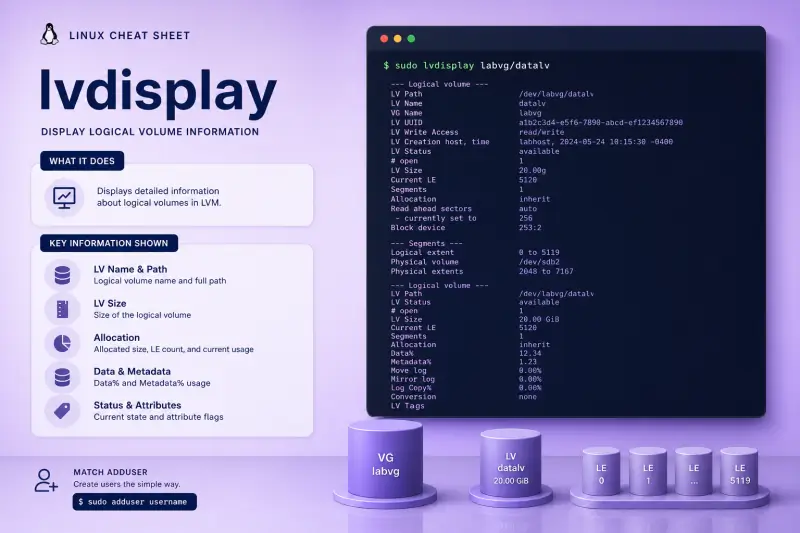
lvdisplay — quick reference
Display modes
| When to use | Command |
|---|---|
| All LVs on the system | sudo lvdisplay |
| One LV by VG/LV name | sudo lvdisplay myvg/mylv |
| Every LV in a volume group | sudo lvdisplay myvg |
| Colon-separated (script parsing) | sudo lvdisplay -c myvg/mylv |
| Column view (like lvs) | sudo lvdisplay -C myvg |
| Extent map to physical volumes | sudo lvdisplay -m myvg/mylv |
| Include internal component LVs | sudo lvdisplay -a myvg |
Related tools
| When to use | Command |
|---|---|
| One-line scan with active/inactive | sudo lvscan |
| Custom report columns | sudo lvs -o +devices |
| Change LV attributes | sudo lvchange ... |
Help and version
| When to use | Command |
|---|---|
| Show built-in usage | lvdisplay --help |
| Show LVM version | lvm version |
lvdisplay — command syntax
Synopsis from lvdisplay --help on Ubuntu 25.04 (LVM 2.03.27):
lvdisplay
	[ -a|--all ]
	[ -c|--colon ]
	[ -C|--columns ]
	[ -m|--maps ]
	[ VG|LV|Tag ... ]
lvdisplay reads LVM metadata only — it does not mount filesystems. Needs sudo on shared systems.
lvdisplay — command examples
Essential Display one logical volume
Replace labvg/datalv with your VG/LV.
sudo lvdisplay labvg/datalvSample output (trimmed):
--- Logical volume ---
  LV Path                /dev/labvg/datalv
  LV Name                datalv
  VG Name                labvg
  LV UUID                bZw1J7-YTHK-vxhy-hO4j-K0L2-yDR1-WkCUFZ
  LV Write Access        read/write
  LV Status              available
  # open                 0
  LV Size                64.00 MiB
  Current LE             16
  Segments               1
  Allocation             inherit
  Block device           252:1
# open counts processes using the device — should be 0 before lvremove.
Essential When to use lvs instead
For monitoring, lvs is shorter:
sudo lvs -o lv_name,vg_name,lv_size,lv_attr,devices labvgUse lvdisplay when you need UUID, LE count, readahead, or snapshot relationships in one report.
Common Snapshot origin shows in lvdisplay
Origin LVs list active snapshots under LV snapshot status.
sudo lvcreate -L 48M -n origin labvg
sudo lvcreate -s -L 12M -n snap labvg/origin
sudo lvdisplay labvg/origin | grep -A2 'snapshot status'
Sample output:
LV snapshot status     source of
                         snap [active]
The snapshot LV has its own lvdisplay block with LV snapshot status active origin.
Common Machine-readable colon format with -c
-c emits one colon-separated record per LV — useful in legacy scripts.
sudo lvdisplay -c labvg/datalvSample output:
/dev/labvg/datalv:labvg:3:1:-1:0:131072:16:-1:0:-1:252:1Field order is documented in lvdisplay(8) — prefer lvs --reportformat json for new tooling.
Common Column output with -C
-C matches the familiar lvs table layout.
sudo lvdisplay -C labvgSample output:
LV     VG    Attr       LSize  Pool Origin Data%
  datalv labvg -wi-a----- 64.00m
  snaplv labvg swi-a-s--- 16.00m      datalv 0.00
Handy when you want lvs-style output from lvdisplay.
Advanced Show extent mapping with -m
-m lists which physical extents on which PV back each logical extent segment.
sudo lvdisplay -m labvg/datalvSample output (trimmed):
--- Logical volume ---
  LV Path                /dev/labvg/datalv
  ...
  --- Segments ---
  Logical extent 0 to 15:
    Type                linear
    Physical volume     /dev/loop24
    Physical extents    0 - 15
Use this when diagnosing split segments or uneven PV usage.
Advanced List internal LVs with -a
RAID, mirror, and thin pools expose component LVs. -a includes them in the report.
sudo lvdisplay -a labvg 2>/dev/null | grep 'LV Name' | head -10On a linear-only lab VG you see the same names as without -a.
lvdisplay — when to use / when not
| Use lvdisplay when | Use something else when |
|---|---|
|
lvdisplay vs lvs
| lvdisplay | lvs | |
|---|---|---|
| Detail | Full multi-line block | One line per LV |
| Maps | -m |
-o seg_pe_ranges |
| Scripts | -c (legacy) |
-o, JSON reports |
Related commands
lvdisplay — interview corner
Which lvdisplay fields matter before lvremove?
Check LV Status, # open, and LV snapshot status. Non-zero # open means something still uses the device.
A strong answer is:
"I look at # open and LV Status — if open is zero and it's not a needed snapshot origin, it's safer to lvremove."
What are Current LE and Segments?
LE is logical extents allocated to the LV. Segments counts how many disjoint regions (for example after pvmove or mirrors) compose the LV.
A strong answer is:
"Current LE is extent count; Segments tells me if the LV is split across regions or PVs."
Why use lvdisplay -c?
Legacy scripts parse the colon-separated line. Modern automation should prefer lvs --reportformat json.
A strong answer is:
"-c is for legacy parsers — I'd use lvs JSON output for new automation."
When do you use lvdisplay -m?
When you need to see which PV and physical extents back each logical extent — capacity planning or after pvmove.
A strong answer is:
"lvdisplay -m when I need the PE-to-PV map for balance or migration troubleshooting."
Troubleshooting
| Symptom | Likely cause | Fix |
|---|---|---|
Failed to find logical volume |
Typo or VG inactive | lvs -a, vgchange -ay |
| Empty output for one LV | Foreign VG | vgimport / vgchange -ay |
Sizes differ from df |
Filesystem smaller than LV | Normal — FS does not fill LV |
-c fields confusing |
Undocumented positions | Use lvs -o or man page field table |
