
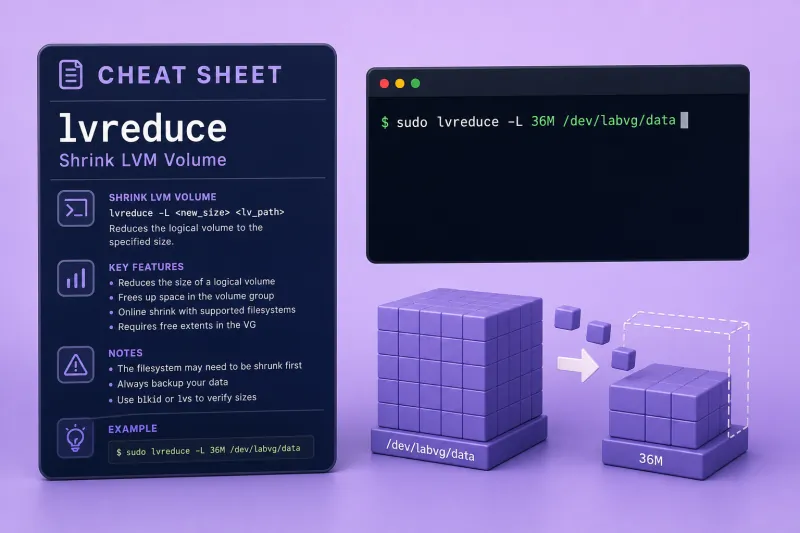
lvreduce — quick reference
Shrink by size
| When to use | Command |
|---|---|
| Set new absolute LV size | sudo lvreduce -L 40M myvg/mylv |
| Shrink by relative amount | sudo lvreduce -L -20M myvg/mylv |
| Shrink by extent count | sudo lvreduce -l -4 myvg/mylv |
| Skip confirmation (scripts/lab) | sudo lvreduce -y -L 40M myvg/mylv |
| Force past warnings (careful) | sudo lvreduce -f -L 40M myvg/mylv |
Filesystem-aware shrink
| When to use | Command |
|---|---|
| Try shrink FS then LV (ext4, when helper works) | sudo lvreduce -r -L 32M myvg/mylv |
Manual ext4 path (recommended when -r fails) |
sudo resize2fs /dev/myvg/mylv SIZE then sudo lvreduce -L SIZE myvg/mylv |
| Skip fsck before reduce | sudo lvreduce -n -L 40M myvg/mylv |
Preparation
| When to use | Command |
|---|---|
| Unmount data LV | sudo umount /mount/point |
| Check ext4 before shrink | sudo e2fsck -f /dev/myvg/mylv |
| Shrink ext4 to specific size | sudo resize2fs /dev/myvg/mylv 32M |
| Verify free space in VG after shrink | sudo vgs myvg |
Help and version
| When to use | Command |
|---|---|
| Show built-in usage | lvreduce --help |
| Same operation via lvresize | sudo lvresize -L 40M myvg/mylv |
lvreduce — command syntax
Synopsis from lvreduce --help on Ubuntu 25.04 (LVM 2.03.27):
lvreduce -L|--size [-]Size[m|UNIT] LV
	[ -l|--extents [-]Number[PERCENT] ]
	[ -f|--force ]
	[ -r|--resizefs ]
	[ -n|--nofsck ]
	[ COMMON_OPTIONS ]
lvreduce is equivalent to lvresize with a smaller target. The removed tail of the LV is discarded — shrink filesystem before the LV on ext4. Needs sudo. Do not shrink ubuntu-lv or other root volumes on a live system without rescue-mode planning.
lvreduce — command examples
Essential Build a practice LV with ext4 for shrink tests
Practice on a disposable volume group such as labvg — never shrink a root logical volume while the system is running from it.
fallocate -l 256M /tmp/lvm-lab-a.img
LOOP_A=$(sudo losetup -fP --show /tmp/lvm-lab-a.img)
sudo pvcreate $LOOP_A && sudo vgcreate labvg $LOOP_A
sudo lvcreate -L 64M -n newdata labvg
sudo mkfs.ext4 -F /dev/labvg/newdata
Sample output:
Logical volume "newdata" created.
Writing superblocks and filesystem accounting information: done
Essential Proper ext4 shrink — umount, e2fsck, resize2fs, lvreduce
Red Hat and Ubuntu docs agree: filesystem first, then LV.
sudo mkdir -p /tmp/lvm-lab-mnt
sudo mount /dev/labvg/newdata /tmp/lvm-lab-mnt
sudo umount /tmp/lvm-lab-mnt
sudo e2fsck -f -y /dev/labvg/newdata
sudo resize2fs /dev/labvg/newdata 32M
sudo lvreduce -y -L 36M /dev/labvg/newdata
sudo lvs labvg/newdata
Sample output:
Resizing the filesystem on /dev/labvg/newdata to 8192 (4k) blocks.
  Size of logical volume labvg/newdata changed from 64.00 MiB to 36.00 MiB.
  Logical volume labvg/newdata successfully resized.
  LV      LSize
  newdata 36.00m
LV size is slightly larger than the filesystem (36 MiB vs 32 MiB) — leave a small gap for metadata and alignment.
Essential Lab cleanup
sudo lvremove -f labvg
sudo vgremove -f labvg
sudo pvremove -f $LOOP_A
sudo losetup -d $LOOP_A
rm -f /tmp/lvm-lab-a.img /tmp/lvm-lab-*.img
Common Shrink by relative amount with -L -SIZE
A leading minus on -L subtracts from the current LV size.
sudo lvcreate -L 48M -n shrinklv labvg
sudo resize2fs /dev/labvg/shrinklv 24M
sudo lvreduce -y -L -12M /dev/labvg/shrinklv
sudo lvs labvg/shrinklv
Sample output:
Size of logical volume labvg/shrinklv changed from 48.00 MiB to 36.00 MiB.
  LV       LSize
  shrinklv 36.00m
Common Shrink by extent count with -l
Extent math follows VG extent size (4 MiB default).
sudo lvcreate -L 32M -n extlv labvg
sudo lvreduce -y -l -2 /dev/labvg/extlv
sudo lvs labvg/extlv
Sample output:
Size of logical volume labvg/extlv changed from 32.00 MiB to 24.00 MiB.
  LV    LSize
  extlv 24.00m
Two extents × 4 MiB = 8 MiB removed.
Advanced When lvreduce -r fails — manual resize2fs path
On some Ubuntu releases, --resizefs calls lvresize_fs_helper and may fail with execvp failed: No such file or directory. Use manual resize2fs followed by lvreduce instead.
sudo lvcreate -L 48M -n fslv labvg
sudo mkfs.ext4 -F /dev/labvg/fslv
sudo lvreduce -y -r -L 32M /dev/labvg/fslv
Sample output:
Failed to reduce file system with lvresize_fs_helper.Manual resize path:
sudo e2fsck -f -y /dev/labvg/fslv
sudo resize2fs /dev/labvg/fslv 28M
sudo lvreduce -y -L 32M /dev/labvg/fslv
Advanced XFS cannot shrink — lvextend only
xfs_growfs) but not shrink. To shrink XFS data you must backup, lvremove, recreate a smaller LV, and restore.Advanced Root LV shrink — offline workflow
Shrinking / on an LVM root volume must be done from rescue or maintenance mode so root is not mounted read-write:
- Boot rescue image or maintenance mode
e2fsck -fandresize2fsto target filesystem sizelvreduce -Lto match (slightly larger than filesystem)- Reboot and verify
df/lvs
See resize root LVM partition for a full walkthrough.
lvreduce — when to use / when not
| Use lvreduce when | Use something else when |
|---|---|
|
lvreduce vs lvremove
| lvreduce | lvremove | |
|---|---|---|
| LV record | Kept, smaller | Deleted |
| Use case | Reclaim partial space | Decommission volume |
Related commands
| Command | One line |
|---|---|
| lvreduce | Shrink logical volumes (this page) |
| resize2fs | Shrink or grow ext2/3/4 filesystem |
lvreduce — interview corner
What is the correct shrink order for ext4?
Unmount → e2fsck → resize2fs to target size → lvreduce to a size ≥ filesystem size.
A strong answer is:
"Filesystem first on ext4 — umount, e2fsck, resize2fs, then lvreduce slightly larger than the FS."
What does lvreduce -L -20M mean?
Shrink the current LV size by 20 MiB (relative), not set absolute size to -20M.
A strong answer is:
"Minus prefix on -L subtracts from current LV size — different from -L 20M which sets absolute size."
What happens to data in removed extents?
Blocks beyond the new LV end are discarded — unrecoverable without backups.
A strong answer is:
"Shrinking drops the tail of the LV — anything only in that region is gone without a backup."
When does -r / --resizefs help?
When lvresize_fs_helper is available, LVM can shrink ext4 before reducing the LV. If -r fails, use manual resize2fs followed by lvreduce.
A strong answer is:
"-r automates FS shrink when the helper exists — I still verify with resize2fs manually if -r fails."
Can you shrink root LVM online?
Not safely while / is mounted read-write. Use rescue mode or an offline maintenance window — same filesystem-then-LV order.
A strong answer is:
"Root shrink needs offline/rescue — same FS-then-LV steps, never lvreduce ubuntu-lv on a live root without a plan."
Troubleshooting
| Symptom | Likely cause | Fix |
|---|---|---|
filesystem size ... larger than requested |
FS bigger than -L target |
resize2fs smaller first |
lvresize_fs_helper failed |
Missing helper on host | Manual resize2fs + lvreduce |
Logical volume is used |
Mounted | umount |
| Shrunk LV corrupts FS | LV smaller than FS | Restore backup; FS must be ≤ LV |
| XFS shrink attempt | XFS no shrink | Backup, lvremove, smaller lvcreate |
