
Steps that install or update RPM packages assume dnf command on RHEL-family systems.
stress — quick reference
Install and help
stress is a separate package on Ubuntu — install it before using the commands below.
| When to use | Command |
|---|---|
| Install on Ubuntu or Debian | sudo apt install stress |
| Show built-in usage | stress --help |
| Same — short help flag | stress -? |
| Show package version | stress --version |
Output control
| When to use | Command |
|---|---|
| Print extra dispatch and worker messages | stress --verbose --cpu 1 --timeout 2 |
| Same — short flag | stress -v --cpu 1 --timeout 2 |
| Suppress informational messages | stress --quiet --cpu 1 --timeout 2 |
| Same — short flag | stress -q --cpu 1 --timeout 2 |
| Show what would run without starting workers | stress --dry-run --cpu 2 --timeout 5 |
| Same — short flag | stress -n --cpu 2 --timeout 5 |
Timing
| When to use | Command |
|---|---|
Stop after N seconds (suffix s, m, h, d, y) |
stress --cpu 2 --timeout 5 |
| Same — short flag | stress -c 2 -t 5 |
| Wait N microseconds before workers start | stress --backoff 1000 --cpu 1 --timeout 3 |
CPU load
| When to use | Command |
|---|---|
Spawn N workers spinning on sqrt() |
stress --cpu 4 |
| Same — short flag | stress -c 4 |
I/O load
| When to use | Command |
|---|---|
Spawn N workers calling sync() |
stress --io 2 |
| Same — short flag | stress -i 2 |
Virtual memory load
| When to use | Command |
|---|---|
| Spawn N workers malloc/free looping | stress --vm 2 |
| Same — short flag | stress -m 2 |
| Bytes per VM worker (default 256M; suffix B/K/M/G) | stress --vm 1 --vm-bytes 128M --timeout 5 |
| Touch one byte every B bytes in the allocation | stress --vm 1 --vm-bytes 64M --vm-stride 8192 --timeout 5 |
Sleep N seconds before free (0 = infinite hang) |
stress --vm 1 --vm-bytes 32M --vm-hang 2 --timeout 5 |
| Redirty memory instead of free/realloc | stress --vm 1 --vm-bytes 32M --vm-keep --timeout 5 |
Disk write load
| When to use | Command |
|---|---|
| Spawn N workers writing/unlinking temp files | stress --hdd 1 |
| Same — short flag | stress -d 1 |
| Bytes written per HDD worker (default 1GB) | stress --hdd 1 --hdd-bytes 50M --timeout 5 |
stress — command syntax
Synopsis from stress --help on Ubuntu 25.04 (stress 1.0.7):
stress [OPTION [ARG]] ...stress only creates temporary worker processes — it does not edit system config files. Use short timeouts on shared lab hosts; combine workers only when you have headroom.
stress — command examples
Essential Install stress on Ubuntu
The stress binary is not part of the base Ubuntu image — install the package first.
Run:
sudo apt install stressSample output (version line varies):
Reading package lists...
Building dependency tree...
The following NEW packages will be installed:
  stress
...
Setting up stress (1.0.7-1) ...
Confirm the build:
stress --versionSample output:
stress 1.0.7Essential Short CPU load with --cpu
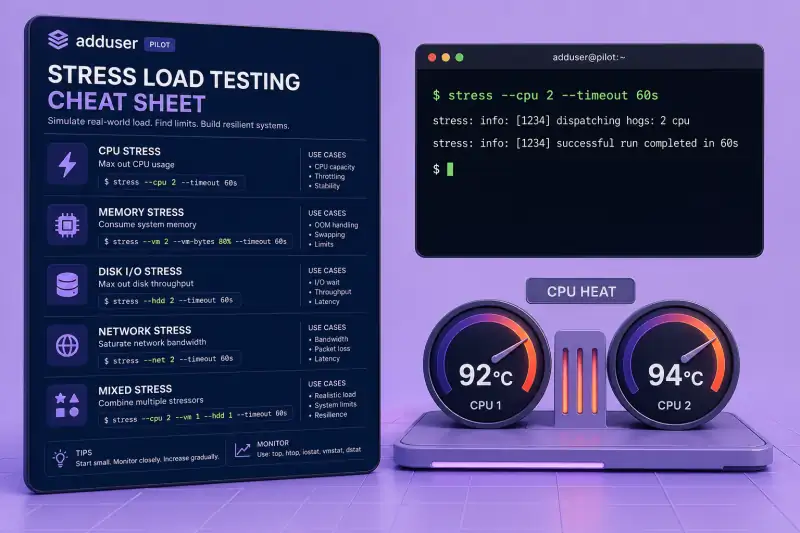
Four sqrt() workers peg CPU until you stop the process or pass --timeout.
Run a bounded test:
stress --cpu 2 --timeout 3Sample output:
stress: info: [42659] dispatching hogs: 2 cpu, 0 io, 0 vm, 0 hdd
stress: info: [42659] successful run completed in 2s
Watch load in another terminal with top or htop while the run is active — see the top command.
Essential Limit run time with --timeout
Always set a timeout on laptops, VMs, and CI runners so a forgotten stress job does not run forever.
Run:
stress -c 4 -t 5Sample output:
stress: info: [43102] dispatching hogs: 4 cpu, 0 io, 0 vm, 0 hdd
stress: info: [43102] successful run completed in 5s
Suffixes work too: --timeout 10s, 5m, etc. (see stress --help).
Common Memory pressure with --vm and --vm-bytes
VM workers allocate and touch memory. Lower --vm-bytes on small VMs to avoid OOM kills.
Run:
stress --vm 1 --vm-bytes 64M --timeout 3Sample output:
stress: info: [42772] dispatching hogs: 0 cpu, 0 io, 1 vm, 0 hdd
stress: info: [42772] successful run completed in 2s
Check memory while it runs:
free -hUse --vm-stride, --vm-hang, and --vm-keep when you need finer control over allocation patterns.
Common Disk sync I/O with --io
I/O workers hammer sync() — useful for exercising I/O wait without filling disk.
Run:
stress --io 1 --timeout 3Sample output:
stress: info: [42691] dispatching hogs: 0 cpu, 1 io, 0 vm, 0 hdd
stress: info: [42691] successful run completed in 2s
Pair with iostat in a second terminal to watch device utilisation.
Common Disk write load with --hdd and --hdd-bytes
HDD workers create, write, and unlink temporary files. Keep --hdd-bytes modest on systems with little free space.
Run:
stress --hdd 1 --hdd-bytes 10M --timeout 3Sample output:
stress: info: [42976] dispatching hogs: 0 cpu, 0 io, 0 vm, 1 hdd
stress: info: [42976] successful run completed in 2s
Default per-worker size is 1GB — always set --hdd-bytes on small disks.
Advanced Combine CPU, memory, and I/O workers
stress accepts multiple worker types in one invocation — the help text shows the canonical pattern.
Run:
stress --cpu 1 --vm 1 --vm-bytes 32M --io 1 --timeout 3Sample output:
stress: info: [43089] dispatching hogs: 1 cpu, 1 io, 1 vm, 0 hdd
stress: info: [43089] successful run completed in 3s
Start with low counts and short timeouts; scale up only on dedicated test hardware.
Advanced Preview a run with --dry-run and --verbose
Use --dry-run (-n) to validate flags before loading production. --verbose (-v) prints worker fork details.
Run:
stress -n -v --cpu 2 --timeout 5Sample output:
stress: info: [43210] dispatching hogs: 2 cpu, 0 io, 0 vm, 0 hdd
stress: dbug: [43210] using backoff sleep of 3000us
stress: dbug: [43210] setting timeout to 5s
stress: info: [43210] successful run completed in 0s
No workers actually spin in dry-run mode — the line count confirms dispatch only.
Advanced Quiet mode and --backoff delay
--quiet hides the stress: info: lines — handy in scripts that only care about exit status. --backoff adds a microsecond delay before workers start.
Run:
stress -q --backoff 1000 --cpu 1 --timeout 2; echo exit:$?Sample output:
exit:0Use --backoff when you need a short pause before load spikes monitoring alerts.
stress — when to use / when not
| Use stress when | Use something else when |
|---|---|
|
|
Related commands
Monitoring and measurement tools to run beside stress.
| Command | One line |
|---|---|
| stress | Synthetic CPU/VM/IO/HDD load (this page) |
| vmstat | CPU, memory, and I/O summaries |
| htop | Interactive process monitor |
Browse the full index in our Linux commands reference.
stress — interview corner
What is the stress command used for?
stress is a small load generator. It forks worker processes that busy-loop on sqrt() (CPU), malloc/free (virtual memory), sync() (I/O), or write/unlink temp files (HDD). Admins use it to verify monitoring, cooling, OOM behaviour, and scheduler settings under known pressure.
It is not a benchmark suite — it does not score performance. It answers: does the system stay healthy when loaded?
A strong answer is:
"stress spawns configurable workers for CPU, VM, IO, and HDD load with an optional timeout — I use it in labs to trigger alerts and watch top, vmstat, or iostat, not to measure peak throughput."
How is stress different from fio?
stress is simple and broad — a few integer counts and one duration flag. fio models real disk workloads with job files, queues, engines, and detailed latency histograms.
Reach for stress when you need fast CPU or mixed hog processes. Reach for fio when you need reproducible storage benchmarks.
A strong answer is:
"stress is a quick system-wide load knob; fio is a proper storage benchmark. I use stress for alerting drills and fio when I need IOPS and latency numbers."
Why should you always use --timeout with stress?
Without --timeout, workers run until you kill the parent stress process. On shared hosts that can trip thermal limits, starve real workloads, or trigger OOM kills when --vm allocations are large.
Always bound lab runs:
stress --cpu 2 --timeout 30A strong answer is:
"stress workers run until stopped — I always set --timeout on shared systems and keep --vm-bytes and --hdd-bytes small on VMs."
What does --vm-bytes control?
Each --vm worker allocates about --vm-bytes of virtual memory (default 256M) and touches pages according to --vm-stride. Total pressure scales with worker count × bytes.
Example:
stress --vm 2 --vm-bytes 128M --timeout 10Roughly two 128M allocators — still set a timeout and watch free -h.
A strong answer is:
"--vm-bytes is per VM worker allocation size; default 256M. I multiply by worker count, set a timeout, and watch for OOM on small instances."
Is stress installed by default on Ubuntu?
No. Ubuntu ships the client tools in base images, but stress is a separate package:
sudo apt install stressConfirm with stress --version (1.0.7 on Ubuntu 25.04 in this lab).
A strong answer is:
"Not by default — apt install stress on Debian/Ubuntu, then verify with stress --version before scripting load tests."
Troubleshooting
| Symptom | Likely cause | Fix |
|---|---|---|
stress: command not found |
Package not installed | sudo apt install stress |
| Process killed mid-run | OOM killer under --vm pressure |
Lower --vm-bytes or worker count; add swap only if policy allows |
| Disk fills up | Default --hdd-bytes is 1GB per worker |
Set --hdd-bytes 50M (or smaller) and --timeout |
| No visible load | --dry-run enabled |
Remove -n / --dry-run |
stress: FAIL / worker errors |
Resource limits (ulimit) |
Check ulimit -a; reduce workers |
| Silent script | --quiet hides info lines |
Drop -q while debugging |
