
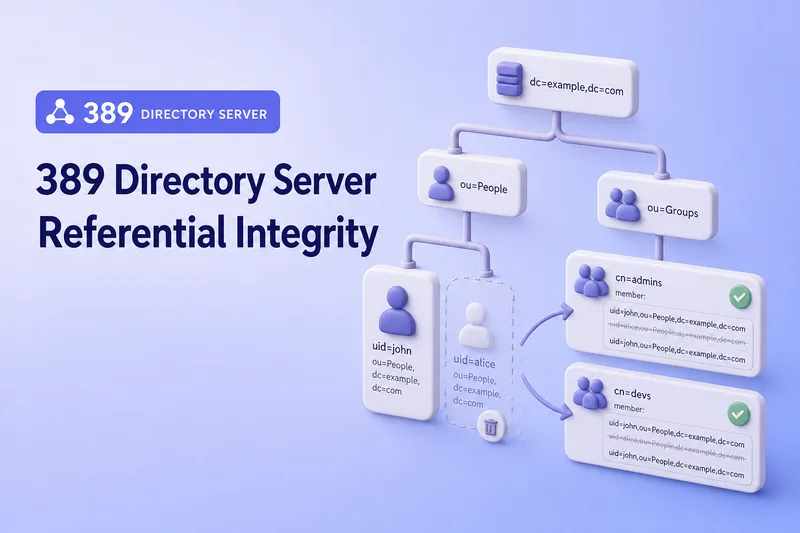
When a user entry is deleted or renamed, static groups and other directory entries can keep the old Distinguished Name in member, uniqueMember, owner, seeAlso, or other DN-valued attributes. Applications then see group memberships and relationships that no longer exist. The Referential Integrity plug-in automates that forward-reference maintenance.
This guide covers the complete DN-reference workflow in 389 Directory Server:
- Removing references after deleting an entry
- Replacing references after renaming or moving an entry
- Default and custom monitored attributes
- Entry, exclusion, and container scopes
- Immediate versus delayed processing
- Required presence and equality indexes
- Replication-topology placement
- Auditing and repairing existing stale references
- Troubleshooting performance and consistency issues
Before you start:
- Install 389 Directory Server — running instance with a suffix (this lab uses
ldap1ondc=example,dc=com) - Manage users and groups —
ou=People,ou=Groups, and static group creation - dsconf commands — online plug-in configuration
memberOf values (memberOf plug-in), automatically assigning users to groups (Auto Membership), general role management (roles vs groups), or complete replication agreement configuration.
Tested on: Rocky Linux 10.2; 389 Directory Server 3.2.0.
The primary lab instance is ldap1 on ldap1.example.com with LDAP port 389. Instance ldap2 on ports 1389 and 1636 is available for multi-instance examples when you need a second host in your own topology.
How the Referential Integrity plug-in works
The plug-in watches configured DN-valued attributes. When a referenced entry is deleted, its DN is removed from every matching attribute on entries inside container scope. When a referenced entry is renamed or moved, the old DN is replaced by the new DN.
Delete workflow:
Delete:
uid=user1,ou=People,dc=example,dc=com
        |
        v
Referential Integrity plug-in searches configured attributes
        |
        v
member: uid=user1,... is removed from matching groups
Rename or move workflow:
Old DN:
uid=user1,ou=People,dc=example,dc=com

New DN:
uid=jdoe,ou=People,dc=example,dc=com
        |
        v
Configured DN references are changed from the old DN to the new DN| Operation | Plug-in action |
|---|---|
| Delete referenced entry | Removes the deleted DN from configured attributes |
| Rename entry | Replaces the old DN with the new DN |
| Move entry | Replaces the old DN with the destination DN |
| Modify unrelated attributes | No DN-reference cleanup required |
The plug-in updates entries that contain references to the affected DN. It does not create group membership, calculate reverse membership, or evaluate dynamic group filters.
Compare Referential Integrity with related plug-ins
| Feature | Purpose |
|---|---|
| Referential Integrity | Removes or updates stale DN references |
| MemberOf | Maintains reverse group membership on member entries |
| Auto Membership | Adds users to groups according to rules |
| Linked Attributes | Maintains a configured reverse attribute pair |
| Attribute Uniqueness | Rejects duplicate attribute values |
Simple contrast:
Deleting a user from the directory:
Referential Integrity removes the user DN from group member attributes.

Removing a user from a group:
MemberOf removes the group DN from the user's memberOf attribute.
Prepare the test directory
The lab tree under dc=example,dc=com uses dedicated entries so delete and rename tests do not disturb course groups such as cn=developers:
dc=example,dc=com
├── ou=People
│   ├── uid=referint-user1
│   └── uid=referint-user2
└── ou=Groups
    └── cn=referint-lab
The transcript below is from my Rocky Linux 10.2 with 389 Directory Server 3.2.0 lab.
Save the following as /tmp/referint-lab.ldif:
dn: uid=referint-user1,ou=people,dc=example,dc=com
objectClass: top
objectClass: person
objectClass: organizationalPerson
objectClass: inetOrgPerson
cn: Referint User1
sn: User1
uid: referint-user1

dn: uid=referint-user2,ou=people,dc=example,dc=com
objectClass: top
objectClass: person
objectClass: organizationalPerson
objectClass: inetOrgPerson
cn: Referint User2
sn: User2
uid: referint-user2

dn: cn=referint-lab,ou=Groups,dc=example,dc=com
objectClass: top
objectClass: groupOfNames
objectClass: groupOfUniqueNames
cn: referint-lab
member: uid=referint-user1,ou=people,dc=example,dc=com
uniqueMember: uid=referint-user1,ou=people,dc=example,dc=com
owner: uid=referint-user1,ou=people,dc=example,dc=com
seeAlso: uid=referint-user1,ou=people,dc=example,dc=com
Add the isolated test users and group:
ldapadd -x -H ldap://127.0.0.1:389 -D "cn=Directory Manager" -y /root/dm.pw -f /tmp/referint-lab.ldifSample output:
adding new entry "uid=referint-user1,ou=people,dc=example,dc=com"

adding new entry "uid=referint-user2,ou=people,dc=example,dc=com"

adding new entry "cn=referint-lab,ou=Groups,dc=example,dc=com"
Confirm the starting references before you enable the plug-in:
ldapsearch -LLL -x -H ldap://127.0.0.1:389 -D "cn=Directory Manager" -y /root/dm.pw -b "cn=referint-lab,ou=Groups,dc=example,dc=com" -s base member uniqueMember owner seeAlsoSample output:
dn: cn=referint-lab,ou=Groups,dc=example,dc=com
member: uid=referint-user1,ou=people,dc=example,dc=com
uniqueMember: uid=referint-user1,ou=people,dc=example,dc=com
owner: uid=referint-user1,ou=people,dc=example,dc=com
seeAlso: uid=referint-user1,ou=people,dc=example,dc=com
All four default attributes point at referint-user1. The later delete test depends on this baseline.
Check the current Referential Integrity configuration
Before enabling the plug-in, review which attributes and branches it currently manages:
dsconf ldap1 plugin referential-integrity showSample output:
dn: cn=referential integrity postoperation,cn=plugins,cn=config
cn: referential integrity postoperation
nsslapd-pluginEnabled: off
nsslapd-pluginInitfunc: referint_postop_init
nsslapd-pluginPath: libreferint-plugin
nsslapd-pluginType: betxnpostoperation
referint-membership-attr: member
referint-membership-attr: uniqueMember
referint-membership-attr: owner
referint-membership-attr: seeAlso
referint-update-delay: 0
On a fresh instance the plug-in is usually disabled even though the default attribute list is already present. The settings to review before you enable it include:
nsslapd-pluginEnablednsslapd-pluginEntryScopensslapd-pluginExcludeEntryScopensslapd-pluginContainerScopereferint-membership-attrreferint-update-delay
If a scope is not configured, that scope setting does not restrict where the plug-in processes entries. Review this carefully on servers containing multiple suffixes or backends.
Enable and configure the Referential Integrity plug-in
Configure the plug-in, scopes, attribute list, and update delay before the first restart. The commands below match the lab layout under ou=People and ou=Groups.
Enable the plug-in:
dsconf ldap1 plugin referential-integrity enableSample output:
Enabled plugin 'referential integrity postoperation'Set entry scope, container scope, the complete membership-attribute list, and immediate processing:
dsconf ldap1 plugin referential-integrity set --entry-scope "ou=People,dc=example,dc=com"dsconf ldap1 plugin referential-integrity set --container-scope "ou=Groups,dc=example,dc=com"dsconf ldap1 plugin referential-integrity set --membership-attr member uniqueMember owner seeAlsodsconf ldap1 plugin referential-integrity set --update-delay 0Each set command should return:
Successfully changed the cn=referential integrity postoperation,cn=plugins,cn=configRestart the instance once so every setting loads together:
dsctl ldap1 restartConfirm the instance is running:
dsctl ldap1 statusSample output:
Instance "ldap1" is runningVerify the complete configuration:
dsconf ldap1 plugin referential-integrity showSample output:
nsslapd-pluginEnabled: on
nsslapd-pluginId: referint
nsslapd-pluginVersion: 3.2.0
nsslapd-pluginentryscope: ou=People,dc=example,dc=com
nsslapd-plugincontainerscope: ou=Groups,dc=example,dc=com
referint-membership-attr: member
referint-membership-attr: uniqueMember
referint-membership-attr: owner
referint-membership-attr: seeAlso
referint-update-delay: 0
The nsslapd-pluginEnabled: on line confirms the plug-in is active. New delete, rename, and move operations will begin updating configured references from this point forward.
In a replicated deployment, every write-enabled supplier that accepts local deletes and Modify DN operations should run the same immediate-processing configuration. The plug-in normally ignores replicated delete and Modify DN operations, so each supplier processes only the changes it accepts locally.
Entry scope, exclusion, and container scope
Directory Server exposes three related scope settings. Confusing entry scope with container scope is a common reason the plug-in appears enabled but updates nothing.
| Scope | Controls |
|---|---|
| Entry scope | Where deleted, renamed, or moved target entries are monitored |
| Excluded entry scope | Branches inside entry scope that are ignored |
| Container scope | Where entries containing DN references are searched and updated |
Important distinction:
Entry scope:
Which deleted or renamed entries trigger the plug-in

Container scope:
Where the plug-in searches for references to update
The lab commands in the previous section set entry scope to ou=People,dc=example,dc=com and container scope to ou=Groups,dc=example,dc=com. Directory Server may store the normalized form ou=people,dc=example,dc=com.
To exclude a protected branch inside People, such as service accounts that should not trigger reference maintenance:
dsconf ldap1 plugin referential-integrity set --exclude-entry-scope "ou=ServiceAccounts,ou=People,dc=example,dc=com"I did not create ou=ServiceAccounts in this lab. The command illustrates the syntax for a branch you want the plug-in to ignore even though it sits inside entry scope. Restart the instance after scope changes that occur outside the initial configuration block.
When an entry moves from inside the configured entry scope to outside it, Referential Integrity treats the operation as leaving scope and removes matching references rather than rewriting them to the out-of-scope DN. When an entry moves into scope, the plug-in can rewrite old references to the new in-scope DN.
Configure monitored attributes
The default list is:
member
uniqueMember
owner
seeAlso
The --membership-attr option replaces the entire list. It does not append one attribute automatically. An example that sets only member would silently stop maintaining uniqueMember, owner, and seeAlso.
To add a custom DN-valued attribute, supply the complete list plus the new attribute. Run this only after creating presence and equality indexes for that attribute on every backend searched through container scope:
dsconf ldap1 plugin referential-integrity set \
  --membership-attr member uniqueMember owner seeAlso manager
The remaining examples in this guide use the original four-attribute configuration. If you test a custom attribute in your lab, restore the baseline before continuing:
dsconf ldap1 plugin referential-integrity set --membership-attr member uniqueMember owner seeAlsodsctl ldap1 restartSuitable custom attributes can include:
manager                 # Standard DN-valued attribute
nsRoleDN                # Directory Server role DN attribute
approver                # Example custom-schema attribute
applicationOwner        # Example custom-schema attribute
Before adding a custom attribute, confirm that it exists in the server schema, uses DN-compatible syntax, is allowed by the relevant entry object classes, and has the required presence and equality indexes.
Only add attributes that contain DN values and whose references should change when the target DN changes.
Create presence and equality indexes for reference attributes
The plug-in searches configured attributes for the affected DN. Every managed attribute must be indexed for both equality (eq) and presence (pres) in every backend where the plug-in searches for references.
Check indexes for:
member
uniqueMember
owner
seeAlso
custom DN-valued attributes
Confirm the member index on the userroot backend:
dsconf ldap1 backend index get userroot --attr memberSample output:
dn: cn=member,cn=index,cn=userroot,cn=ldbm database,cn=plugins,cn=config
cn: member
nsIndexType: eq
nsIndexType: pres
Both nsIndexType lines must be present. If only eq is configured, add presence indexing:
dsconf ldap1 backend index set --attr member --add-type pres userrootSample output:
Index successfully updatedRebuild the index so Directory Server populates the newly enabled presence index:
dsconf ldap1 backend index reindex --attr member userrootSample output:
Index task index_attrs_2026-07-17T22:07:01.009802 completed successfully
Successfully reindexed database
Verify the active index types:
dsconf ldap1 backend index get userroot --attr memberSample output:
dn: cn=member,cn=index,cn=userroot,cn=ldbm database,cn=plugins,cn=config
cn: member
nsIndexType: eq
nsIndexType: pres
Check each configured attribute individually. If an index already exists but lacks either eq or pres, add the missing index type and reindex the attribute.
If the attribute has no index entry, create both required index types and populate them immediately. For example, to create the owner indexes:
dsconf ldap1 backend index add --attr owner --index-type eq --index-type pres --reindex userrootSample output:
Index task index_attrs_2026-07-17T22:17:52.153526 completed successfully
Successfully added index
Verify the result:
dsconf ldap1 backend index get userroot --attr ownerSample output:
dn: cn=owner,cn=index,cn=userroot,cn=ldbm database,cn=plugins,cn=config
cn: owner
nsIndexType: eq
nsIndexType: pres
Repeat the appropriate existing-index or new-index procedure for uniqueMember, owner, seeAlso, and every custom attribute listed in referint-membership-attr.
Without suitable indexes on every searched attribute, a delete or rename can trigger full database scans and significantly slow the original operation.
Full index creation and reindexing steps are covered in index design and maintenance. Referential Integrity requires presence and equality indexes for its configured attributes. Substring indexes are not required for the plug-in's exact DN matching unless another application search pattern needs them.
Directory data changes in this section use dsidm commands.
Test cleanup after deleting a user
Confirm cn=referint-lab still carries all four reference attributes:
ldapsearch -LLL -x -H ldap://127.0.0.1:389 -D "cn=Directory Manager" -y /root/dm.pw -b "cn=referint-lab,ou=Groups,dc=example,dc=com" -s base member uniqueMember owner seeAlsoSample output:
dn: cn=referint-lab,ou=Groups,dc=example,dc=com
member: uid=referint-user1,ou=people,dc=example,dc=com
uniqueMember: uid=referint-user1,ou=people,dc=example,dc=com
owner: uid=referint-user1,ou=people,dc=example,dc=com
seeAlso: uid=referint-user1,ou=people,dc=example,dc=com
Delete the test user:
Removals in this section use the ldapdelete command.
ldapdelete -x -H ldap://127.0.0.1:389 -D "cn=Directory Manager" -y /root/dm.pw "uid=referint-user1,ou=people,dc=example,dc=com"ldapdelete normally produces no output when the deletion succeeds. The following base-scope group search verifies that Referential Integrity removed the four DN references.
Search the group again:
ldapsearch -LLL -x -H ldap://127.0.0.1:389 -D "cn=Directory Manager" -y /root/dm.pw -b "cn=referint-lab,ou=Groups,dc=example,dc=com" -s base member uniqueMember owner seeAlsoSample output:
dn: cn=referint-lab,ou=Groups,dc=example,dc=comThe result contains only the group DN. The plug-in removed member, uniqueMember, owner, and seeAlso values that pointed at the deleted user.
Test reference updates after rename and move
Complete Modify DN syntax with ldapmodify, ldapmodrdn, and dsidm helpers is covered in Rename and move LDAP entries. The rename and move demonstrations below use referint-user2.
Add referint-user2 to every configured attribute on cn=referint-lab:
Entry updates in this section use the ldapmodify command.
ldapmodify -x -H ldap://127.0.0.1:389 -D "cn=Directory Manager" -y /root/dm.pw <<'EOF'
dn: cn=referint-lab,ou=Groups,dc=example,dc=com
changetype: modify
add: member
member: uid=referint-user2,ou=people,dc=example,dc=com
-
add: uniqueMember
uniqueMember: uid=referint-user2,ou=people,dc=example,dc=com
-
add: owner
owner: uid=referint-user2,ou=people,dc=example,dc=com
-
add: seeAlso
seeAlso: uid=referint-user2,ou=people,dc=example,dc=com
EOF
Sample output:
modifying entry "cn=referint-lab,ou=Groups,dc=example,dc=com"Rename within the same parent
Rename uid=referint-user2 to uid=referint-jdoe while the user remains under ou=people:
ldapmodify -x -H ldap://127.0.0.1:389 -D "cn=Directory Manager" -y /root/dm.pw <<'EOF'
dn: uid=referint-user2,ou=people,dc=example,dc=com
changetype: modrdn
newrdn: uid=referint-jdoe
deleteoldrdn: 1
EOF
Sample output:
modifying rdn of entry "uid=referint-user2,ou=people,dc=example,dc=com"Verify the group references:
ldapsearch -LLL -x -H ldap://127.0.0.1:389 -D "cn=Directory Manager" -y /root/dm.pw -b "cn=referint-lab,ou=Groups,dc=example,dc=com" -s base member uniqueMember owner seeAlsoSample output:
dn: cn=referint-lab,ou=Groups,dc=example,dc=com
member: uid=referint-jdoe,ou=people,dc=example,dc=com
uniqueMember: uid=referint-jdoe,ou=people,dc=example,dc=com
owner: uid=referint-jdoe,ou=people,dc=example,dc=com
seeAlso: uid=referint-jdoe,ou=people,dc=example,dc=com
Every configured attribute now contains the renamed DN instead of uid=referint-user2,....
Move to a different parent inside entry scope
Create ou=Archive under ou=people and move the renamed user there:
ldapadd -x -H ldap://127.0.0.1:389 -D "cn=Directory Manager" -y /root/dm.pw <<'EOF'
dn: ou=Archive,ou=people,dc=example,dc=com
objectClass: top
objectClass: organizationalUnit
ou: Archive
EOF
Sample output:
adding new entry "ou=Archive,ou=people,dc=example,dc=com"ldapmodify -x -H ldap://127.0.0.1:389 -D "cn=Directory Manager" -y /root/dm.pw <<'EOF'
dn: uid=referint-jdoe,ou=people,dc=example,dc=com
changetype: modrdn
newrdn: uid=referint-jdoe
deleteoldrdn: 1
newSuperior: ou=Archive,ou=people,dc=example,dc=com
EOFSample output:
modifying rdn of entry "uid=referint-jdoe,ou=people,dc=example,dc=com"Verify the destination DN appears in every reference attribute:
ldapsearch -LLL -x -H ldap://127.0.0.1:389 -D "cn=Directory Manager" -y /root/dm.pw -b "cn=referint-lab,ou=Groups,dc=example,dc=com" -s base member uniqueMember owner seeAlsoSample output:
dn: cn=referint-lab,ou=Groups,dc=example,dc=com
member: uid=referint-jdoe,ou=archive,ou=people,dc=example,dc=com
uniqueMember: uid=referint-jdoe,ou=archive,ou=people,dc=example,dc=com
owner: uid=referint-jdoe,ou=archive,ou=people,dc=example,dc=com
seeAlso: uid=referint-jdoe,ou=archive,ou=people,dc=example,dc=com
The new superior path is reflected in all four attributes. Both the renamed entry and the group must fall within their respective scopes for this update to occur.
When an entry moves from inside the configured entry scope to outside it, Referential Integrity treats the operation as leaving scope and removes matching references rather than rewriting them to the out-of-scope DN. Plan entry scope wide enough to cover every subtree whose renames and moves should trigger maintenance.
Configure immediate or delayed integrity updates
By default:
referint-update-delay: 0This performs integrity searches and updates immediately as part of the original operation.
| Mode | Benefit | Risk |
|---|---|---|
| Immediate | References remain consistent immediately | Delete or rename may take longer |
| Delayed | Original operation can complete sooner | References remain stale temporarily |
| Delayed in multi-supplier | Reduces synchronous work | Can cause replication loops or inconsistencies |
For delayed processing:
dsconf ldap1 plugin referential-integrity set --update-delay 5Sample output:
Successfully changed the cn=referential integrity postoperation,cn=plugins,cn=configRestart the instance:
dsctl ldap1 restartConfirm the instance is running:
dsctl ldap1 statusSample output:
Instance "ldap1" is runningVerify the delayed setting:
dsconf ldap1 plugin referential-integrity show | grep -i referint-update-delaySample output:
referint-update-delay: 5That value schedules the integrity search five seconds after the original operation completes. Return to immediate processing before you continue with the remaining tests unless you are intentionally evaluating delayed mode:
dsconf ldap1 plugin referential-integrity set --update-delay 0dsctl ldap1 restartVerify immediate processing is restored:
dsconf ldap1 plugin referential-integrity show | grep -i referint-update-delaySample output:
referint-update-delay: 0Official guidance warns against enabling delayed processing on multiple suppliers. Use immediate processing unless a measured performance requirement justifies a delay.
nsslapd-pluginAllowReplUpdates on exactly one supplier, but this requires replication testing because enabling it on multiple suppliers can create loops and conflicts.
Audit and repair existing stale references
Enabling the plug-in protects future delete and rename operations. It does not automatically repair historical stale references.
List candidate entries that contain configured DN-valued attributes:
ldapsearch -LLL -x -H ldap://127.0.0.1:389 -D "cn=Directory Manager" -y /root/dm.pw -b "ou=Groups,dc=example,dc=com" "(|(member=*)(uniqueMember=*)(owner=*)(seeAlso=*))" dn member uniqueMember owner seeAlsoSample output:
dn: cn=ldap-readers,ou=Groups,dc=example,dc=com
member: uid=user1

dn: cn=developers,ou=Groups,dc=example,dc=com
member: uid=user1,ou=people,dc=example,dc=com
member: uid=old-user,ou=people,dc=example,dc=com

dn: cn=ops-unique,ou=Groups,dc=example,dc=com
uniqueMember: uid=user2,ou=people,dc=example,dc=com
This search lists candidate DN references. It does not determine whether their target entries still exist. Each returned DN must be checked with a base-scope search.
Check whether a referenced entry still exists:
ldapsearch -LLL -x -H ldap://127.0.0.1:389 -D "cn=Directory Manager" -y /root/dm.pw -b "uid=old-user,ou=people,dc=example,dc=com" -s base dnExample stale-reference result:
No such object (32)
Matched DN: ou=people,dc=example,dc=com
Before deleting a value, distinguish a genuinely stale DN from a temporarily unavailable entry in another backend, a chained database, or an external directory.
Remove one stale member value after you confirm the target entry no longer exists:
ldapmodify -x -H ldap://127.0.0.1:389 -D "cn=Directory Manager" -y /root/dm.pw <<'EOF'
dn: cn=developers,ou=Groups,dc=example,dc=com
changetype: modify
delete: member
member: uid=old-user,ou=people,dc=example,dc=com
EOF
Sample output:
modifying entry "cn=developers,ou=Groups,dc=example,dc=com"The official Directory Server workflow does not document a Referential Integrity fixup task comparable to the MemberOf fixup task. Historical forward references must therefore be audited and repaired separately.
This differs from the MemberOf plug-in, which provides a documented fixup task for reverse membership.
Configure Referential Integrity with replication
Standard multi-supplier configuration
With immediate processing:
- Enable the plug-in on every supplier that contains only read-write replicas.
- Use identical plug-in settings on all suppliers.
- Do not enable it on dedicated read-only consumers or hubs.
- Do not enable it on a server mixing read-write and read-only replicas.
- Allow the supplier-generated reference updates to replicate normally.
The plug-in normally ignores replicated delete and Modify DN operations. Each write-enabled supplier therefore processes the local operations it accepts, which is why the same configuration must exist on every supplier.
Delayed processing
When referint-update-delay is greater than zero:
- Do not enable delayed processing on multiple suppliers.
- Official guidance warns that this can create replication loops and inconsistent references.
- Use only one carefully selected supplier if delayed processing is required.
Because replicated operations are normally ignored, a single delayed-processing supplier must either receive all relevant delete and Modify DN writes directly, or be intentionally configured to process replicated updates using nsslapd-pluginAllowReplUpdates: on.
External upstream supplier
If deletes or renames arrive from a server that cannot run the plug-in, such as an external Active Directory source, enable replicated-operation processing on exactly one Directory Server supplier. The default for nsslapd-pluginAllowReplUpdates is off.
ldapmodify -x -H ldap://127.0.0.1:389 -D "cn=Directory Manager" -y /root/dm.pw <<'EOF'
dn: cn=referential integrity postoperation,cn=plugins,cn=config
changetype: modify
replace: nsslapd-pluginAllowReplUpdates
nsslapd-pluginAllowReplUpdates: on
EOF
Sample output:
modifying entry "cn=referential integrity postoperation,cn=plugins,cn=config"Restart and verify on the one selected supplier:
dsctl ldap1 restartdsctl ldap1 statusldapsearch -LLL -Y EXTERNAL -H ldapi://%2Fvar%2Frun%2Fslapd-ldap1.socket -b "cn=referential integrity postoperation,cn=plugins,cn=config" nsslapd-pluginAllowReplUpdatesSample output:
nsslapd-pluginAllowReplUpdates: onEnable this setting on exactly one supplier in the topology. Do not enable it on multiple suppliers.
Track and log plug-in-initiated updates
Review the instance access and error logs:
/var/log/dirsrv/slapd-ldap1/access
/var/log/dirsrv/slapd-ldap1/errors
When delayed processing is enabled, also review the Referential Integrity update log configured by referint-logfile. On this ldap1 lab instance, referint-logfile is configured as:
/var/log/dirsrv/slapd-ldap1/referintA group or reference entry can be modified internally by the plug-in after another user deletes or renames the referenced entry. If audit records must retain the identity of the client that initiated the original operation, review the global nsslapd-plugin-binddn-tracking setting. It is disabled by default and controls whether internal plug-in operations retain the original bind identity for tracking purposes.
Troubleshoot Referential Integrity
| Symptom | Likely cause | Fix |
|---|---|---|
| Deleted users remain in groups | Plug-in disabled, missing restart, attribute not in referint-membership-attr, scope mismatch, delete accepted on wrong server |
Enable plug-in, restart instance, confirm full attribute list and scopes, verify writable supplier placement |
| Rename succeeds but references retain the old DN | Renamed entry or reference entry outside configured scope | Expand entry scope or container scope, or move entries into monitored branches |
| One attribute updates but another does not | Incomplete referint-membership-attr list after a prior set |
Reapply the full attribute list including member, uniqueMember, owner, and seeAlso |
| Delete or rename operations become slow | Missing presence or equality indexes, very large container scope | Add eq and pres indexes, narrow container scope, review chaining and remote database searches |
| References differ across replicas | Mixed supplier configuration, delayed mode on multiple suppliers, external replicated source without nsslapd-pluginAllowReplUpdates |
Align immediate configuration on all writable suppliers, review replication backlog and conflicts |
| Existing stale references remain after enabling the plug-in | Plug-in handles future operations only | Audit and remove historical stale values manually |
| Chaining causes high CPU or long operation times | Integrity searches across chained or large branches | Review scope, indexes, and chaining design |
Disable or roll back the plug-in
Before disabling it:
- Record the complete configuration.
- Verify that no application depends on automatic reference cleanup.
- Complete pending delayed updates.
- Disable the plug-in.
- Restart the instance.
- Delete and rename test entries.
- Confirm the expected changed behavior.
- Restore the plug-in if stale references are created.
Disable:
dsconf ldap1 plugin referential-integrity disableSample output:
Disabled plugin 'referential integrity postoperation'Restart:
dsctl ldap1 restartdsctl ldap1 statusSample output:
Instance "ldap1" is runningWhat's next
After you complete this guide, continue with:
- Configure the 389 Directory Server memberOf Plugin — reverse membership on static groups
- Automatically Add Users to Groups with 389 DS Auto Membership — automatic group membership
- Configure Managed Entries and Linked Attributes in 389 Directory Server — derived entries and references
- 389 Directory Server Roles vs Groups: Differences and Use Cases — roles and nested membership
- Tune Large LDAP Groups and memberOf Performance in 389 Directory Server — group changes at scale
Summary
- Enable the Referential Integrity plug-in.
- Define which target entries should trigger processing with entry scope.
- Define where reference-containing entries should be updated with container scope.
- Maintain the complete list of DN-valued attributes.
- Create presence and equality indexes for every managed attribute.
- Test delete, rename, and move operations.
- Prefer immediate processing.
- Apply the correct replication-topology design.
- Audit historical stale references separately.
References
- 389 Directory Server project
- Red Hat Directory Server 13 — Using Referential Integrity to maintain relationships between entries
- Red Hat Directory Server — Plug-in implemented server functionality reference
- 389 Directory Server — Configuring scope for the Referential Integrity plug-in
- 389 Directory Server — Referential Integrity replication design
