
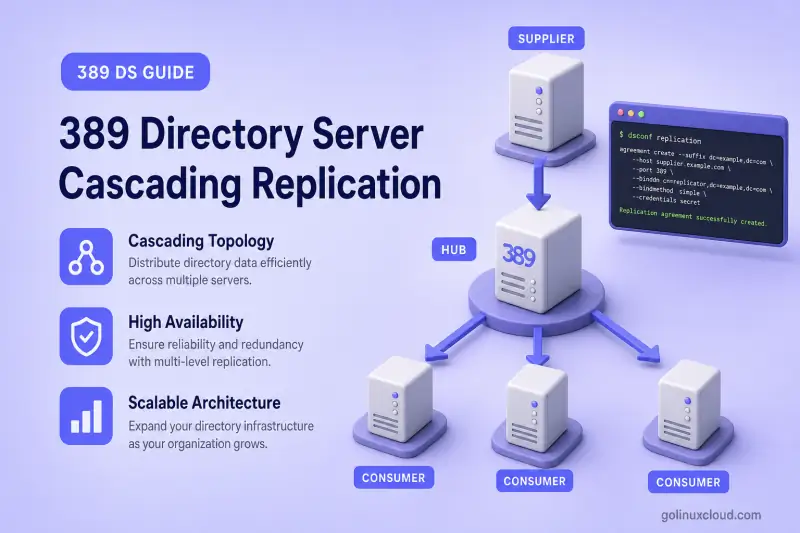
Cascading replication sends directory changes from a writable supplier through a read-only hub to one or more downstream consumers. The hub receives updates like a consumer but maintains a replication changelog and forwards changes through its own agreements. This guide walks through the full CLI setup: hub preparation, supplier-to-hub replication, hub-to-consumer replication, end-to-end verification, and outage behavior.
For replica roles, changelog behavior, and topology selection, read 389 Directory Server architecture first. For a direct supplier-to-consumer layout without a hub, see single-supplier replication. To promote an existing consumer to a hub or supplier, see promote or demote a replica.
Tested on: Rocky Linux 10.2; 389 Directory Server 3.2.0.
How cascading replication works
In a cascading topology, changes flow in one direction through two replication hops:
supplier → hub → consumerThe supplier accepts LDAP writes and pushes updates to the hub. The hub holds a read-only replica, records changes in its own changelog, and forwards them to consumers through separate agreements. Consumers receive updates but do not forward them further.
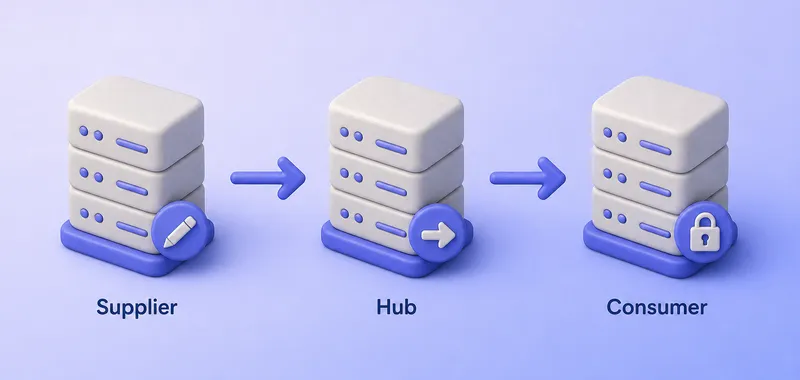
A replication hub is not a load balancer and not a writable failover server. It is a read-only replica that reduces replication connection load on the primary supplier while still participating in the replication protocol as a downstream source for consumers.
Supplier, hub, and consumer roles
| Role | Accepts client writes | Maintains changelog | Receives updates | Forwards updates |
|---|---|---|---|---|
| Supplier | Yes | Yes | No (in this guide) | Yes (to hub) |
| Hub | No | Yes | Yes (from supplier) | Yes (to consumers) |
| Consumer | No | No | Yes (from hub) | No |
The supplier is the only writable server in this topology. Both the hub and consumer reject normal client writes for the replicated suffix.
Direction of replication agreements
Replication agreements are directional. You create each agreement on the server that initiates the replication session:
ldap1-to-hub1on the supplier (ldap1.example.com)hub1-to-consumer1on the hub (hub1.example.com)
Do not create reverse agreements in a standard cascading layout. The hub does not push changes back to the supplier, and the consumer does not push changes to the hub.
When cascading replication is useful
Use cascading replication when:
- Remote sites need directory data but should not maintain a direct replication link to the primary supplier
- Many downstream consumers would otherwise open sessions to one supplier
- Network boundaries make a single fan-out from the supplier impractical
- You want one hub to serve several read-only consumers at a branch office
Every additional hop adds latency and another failure point for downstream replicas. Keep cascade depth shallow unless a remote site truly needs the extra layer.
Lab environment and prerequisites
Example topology
This walkthrough uses two physical hosts. Instance ldap1 runs on ldap1.example.com. Instances hub1 and ldap2 run on a second host as hub1.example.com and consumer1.example.com. Their FQDNs represent three logical replication endpoints. Production deployments normally place supplier, hub, and consumer on separate hosts.
Host 1 — ldap1.example.com:     ldap1 (389)  → supplier
Host 2 — hub1.example.com:      hub1 (4390)  → hub
         consumer1.example.com: ldap2 (1389) → consumer
Adjust hostnames, ports, and instance names to match your deployment, but keep supplier replica IDs unique across the topology.
| Role | Hostname | Instance | LDAP port | Backend name | Database | Replica ID | Agreement (on source host) |
|---|---|---|---|---|---|---|---|
| Supplier | ldap1.example.com |
ldap1 |
389 |
userroot |
LMDB | 1 |
ldap1-to-hub1 |
| Hub | hub1.example.com |
hub1 |
4390 |
userroot |
LMDB | 65535 |
hub1-to-consumer1 |
| Consumer | consumer1.example.com |
ldap2 |
1389 |
example |
LMDB | 65535 |
— |
All three instances replicate suffix dc=example,dc=com. The replication manager DN on every instance is cn=replication manager,cn=config. Hubs and consumers use replica ID 65535; only the supplier uses a unique numeric ID for the suffix.
All instances were created with dscreate. The hub instance on the second host is an additional instance on that host; see multiple instances if you need a separate hub1 instance alongside ldap2. Local backend names may differ between hosts, as they do in this lab. The supplier contains the authoritative starting data and an ou=People,dc=example,dc=com container for the test entries in later sections.
Commands below use mode-600 password files:
| File | Used on | Purpose |
|---|---|---|
/root/dm.pw |
Both physical hosts | Local Directory Manager password; shared by local instances in this lab |
/root/hub1-replmgr.pw |
Second host | Password used when enabling replication on hub1 |
/root/consumer1-replmgr.pw |
Second host | Password used when enabling replication on ldap2 |
/root/hub1-repl.pw |
Supplier host | Matching outbound credential for ldap1-to-hub1 |
/root/consumer1-repl.pw |
Second host | Matching outbound credential for hub1-to-consumer1 |
For simplicity, this lab uses the same Directory Manager password on all three instances. If your passwords differ, create separate mode-600 files for each target instance and use the password file that belongs to the server you query with ldapsearch or dsconf.
repl-agmt status contacts the remote replica named in the agreement. When Directory Manager passwords differ between hosts, pass the remote credentials explicitly. On the supplier, use /root/hub1-dm.pw for ldap1-to-hub1. On the hub, use /root/consumer1-dm.pw for hub1-to-consumer1.
Preconfiguration checks
On RPM-based hosts, verify that 389 Directory Server is installed on both hosts:
rpm -q 389-ds-baseSample output:
389-ds-base-3.2.0-8.el10_2.x86_64Confirm each instance is running. On the supplier:
dsctl ldap1 statusSample output:
Instance "ldap1" is runningOn the second host, confirm both instances are running:
dsctl hub1 status
dsctl ldap2 status
Sample output:
Instance "hub1" is running
Instance "ldap2" is running
Verify all three logical hostnames resolve correctly:
getent hosts ldap1.example.com hub1.example.com consumer1.example.com | sort -uSample output:
192.0.2.10  ldap1.example.com
192.0.2.11  hub1.example.com consumer1.example.com
Compare clocks on each host before you enable replication roles:
date -uSample output:
Sun Jul 19 07:42:13 UTC 2026timedatectl show -p NTPSynchronizedSample output:
NTPSynchronized=yesRun these commands on every physical host. In this two-host lab, run them on the supplier host and once on the second host. Do not continue until their UTC times are reasonably aligned and NTPSynchronized=yes is reported everywhere.
Confirm the suffix exists on each instance:
dsconf -y /root/dm.pw ldap1 backend suffix listSample output:
dc=example,dc=com (userroot)dsconf -y /root/dm.pw hub1 backend suffix listSample output:
dc=example,dc=com (userroot)dsconf -y /root/dm.pw ldap2 backend suffix listSample output:
dc=example,dc=com (example)From the supplier, confirm the hub port is reachable:
nc -zv hub1.example.com 4390Sample output:
Ncat: Connected to hub1.example.com:4390.From the hub, confirm the consumer port is reachable:
nc -zv consumer1.example.com 1389Sample output:
Ncat: Connected to consumer1.example.com:1389.If agreements will use LDAPS or StartTLS, configure TLS on every instance before you create agreements. Back up any existing consumer or hub suffix data; initialization replaces directory content under the replicated suffix.
Procedure overview
The setup below follows replication dependencies: the hub must exist before the first hop initializes, and the consumer must not be initialized until the hub is current.
- Prepare the hub replica on the second host (
hub1). - Enable the supplier and create
ldap1-to-hub1on the supplier host; initialize the hub and verify the first hop. - Prepare the downstream consumer on the second host (
ldap2). - Create
hub1-to-consumer1and initialize the consumer from the hub. - Verify the full cascade with LDAP tests, then exercise outage and recovery behavior.
The following sections walk through each phase in order.
Prepare the hub replica
Run these steps on hub1.example.com against local instance hub1.
Verify the hub suffix
Confirm the suffix and backend exist before you enable the hub role:
dsconf -y /root/dm.pw hub1 backend suffix listSample output:
dc=example,dc=com (userroot)The replicated suffix DN must match on all three servers. Local backend names may differ.
Enable the hub role
Create a password file for the replication manager on the second host. The supplier uses this identity when it connects to hub1.
umask 077
read -rsp 'Replication manager password: ' REPL_PASSWORD
echo
printf '%s' "$REPL_PASSWORD" > /root/hub1-replmgr.pw
unset REPL_PASSWORD
chmod 600 /root/hub1-replmgr.pw
Enable the hub role on the suffix. The --role hub option configures a read-only replica that maintains a changelog for forwarding updates.
dsconf -y /root/dm.pw hub1 replication enable --suffix "dc=example,dc=com" --role hub --bind-dn "cn=replication manager,cn=config" --bind-passwd-file /root/hub1-replmgr.pwSample output:
Replication successfully enabled for "dc=example,dc=com"The replication-manager account configured on the hub authorizes inbound updates from the supplier. The hub’s outgoing agreement stores a separate credential matching the replication-manager account configured on the downstream consumer.
Configure the writable referral so LDAP clients that hit the hub are directed to the supplier. Hubs do not infer this URL reliably from incoming agreements alone. See LDAP referrals for replicated-suffix referral configuration.
dsconf -y /root/dm.pw hub1 replication set --suffix "dc=example,dc=com" --repl-add-ref="ldap://ldap1.example.com:389"Sample output:
Successfully updated replication configurationVerify the referral URL:
dsconf -y /root/dm.pw hub1 replication get --suffix "dc=example,dc=com" | grep '^nsDS5ReplicaReferral:'Sample output:
nsDS5ReplicaReferral: ldap://ldap1.example.com:389Verify the hub configuration
Read the replica settings and confirm the hub role:
dsconf -y /root/dm.pw hub1 replication get --suffix "dc=example,dc=com"Sample output:
dn: cn=replica,cn=dc\3Dexample\2Cdc\3Dcom,cn=mapping tree,cn=config
cn: replica
nsDS5Flags: 1
nsDS5ReplicaBindDN: cn=replication manager,cn=config
nsDS5ReplicaId: 65535
nsDS5ReplicaRoot: dc=example,dc=com
nsDS5ReplicaType: 2
nsDS5ReplicaType: 2 is the read-only replica type shared by hubs and consumers. nsDS5ReplicaId: 65535 is the reserved ID dsconf assigns to hubs and consumers. nsDS5Flags: 1 indicates the hub maintains a changelog for forwarding. nsDS5ReplicaBindDN lists the replication manager account the supplier will use during supplier-to-hub replication.
Configure supplier-to-hub replication
Run these steps on ldap1.example.com against instance ldap1.
Enable the supplier replica
Enable the supplier role with a unique replica ID if replication is not already configured for the suffix:
dsconf -y /root/dm.pw ldap1 replication enable --suffix "dc=example,dc=com" --role supplier --replica-id 1Sample output:
Replication successfully enabled for "dc=example,dc=com"Verify the supplier configuration:
dsconf -y /root/dm.pw ldap1 replication get --suffix "dc=example,dc=com"Sample output:
dn: cn=replica,cn=dc\3Dexample\2Cdc\3Dcom,cn=mapping tree,cn=config
cn: replica
nsDS5ReplicaId: 1
nsDS5ReplicaRoot: dc=example,dc=com
nsDS5ReplicaType: 3
nsDS5ReplicaType: 3 identifies a writable supplier. Assign a unique replica ID between 1 and 65534 to every supplier in the topology.
Create the supplier-to-hub agreement
Create a matching local password file on the supplier. Files under /root are host-local; the supplier does not read /root/hub1-replmgr.pw from the second host.
umask 077
read -rsp 'Replication manager password (same as hub1): ' REPL_PASSWORD
echo
printf '%s' "$REPL_PASSWORD" > /root/hub1-repl.pw
unset REPL_PASSWORD
chmod 600 /root/hub1-repl.pw
Create the agreement on the supplier. For an isolated lab on a trusted network, plain LDAP illustrates the command shape:
dsconf -y /root/dm.pw ldap1 repl-agmt create ldap1-to-hub1 --suffix "dc=example,dc=com" --host hub1.example.com --port 4390 --conn-protocol LDAP --bind-method SIMPLE --bind-dn "cn=replication manager,cn=config" --bind-passwd-file /root/hub1-repl.pwSample output:
Successfully created replication agreement "ldap1-to-hub1"In production, use --conn-protocol LDAPS or StartTLS for replication traffic.
Verify the agreement before you initialize:
dsconf -y /root/dm.pw ldap1 repl-agmt get --suffix "dc=example,dc=com" ldap1-to-hub1Sample output:
cn: ldap1-to-hub1
nsDS5ReplicaHost: hub1.example.com
nsDS5ReplicaPort: 4390
nsDS5ReplicaTransportInfo: LDAP
nsDS5ReplicaBindDN: cn=replication manager,cn=config
nsDS5ReplicaBindMethod: simple
nsds5ReplicaEnabled: on
Initialize the hub
Initialize the hub from the supplier. Initialization copies suffix data and replication metadata from the supplier to the hub.
dsconf -y /root/dm.pw ldap1 repl-agmt init --suffix "dc=example,dc=com" ldap1-to-hub1Sample output:
Agreement initialization started...Monitor initialization until it completes:
dsconf -y /root/dm.pw ldap1 repl-agmt init-status --suffix "dc=example,dc=com" ldap1-to-hub1Sample output when initialization finishes:
Agreement successfully initialized.Do not configure the downstream consumer until supplier-to-hub initialization succeeds. A consumer initialized before the hub is current can miss data or report generation mismatches.
Verify supplier-to-hub replication
Add a marker entry on the supplier:
ldapadd -x -H ldap://ldap1.example.com:389 -D "cn=Directory Manager" -y /root/dm.pw <<'EOF'
dn: cn=hub-hop-test,ou=People,dc=example,dc=com
objectClass: top
objectClass: person
cn: hub-hop-test
sn: hubtest
description: supplier-to-hub validation
EOF
Sample output:
adding new entry "cn=hub-hop-test,ou=People,dc=example,dc=com"Search for the entry on the hub after a few seconds:
ldapsearch -LLL -x -H ldap://hub1.example.com:4390 -D "cn=Directory Manager" -y /root/dm.pw -b "cn=hub-hop-test,ou=People,dc=example,dc=com" -s base cn descriptionSample output:
dn: cn=hub-hop-test,ou=People,dc=example,dc=com
cn: hub-hop-test
description: supplier-to-hub validation
Check the first-hop agreement status on the supplier. When hub1 uses a different Directory Manager password, create /root/hub1-dm.pw on the supplier and pass it explicitly:
dsconf -y /root/dm.pw ldap1 repl-agmt status --suffix "dc=example,dc=com" --bind-dn "cn=Directory Manager" --bind-passwd-file /root/hub1-dm.pw ldap1-to-hub1When all three instances share the same Directory Manager password, this shorter form is enough:
dsconf -y /root/dm.pw ldap1 repl-agmt status --suffix "dc=example,dc=com" ldap1-to-hub1Sample output (trimmed):
Last Update Status: Error (0) Replica acquired successfully: Incremental update succeeded
Last Init Status: Error (0) Total update succeeded
Replication Status: In Synchronization
Remove the marker entry before you continue:
ldapdelete -x -H ldap://ldap1.example.com:389 -D "cn=Directory Manager" -y /root/dm.pw "cn=hub-hop-test,ou=People,dc=example,dc=com"A successful ldapdelete normally produces no output.
Prepare the downstream consumer
Run these steps on consumer1.example.com against local instance ldap2.
Verify the consumer suffix
Confirm the suffix exists and that you have backed up any data that must be preserved:
dsconf -y /root/dm.pw ldap2 backend suffix listSample output:
dc=example,dc=com (example)Enable the consumer role
Create the replication manager password file for ldap2 on the second host:
umask 077
read -rsp 'Replication manager password: ' REPL_PASSWORD
echo
printf '%s' "$REPL_PASSWORD" > /root/consumer1-replmgr.pw
unset REPL_PASSWORD
chmod 600 /root/consumer1-replmgr.pw
Enable the consumer role:
dsconf -y /root/dm.pw ldap2 replication enable --suffix "dc=example,dc=com" --role consumer --bind-dn "cn=replication manager,cn=config" --bind-passwd-file /root/consumer1-replmgr.pwSample output:
Replication successfully enabled for "dc=example,dc=com"Configure the writable referral on the consumer. The consumer must point to the writable supplier, not to the read-only hub.
dsconf -y /root/dm.pw ldap2 replication set --suffix "dc=example,dc=com" --repl-add-ref="ldap://ldap1.example.com:389"Sample output:
Successfully updated replication configurationVerify the referral URL:
dsconf -y /root/dm.pw ldap2 replication get --suffix "dc=example,dc=com" | grep '^nsDS5ReplicaReferral:'Sample output:
nsDS5ReplicaReferral: ldap://ldap1.example.com:389Verify read-only consumer behavior
Confirm the consumer role:
dsconf -y /root/dm.pw ldap2 replication get --suffix "dc=example,dc=com"Sample output:
dn: cn=replica,cn=dc\3Dexample\2Cdc\3Dcom,cn=mapping tree,cn=config
cn: replica
nsDS5ReplicaBindDN: cn=replication manager,cn=config
nsDS5ReplicaId: 65535
nsDS5ReplicaRoot: dc=example,dc=com
nsDS5ReplicaType: 2
A consumer holds a read-only replica and does not maintain a forwarding changelog. Only the hub creates outgoing replication agreements in this cascading layout.
Configure hub-to-consumer replication
Run these steps on hub1.example.com against instance hub1 after supplier-to-hub replication is healthy.
Create the hub-to-consumer agreement
Create a local password file on the hub that matches the replication manager password configured on the consumer:
umask 077
read -rsp 'Replication manager password (same as consumer1): ' REPL_PASSWORD
echo
printf '%s' "$REPL_PASSWORD" > /root/consumer1-repl.pw
unset REPL_PASSWORD
chmod 600 /root/consumer1-repl.pw
Create the agreement on the hub. The hub initiates replication to the consumer even though LDAP clients cannot write to the hub:
dsconf -y /root/dm.pw hub1 repl-agmt create hub1-to-consumer1 --suffix "dc=example,dc=com" --host consumer1.example.com --port 1389 --conn-protocol LDAP --bind-method SIMPLE --bind-dn "cn=replication manager,cn=config" --bind-passwd-file /root/consumer1-repl.pwSample output:
Successfully created replication agreement "hub1-to-consumer1"Verify the agreement:
dsconf -y /root/dm.pw hub1 repl-agmt get --suffix "dc=example,dc=com" hub1-to-consumer1Sample output:
cn: hub1-to-consumer1
nsDS5ReplicaHost: consumer1.example.com
nsDS5ReplicaPort: 1389
nsDS5ReplicaTransportInfo: LDAP
nsDS5ReplicaBindDN: cn=replication manager,cn=config
nsDS5ReplicaBindMethod: simple
nsds5ReplicaEnabled: on
Initialize the consumer from the hub
Initialize the consumer only after supplier-to-hub replication is working:
dsconf -y /root/dm.pw hub1 repl-agmt init --suffix "dc=example,dc=com" hub1-to-consumer1Sample output:
Agreement initialization started...Monitor initialization:
dsconf -y /root/dm.pw hub1 repl-agmt init-status --suffix "dc=example,dc=com" hub1-to-consumer1Sample output:
Agreement successfully initialized.Verify the agreement status
Check runtime status on the hub. When consumer1 uses a different Directory Manager password, create /root/consumer1-dm.pw on the hub and pass it explicitly:
dsconf -y /root/dm.pw hub1 repl-agmt status --suffix "dc=example,dc=com" --bind-dn "cn=Directory Manager" --bind-passwd-file /root/consumer1-dm.pw hub1-to-consumer1When passwords match across the lab, this shorter form is enough:
dsconf -y /root/dm.pw hub1 repl-agmt status --suffix "dc=example,dc=com" hub1-to-consumer1Sample output (trimmed):
Status For Agreement: "hub1-to-consumer1" (consumer1.example.com:1389)
Replica Enabled: on
Last Update Status: Error (0) Replica acquired successfully: Incremental update succeeded
Last Init Status: Error (0) Total update succeeded
Replication Status: Not in Synchronization: supplier (Unknown) consumer (Unknown) State (green) Reason (error (0) replica acquired successfully: incremental update succeeded)
Replication Lag Time: unavailable
The Error (0) prefix is normal; read the message after it. State (green) and Incremental update succeeded show that the latest agreement session completed without an error. Because the supplier and consumer RUVs and replication lag are unavailable, confirm end-to-end synchronization with the LDAP searches in the next section.
Verify cascading replication end to end
The LDAP client tests below use plain LDAP only for the isolated lab. SIMPLE binds over ldap:// expose the Directory Manager password to anyone able to observe the connection. The replication agreements’ SIMPLE binds expose replication-manager passwords on each hop. Use LDAPS or StartTLS outside a trusted disposable lab.
Test add, modify, rename, and delete operations
Add a marker entry on the supplier:
ldapadd -x -H ldap://ldap1.example.com:389 -D "cn=Directory Manager" -y /root/dm.pw <<'EOF'
dn: cn=cascade-repl-test,ou=People,dc=example,dc=com
objectClass: top
objectClass: person
cn: cascade-repl-test
sn: cascadetest
description: cascading replication validation
EOF
Sample output:
adding new entry "cn=cascade-repl-test,ou=People,dc=example,dc=com"Verify on the hub:
ldapsearch -LLL -x -H ldap://hub1.example.com:4390 -D "cn=Directory Manager" -y /root/dm.pw -b "cn=cascade-repl-test,ou=People,dc=example,dc=com" -s base cn descriptionSample output:
dn: cn=cascade-repl-test,ou=People,dc=example,dc=com
cn: cascade-repl-test
description: cascading replication validation
Verify on the consumer:
ldapsearch -LLL -x -H ldap://consumer1.example.com:1389 -D "cn=Directory Manager" -y /root/dm.pw -b "cn=cascade-repl-test,ou=People,dc=example,dc=com" -s base cn descriptionSample output:
dn: cn=cascade-repl-test,ou=People,dc=example,dc=com
cn: cascade-repl-test
description: cascading replication validation
Modify the entry on the supplier:
ldapmodify -x -H ldap://ldap1.example.com:389 -D "cn=Directory Manager" -y /root/dm.pw <<'EOF'
dn: cn=cascade-repl-test,ou=People,dc=example,dc=com
changetype: modify
replace: description
description: modified on supplier
EOF
Sample output:
modifying entry "cn=cascade-repl-test,ou=People,dc=example,dc=com"Confirm the change reached the consumer:
ldapsearch -LLL -x -H ldap://consumer1.example.com:1389 -D "cn=Directory Manager" -y /root/dm.pw -b "cn=cascade-repl-test,ou=People,dc=example,dc=com" -s base descriptionSample output (attribute line only):
description: modified on supplierRename the entry on the supplier with -r so the old RDN attribute value is removed:
ldapmodrdn -r -x -H ldap://ldap1.example.com:389 -D "cn=Directory Manager" -y /root/dm.pw "cn=cascade-repl-test,ou=People,dc=example,dc=com" "cn=cascade-renamed"A successful ldapmodrdn normally produces no output. Confirm the new DN on the consumer:
ldapsearch -LLL -x -H ldap://consumer1.example.com:1389 -D "cn=Directory Manager" -y /root/dm.pw -b "cn=cascade-renamed,ou=People,dc=example,dc=com" -s base cnSample output:
dn: cn=cascade-renamed,ou=People,dc=example,dc=com
cn: cascade-renamed
Verify replication at both hops
Check each agreement separately instead of treating the cascade as one connection.
On the supplier:
dsconf -y /root/dm.pw ldap1 repl-agmt status --suffix "dc=example,dc=com" ldap1-to-hub1Sample output (trimmed):
Replication Status: In Synchronization
Replication Lag Time: 00:00:00
On the hub:
dsconf -y /root/dm.pw hub1 repl-agmt status --suffix "dc=example,dc=com" hub1-to-consumer1Sample output (trimmed):
Last Update Status: Error (0) Replica acquired successfully: Incremental update succeeded
Last Init Status: Error (0) Total update succeeded
Replication Status: Not in Synchronization: supplier (Unknown) consumer (Unknown) State (green) Reason (error (0) replica acquired successfully: incremental update succeeded)
Replication Lag Time: unavailable
On the supplier-to-hub hop, Replication Status: In Synchronization with zero lag is typical. On the hub-to-consumer hop, read Last Update Status first. Treat these fields as agreement-session health indicators. Use the end-to-end LDAP checks to confirm that the consumer actually received the changes.
Test writes against the hub and consumer
While the renamed entry still exists, attempt a modify against the hub:
ldapmodify -x -H ldap://hub1.example.com:4390 -D "cn=Directory Manager" -y /root/dm.pw <<'EOF'
dn: cn=cascade-renamed,ou=People,dc=example,dc=com
changetype: modify
replace: description
description: write attempt on hub
EOF
Sample output (relevant lines):
modifying entry "cn=cascade-renamed,ou=People,dc=example,dc=com"
ldap_modify: Referral (10)
	matched DN: dc=example,dc=com
	referrals:
		ldap://ldap1.example.com:389
Attempt the same modify against the consumer:
ldapmodify -x -H ldap://consumer1.example.com:1389 -D "cn=Directory Manager" -y /root/dm.pw <<'EOF'
dn: cn=cascade-renamed,ou=People,dc=example,dc=com
changetype: modify
replace: description
description: write attempt on consumer
EOF
Sample output (relevant lines):
modifying entry "cn=cascade-renamed,ou=People,dc=example,dc=com"
ldap_modify: Referral (10)
	matched DN: dc=example,dc=com
	referrals:
		ldap://ldap1.example.com:389
Both the hub and consumer return LDAP result code 10 (referral) and point clients to the writable supplier. Applications must send writes to the supplier. Do not enable backend or instance read-only mode on an active replicated database; read-only mode disables replication on that backend.
Remove the test entry on the supplier:
ldapdelete -x -H ldap://ldap1.example.com:389 -D "cn=Directory Manager" -y /root/dm.pw "cn=cascade-renamed,ou=People,dc=example,dc=com"A successful ldapdelete normally produces no output. Confirm deletion on the consumer:
ldapsearch -LLL -x -H ldap://consumer1.example.com:1389 -D "cn=Directory Manager" -y /root/dm.pw -b "cn=cascade-renamed,ou=People,dc=example,dc=com" -s base cnSample output:
No such object (32)
Matched DN: ou=People,dc=example,dc=com
Test outage and recovery behavior
Consumer outage
Stop the consumer instance:
dsctl ldap2 stopSample output:
Instance "ldap2" has been stoppedAdd a marker entry on the supplier:
ldapadd -x -H ldap://ldap1.example.com:389 -D "cn=Directory Manager" -y /root/dm.pw <<'EOF'
dn: cn=cascade-outage-consumer,ou=People,dc=example,dc=com
objectClass: top
objectClass: person
cn: cascade-outage-consumer
sn: outage
description: added during consumer outage
EOF
Sample output:
adding new entry "cn=cascade-outage-consumer,ou=People,dc=example,dc=com"The hub should receive the change while the consumer is offline:
ldapsearch -LLL -x -H ldap://hub1.example.com:4390 -D "cn=Directory Manager" -y /root/dm.pw -b "cn=cascade-outage-consumer,ou=People,dc=example,dc=com" -s base cnSample output:
dn: cn=cascade-outage-consumer,ou=People,dc=example,dc=com
cn: cascade-outage-consumer
Start the consumer and verify catch-up:
dsctl ldap2 startSample output:
Instance "ldap2" has been startedldapsearch -LLL -x -H ldap://consumer1.example.com:1389 -D "cn=Directory Manager" -y /root/dm.pw -b "cn=cascade-outage-consumer,ou=People,dc=example,dc=com" -s base cnSample output:
dn: cn=cascade-outage-consumer,ou=People,dc=example,dc=com
cn: cascade-outage-consumer
Remove the marker entry:
ldapdelete -x -H ldap://ldap1.example.com:389 -D "cn=Directory Manager" -y /root/dm.pw "cn=cascade-outage-consumer,ou=People,dc=example,dc=com"A successful ldapdelete normally produces no output.
Hub outage
Stop the hub:
dsctl hub1 stopSample output:
Instance "hub1" has been stoppedAdd a marker entry on the supplier:
ldapadd -x -H ldap://ldap1.example.com:389 -D "cn=Directory Manager" -y /root/dm.pw <<'EOF'
dn: cn=cascade-outage-hub,ou=People,dc=example,dc=com
objectClass: top
objectClass: person
cn: cascade-outage-hub
sn: hubout
description: added during hub outage
EOF
Sample output:
adding new entry "cn=cascade-outage-hub,ou=People,dc=example,dc=com"Writes remain available on the supplier. The consumer does not receive new changes while the hub is offline:
ldapsearch -LLL -x -H ldap://consumer1.example.com:1389 -D "cn=Directory Manager" -y /root/dm.pw -b "cn=cascade-outage-hub,ou=People,dc=example,dc=com" -s base cnSample output:
No such object (32)
Matched DN: ou=People,dc=example,dc=com
Start the hub and verify both hops catch up:
dsctl hub1 startSample output:
Instance "hub1" has been startedAfter replication catches up, the entry appears on the hub and consumer:
ldapsearch -LLL -x -H ldap://hub1.example.com:4390 -D "cn=Directory Manager" -y /root/dm.pw -b "cn=cascade-outage-hub,ou=People,dc=example,dc=com" -s base cnSample output:
dn: cn=cascade-outage-hub,ou=People,dc=example,dc=com
cn: cascade-outage-hubldapsearch -LLL -x -H ldap://consumer1.example.com:1389 -D "cn=Directory Manager" -y /root/dm.pw -b "cn=cascade-outage-hub,ou=People,dc=example,dc=com" -s base cnSample output:
dn: cn=cascade-outage-hub,ou=People,dc=example,dc=com
cn: cascade-outage-hub
The hub is a failure point for every downstream consumer unless you design redundant paths. Remove the marker entry when the test completes:
ldapdelete -x -H ldap://ldap1.example.com:389 -D "cn=Directory Manager" -y /root/dm.pw "cn=cascade-outage-hub,ou=People,dc=example,dc=com"A successful ldapdelete normally produces no output.
Extended outage considerations
If a hub or consumer stays offline longer than changelog retention on the upstream server, incremental catch-up may fail and reinitialization becomes necessary. Recovery in a cascade must proceed from upstream to downstream:
- Verify
ldap1-to-hub1before you attempt downstream recovery. - If the hub can no longer catch up from the supplier, reinitialize the hub from the supplier with
repl-agmt initonldap1-to-hub1. - After the hub is current, verify
hub1-to-consumer1. - If the consumer can no longer obtain missing changes from the hub’s changelog, reinitialize the consumer from the hub with
repl-agmt initonhub1-to-consumer1. - Reinitialize downstream consumers only after the upstream hop is healthy; initializing a consumer before the hub is current can leave missing data or generation mismatches.
See initialize and reinitialize replicas for online, offline, and reinitialization procedures.
Scale the cascading topology
- Connect multiple consumers to one hub with a separate hub-to-consumer agreement and password file for each consumer.
- Deploy separate hubs for different remote sites instead of chaining hubs behind hubs.
- Place hubs behind a multi-supplier core when the writable tier needs redundancy; that core configuration is outside this guide.
- Name agreements consistently (
ldap1-to-hub1,hub1-to-consumer2) as the topology grows. - Avoid deep cascade chains; every hop adds latency and another server that downstream replicas depend on.
Common cascading replication problems
| Symptom | Likely cause | First check |
|---|---|---|
| Hub receives changes but consumer does not | Hub-to-consumer agreement, auth, or init state | hub1 repl-agmt get and repl-agmt status on the hub |
| Consumer missing data after setup | Consumer initialized before hub was current | Reinitialize consumer from hub after supplier-to-hub is healthy |
| Agreement authentication failure | Mismatched replication manager password | Compare agreement bind DN and credential on source with replication get on target |
| Changes stop after extended outage | Purged changelog on supplier or hub | Check agreement status; reinitialize downstream replica if required |
| Hub or consumer accepts writes | Wrong replica role or clients bound to wrong host | replication get on each server; verify application LDAP URLs |
| Supplier cannot reach hub | Firewall, DNS, or wrong port | nc -zv hub-host agreement-port from supplier |
| Hub cannot reach consumer | Firewall, DNS, or wrong port | nc -zv consumer-host agreement-port from hub |
| TLS or hostname validation failure | Certificate CN/SAN mismatch | Align agreement --host with certificate identity |
For deeper diagnosis, consult the Red Hat replication troubleshooting chapter.
Production recommendations and limitations
- Use LDAPS or StartTLS for both replication agreements.
- Monitor
ldap1-to-hub1andhub1-to-consumer1independently. - Size changelog retention on the supplier and hub for the longest expected outage at each hop.
- Avoid excessive cascade depth; prefer additional consumers on one hub over long chains.
- Test supplier, hub, consumer, and network failures separately in a lab.
- Remember that a hub is read-only and not a writable failover target.
- Replication does not redirect LDAP clients when a server fails.
- Maintain backups even when replication is enabled.
- Document every host, replica role, suffix, replica ID, and agreement name.
Add another consumer behind the hub
On consumer2.example.com, enable the consumer role and create /root/consumer2-replmgr.pw locally. On the hub, create /root/consumer2-repl.pw and a new agreement after TLS is configured:
dsconf -y /root/dm.pw hub1 repl-agmt create hub1-to-consumer2 --suffix "dc=example,dc=com" --host consumer2.example.com --port 636 --conn-protocol LDAPS --bind-method SIMPLE --bind-dn "cn=replication manager,cn=config" --bind-passwd-file /root/consumer2-repl.pwEnsure the hub trusts the consumer’s issuing CA and that the certificate matches consumer2.example.com. Initialize and verify hub1-to-consumer2 independently of hub1-to-consumer1.
References
- Red Hat Directory Server documentation
- Red Hat Directory Server 13: Configuring cascading replication using the command line
- Red Hat Directory Server 13: Initializing a consumer in a replication topology
- Red Hat Directory Server 13: Monitoring the replication topology
- Red Hat Directory Server 13: Troubleshooting replication
- 389 Directory Server architecture
Summary
Cascading replication in 389 Directory Server uses a writable supplier, a read-only hub with its own changelog, and one or more downstream consumers. Create ldap1-to-hub1 on the supplier, initialize the hub, then create hub1-to-consumer1 on the hub and initialize each consumer. Verify add, modify, rename, and delete operations at both hops, confirm the hub and consumer refer client writes to the supplier, and rehearse hub and consumer outages separately. Use TLS in production, monitor each agreement independently, and keep cascade depth shallow.
