
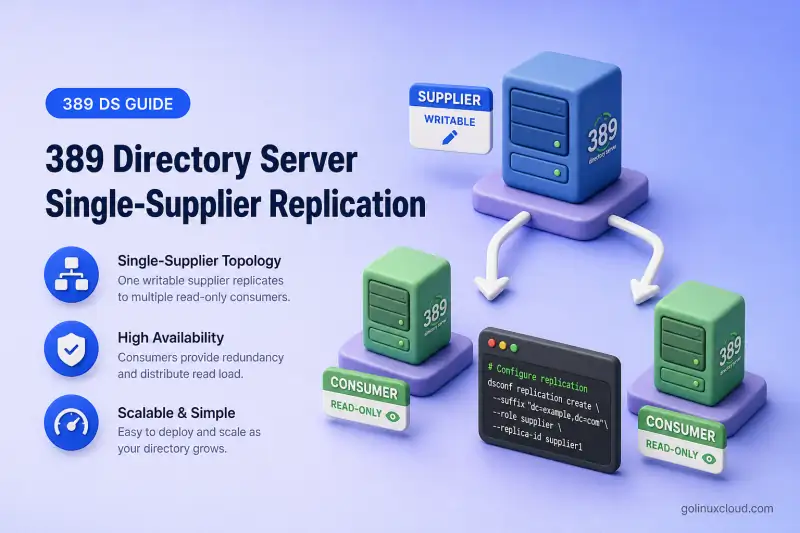
Single-supplier replication gives you one writable 389 Directory Server and one or more read-only consumers that receive the same suffix data. Applications send writes to the supplier and can spread read traffic across consumers. This guide walks through the full CLI setup: consumer preparation, supplier role, replication agreement, online initialization, verification, outage recovery, and adding a second consumer.
For replication roles, changelog behavior, and topology choices, read 389 Directory Server architecture first. This page stays focused on configuring one supplier with read-only consumers.
Tested on: Rocky Linux 10.2; 389 Directory Server 3.2.0.
How single-supplier replication works
In a single-supplier topology, every directory change flows in one direction: from the supplier to each consumer. The supplier accepts LDAP reads and writes, records changes in its replication changelog, and pushes updates through replication agreements. Consumers hold a read-only copy of the suffix and answer search requests; they do not originate writes for that suffix.
Older documentation called this pattern master-slave replication. Current 389 Directory Server terminology uses supplier and consumer.

Use single-supplier replication when:
- One team or application owns all writes for the suffix
- You need read scaling or geographic read copies without multi-writer complexity
- You want the simplest agreement layout to operate and monitor
The trade-off is write availability. If the supplier is unavailable, clients cannot write to the suffix. Restoring write service requires deliberately promoting a consumer to supplier and then redirecting writers to it. This is a manual topology change, not automatic failover. Multi-supplier replication is the path when more than one writable server is required.
Lab environment and prerequisites
Lab topology
This walkthrough uses two hosts. Adjust hostnames, ports, and instance names to match your deployment, but keep supplier replica IDs unique across the topology.
| Item | Supplier | Consumer |
|---|---|---|
| Hostname | ldap1.example.com |
consumer1.example.com |
| Local instance name | ldap1 |
ldap2 |
| LDAP port | 389 |
1389 |
| Replicated suffix | dc=example,dc=com |
dc=example,dc=com |
| Backend database | userroot (LMDB) |
example (LMDB) |
| Replication agreement | ldap1-to-consumer1 (on supplier) |
— |
| Supplier replica ID | 1 |
— (consumer uses 65535) |
Both instances were created with dscreate and share the same suffix DN described in suffixes and backends. Local backend names may differ between hosts, as they do in this lab. The supplier already contains the authoritative directory data and an ou=People,dc=example,dc=com container for the test entries in later sections.
Commands below use /root/dm.pw, a mode-600 file that holds the local Directory Manager password for that host.
Preconfiguration checks
Confirm the basics before you enable replication roles.
On RPM-based hosts, verify that 389 Directory Server is installed on both servers:
rpm -q 389-ds-baseSample output:
389-ds-base-3.2.0-8.el10_2.x86_64On the supplier host, confirm instance ldap1 is running:
dsctl ldap1 statusSample output:
Instance "ldap1" is runningOn the consumer host, confirm instance ldap2 is running:
dsctl ldap2 statusSample output:
Instance "ldap2" is runningCheck that each host resolves the other by hostname. Replication agreements store hostnames, and TLS validation depends on consistent naming.
getent hosts ldap1.example.com consumer1.example.comSample output:
192.0.2.10  ldap1.example.com
192.0.2.20  consumer1.example.com
Replication ordering relies on synchronized clocks. Compare time on both servers before you proceed.
timedatectl status | head -3Sample output:
Local time: Sun 2026-07-19 12:11:28 IST
           Universal time: Sun 2026-07-19 06:41:28 UTC
                 RTC time: Sun 2026-07-19 06:41:29
Confirm the LDAP port on the consumer is reachable from the supplier. Replace the port if your instance listens elsewhere.
nc -zv consumer1.example.com 1389Sample output:
Ncat: Connected to consumer1.example.com:1389.Verify the suffix exists on both instances:
dsconf -y /root/dm.pw ldap1 backend suffix listSample output:
dc=example,dc=com (userroot)dsconf -y /root/dm.pw ldap2 backend suffix listSample output:
dc=example,dc=com (example)If the agreement will use LDAPS or StartTLS, configure TLS on both instances before you create the agreement. Production replication should not send the replication manager password over plain LDAP.
Back up any existing data on the consumer suffix. Online initialization replaces directory content under the replicated suffix with a copy from the supplier.
Prepare the read-only consumer
Run the consumer steps on consumer1.example.com against local instance ldap2.
Verify the consumer suffix
Confirm the suffix and backend name before you enable the consumer role.
dsconf -y /root/dm.pw ldap2 backend suffix listSample output:
dc=example,dc=com (example)The replicated suffix DN must match on both servers. Local backend names may differ because replication agreements identify the replicated area by suffix DN. Backend names matter only when you run local backend operations such as offline export or import.
Enable the consumer role
Create a password file for the replication manager on the consumer host. Each consumer can use its own replication-manager password as long as the supplier agreement stores the matching credential.
umask 077
read -rsp 'Replication manager password: ' REPL_PASSWORD
echo
printf '%s' "$REPL_PASSWORD" > /root/replmgr.pw
unset REPL_PASSWORD
chmod 600 /root/replmgr.pw
Enable the consumer role on the suffix. The command creates the replication manager entry when you pass --bind-dn and --bind-passwd-file.
dsconf -y /root/dm.pw ldap2 replication enable --suffix "dc=example,dc=com" --role consumer --bind-dn "cn=replication manager,cn=config" --bind-passwd-file /root/replmgr.pwSample output:
Replication successfully enabled for "dc=example,dc=com"The replication manager bind DN (cn=replication manager,cn=config) is the identity the supplier uses when it connects to the consumer during replication. Protect the password file; the supplier stores encrypted credentials in the agreement entry.
Verify the consumer configuration
Read the replica settings and confirm the server is a read-only consumer.
dsconf -y /root/dm.pw ldap2 replication get --suffix "dc=example,dc=com"Sample output:
dn: cn=replica,cn=dc\3Dexample\2Cdc\3Dcom,cn=mapping tree,cn=config
cn: replica
nsDS5ReplicaBindDN: cn=replication manager,cn=config
nsDS5ReplicaId: 65535
nsDS5ReplicaRoot: dc=example,dc=com
nsDS5ReplicaType: 2
nsDS5ReplicaRoot is the replicated suffix. nsDS5ReplicaType: 2 means read-only consumer. nsDS5ReplicaBindDN lists the account the supplier may use to push updates. dsconf assigns the reserved replica ID 65535 to consumers and hubs. Only writable suppliers receive a unique administrator-assigned ID from 1 through 65534.
Configure the supplier and replication agreement
Run the supplier steps on ldap1.example.com against instance ldap1.
Enable the supplier role
Enable replication on the supplier suffix and assign a unique replica ID. Every supplier in the topology for this suffix needs a different ID between 1 and 65534.
dsconf -y /root/dm.pw ldap1 replication enable --suffix "dc=example,dc=com" --role supplier --replica-id 1Sample output:
Replication successfully enabled for "dc=example,dc=com"Verify the supplier configuration:
dsconf -y /root/dm.pw ldap1 replication get --suffix "dc=example,dc=com"Sample output:
dn: cn=replica,cn=dc\3Dexample\2Cdc\3Dcom,cn=mapping tree,cn=config
cn: replica
nsDS5ReplicaId: 1
nsDS5ReplicaRoot: dc=example,dc=com
nsDS5ReplicaType: 3
nsDS5ReplicaType: 3 identifies a writable supplier. Record replica ID 1 in your topology documentation so you do not assign the same ID to another supplier later.
Create the replication agreement
Create one agreement per consumer on the supplier. The agreement defines where the supplier sends updates.
Create a matching local password file on the supplier. Files under /root are host-local; the supplier does not read /root/replmgr.pw from the consumer.
umask 077
read -rsp 'Replication manager password (same as consumer1): ' REPL_PASSWORD
echo
printf '%s' "$REPL_PASSWORD" > /root/consumer1-repl.pw
unset REPL_PASSWORD
chmod 600 /root/consumer1-repl.pw
For an isolated lab on a trusted network, plain LDAP illustrates the command shape:
dsconf -y /root/dm.pw ldap1 repl-agmt create ldap1-to-consumer1 --suffix "dc=example,dc=com" --host consumer1.example.com --port 1389 --conn-protocol LDAP --bind-method SIMPLE --bind-dn "cn=replication manager,cn=config" --bind-passwd-file /root/consumer1-repl.pwSample output:
Successfully created replication agreement "ldap1-to-consumer1"In production, use --conn-protocol LDAPS or StartTLS and restrict SIMPLE binds to encrypted transport.
Verify the replication agreement
Inspect the agreement entry before you initialize. repl-agmt get returns the host, port, protocol, and bind settings for one named agreement.
dsconf -y /root/dm.pw ldap1 repl-agmt get --suffix "dc=example,dc=com" ldap1-to-consumer1Sample output:
dn: cn=ldap1-to-consumer1,cn=replica,cn=dc\3Dexample\2Cdc\3Dcom,cn=mapping tree,cn=config
cn: ldap1-to-consumer1
nsDS5ReplicaHost: consumer1.example.com
nsDS5ReplicaPort: 1389
nsDS5ReplicaTransportInfo: LDAP
nsDS5ReplicaBindDN: cn=replication manager,cn=config
nsDS5ReplicaBindMethod: simple
nsds5ReplicaEnabled: on
Confirm the consumer hostname, port, protocol, bind method, and enabled state match your plan. Do not initialize until these values are correct.
Initialize the consumer
Initialization copies the current suffix data and replication metadata from the supplier to the consumer. Existing consumer data under that suffix is replaced.
Start online initialization
Run initialization from the supplier that owns the agreement.
dsconf -y /root/dm.pw ldap1 repl-agmt init --suffix "dc=example,dc=com" ldap1-to-consumer1Sample output:
Agreement initialization started...Monitor initialization status
Poll initialization until the task completes. Large directories can take much longer than a small lab suffix.
dsconf -y /root/dm.pw ldap1 repl-agmt init-status --suffix "dc=example,dc=com" ldap1-to-consumer1Sample output during the run:
Agreement initialization in progress.Sample output when initialization finishes:
Agreement successfully initialized.When online initialization is not suitable
Online initialization works well for small and medium suffixes and a modest number of consumers. For very large databases, many simultaneous consumers, or strict change-window requirements, consider offline LDIF initialization with dsctl db2ldif --replication and dsctl ldif2db. See initialize and reinitialize replicas for online, offline, timeout, and reinitialization procedures.
Reinitialize when the consumer is too far behind, reports a different generation ID, or no longer has the changelog entries required to catch up incrementally.
Verify replication and read-only behavior
The LDAP client tests below use plain LDAP only for the isolated lab. SIMPLE binds over ldap:// expose the Directory Manager password to anyone able to observe the connection. The replication agreement’s SIMPLE bind exposes the replication-manager password on the supplier-to-consumer link. Use LDAPS or StartTLS outside a trusted disposable lab.
Check the replication agreement status
After initialization, confirm incremental replication is healthy. repl-agmt status queries the remote consumer; the sample assumes the Directory Manager password in /root/dm.pw works on both hosts. When the consumer uses a different password, pass its credentials with --bind-dn and --bind-passwd-file.
dsconf -y /root/dm.pw ldap1 repl-agmt status --suffix "dc=example,dc=com" ldap1-to-consumer1When passwords differ, create /root/consumer1-dm.pw on the supplier as a mode-600 file containing consumer1’s Directory Manager password, then pass it explicitly:
dsconf -y /root/dm.pw ldap1 repl-agmt status --suffix "dc=example,dc=com" --bind-dn "cn=Directory Manager" --bind-passwd-file /root/consumer1-dm.pw ldap1-to-consumer1Sample output (trimmed):
Status For Agreement: "ldap1-to-consumer1" (consumer1.example.com:1389)
Replica Enabled: on
Update In Progress: FALSE
Last Update Status: Error (0) Replica acquired successfully: Incremental update succeeded
Last Init Status: Error (0) Total update succeeded
Replication Status: In Synchronization
Replication Lag Time: 00:00:00
The Error (0) prefix is normal in agreement status fields; read the message after it. In Synchronization with zero lag means the consumer matches the supplier for replicated changes. Last Init Status confirms the total update (initialization) succeeded.
Test an add operation
Add a marker entry on the supplier:
ldapadd -x -H ldap://ldap1.example.com:389 -D "cn=Directory Manager" -y /root/dm.pw <<'EOF'
dn: cn=ss-repl-test,ou=People,dc=example,dc=com
objectClass: top
objectClass: person
cn: ss-repl-test
sn: repltest
description: single-supplier replication validation
EOF
Sample output:
adding new entry "cn=ss-repl-test,ou=People,dc=example,dc=com"Search for the same entry on the consumer. Replication is asynchronous; wait a few seconds if the entry is not visible immediately.
ldapsearch -LLL -x -H ldap://consumer1.example.com:1389 -D "cn=Directory Manager" -y /root/dm.pw -b "cn=ss-repl-test,ou=People,dc=example,dc=com" -s base cn descriptionSample output:
dn: cn=ss-repl-test,ou=People,dc=example,dc=com
cn: ss-repl-test
description: single-supplier replication validation
Matching results on supplier and consumer confirm incremental replication after initialization.
Test modify, rename, and delete operations
Modify an attribute on the supplier:
ldapmodify -x -H ldap://ldap1.example.com:389 -D "cn=Directory Manager" -y /root/dm.pw <<'EOF'
dn: cn=ss-repl-test,ou=People,dc=example,dc=com
changetype: modify
replace: description
description: modified on supplier
EOF
Sample output:
modifying entry "cn=ss-repl-test,ou=People,dc=example,dc=com"Verify the change on the consumer:
ldapsearch -LLL -x -H ldap://consumer1.example.com:1389 -D "cn=Directory Manager" -y /root/dm.pw -b "cn=ss-repl-test,ou=People,dc=example,dc=com" -s base descriptionSample output (attribute lines only):
description: modified on supplierRename the entry on the supplier. The -r flag removes the old RDN attribute value so the consumer does not retain both cn values.
ldapmodrdn -r -x -H ldap://ldap1.example.com:389 -D "cn=Directory Manager" -y /root/dm.pw "cn=ss-repl-test,ou=People,dc=example,dc=com" "cn=ss-repl-renamed"A successful ldapmodrdn normally produces no output. Confirm the new DN on the consumer:
ldapsearch -LLL -x -H ldap://consumer1.example.com:1389 -D "cn=Directory Manager" -y /root/dm.pw -b "cn=ss-repl-renamed,ou=People,dc=example,dc=com" -s base cnSample output:
dn: cn=ss-repl-renamed,ou=People,dc=example,dc=com
cn: ss-repl-renamed
Confirm that the consumer is read-only
While the renamed entry still exists, attempt a modify directly against the consumer:
ldapmodify -x -H ldap://consumer1.example.com:1389 -D "cn=Directory Manager" -y /root/dm.pw <<'EOF'
dn: cn=ss-repl-renamed,ou=People,dc=example,dc=com
changetype: modify
replace: description
description: write attempt on consumer
EOF
Sample output (relevant lines):
modifying entry "cn=ss-repl-renamed,ou=People,dc=example,dc=com"
ldap_modify: Referral (10)
	matched DN: dc=example,dc=com
	referrals:
		ldap://ldap1.example.com:389
A read-only consumer returns LDAP result code 10 (referral) and points clients to the supplier for writes. Applications must send adds, modifies, and deletes to the supplier (or follow referrals if the client library supports that).
Verify the consumer replication referral URL:
dsconf -y /root/dm.pw ldap2 replication get --suffix "dc=example,dc=com" | grep -i '^nsDS5ReplicaReferral:'Sample output:
nsDS5ReplicaReferral: ldap://ldap1.example.com:389If the line is absent, add it on the consumer with replication set --repl-add-ref. See LDAP referrals for replication referral configuration.
Do not enable backend or instance read-only mode on an active replicated database. Read-only mode disables replication on that backend.
Delete the test entry
Remove the marker entry on the supplier:
ldapdelete -x -H ldap://ldap1.example.com:389 -D "cn=Directory Manager" -y /root/dm.pw "cn=ss-repl-renamed,ou=People,dc=example,dc=com"A successful ldapdelete normally produces no output. Confirm the entry is gone from the consumer:
ldapsearch -LLL -x -H ldap://consumer1.example.com:1389 -D "cn=Directory Manager" -y /root/dm.pw -b "cn=ss-repl-renamed,ou=People,dc=example,dc=com" -s base cnSample output:
No such object (32)
Matched DN: ou=People,dc=example,dc=com
Result code 32 confirms the consumer no longer holds the deleted entry.
Test consumer outage and recovery
Stop the consumer and create changes
Stop the consumer instance to simulate an outage:
dsctl ldap2 stopSample output:
Instance "ldap2" has been stoppedAdd a marker entry on the supplier while the consumer is offline:
ldapadd -x -H ldap://ldap1.example.com:389 -D "cn=Directory Manager" -y /root/dm.pw <<'EOF'
dn: cn=ss-outage-test,ou=People,dc=example,dc=com
objectClass: top
objectClass: person
cn: ss-outage-test
sn: outage
description: added while consumer offline
EOF
Sample output:
adding new entry "cn=ss-outage-test,ou=People,dc=example,dc=com"Writes remain available on the supplier during the consumer outage.
Start the consumer and verify catch-up
Start the consumer:
dsctl ldap2 startSample output:
Instance "ldap2" has been startedSearch for the outage marker on the consumer after replication catches up:
ldapsearch -LLL -x -H ldap://consumer1.example.com:1389 -D "cn=Directory Manager" -y /root/dm.pw -b "cn=ss-outage-test,ou=People,dc=example,dc=com" -s base cn descriptionSample output:
dn: cn=ss-outage-test,ou=People,dc=example,dc=com
cn: ss-outage-test
description: added while consumer offline
Check agreement status on the supplier:
dsconf -y /root/dm.pw ldap1 repl-agmt status --suffix "dc=example,dc=com" ldap1-to-consumer1Sample output:
Replication Status: In Synchronization
Replication Lag Time: 00:00:00
The consumer received changes made during the outage once it returned online.
Remove the outage marker so repeated lab runs do not fail with “Already exists”:
ldapdelete -x -H ldap://ldap1.example.com:389 -D "cn=Directory Manager" -y /root/dm.pw "cn=ss-outage-test,ou=People,dc=example,dc=com"A successful ldapdelete normally produces no output.
Handle a consumer that does not catch up
When catch-up fails, work through these checks before you reinitialize:
- Confirm the agreement is enabled with
dsconf ldap1 repl-agmt get --suffix "dc=example,dc=com" ldap1-to-consumer1. - Test network connectivity from supplier to consumer on the agreement port.
- Compare the agreement bind DN and stored credential on the supplier with the replication-manager DN and password configured on the consumer.
- Disable and re-enable the agreement to force a new update session when the error looks transient.
- Reinitialize when the supplier changelog no longer contains the missing changes — see forcing replication updates and the Red Hat replication troubleshooting chapter.
Common single-supplier replication problems
| Symptom | Likely cause | First check |
|---|---|---|
| Authentication failure on agreement | Wrong replication manager password or bind DN | Compare repl-agmt get bind DN with replication get on consumer |
| Supplier cannot contact consumer | Firewall, wrong port, or DNS failure | nc -zv consumer-host agreement-port from supplier |
| Consumer has no replicated area | Consumer role not enabled for suffix | dsconf ldap2 replication get --suffix SUFFIX on consumer host |
| Duplicate supplier replica ID | Same --replica-id on two suppliers |
replication get on every supplier; re-plan IDs |
| Different generation ID | Consumer initialized from wrong source or stale backup | Compare RUV; reinitialize from authoritative supplier |
| Initialization stuck or failed | Large database, timeout, or consumer not reachable | repl-agmt init-status; see RHDS consumer initialization docs |
| Agreement disabled | Manual disable or import side effect | repl-agmt get; repl-agmt enable |
| TLS or hostname validation failure | Certificate CN/SAN mismatch | Align agreement --host with certificate identity |
| Consumer unavailable in status | Instance stopped or port blocked | dsctl ldap2 status; restart and recheck lag |
| Consumer offline longer than changelog retention | Purged changes on supplier | Reinitialize; size changelog retention for expected outage |
For deeper diagnosis, monitor agreement state with repl-agmt status and consult the Red Hat replication troubleshooting chapter.
Production recommendations and next steps
- Use LDAPS or StartTLS for replication traffic and protect per-consumer password files such as
/root/consumer1-repl.pwon the supplier. - Keep DNS and system time reliable; skew complicates lag analysis and log correlation.
- Monitor agreement state and replication lag with
repl-agmt statusor your monitoring stack. - Size changelog retention for the longest expected consumer outage; otherwise catch-up may require reinitialization.
- Maintain backups — replicated deletes and mistakes propagate to consumers.
- Direct client writes to the supplier and reads to the nearest healthy replica.
- Document replica IDs, agreement names, and consumer hostnames before production cutover.
- Test consumer outages in a lab before you depend on catch-up behavior.
- Remember that single-supplier replication does not provide automatic write failover.
- Plan multi-supplier replication when multiple writable servers are a requirement.
Add more consumers to the supplier
One supplier can replicate the same suffix to multiple read-only consumers. Each consumer needs its own preparation, password file on the supplier, agreement, initialization, and verification. Consumers do not replicate to one another.
On consumer2.example.com, enable the consumer role with a password file local to that host (for example /root/replmgr.pw). On the supplier, create a matching local file (for example /root/consumer2-repl.pw) and a separate agreement. After you configure TLS on consumer2, use LDAPS on the standard port and ensure the supplier trusts the consumer’s issuing CA and that the certificate matches consumer2.example.com:
dsconf -y /root/dm.pw ldap1 repl-agmt create ldap1-to-consumer2 --suffix "dc=example,dc=com" --host consumer2.example.com --port 636 --conn-protocol LDAPS --bind-method SIMPLE --bind-dn "cn=replication manager,cn=config" --bind-passwd-file /root/consumer2-repl.pwInitialize and verify ldap1-to-consumer2 independently of ldap1-to-consumer1.
References
- Red Hat Directory Server documentation
- Red Hat Directory Server 13: Configuring single-supplier replication
- Red Hat Directory Server 13: Initializing a consumer in a replication topology
- Red Hat Directory Server 13: Troubleshooting replication
- Red Hat Directory Server 13: Forcing replication updates
Summary
Single-supplier replication in 389 Directory Server uses one writable supplier and one or more read-only consumers for the same suffix. Enable the consumer role and replication manager on each consumer, enable the supplier with a unique replica ID, create a repl-agmt on the supplier with a per-consumer password file, and initialize each consumer before you rely on incremental updates. Verify with agreement status and LDAP add/modify/rename/delete tests, confirm consumers refer writes to the supplier, and rehearse consumer outage catch-up. Use encrypted transport in production, monitor lag, and consult Red Hat documentation for initialization edge cases and troubleshooting.
