

Apache HTTP Server can authenticate website visitors directly against 389 Directory Server with mod_authnz_ldap. The browser sends HTTP Basic credentials, Apache searches the directory for the matching uid, verifies the password with a user bind, and then evaluates a separate authorization rule such as Require valid-user or Require ldap-group.
This guide protects one Apache URL on a Rocky Linux 10 application host. For complete user and group lifecycle work, see manage users and groups. For server TLS and CA export, see TLS, STARTTLS, and LDAPS. For search-account ACIs, see ACI examples.
Tested on: Rocky Linux 10.2; 389 Directory Server 3.2.0; Apache HTTP Server 2.4.63 with
mod_ldap; SELinux Enforcing.
How Apache LDAP authentication works
When a browser requests a protected URL, Apache first verifies who the user is, then checks whether that authenticated user is allowed to open the protected page.
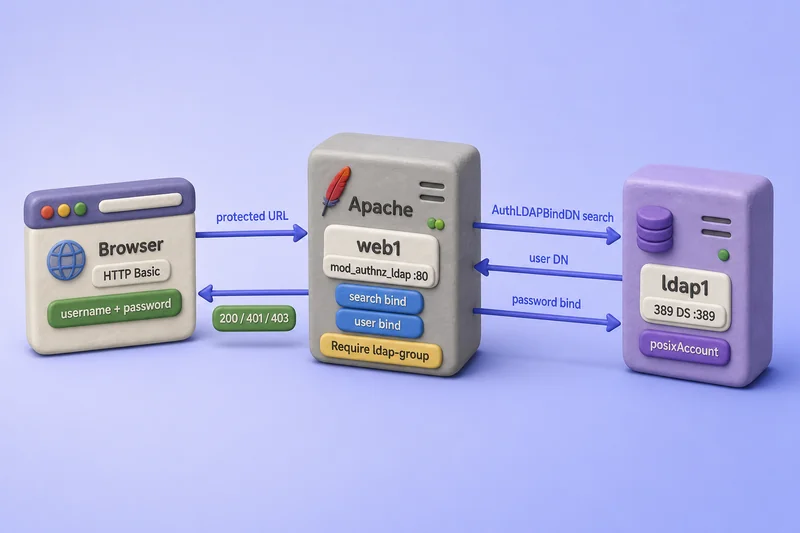
The diagram shows the logical path, not packet timing. Apache connects directly to 389 DS; SSSD is not involved in this integration.
- Apache binds with the configured search account, or anonymously when the directory permits it, and searches for the username entered in the browser.
- Apache locates the user entry under the configured base DN using the login attribute from
AuthLDAPURL, normallyuid. - Apache binds as the discovered user DN with the submitted password to verify credentials.
- Apache evaluates the applicable
Requiredirective. - When both checks pass, Apache serves the page. A failed password check returns
401; a failed authorization rule returns401by default or403whenAuthzSendForbiddenOnFailure Onis configured.
LDAP authentication does not automatically authorize every authenticated user. Authorization is controlled separately through Require valid-user, ldap-user, ldap-group, ldap-attribute, or ldap-filter.
| Module | Purpose |
|---|---|
mod_auth_basic |
Provides the browser login prompt |
mod_authz_user |
Provides Require valid-user |
mod_authnz_ldap |
Performs LDAP authentication and authorization |
mod_ldap |
Provides LDAP connections, caching, TLS, and connection pooling |
HTTP Basic authentication sends credentials on every request. Serve the protected website over HTTPS in production, and encrypt the separate LDAP connection between Apache and 389 Directory Server.
Prepare the two-VM Apache LDAP lab
The lab uses two Rocky Linux 10 VMs. Run directory commands on VM1 (ldap1.example.com) and Apache commands on VM2 (web1.example.com).
| Role | Host | Notes |
|---|---|---|
| VM1 — directory server | ldap1.example.com |
Instance ldap1, suffix dc=example,dc=com |
| VM2 — Apache server | web1.example.com |
Rocky Linux 10.2 with httpd and mod_ldap |
| User search base | ou=people,dc=example,dc=com |
Narrow POSIX user subtree |
| Group DN | cn=apache-web-users,ou=Groups,dc=example,dc=com |
groupOfNames authorization group |
| Search account | cn=apache-reader,ou=Services,dc=example,dc=com |
Read-only LDAP bind for Apache |
| Allowed user | apacheuser1 |
Member of apache-web-users |
| Unauthorized user | apacheguest |
Valid POSIX account, not in the group |
| LDAP URI (StartTLS) | ldap://ldap1.example.com |
Port 389 with STARTTLS on AuthLDAPURL |
| LDAPS URI (alternative) | ldaps://ldap1.example.com:636 |
Implicit TLS on the secure port |
| CA certificate on VM2 | /etc/httpd/conf/ldap1-ca.crt |
Copied from VM1 |
| Protected URL | https://web1.example.com/secure/ |
One test directory |
Confirm DNS or /etc/hosts on VM2 resolves ldap1.example.com, copy the directory CA from VM1, and keep clocks synchronized with chrony on both systems. This article assumes 389 Directory Server is already installed and configured on VM1 and an HTTPS virtual host is available on VM2. The required Apache and LDAP packages are installed later in the guide.
Prepare the LDAP users, group, and search account
VM1 (ldap1.example.com): Apache maps the browser username to the uid attribute. Create only the minimum lab objects here; use the users-and-groups guide for full account workflows and the ACI examples guide for production search-account permissions.
This lab assumes ou=People and ou=Groups already exist from the users-and-groups guide. The dsidm service command also requires ou=Services, so create that container when it is not already present:
dsidm -y /root/dm.pw ldap1 ou listSample output (trimmed):
People
Groups
When Services is missing, create it:
dsidm -y /root/dm.pw ldap1 ou create --ou ServicesSample output:
Successfully created ServicesCreate the test users with dsidm:
dsidm -y /root/dm.pw ldap1 user create --uid apacheuser1 --cn "Apache User1" --displayName "Apache User1" --uidNumber 15201 --gidNumber 15200 --homeDirectory /home/apacheuser1Sample output:
Successfully created apacheuser1dsidm -y /root/dm.pw ldap1 user create --uid apacheguest --cn "Apache Guest" --displayName "Apache Guest" --uidNumber 15202 --gidNumber 15202 --homeDirectory /home/apacheguestSample output:
Successfully created apacheguestCreate the read-only search account under ou=Services:
dsidm -y /root/dm.pw ldap1 service create --cn apache-reader --description "Apache LDAP search account"Sample output:
Successfully created apache-readerSet passwords for the lab accounts:
dsidm -y /root/dm.pw ldap1 account reset_password "uid=apacheuser1,ou=people,dc=example,dc=com" 'ApacheUser1!'Sample output:
reset password for uid=apacheuser1,ou=people,dc=example,dc=comdsidm -y /root/dm.pw ldap1 account reset_password "uid=apacheguest,ou=people,dc=example,dc=com" 'ApacheGuest!'Sample output:
reset password for uid=apacheguest,ou=people,dc=example,dc=comdsidm -y /root/dm.pw ldap1 account reset_password "cn=apache-reader,ou=Services,dc=example,dc=com" 'ApacheReader!'Sample output:
reset password for cn=apache-reader,ou=Services,dc=example,dc=comCreate the authorization group as groupOfNames with a complete member DN:
ldapmodify -x -H ldap://ldap1.example.com:389 -D "cn=Directory Manager" -y /root/dm.pw <<'EOF'
dn: cn=apache-web-users,ou=Groups,dc=example,dc=com
changetype: add
objectClass: top
objectClass: groupOfNames
cn: apache-web-users
member: uid=apacheuser1,ou=people,dc=example,dc=com
EOF
Sample output:
adding new entry "cn=apache-web-users,ou=Groups,dc=example,dc=com"Grant the search account read access to the attributes Apache needs. The reader must be able to read objectClass when your AuthLDAPURL filter uses (objectClass=posixAccount):
ldapmodify -x -H ldap://ldap1.example.com:389 -D "cn=Directory Manager" -y /root/dm.pw <<'EOF'
dn: ou=people,dc=example,dc=com
changetype: modify
add: aci
aci: (targetattr="uid || cn || objectClass")(version 3.0; acl "Apache reader search people"; allow (read,search,compare) userdn="ldap:///cn=apache-reader,ou=Services,dc=example,dc=com";)
EOF
Sample output:
modifying entry "ou=people,dc=example,dc=com"ldapmodify -x -H ldap://ldap1.example.com:389 -D "cn=Directory Manager" -y /root/dm.pw <<'EOF'
dn: ou=Groups,dc=example,dc=com
changetype: modify
add: aci
aci: (targetattr="cn || member")(version 3.0; acl "Apache reader search groups"; allow (read,search,compare) userdn="ldap:///cn=apache-reader,ou=Services,dc=example,dc=com";)
EOFSample output:
modifying entry "ou=Groups,dc=example,dc=com"The user DN still appears in LDAP search results without listing dn in targetattr. Values in targetattr must be real schema attributes such as uid, cn, member, and objectClass.
Do not use Directory Manager as the Apache bind account in production. The search account needs read, search, and compare rights on the required user and group attributes, but it does not need write access or permission to read userPassword. Apache performs a directory search during authentication and uses comparisons for several authorization providers.
Verify LDAP connectivity from the Apache server
VM2 (web1.example.com): Confirm LDAP settings from the shell before you edit Apache. Use the same hostname, base DN, bind DN, CA file, and StartTLS mode that AuthLDAPURL will use. The ldapsearch command documents -b, -D, -ZZ, and filter syntax for these checks.
Export the CA path for the client tools:
export LDAPTLS_CACERT=/etc/openldap/certs/ldap1-ca.crtTest the search-account bind and user lookup:
ldapsearch -LLL -o ldif-wrap=no -x -ZZ -H ldap://ldap1.example.com:389 -D "cn=apache-reader,ou=Services,dc=example,dc=com" -W -b "ou=people,dc=example,dc=com" "(uid=apacheuser1)" uidSample output:
dn: uid=apacheuser1,ou=people,dc=example,dc=com
uid: apacheuser1
Verify the authorization group and member values:
ldapsearch -LLL -o ldif-wrap=no -x -ZZ -H ldap://ldap1.example.com:389 -D "cn=apache-reader,ou=Services,dc=example,dc=com" -W -b "ou=Groups,dc=example,dc=com" "(cn=apache-web-users)" cn memberSample output:
dn: cn=apache-web-users,ou=Groups,dc=example,dc=com
cn: apache-web-users
member: uid=apacheuser1,ou=people,dc=example,dc=com
Confirm the user password with a direct bind:
ldapwhoami -x -ZZ -H ldap://ldap1.example.com:389 -D "uid=apacheuser1,ou=people,dc=example,dc=com" -WSample output:
dn: uid=apacheuser1,ou=people,dc=example,dc=comAn incorrect password should fail with ldap_bind: Invalid credentials (49). When ldapsearch succeeds from VM2 but Apache later fails, the problem is usually Apache configuration, SELinux, or TLS trust rather than the directory data itself.
Install and verify the Apache LDAP modules
VM2 (web1.example.com): Install Apache HTTP Server, the LDAP modules, and the LDAP client utilities. Package installs on RHEL-family hosts use sudo and dnf:
sudo dnf install -y httpd mod_ldap openldap-clientsEnable and start the web server with systemctl:
sudo systemctl enable --now httpdConfirm the required modules are loaded rather than assuming they are active:
httpd -M | grep -E 'auth_basic|authz_user|ldap'Sample output:
auth_basic_module (shared)
 authz_user_module (shared)
 ldap_module (shared)
 authnz_ldap_module (shared)
On SELinux Enforcing systems, allow Apache to open outbound LDAP connections. Prefer the LDAP-specific boolean over broad network permissions. If connections still fail, confirm firewalld allows LDAP from the Apache host to VM1.
sudo setsebool -P httpd_can_connect_ldap onVerify the boolean:
getsebool httpd_can_connect_ldapSample output:
httpd_can_connect_ldap --> onCreate a protected test directory before you add authentication:
sudo install -d -m 0755 /var/www/html/secureecho 'LDAP authentication succeeded.' | sudo tee /var/www/html/secure/index.htmlPlace LDAP settings in /etc/httpd/conf.d/389ds-ldap-auth.conf rather than .htaccess. Server-level configuration is easier to audit and keeps the bind password out of content directories.
Configure basic LDAP authentication
VM2 (web1.example.com): Copy the directory CA to a path Apache can read:
sudo cp /etc/openldap/certs/ldap1-ca.crt /etc/httpd/conf/ldap1-ca.crtsudo chmod 0644 /etc/httpd/conf/ldap1-ca.crtCreate /etc/httpd/conf.d/389ds-ldap-auth.conf with the minimum working authentication block. Place LDAPTrustedGlobalCert in server configuration context, outside <Directory>:
LDAPTrustedGlobalCert CA_BASE64 /etc/httpd/conf/ldap1-ca.crt
LDAPVerifyServerCert On

<Directory "/var/www/html/secure">
    AuthType Basic
    AuthName "389 Directory Server Login"
    AuthBasicProvider ldap

    AuthLDAPURL "ldap://ldap1.example.com/ou=people,dc=example,dc=com?uid?sub?(objectClass=posixAccount)" STARTTLS
    AuthLDAPBindDN "cn=apache-reader,ou=Services,dc=example,dc=com"
    AuthLDAPBindPassword "ApacheReader!"

    Require valid-user
</Directory>
Restrict ownership because the file contains the service bind password. Ownership changes use the chown command:
sudo chown root:root /etc/httpd/conf.d/389ds-ldap-auth.confsudo chmod 0600 /etc/httpd/conf.d/389ds-ldap-auth.confUnderstand the AuthLDAPURL syntax
The LDAP URL ends after the search filter:
ldap://host:port/base-dn?login-attribute?scope?filterAppend STARTTLS after the quoted URL to upgrade a port 389 connection to TLS. Apache documents the full directive form as:
AuthLDAPURL url [NONE|SSL|TLS|STARTTLS]| Component | Example | Purpose |
|---|---|---|
| Scheme | ldap:// or ldaps:// |
Plain LDAP or implicit TLS |
| Server | ldap1.example.com |
389 Directory Server host |
| Port | 389 or 636 |
Omitted for default scheme port |
| Base DN | ou=people,dc=example,dc=com |
Where user searches begin |
| Login attribute | uid |
Browser username mapped to this attribute |
| Scope | sub |
Search the complete subtree |
| Filter | (objectClass=posixAccount) |
Restrict matching entries |
| Transport | STARTTLS after the URL |
Upgrade the LDAP connection to TLS on port 389 |
Use a narrow user search base when possible. The filter must match attributes your search account can read.
Validate syntax before reloading:
sudo apachectl configtestSample output:
Syntax OKReload Apache:
sudo systemctl reload httpdTest an unauthenticated request over HTTPS. The workstation running curl must trust the Apache HTTPS certificate; when the site uses a private web CA, pass --cacert /path/to/web-ca.crt instead of switching back to HTTP — see OpenSSL for inspecting or staging web-server certificates. HTTPS login tests use the curl command with -sI and -u:
curl --noproxy '*' -sI https://web1.example.com/secure/Sample output:
HTTP/1.1 401 Unauthorized
WWW-Authenticate: Basic realm="389 Directory Server Login"
Test a valid LDAP user without placing the password on the command line:
curl --noproxy '*' -sI -u apacheuser1 https://web1.example.com/secure/curl prompts for the password interactively.
Sample output:
HTTP/1.1 200 OKA wrong password returns 401 again.
Restrict access using LDAP users and groups
Require valid-user confirms that the account exists and the password is correct. It does not limit which LDAP users may access the page.
Allow specific LDAP users
Replace Require valid-user with a named user list:
Require ldap-user apacheuser1This matches the login attribute returned by AuthLDAPURL, not the full user DN.
Validate and reload before testing:
sudo apachectl configtestsudo systemctl reload httpdA user not listed in the directive should fail even with a valid password:
curl --noproxy '*' -s -o /dev/null -w '%{http_code}\n' -u apacheguest https://web1.example.com/secure/Sample output:
401Allow members of an LDAP group
Replace Require valid-user with the complete group-authorization block below. This lab checks direct membership only, so AuthLDAPMaxSubGroupDepth 0 disables subgroup traversal. Apache otherwise defaults to a subgroup depth of 10 and can evaluate nested groupOfNames or groupOfUniqueNames entries unless you set the depth to zero or directory permissions block the extra searches.
LDAPTrustedGlobalCert CA_BASE64 /etc/httpd/conf/ldap1-ca.crt
LDAPVerifyServerCert On

<Directory "/var/www/html/secure">
    AuthType Basic
    AuthName "389 Directory Server Login"
    AuthBasicProvider ldap

    AuthLDAPURL "ldap://ldap1.example.com/ou=people,dc=example,dc=com?uid?sub?(objectClass=posixAccount)" STARTTLS
    AuthLDAPBindDN "cn=apache-reader,ou=Services,dc=example,dc=com"
    AuthLDAPBindPassword "ApacheReader!"

    AuthLDAPGroupAttribute member
    AuthLDAPGroupAttributeIsDN on
    AuthLDAPMaxSubGroupDepth 0
    AuthzSendForbiddenOnFailure On

    Require ldap-group cn=apache-web-users,ou=Groups,dc=example,dc=com
</Directory>
member stores the complete user DN. AuthLDAPGroupAttributeIsDN on tells Apache to compare the authenticated user's DN against that attribute. A matching POSIX gidNumber on the user entry does not satisfy Require ldap-group.
When you intentionally use nested groups, remove AuthLDAPMaxSubGroupDepth 0 and ensure the Apache bind account can read subgroup member or uniqueMember values and the objectClass attributes Apache needs for traversal.
By default, Apache returns 401 Unauthorized after a successful password bind when authorization fails. AuthzSendForbiddenOnFailure On changes that behavior so a valid password with failed group membership returns 403 Forbidden, which makes authentication and authorization easier to distinguish during testing.
AuthzSendForbiddenOnFailure On reveals that the supplied password was valid when group authorization fails. Leave the default Off in production when that distinction would disclose sensitive authentication information.
Validate syntax and reload before retesting:
sudo apachectl configtestsudo systemctl reload httpdAllowed group member:
curl --noproxy '*' -s -o /dev/null -w '%{http_code}\n' -u apacheuser1 https://web1.example.com/secure/Sample output:
200Authenticated user outside the group:
curl --noproxy '*' -s -o /dev/null -w '%{http_code}\n' -u apacheguest https://web1.example.com/secure/Sample output with AuthzSendForbiddenOnFailure On:
403The second result proves authentication succeeded while group authorization rejected the user.
Authorize using an attribute or LDAP filter
A group is not always necessary. When the user entry already contains an application flag or role attribute, Apache can authorize that value directly with ldap-attribute or evaluate a broader condition with ldap-filter.
This optional memberOf rule requires two prerequisites: the MemberOf plug-in must populate memberOf, and the Apache search account must have search and read access to that attribute. The earlier lab ACI does not include memberOf because direct ldap-group authorization does not need it.
Extend the People ACI when you want to test ldap-filter against memberOf:
ldapmodify -x -H ldap://ldap1.example.com:389 -D "cn=Directory Manager" -y /root/dm.pw <<'EOF'
dn: ou=people,dc=example,dc=com
changetype: modify
delete: aci
aci: (targetattr="uid || cn || objectClass")(version 3.0; acl "Apache reader search people"; allow (read,search,compare) userdn="ldap:///cn=apache-reader,ou=Services,dc=example,dc=com";)
-
add: aci
aci: (targetattr="uid || cn || objectClass || memberOf")(version 3.0; acl "Apache reader search people"; allow (read,search,compare) userdn="ldap:///cn=apache-reader,ou=Services,dc=example,dc=com";)
EOF
Sample output:
modifying entry "ou=people,dc=example,dc=com"Then Apache can authorize users who carry a specific memberOf value:
Require ldap-filter "(memberOf=cn=apache-web-users,ou=Groups,dc=example,dc=com)"Require ldap-attribute expects an attribute=value pair, for example Require ldap-attribute employeeType=web-enabled. Use that form only when the attribute exists on the test user, is not already enforced by your AuthLDAPURL filter, and the Apache bind account has compare access to it.
Use ldap-filter and ldap-attribute sparingly. They are useful when roles or account flags already live on the user entry; see roles versus groups for server-side role design.
| Directive | Use |
|---|---|
Require valid-user |
Any authenticated LDAP user |
Require ldap-user |
One or more named users |
Require ldap-group |
Members of an LDAP group |
Require ldap-attribute |
User entry contains attribute=value |
Require ldap-filter |
User matches a more complex LDAP filter |
Secure the Apache-to-LDAP connection
Two connections need protection:
Browser -- HTTPS --> Apache -- LDAP TLS --> 389 Directory ServerEncrypting only the website does not encrypt LDAP traffic between Apache and 389 DS. Complete Apache HTTPS setup belongs in a separate article; this lab assumes HTTPS is already available for the protected URL.
Option 1: LDAP with StartTLS
Upgrade a plain LDAP connection on port 389:
AuthLDAPURL "ldap://ldap1.example.com/ou=people,dc=example,dc=com?uid?sub?(objectClass=posixAccount)" STARTTLSKeep LDAPTrustedGlobalCert and LDAPVerifyServerCert On at server scope. On Rocky Linux 10.2, Apache accepted the PEM CA file with CA_BASE64. Certificate export and renewal stay in the 389 DS TLS guide.
Verify StartTLS independently before testing Apache:
ldapsearch -LLL -o ldif-wrap=no -x -ZZ -H ldap://ldap1.example.com:389 -D "cn=apache-reader,ou=Services,dc=example,dc=com" -W -b "ou=people,dc=example,dc=com" "(uid=apacheuser1)" uidOption 2: LDAPS
LDAPS negotiates TLS immediately on port 636:
AuthLDAPURL "ldaps://ldap1.example.com:636/ou=people,dc=example,dc=com?uid?sub?(objectClass=posixAccount)"Do not append STARTTLS to an ldaps:// URL. Use either StartTLS or LDAPS consistently for each connection.
Do not disable certificate validation as a permanent fix. Correct the CA path, hostname, and certificate trust instead.
Test authentication and authorization
Use a small matrix to separate authentication from authorization:
| Test | Password | Group membership | Expected result |
|---|---|---|---|
apacheuser1 |
Correct | Member of apache-web-users |
200 |
apacheuser1 |
Incorrect | Member | 401 |
apacheguest |
Correct | Not a member | 403 with AuthzSendForbiddenOnFailure On |
| Unknown user | Any | None | 401 |
| Anonymous request | None | None | 401 |
A 401 response usually means the user search or password bind failed. With AuthzSendForbiddenOnFailure On, a 403 response after a valid password means Require ldap-group or another authorization rule rejected the authenticated identity.
Test in the browser and with curl -u username over HTTPS. Run apachectl configtest and reload httpd after each meaningful configuration change.
mod_ldap caches successful LDAP search, bind, and group-comparison results. The default TTL for both the main LDAP cache and operation cache is 600 seconds, so a password change, account lockout, or newly added group membership may not appear immediately in repeated Apache tests. During the lab, wait for the configured cache TTL or run sudo systemctl restart httpd when you need a clean retest after changing a password, account state, or group membership. Use reload after ordinary configuration edits; reserve restart for clearing in-memory LDAP test state.
Troubleshoot Apache LDAP authentication
| Symptom | Likely cause | Fix |
|---|---|---|
configtest reports AuthLDAPURL is invalid |
mod_authnz_ldap not loaded |
Install mod_ldap, confirm authnz_ldap_module with httpd -M, rerun apachectl configtest |
Login always returns 401 |
Search base, filter, bind DN, password, or TLS | Match ldapsearch to AuthLDAPURL; confirm exactly one user entry |
Require valid-user works, Require ldap-group fails |
Wrong group attribute model | For groupOfNames, set AuthLDAPGroupAttribute member and AuthLDAPGroupAttributeIsDN on |
HTTP 500 during login |
SELinux blocks LDAP connect | Run setsebool -P httpd_can_connect_ldap on |
| TLS verification fails | Wrong CA file or hostname mismatch | Fix LDAPTrustedGlobalCert; use the LDAP server FQDN from the certificate SAN |
| Search works in shell but Apache says user not found | Search account cannot read filter attributes | Grant read access to objectClass or simplify the AuthLDAPURL filter |
| Password or group change not reflected | mod_ldap cache |
Wait for LDAPCacheTTL / LDAPOpCacheTTL, or run sudo systemctl restart httpd during lab retests |
Review Apache logs after a failed login:
sudo tail -20 /var/log/httpd/error_logA failed user search often appears as AH01618: user <uid> not found. TLS or bind failures may appear as LDAP connection errors in the same log.
On VM1, review 389 DS access logs to distinguish failed searches from failed user binds:
sudo tail -30 /var/log/dirsrv/slapd-ldap1/accessLook for the search performed by cn=apache-reader, followed by the user bind. A successful user bind confirms authentication; a later Apache authorization failure points to the applicable Require rule instead. Log lines vary by server configuration, so a fabricated full sample is not necessary here.
Account lockout and password policy on the directory server still apply to the user bind Apache performs. When a locked account fails authentication, fix the account state on 389 DS rather than in Apache; see account lockout for failed-bind behavior.
References
- Apache mod_authnz_ldap — LDAP authentication and authorization directives
- Apache mod_ldap — LDAP connection, TLS, and cache settings
- Apache mod_authz_core —
AuthzSendForbiddenOnFailure - 389 Project: Apache LDAP guide — upstream integration notes
- SELinux policy reference for httpd —
httpd_can_connect_ldapboolean
Summary
You configured Apache HTTP Server to authenticate users directly against 389 Directory Server:
- Created test users, a
groupOfNamesauthorization group, and a read-onlyapache-readersearch account. - Verified LDAP connectivity from VM2 with
ldapsearchandldapwhoamibefore editing Apache. - Installed and confirmed
mod_ldap,mod_authnz_ldap,mod_auth_basic, andmod_authz_user. - Configured
AuthLDAPURLto searchuidunderou=peoplewith StartTLS. - Started with
Require valid-user, then restricted access withRequire ldap-group. - Encrypted Apache-to-directory traffic with StartTLS or LDAPS and trusted the issuing CA.
For the surrounding course, continue with the ACI examples, MemberOf, and SSSD LDAP authentication guides when you need operating-system login instead of web-server login.
