
Linux clients resolve POSIX users and groups from 389 Directory Server through SSSD. NSS asks SSSD for passwd and group entries, PAM sends authentication through SSSD, and SSSD queries the directory over LDAP with TLS before it optionally caches identities and credentials for offline use.
This guide configures a Rocky Linux 10 client against an existing 389 DS suffix. For complete user and group lifecycle work, see manage users and groups. For server TLS and CA export, see TLS, STARTTLS, and LDAPS. For search-account ACIs, see ACI examples.
Tested on: Rocky Linux 10.2; 389 Directory Server 3.2.0.
How 389 Directory Server and SSSD authentication works
When a user runs id alice or logs in through SSH, SSSD mediates both identity lookup and password verification against 389 Directory Server.
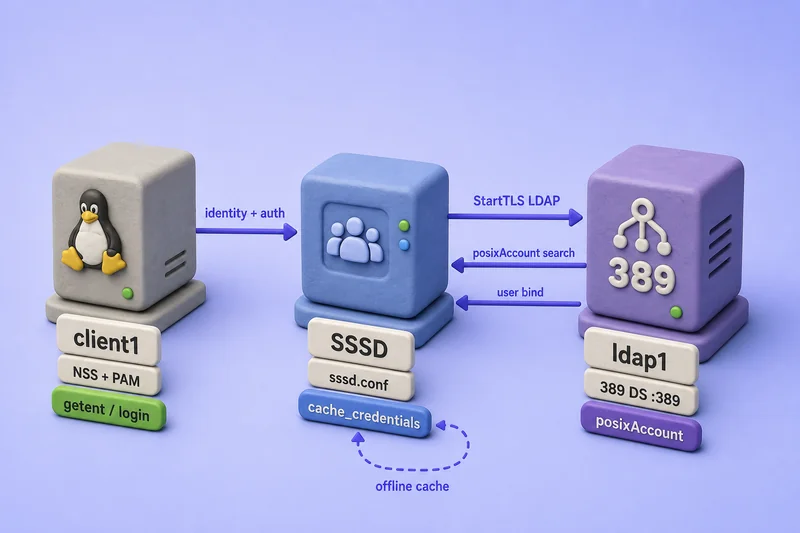
The diagram shows the logical path, not thread timing. NSS lookups and PAM authentication both go through SSSD, but ldap_access_filter can allow getent resolution while denying login for users outside the allowed group.
- NSS (
getent,id,ls) asks SSSD for user and group information when applications resolve POSIX identities. - SSSD searches 389 Directory Server for the matching
posixAccountentry over StartTLS or LDAPS. - PAM sends authentication requests to SSSD during login, console, or
su. - SSSD verifies the password with an LDAP bind as that user over TLS — it does not compare against a hash downloaded from the directory.
- With
cache_credentials = true, SSSD stores a salted hash of the credential in its local cache after a successful online login for offline use.
SSSD does not download the directory password hash and compare it locally. Password authentication requires a live LDAP bind unless a prior online login cached the credentials.
The lab uses two Rocky Linux 10 VMs. Run directory commands on VM1 (ldap1.example.com) and SSSD client commands on VM2 (client1.example.com).
| Role | Host | Notes |
|---|---|---|
| VM1 — directory server | ldap1.example.com |
Instance ldap1, suffix dc=example,dc=com |
| VM2 — SSSD client | client1.example.com |
Rocky Linux 10.2 client |
| LDAP URI (StartTLS) | ldap://ldap1.example.com |
Port 389 with ldap_id_use_start_tls = true |
| LDAPS URI (alternative) | ldaps://ldap1.example.com:636 |
Implicit TLS on the secure port |
| CA certificate on client | /etc/openldap/certs/ldap1-ca.crt |
Copied from VM1 |
| Allowed login group | cn=sssd-clients,ou=Groups,dc=example,dc=com |
ldap_access_filter target |
| Allowed user | sssduser1 |
Member of sssd-clients |
| Rejected user | sssdguest |
Valid POSIX account, not in sssd-clients |
Confirm DNS or /etc/hosts on VM2 resolves ldap1.example.com and keep clocks synchronized with NTP or chrony on both systems.
Prepare 389 Directory Server users and groups for Linux
VM1 (ldap1.example.com): SSSD needs standard POSIX attributes to map directory accounts to Linux logins. Create only the minimum lab objects here; use the manage users and groups guide for full account workflows.
The MemberOf plug-in must already be enabled and configured for the member attribute. Without it, memberOf values and the ldap_access_filter used later will not match.
Verify the POSIX user attributes
Each Linux login user needs:
| Attribute | Purpose |
|---|---|
uid |
Login name |
uidNumber |
Numeric UID |
gidNumber |
Primary GID |
homeDirectory |
Home directory path |
loginShell |
Login shell |
cn |
Display name (mapped to GECOS with ldap_user_gecos = cn) |
objectClass: posixAccount |
POSIX user identity |
Choose uidNumber and gidNumber values that do not collide with local /etc/passwd entries or other directory accounts.
Create the login group, a primary group for the guest user, and the test accounts:
dsidm -y /root/dm.pw ldap1 posixgroup create --cn sssd-clients --gidNumber 15100dsidm -y /root/dm.pw ldap1 posixgroup create --cn sssd-guests --gidNumber 15102dsidm -y /root/dm.pw ldap1 user create --uid sssduser1 --cn "SSSD User1" --displayName "SSSD User1" --uidNumber 15101 --gidNumber 15100 --homeDirectory /home/sssduser1dsidm -y /root/dm.pw ldap1 user create --uid sssdguest --cn "SSSD Guest" --displayName "SSSD Guest" --uidNumber 15102 --gidNumber 15102 --homeDirectory /home/sssdguestAdd the allowed user to the login group and set passwords:
dsidm -y /root/dm.pw ldap1 posixgroup modify sssd-clients add:member:uid=sssduser1,ou=people,dc=example,dc=comdsidm -y /root/dm.pw ldap1 account reset_password "uid=sssduser1,ou=people,dc=example,dc=com" 'Ssdlab1!'dsidm -y /root/dm.pw ldap1 account reset_password "uid=sssdguest,ou=people,dc=example,dc=com" 'Ssdlab1!'Add loginShell if your user entries do not already include it:
ldapmodify -x -H ldap://ldap1.example.com:389 -D "cn=Directory Manager" -y /root/dm.pw <<'EOF'
dn: uid=sssduser1,ou=people,dc=example,dc=com
changetype: modify
add: loginShell
loginShell: /bin/bash

dn: uid=sssdguest,ou=people,dc=example,dc=com
changetype: modify
add: loginShell
loginShell: /bin/bash
EOF
Sample output:
modifying entry "uid=sssduser1,ou=people,dc=example,dc=com"

modifying entry "uid=sssdguest,ou=people,dc=example,dc=com"
Verify the POSIX group structure
dsidm posixgroup create builds a groupOfNames entry that also carries posixGroup, which is what SSSD needs for RFC2307bis membership. The member attribute stores complete user DNs; the MemberOf plug-in maintains memberOf on users. RFC2307 memberUid username lists are not the primary model here.
Confirm the login group carries the expected object classes and membership. Group membership checks use the ldapsearch command with -b and filter syntax:
ldapsearch -LLL -x -H ldap://ldap1.example.com:389 -D "cn=Directory Manager" -y /root/dm.pw -b "cn=sssd-clients,ou=Groups,dc=example,dc=com" objectClass gidNumber memberSample output:
dn: cn=sssd-clients,ou=Groups,dc=example,dc=com
objectClass: top
objectClass: groupOfNames
objectClass: posixGroup
objectClass: nsMemberOf
gidNumber: 15100
member: uid=sssduser1,ou=people,dc=example,dc=com
Confirm the allowed user carries the expected POSIX attributes:
ldapsearch -LLL -x -H ldap://ldap1.example.com:389 -D "cn=Directory Manager" -y /root/dm.pw -b "uid=sssduser1,ou=people,dc=example,dc=com" uid uidNumber gidNumber homeDirectory loginShell memberOfSample output:
dn: uid=sssduser1,ou=people,dc=example,dc=com
uid: sssduser1
uidNumber: 15101
gidNumber: 15100
homeDirectory: /home/sssduser1
loginShell: /bin/bash
memberOf: cn=sssd-clients,ou=Groups,dc=example,dc=com
sssdguest resolves as a POSIX user with primary group sssd-guests but is not a member of sssd-clients, which the access filter uses later.
Verify LDAP and TLS connectivity from the client
VM1 (ldap1.example.com): The issuing CA PEM lives at /etc/dirsrv/slapd-ldap1/ca.crt, which is normally readable only by dirsrv and root. Stage a world-readable copy in /tmp before you copy it to VM2. File staging on the client uses sudo command:
sudo install -m 0644 /etc/dirsrv/slapd-ldap1/ca.crt /tmp/ldap1-ca.crtVM2 (client1.example.com): Copy the staged file from VM1 with scp and install it where SSSD will read it. Replace adminuser with the SSH username used to access VM1. See the ssh command for key-based login and scp options.
scp [email protected]:/tmp/ldap1-ca.crt /tmp/ldap1-ca.crtsudo install -d -m 755 /etc/openldap/certs
sudo install -m 0644 /tmp/ldap1-ca.crt /etc/openldap/certs/ldap1-ca.crtConfirm the hostname resolves on the client:
getent hosts ldap1.example.comTest StartTLS with the same CA file SSSD will use. Use -W so you type the Directory Manager password on the client; do not copy the server password file to VM2:
LDAPTLS_CACERT=/etc/openldap/certs/ldap1-ca.crt ldapsearch -LLL -x -ZZ -H ldap://ldap1.example.com:389 -D "cn=Directory Manager" -W -b "uid=sssduser1,ou=people,dc=example,dc=com" uid uidNumber gidNumber homeDirectory loginShell memberOfSample output:
dn: uid=sssduser1,ou=people,dc=example,dc=com
uid: sssduser1
uidNumber: 15101
gidNumber: 15100
homeDirectory: /home/sssduser1
loginShell: /bin/bash
memberOf: cn=sssd-clients,ou=Groups,dc=example,dc=com
A plain anonymous search returned no rows in this lab because anonymous read is restricted. SSSD therefore needs ldap_default_bind_dn and a bind password for identity lookups. The lab uses the Directory Manager identity; use a dedicated read-only bind account with ACIs when you deploy clients routinely.
LDAP password authentication through SSSD requires encryption. The final configuration uses ldap_tls_reqcert = demand, not allow.
Install SSSD and prepare the Linux client
VM2 (client1.example.com): On Rocky Linux 10 and other RHEL-family systems, install the client packages with the dnf command:
sudo dnf install -y sssd sssd-ldap sssd-tools openldap-clients authselect oddjob oddjob-mkhomedirSample output ends with Complete! when the packages install successfully. The sssd-tools package provides sssctl, including sssctl config-check.
The SSSD LDAP provider settings are portable across distributions. RHEL, Rocky Linux, AlmaLinux, Oracle Linux, and CentOS Stream share the same dnf package names and authselect workflow shown here. SUSE and Debian-family clients use equivalent packages (zypper / apt) and their own PAM/NSS activation tools. This guide stays on Rocky Linux 10 for the tested procedure.
Configure SSSD for 389 Directory Server
Generate a starting configuration with dsidm
VM1 (ldap1.example.com): dsidm client_config inspects the live server and prints a starter sssd.conf snippet. The dsidm command reference covers client_config and other directory helpers. Pass the allowed login group name so the template includes ldap_access_filter:
dsidm -y /root/dm.pw ldap1 client_config sssd.conf sssd-clientsSample output (trimmed):
[domain/ldap]
cache_credentials = True
id_provider = ldap
auth_provider = ldap
access_provider = ldap
chpass_provider = ldap
ldap_schema = rfc2307bis
ldap_search_base = dc=example,dc=com
ldap_uri = ldapi://%2fvar%2frun%2fslapd-ldap1.socket
ldap_tls_reqcert = demand
ldap_access_filter = (memberOf=cn=sssd-clients,ou=Groups,dc=example,dc=com)
ldap_user_member_of = memberof
ldap_user_gecos = cn
ldap_user_uuid = nsUniqueId
ldap_group_uuid = nsUniqueId
ldap_account_expire_policy = rhds
ldap_access_order = filter, expire
Replace ldapi:// with the client-facing LDAP URI, set ldap_tls_cacert, and review search bases before you deploy the file on VM2.
Configure the LDAP identity and authentication providers
VM2 (client1.example.com): The lab uses one complete domain definition adapted from the dsidm template:
[sssd]
domains = example.com
services = nss, pam

[domain/example.com]
id_provider = ldap
auth_provider = ldap
chpass_provider = ldap
access_provider = ldap

ldap_uri = ldap://ldap1.example.com
ldap_search_base = dc=example,dc=com
ldap_user_search_base = ou=people,dc=example,dc=com
ldap_group_search_base = ou=Groups,dc=example,dc=com

ldap_schema = rfc2307bis
ldap_user_member_of = memberOf
ldap_user_gecos = cn
ldap_user_uuid = nsUniqueId
ldap_group_uuid = nsUniqueId

ldap_account_expire_policy = rhds
ldap_access_order = filter, expire
ldap_access_filter = (memberOf=cn=sssd-clients,ou=Groups,dc=example,dc=com)

ldap_id_use_start_tls = true
ldap_tls_cacert = /etc/openldap/certs/ldap1-ca.crt
ldap_tls_reqcert = demand

ldap_default_bind_dn = cn=Directory Manager
ldap_default_authtok_type = password
ldap_default_authtok = <directory-manager-password>

cache_credentials = true
enumerate = false
use_fully_qualified_names = false
Important behavior:
id_provider,auth_provider, andchpass_providerall use LDAP.ldap_schema = rfc2307bismatches MemberOf-backed group membership.ldap_user_member_of = memberOflets SSSD evaluate group-based access filters.ldap_user_gecos = cnmaps the directorycnattribute into the GECOS field shown bygetent passwd.ldap_account_expire_policy = rhdsmaps 389 DS account lock attributes into SSSD access control.ldap_access_filterallows login only for members ofsssd-clients. Users outside the group can still resolve through NSS.cache_credentials = trueenables offline credential caching after a successful online login.
This lab uses StartTLS because the configured URI begins with ldap://. For LDAPS instead, set ldap_uri = ldaps://ldap1.example.com:636 and remove ldap_id_use_start_tls. Do not combine both on the same URI.
Replace <directory-manager-password> with the actual Directory Manager password used in this lab, then save the configuration as /tmp/sssd.conf on VM2.
Copy the file into place with restrictive permissions:
sudo install -m 0600 -o root -g root /tmp/sssd.conf /etc/sssd/sssd.confValidate the syntax:
sudo sssctl config-checkSample output:
Issues identified by validators: 0

Messages generated during configuration merging: 0

Used configuration snippet files: 0
Enable NSS and PAM integration with authselect
VM2 (client1.example.com): Inspect the current profile before you change it. Record the profile ID and enabled features; they vary on systems that already customized authentication:
authselect currentYour output may differ. A host that already selected SSSD with home-directory creation might show:
Profile ID: sssd
Enabled features:
- with-mkhomedir
Select the SSSD profile and enable automatic home-directory creation:
sudo authselect select sssd with-mkhomedir --forceSample output:
Profile "sssd" was selected.Start the required services with the systemctl command:
sudo systemctl enable --now sssd oddjobdConfirm NSS is using SSSD:
grep sss /etc/nsswitch.confSample output:
passwd:     files sss systemd
group:      files [SUCCESS=merge] sss [SUCCESS=merge] systemd
services:   files sss
authselect --force can replace unsupported manual PAM or NSS edits. Review authselect current first on systems that already customized authentication.
Verify LDAP user and group resolution
VM2 (client1.example.com): Test identity lookup before you attempt an interactive login:
getent passwd sssduser1Sample output:
sssduser1:*:15101:15100:SSSD User1:/home/sssduser1:/bin/bashid sssduser1Sample output:
uid=15101(sssduser1) gid=15100(sssd-clients) groups=15100(sssd-clients)getent group sssd-clientsSample output:
sssd-clients:*:15100:sssduser1Check the SSSD domain:
sssctl domain-listSample output:
example.comsssctl domain-status example.comSample output (trimmed):
Online status: Online
Active servers:
LDAP: ldap1.example.comid sssdguestSample output:
uid=15102(sssdguest) gid=15102(sssd-guests) groups=15102(sssd-guests)Run access checks for allowed and rejected accounts:
sssctl user-checks sssduser1Sample output (trimmed):
pam_acct_mgmt: Success
user: sssduser1
 - user id: 15101
 - group id: 15100
 - home directory: /home/sssduser1
- shell: /bin/bashsssctl user-checks sssdguestSample output (trimmed):
pam_acct_mgmt: Permission denied
user: sssdguest
 - user id: 15102
 - group id: 15102
sssdguest resolves through NSS, but the access provider denies account management because the user is outside sssd-clients.
Test password login and automatic home-directory creation
VM2 (client1.example.com): Test password authentication from a regular local-user session. Do not run this test as root; su as root normally skips the target user's password prompt and will not exercise LDAP authentication.
Log in as a local account such as labuser, then switch to the LDAP user:
su - sssduser1 -c 'whoami; pwd; id'Enter Ssdlab1! when prompted.
Sample output:
sssduser1
/home/sssduser1
uid=15101(sssduser1) gid=15100(sssd-clients) groups=15100(sssd-clients)
Confirm oddjobd created the home directory with correct ownership:
ls -ld /home/sssduser1Sample output:
drwx------. 2 sssduser1 sssd-clients 4096 Jul 20 12:28 /home/sssduser1Test a rejected login for the user outside the access filter:
su - sssdguest -c 'whoami'Sample output:
su: Permission deniedThe password-verification phase can succeed while PAM account management rejects the user. A complete login through the selected PAM service must deny sssdguest, as shown above.
Test SSSD offline authentication
Offline login requires a prior successful online authentication when cache_credentials = true. Identity cache and credential cache are not the same thing. While offline, SSSD reuses the most recent successful online access result; it cannot evaluate new LDAP membership changes against ldap_access_filter.
Create a second allowed user who resolves online but has never authenticated. VM1 (ldap1.example.com):
dsidm -y /root/dm.pw ldap1 user create --uid sssdnew --cn "SSSD New" --displayName "SSSD New" --uidNumber 15103 --gidNumber 15100 --homeDirectory /home/sssdnewdsidm -y /root/dm.pw ldap1 user modify sssdnew add:loginShell:/bin/bashdsidm -y /root/dm.pw ldap1 posixgroup modify sssd-clients add:member:uid=sssdnew,ou=people,dc=example,dc=comdsidm -y /root/dm.pw ldap1 account reset_password "uid=sssdnew,ou=people,dc=example,dc=com" 'Ssdlab1!'VM2 (client1.example.com): Confirm the new user resolves but do not log in as sssdnew yet:
getent passwd sssdnewSample output:
sssdnew:*:15103:15100:SSSD New:/home/sssdnew:/bin/bashConfirm the access filter accepts sssdnew before you test uncached offline authentication:
sssctl user-checks sssdnewSample output (trimmed):
pam_acct_mgmt: Success
user: sssdnew
 - user id: 15103
 - group id: 15100
 - home directory: /home/sssdnew
 - shell: /bin/bash
From a local-user session on VM2, authenticate online as sssduser1 first:
su - sssduser1 -c 'whoami'Enter Ssdlab1! when prompted. That caches credentials for sssduser1.
VM1 (ldap1.example.com): Stop the directory service to simulate an unreachable server:
sudo systemctl stop dirsrv@ldap1VM2 (client1.example.com): Retry login for the cached user from a local-user session:
su - sssduser1 -c 'whoami'Sample output:
sssduser1An allowed user who resolved online but never completed an online login still fails while the server is down:
su - sssdnew -c 'whoami'Sample output:
su: Authentication failureVM1 (ldap1.example.com): Restore directory service:
sudo systemctl start dirsrv@ldap1VM2 (client1.example.com): Restart SSSD so it returns online:
sudo systemctl restart sssdOffline mode cannot discover previously uncached LDAP users, change passwords, or refresh LDAP group membership. It only reuses cached identity and credential material from earlier successful online sessions.
Troubleshoot SSSD and LDAP authentication
User does not appear in getent or id
Check the search base, POSIX object classes, UID attributes, service bind credentials, and domain status. Clear a stale negative cache entry when you fix directory data:
sss_cache -u problemuserUser resolves but cannot authenticate
Check TLS trust, ldap_tls_reqcert, PAM integration, password validity, and whether SSSD can bind as the user over StartTLS or LDAPS. When the directory server has locked the account, see account lockout for failed-bind behavior. Inspect /var/log/sssd/sssd_<domain>.log and journalctl for recent SSSD unit messages.
Groups or access filters do not work
Confirm RFC2307bis membership, member DN values, memberOf on users, and that the MemberOf plug-in is enabled. Verify ldap_access_filter syntax against the full group DN.
Home directory is not created
Confirm authselect select sssd with-mkhomedir, oddjobd is active, homeDirectory is set on the user entry, and the parent path allows directory creation.
Offline login fails
Confirm the user completed at least one successful online login, cache_credentials = true, and you have not expired the credential cache. Offline login does not help users who were never cached.
| Symptom | First checks |
|---|---|
sssctl config-check reports errors |
Typo in sssd.conf; unsupported options for your SSSD build |
Domain offline in domain-status |
TLS trust, URI, firewall, service bind password |
getent works, login fails |
Access filter, account lock, PAM profile, password bind over TLS |
| Wrong groups | RFC2307 vs RFC2307bis, memberOf, group search base |
| No home directory | with-mkhomedir, oddjobd, homeDirectory attribute |
Use sssctl config-check, sssctl domain-status, sssctl user-checks, and targeted sss_cache invalidation before you delete the entire SSSD cache directory.
References
- RHEL 10: Configuring SSSD to use LDAP with TLS
- RHEL 10: Enabling offline authentication and LDAP access filters
- 389 Project: Configure SSSD with 389 Directory Server
- 389 Directory Server quick-start guide
- SSSD LDAP quick-start documentation
Summary
Configure Linux LDAP authentication with 389 Directory Server by preparing POSIX users and groups on VM1, copying the CA to VM2, installing SSSD, adapting the dsidm client_config template, and enabling the authselect SSSD profile with with-mkhomedir. Use ldap_tls_reqcert = demand, validate with sssctl config-check, confirm identity with getent and id, and test login plus offline caching separately from a local-user session. Restrict login with ldap_access_filter, and keep search-account ACIs in the dedicated directory-security chapters.
