
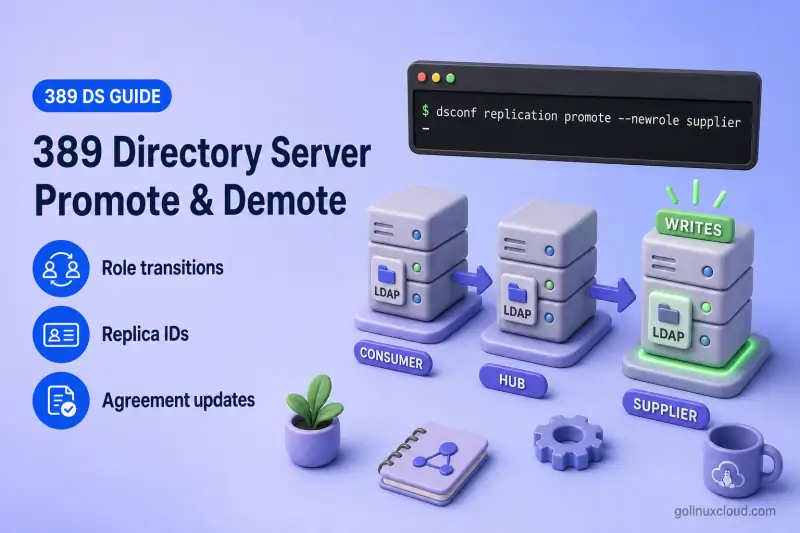
Changing a replica role moves a server between consumer, hub, and supplier behavior for a suffix. Promotion and demotion are operational steps you run after replication is healthy — they do not replace a tested multi-supplier topology when you need continuous write availability during supplier maintenance.
This runbook covers supported role transitions, preflight checks, one promotion scenario (consumer to hub to supplier), one demotion scenario (supplier to hub to consumer), agreement updates, validation, and rollback. For replica roles and changelog behavior, see replication architecture. For first-time setup, see single-supplier, cascading, or multi-supplier replication. For initialization before promotion, see initialize and reinitialize replicas.
Tested on: Rocky Linux 10.2; 389 Directory Server 3.2.0.
How replica promotion and demotion work
dsconf replication promote and dsconf replication demote change the role Directory Server plays for a replicated suffix on one instance. The commands do not create agreements, redesign the topology, or redirect LDAP clients.
| Current role | New role | Replica ID required | Result |
|---|---|---|---|
| Consumer | Hub | No | Read-only replica that maintains a changelog and can forward updates |
| Consumer | Supplier | Yes | Writable replica that can originate updates |
| Hub | Supplier | Yes | Writable replica; outgoing hub agreements usually remain |
| Supplier | Hub | No | Read-only forwarder that can keep sending updates downstream |
| Supplier | Consumer | No | Read-only replica that no longer sends updates |
| Hub | Consumer | No | Stops forwarding updates |
Supplier replica IDs must be unique integers from 1 to 65534 for each writable supplier on the suffix. Hubs and consumers use the reserved read-only ID 65535 that dsconf manages. Legacy documentation sometimes calls suppliers masters and consumers slaves; this guide uses supplier, hub, and consumer only.
On 389 Directory Server 3.2.0, nsDS5ReplicaType: 3 marks a supplier. nsDS5ReplicaType: 2 covers both hubs and consumers. When the type is 2, nsDS5Flags: 1 identifies a hub and nsDS5Flags: 0 identifies a consumer. Suppliers in this lab also showed nsDS5Flags: 1. Use the flag together with type and role context — not any single field alone. A hub still needs a valid outgoing agreement before it can forward updates.
The walkthrough below uses a two-step promotion (consumer → hub → supplier) and a matching demotion path. Those hub stages are optional:
- Consumer → supplier: run
replication promote --newrole supplier --replica-id IDdirectly on a synchronized consumer when you do not need a forwarding layer. - Supplier → consumer: drain writes, confirm pending changes reached another supplier, remove or disable obsolete outgoing agreements, and run
replication demote --newrole consumerdirectly when no hub role is required.
Plan the role change
Define the target topology
Record these items before you run promote or demote:
- Current and target role for the suffix
- Incoming agreements (who sends updates to this server)
- Outgoing agreements (who receives updates from this server)
- Replica IDs already assigned to suppliers on the suffix
- Downstream consumers or hubs that depend on this server
- LDAP clients and applications that send writes to the server today
- Whether rollback must restore the original supplier role and replica ID
Select a replica ID
Before you promote to supplier, list every active supplier for the suffix and choose an unused ID:
dsconf -y /root/dm.pw ldap1 replication get --suffix "dc=example,dc=com" | grep nsDS5ReplicaIdSample output on the primary supplier:
nsDS5ReplicaId: 1Run the same command on every other supplier peer. Never assign the same replica ID to two suppliers, even when agreement names differ.
Also inspect the suffix RUV on an authoritative supplier:
dsconf -y /root/dm.pw ldap1 replication get-ruv --suffix "dc=example,dc=com"Sample output from ldap1 in this lab (trimmed):
RUV:        {replica 1 ldap://ldap1.example.com:389} 6a5b1207000000010000 6a5be547000000010000
Replica ID: 1
LDAP URL:   ldap://ldap1.example.com:389
Min CSN:    2026-07-18 05:41:27 (6a5b1207000000010000)
Max CSN:    2026-07-18 20:42:47 (6a5be547000000010000)

RUV:        {replica 2 ldap://ldap2.example.com:1389}
Replica ID: 2
LDAP URL:   ldap://ldap2.example.com:1389
...
Each block is one supplier identity recorded in the local RUV. Replica IDs 1 and 2 appear here because ldap1 has received updates from those suppliers. ID 3 may appear after the disposable hub is promoted to supplier.
Do not reuse a former supplier ID merely because no active server currently shows it in replication get. If the ID remains in the RUV, keep it reserved until the old supplier identity has been removed through the documented CleanAllRUV procedure.
Plan agreement changes
Agreements are directional and live on the server that initiates replication sessions. Decide for each agreement whether you will retain, disable, delete, recreate in another direction, or replace with an alternate path. Deleting a local outgoing agreement does not remove agreements configured on other servers — see manage replication agreements.
Lab environment
This walkthrough uses three disposable instances on one host. Production deployments use separate hosts, LDAPS, and hostnames that match certificates.
| Role | Instance | LDAP URL (lab) | Replica ID | Agreement |
|---|---|---|---|---|
| Supplier | ldap1 |
ldap://127.0.0.1:389 |
1 |
ldap1-to-hub1 (created and initialized before this walkthrough) |
| Hub candidate | bdb-consumer |
ldap://127.0.0.1:21389 |
65535 (read-only) |
hub1-to-branch1 (after hub promotion) |
| Branch consumer | bdb-lab |
ldap://127.0.0.1:20389 |
65535 (read-only) |
— |
| External supplier peer | ldap2 on ldap2.example.com |
not used in commands below | 2 |
ldap1-to-supplier2 (production lab agreement; unchanged) |
Replica ID 2 is already assigned to the external multi-supplier peer on this suffix. The promotion step below uses ID 3 for the disposable promoted supplier.
Password files /root/hub1-dm.pw and /root/branch1-dm.pw in the commands below are symlinks to the Directory Manager password files for bdb-consumer and bdb-lab.
| File | Purpose |
|---|---|
/root/dm.pw |
Directory Manager on ldap1 |
/root/hub1-dm.pw |
Directory Manager on bdb-consumer |
/root/branch1-dm.pw |
Directory Manager on bdb-lab |
/root/hub1-repl.pw |
Replication manager password configured on bdb-consumer and bdb-lab |
/root/ldap1-repl.pw |
Replication manager password accepted by ldap1 for inbound replication binds |
Prepare the consumer role and replication manager on bdb-consumer and bdb-lab, then create and initialize ldap1-to-hub1 before promotion. Follow initialize and reinitialize replicas if the hub candidate is empty.
Starting topology — supplier ldap1 sends updates to read-only consumer bdb-consumer through ldap1-to-hub1:
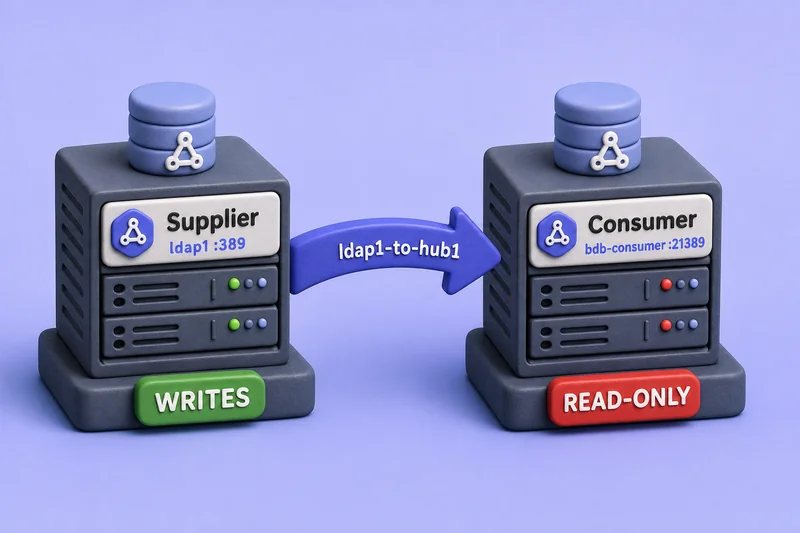
The agreement name labels the direction; only ldap1 accepts writes at this stage.
Perform pre-promotion checks
Confirm replication health on the candidate before you change its role:
- Required replicas are online and reachable on the expected ports
- Incoming agreements report successful incremental updates
- The candidate completed total initialization
- Replication lag is zero or within your accepted window
- Clocks are synchronized across participating hosts — excessive time skew can break replication sessions
ds-replcheck statereports the supplier and candidate are synchronized- DNS, TLS, authentication, and firewall rules work for replication binds
- A current backup exists
- You recorded the current role, replica ID, agreements, and
replication getoutput
Check agreement status from the supplier:
dsconf -y /root/dm.pw ldap1 repl-agmt status --suffix "dc=example,dc=com" --bind-dn "cn=replication manager,cn=config" --bind-passwd-file /root/hub1-repl.pw ldap1-to-hub1Sample output (trimmed):
Last Init Status: Error (0) Total update succeeded
Last Update Status: Error (0) Replica acquired successfully: Incremental update succeeded
The 0 is the underlying LDAP result code; it does not by itself prove that replication is healthy. Read the complete status text. Here, Total update succeeded and Incremental update succeeded confirm success. Other Error (0) messages can describe a disabled agreement, a session that has not started, or an inability to obtain a current CSN.
Agreement status proves the last replication session succeeded; it does not by itself prove the candidate holds identical data. Run a lightweight convergence check before you change roles.
ds-replcheck state uses one bind DN and password for both URLs. The command below assumes the Directory Manager password in /root/dm.pw is valid on both ldap1 and bdb-consumer. Otherwise, use a common comparison account authorized on both replicas, or prompt with -W.
ds-replcheck state -m ldap://127.0.0.1:389 -r ldap://127.0.0.1:21389 -b "dc=example,dc=com" -D "cn=Directory Manager" -y /root/dm.pwSample output:
Replication State: Supplier and Replica are in perfect synchronizationFor deeper comparison workflows, see ds-replcheck.
Read the candidate replica settings:
dsconf -y /root/hub1-dm.pw bdb-consumer replication get --suffix "dc=example,dc=com" | grep -E "nsDS5Replica(Id|Type|Root)|nsDS5Flags"Sample output before promotion:
nsDS5Flags: 0
nsDS5ReplicaId: 65535
nsDS5ReplicaRoot: dc=example,dc=com
nsDS5ReplicaType: 2
nsDS5ReplicaType: 2 with nsDS5Flags: 0 is the consumer signature in this lab.
Promotion scenario: consumer to hub to supplier
This section promotes the synchronized consumer on bdb-consumer to a forwarding hub, validates cascading behavior to bdb-lab, then promotes the hub to supplier replica ID 3.
Promote the consumer to a hub
When the candidate is current, promote it on the hub instance:
dsconf -y /root/hub1-dm.pw bdb-consumer replication promote --suffix "dc=example,dc=com" --newrole hubSample output:
Successfully promoted replica to "hub"Confirm the hub changelog flag and read-only ID:
dsconf -y /root/hub1-dm.pw bdb-consumer replication get --suffix "dc=example,dc=com" | grep -E "nsDS5Replica|nsDS5Flags"Sample output:
nsDS5Flags: 1
nsDS5ReplicaId: 65535
nsDS5ReplicaRoot: dc=example,dc=com
nsDS5ReplicaType: 2
nsDS5Flags: 1 with nsDS5ReplicaType: 2 is the hub signature. Forwarding still requires a valid outgoing agreement.
Test a direct write on the hub. Exact failure output depends on whether an update referral is configured; this lab returned a referral:
ldapmodify -x -H ldap://127.0.0.1:21389 -D "cn=Directory Manager" -y /root/hub1-dm.pw <<'EOF'
dn: uid=user1,ou=People,dc=example,dc=com
changetype: modify
add: description
description: hub-write-test
EOF
Sample output:
ldap_modify: Referral (10)
modifying entry "uid=user1,ou=People,dc=example,dc=com"
The modifying entry line identifies the target entry. Referral (10) is the operation result — the modification was not applied. A hub without a referral may return a different read-only error instead. Do not treat either result as proof of forwarding — verify downstream replication separately.
Create the hub-to-branch agreement
Create outgoing agreements only for consumers that should receive updates from the new hub:
dsconf -y /root/hub1-dm.pw bdb-consumer repl-agmt create hub1-to-branch1 --suffix "dc=example,dc=com" --host 127.0.0.1 --port 20389 --conn-protocol LDAP --bind-method SIMPLE --bind-dn "cn=replication manager,cn=config" --bind-passwd-file /root/hub1-repl.pwSample output:
Successfully created replication agreement "hub1-to-branch1"Initialize the branch consumer from the hub:
dsconf -y /root/hub1-dm.pw bdb-consumer repl-agmt init --suffix "dc=example,dc=com" hub1-to-branch1Sample output:
Agreement initialization started...Poll until initialization completes:
dsconf -y /root/hub1-dm.pw bdb-consumer repl-agmt init-status --suffix "dc=example,dc=com" hub1-to-branch1Sample output:
Agreement successfully initialized.Target topology after hub promotion — the middle node forwards through hub1-to-branch1:
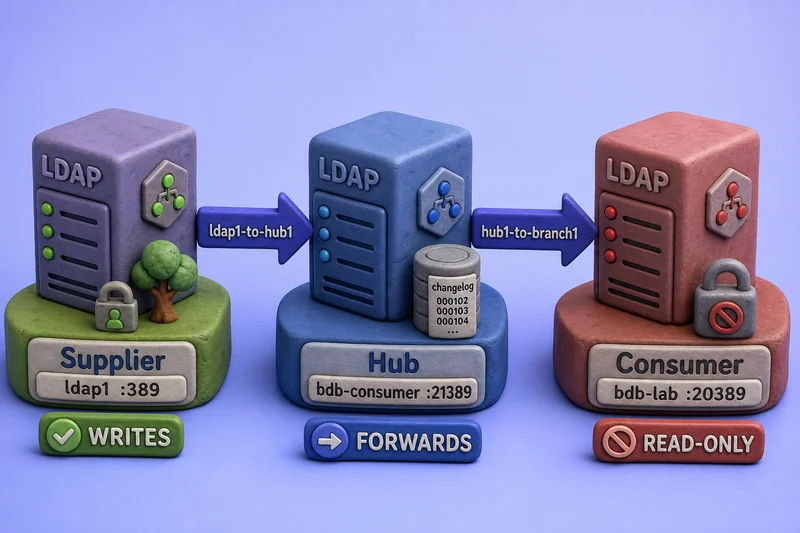
As a hub, the server maintains a changelog for downstream replication. With nsDS5ReplicaType: 2, nsDS5Flags: 1 distinguishes this hub role from a consumer.
Validate hub forwarding
Add a disposable attribute on the supplier, poke both hops, and read the value on the hub and branch consumer:
ldapmodify -x -H ldap://127.0.0.1:389 -D "cn=Directory Manager" -y /root/dm.pw <<'EOF'
dn: uid=user1,ou=People,dc=example,dc=com
changetype: modify
add: description
description: promote-hub-forward-check
EOF
Sample output:
modifying entry "uid=user1,ou=People,dc=example,dc=com"dsconf -y /root/dm.pw ldap1 repl-agmt poke --suffix "dc=example,dc=com" ldap1-to-hub1Sample output:
Agreement has been pokedrepl-agmt poke requests an immediate replication attempt. Continuous replication should process the change automatically, but poke is useful in a lab when you do not want to wait for the next automatic attempt or retry.
dsconf -y /root/hub1-dm.pw bdb-consumer repl-agmt poke --suffix "dc=example,dc=com" hub1-to-branch1Sample output:
Agreement has been pokedldapsearch -LLL -x -H ldap://127.0.0.1:21389 -D "cn=Directory Manager" -y /root/hub1-dm.pw -b "uid=user1,ou=People,dc=example,dc=com" -s base descriptionSample output:
dn: uid=user1,ou=people,dc=example,dc=com
description: promote-hub-forward-checkldapsearch -LLL -x -H ldap://127.0.0.1:20389 -D "cn=Directory Manager" -y /root/branch1-dm.pw -b "uid=user1,ou=People,dc=example,dc=com" -s base descriptionSample output:
dn: uid=user1,ou=people,dc=example,dc=com
description: promote-hub-forward-check
Matching description: promote-hub-forward-check on the hub and branch consumer confirms both replication hops.
Promote the hub to a supplier
Choose an unused replica ID — 3 in this lab because supplier ldap1 already uses ID 1 and the external peer ldap2 already uses ID 2 on this suffix.
dsconf -y /root/hub1-dm.pw bdb-consumer replication promote --suffix "dc=example,dc=com" --newrole supplier --replica-id 3Sample output:
Successfully promoted replica to "supplier"The replica ID is stored on the suffix replica entry, not on individual agreements:
dsconf -y /root/hub1-dm.pw bdb-consumer replication get --suffix "dc=example,dc=com" | grep -E "nsDS5Replica(Id|Type)|nsDS5Flags"Sample output:
nsDS5Flags: 1
nsDS5ReplicaId: 3
nsDS5ReplicaType: 3
On 389 Directory Server 3.2.0, the existing outgoing agreement hub1-to-branch1 remained enabled after supplier promotion.
Create the outgoing supplier agreement
An incoming ldap1-to-hub1 agreement copies updates from ldap1 to the promoted server. It does not carry writes that originate on the promoted supplier back to ldap1. Before you create the return path, confirm that cn=replication manager,cn=config exists on ldap1 and is authorized as a replication bind DN or bind-group member for this suffix.
Create a separate outgoing agreement from the promoted supplier to ldap1 without --init — the peer already holds authoritative data:
dsconf -y /root/hub1-dm.pw bdb-consumer repl-agmt create hub1-to-ldap1 --suffix "dc=example,dc=com" --host 127.0.0.1 --port 389 --conn-protocol LDAP --bind-method SIMPLE --bind-dn "cn=replication manager,cn=config" --bind-passwd-file /root/ldap1-repl.pwSample output:
Successfully created replication agreement "hub1-to-ldap1"Do not run repl-agmt init on this return path. See multi-supplier replication for the same pattern on a populated supplier peer.
Verify local writes, then confirm the promoted supplier can distribute changes:
ldapmodify -x -H ldap://127.0.0.1:21389 -D "cn=Directory Manager" -y /root/hub1-dm.pw <<'EOF'
dn: uid=user1,ou=People,dc=example,dc=com
changetype: modify
delete: description
description: promote-hub-forward-check
-
add: description
description: promote-supplier-write-check
EOF
Sample output:
modifying entry "uid=user1,ou=People,dc=example,dc=com"dsconf -y /root/hub1-dm.pw bdb-consumer repl-agmt poke --suffix "dc=example,dc=com" hub1-to-ldap1dsconf -y /root/hub1-dm.pw bdb-consumer repl-agmt poke --suffix "dc=example,dc=com" hub1-to-branch1Sample output for each poke:
Agreement has been pokedldapsearch -LLL -x -H ldap://127.0.0.1:389 -D "cn=Directory Manager" -y /root/dm.pw -b "uid=user1,ou=People,dc=example,dc=com" -s base descriptionSample output when hub1-to-ldap1 is healthy:
dn: uid=user1,ou=people,dc=example,dc=com
description: promote-supplier-write-checkldapsearch -LLL -x -H ldap://127.0.0.1:20389 -D "cn=Directory Manager" -y /root/branch1-dm.pw -b "uid=user1,ou=People,dc=example,dc=com" -s base descriptionSample output:
dn: uid=user1,ou=people,dc=example,dc=com
description: promote-supplier-write-checkdsconf -y /root/hub1-dm.pw bdb-consumer repl-agmt status --suffix "dc=example,dc=com" --bind-dn "cn=replication manager,cn=config" --bind-passwd-file /root/ldap1-repl.pw hub1-to-ldap1Sample output when the return path is working (trimmed):
Last Update Status: Error (0) Replica acquired successfully: Incremental update succeededOnly after the write appears on ldap1 and downstream replicas should you add the promoted supplier to client routing or a load balancer.
Remove test attributes before demotion
While the promoted server is still writable and both outgoing agreements exist, remove the test description values and confirm the deletion replicated:
ldapmodify -x -H ldap://127.0.0.1:21389 -D "cn=Directory Manager" -y /root/hub1-dm.pw <<'EOF'
dn: uid=user1,ou=People,dc=example,dc=com
changetype: modify
delete: description
description: promote-supplier-write-check
EOF
Sample output:
modifying entry "uid=user1,ou=People,dc=example,dc=com"dsconf -y /root/hub1-dm.pw bdb-consumer repl-agmt poke --suffix "dc=example,dc=com" hub1-to-ldap1dsconf -y /root/hub1-dm.pw bdb-consumer repl-agmt poke --suffix "dc=example,dc=com" hub1-to-branch1Confirm that the test value is absent on every replica. Existing legitimate description values may remain. The validation condition is the absence of description: promote-supplier-write-check, not the absence of the entire description attribute.
ldapsearch -LLL -x -H ldap://127.0.0.1:389 -D "cn=Directory Manager" -y /root/dm.pw -b "uid=user1,ou=People,dc=example,dc=com" -s base descriptionldapsearch -LLL -x -H ldap://127.0.0.1:21389 -D "cn=Directory Manager" -y /root/hub1-dm.pw -b "uid=user1,ou=People,dc=example,dc=com" -s base descriptionldapsearch -LLL -x -H ldap://127.0.0.1:20389 -D "cn=Directory Manager" -y /root/branch1-dm.pw -b "uid=user1,ou=People,dc=example,dc=com" -s base descriptionWhen the entry has no other description values, each search returns only the entry DN:
dn: uid=user1,ou=People,dc=example,dc=comThat exact output applies only when no other description values exist. If user1 still has a legitimate description, the line description: promote-supplier-write-check must be absent while other values may remain. Only after the test value has been removed from every replica should you begin demotion and remove the outgoing agreements.
Demotion scenario: supplier to hub to consumer
Demotion reverses the promotion path on the same disposable instance. Stop client writes to the server you are demoting, confirm pending changes reached another supplier, and record the original replica ID before you continue.
Demote the supplier to a hub
dsconf -y /root/hub1-dm.pw bdb-consumer replication demote --suffix "dc=example,dc=com" --newrole hubSample output:
Successfully demoted replica to "hub"dsconf -y /root/hub1-dm.pw bdb-consumer replication get --suffix "dc=example,dc=com" | grep -E "nsDS5Replica(Id|Type)|nsDS5Flags"Sample output:
nsDS5Flags: 1
nsDS5ReplicaId: 65535
nsDS5ReplicaType: 2
nsDS5ReplicaType: 2 with nsDS5Flags: 1 confirms the hub signature after demotion from supplier. The outgoing hub1-to-branch1 agreement remained present after demotion in this lab. Confirm forwarding still works before you rely on the hub role.
Demote the hub to a consumer
Before you demote a hub to consumer, remove outgoing agreements that should no longer send updates — including hub1-to-ldap1 if you created it during supplier promotion. In production you would also confirm another supplier or hub still serves downstream replicas.
dsconf -y /root/hub1-dm.pw bdb-consumer repl-agmt delete --suffix "dc=example,dc=com" hub1-to-branch1dsconf -y /root/hub1-dm.pw bdb-consumer repl-agmt delete --suffix "dc=example,dc=com" hub1-to-ldap1Sample output:
Agreement has been successfully deleteddsconf -y /root/hub1-dm.pw bdb-consumer replication demote --suffix "dc=example,dc=com" --newrole consumerSample output:
Successfully demoted replica to "consumer"dsconf -y /root/hub1-dm.pw bdb-consumer replication get --suffix "dc=example,dc=com" | grep -E "nsDS5Replica(Id|Type)|nsDS5Flags"Sample output:
nsDS5Flags: 0
nsDS5ReplicaId: 65535
nsDS5ReplicaType: 2
nsDS5Flags: 0 distinguishes the consumer from the hub state you saw one step earlier.
Update agreements and client routing
After any role change, review every incoming and outgoing path affected by the transition:
- Create agreements from a promoted supplier or hub when new downstream paths are required
- Delete or disable obsolete outgoing agreements on the server whose role changed
- Keep valid incoming agreements on peer servers — peers are not updated automatically
- Prevent isolated consumers with no incoming supplier or hub path
- Avoid duplicate agreements that target the same consumer twice
- Update monitoring aliases, runbooks, and load-balancer pools only after replication validation finishes
Promotion makes a replica writable; demotion makes it read-only. Neither command updates application LDAP URLs. Drain writes, validate replication, then change client routing.
Validate the new replica role
Verify role and replica ID
| Role | nsDS5ReplicaType |
nsDS5ReplicaId |
nsDS5Flags |
|---|---|---|---|
| Consumer | 2 |
65535 |
0 |
| Hub | 2 |
65535 |
1 |
| Supplier | 3 |
unique 1–65534 |
1 in the tested 3.2.0 lab; do not identify a supplier from this flag alone |
dsconf -y /root/hub1-dm.pw bdb-consumer replication get --suffix "dc=example,dc=com" | grep -E "nsDS5Replica(Id|Type|Root)|nsDS5Flags"Match the signature for the role you intended before you restore client traffic.
Test role-specific behavior
| Role | Write test | Replication test |
|---|---|---|
| Supplier | ldapmodify add or modify succeeds |
Change appears on a peer replica |
| Hub | Direct write fails or refers to supplier | Upstream change forwards downstream |
| Consumer | Direct write fails | Incoming changes continue to arrive |
For topology-wide checks, compare repl-agmt status on each hop and RUV output from replication get-ruv on suppliers when you need a deeper convergence read. See ds-replcheck and restore a replicated server for comparison and RUV diagnosis workflows.
Final checklist
Before you restore client traffic:
replication getshows the intended role and replica ID- Role-specific write and read tests passed
- Every affected agreement reports successful incremental updates
- No downstream consumer is isolated
- Client routing points at the correct writable supplier
- Rollback notes, backups, and agreement exports are stored
Roll back a failed role change
Record rollback requirements in advance
Save the original role, supplier replica ID, agreement definitions from repl-agmt get, client-routing configuration, replication bind settings, and the last healthy repl-agmt status output before you promote or demote. repl-agmt get output is a configuration record — you must recreate agreements manually during rollback; Directory Server does not import it automatically.
Roll back by failed transition
| Failed change | Original role | Rollback action |
|---|---|---|
| Consumer promoted to hub | Consumer | Remove new outgoing agreements, then demote --newrole consumer |
| Consumer promoted to supplier | Consumer | Drain writes, confirm changes reached another supplier, remove new outgoing agreements, then demote --newrole consumer |
| Hub promoted to supplier | Hub | Drain writes, remove or disable new outgoing agreements such as hub1-to-ldap1, then demote --newrole hub |
| Supplier demoted to hub or consumer | Supplier | Confirm no other active supplier uses the original replica ID and verify that any existing RUV record for the ID belongs to this same server identity. promote with the original ID, recreate recorded agreements from repl-agmt get, and test both directions |
Handle replica-ID history carefully
Do not run CleanAllRUV merely because a supplier was demoted. Keep the original replica ID reserved when you may promote the same server again quickly — finding that ID in the RUV is expected during rollback of the same server identity. Reserve the rule that an ID must not remain in the RUV for assigning an ID to a different or newly promoted supplier. Permanent retirement of a supplier identity may require RUV cleanup — see CleanAllRUV and remove a replica from the topology. Ordinary temporary demotion does not justify running CleanAllRUV immediately.
Common promotion and demotion problems
| Symptom | Likely cause | Fix |
|---|---|---|
| Duplicate replica ID error | ID already assigned or still present in the RUV | Run replication get on every supplier and replication get-ruv; choose an unused ID not reserved in the RUV |
| Writes on promoted supplier do not appear on peer | Missing outgoing agreement from promoted supplier to peer | Create the return-direction agreement without init; verify with ldapsearch on the peer |
| Consumer isolated after demotion | Incoming path removed or outgoing hub agreement deleted too early | Restore supplier-to-consumer or hub path before demotion |
| Hub no longer forwards | Outgoing agreement disabled or wrong role signature (nsDS5Flags: 0) |
Confirm hub signature (type 2, flag 1) and agreement status on the hub |
| Applications write to demoted server | Client routing not updated | Drain writes; point LDAP URLs at the current supplier |
| Promotion on stale replica | Candidate behind or partially initialized | Reinitialize from authoritative supplier, then promote |
| TLS or bind failures after role change | Agreement still points at old role or wrong credential | Compare repl-agmt get with replication get on each endpoint |
| Role changed on wrong suffix | Multiple backends on one instance | Match --suffix to the intended replication get DN |
For conflict resolution, stale RUV cleanup, and deep log analysis, see restore a replicated server and replication architecture. Do not permanently delete an instance after removing only its agreements. Follow remove a replica from the topology to drain changes, disable replication, remove agreements, and clean supplier metadata safely.
Clean up the lab
If you followed the demotion walkthrough, hub1-to-branch1 and hub1-to-ldap1 were already deleted during demotion. Delete the remaining disposable agreement:
dsconf -y /root/dm.pw ldap1 repl-agmt delete --suffix "dc=example,dc=com" ldap1-to-hub1Sample output:
Agreement has been successfully deletedReferences
- Red Hat Directory Server 13: Changing the role of a replica
- Red Hat Directory Server 13: Configuring and managing replication
- Red Hat Directory Server 13: Comparing two Directory Server instances
- Red Hat Directory Server 13: Configuring multi-supplier replication using the command line
- Red Hat Directory Server 13: Removing an instance from a replication topology
- 389 Directory Server: Replication agreement status (supplementary)
Summary
Use dsconf replication promote and dsconf replication demote to move a synchronized replica between consumer, hub, and supplier roles for a suffix. Supplier promotion requires a unique replica ID; hub and consumer roles use the reserved read-only ID. Promotion does not create agreements or redirect clients — plan topology changes, validate each hop, update routing only after replication is healthy, and keep rollback notes before you change production roles.
